-
Carrara Challenge 45: Extinction and De-extinction! Voting Thread:
Entry #: 8
Title: Alien Cloning Centre
Artist: Bunyip02
Category: B=De-extinction
Links to WIP thread: https://www.daz3d.com/forums/discussion/comment/4337981/#Comment_4337981
Credits: Michael 4 - https://www.daz3d.com/michael-4-base-male-3d-model
Valiant for Michael 4 - https://www.daz3d.com/valiant-for-michael-4
STO Antares 02 Uniform Textures for M4 Valiant - https://sharecg.com/v/65164/gallery/11/Poser/STO-Antares-02-Uniform-Textures-for-M4-Valiant
Popular Alien for Michael 4 - https://www.renderosity.com/mod/freestuff/popular-alien-for-michael-4/59721
Reptilliad for M4 - https://www.daz3d.com/reptilliad-for-m4
Michael 4 Creature Creator Morphs - https://www.daz3d.com/michael-4-creature-creator-morphs
Sci-fi Lab - https://www.daz3d.com/sci-fi-lab
Containment Zone - https://www.daz3d.com/containment-zone
Discussion: Inspired by the movie Avatar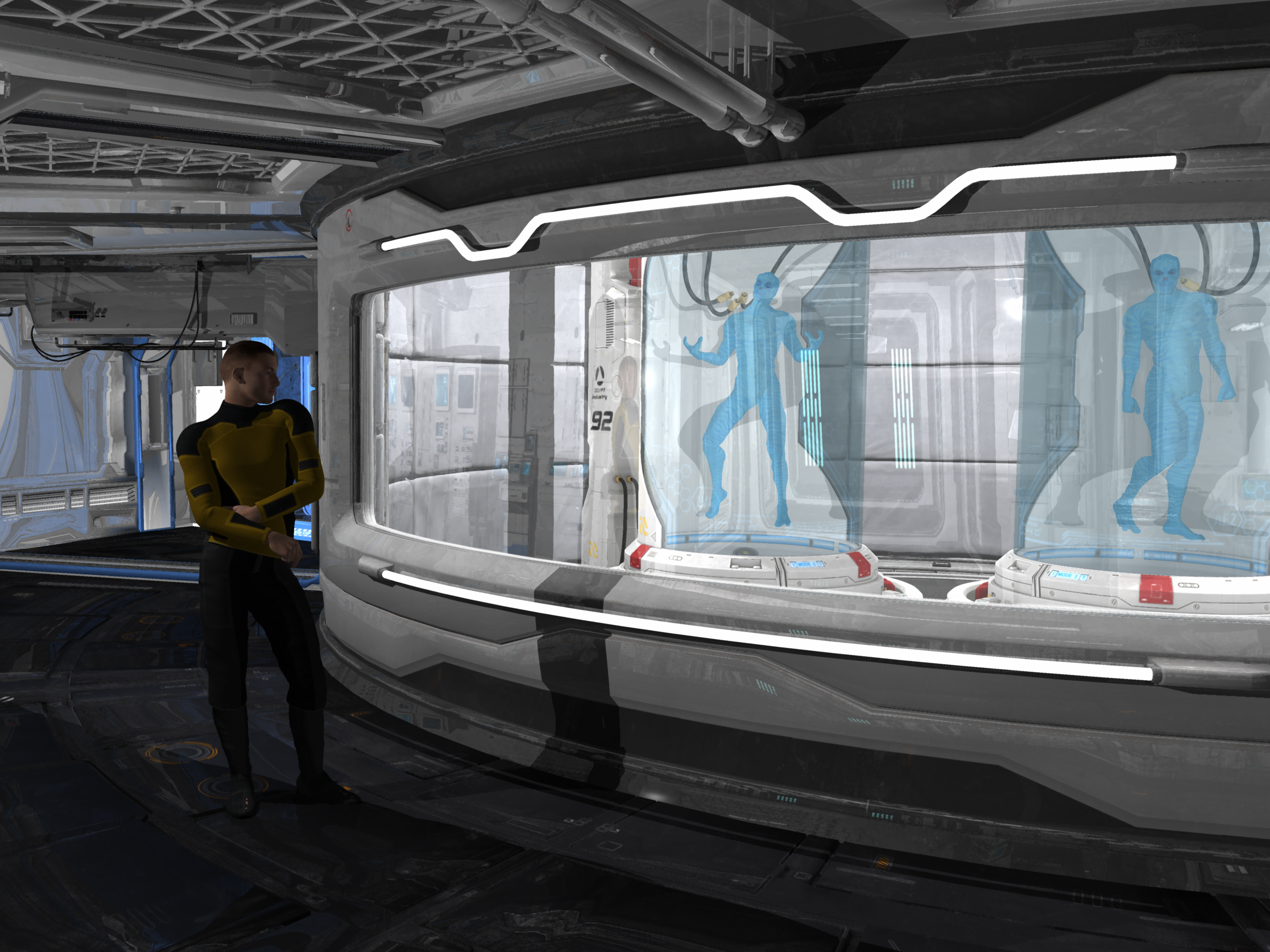 It Problem to Install "Anatomy Pro Bundle"
Also, the Michael 4 product is in Smart Content too. It has a broken icon & is called 'Michael 4 Base Puppeteer StudioCF and has a preset called 'Michael 4.cr2'
Victoria 4 is listed as Victoria 42 Base with a preset called 'Victoria 4.2.cr2.
It Problem to Install "Anatomy Pro Bundle"In your DAZ Studio go to the
a) tab: Content Library
b) scroll in the left hand side of that tab until you get to: Products
c) click the arrow - scroll to D - scroll to DAZ Brain
d) click the arrow - scroll to M - scroll to Michael 4 Internal Organs / Michael 4 Muscle Maps / Michael 4 Muscle Morphs / Michael 4 Skeleton
e) click the arrow - scroll to V - scroll to Victoria 4 Internal Organs / Victoria 4.2 Muscle Maps / Victoria 4 Skeleton / Victoria 4.2 Muscle Morphs
f) Alternatively you could also at the top of the Content Library tab search for the product names individually.
It Problem to Install "Anatomy Pro Bundle"Actually I just switched on my other PC (where DAZ Studio is installed) and looked for myself. I can find the Michael 4 Skeleton, Internal Organs and Muscle Maps, Victoria 4, her Skeleton, Internal Organs and Muscle Maps and the DAZ Brain in Smart Content. The only one that is missing is the Michael 4 character.
V4 and the Skeletons appear in the "Figures" category, the Organs and Brain in the "Anatomy" category, the Muscle Maps in the "Materials" catergory - are you not seeing them there?
In Smart Content, it's not the same. and I install Daz3d in new computer it's not the same. i'm so sad T T
Bringing older generations up to modern standards - might be fun ;)I would love to get it working but I'm confuzzled right from the start pretty much. I need to find some in-depth tutorials or something. I can't imagine saving a Genesis character that's never going to be used in Poser as a .cr2 can't still apply with GenX2.
Laurie
Its a lot easier when the source and destination are both Genesis figures. You select Genesis as the source, G3M as the destination, then select the morphs you want to move over. No CR2s needed!
Is is really that easy? I have GenX2 but was worried I wouldn't be able to find the files, it things went poorly; and still being a newb, I have no idea how to delete sliders. I am just finishing recataloging my database after my pc went wonky at Christmas. The thought of messing with my currently orderly file state was enough to forestall playing with Genx2. That and my free time to "play" with DS is sparse.
I am currently interested in attempting the 3DU and JQ in G1. Havos, have your tried with any of Philosopher's Eggs M4 creatures? I work with elementary students and would love to convert some of those to G3. Thanks for any tips and instructions you are willing to share.
I have not tried those morphs, but I have moved other creature morphs from M4/V4 and K4 before without issues, including some relatively extreme morphs (for example I moved this morph https://www.daz3d.com/shamus-o-shaughnessy-for-k4). You might want to move them to G1 rather than G3, since G1 can use the M4, V4 and K4 textures used by the Philosopher egg creatures. There are products to use M4 and V4 texures on G3, but not K4. To use a K4 skin on G3 you should use Map Transfer first to convert the skin to M4 or V4.
Like anything, GenX has it complications, I am not saying it is trivial to use, but there are more complicated things in Daz Studio. Once you have worked out how to transfer 1 shape, the rest is very easy.
Thank you for the tip to transfer to G1. Do you happen to know the product name(s) for using M4/V4. on G3? While I have K4, I wasn't really concerned about using the K4 morphs, because I was planning to experiment with Zevo's Growing Up products that i own. Thanks again for your time!
If you mean M4/V4 skins on G3 then this is what you need: https://www.daz3d.com/legacy-uvs-for-genesis-3-michael-4 ; for M4
For V4 the product is at renderosity, by the same PA (Caymen Studios)
A lot of the creatures at Philosophers Egg are K4, and will have textures that are rather important for the overall look of the creature (fur for animals etc). These you are better off using on G1
Thanks. Philosopher's has each creature with a M4, V4, and K4 version - you can buy them separate or as a bundle; I really don't need animals with breasts, and was intending to try the M4 animals and then use growing up for a child like version. I have all 3 of the GU products. (Although some of the extra colors are on the female version.)
It Problem to Install "Anatomy Pro Bundle"Actually I just switched on my other PC (where DAZ Studio is installed) and looked for myself. I can find the Michael 4 Skeleton, Internal Organs and Muscle Maps, Victoria 4, her Skeleton, Internal Organs and Muscle Maps and the DAZ Brain in Smart Content. The only one that is missing is the Michael 4 character.
V4 and the Skeletons appear in the "Figures" category, the Organs and Brain in the "Anatomy" category, the Muscle Maps in the "Materials" catergory - are you not seeing them there?
"Fundamental" Genesis 8 ProductsG8 head and body morphs for male and female, of course.
200+ Head Morphs - for more morph dials.
Fit Control - I find it particularly useful to use items from older generations, or to kit-bash.
V4 & M4 Clones - There's a way to auto-fit M4 and V4 items to G8 without additional products, but I find that this product handles some items better. I hear that the recently released clothing converter for M4 and V4 works even better still, but I don't own those products so I can't confirm.
Hair, hair, hair... but needless to say, it's highly subjective which ones.
Personally I found the V4 and M4 clones product gave horrible results and had to return it. Same for the riversift art conversion product. I get a much more perfect fit autofitting to G3 first and then saving that version to fit to G8.
Other than the G8 head and body morphs for male and female, there is nothing on your list that I would consider essential or fundamental which is why it's hard to give answers to questions like this, eveyone has their own preferences and the list can get really long, real fast.
Bringing older generations up to modern standards - might be fun ;)I would love to get it working but I'm confuzzled right from the start pretty much. I need to find some in-depth tutorials or something. I can't imagine saving a Genesis character that's never going to be used in Poser as a .cr2 can't still apply with GenX2.
Laurie
Its a lot easier when the source and destination are both Genesis figures. You select Genesis as the source, G3M as the destination, then select the morphs you want to move over. No CR2s needed!
Is is really that easy? I have GenX2 but was worried I wouldn't be able to find the files, it things went poorly; and still being a newb, I have no idea how to delete sliders. I am just finishing recataloging my database after my pc went wonky at Christmas. The thought of messing with my currently orderly file state was enough to forestall playing with Genx2. That and my free time to "play" with DS is sparse.
I am currently interested in attempting the 3DU and JQ in G1. Havos, have your tried with any of Philosopher's Eggs M4 creatures? I work with elementary students and would love to convert some of those to G3. Thanks for any tips and instructions you are willing to share.
I have not tried those morphs, but I have moved other creature morphs from M4/V4 and K4 before without issues, including some relatively extreme morphs (for example I moved this morph https://www.daz3d.com/shamus-o-shaughnessy-for-k4). You might want to move them to G1 rather than G3, since G1 can use the M4, V4 and K4 textures used by the Philosopher egg creatures. There are products to use M4 and V4 texures on G3, but not K4. To use a K4 skin on G3 you should use Map Transfer first to convert the skin to M4 or V4.
Like anything, GenX has it complications, I am not saying it is trivial to use, but there are more complicated things in Daz Studio. Once you have worked out how to transfer 1 shape, the rest is very easy.
Thank you for the tip to transfer to G1. Do you happen to know the product name(s) for using M4/V4. on G3? While I have K4, I wasn't really concerned about using the K4 morphs, because I was planning to experiment with Zevo's Growing Up products that i own. Thanks again for your time!
If you mean M4/V4 skins on G3 then this is what you need: https://www.daz3d.com/legacy-uvs-for-genesis-3-michael-4 ; for M4
For V4 the product is at renderosity, by the same PA (Caymen Studios)
A lot of the creatures at Philosophers Egg are K4, and will have textures that are rather important for the overall look of the creature (fur for animals etc). These you are better off using on G1
It Problem to Install "Anatomy Pro Bundle"I'm pretty sure if you installed it via DIM, its going to be found in your Smart Content. This product is only compatible with Michael 4 and Victoria 4 character bases, so if you have another character selected that is from a different base, it probably won't appear in your smart content.
Assuming you have one or both of the aforementioned character bases, try going to your Content Library and looking for the components. Don't try to look under "A" for Anatomy, because it is a bundle of different products. For example, Michael 4 Internal Organs, I would look in the "M" folder contained under the Products folder in your Content Library tab. I could be wrong as I do not have this product, but that's one of the first things I would check.
The problem is not gone. I've tried it and I think it might support older daz3d versions.
"Fundamental" Genesis 8 ProductsG8 head and body morphs for male and female, of course.
200+ Head Morphs - for more morph dials.
Fit Control - I find it particularly useful to use items from older generations, or to kit-bash.
V4 & M4 Clones - There's a way to auto-fit M4 and V4 items to G8 without additional products, but I find that this product handles some items better. I hear that the recently released clothing converter for M4 and V4 works even better still, but I don't own those products so I can't confirm.
Hair, hair, hair... but needless to say, it's highly subjective which ones.
It Problem to Install "Anatomy Pro Bundle"I'm pretty sure if you installed it via DIM, its going to be found in your Smart Content. This product is only compatible with Michael 4 and Victoria 4 character bases, so if you have another character selected that is from a different base, it probably won't appear in your smart content.
Assuming you have one or both of the aforementioned character bases, try going to your Content Library and looking for the components. Don't try to look under "A" for Anatomy, because it is a bundle of different products. For example, Michael 4 Internal Organs, I would look in the "M" folder contained under the Products folder in your Content Library tab. I could be wrong as I do not have this product, but that's one of the first things I would check.
Poser Content - How to Find Stuff?I'm not going to be able to help with most of these questions unfortunately.
"Figures", also called "Characters", is for anything that is rigged (i.e., not a prop). That is why clothes are under there as well. Also the reason for hair, the hr2 file type I believe cannot include rigging, so if the hair is longer and needs rigging it would be under Figures. I don't recall if there were any real differences between the hr2 format and pp2 format, at least in Studio. Poses and material files (the types of materials that Studio uses anyway) were both int he poses folder, hence why some creators added MAT in front of the folder name, but... it was up to them, there weren't set conventions for this.
I haven't used Studio's category system yet, so I'm not sure if you can can add those labels once you find out what everything is for. But what you are seeing is why in the past I have spent dozens of hours relabeling items and folders in my Poser structure to get any sort of rhyme and reason out of it. If you got the product you are looking for from DAZ, I would look in DIM to see the file list to see where it is located by default, or if you downloaded the zip check there (same with zips from other places).
Something with older content to consider, with generation 3 it was a bit of a "reset", so something that is just labeled Michael or David or Aiko may be more likely to be for M3 and D3 and A3, with Michael 4 products being more likely to have the 4 label. This might help a bit, but if you have a ton of content and the thumbnails aren't good, there may be some trial and error. I haven't used Michael 3 lately, so I don't recall if there are any bones in the rig that will let you know right away if you load a clothing item and it has certain bones.
Hopefully someone else will know if there have been any new tricks in Studio in the past few years that can help with this.
Convert ANY V4 Long Dress to Genesis! (TUTORIAL)I bookmarked this. Gratefully enough, doing this helped me make the Mystix skirt work on G8M. I did the conversion to Genesis like how your tutorial had done, but just repeated the transfer utility to being on G8M. Thank you a million for the ability for me to be able to use it now on the new characters. ^^ I'll upload a finished piece when it renders, and I will have to also try out Wancow's version too to see of how that goes. :)
Edit: Image attachment. 2k height, and only 50% done after 1hr and 42mins., but I wanted to show it off finally. Genesis 8 Male, with Kouros Hair, Michael 4 Texture, and the Mystix skirt with leather and metal shaders. All done in Iray with no postwork.
Any rifle poses for M4?It is no longer in the store but check your product library to see if you own 'USMC Marine for Michael 4'. There are some rifle poses in it.
Or there are a few poses that might work in this set: https://www.renderosity.com/mod/bcs/hellriegel-submachine-gun/118043
[Solved] M4 Critical Error while trying to load himhttps://www.daz3d.com/forums/discussion/253451/michael-4-support-folder-could-not-be-found
that was when my friend who had also had the issue subsequently helped another when I had forgotten what to do.
and from your comment in that thread Richard, what is actually in the runtimes may have the effect, maybe any injection files etc for the generation 4 characters affect it
Yes, a partial install found before a full install could certainly cause issues.
[Solved] M4 Critical Error while trying to load himhttps://www.daz3d.com/forums/discussion/253451/michael-4-support-folder-could-not-be-found
that was when my friend who had also had the issue subsequently helped another when I had forgotten what to do.
and from your comment in that thread Richard, what is actually in the runtimes may have the effect, maybe any injection files etc for the generation 4 characters affect it
[Solved] M4 Critical Error while trying to load himI've not found it necessary to have the Michael 4 folder be the first Poser content directory.
well a few of us had this issue with DAZ studio some years ago, Jaderail was alive so that would make it 5 years ago and it was discussed back then and one friend more recently had it happen.
it may be something to do with where DAZ studio and ones libraries are installed even but it worked
[Solved] M4 Critical Error while trying to load himI've not found it necessary to have the Michael 4 folder be the first Poser content directory.
[Solved] M4 Critical Error while trying to load himHi All,
I am attempting to add Michael 4 to my scene and I am receiving a critical error that says his support folder cannot be found. Victoria works for me so I dug into her files to see how the path went and the Michael 4 Base file that I downloaded is the exact same. I went into the support folder and was able to locate his files as well. I do not know what is wrong or how to fix it; is anyone able to assist or shed some light on my problem? I have been away for 5+yrs so I am still in the process of relearning everything, so please bear with me and any confusion that might crop up. =)
Thank you!
~Bree
Edit: I probably should have mentioned that I am attempting this inside of DAZ 4.10 Pro, in case the program matters.
Welcome to Hatsune Miku Anime Manga Cafe ☕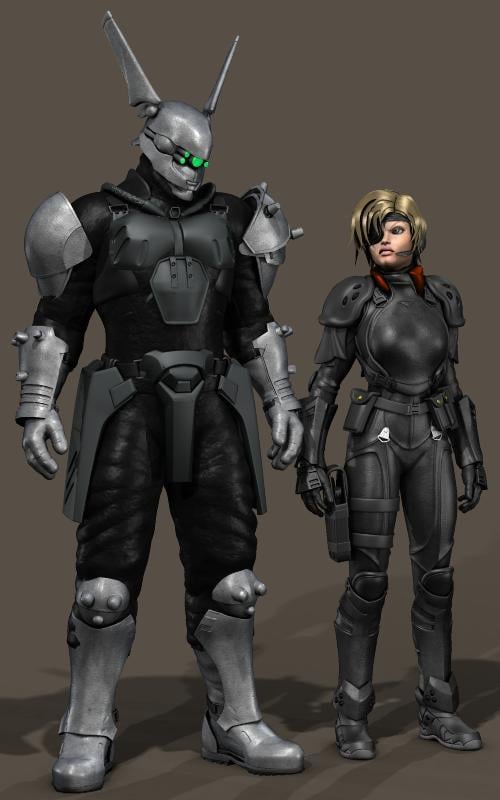
Deunan Knute (using A3, of course) and Briareos (Michael 4) from Shirow Masamune's "Appleseed". Almost all the clothing and prop elements are by Royloo, inclusing Briareos' distinctive cyborg helmet.
Sincerely,
Bill
Love it. Where can I get that helmit?
Daz 3D is part of

Connect
DAZ Productions, Inc.
7533 S Center View Ct #4664
West Jordan, UT 84084Licensing Agreement | Terms of Service | Privacy Policy | EULA
© 2026 Daz Productions Inc. All Rights Reserved.