-
Please help me identify hair used in outfit render!
I love the hair used for the model on the left character on this page: https://www.daz3d.com/sci-fi-punk-outfit-for-genesis-8-females
But after searching through many pages of hair and trying a lot of different search terms I still can't find it. Does anyone recognize it? Thanks!!
So what forum section do you frequent and why?csaa said:
Lastly the one-liner replies need calling out -- Daz Forum should have a +1 or button for that purpose! Is there a competition to have the greatest post-count?
No thanks. Way too many sites have this feature already.
So what forum section do you frequent and why?-- Daz Forum should have a +1 or button for that purpose! Is there a competition to have the greatest post-count?
Yes, and I am winning

Case in point ... +1 Richard Haseltine he he.
Cheers!
Let's appreciate/discuss today's new releases - ongoing threadFSMCDesigns said:
Daywalker Designs said:
FSMCDesigns said:
I like the look of TMA Aaliyah for Genesis 8.1 Female, but knowing that PA puts their files in the most awkward locations keeps me from buying from them (DAZ needs to set them straight on file locations. A user shouldn't have to search for the shaping and materials folders for files to load from a character)
That's a bit strange. I would look in People\<insert Genesis version here>\Characters\charactername (or People\<insert Genesis version here>\Characters\vendorname\charactername)for the shaping presets (at least for figures prior to Genesis 9) and expect the materials in a subfolder of that. I'd also expect a vendor specifc scaled actor preload in People\<insert Genesis version here>\Characters. That's pretty much how I have the few custom characters I've done in zBrush set up in DAZ Studio.
Exactly, that is how most are packaged. If you look at the readmes, there is a single character load under the PAs name in characters and all other files are in shaping and materials instead of subfolders in the character folder .
That is how Daz has tended to package the name-and-number "base" characters, too.
So what forum section do you frequent and why?csaa said:
I also like the Commons and appreciate all the views people share there, but ... the rate that responses show up can be overwhelming. It can be hard picking out the nuggests of gold from the verbiage that hustle through. And the herd mentality (heard mentality?) cynicism. Heaven help us! Often the experience devoles into doom scrolling. Lastly the one-liner replies need calling out -- Daz Forum should have a +1 or button for that purpose! Is there a competition to have the greatest post-count?
Yes, and I am winning
More than the Commons, I frequent the Art Studio forum where people are stretching the limits of their creativity. There's a strong workshop feel too it ... the roughness, the wonky feedback people give. While the images shared at the Art Studio don't have the polish of the Daz Gallery, I find the honesty very refreshing.
After the Commons and the Art Studio, I dive into the Blender Discussion. Now the Blender forum is like traveling to a foreign country. Somethings are familiar, but a lot are not. If you keep an open mind, you're bound to learn a lot.

Cheers!
Captcha being used for products in store?Never mind I guess... It's gone from all the pages I found it on.
It seemed to disappear randomly as some products (like winter beaches) had it for longer.
The forum keeps freezing, so I couldn't update this...
Probably just a feature glitch, but it was weird
Dartanbeck's Journey - CG FilmmakingAnother great:
 So what forum section do you frequent and why?
I also like the Commons and appreciate all the views people share there, but ... the rate that responses show up can be overwhelming. It can be hard picking out the nuggests of gold from the verbiage that hustle through. And the herd mentality (heard mentality?) cynicism. Heaven help us! Often the experience devoles into doom scrolling. Lastly the one-liner replies need calling out -- Daz Forum should have a +1 or button for that purpose! Is there a competition to have the greatest post-count?
More than the Commons, I frequent the Art Studio forum where people are stretching the limits of their creativity. There's a strong workshop feel too it ... the roughness, the wonky feedback people give. While the images shared at the Art Studio don't have the polish of the Daz Gallery, I find the honesty very refreshing.
After the Commons and the Art Studio, I dive into the Blender Discussion. Now the Blender forum is like traveling to a foreign country. Somethings are familiar, but a lot are not. If you keep an open mind, you're bound to learn a lot.
Cheers!
Let's appreciate/discuss today's new releases - ongoing threadHylas said:
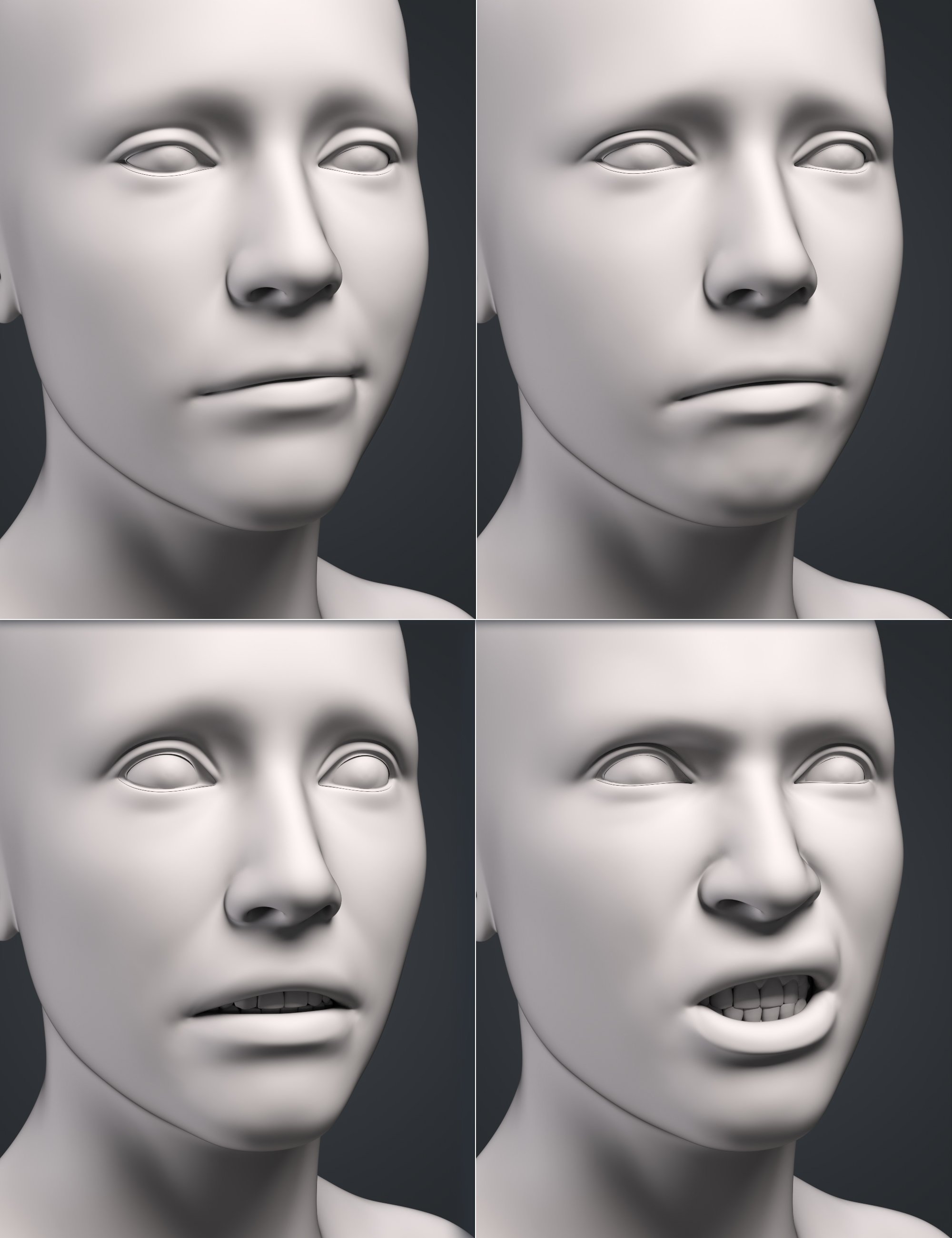
JWolf's Expressions are interesting to me. I generally like their work and there's certainly nothing wrong with this new set. But I don't see the difference between this and the average G8.1 expression set. If G9 has improved expressions I don't see it here.
Same. G9 expressions/poses/morphs/gear will have to be improvements, or no sale for me. In fact, I just realized that my impression of G9 expressions is based on my initial impression of V9's expressions rather than any actual improvement I've seen in G9 expressions, even the DO Expression pack, whose promo pretty much sums up my reaction.
FSMCDesigns said:
I like the look of TMA Aaliyah for Genesis 8.1 Female, but knowing that PA puts their files in the most awkward locations keeps me from buying from them (DAZ needs to set them straight on file locations. A user shouldn't have to search for the shaping and materials folders for files to load from a character)
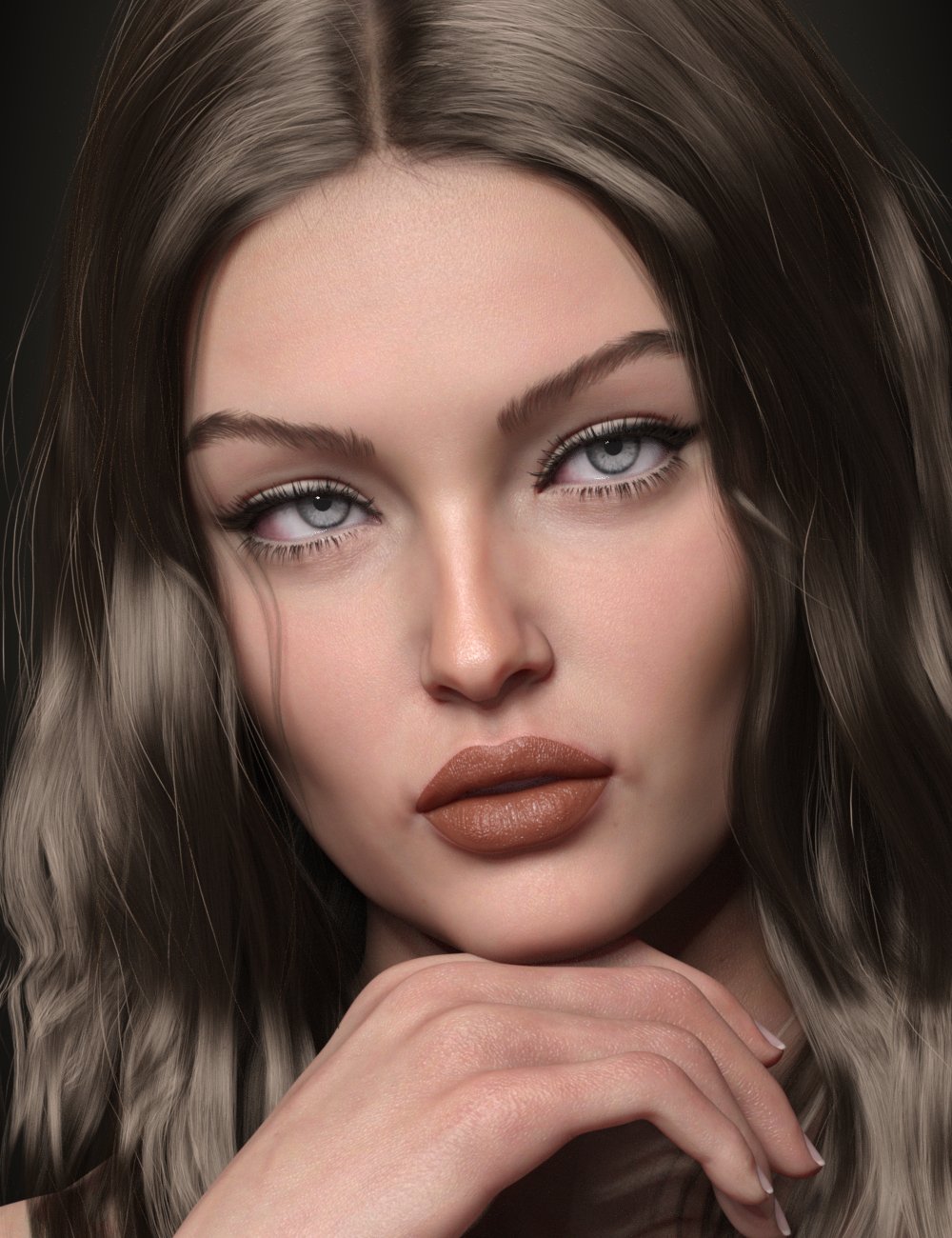
Thanks. You just reminded me why I returned TMA Andrea, who is otherwise quite striking. I really like Aaliyah, but could we get a 3/4 or profile promo? Different hairstyle? Stunning model though. Captures that moment just a few months before she hits the wall.
 Let's appreciate/discuss today's new releases - ongoing thread
Daywalker Designs said:
FSMCDesigns said:
I like the look of TMA Aaliyah for Genesis 8.1 Female, but knowing that PA puts their files in the most awkward locations keeps me from buying from them (DAZ needs to set them straight on file locations. A user shouldn't have to search for the shaping and materials folders for files to load from a character)
That's a bit strange. I would look in People\<insert Genesis version here>\Characters\charactername (or People\<insert Genesis version here>\Characters\vendorname\charactername)for the shaping presets (at least for figures prior to Genesis 9) and expect the materials in a subfolder of that. I'd also expect a vendor specifc scaled actor preload in People\<insert Genesis version here>\Characters. That's pretty much how I have the few custom characters I've done in zBrush set up in DAZ Studio.
Exactly, that is how most are packaged. If you look at the readmes, there is a single character load under the PAs name in characters and all other files are in shaping and materials instead of subfolders in the character folder .
Let's appreciate/discuss today's new releases - ongoing threadFSMCDesigns said:
I like the look of TMA Aaliyah for Genesis 8.1 Female, but knowing that PA puts their files in the most awkward locations keeps me from buying from them (DAZ needs to set them straight on file locations. A user shouldn't have to search for the shaping and materials folders for files to load from a character)
That's a bit strange. I would look in People\<insert Genesis version here>\Characters\charactername (or People\<insert Genesis version here>\Characters\vendorname\charactername)for the shaping presets (at least for figures prior to Genesis 9) and expect the materials in a subfolder of that. I'd also expect a vendor specifc scaled actor preload in People\<insert Genesis version here>\Characters. That's pretty much how I have the few custom characters I've done in zBrush set up in DAZ Studio.
Women's Basketball Uniform? Baggy Knee Length Shorts? Matching Jersey?Thanks for replies. "Basketball kit" seems a winner. Odd it didn't show up when I'd typed 'basketball', 'basketball uniform', etc. Anyway, good idea about supersuit to make bandage brace. Hadn't thought of that.
Nice to find another PA who makes contemporary stuff. Outfit looks great. Also looks like Darius & Monique will be getting hairdo & probably snag a couple of his characters while I'm at it.
---
That's why I like DAZ forums. Can always count on members to help out if draw a blank on search results.
Best wishes & enjoy week. ; )
epileptic seizure warningDP WES said:
Cris Palomino said:
We have flagged this up to Daz.
Is this the best course of action due to a lack of response or action?
Want to know how to block autoplay?
Brave - brave://settings/content/autoplay
Chrome - chrome://flags/#autoplay-policy
Firefox - https://support.mozilla.org/en-US/kb/block-autoplay
Since afaik no video is allowed to auto play on a product page or forum it will only effect the front page that is autoplaying anyway.
Thanks. I just linked to the main shopping page to spare my eyeballs. But I'll keep this tidbit incase I need it in the future
 Postwork with Affinity Creative Suite of Photo - Designer - Publisher
They recently confirmed that there will be a normal installer again in the future. The new msix app method created so many issues for so many users that the topic in their forum became a big shitstorm. But at least they understood how bad the APP idea was in the context of workflows and pipeline integration.
epileptic seizure warningCris Palomino said:
We have flagged this up to Daz.
Is this the best course of action due to a lack of response or action?
Want to know how to block autoplay?
Brave - brave://settings/content/autoplay
Chrome - chrome://flags/#autoplay-policy
Firefox - https://support.mozilla.org/en-US/kb/block-autoplay
Since afaik no video is allowed to auto play on a product page or forum it will only effect the front page that is autoplaying anyway.
THANKS, DAZ for the forum fix!Daywalker Designs said:
marble said:
McGyver said:
Daywalker Designs said:
kyoto kid said:
...but did they fix the 502/504 bad gateway issue yet?
This is usually a result of data speed issues between the DAZ Servers and whatever specific Cloudflare server you're going through, which may not be something that DAZ3D has any control over.
The Cloudflare report always puts the failure on DAZ's servers...
You: Browser (working) -> Network: Cloudflare (working) -> www.daz3d.com: Host (error)
Exactly. I've just had two in a row and it is really annoying. I read somewhere (here on this forum) that DAZ will need to replace the forum software to fix it so that does not suggest a Cloudflare problem. Besides, Cludflare is used by many, many huge online entities without any issues and, just from personal experience, DAZ is the only - yes the ONLY - site that I have a problem reaching.
I'm not saying it's a Clouflare problem; I'm saying that the "gateway" may not be a server that's directly under DAZ3D's control.
It's a bit weird though, that I - from my memory - never a cloudflare problem resulting in these 503/504 errors with any other server than DAZland's.. so IF it's not DAZland's server that is causing the problem, they should contact their provider to check if their routing could be handled differently?!? Of course it's easier to ignore the problem and leave a possible solution to someone else...
Let's appreciate/discuss today's new releases - ongoing threadI am very picky with purchasing content now, especially this time of year with lots of bills and the holidays coming up. As for the toon heros, it's probably a quality product knowing the PA, but I have no use for toon anything.
I like the look of TMA Aaliyah for Genesis 8.1 Female, but knowing that PA puts their files in the most awkward locations keeps me from buying from them (DAZ needs to set them straight on file locations. A user shouldn't have to search for the shaping and materials folders for files to load from a character)
Enchanted Attic does look nice and useful for some of my projects.
I haven't jumped on the G9 bandwagon yet, but seeing new heels for her might make me jump sooner than I thought!!.
Gateway...Adding forum problems...
Refreshing the page was "Waiting for www.mczbf.com" for quite a long time.
Going to the page, opened a mostly blank page with the text "Hello World"UltraScenery - new territory [Commercial]Llola Lane said:
barbult said:
Maybe Fisio will be useful.
interesting... never heard of it... you are a wealth of information Barb :)
I just stumbled over the new forum thread about it.
How to Use dForce: Creating a Blanket, Draping Clothes on Furniture, and Much More [Commercial]This was a dForce topic that I heard about today. Unlike sometimes, it came together pretty quickly.
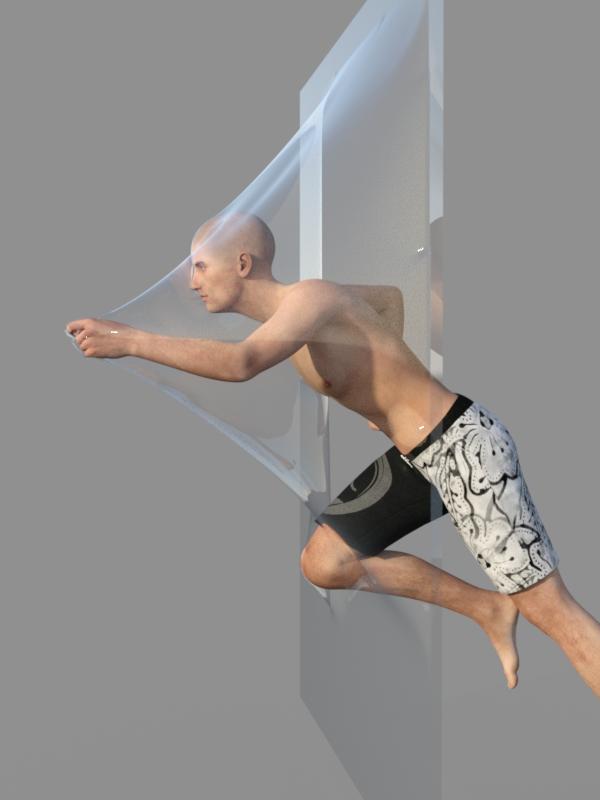
91. Cling Wrap
Bluefeathers posted to the Daz Forum looking to get the effect of a character breaking through a sheet of cling film. I gave it a try and came up with a reasonable representation of that happening.
a. Create a plane with 250 divisions.
b. Add a dynamic dForce modifier to the plane.
c. In the Surface pane, set the Simulation parameters as follows:
- Stretch, Shear, and Bend Stiffness to 0.01
- Buckling stiffness to 100%
- Buckling ratio to 0%
- Density is 600
d. Add a dForce modifier weight node to the plane. Using the Node Weight Map tool found in the Tool Settings pane, click Add Map to create an influence weight map. Then right click in the viewport and choose Selection Type/Polygon Selection. Draw a rectangle on the plane slightly end from the borders. That will select the center of the plane.
e. Right click in the viewport and choose Geometry Selection/Invert Selection to select the outside faces of the plane.
f. Right click in the viewport and choose Weight Editing/Fill Selected and choose 0%. This will lock the edges of the plane in place, while allowing dForce to deform the center of the plane.
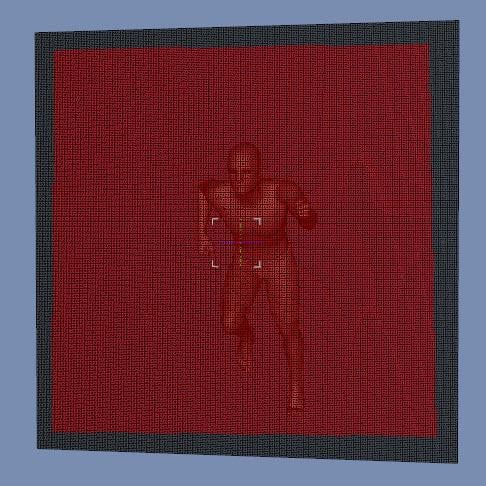
g. Add a figure (I’m using Genesis 2 Male) and pose it how you like. Move the figure so it is almost touching the plane.
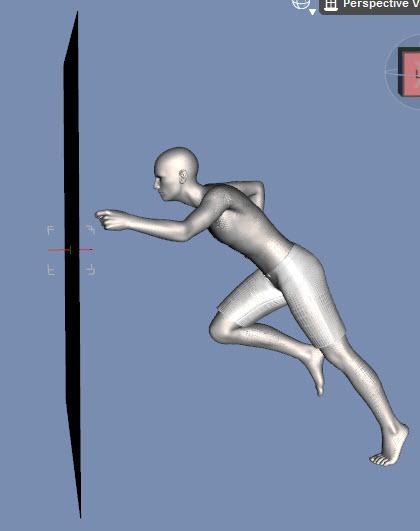
h. With the figure selected and using the timeline, click on the +key to add a keyframe at frame 0.
i. Go to frame 15 and move the figure so it is protruding through the plane to whatever depth you want. When animated, the figure will move towards the plane and push it forward. Moving the figure and not the plane prevents dForce momentum effects on the plane.
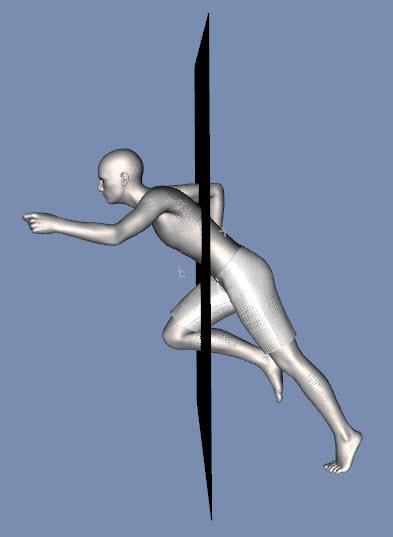
j. In the Simulation Settings pane, set Environment/Gravity to 0. All we want is deformation from movement, not gravity.
k. Run an animated simulation. You can stop after frame 15 is reached as once the figure stops moving momentum effects begin to take over.
l. Select whichever frame you like best to render.
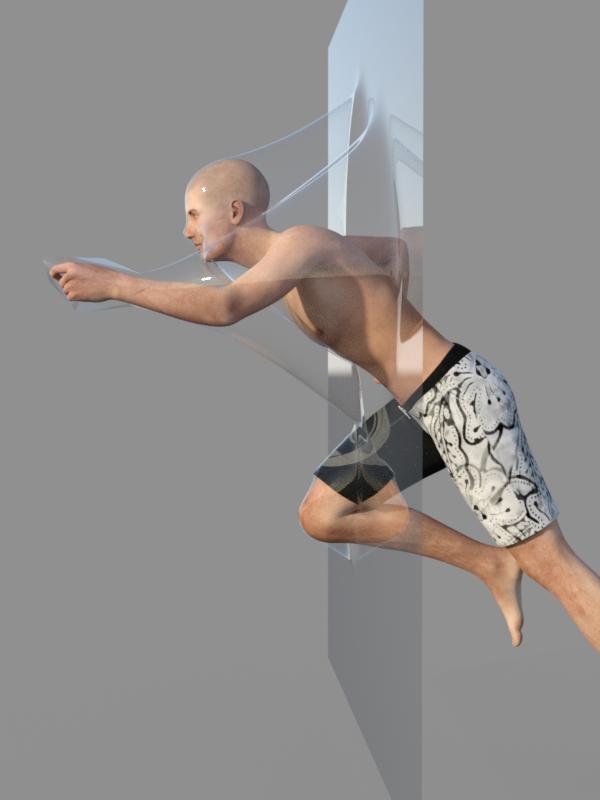
m. For the pose I used, the hand presses forward and stretches just a few polygons giving a triangular look to the film. One way to correct this is to use a product like MeshGrabber to move any offending vertices to a more suitable position. You will need to do this after every simulation.

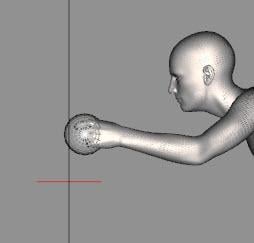
n. Another way to correct this is to use an animated sphere so more polygons are located by the hand.
- Create a 5 inch sphere with 16 sides and 16 divisions.
- At frame 0, position it so it overlaps the figure’s leading hand. Click on the +key to set a keyframe.
- At frame 15, reposition the sphere so it is over the moved hand. Scale it down so it is just larger than the hand (I used 80%).
- Run the simulation.
- The sphere keeps more polygons near the hand and avoids the jutting polygons. It does mean the head doesn’t project as much at frame 15 so I picked frame 12 to render as it gave the best overall look.

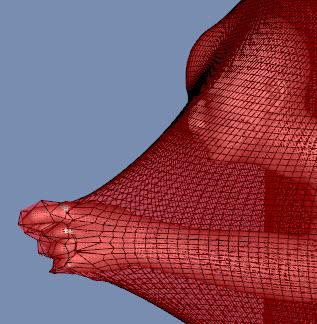
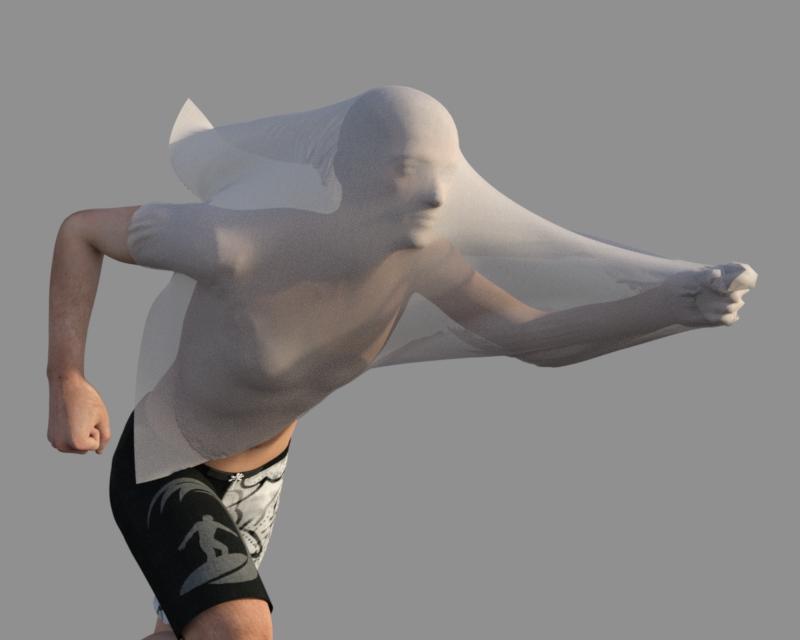
ETA: You can leave off the weight map, scale down the plane, and use a more extreme figure movement to get something like this:
Daz 3D is part of

Connect
DAZ Productions, Inc.
7533 S Center View Ct #4664
West Jordan, UT 84084Licensing Agreement | Terms of Service | Privacy Policy | EULA
© 2026 Daz Productions Inc. All Rights Reserved.