-
What are your recommended must have basics for Genesis 9?
And if you're a bit short of available cash, there are freebie pose convertors to G9. I do one where you apply the pose to G8 and it's effectively copy & pasted to G9 (https://www.daz3d.com/forums/discussion/598316/g8f-m-pose-transfer-to-g9/p1), but there are others that can open pose files and apply the pose direct to a G9. Take a look in the freebie forum for them.
Regards,
Richard
Create instance - geometry does not match the original?WendyLuvsCatz said:
you cannot share the obj
however you can load it in morphloader and save and share that morph
Yeah, I'll just delete the obj that contains a mesh that has over 40 different vertex coordinates that make up over 60% of the total mesh. I'd rather let other purchasers remain the victims of shoddy Quality control and artists, do the work for themselves than do more work simply for them. But thanks for info.
Create instance - geometry does not match the original?you cannot share the obj
however you can load it in morphloader and save and share that morph
Trouble creating morph for Gen9 using Blender 3.4his.royal.duckness said:
- Exported Gen9 base model in normal res and 0 subdivisions to an .obj file using the Daz Studio scale.
Any attachments like eyes and mouth present on your export? You cant have those present on Gen 9, those need to be morphed separately using follower morph. (See youtube tutorials on making eye and mouth morphs for Gen 9)
Does "Base model in normal res and 0 subdivisions" mean "Resolution Level: Base"? It needs to be set to "Base".
New Release: Bringing Daz figures To Life in UE5peterpeter said:
Not sure if this has been asked before but, have you thought about creating a Maya plugin with your technology? Since your script uses Maya as a bridge between Daz and Unreal, it would be great if we could just stay in Maya, get the rig converted to HumanIK and the materials converted to Arnold or Vray.
The official bridge has so many issues and the development speed seems really slow, so this could be a great alternative to it since it looks like you have most of those issues solved already.
I did consider porting my code to C++ and making a plugin, but it's simply too time consuming. I'd rather spend my time working on new features for DTL; G9 support, morph-driven bone transforms and of course integration with UE's Machine Learning functionality form the current roadmap...
Trouble creating morph for Gen9 using Blender 3.4Apologies if I'm stretching this newb thing too far. I'm hoping someone can spot what I'm doing wrong trying to load a morph I created using Blender 3.4. I consistently get the "Geometry did not match, failed to create morph" message. At first I was able to load the morph I created, but I probably wasn't importing/exporting with the correct settings. Toggling the morph on, instead of creating some grooves in the leg, caused the whole figure to essentially melt. I went back through and paid much closer attention to the settings I was using, double checked that I was doing my best to get as close to the tutorial I was following as possible, but now it simply won't load.
I'm following a tutorial found in https://www.daz3d.com/how-to-create-a-new-custom-daz-studio-character, but they use blender 2.8 on a Gen8 model and I'm probably missing something fairly important. Here's what I did:
- Exported Gen9 base model in normal res and 0 subdivisions to an .obj file using the Daz Studio scale.
- Imported in Blender using Wavefront (legacy) option - it looked closer to 2.8's presets - with "Keep Vert Order" and Poly Groups checked.
- Created the Shape Keys for Base and my Morph, dialed the Morph key up to 1.
- Used the sculpting tool to make some changes to the legs
- Exported as Wavefront (legacy) with Selection Only, OBJ Objects checked in the Include section, and Apply Modifiers, Write Normals, Include UVs, Write Materials, Polygroups, and Keep Vertex Order checked.
- Back in Daz, selected the Gen9, opened Morph Loader Pro, loaded the new .obj in the Morph Files, still using the Daz Studio scale. Load Morphs For is set to Primary Figure (Vertex Only).
If anyone has any tips on what I might be doing wrong, might save what's left of my sanity.
Use G8 wearable preset on G9?There is a converter from G8 to G9
https://www.renderosity.com/freestuff/items/93219/g8fm-pose-transfer-to-g9G2 to G8 smart props conversionNot sure I'd do it that way, mostly because I'm not sure I understand what's happening.
What I would do is (and I have to confess I'm not certain if it'd work - I'm not at my DS machine to give the full sequence of commands and menu option descriptions & I've not done it very often.):
- Apply the smart prop to G8, it will go in the wrong place.
- Move the prop to the correct position.
- If the prop is rigged, I'd transfer the G8 rigging to the prop using the Transfer Utility and then save as a Wearable Preset
- If the prop is not rigged, I'd just save as a wearable preset with the 'Smart Prop' checkbox ticked. Did this for my 'Mbira' Prop and also included the hand's pose in the preset.
Hope that gives an idea of where to start doing this.
Regards,
Richard
Genesis 9 VERY slow parameter responseWhen one uses a dial the first time (for that character in that session), DS will read the vertex deltas from the morph files. If there are many morph files dependent of that one dial, it may take a while for the dial to respond.
Which Genesis 3/8/9 Female Characters have areolar glands?I wouldn't recommend relying on a character morph for such a detail. Breast Control and Breast Utilities both have areola detail morphs. Both are available for G3 as well, with an extra updated Breast Utilities for G8.1, but so far only Breast Control is available for G9.
What are your recommended must have basics for Genesis 9?I just installed the free Genesis 9 starter products and am wondering what recommendations those who have used G9 for a while now would say are there top must havess and favorites ? For every new generation I have bought so many morph, expression, characters etc that I never used or have purchased multiple products that do the same thing. I have waited to jump on G9 until there have been a good amount of products for it.
So for those who have used G9 for awhile now what would you recommend for morph packs, expressions etc ?
So, Easter Eggs?Both the metal shaders and the hair were in my product library today and downloaded without any issues in DIM.
I really like the hair except for the enormous volume on the left side. I thought that there would be a morph to lessen it but I don't see one, maybe I'm just not seeing it?
Also, I would have missed the first part of the new egg series if someone didn't link it here, for some reason it wasn't showing up no matter what I did.
Printing your art - Where to get it printed?I use a local FedEx store here in the States that typically prints displays for businesses. The quality is good, the staff works with you to get the best size based on DPI and image size, you can choose glossy or matte paper stock, and they will trim the product for framing. The prices are reasonable, and the service is same day. I've also used the online Fracture service. The transfer your image directly to glass, but you are limited to certain sizes and dimensions. Again, quality is good and prices are reasonable.
Sculpting custom morphs CommissionGreetings~
I'd like to find an artist to commission, basically what I need is someone to sculpt a custom character head morph for Genesis 8/8.1 males from provided 2d references, mostly non-human characters. There are other tasks that I would also like to see carried out related to character design that are probably better discussed privately to keep this topic simple.Anyone qualified for the described who is interested please send me a private message to discuss it all in detail, in addition to discussing prices.
Also if someone knows artists that may be qualified I'd appreciate if can link them here or via private message.
Thank you for your attention.Sculpting Your Own Character?Crosswind, thanks for the quick response, I think I had forgotten about the "deltas only" option, that seems to do what I wanted, I didn't want the "extra detail" morph to be tied to any particular emotion, so I imported it with reverse:yes and deltas only, so I can then dial it manually whenever I want it, the only "issue" is having to remember to load it before doing any additional shaping or posing:)
and I figured I'd try this with G9, since it has more base detail, getting this to work with G8 probably isn't feasible, since the base mesh is just too crude and mere mortals can't import hd morphs (which I think, with the recent developments in other 3d softwares, will eventually lead to people dropping Daz altogether, having to fix all issues with creditcard after waiting for PAs to finally produce a product that actually does what you want just isn't a solution)
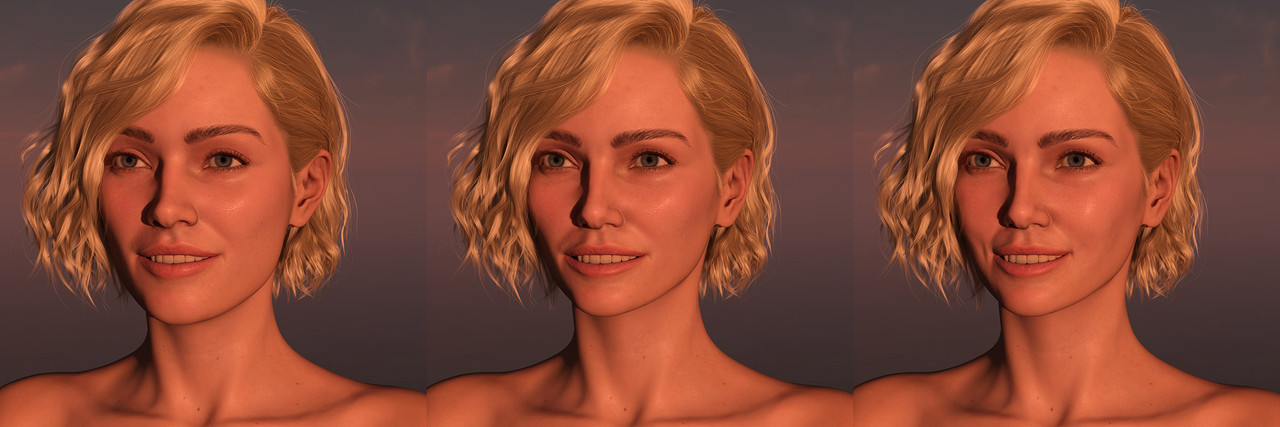
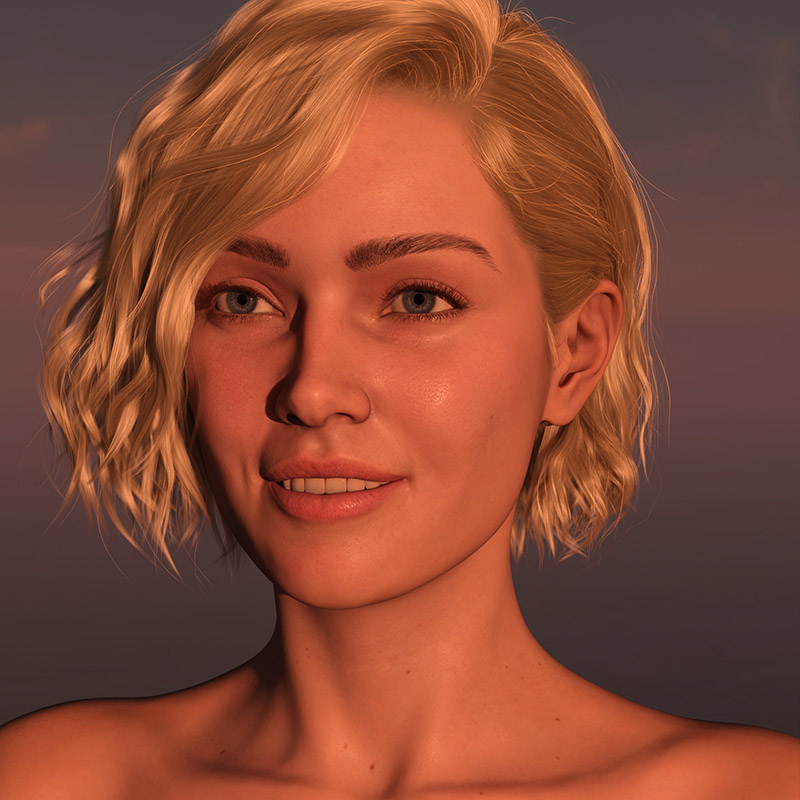
here's an example of almost default V9 with Smile Show Teeth at 50%, then a custom head I sculpted with bone adjustment done (not manual, the automatic one), and the 3rd one was the 2nd exported again to blender (with morphs, and had to dial in the show teeth smile in blender, and take it from there) and sculpted in the extra detail and fixes (I'm no artist btw, just a regular amateur, so don't judge too harshly :D )
I know some of the "lizardness" can be fixed fiddling with dials and face in PowerPose, but what I was looking for is extra wrinkles, dimples and creases, and that is just too painful to do using meshgrabber, that author has their work cut out for them to add sculpting to it, not just simple mesh manipulation if they want Daz to continue to be relevant
here the "helper" morph on the 1st head (the custom head dialed out), now if only Daz would figure out that adding assymetry to "default" expressions isn't a great idea...
 Sculpting Your Own Character?
Let's use Smile Open Full Face that you mentioned as the example. An FACS expression on G8.1 is not a 'true morph' but just a single Pose Control dial controlling a series of sub-expressions and bones as default, so there's no geometry data in its dsf file. You current way will not work. Now in this case, a quickest way is to create a delta morph which could be controlled by Smile Open Full Face. For instance, let's add more crease on asolabial fold based on this expression:
1. Dial this expression 100% on G8.1F base figure. Set figure's Resolution Level to Base and export to obj file.
2. Import obj to blender and sculpt more crease, then export to obj file.
3. Use Morph Loader Pro to import obj file with these settings: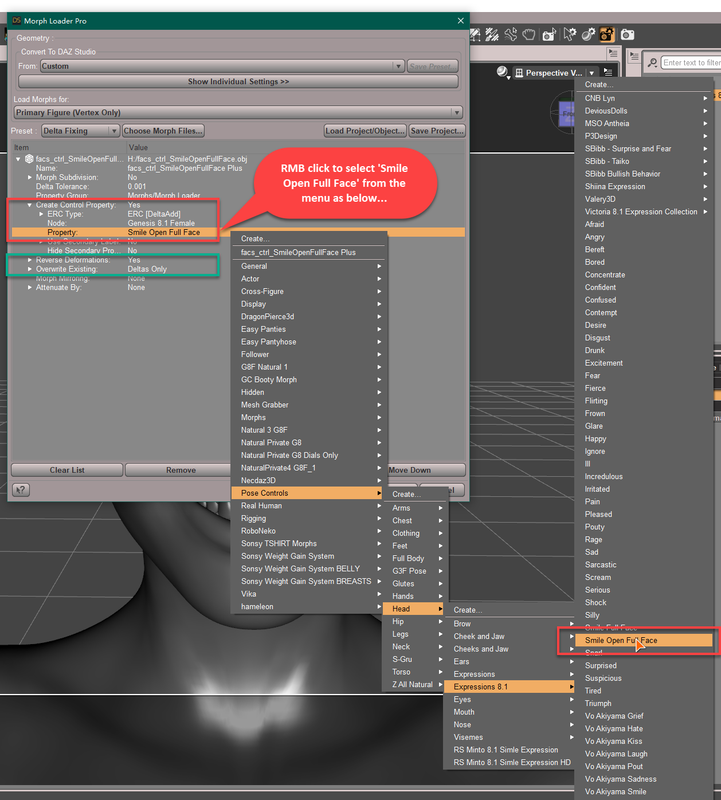
4. Then when you dial Smile Open Full Face, this 'delta morph with more crease' will be automatically triggered.
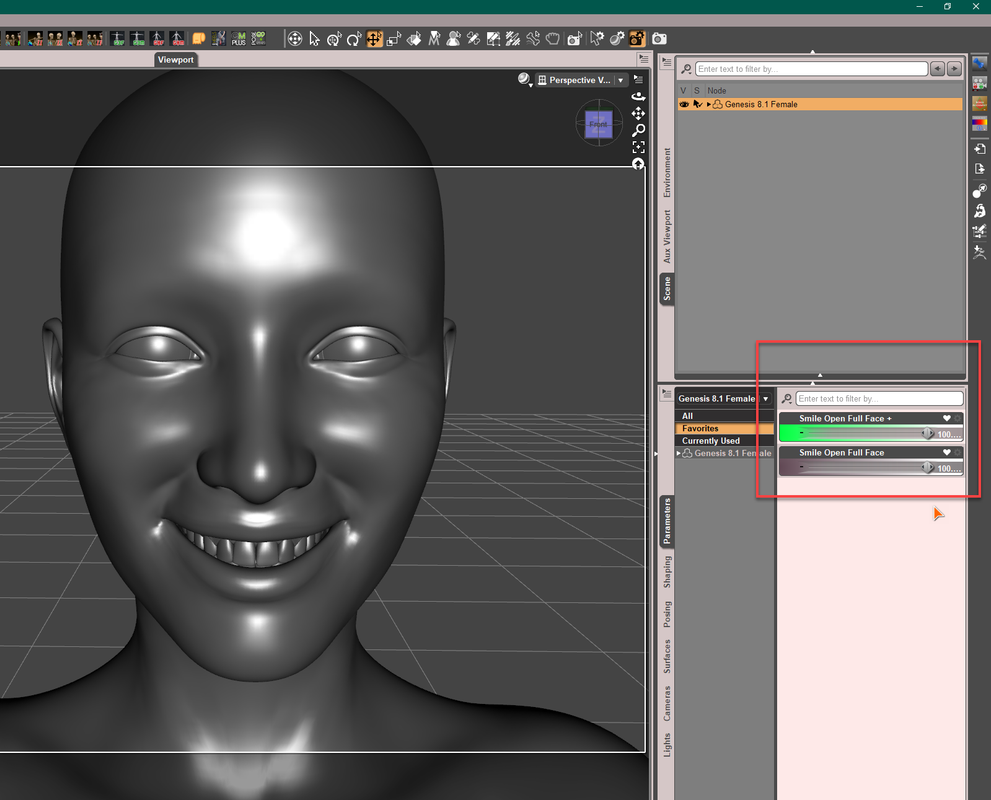
5. Save this 'delta morph' as a Morph Asset to your vendor folder.In this way, you're able to use a FACS control dial + any delta morph of subtle variations that you made.
PS: You surely can create a uniqe morph based on this expression then make change on it but that'll take more steps and time, not really necessary... and you'll have no way to separately control partial expression with it..
A Mesh Grabber questionThanks BeeMKay. Unfortunately there is no volume morph on this hair which is why I was looking at mesh grabber.
A Mesh Grabber questionYes, though it would probably be a bit of work. The Mesh Grabber is a good purchase in any case, though.
Also, you can try to go to the hair volume morph parameters, click on the cog wheel and remove the limit from the dial. If you are really lucky, and dial in a negative, it will give you the result you need. There's no guarantee too that looking good, though.
A Mesh Grabber questionHello,
I have a hair model that I would like to create a morph for. The hair doesn't have very many morphs built in and none that act on the hair volume. The morph I would like to create would decrease the overall volume of the hair like a mirror image of the increase hair volume morphs found on some other hair models. Is this something that could be done with the Mesh Grabber product? I see that the bundle is on sale and if it can do this I will purchase it.
Thanks in advance for any replies.
nabob21
Sculpting Your Own Character?I thought I'd append my question to this, since it already contains quite a bit of info regarding morphs and Blender
Could someone explain basic steps of how to export/import between Daz and Blender emotion morphs? What I want to do is create a bit different smile morphs, change how the creases are around cheek/mouth area.
I'm pretty comfortable sending a genesis figure back and forth between Daz and Blender if I want to sculpt the face or body in neutral pose using Morph Loader Pro and "Reverse Deformations: Yes", everything works as expected, but I can't find any tips on how to customize let's say a G8.1F "Smile Open Full Face" expression, I'm somewhat aware of JCMs, weight maps etc, and how they interact, I've even did some "helper" morphs inside Daz using meshgrabber, but I was wondering how to go about doing that using Blender, since Beshgrabber is very lacking when it comes to sculpting.
tip regarding the issue mentioned previously regarding sculpting aroung mouth and eye area, to avoid deforming eyes for instance when sculpting eyelid area, in Blender, while in Sculpt mode, and Draw (or any other brush) selected, on the right side (default layout), there is a Active Tool and Workspace settings tab (screwdriver and wrench icon), then under Brush Settings>Advanced> check the "Topology" setting, what this does for a Grab brush for instance is that if you grab a vertex on the eyelid next to the eye, it will no longer pull the eye mesh geometry with it, don't ask me to explain why, it just works... but you have to check that setting for each brush you're going to use.
Daz 3D is part of

Connect
DAZ Productions, Inc.
7533 S Center View Ct #4664
West Jordan, UT 84084Licensing Agreement | Terms of Service | Privacy Policy | EULA
© 2026 Daz Productions Inc. All Rights Reserved.