-
Why Does It Take So Long To Load Figures? ("Solved", with GUIDE)
crosswind said:
Poser uses injection while Daz uses pre-load, each way has the pros and cons of its own... But the root reason of long loading time still results from the great deal of DSON support files under those well-known data folders. In fact, lots of people are 'character & morph collectors' who are keen on installing character products and varieties of morph / shape packages even if many of the 'products' are garbage. Moreover many of them don't understand the 'side-effect' of doing so, let alone the killer - 'duplicate formulas'....
BTW, 'thanks to' those 'vendors' esp. on some 3rd-party sites... Customers pay your bills, you steal their time just because you're no pro or ignorant of these matters... or push your luck from time to time... Anyway, this is the real life in 3D world, but people still need to resist the impulse and make choices wisely...
Injection still requires channels for the morph to be injected into, and grouping data - that is what soem of the ExP files used by the foruth generation figures are, while the older figures had to have special CR2 (figure) files with the channels defined (which made mixing morph sets a pain). .pmd files can be injected into a figure without needing pre-defined channels, but those had a big memory impact initially.
Why Does It Take So Long To Load Figures? ("Solved", with GUIDE)Poser uses injection while Daz uses pre-load, each way has the pros and cons of its own... But the root reason of long loading time still results from the great deal of DSON support files under those well-known data folders. In fact, lots of people are 'character & morph collectors' who are keen on installing character products and varieties of morph / shape packages even if many of the 'products' are garbage. Moreover many of them don't understand the 'side-effect' of doing so, let alone the killer - 'duplicate formulas'....
BTW, 'thanks to' those 'vendors' esp. on some 3rd-party sites... Customers pay your bills, you steal their time just because you're no pro or ignorant of these matters... or push your luck from time to time... Anyway, this is the real life in 3D world, but people still need to resist the impulse and make choices wisely...[Released] Faber Inc - Nahuel for Genesis 9 HD [Commercial]plasma_ring said:
I ended up using his morph for the G9 remake of the character in my icon, and he works really well with other shapes. It can be challenging to give nonhuman characters realistic facial features without throwing something out of balance, but Nahuel is like an actor who can pull off a lot of different roles and costumes easily. It's cool seeing the examples in this thread because he looks like a different person in each one, but his features are still very distinctive and charismatic.

Incredible! I totally see his characteristic nose and jawline there. Excellent work and thanks for sharing it!
 [Released] Faber Inc - Nahuel for Genesis 9 HD [Commercial]
I ended up using his morph for the G9 remake of the character in my icon, and he works really well with other shapes. It can be challenging to give nonhuman characters realistic facial features without throwing something out of balance, but Nahuel is like an actor who can pull off a lot of different roles and costumes easily. It's cool seeing the examples in this thread because he looks like a different person in each one, but his features are still very distinctive and charismatic.
Why Does It Take So Long To Load Figures? ("Solved", with GUIDE)tonyjas46_1cccd9144e said:
With Genesis 9 having both male and female characters in the same content directory the loading times are now doubled if you have a lot of content. Clothing, matrerials poses are only referenced in the content directory BUT MORPHS are all loaded as soon as you select a figure. Isn't it time DAZ studio only loaded the essential base morphs for a figure and then selectively load all the required character morphs for that particular folder?
With V4 we had a list of optional morphs appear when V4 was selected to load. Surely Daz can use the same principle with later genesis versions. Seems to make a lot of sense when DAZ makes its income from content and not the program. I am reluctant to keep buying more characters when each set of morphs gets added to the existing list. I tend now to modify the base figure to create my characters for this reason.
Currently the only workaround for this problem is the have two morph directories and name one Morphs and the other Morphs zzz (or similar) then copy as needed from one to the other and delete or move to the Morphs zzz when not needed. An other option is to find all the sub folders under the Morphs folder and add "zzz" to the end of each one not used or needed. All in all this is a slow and time consuming process.
Hi, I'm still using G8, but I've basically solved the issue with this: https://www.daz3d.com/turbo-loader-for-genesis-8-and-81
Maybe RiverSoftArt will make a version for G9. It's a must for creators who have a ton of content (like me). I do comics, so once I've created the characters and their variations I don't need all the morphs, with this tool I let Daz know what morphs I'm using right now, and everything loads so much faster. If you want to turn on or off every morph, there's a way too.
Why Does It Take So Long To Load Figures? ("Solved", with GUIDE)With Genesis 9 having both male and female characters in the same content directory the loading times are now doubled if you have a lot of content. Clothing, matrerials poses are only referenced in the content directory BUT MORPHS are all loaded as soon as you select a figure. Isn't it time DAZ studio only loaded the essential base morphs for a figure and then selectively load all the required character morphs for that particular folder?
With V4 we had a list of optional morphs appear when V4 was selected to load. Surely Daz can use the same principle with later genesis versions. Seems to make a lot of sense when DAZ makes its income from content and not the program. I am reluctant to keep buying more characters when each set of morphs gets added to the existing list. I tend now to modify the base figure to create my characters for this reason.
Currently the only workaround for this problem is the have two morph directories and name one Morphs and the other Morphs zzz (or similar) then copy as needed from one to the other and delete or move to the Morphs zzz when not needed. An other option is to find all the sub folders under the Morphs folder and add "zzz" to the end of each one not used or needed. All in all this is a slow and time consuming process.
Gen 8.1 Male figure broken after installing Teeth Master Control for Genesis 8 MaleI bought the Teeth Master Control for Genesis 8 Male morph set as I wanted to be able to adjust the teeth on some of my gen 8 and gen 8.1 figures. After buying and installing Teeth Master Control for Genesis 8 Male I was able to make adjustments to the teeth which was cool. After I made adjustments to a character and saved it, I went to customize a new character. I noticed that when I adjusted his mouth via expressions or by manually adjusting the jaw poses that the the top first premolars and most of the teeth on the lower jaw are messed up. I closed the scene and opened up a brand new dev 8.1 character in a brand new scene to see if the issue still persisted, and it did. Attached is a screen shot showing the character with his teeth missing below his gums. This is the base 8.1 male dev figure which I have not applied any customization to. If I open a gen 8 male character, the teeth move properly when you open close the jaw, so the issue seems to be only the 8.1 male figure.
Essentially the steps shortly before the problem occurred was I installed Teeth Master Control for Genesis 8 Male. I used it to make adjustments to one of my highly mixed morph characters. Then when I was happy with the end result and saved my scene, I used shape splitter to merge all of the morphs of my custom character into 1 stand alone morph no longer dependent on the previous morphs. I tested the new character morph out to make sure it worked fine, which it did. Then I loaded a new 8.1 male dev figure to start tweaking which is when I discovered the teeth no longer stuck to the jaw when manipulating it.
Does anyone know how I can fix this? Thanks.
Use G8 wearable preset on G9?Faeryl Womyn said:
The only other thing I can think of and it's more time consuming then a script, take the Genesis you're working on and the outfit and bring them into Blender or Hexagon or whatever program you use and just make the outfit fit the model and export the outfit only to obj and import to Daz and apply the Transfer Utility and, if you're game, dforce options.
That doesn't seem related to the problem of positioning wearable props at all.
Performance improvement suggestion when loading scenesjohndoe_36eb90b0 said:
Lantia Vertel said:
After reading the asset in the first step, it should be trivial to check what you should unload/destroy, and what you shoud load/create...
That's absolutely non-trivial and from your assumption it seems that you do not understand how Daz Studio, and 3D assets in general, work.
In order to compare two scenes, you have to compare the full scene tree hierarchy (recursion). That's already computationaly more expensive than just deleting and loading everything from scratch.
For the sake of an argument, let's say you have a simple scene with just one G8F figure.
In your current scene she is wearing a bikini, in the one you want to load she is wearing a dress. When you start loading new scene Daz Studio would according to you need to somehow determine that the figures are the same. Let's say that's an easy task (even if it isn't). Your ideal outcome would be Daz Studio unloading bikini and loading dress. How do you propose they determine what should be kept? What if the figure is also wearing sunglasses with the bikini? Should they remain and be paired with a dress or be removed? What if the new figure differs in just one morph state or it has different face texture (makeup)? Is it still the same figure?
That is already a complex and hard to define task, and we haven't even considered world XYZ coordinates of the figure (what should happen if they aren't the same? Should the figure move to a new position or not?), morphs which are dialed in (should old morphs remain and be combined with new morphs or be fully replaced with new morphs?), geografts, geoshells, deformers, cameras, lights, multiple objects, instancing, etc, etc.
Trust me when I say this, doing that would just make things slower.
Right now, the only things that make scene loading slow are:
1. Having too much installed 3D assets (the less you have the faster your scenes load, and this is especially true for figure morphs)
2. The efficiency of find/add/remove operations on data structures used to represent scene objects as GUI elements in memory (this is what could probably be further optimized by Daz 3D)So if you want your scene load time to be faster my advice is to have two separate Daz Studio installs (release and beta), and two separate content folders. In release content you keep only the minimum amount of 3D assets required for working on your current project, and everything else keep in beta content.
Most people complaining about slow scene loading have hundreds of gigabytes of accumulated 3D assets installed -- it's like having a cluttered desk and then complaining you can't find that one particular paper you need quickly.
You can easily test if doing what I suggest would help in your particular workflow -- just move everything out of your content directory to a safe place, then load the scene, scroll through the missing files dialog, and copy only those missing files from the safe place to your content directory. Once you have all the files used by the scene try loading it, I'd be surprised if you reported back that it isn't considerably faster.
Hope this helps.
Listen my friend, don't want to have a pointless discussion and I really think you are being defensive here. I think you are asserting a lot which is not true and I don't really have time to explain point by point each thing. Just looking the start of the comment:
johndoe_36eb90b0 said:
In order to compare two scenes, you have to compare the full scene tree hierarchy (recursion). That's already computationaly more expensive than just deleting and loading everything from scratch.
First, that's not recursion (you can implement a diff recursively, but you don't need to) and in any case, with a recursive implementation or not, that's nothing for even a low spec pc, it will take a few ms. Second: Every asset/resource should be indexed in a pool for direct access (that's one of the reasons for having a unique id for each thing) which leaves diff problem in nothing. It's very basic resource manamgent. Third: In the worst case scenario (the indexed pool is not part of the scene file (at the moment it's not, and I don't think that needs to change) you only need to read the scene file in a single pass, which is what it happens now. That would be dramatically faster than regenerating everything from scratch, and definitely no way to be slower as you say.
Don't want to continue this discussion as it doesn't seem constructive or productive. I'm an experienced dev (20+ years of commercial experience (7 in graphics)) (so I think I know what I was tallking about), found a basic thing that could (should) improve the performance when loading scenes, I left my suggestion here hoping it helps. But now, seeing how this comunity receips feedback and proposals I understand why Daz works as it does. This explains everything.
Use G8 wearable preset on G9?The only other thing I can think of and it's more time consuming then a script, take the Genesis you're working on and the outfit and bring them into Blender or Hexagon or whatever program you use and just make the outfit fit the model and export the outfit only to obj and import to Daz and apply the Transfer Utility and, if you're game, dforce options.
Lawrence 9 HDPixelSploiting said:
He looks great, but I think the only interesting items from the bundle are explosion FX and the unifom (and the uniform is only basic everyday overalls no other kit). I've no shortage of gun props.
Ditto for me. The single item discount stacking and tokens make it feasible to make my own bundle rather than buying the April Inanity bundles. I haven't seen the stovepipe hairstyle since the 80's, but I hear it's being recycled. The raggedy Antoine yarn braids seem to be a more common hairstyle than that.
Lawrence's skin looks just like Angela's skin with different normals. If we still had separate genders, then repeating a skin for both genders would be defensible. But this doesn't make much sense. His head morph seems well-made (since he looks stoic, perhaps it won't matter how well he takes expressions), but his bends look like they need some FBM/CBS love. Don't know what's up with the clotshot calamari vascularity.
Still, Genesis 8 black men were so obviously painted that I only used them at distance. Genesis 8.1 black skin looked great, and Genesis 9 now has two versions of one skin that looks amazing.
Genesis 9 VERY slow parameter responsestripe6499_9253833ae8 said:
I had something similar with a G8 figure, and that turned out to be the DForce Sea Salt hair I was using on the figure. Even with a massively upgraded pc, I still can't move a figure around, using that hair. Try removing any hair products and see if you still have that issue?
That could certainly be one culprit, as when one uses the dial on the character the first time (reading the deltas for the morph), the morph is also transfered to any and all fitted items and if the item (hair) has a dense geometry it may very well take some time.
Transfer Utility - Transfer Weights without derforming the model?Is it possible to parent a garment to a genesis character using transfer utliity - but without deforming the garment?
This leaves a lot of artefacts, predominantly on buttons, that can't be cleaned up with weight mapping because the mesh becomes deformed as a default state post transferring weights.[attached imgs showing before transfer, after transfer, and transfer settings]
I'm more familiar with Blender's 'Parent with Automatic Weights' feature and then adjusting weight maps. In Blender, parenting/weighting an asset to an armeture doesn't deform the model. For this use case I can't really do the weight painting in Blender unfortunately.I've tried to deselect the 'Fit to Source Figure' option, which solves my problem to some degree but that means I can't move the garment or apply morphs.
Does anyone with some experience with Transfer Utility have any suggestions to help with this issue please?
Thanks
Performance improvement suggestion when loading scenesLantia Vertel said:
After reading the asset in the first step, it should be trivial to check what you should unload/destroy, and what you shoud load/create...
That's absolutely non-trivial and from your assumption it seems that you do not understand how Daz Studio, and 3D assets in general, work.
In order to compare two scenes, you have to compare the full scene tree hierarchy (recursion). That's already computationaly more expensive than just deleting and loading everything from scratch.
For the sake of an argument, let's say you have a simple scene with just one G8F figure.
In your current scene she is wearing a bikini, in the one you want to load she is wearing a dress. When you start loading new scene Daz Studio would according to you need to somehow determine that the figures are the same. Let's say that's an easy task (even if it isn't). Your ideal outcome would be Daz Studio unloading bikini and loading dress. How do you propose they determine what should be kept? What if the figure is also wearing sunglasses with the bikini? Should they remain and be paired with a dress or be removed? What if the new figure differs in just one morph state or it has different face texture (makeup)? Is it still the same figure?
That is already a complex and hard to define task, and we haven't even considered world XYZ coordinates of the figure (what should happen if they aren't the same? Should the figure move to a new position or not?), morphs which are dialed in (should old morphs remain and be combined with new morphs or be fully replaced with new morphs?), geografts, geoshells, deformers, cameras, lights, multiple objects, instancing, etc, etc.
Trust me when I say this, doing that would just make things slower.
Right now, the only things that make scene loading slow are:
1. Having too much installed 3D assets (the less you have the faster your scenes load, and this is especially true for figure morphs)
2. The efficiency of find/add/remove operations on data structures used to represent scene objects as GUI elements in memory (this is what could probably be further optimized by Daz 3D)So if you want your scene load time to be faster my advice is to have two separate Daz Studio installs (release and beta), and two separate content folders. In release content you keep only the minimum amount of 3D assets required for working on your current project, and everything else keep in beta content.
Most people complaining about slow scene loading have hundreds of gigabytes of accumulated 3D assets installed -- it's like having a cluttered desk and then complaining you can't find that one particular paper you need quickly.
You can easily test if doing what I suggest would help in your particular workflow -- just move everything out of your content directory to a safe place, then load the scene, scroll through the missing files dialog, and copy only those missing files from the safe place to your content directory. Once you have all the files used by the scene try loading it, I'd be surprised if you reported back that it isn't considerably faster.
Hope this helps.
Use G8 wearable preset on G9?Faeryl Womyn said:
There is a converter from G8 to G9
https://www.renderosity.com/freestuff/items/93219/g8fm-pose-transfer-to-g9I do have a convertor, and it's great for poses, but sadly useless for wearables.
 April 2023 - Daz 3D New User Challenge - Open Render Challenge
the villain
daz studio
intermediate

Modifying characters with blender's sculpting function is my main interest in the moment.
Creating the scar in the face of the rat and the full body morph for the kitten was easyer than the controle of dForce hair in DS,
Slowly I'm getting an idea, what all the parameters under "simulate" are doing.
Lawrence 9 HDHe's so pretty and exactly the morph I needed for a character I couldn't nail down. I have exactly zero use for military stuff, so he's all I'm getting; I might wait a day and see if they spring an alternate theme or something.
Lawrence 9 HDSo, Angela's brother is into the store. He's had morph fits in a few things, so it was clear he was coming, if not when. (Been a while since they let that happen.)
Don't think I want all of either bundle, but we shall see.
The combinations with him look pretty good.
Performance improvement suggestion when loading scenesAs example, If I load a scene and I load the same scene again without changing anything, it takes 23 seconds to load, according to the logs this is what happens:2023-04-19 15:52:43.881 [INFO] :: Prepare asset load (open): PATH_TO_MY_SCENE(4 seconds!! glad to see this line here, but it takes a lot :( )
2023-04-19 15:52:43.881 [INFO] :: Locking viewport redraw...
2023-04-19 15:52:43.881 [INFO] :: Viewport redraw locked.
2023-04-19 15:52:43.928 [INFO] :: Native format content directories: 4
2023-04-19 15:52:43.928 [INFO] :: Poser format content directories: 3
2023-04-19 15:52:43.928 [INFO] :: Other import format content directories: 0
2023-04-19 15:52:43.928 [INFO] :: Begin asset load (open): PATH_TO_MY_SCENE
2023-04-19 15:52:44.562 [INFO] :: Clearing the scene...
2023-04-19 15:52:47.812 [INFO] :: *** Scene Cleared ***
2023-04-19 15:52:47.812 [INFO] :: Determining missing assets...2023-04-19 15:52:51.136 [INFO] :: Setting textures...(3 seconds!! do we need to create the same materials again?)
2023-04-19 15:52:51.292 [INFO] :: Scanning for addons...
2023-04-19 15:52:53.488 [INFO] :: Creating node geometry...
2023-04-19 15:52:53.543 [INFO] :: Creating UV sets...
2023-04-19 15:52:53.543 [INFO] :: Creating materials...2023-04-19 15:52:56.382 [INFO] :: Resolving legacy figures...
2023-04-19 15:52:56.382 [INFO] :: Preparing modifiers...
....I think it really depends on the assets / resources that need to be loaded... My single V9 scene is even slower: ( latest Public Build )
2023-04-20 08:16:57.108 [INFO] :: Prepare asset load (open): /H:/G9Dev.duf(7 secs with PBRSkin + those big maps. Each time it must load the map files on disk. No cache for materials)
2023-04-20 08:16:57.108 [INFO] :: Locking viewport redraw...
2023-04-20 08:16:57.108 [INFO] :: Viewport redraw locked.
2023-04-20 08:16:57.211 [INFO] :: Native format content directories: 3
2023-04-20 08:16:57.211 [INFO] :: Poser format content directories: 2
2023-04-20 08:16:57.211 [INFO] :: Other import format content directories: 0
2023-04-20 08:16:57.211 [INFO] :: Begin asset load (open): /H:/G9Dev.duf
2023-04-20 08:16:57.246 [INFO] :: Clearing the scene...
2023-04-20 08:16:57.258 [INFO] :: *** Scene Cleared ***
2023-04-20 08:16:57.258 [INFO] :: Determining missing assets...
2023-04-20 08:16:57.731 [INFO] :: Setting textures...
2023-04-20 08:16:57.897 [INFO] :: Scanning for addons...
2023-04-20 08:17:03.677 [INFO] :: Creating node geometry...
2023-04-20 08:17:03.687 [INFO] :: Creating UV sets...
2023-04-20 08:17:03.688 [INFO] :: Creating materials...2023-04-20 08:17:03.707 Iray [INFO] - MDLC:COMPILER :: 1.0 MDLC comp info : Loading module "......\pbr_skin.mdl".(16 secs, fr projection queue of anatomy to redraw unlock, as no cache for projection.)
2023-04-20 08:17:10.566 [INFO] :: Resolving legacy figures...
2023-04-20 08:17:10.566 [INFO] :: Preparing modifiers...
2023-04-20 08:17:10.617 [INFO] :: Creating modifiers...
2023-04-20 08:17:11.563 [INFO] :: Creating property aliases...
2023-04-20 08:17:11.590 [INFO] :: Resolving 186055 formulas...
2023-04-20 08:17:11.590 [INFO] :: Finding formula properties...
2023-04-20 08:17:12.680 [INFO] :: Sorting formula properties...
2023-04-20 08:17:12.724 [INFO] :: Creating ERC Links...
2023-04-20 08:17:14.204 [INFO] :: Finished resolving formulas.
2023-04-20 08:17:14.263 [INFO] :: Processing scene data...
2023-04-20 08:17:14.264 [INFO] :: Finalizing modifiers...
2023-04-20 08:17:14.265 [INFO] :: Finalizing channels...
2023-04-20 08:17:14.265 [INFO] :: Finalizing materials...
2023-04-20 08:17:14.265 [INFO] :: Sorting property groups...
2023-04-20 08:17:14.271 [INFO] :: Setting up follow targets...
2023-04-20 08:17:14.271 [INFO] :: Start following: Victoria 9 HD << Genesis 9 Eyelashes
2023-04-20 08:17:14.271 [INFO] :: Following started: Victoria 9 HD << Genesis 9 Eyelashes
2023-04-20 08:17:14.272 [INFO] :: Connect base morphs: Victoria 9 HD << Genesis 9 Eyelashes
2023-04-20 08:17:14.288 [INFO] :: Applying projection morphs...
2023-04-20 08:17:14.291 [INFO] :: Loaded morph deltas: 0m 0.3s - /data/Daz 3D/Genesis 9/Genesis 9 Eyelashes/Morphs/Daz 3D/Base/head_bs_EyelashesProjectionShape.dsf
2023-04-20 08:17:14.335 [INFO] :: Creating morph projection map: Victoria 9 HD << Genesis 9 Eyelashes
2023-04-20 08:17:14.364 [INFO] :: Base morphs connected: Victoria 9 HD << Genesis 9 Eyelashes
2023-04-20 08:17:14.364 [INFO] :: Applying projection morphs...
2023-04-20 08:17:14.364 [INFO] :: Creating morph projection map: Victoria 9 HD << Genesis 9 Eyelashes
................................................................
2023-04-20 08:17:14.801 [INFO] :: Setting current camera...
2023-04-20 08:17:14.801 [INFO] :: Finalizing scene data...
2023-04-20 08:17:14.802 [INFO] :: Finished asset load (open): 0m 17.590s - /H:/G9Dev.duf
2023-04-20 08:17:14.803 [INFO] :: Processing morph projection queue: Victoria 9 HD << Genesis 9 Eyelashes................................................................
2023-04-20 08:17:30.004 [INFO] :: Unlocking viewport redraw...
2023-04-20 08:17:30.004 [INFO] :: Viewport redraw unlocked.
Asset loading time 17.6s, total loading time 34.6s before viewport redraw, even if my computer is pretty robust... But the loading time in latest Public build was shortened by 10% at least comparing to General release, I was still a bit satisfied...* Closed * RRRR - "Back from the dead" Render ContestKen OBanion said:
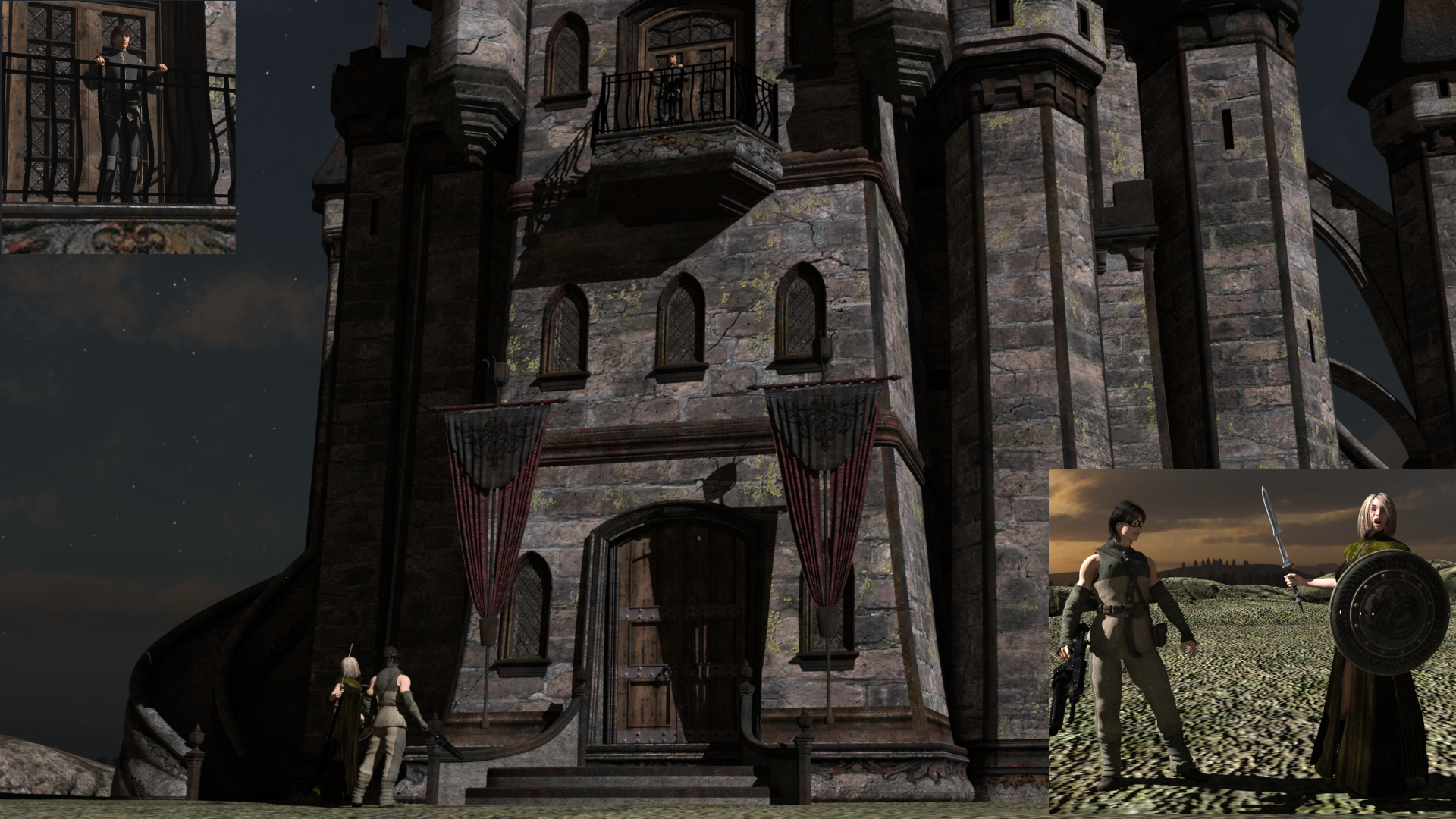
While entry #2 is rendering (and after 30 minutes, and only 2% complete, it's liable to take a while), I thought I'd get a jump on #3. So here's my (pseudo-)random draw for round 3:
8301 - Fairytale Collection - Charming For David
7452 - Fantasy Castle 2011 - Castle Keep 2
7413 - Trail Scouts
2656 - AgilaMan, that 'blast from the past' vibe is still going strong, isn't it!?
So..., okay; challenge accepted!
This one came together surprisingly quickly!
I had to do it as three separate images, and then composited them, due to the scale of the scene, plus the fact that the various figures are all facing in different directions. (And for the record, I don't recommend it, and I hope I don't have to do it again!)
Anyway, here it is.
Also used:
David (obviously; otherwise that Charming outfit would be just another empty suit!)
Donavan (MAT and morphs by LA3D - a ShareCG freebie)
Jamie Hair by AprilYSH
Michael 3 Sr2
Level Hype (another LA3D morph package for M3)
Shelby textures (LA3D again)
Prince Charming Hair for M3
The Scout for M3 (required for Trail Scout textures)
Marauder for M3 (Rifle; yeah, it's an AR-15 -- what's your point?)
Victoria 4.2
DMR Lynette (MAT and morphs)
V4 Ranger Hair
Vandra (required for Agila textures)
V4 Morphing Cloak and Cape
DMs Courage Realm (Weapons and hand poses)
Dark Tales textures for Castle Keep 2
Easy Environments Witchcraft: Eclipse (Skydome)
With a little bit of postwork in GIMP. (Okay, a lot of postwork in GIMP!)
Tag: OBanion_03
Title: A Little Unfinished Business
Long believed dead, Agila had instead been relentlessly hunting down the man who murdered her father. In the course of her travels, she encountered a man out of his place, and out of his time who, lacking anything better to do, had joined her in her quest for justice and retribution.
At long last, much to Prince Humperdinck's surprise, the two travellers arrived at his castle.
Agila: "My name is Agila Montoya! You killed my father! Prepare to die!"
Michael: "Seriously...!?"
Daz 3D is part of

Connect
DAZ Productions, Inc.
7533 S Center View Ct #4664
West Jordan, UT 84084Licensing Agreement | Terms of Service | Privacy Policy | EULA
© 2026 Daz Productions Inc. All Rights Reserved.