-
Need idiot proof toon shader/render tut, esp for four listed...
What type of look are you looking for? I've had some luck playing with pwToon for a few years. If you follow some of the links in my signature, you can see some of the pictures I've done over the years. If you're interested, I can make up a quick tutorial of my process.
One big help was starting off with Crescent's pwToon presets (http://www.sharecg.com/v/69733/favorite/21/DAZ-Studio/Crescents-pwToon-Cel-Shaders). They're a bunch of color presets that are quite good. They remove the specular color and have different diffuse and shading colors than the usual gray shade. Also, they have a smooth shade or hard shade option, and different outline widths depending on what you need.
Was this done with pwToon too?
http://mysteriousworldsofsphinxmagoo.tumblr.com/image/159998052456
That one was done with Sketchy. I avoided the line drawing options because I wanted to test the Toon capabilities in Sketchy and to play a little bit with iRay. Not a lot of Toon or cel-shaded options in iRay...
Need idiot proof toon shader/render tut, esp for four listed...What type of look are you looking for? I've had some luck playing with pwToon for a few years. If you follow some of the links in my signature, you can see some of the pictures I've done over the years. If you're interested, I can make up a quick tutorial of my process.
One big help was starting off with Crescent's pwToon presets (http://www.sharecg.com/v/69733/favorite/21/DAZ-Studio/Crescents-pwToon-Cel-Shaders). They're a bunch of color presets that are quite good. They remove the specular color and have different diffuse and shading colors than the usual gray shade. Also, they have a smooth shade or hard shade option, and different outline widths depending on what you need.
Was this done with pwToon too?
http://mysteriousworldsofsphinxmagoo.tumblr.com/image/159998052456
Need idiot proof toon shader/render tut, esp for four listed...What type of look are you looking for? I've had some luck playing with pwToon for a few years. If you follow some of the links in my signature, you can see some of the pictures I've done over the years. If you're interested, I can make up a quick tutorial of my process.
One big help was starting off with Crescent's pwToon presets (http://www.sharecg.com/v/69733/favorite/21/DAZ-Studio/Crescents-pwToon-Cel-Shaders). They're a bunch of color presets that are quite good. They remove the specular color and have different diffuse and shading colors than the usual gray shade. Also, they have a smooth shade or hard shade option, and different outline widths depending on what you need.
Need idiot proof toon shader/render tut, esp for four listed...Sketchy - Toon Edge and Art Style Shaders for Iray
I've got tools, including PS whatever come w/ CS6, and years of doing stuff on the low end pro side, but I really wnt to bump up my skill set with doing comic and toon style scenes. I do animations, but the software for thar is from one of my cliets and I am NDA all over on it.
So, DAZ Studio 4.9 pro and the 4 listed. Any tutorials that are easy for a old guy who drinks?
NSFW example (still in TOS and rulles here though) of what I do in Photoshop and DS4.9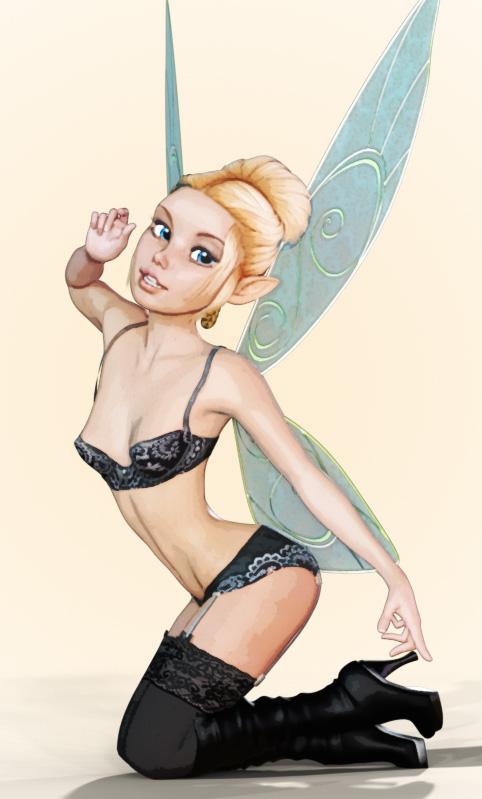 Non-photorealistic Renders (NPR)
I need to make comments but gotta do a post and dash for now -- the hubby bought Rogue One, so we're watching that in a few minutes.
Re: toonish renders, I have PWToon but have always struggled to get something I like out of it. My more usual mode these days is to just go for a general illustrated-like look and run the finished render through Topaz Clean (Fluid Edges usually, sometimes another preset) and then use a preset from Filter Forge's Comic Stylize + weirdness filter (yes, that's what it's called.) I use a line-only preset, copy the result, and then paste it over the Topaz-ified image as a new layer set to 50% Multiply (if one likes darker lines, increase the setting.)
Below is Monique 7 after the Topaz Clean filter was added, then after the merging with the Filter Forge preset. The third one had a subtle distressed halftone texture added. (I do clean up the Filter Forge results a bit using the Mehdi Fine Threshold plugin. I sometimes do this with the airbrush, but usually I'm lazy and go for quick.)
More later...
Non-photorealistic Renders (NPR)Yeah, the problem with PWToon is that the lines are hugely variable. It's VERY hard to control and get consistent lines. On the flip side, LineRender9000 gets much more consistent lines... but almost too precise (but, then, good filters help).
As for the cameltoe, I honestly felt that was appropriate to the genre. ;)
I need to get back to working with LR9K. I have been distracted wirh other processes lately.
Camel toe: HAH!Non-photorealistic Renders (NPR)Yeah, the problem with PWToon is that the lines are hugely variable. It's VERY hard to control and get consistent lines. On the flip side, LineRender9000 gets much more consistent lines... but almost too precise (but, then, good filters help).
As for the cameltoe, I honestly felt that was appropriate to the genre. ;)
Non-photorealistic Renders (NPR)Superhero comic style.
(Mainly PWToon, LR9K to fill in some extra lines, Lightroom to smooth the colors a bit, Photoshop to get the border)
Very nice (and you are getting much better lines than I'm getting with these tools -- I need more practice), but I think this calls for some handwork to fix the big thigh on the bent leg and the hint of camel toe on the shorts.
Non-photorealistic Renders (NPR)Superhero comic style.
(Mainly PWToon, LR9K to fill in some extra lines, Lightroom to smooth the colors a bit, Photoshop to get the border)
LineRender9000 [Commercial]One of the upsides of this product:
PWToon, and several other similar things, fail to outline the boundary between opaque and transparent portions of clothing. Like, say, dresses where dress length is handled by cutting parts of the dress out via transparency.
LR9K's colorID outlining, on the other hand, handles these elements properly.
Non-photorealistic Renders (NPR)If it helps, I'm pretty sure you can do that style in PWToon or LineRender9000 (if those are easier for you).
Most likely. Carrara and my old eyes do not get along.
Non-photorealistic Renders (NPR)If it helps, I'm pretty sure you can do that style in PWToon or LineRender9000 (if those are easier for you).
Non-photorealistic Renders (NPR)I finally picked up GenX2 and the first thing I did was port some Hiros to G3M, in pursuit of my own style. Not nearly as impressive as some of the other stuff here, but so much better than my original effort to hand-morph the same that I had to share.
(This is Hiro 5 added to somebody or other at 50%.)
I like the character; I'm using combinations of Topaz Clean and Simplify (with a few PhotoShop actions) myself and find I'm enjoying this much more than the years I was using PWToon and related shaders -- there's a certain amount of extra freedom, and the ability to automate the postwork on batches of renders really speeds things up.
Again, really like the character, well-done!
-- Walt Sterdan
Getting a good outline for a Toon EffectBy the way, is there any way to keep PWToon from throwing a huge shadow on the floor like in the image in attachment? Getting rid of that without losing the outline would also be wonderfull.
Thanks a lot,
Me
Getting a good outline for a Toon EffectFloors are a problem with PWtoon, I didn't usually bother to use the shader on them, I found that if you use basic textures they usually looked fine.
The black is down to camera angles it can be got rid of by altering the camera and the lighting.I think the inner line effects it as well its a long time since I have used PWToon so can't remember the details sorry.
Getting a good outline for a Toon EffectLinerender9000 is awesome.
The most powerful part of it is that it adds a ColorID channel to every surface, and Main Camera Lines are drawn wherever there is a ColorId difference.
Also, it's fresnel lines, while not perfect, are better than most Normal based outlines (which I'm pretty sure is what PWToon uses)
Getting a good outline for a Toon EffectHi all,
I'm trying to get a good outline for a cartoon effect in my 3Delight render. Thusfar PWtoon gives me the wrong outlines. As you can see, it "blackens out" most of the floor, while providing no outline at all on the contours of the floor stones or the wooden planks that make up the counter. How do I fix this? Would the Linerender 9000 be any good? I found a manual somewhere, but I get completely blank images out of it, or images without any outline at all...
Thanks a lot,
Me
Non-photorealistic Renders (NPR)Continuing to hone the style.
I'm finding PWToon isn't super necessary, because soft normal shadows work better for many of the filters.
So:
Flat color pass (ambient with no AO)
Soft shadow pass (turn all surfaces to light gray, use ambient with AO + distant light with soft shadows at various levels)
LR9K:
Main camera lines with colorID, make all surfaces/objects different
Fresnel
And composite, usually lightening the color and then increasing vibrance.
that's a great effect, thanks for the workflow description
Non-photorealistic Renders (NPR)Continuing to hone the style.
I'm finding PWToon isn't super necessary, because soft normal shadows work better for many of the filters.
So:
Flat color pass (ambient with no AO)
Soft shadow pass (turn all surfaces to light gray, use ambient with AO + distant light with soft shadows at various levels)
LR9K:
Main camera lines with colorID, make all surfaces/objects different
Fresnel
And composite, usually lightening the color and then increasing vibrance.
Very nice!!!
Non-photorealistic Renders (NPR)Continuing to hone the style.
I'm finding PWToon isn't super necessary, because soft normal shadows work better for many of the filters.
So:
Flat color pass (ambient with no AO)
Soft shadow pass (turn all surfaces to light gray, use ambient with AO + distant light with soft shadows at various levels)
LR9K:
Main camera lines with colorID, make all surfaces/objects different
Fresnel
And composite, usually lightening the color and then increasing vibrance.
Daz 3D is part of

Connect
DAZ Productions, Inc.
7533 S Center View Ct #4664
West Jordan, UT 84084Licensing Agreement | Terms of Service | Privacy Policy | EULA
© 2026 Daz Productions Inc. All Rights Reserved.