-
There's Always Another Sale Thread -- Discussions Only Pt 5
daveso said:
From @Leana post, we should expect a balloon tomorrow.
Yeah, with everything required to have a buy-in to get a few percent off, this one is slowly sliding by. I think I'll wait until the next quick grab changeover. There has been some pretty good things I've picked up there. I've only added one item to my WL since this sale started, so that means I've passed on the doorbusters, and then that drips down to the new debut releases, and of course the still new, as they just drop to the next category the same products. I've only spent $21 so far with this current sale, the majority being from Quick Grab. The only purchase so far has been AH dForce Lacy Bloom Outfit and its texture set. $3.00. My Premier membership expires on the 17th.I found https://www.daz3d.com/z-utility-carrying-bags-pose-set-for-genesis-9-and-8-female the other day and added it to the cart right away. Wouldn't you know the day before that I was searching my pose library for something close to those. And I have purses and poses, but none that came close. I have no issue changing a pose somewhat, but there are limits when time is short. And just for $0.79! And then I saw the https://www.daz3d.com/pvc-latex-shaders which I had dithered over before when they were full price. Also $0.79. And it comes with metadata. But I am trying to stretch a gift card, so more things are going on my wishlist.
LUTsSuggestion: The ability to import and export LUTs. To get a matching look and style between DS scenes and video edits.Or to create a lighting effect and export it as a merchant resource.
Daz Studio 6 Beta - version 6.25.2026.19821! (Updated July 23, 2026)I need a sort of confimartion: Someone tried exporting and reimporting an animation in BVH format for the DAZ Dog 8? When I try the BHV file seems to work fine on the BVH Viewer but when I import it to the model the animation is broken.
Blender to DAZ Bridge: How to export images without adding a second extension?I purchased the Blender to DAZ Bridge last week, and I am having a minor problem with regards to exporting the .png images as I transfer the object in Blender into DAZ Studio through the bridge.
Whenever the images import, it adds a second instance of ".png" on the end, which means the images now have a double .png extension, which I don't want after I learned that files that have double extensions tend to have viruses. What would I need to do with the Blender add-on in order to export the image (as I export the object) without the extra extension?
Daz Studio 6 Beta - version 6.25.2026.19821! (Updated July 23, 2026)DoctorJellybean said:
Daz Studio 6.x uses FFmpeg for the multimedia backend. Nothing in regard to FFmpeg or the audio importer has changed since 6.25.2025.18515
Populating the supported formats in the import dialog comes from querying FFmpeg for a list of the formats it supports on the machine it is installed on. FFmpeg's support for standard uncompressed WAV format does not require any external dependencies - the necessary libraries for handling uncompressed PCM audio, the most common type found in WAV files, are part of the FFmpeg core and are included in any standard build.
What has changed recently are a number of dependent libraries (25.2025.25407, 6.25.2025.26707), and distribution footprints (which files are included), but that should have had no impact on FFmpeg's response when queried for the list of supported formats omitting WAV.
Thanks for the info; I know it worked in 6.25.2025.22607 (August 14, 2025) and stopped working in 6.25.2025.23807 (August 26, 2025), hopefully they'll be able to see what change was made between versions that broke audio import and fix it in the near future.
Daz Studio 6 Beta - version 6.25.2026.19821! (Updated July 23, 2026)wsterdan said:
I was thinking about why the last few versions of DAZ Studio (D|S) no longer sees the audio files for import. From my limited programming experience, I figured that when the program calls for an "open file" dialog box it needs to be passed a list of parameters of the types of files it's looking for. It would follow that – for whaterver possilbe reason – the developers have kept the "open file" dialog box but neglected to keep the parameter list for file types to accept.
To test it, I re-installed the latest version to confirm. Here's what the Audio…/… load dialog box looks like in the latest couple of versions of D|S:

No options of file types to import.
And here's what it looks like in the old versions of D|S that still work:
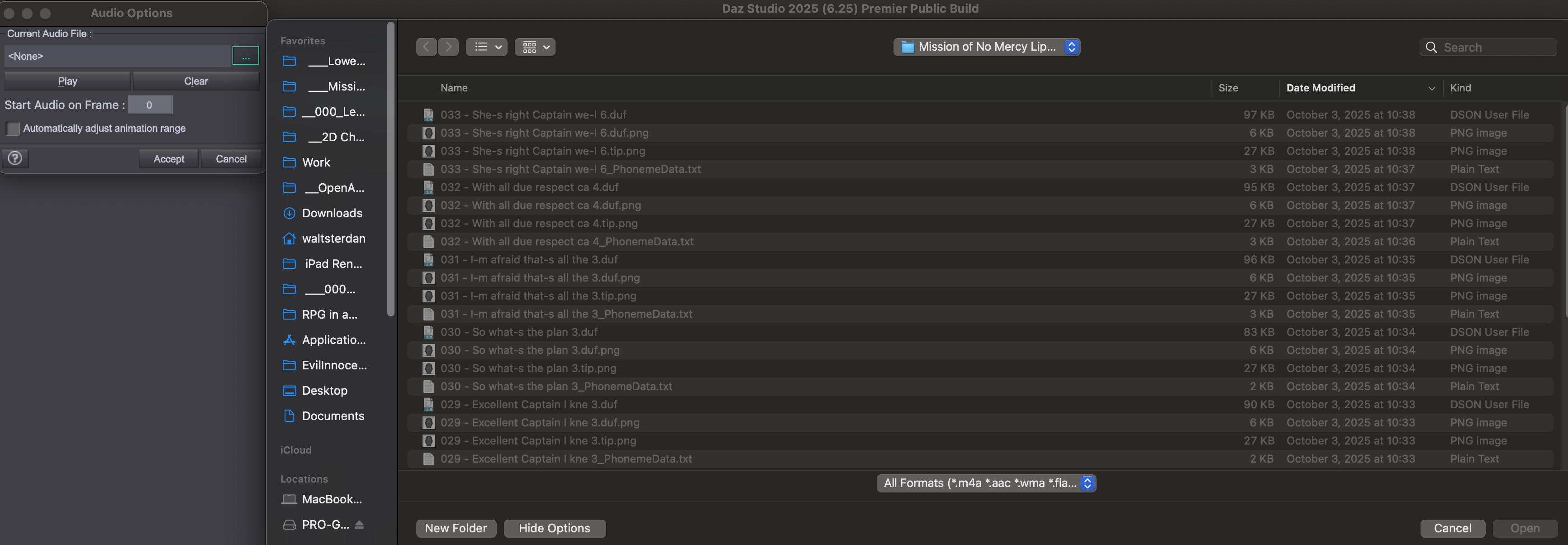
So, it looks to me like they might just need to add the parameters? Any comments, or am I totally off the mark?Just a bit.
Daz Studio 6.x uses FFmpeg for the multimedia backend. Nothing in regard to FFmpeg or the audio importer has changed since 6.25.2025.18515
Populating the supported formats in the import dialog comes from querying FFmpeg for a list of the formats it supports on the machine it is installed on. FFmpeg's support for standard uncompressed WAV format does not require any external dependencies - the necessary libraries for handling uncompressed PCM audio, the most common type found in WAV files, are part of the FFmpeg core and are included in any standard build.
What has changed recently are a number of dependent libraries (25.2025.25407, 6.25.2025.26707), and distribution footprints (which files are included), but that should have had no impact on FFmpeg's response when queried for the list of supported formats omitting WAV.
Petipet's Sci Fi Hangars and DiffeoYes I'm using easy import with the default settings, everything works fine here, no idea what it may be wrong on your side apart what I already explained. Below it's my polaris scene if you want to try and import and eventually check for differences. Or you can upload yours for me to test.
Smoothing rounding off teeth (diffeo)Yes, exporting with HD checked does a HD export of course, then you also need the HD option in the global settings that's by default. You see rounded teeth in the viewport but rendering will work fine, unless there's import errors that you can check in the console. The HD shape is baked from the daz studio viewport, so what you see in the viewport is what you get in blender.
Or export without HD as Krys explains.
Petipet's Sci Fi Hangars and DiffeoRemoved the scripts under Studio and copied what I have from 2 Oct 2025. Still have the same issue. When you import in Blender, are you using the Easy option?
Daz Studio 6 Beta - version 6.25.2026.19821! (Updated July 23, 2026)I was thinking about why the last few versions of DAZ Studio (D|S) no longer sees the audio files for import. From my limited programming experience, I figured that when the program calls for an "open file" dialog box it needs to be passed a list of parameters of the types of files it's looking for. It would follow that – for whaterver possilbe reason – the developers have kept the "open file" dialog box but neglected to keep the parameter list for file types to accept.
To test it, I re-installed the latest version to confirm. Here's what the Audio…/… load dialog box looks like in the latest couple of versions of D|S:
No options of file types to import.
And here's what it looks like in the old versions of D|S that still work:
So, it looks to me like they might just need to add the parameters? Any comments, or am I totally off the mark?Aligning normals via reimport instead of manuallycrosswind said:
You need to import the full OBJ file...The data of normals can either be saved within the geometry library of its DSF file in data folder...or saved in a DUF scene file without saving Figure / Prop assets.
I figured out the solution, though it was case specific. It was never a normals problem. Turns out this clothing item was composed of two "shells" floating extremely close to each other (>1mm, the inside of the clothing is a different color than the outside and the inside can be seen because it's baggy and has some openings) and when the creator fit the clothing to the character they didn't realize some of the internal shell got hit by the weight differrently so it broke through the external shell.
I had to manually tweak those broken through polys back in C4D and then just load it as a corrective morph like usual.Aligning normals via reimport instead of manuallycrosswind said:
You need to import the full OBJ file...The data of normals can either be saved within the geometry library of its DSF file in data folder...or saved in a DUF scene file without saving Figure / Prop assets.
That's what I was afraid of. That means I'd have to redo all the custom bone weighting which would take 100x longer than just hand selecting the polys to flip in daz lol
Aligning normals via reimport instead of manuallymmdestiny said:
crosswind said:
There's no such an option of flipping normal when importing assets in DS... AFAIK. You either manually do it with Geometry Editor in DS or with external applications, like Blender, C4D...
Not necessiily looking for a literal option in the import itself. More like I'm wondering if, say I fix everything in C4D, then export as an obj. If I were to use "Load UV Set" to load that obj, would DAZ pick up that the normals have changed? I'm not sure where in the asset the normal information is stored. Or perhaps load the fixed obj in morph loader pro, and even though there's nothing new IN the morph (no changed deltas), maybe it would pick up the change to the normals.
You need to import the full OBJ file...The data of normals can either be saved within the geometry library of its DSF file in data folder...or saved in a DUF scene file without saving Figure / Prop assets.
Aligning normals via reimport instead of manuallycrosswind said:
There's no such an option of flipping normal when importing assets in DS... AFAIK. You either manually do it with Geometry Editor in DS or with external applications, like Blender, C4D...
Not necessiily looking for a literal option in the import itself. More like I'm wondering if, say I fix everything in C4D, then export as an obj. If I were to use "Load UV Set" to load that obj, would DAZ pick up that the normals have changed? I'm not sure where in the asset the normal information is stored. Or perhaps load the fixed obj in morph loader pro, and even though there's nothing new IN the morph (no changed deltas), maybe it would pick up the change to the normals.
How to save custom properties?Well, I'm not 100% sure what you really want.... but if you created a controling property on G9 to control multiple sub-component properties on a geo-graft on G9... did you save the sub-component properties on the geo-graft as well ?
If you did, it would work ~~ because in such case of Genesis figure + conformed wearables / attachment e.g. geo-grafts, garments..., all the formulae that push value to the modifiers are all saved in the sub-component properties rather than their controller(s). Only saving the controling property is not enough ~~
So in the example you mentioned, you should've also saved Default Pose on G9 AE.
Edit: But if you were creating morphs (delta) on G9 and/or the geo-grafts, you should import the morphs by using Facet Order option in Morph Loader Pro plus turning on AutoFit on the controlling property.
Save / Export currently used parameters names : ClosedDoes anyone know a way to save / export currecntly used parameters as a list of parameters names.
Or better a script to save / export the locked parameters as an export morph list so I can import it?
Chatbot was very helpful <3
script
var node = Scene.getPrimarySelection();

if (node) {

    var obj = node.getObject();

    if (obj !== null) {

        var numModifiers = obj.getNumModifiers();

        for (var i = 0; i < numModifiers; i++) {

            var modifier = obj.getModifier(i);

            print("Morph Name (Internal): " + modifier.name + ", Label: " + modifier.label);

        }

    }

}
New version to create the content of a morph export from locked parameters, paste the result into a morph_character.csv and it's ready to be imported
var node=Scene.getPrimarySelection();if(node){var obj=node.getObject();if(obj!==null){for(var i=0;i<obj.getNumModifiers();i++){var m=obj.getModifier(i);if(m.getValueControl!=undefined){var c=m.getValueControl();if(c){var isLocked=c.isLocked();var isHidden=(c.isHidden!=undefined)?c.isHidden():false;if(isLocked==true&&isHidden!=true){print('"'+m.name+'","Export"');}}}}}}print('"Anything","Bake"');
separating objects from a scene when the entire scene is loaded as onePersonally I export an object, delete the bits I don't want and then re-import the bit I do want and copy the material across. Geometry editor, really, just done with a program better suited to modelling. Regards, Richard.Aligning normals via reimport instead of manuallyHi folks,
I got an asset (3rd party) that is absolutely beatiful in Filatoon, but the creator left the normals a mess. In case you didn't know, flipped normals case the Toon Outline to project internally instead of externally.
Can one of the the import functions (morph loader, UV Set, etc) be used to update JUST the normals of the asset so I don't have to flip them manually in Daz? C4D has a some very powerful normal tools that would make a lot of hand work instant.
The KindredArts Free Resource RepoFreebie Repo!
Hello there chums Both myself and my captors run the monthly freebie competition right here on these very boards, and it would be nice to have a lovely list of freebie resources that is (mostly) up to date. I will add my own entries, or any other resources that should be safe for the freebie competition. If you have a wicked resource for freebies (that isn't dodgy), please shoot me a PM, and i'll add it here.
Thanks Pals!
Websites:
Polyhaven - Using any individual models, textures, or HDRIs from these sites will count as a freebie, and they do stack. If the competition requires 3 freebies, and you use 3 models, you're golden.
Renderhub - Not sure if these are rotational. It's probably fine.
Daz3D Freebies - Yes, Daz freebies.
Renderosity - Rendo, up to date, decent stuff.
3Dassets.one - Lots of textures, models and HDRIs. Not daz ready, but takes minimal effort to import.
Wilmap - Sight for older genesis clothing, but still a great repo.
sdeBStore - Lots of good quality modern G8/9 clothing.
3dShards - @FrankTheTank submitted this, looks good.
Cgbytes - The family friendly area.
Destroy! - A pack of props and crowd generator tools submitted by @FrankTheTank
Carrara:
Carrara Freebie Index - Submitted by @Stezza
KA Freebies:

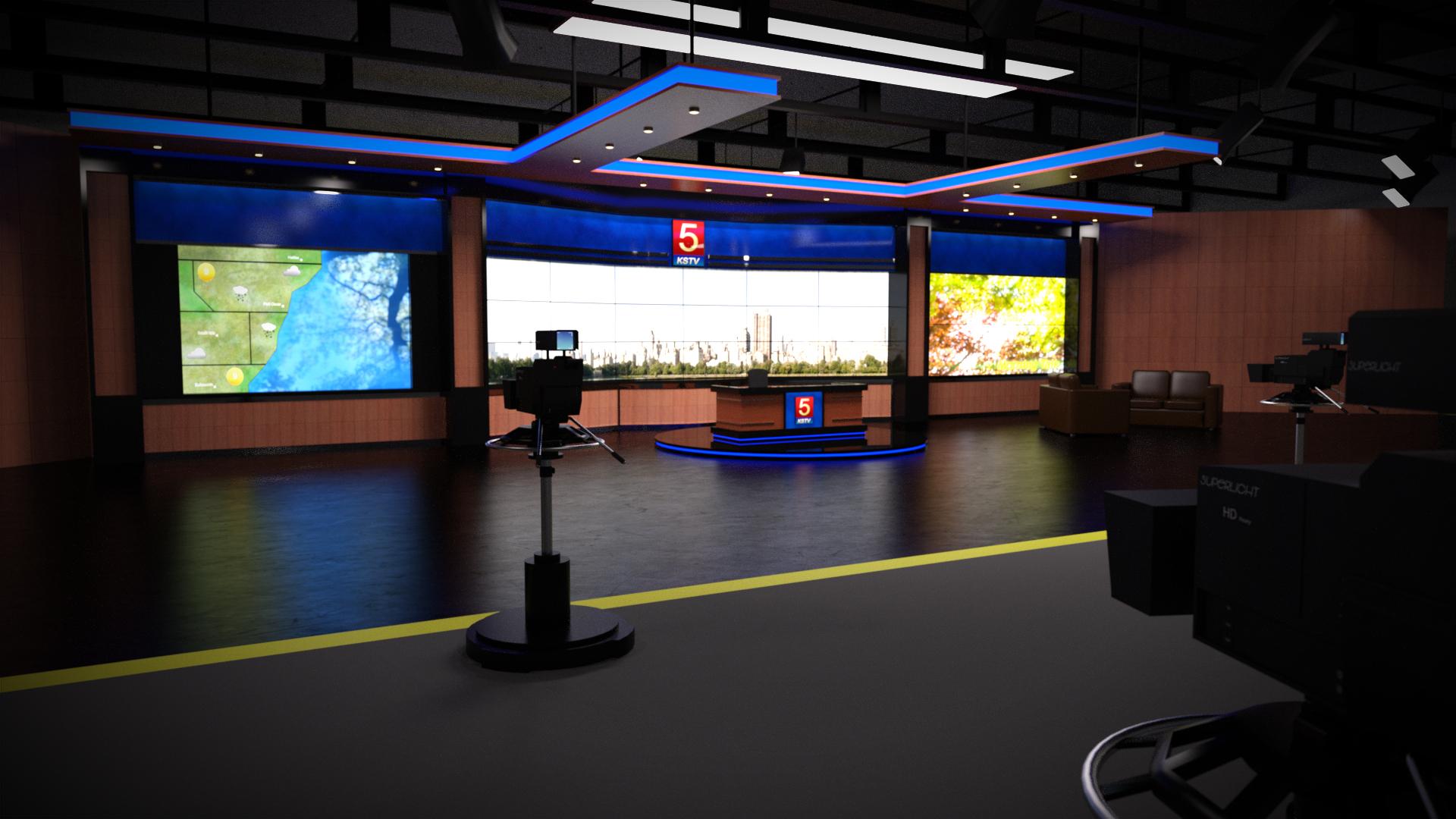
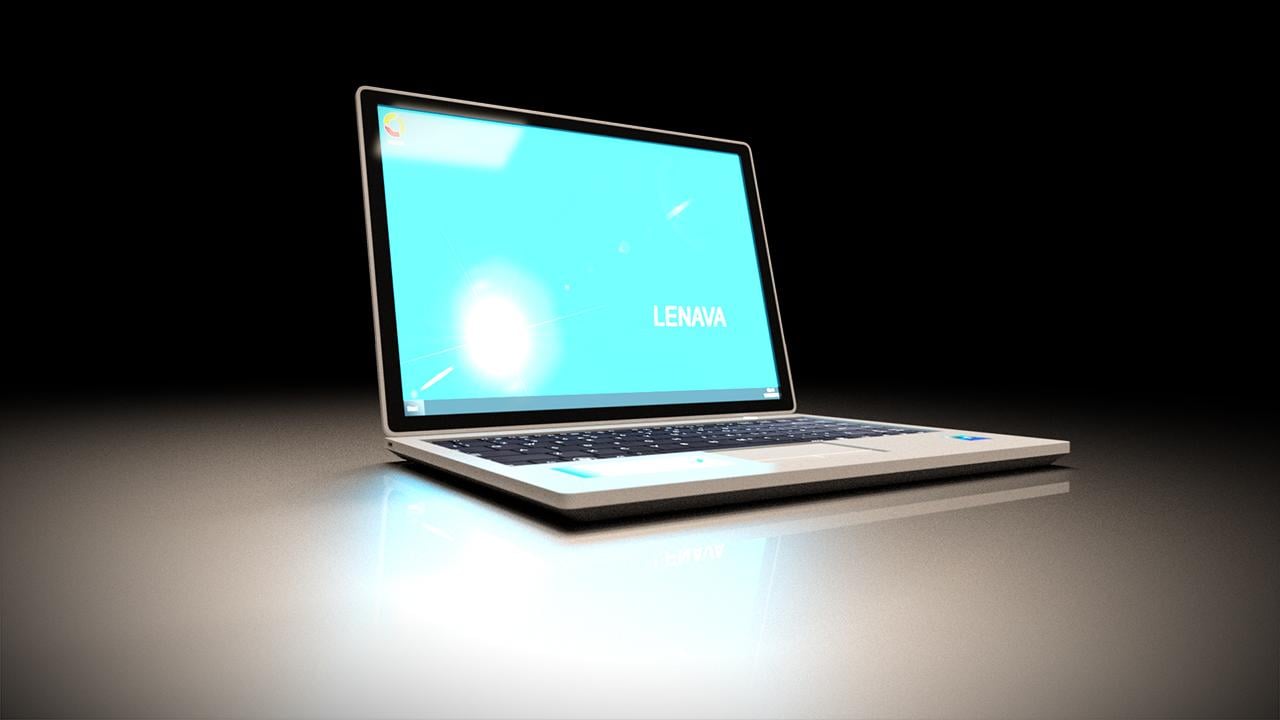
Polyhaven Bundle:
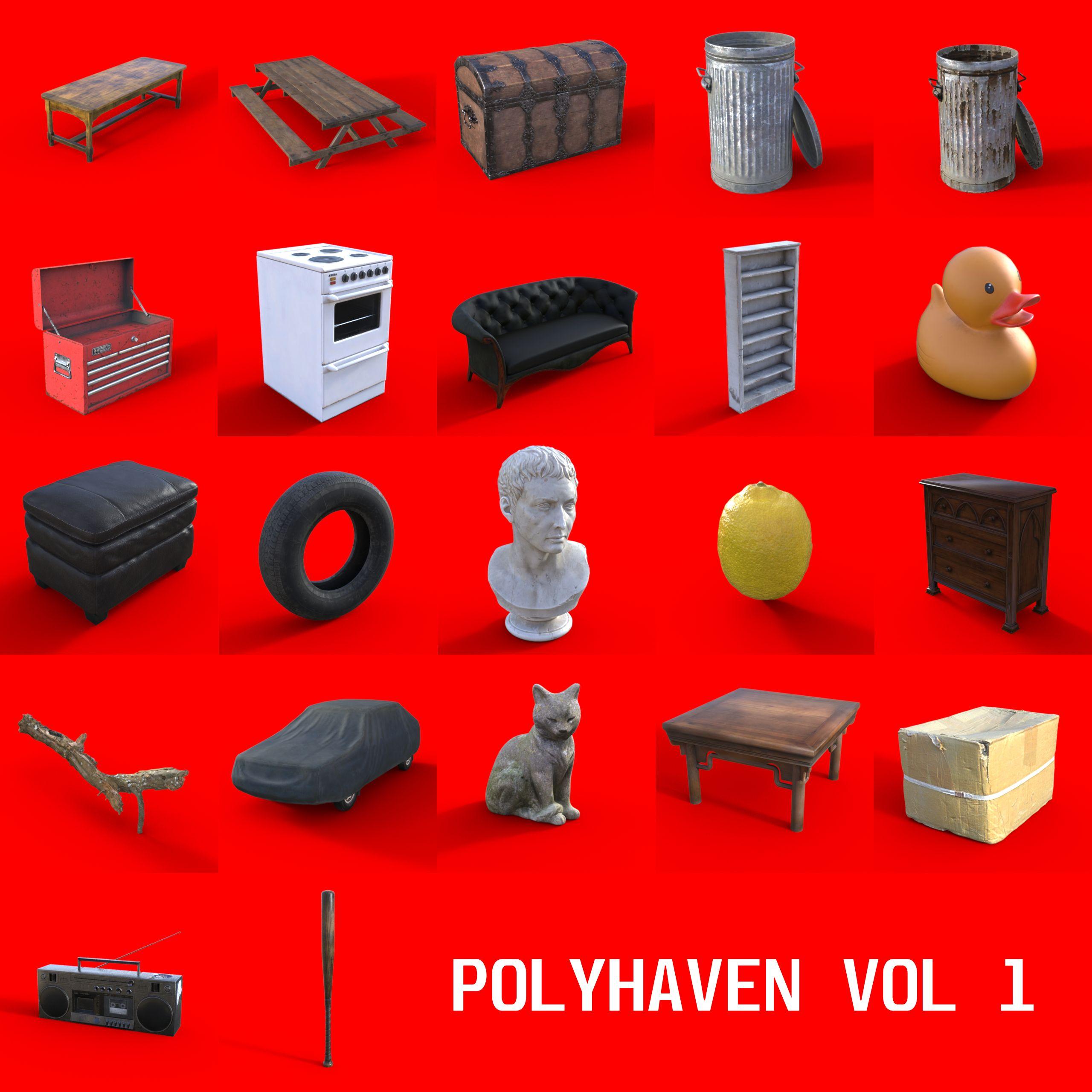
Polyhaven Vol 1 (These models are from the good folks at polyhaven. I have simply repacked them for daz, with data/runtime paths.)
...Again, please reach out to me if you have more current freebie resources.
KA
Daz Studio 6 Beta - version 6.25.2026.19821! (Updated July 23, 2026)System used:
MacBook Pro, Apple M4 Pro; 48 GB RAM; macOS: 15.3 (24D60)
Daz Studio 2025 ALPHA - version 6.25.2025.27507 (Updated October 2, 2025)
Computer was rebooted, then DAZ Studio loaded fresh.
Created a file with three Genesis 9 figures (with hair and clothing) on a Vanishingpoint starship bridge.
Scene set up to render a Filatoon animation.
Applied multiple lip sync poses between the three characters ending up with 842 frames (@ 24 fps).
Unable to import an audio file, same as last version of DAZ Studio.
Rendered to movie.
At the end of the render, warning box came up saying it couldn't save the file:
All 842 individual frames were saved in the temp folder, so I could salvage the animation but on looking at the frames I can see that my old friend, "removed the skin from my victims" has returned.
Frame r081 everything's fine.
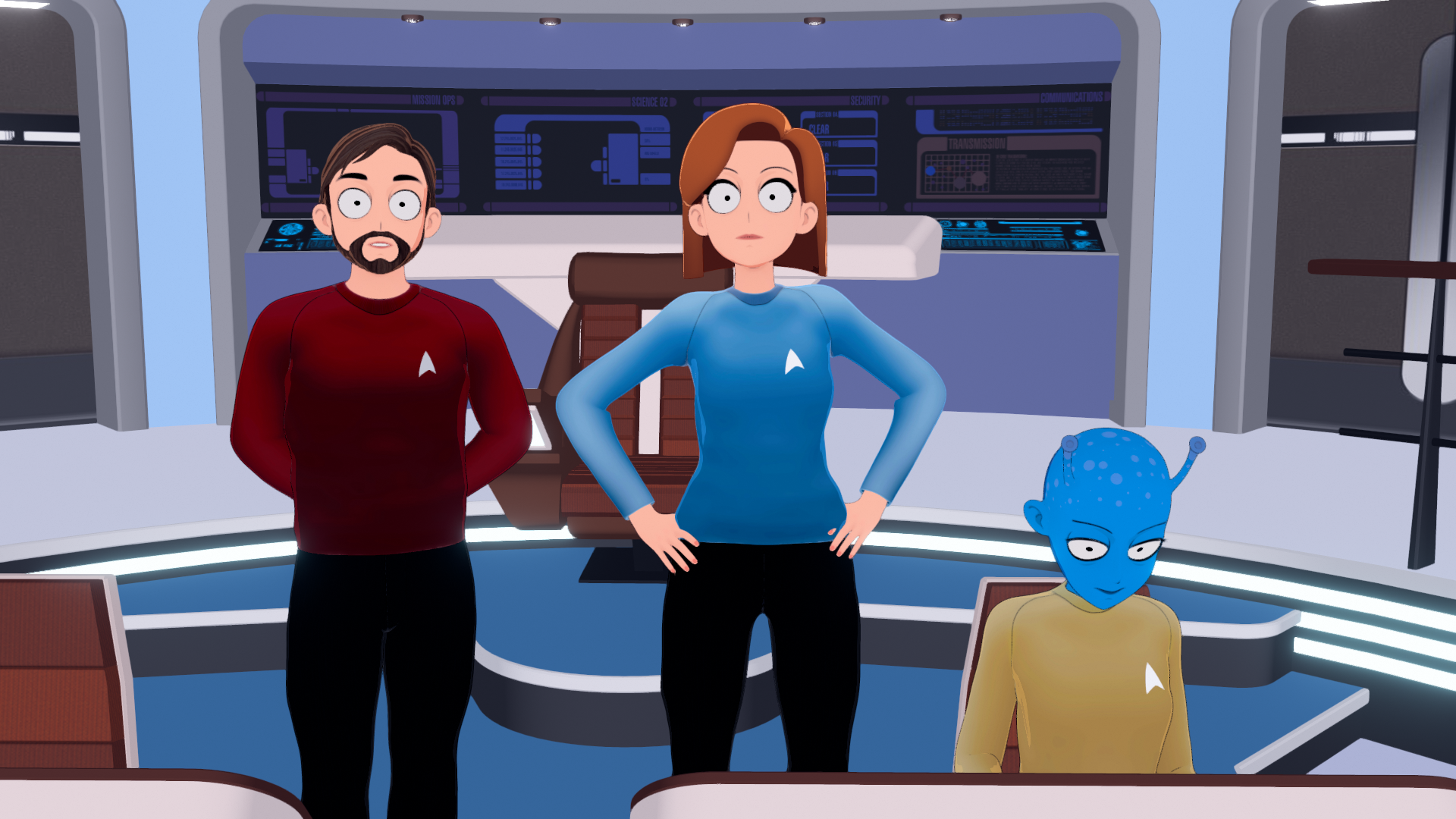
Frame r082 the characters' skins have disappeared. Only the characters' skins, never their clothing, their hair nor any add-ons like eyebrows, mouths, etc.. Nothing else ever vanishes.
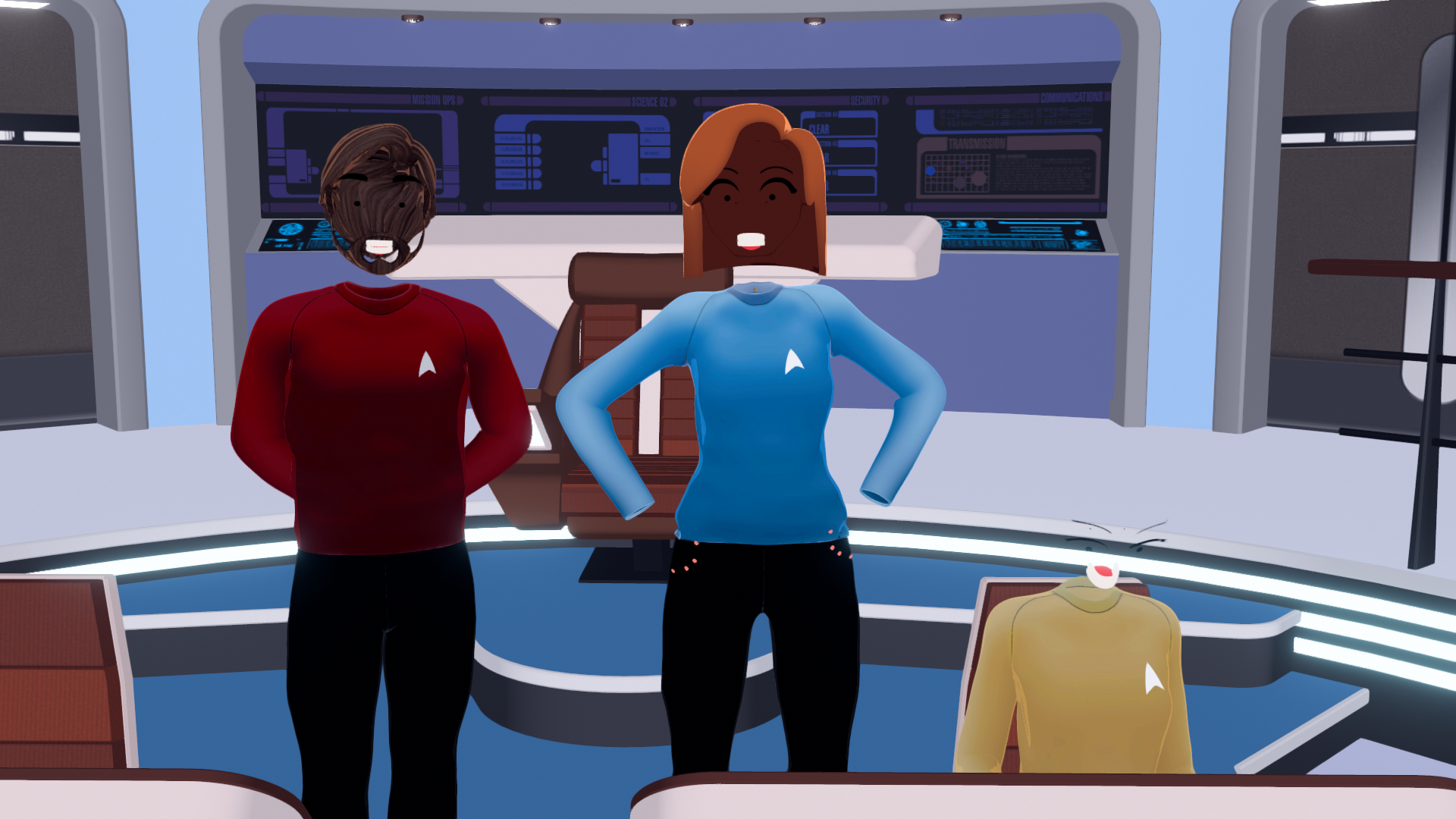
At this point, memory usage shows DAZStudio using 192.97 GB.

I checked the log and there's no warnings or errors when those frames are rendered:
2025-10-03 13:49:46.771 [INFO] :: Saved image: /Users/waltsterdan/Library/Application Support/DAZ 3D/Studio6 Public Build/temp/render/r080.png
2025-10-03 13:49:51.060 [INFO] :: Saved image: /Users/waltsterdan/Library/Application Support/DAZ 3D/Studio6 Public Build/temp/render/r081.png
2025-10-03 13:49:55.354 [INFO] :: Saved image: /Users/waltsterdan/Library/Application Support/DAZ 3D/Studio6 Public Build/temp/render/r082.png
2025-10-03 13:49:59.654 [INFO] :: Saved image: /Users/waltsterdan/Library/Application Support/DAZ 3D/Studio6 Public Build/temp/render/r083.pngI used the "New…" menu to close the scene and opened a new one. After 10 minutes on no activity, the memory has not been cleared.
I quit DAZ Studio and restared DAZ Studio and the memory was cleared.
Between creating the file, applying all of the lip syncs, adding a little secondary character animation and rendering the file out I worked with DAZ Studio for a little over two hours; I had no crashes or "working" issues other than not being able to save a movie file. I am able to use the temporary frames generated (or could, if they'd kept their skin on) and I'm able to render individual images and save them without issue.
I quit and uninstalled DAZ, re-installing version 6.25.2025.21707 (August 5, 2025) as I found it works best for me; I opened the saved file with the lip syncs still applied, added an audio file and rendered the movie again. At the end of the render the .mov file saves without issue and no one loses their skin.
During the final render, the memory usage spiked up to 112.21 GB; it should be noted that the "Memory Pressure" window at the bottom of the Activity Monitor stayed a sold green in both cases (green indicating efficient use, yellow suggesting potential need for more RAM, and red showing that your Mac needs more RAM).
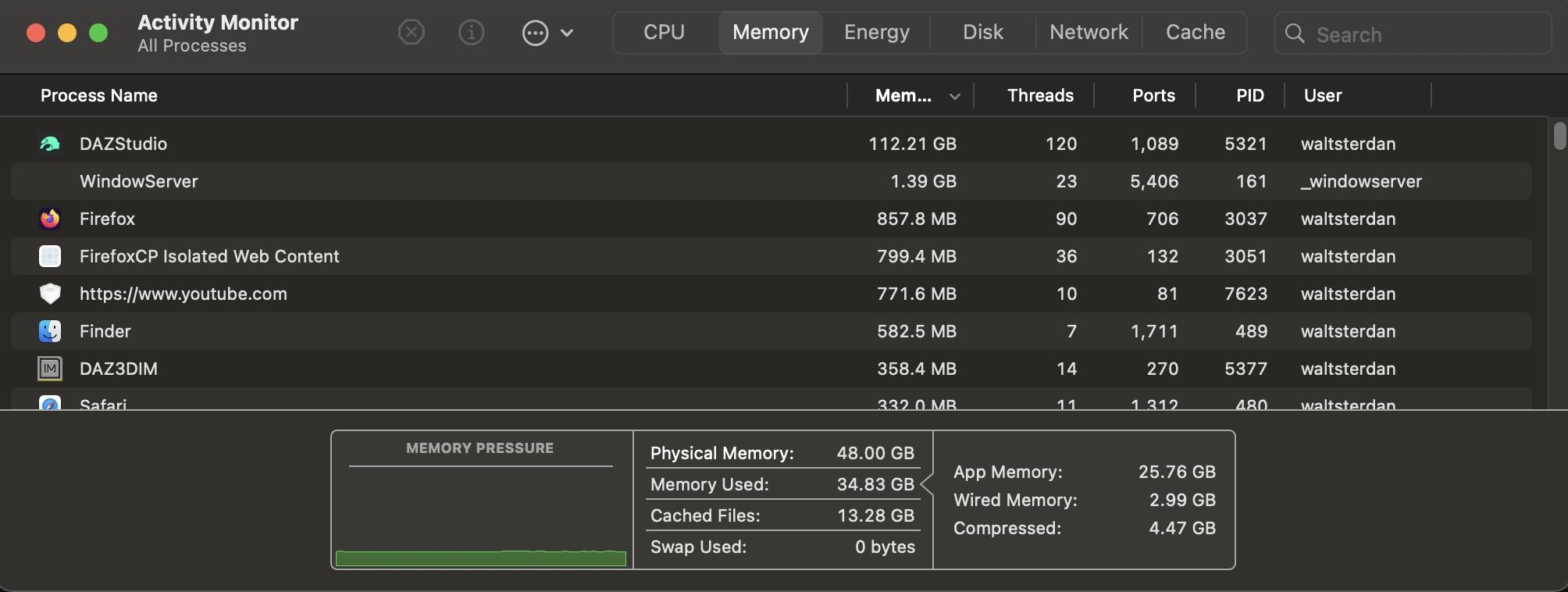
The scene, when not rendering, had DAZ Studio using under 14 GB of memory. Memory usage in the older versions of DAZ Studio drops back to this amount once the rendering has been done and saved.
Daz 3D is part of

Connect
DAZ Productions, Inc.
7533 S Center View Ct #4664
West Jordan, UT 84084Licensing Agreement | Terms of Service | Privacy Policy | EULA
© 2026 Daz Productions Inc. All Rights Reserved.