-
VIctoria 4 Anatomy to Genesis 8
Maybe this may help? https://www.daz3d.com/sy-victoria-4-and-michael-4-clones-for-genesis-8
I don't have the product, but maybe someone else could verify if it works or not.
Thanks! I've already spent a significant amount of money on the anatomy bundle and not too keen to roll the dice with more purchases.
Anyone have experience using this product?VIctoria 4 Anatomy to Genesis 8Maybe this may help? https://www.daz3d.com/sy-victoria-4-and-michael-4-clones-for-genesis-8
I don't have the product, but maybe someone else could verify if it works or not.
Victoria 4.2 & Morphs ++ Show as not Installed in Studio Via DIM InstallationWe need more info. A screenshot of Studio's Content Management Directory with DAZ Studio Formats and Poser Formats expanded and a screenshot of DIM's Installation tab.
As requested - see attached. As you can see DIM is only used to install DS Content and the reason for 2 separate directories - Drive G: G1-G2 is older Studio Content for Genesis 1&2 content and Drive P: is everything else. This was necessary due to drive space limitations as drive G is 1 TB in size internal SSD drive and Drive P is an external 2 TB USB 3 drive... Also when downloding and installing content in DIM I use the drop down box that shows where each item is installed and in the case of multiple installs I 1st select the correct items to the correct drives as indicated by their respective install paths.
As for your earlier inquiry about the "DAZ Michael 4" and a "DAZ Victoria 4" content those refer not to charcters but other content like clothing and hair...
Hope this additional info is helpful in getting this resolved and thanks for your help so far.
Victoria 4.2 & Morphs ++ Show as not Installed in Studio Via DIM InstallationI see a "DAZ Michael 4" and a "DAZ Victoria 4" besides the "DAZ People", do you have multiple installs of the 4th Generations?
Hi, thanks for asking. The only installs that have been done were through DIM and who knows where it chose to install them within Studio... Is there anyway of telling when these were installed. Also neither of you has addressed the main issue shown in the multiple screen prints included showing over 100 of those older content items with the [Triangle & ! inside it] with some of them being greyed out, and not showing as installed... Why is this issue being avoided as that is the main problem I am experiencing.
Please look into further and give me some clear guidance as I do not know what to do and would really like to get this resolved...
Thanks.
Victoria 4.2 & Morphs ++ Show as not Installed in Studio Via DIM InstallationI see a "DAZ Michael 4" and a "DAZ Victoria 4" besides the "DAZ People", do you have multiple installs of the 4th Generations?
Am I the only person who has issues with Legacy UVs for Genesis 8: Michael 4?I've tried all suggestions without result. The closest I came was Cayman's idea. I used the one saved Michael 4 in my content library, (no idea how he got there) and the Gen 8 male took on most of the texture, but there were still white strips that looked like band-aids on his thighs and lower arms and hands. Close, but no taco. I'm afraid this may be a little above my paygrade. It seems that more and more I keep wading into the more complicated waters, the more I should stick more to the less complicated products. A lot of the technilogical languauge whizzes by over my head. Half the files and locations they mention, I haven't the foggiest notion of their location, or what to do when I finally find it. Now I undertstand that may be the correct terminology, but it's kind of like trying to explain microbiology to a squirrel monkey.
Anybody got a spare banana?
Thanks for all the help, everyone!You are so close to finishing...
When you prepare G8, you should get a grey clay figure with those bands showing; that means you are off to a good start. The main figure and the geografts should all be selected in the scene tab. If not select them all. In the Legacy UV's folder there should be an "Apply M4 UVs" script. Double click to apply. This will set the UV's on all parts to M4, which will map the textures into the right places. Now apply your M4 material preset and you should have a completely textured G8.
If you apply the M4 materials first, it might set the UV by itself, if not, all the bitmaps might be be misaligned, but you can just select the main figure and the geografts and then "Apply M4 UVs" after and everything should fall into place.
Am I the only person who has issues with Legacy UVs for Genesis 8: Michael 4?I've tried all suggestions without result. The closest I came was Cayman's idea. I used the one saved Michael 4 in my content library, (no idea how he got there) and the Gen 8 male took on most of the texture, but there were still white strips that looked like band-aids on his thighs and lower arms and hands. Close, but no taco. I'm afraid this may be a little above my paygrade. It seems that more and more I keep wading into the more complicated waters, the more I should stick more to the less complicated products. A lot of the technilogical languauge whizzes by over my head. Half the files and locations they mention, I haven't the foggiest notion of their location, or what to do when I finally find it. Now I undertstand that may be the correct terminology, but it's kind of like trying to explain microbiology to a squirrel monkey.
Anybody got a spare banana?
Thanks for all the help, everyone!Those white bands are geografts.... Select them in the the scene tab, select them in the surface tab and apply the default iray shader. Next, one by one apply the appropriate texture in the surface tab by copying the torso surface from the figure and past to the surface of the torso geograft, arm to arm geograft etc... continue until you are done.
Am I the only person who has issues with Legacy UVs for Genesis 8: Michael 4?I've tried all suggestions without result. The closest I came was Cayman's idea. I used the one saved Michael 4 in my content library, (no idea how he got there) and the Gen 8 male took on most of the texture, but there were still white strips that looked like band-aids on his thighs and lower arms and hands. Close, but no taco. I'm afraid this may be a little above my paygrade. It seems that more and more I keep wading into the more complicated waters, the more I should stick more to the less complicated products. A lot of the technilogical languauge whizzes by over my head. Half the files and locations they mention, I haven't the foggiest notion of their location, or what to do when I finally find it. Now I undertstand that may be the correct terminology, but it's kind of like trying to explain microbiology to a squirrel monkey.
Anybody got a spare banana?
Thanks for all the help, everyone!Am I the only person who has issues with Legacy UVs for Genesis 8: Michael 4?I am incapable following the instructions on how to turn a Poser Mat file into a 'duf.' Without that ability, this is basically a waste of money.
I don't have the M4 one for G8M but I have the V4 one for G8F and I have quite a few of his other Legacy UV products as well. They're pretty cool and I enjoy using them. :) I'll try to write a quick "walk through" of how I usually do it and maybe you'll find it helpful:
Load Michael 4 and apply the materials/skin that you want to be able to use with Genesis 8 Male. Make any adjustments that you want to it (skin shaders, Iray conversions, whatever tweaks you want to make it look good). Once you have the skin looking the way you want it, save it as a Materials Preset (File >> Save As >> Materials Preset) and save it to a place you'll remember it. I usually save to Presets >> Materials.
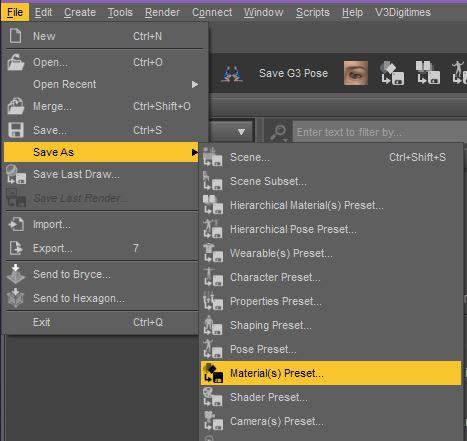
Make sure to save it with a name that is easy to find. The naming convention I usually use for Materials Presets is to start with the figure it's for, then the character the mats are from, then any adjustments I've made. So for this example I'm using the textures from Forest Daphni. So once I've tweaked it with a shader I've saved it as a Materials Preset and named it "V4 - Forest Daphni Mats with Altern8".
Now load Genesis 8 Male, navigate to the Legacy UV product (it should be under People >> Genesis 8 Male >> Anatomy) and load the "Legacy UVs !Prepare Genesis 8 Male" script and then load the "Legacy UVs - Apply Michael 4 UVs". Last, navigate to where you saved the M4 materials preset and apply that to G8M. You should now have the saved M4 materials on G8M.
Once you have the UVs and everything on G8M you can save it as Scene Subset to quickly load the figure in the future with the Legacy UV geografts and textures already applied. (File >> Save As >> Scene Subset)
Am I the only person who has issues with Legacy UVs for Genesis 8: Michael 4?I am certainly not a member of Mensa, but I'm perfectly capable of reading instructions over and over ad nauseum. But I am incapable following the instructions on how to turn a Poser Mat file into a 'duf.' Without that ability, this is basically a waste of money.
"The Material files must be in .duf format to work correctly with Genesis 8. You can either prepare these yourself by loading the MATs onto Michael 4 and then saving them within DAZ Studio as Material Presets, or you can utilise a program such as DraagonStorm's "Michael 4 Skins Batch Converter" which will convert them automatically. The Batch converter does not currently, however, convert textures for the Genitalia, so you will have to convert those separately."The promo doesn't mention this bit of frustrating information. You have to go deep into the Adobe Acrobat file for that.
As can be seen below, it sends me to where I have properly saved the file after adding duf. and it does not show up as an item that can be saved.
Closer still to my Daz induced psychosis, but hoping someone can help a poor ol' broke down slomo down on his luck.
Thanks for taking the time to read.
Load M4. Apply the Poser Mat you want to use to him. If it looks right, apply Daz Uber Base shader preset to all surfaces, go to "save as" and select materials preset, save it under Content/People/Michael 4/Materials (or whatever you like but this seems most logical). It will be in duf format. If it doesn't look right, apply one of several shader preset products designed to make skin look good in Iray, or tweak by hand. (Daz's base leather preset might be a workable starter for skin, once you change the diffuse color back to white). If you do not own M4, try loading Genesis 1 (free, comes with a UV setting for M4), applying the poser material and swapping the UV map to M4, then saving out as above. I haven't tested that, but it's the only option I can think of for someone who picked up an M4 skin free or cheap but doesn't have the base figure for whatever reason.
Once you have created the duf file, load G8M, apply the legacy skin geografts found under Genesis 8 Male/Anatomy, and apply the duf file.
There is no batch conversion from *.pz2 (the Poser material format that actually works in Daz, as distinct from *.mtl, which does not) to .duf, so far as I know.
Am I the only person who has issues with Legacy UVs for Genesis 8: Michael 4?I am certainly not a member of Mensa, but I'm perfectly capable of reading instructions over and over ad nauseum. But I am incapable following the instructions on how to turn a Poser Mat file into a 'duf.' Without that ability, this is basically a waste of money.
"The Material files must be in .duf format to work correctly with Genesis 8. You can either prepare these yourself by loading the MATs onto Michael 4 and then saving them within DAZ Studio as Material Presets, or you can utilise a program such as DraagonStorm's "Michael 4 Skins Batch Converter" which will convert them automatically. The Batch converter does not currently, however, convert textures for the Genitalia, so you will have to convert those separately."The promo doesn't mention this bit of frustrating information. You have to go deep into the Adobe Acrobat file for that.
As can be seen below, it sends me to where I have properly saved the file after adding duf. and it does not show up as an item that can be saved.
Closer still to my Daz induced psychosis, but hoping someone can help a poor ol' broke down slomo down on his luck.
Thanks for taking the time to read.
3D Art Freebie Challenge-March 2019-"Lady Luck" -Main Thread Only3D Art Freebie Challenge March 2019 "Lady Luck"
"Bad Luck/Good Luck"
(Subtitle: Someone's bad luck can be someone else's good luck...)
Starring: Sirine and Lolo BotThe tale:
SIRINEdigital2, a Female Android Model 228 (FAM228), was being updated but during the process one of the cables got loose and this lead to a very bad decission, she pressed the button of her Pokeball® and all the characters she caught earlier escaped, good luck for those ladies! Not for SIRINEdigital2 but she's an android and hasn't been programmed with feelings like bad or good luck. Lolo Bot is and she is very sad for SIRINEdigital2, "OMG! Mecha-Pop, Hacker, SentaiGirl and The Phenomenon, they all got away! And even the Forgiver escaped! O-o-ow..."
Soundtrack:
Doctor Who (Original Theme) [From "Doctor Who"] by Ron Grainer & Delia Derbyshire (1963)
https://www.youtube.com/watch?v=MAYeJgRfhV4
COUNTABLE FREEBIES: (Alphabetic order)#01! AA Satin Dot Shaders for Daz Studio - Iray by AllenArt
https://sharecg.com/v/86624/gallery/21/DAZ-Studio/AA-Satin-Dot-Shaders-for-Daz-Studio-Iray **#02! Actionspec Shades by insane_machine
https://www.renderosity.com/mod/freestuff/actionspec-shades/65792 **#03! Alaia Clothes (G8F) by teknology3d
https://www.renderosity.com/mod/freestuff/alaia-clothes/79056 **
[Bottoms used]#04! Amy AiMei for Genesis 8 Female (morphs only) by Amy AiMei
https://www.deviantart.com/amyaimei/art/Amy-AiMei-for-Genesis-8-Female-morphs-only-687709757
[Used on Mecha-Pop]#05! Channing's Button Prop re-posted by Seacanyon
http://www.sharecg.com/v/56691/related/21/DAZ-Studio/Channings-Button-Prop **
[Used on the Hacker]#06! Fantasy Amazon Bundle for G8F - 100% FREE by squarepeg3d
https://www.renderosity.com/mod/freestuff/fantasy-amazon-bundle-for-g8f---100-free/79046 **
[Bra used]#07! Forgiver for Genesis 8 Female - 100% FREE by squarepeg3d
https://www.renderosity.com/mod/freestuff/forgiver-for-genesis-8-female---100-free/81155 **#08! Hacker for Genesis 8 Female by squarepeg3d
https://www.renderosity.com/mod/freestuff/hacker-for-genesis-8-female/81206 **#09! Iray car related shader presets 'megapack' by Tom2099
https://www.deviantart.com/tom2099/art/Iray-car-related-shader-presets-megapack-539622361#10! Lolo Bot by GhastlyH
https://www.renderosity.com/mod/freestuff/lolo-bot/81468 **#11! Mecha-Pop for G8F by squarepeg3d
https://www.renderosity.com/mod/freestuff/mecha-pop-for-g8f/80259 **#12! MicCable Set by MDP
https://sites.google.com/site/mdp6gdl/ (item 12)#13! Neural Implant! for V4 by 3-d-c
https://sharecg.com/v/36654/gallery/11/Poser/Neural-Implant%21-for-V4 **#14! Pokeball® - 100% FREE by squarepeg3d
https://www.renderosity.com/mod/freestuff/pokeball---100-free/76492 **#15! Sentai Outfit (G8F, dForce) by Ocelot1300
https://sharecg.com/v/93266/browse/21/DAZ-Studio/Sentai-Outfit-G8F-dForce **#16! Simple IRAY for The Phenomenon G8F by MimicMolly
https://www.renderosity.com/mod/freestuff/simple-iray-for-the-phenomenon-g8f/80147 **#17! SIRINE for G8F by Shadoweagle
https://www.sharecg.com/v/89913/browse/21/DAZ-Studio/SIRINE-for-G8F **#18! SOTO's Shaved Hair for Michael 4 by Hellboy
https://sharecg.com/v/62755/gallery/11/Poser/SOTOs-Shaved-Hair-for-Michael-4 **
[Used on the Hacker]#19! SOTO's Tribal Patterns for M4 Shaved Hair by hellboy
https://sharecg.com/v/62756/gallery/11/Poser/SOTOs-Tribal-Patterns-for-M4-Shaved-Hair **#20! Storm Ball SFX by Most Digital Creations (Adam Thwaites)
https://www.most-digital-creations.com/free_poser_poses_textures_morphs_props_13.htm (item 12)#21! The Phenomenon for G8F - 100% FREE by squarepeg3d
https://www.renderosity.com/mod/freestuff/the-phenomenon-for-g8f---100-free/80119&ca **#22! Urban Streets Of Tomorrow by sfman
https://sfman.deviantart.com/art/Free-for-DAZ-Urban-Streets-Of-Tomorrow-by-sfman-723531345
[Drone and Scan Beam used]
NO-COUNT ITEMS:--- IDG Vibrant Light Probes (The Holiday Loyalty Sale 2018 Free Item)
--- MP3 Wireless Headset by Channing [Used on the Hacker]
++ Toulouse Hair for Genesis 3 Female by Daz Originals
PURCHASED/PAID FOR ITEMS: None. 100% Free
*1 E-mail address required
** Registration required
#x! Countable Items (Bold ones are used by me for the first time.)
--- No longer available freebies
++ Free with DAZ Studio (or the Essentials)
$x. Purchased/Paid For Item
Rendered with DAZ Studio 4.10.0.123 (nVidia Iray)Other free software used: GIMP v2.10.8 and Irfanview 4.52
Postwork: (oa) used the AltaLux Image Enhancement Filter (Effect) by Stefano Tommesani that comes with Irfanview and the Lens Flare and Motion Blur filters that come with GIMP.
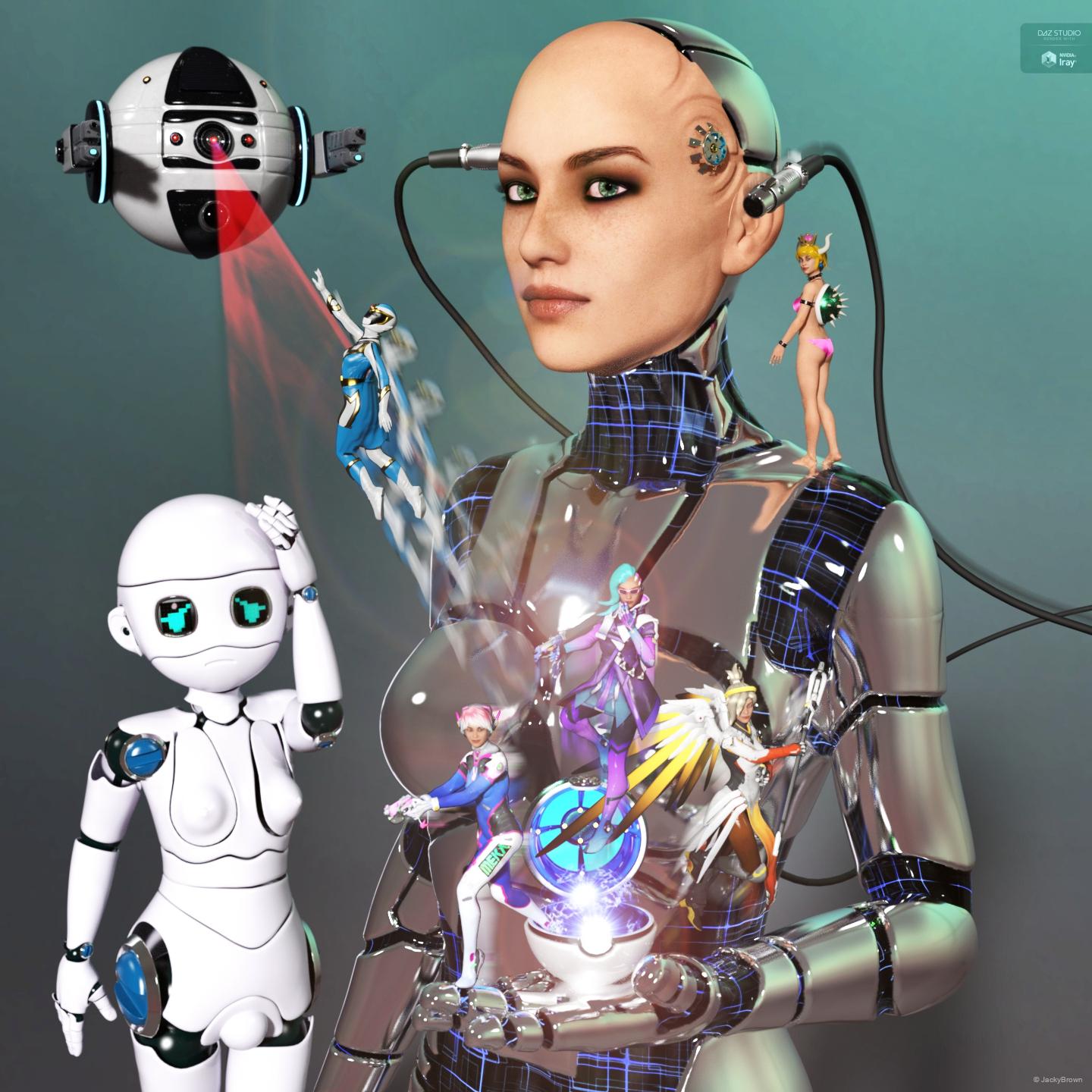
"Bad Luck/Good Luck"
The ShareCG links have been acting odd so I couldn't verify them yet, not sure if shareCG has a site problem atm of if the is just my access being weird (bad mirror or something)
Still even without those (if the would count as non count items ) you have enough working links So
Please move to Entries thread!
If someone could have a look at the sharecg links and throw in a line here that they work, that would be very appreciated.
Thanks!
Rockin' out with Phil Wilkes!Would you characterise those differences more in the rendring approach or would you say there were other main factors between yourself and Phil ?
I watching "Learning Carrara" and "Advanced Carrara Techniques", I noticed that nearly everything we do in Carrara, we do in a somewhat different fashion, which is delightfully awesome! I'll be able to give some better examples of that once I get a new computer. Right now I can barely run Carrara, which is sending me to a very dark place lately. It's a nightmare!
Purely as an observer, your artwork evokes to me the Edgar Rice Burroughs paperback covers from the 70s, or the classic Boris Vallejo Conan covers. I really like your images.
Wow, Thanks! I've been a big fan of Boris Vallejo, Frazetta, and others in that realm nearly all my life, which is likely why I tend toward that style - even if by accident, even though sometimes it's been fairly intentional! LOL
I understand your main two characters are based on yourself and partner. Was it a difficult workflow to nail the likenesses ? The tutorials I see rely on reference material which are more like official passport photos front and side view with a neutral facial expression. However, if trying to nail the likeness of, say an actor or rock star, the reference is not so conveniently available and if there are twenty different photos, the lens distortion factor could be different for each one, so I think there must still be some hand/eye coordination needed.
Generation 4 was Morph heaven for me - so getting Genesis Generation X2 has been a real treat for me! Now I can have those morphs on characters that relied on them before, and even better, I get my cool expression morphs collections I've bought for V4, and can use them on male figures as well!
Anyway, back to your question:
The morphs that came with Morphs++ were extensive and very well named. I used those to tweak and tweak my Rosie character for quite some time. I used to run up to her and gaze at her face while she was reading, watching TV, or whatever. Eventually she got used to it! LOL Even after I had a pretty good start, like the version of Rosie we see in my Just a Bit of Fun video, I still have made tweaks here and there. Michael 4 was actually almost already shaped like my face - kind of - so I didn't really do a whole lot with that one. Then I exaggerated the strength and beefiness to turn Dartanbeck into much more of a strong man than I am! LOL I mean, he's an imaginary Super Hero... he's supposed to be beefier than me, right?
I mentioned my Expressions morphs collection. Real difficulty came to me when I started trying to make Rosie 4 talk and smile. I just couldn't quite get the right moth shapes while it was moving or during a smile. This bothered me immensely, so I'd just move on to working on other things I needed to learn, like optimizing texture sizes to use less RAM, lighting like a cinematographer, learning the differences between shine and reflection, etc., When Facial Expressions for V4 came out, and I noticed that, unlike a lot of other "expression" products, this one actually added morph dials, I had to have it! With that, I then decided to add in the Girl 4 expressions too, and I could dial a little here, a little there, and back and forth, to get results that I was overjoyed with. Some of those results are in Just a Bit of Fun.
Textures were a different story altogether. Well, not for Dartanbeck. Those are just plain ol' M4 High Rez. For Rosie, I bought these and those... then I bought some more and more, and just kept buying. Okay now here's the funny part. You know what I'm using for Rosie's textures? V4 High Rez! LOL However, they're not just that. I've spent a lot of time in Howler painting them to be how I need them to be, and then repeating each process for the highlight and bump maps as needed.
Getting Arki's EYEdeas 3+ product, along with the Natural Textures add-on, was a real game changer. When I was completely satisfied with the eyes previously, it was only because I didn't know any better. But once I got my hands on Digital Lighting and Rendering, by Jeremy Birn, and read the part about rendering and lighting eyes, I needed to do something different. Well, the timing couldn't have been better - and it was funny for me. I made a custom morph to concave V4's irises, so that I could get the "Eye Sheen" phenomenon that is so important to cinematographers. It worked... kinda. It was just an experiment, so I worked quickly on it, and it was successful enough to urge me on to try and make them better.
It was just then, when Runtime DNA merged with DAZ 3D, and Arki's wonderful product hit the store shelves, and t caught my eye right away - it comes with iris morphs for just such a thing - along with a whole lot more. But also, Jeremy Birn talked about "Light Linking" - setting lights to only affect the eyes, and not the rest of the figure. Well, we cannot do that with Daz Figures in Carrara since the eyes are technically part of the same mesh. Arki's EYEs conform to Gen 4 figures and work beautifully. And that makes light lnking very easy. But even when using individual EYEdeas 3+ eye models on Genesis or Genesis 2 (or 3 or 8, for that matter) and parenting them to the eyes on the main figure, it turns out that we can still Light Link to them - so it truly is a win Win!
Yeah... with figure technology working much faster than my hobbiest learning curve, I'm still tweaking my two main characters! :)
I love Phil's Photo-Real approach as well - and he's always introducing something that I haven't tried yet, so I love to pay attention whenever he has something to say!
Native Daz file import for Blender - How does Daz feel about that?TriAx was the weight-mapped rigging system devised by Daz for Ds4/Genesis, Poser didn't add weight-mapping with a similar system until later. The older figures, including Victoria 4 and Michael 4, use parametric rigging which does have separate settings for each axis but isn't what is meant by TriAx.
Thanks for pointing that out. I always thought that TriAx is referring to the separate maps for XYZ, which is not supported by most modern CG programs as far as I know. I like that quaternion weighting is identical with Cinema 4D's spherical weighting.
3D Art Freebie Challenge-March 2019-"Lady Luck" -Main Thread Only3D Art Freebie Challenge March 2019 "Lady Luck"
"Bad Luck/Good Luck"
(Subtitle: Someone's bad luck can be someone else's good luck...)
Starring: Sirine and Lolo BotThe tale:
SIRINEdigital2, a Female Android Model 228 (FAM228), was being updated but during the process one of the cables got loose and this lead to a very bad decission, she pressed the button of her Pokeball® and all the characters she caught earlier escaped, good luck for those ladies! Not for SIRINEdigital2 but she's an android and hasn't been programmed with feelings like bad or good luck. Lolo Bot is and she is very sad for SIRINEdigital2, "OMG! Mecha-Pop, Hacker, SentaiGirl and The Phenomenon, they all got away! And even the Forgiver escaped! O-o-ow..."
Soundtrack:
Doctor Who (Original Theme) [From "Doctor Who"] by Ron Grainer & Delia Derbyshire (1963)
https://www.youtube.com/watch?v=MAYeJgRfhV4
COUNTABLE FREEBIES: (Alphabetic order)#01! AA Satin Dot Shaders for Daz Studio - Iray by AllenArt
https://sharecg.com/v/86624/gallery/21/DAZ-Studio/AA-Satin-Dot-Shaders-for-Daz-Studio-Iray **#02! Actionspec Shades by insane_machine
https://www.renderosity.com/mod/freestuff/actionspec-shades/65792 **#03! Alaia Clothes (G8F) by teknology3d
https://www.renderosity.com/mod/freestuff/alaia-clothes/79056 **
[Bottoms used]#04! Amy AiMei for Genesis 8 Female (morphs only) by Amy AiMei
https://www.deviantart.com/amyaimei/art/Amy-AiMei-for-Genesis-8-Female-morphs-only-687709757
[Used on Mecha-Pop]#05! Channing's Button Prop re-posted by Seacanyon
http://www.sharecg.com/v/56691/related/21/DAZ-Studio/Channings-Button-Prop **
[Used on the Hacker]#06! Fantasy Amazon Bundle for G8F - 100% FREE by squarepeg3d
https://www.renderosity.com/mod/freestuff/fantasy-amazon-bundle-for-g8f---100-free/79046 **
[Bra used]#07! Forgiver for Genesis 8 Female - 100% FREE by squarepeg3d
https://www.renderosity.com/mod/freestuff/forgiver-for-genesis-8-female---100-free/81155 **#08! Hacker for Genesis 8 Female by squarepeg3d
https://www.renderosity.com/mod/freestuff/hacker-for-genesis-8-female/81206 **#09! Iray car related shader presets 'megapack' by Tom2099
https://www.deviantart.com/tom2099/art/Iray-car-related-shader-presets-megapack-539622361#10! Lolo Bot by GhastlyH
https://www.renderosity.com/mod/freestuff/lolo-bot/81468 **#11! Mecha-Pop for G8F by squarepeg3d
https://www.renderosity.com/mod/freestuff/mecha-pop-for-g8f/80259 **#12! MicCable Set by MDP
https://sites.google.com/site/mdp6gdl/ (item 12)#13! Neural Implant! for V4 by 3-d-c
https://sharecg.com/v/36654/gallery/11/Poser/Neural-Implant%21-for-V4 **#14! Pokeball® - 100% FREE by squarepeg3d
https://www.renderosity.com/mod/freestuff/pokeball---100-free/76492 **#15! Sentai Outfit (G8F, dForce) by Ocelot1300
https://sharecg.com/v/93266/browse/21/DAZ-Studio/Sentai-Outfit-G8F-dForce **#16! Simple IRAY for The Phenomenon G8F by MimicMolly
https://www.renderosity.com/mod/freestuff/simple-iray-for-the-phenomenon-g8f/80147 **#17! SIRINE for G8F by Shadoweagle
https://www.sharecg.com/v/89913/browse/21/DAZ-Studio/SIRINE-for-G8F **#18! SOTO's Shaved Hair for Michael 4 by Hellboy
https://sharecg.com/v/62755/gallery/11/Poser/SOTOs-Shaved-Hair-for-Michael-4 **
[Used on the Hacker]#19! SOTO's Tribal Patterns for M4 Shaved Hair by hellboy
https://sharecg.com/v/62756/gallery/11/Poser/SOTOs-Tribal-Patterns-for-M4-Shaved-Hair **#20! Storm Ball SFX by Most Digital Creations (Adam Thwaites)
https://www.most-digital-creations.com/free_poser_poses_textures_morphs_props_13.htm (item 12)#21! The Phenomenon for G8F - 100% FREE by squarepeg3d
https://www.renderosity.com/mod/freestuff/the-phenomenon-for-g8f---100-free/80119&ca **#22! Urban Streets Of Tomorrow by sfman
https://sfman.deviantart.com/art/Free-for-DAZ-Urban-Streets-Of-Tomorrow-by-sfman-723531345
[Drone and Scan Beam used]
NO-COUNT ITEMS:--- IDG Vibrant Light Probes (The Holiday Loyalty Sale 2018 Free Item)
--- MP3 Wireless Headset by Channing [Used on the Hacker]
++ Toulouse Hair for Genesis 3 Female by Daz Originals
PURCHASED/PAID FOR ITEMS: None. 100% Free
*1 E-mail address required
** Registration required
#x! Countable Items (Bold ones are used by me for the first time.)
--- No longer available freebies
++ Free with DAZ Studio (or the Essentials)
$x. Purchased/Paid For Item
Rendered with DAZ Studio 4.10.0.123 (nVidia Iray)Other free software used: GIMP v2.10.8 and Irfanview 4.52
Postwork: (oa) used the AltaLux Image Enhancement Filter (Effect) by Stefano Tommesani that comes with Irfanview and the Lens Flare and Motion Blur filters that come with GIMP.
"Bad Luck/Good Luck"
Native Daz file import for Blender - How does Daz feel about that?To be Fair Daz, is not precluding their models&content from being used outside of DS
they are only restrictingYes of course I was talking about HD and Triax that's the features the blender plugin can't support .. everything else works fine.
I really like that Daz abandoned the triax feature with G3. This is so outdated and no professional software supports this out of the box. As far as I remember, triax was a system implemented in Poser first and thus a rigged character (e.g. V4/M4) can hardly be transferred and used in todays software. HD would be fine though.
TriAx was the weight-mapped rigging system devised by Daz for Ds4/Genesis, Poser didn't add weight-mapping with a similar system until later. The older figures, including Victoria 4 and Michael 4, use parametric rigging which does have separate settings for each axis but isn't what is meant by TriAx.
Backward compatibility issues with clothing on Genesis 8 - Shoes not fittingI think most of us expect too much when we first get started with Daz Studio, or other 3D programs. How can you not, with such wonderful movies as Brave showing us what is possible? It's easy to forget that those movies use an army of 3D artists and high-end software. Brave, for example, actually had new software developed just to animate Merida's hair.
But it really is possible to do amazing things with Daz Studio. It's a robust program with a lot of features. The more you learn, the easier it is to continue to learn. As far as I've come in four and a half years, I'm pretty sure I use less than half of the capabilities. And that's not even considering the new features that will undoubtedly be added in the years to come.
I encourage people to just have fun with it, learn as you go, and create art that you enjoy. And try not to buy a lot of stuff when you're first getting started! LOL
I actually started to free hand draw in 2016 and I am OK with pencil drawings. But naturally I wanted to do more work with computer art. I do have a Wacom Bamboo tablet and a couple drawing programs, but I quickly found out it is pretty difficult to draw that way. Many of my lines were very shaky and it looked like a child drew it! LOL. I had been playing around with character generation programs such as Azalea's Dolls, and Rinmaru. But those kind of felt 'kid like' and very limited. So I set out to find something like that, but with more options. Rinmaru on steroids, so to speak. It didn't take me too long to find Daz Studio and I have heard of it before, but I was under the impression it was a full art program like Blender or Maya. It wasn't until I read more about and a friend of mine over at Deviant Art explained it more to me that I realized it is more of a 3D Posing and animation program similar to Poser, but better. I did hear of Poser first, since the company that made that program, Smith Micro, made one of my art programs, Manga Studio. BUT a huge plus with Daz was that it was free. I could try it out right away. BUT I was warned ahead of time about spending and was told to "Be prepared to spend more money than you dreamed possible with Daz."
They were right about that. It does quickly become an expensive proposition. I already reached my year budget for Daz within the near three months I have it now. I did set out to make rules about certain items that I would NOT buy and that is poses and characters since I can do those myself. But while I was good with the former, the latter proved difficult in more ways than one. There were a few really pretty ladies I saw and wanted and bought them. Then there were those sale situations in that you HAD to buy something to get a deal on another thing. But for the most part, if it isn't out of a sale deal, I only outright buy a character if she has something that cannot be created easily or has a special skin.
But by and large, the largest 'sink hole' for me is clothing.
I didn't mean to imply you thought there was anything wrong with other generations. However, I was recommending you stick with a single generation to begin with, and I didn't want to leave you with the impression there was something wrong with the others. Or that I thought there was something wrong with older generations.
This was my initial plan, but then I started to see some of the really nice fantasy themed outfits that were for Genesis 3 and so I figured that since I was Genesis 8 and it was backward compatible, I would be good to go. But an early mistake had me question it. As you know some outfits and hair were meant for both Genesis 8 and 3 and they had presets for both. Well, one time I was setting hair and clicked on the wrong one and got some weird results. BUT that wasn't a problem, as I had the other preset, but it did make me wary of using Genesis 3 hair on Genesis 8. So I tried a Genesis 3 outfit and it worked, so I figured I had the 'gold key' to start looking for, buying and using Genesis 3 outfits. So there was big flash sale one night on Genesis 2 and 3 items, and I did buy quite a few things from that sale and I continued to put more in my wish list. The first few outfits I tried had low heels and they worked. But then when I tried out the high heeled outfits that was when I ran into the problem. I thought it was a fluke with a particular outfit, but then I tried others. After trying 7 outfits and four of the 7 had high heels and noted that only those were the ones that failed. So that was when I created this post. Naturally I didn't think there was something wrong with Genesis 3 or the clothing for the same clothing DID work fine when I tested it with, Ophelia, a Genesis 3 figure I bought because she doesn't have a Gen 8 counterpart. So I knew it was a compatibility issue with Genesis 8. And again, I am not pinning the blame on that figure or Daz in that aspect. I am pointing the finger at Daz for not making it more clear that there could be compatibililty issues. However, given that Daz does have a return policy I do have the option to return those outfits. But I did buy more in a more recent sale and I had to go through them. Luckily in that batch the Genesis 3 stuff I bought had all low shoes. Sadly, one of my favorite outfits I bought, is this one:
https://www.daz3d.com/downloader/customer/files/prod/20613/
I thought it was Genesis 3, but it is Genesis 2 and yes it has the problem. Sadly being Gen 2, there is no fix for this one. But I am going to keep this one as it really looks good on one of my Daz ladies (see attached)
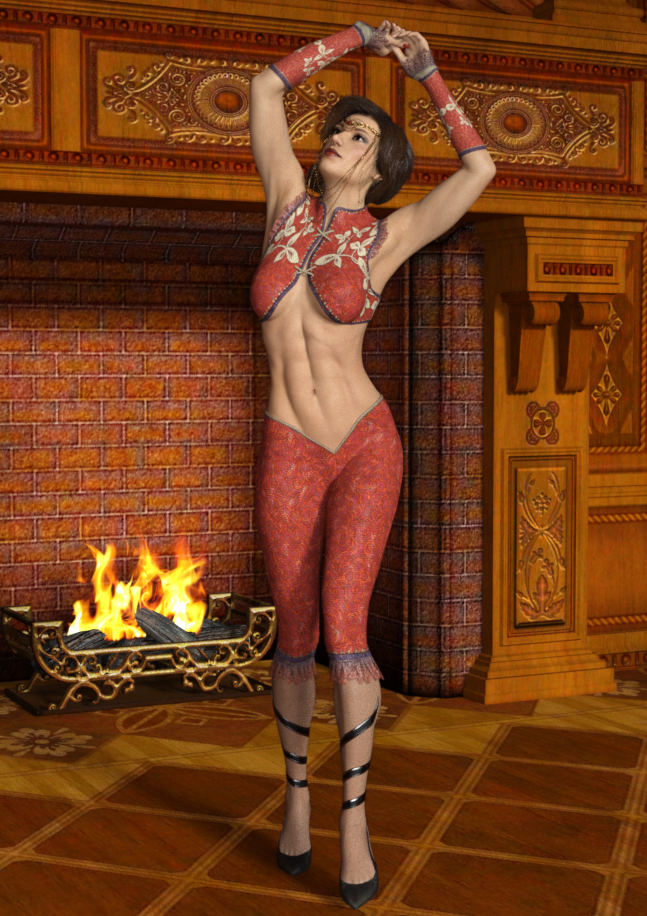
As you see I got a bit creative with her footwear. I borrowed it from another outfit.
Aside from each generation having characters that look different from the other generations, there are technical differences, mostly under the hood. Each successive generation bends better, for example, and G8 has a lot more face bones for creating expressions.
I do not create my own clothing for my figures, yet. I bought Marvelous Designer last November, but haven't had the time to really learn it yet. It's on my list of things to do this year.

Oh yeah, I gathered that there is more going on under the surface as well. So it is mostly in the face then? But apparently it there must be some changes in how the feet are done if there are issues with using previous generation high heels on them.
I too work almost exclusively with G8 figures. Using items across generations can be frustrating and disappointing. It can also be fun, though! Especially if you get the older items for free or for very cheap. I was successful in converting the Desperado boots from G3 to G8 using the tutorial linked to above.
Well, THAT was the main incentive. I often saw that many deals and sales seemed to favor the prior generation figure(s). There were mostly really good deep price cuts on Genesis, Gen 2 and Gen 3 items. While I have not heard much about the compatibility with Genesis and Gen 2, I heard time and time again that Genesis 3 is very close to Genesis 8 and even in forums I heard this mentioned a few times too. So didn't think much of it when I kept reading about the backward compatibiility of Gen 8 with prior Genesis characters. So I was a bit dismayed when I encountered this problem. Had I know ahead of time, I too would have stuck with Genesis 8. But yeah, you do have to get more creative and look at setting up the Gen 3 outfit with Gen 8 footwear that somewhat matches. So it does add to the interest of mixing and matching outfits, but when you buy an outfit that has these nice matching high heeled boots only to be disappointed that you don't get the full look when the shoes don't work on the figure.
To expand further (was on the phone before)...
- hair generally has good compatibility. If it's shoulder length or longer you shouldn't use auto-fit. Fitting hair manually is simple and you can find tutorials about it.
- Garments that follow the body (Catsuits, relatively tight pants or tops) generally work well with auto-fit.
- Items that are supposed to be "hard" (such as armour) sometimes distorts awkwardly with auto-fit.
- Skirts, dresses, capes, and other flowy/drapy stuff doesn't work well with auto-fit. However, there's a chance that you can make it work with dForce. Furisode is a good example of an item that doesn't work with auto-fit at all, but drapes beautifully with dForce. (That being said, dForce can be tricky and a source of frustration all by itself.)
- Fit Control can help you tweak garments that fit "almost but not quite".
- There are many other products to increase compatibility, if you really want to get into it. Sickleyield and RiverSoft Art in particular sell many such products.
Good luck!
I had a aproblem right off the bat trying to use, or should I say accidentally using a Genesis 3 hair on Genesis 8. So I was a bit wary about buying anything hair related that wasn't Genesis 8. For me that is not a big deal though. There does seem to be enough Gen 8 hair styles that can keep me occupied. But it is the clothing that I wanted to broaden my horizons with.
I am not sure what you mean by using and not using auto-fit. I was under the impression that auto-fit was something you couldn't turn off. So far the dresses that I did get, did seem to work, but for the most part they are not very long and flowing. But I have not tried really crazy poses with them either.
Most of the outfits are skimpier medieval style outfits and sci-fi / super hero outfits which are very tight fitting and yes, those work well.
I wasn't aware that dforce works outside of Genesis 8 products that are labeled as such. So a Genesis 3 flowing gown will work with dForce?
Fit Control does look promising, but at that price? I would definitely need a good deal on that before I would get it.
I will see if there is something that would do the trick that is also less expensive.
- Skirts, dresses, capes, and other flowy/drapy stuff doesn't work well with auto-fit.Auto-fitting capes is often not the best idea, simply parenting them to the target figure usually works better.
SY Ultra templates are very useful for skirts and dresses.
How does one go about non-auto-fitting an item? As I said before, I am not aware that not using Auto-Fit could be done.
Thanks for the info guys!
Backward compatibility issues with clothing on Genesis 8 - Shoes not fittingTo expand further (was on the phone before)...
- hair generally has good compatibility. If it's shoulder length or longer you shouldn't use auto-fit. Fitting hair manually is simple and you can find tutorials about it.
- Garments that follow the body (Catsuits, relatively tight pants or tops) generally work well with auto-fit.
- Items that are supposed to be "hard" (such as armour) sometimes distorts awkwardly with auto-fit.
- Skirts, dresses, capes, and other flowy/drapy stuff doesn't work well with auto-fit. However, there's a chance that you can make it work with dForce. Furisode is a good example of an item that doesn't work with auto-fit at all, but drapes beautifully with dForce. (That being said, dForce can be tricky and a source of frustration all by itself.)
- Fit Control can help you tweak garments that fit "almost but not quite".
- There are many other products to increase compatibility, if you really want to get into it. Sickleyield and RiverSoft Art in particular sell many such products.
Good luck!
Victoria 4.2 & Morphs ++ Show as not Installed in Studio Via DIM InstallationVictoria 4 is the base, there isn't a Genesis-equivalent base figure for which it is an add-on (essentially Victoria 4 and Michael 4 played that role, with other Name 4 being add-ons for oen or the other - except for Kids 4 which was also a base). Victoria 4.2 is the final update of Victoria 4.
Yes, I meant that the basic files are in Poser format and therefore appear under Poser Formats in DS if you use the actual file-system view in Content Library.
Victoria 3, Michael 3, and all the other Name 3 figures are self-contained, you don't need one to use the others, and there is no dependency on them in the fourth generation figures.
Thanks again for your help Richard, still can't believe DIM cannot process these downloads and installs correctly as it does for all other Content purchased... Wonder if I should submit a BUG report on this issue in case others are experiencing the same problem??
Victoria 4.2 & Morphs ++ Show as not Installed in Studio Via DIM InstallationVictoria 4 is the base, there isn't a Genesis-equivalent base figure for which it is an add-on (essentially Victoria 4 and Michael 4 played that role, with other Name 4 being add-ons for oen or the other - except for Kids 4 which was also a base). Victoria 4.2 is the final update of Victoria 4.
Yes, I meant that the basic files are in Poser format and therefore appear under Poser Formats in DS if you use the actual file-system view in Content Library.
Victoria 3, Michael 3, and all the other Name 3 figures are self-contained, you don't need one to use the others, and there is no dependency on them in the fourth generation figures.
Daz 3D is part of

Connect
DAZ Productions, Inc.
7533 S Center View Ct #4664
West Jordan, UT 84084Licensing Agreement | Terms of Service | Privacy Policy | EULA
© 2026 Daz Productions Inc. All Rights Reserved.