-
Environment prop (car) morph issue - affecting pose controls
Are you sure the mesh you exported didn't have any of those in effect already? Have you use ERC Freeze on your morph, or another controller, to achieve the desired effect, or do you just set the morph directly with nothing else (intentionally) affected?
Environment prop (car) morph issue - affecting pose controlsAll - I created a custom morph on a daz car prop. I imported the model into blender, modified the geometry, and imported the change back into daz as a morph. The morph consists of being able to move the car's shifter. The car model itself has pose controls that let you open and close the doors, adjust the seats, and turn the wheels. I successfully imported the morph back into Daz and it works, the shifter moves as I adjust the percentage. Problem is, all the other pose controls move too when I adjust the morph (wheels scale, doors open/close, etc.). I tried locking the pose control parameters as well as setting their min and max settings to a fixed position but this has not worked.
Is there any way to isolate the morph from the pose controls?
Struggling with Weight Mapping for rigged ArtStation clothing [solved]I am trying to rig a jumpsuit that I bought on ArtStation for Genesis 8 Female. The clothing was created in Marvelous Designer using an Genesis 8 avatar that was not in the default A pose (arms and legs were not spread apart enough).
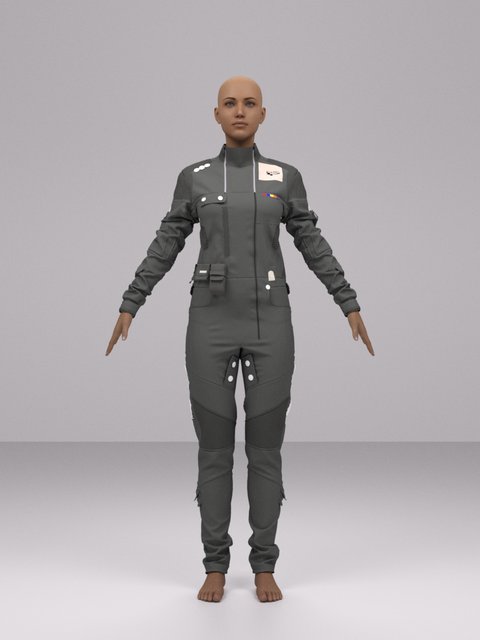
As a result, Daz's transfer utility is mapping vertex weights in the armpits and crotch regions to the wrong bones.
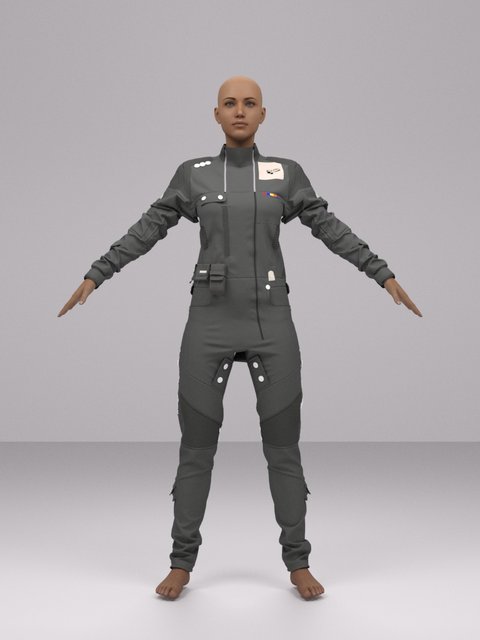
When the arms are moved from the torso, the vertices in the armpit sections are sticking to the chest region.
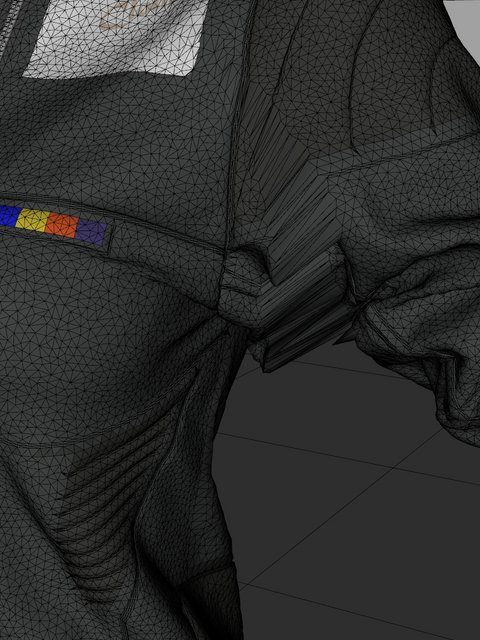
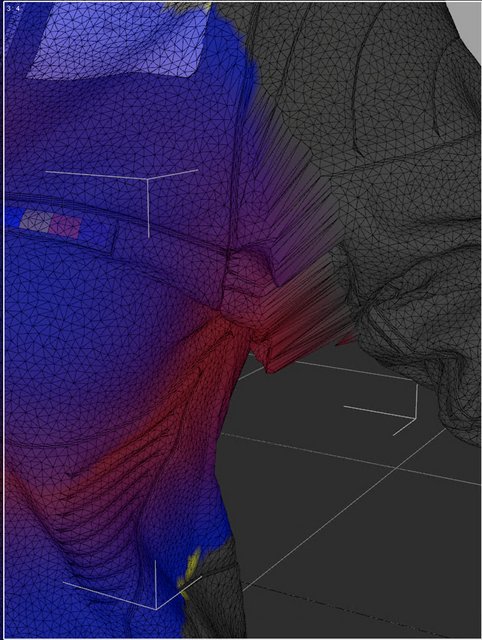
I have tried redistributing the vertex weights in the affected area(s) to the correct bones with no success. I have also tried manually assigning the responsible vertices to the arm with less than optimal results.
From other models that I bought, I think that this seems to be a frequent problem with ArtStation models where the avatars are a non-standard shape or pose. From what I have read online, artists frequently deal with this using morphs and/or manual weight mapping but I can't seem to figure out how to do that for the jumpsuit. I am hoping that there is a native solution in Daz to correct and fine-tune weight mapping misalignments.
Any advice, assistance or references (e.g. tutorials) on how I can correct these types of issues for clothing with complex geometry would be greatly appreciated.
Thanks!
PA monthly coupon not applying full discountHere we go again. The never ending story of something not working properly with DAZ store. I have 3 non-DO items from my wishlist in my cart for a total of a bit over $20 after a total of 70% off (50% * 40%). When I apply the PA coupon it only applies $3.60, instead of $6.00. I added a fourth non-DO item to check and once again it did not apply the full discount. I noticed however, that in both cases (3 and 4 items), all items went from 70% to 73% off. Not sure why.
Every single item is more than $6 after the 70% discount, so even if only one item was compatible with the coupon, I should be able to get the full discount. These items do not fall in the NEW category list either. So I'm lost with this error.
Is no point for me to buy now with the coupon and request the difference later because probably my bank will charge me for international transfer. Could I get a credit instead?
I know I'm whinning about $2.40, but this should not be an issue in the first place.
Cheers.
Genesis 8 Male - Eyelashes not aligned/attachedYes... check if you used Turbo Loader...still, check if there's any full head morph or partial head morph dialed in Eyelashes hidden properties. On a pure G8M Base figure, the eyelashes won't be 'detached' if there's nothing weird 'dialed' in its properties...
Olivia 9Hylas said:
sid said:
And, I'll sneak this in here, Olivia's skin on a dial-spin character:

Beautiful! Low-key reminds me of that Yumi Nu cover
I wished I saved her! From memory she was a mix of MGHLM Jacq, SWM Ms Swole (who I can't fnd the g9 version on the store at the moment), Xiu Liu, and then whatever dials I could find to make the proportions work.
I just realised my favourite face morph kits from G8 were Rarestone... we're probably not going to get G9 ones are we? :(
What happened to the teeth?igorbatistadocarmo said:
Catherine3678ab, I found the morph that gave the error. It was a morph to lengthen the legs. When changing the height of the character, that part of the teeth stays fixed... the funny thing is that it was only in this specific morph. When I used another morph to lengthen the legs this error didn't happen. Thank you for your help! :D
Glad you found the problem, and a solution :-)
Sadly, depending upon how the morphs are made, it can be quite easy to snag a little more than intended when making the geometry selection.
Carrara Community Art Gallery - Show us your Renders!!!genesis 1
Hellfish studios catfolk (Renderosity)
outfits include
https://www.daz3d.com/aspasia-hair
https://www.daz3d.com/midnight-huntress-for-genesis
lululee 1 click lacey lingerie ( but applied to a geoshell or maybe Carrara layer but needs map transfer too as Stephanie 5 UV, is a V4 Poser second skin shader) (Renderosity)
https://www.daz3d.com/lorella-fantasy-outfit DAZ Studio only, crashes Carrara
https://www.daz3d.com/blood-bound and addon https://www.daz3d.com/barbarian-princess
Voluptuousness and fitness details as well as partial dialing of catfolk, also various ear nose eye adjustments
Any way to delete keyframes after dforce?feldarzt said:
Feels like this thing: https://www.daz3d.com/dforce2morph can help you.
Or a cheaper but more work-consuming way of "save your object as a .obj file, then import it with Morph Creator Pro".What's Morph Creator Pro, never heard of it before, not in the Daz store and nothing showed up in google search.
[RELEASED!!!] Dynamic Character Animation in Daz Studio [commercial]marble said:
So, if I understand you correctly (and I'm not sure I do - even now) - your "tools" are parameter dials? As in Pose controls? As in Morph dials?
If so, I use them all the time and I use them for the tiny animations that I occasionally attempt but I rarely use aniblocks even though I also bought the paid version of AniMate.
You say you "started adding these custom tools" and that's what I don't understand - those dials are there for all to use. Or am I still confused?
Those dials you use all the time, we're making custom dials that do different things that don't come included on the base figure.
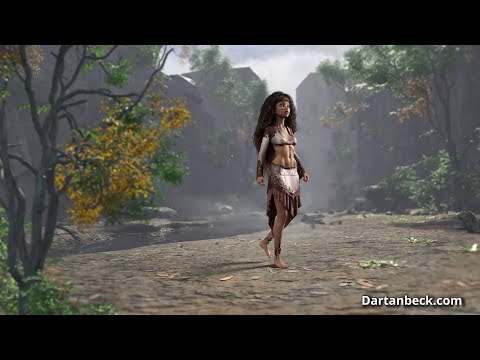
This one that I made in our dForce discussion is just Pacing Calm, but tweaked to make it "Rosie" using these new custom dials.
 Genesis 8 Male - Eyelashes not aligned/attached
I wrote a ticket on this a few months ago. Long story short, The Ren morph for the eyelashes is a function of the Head morph. No problem with that, but if you use Turbo Loader, the head morph is disabled, making it invisible to the function, which defaults the eyelash morph to 1.0 all the time. Other more recent eyelash morphs from the same vendor are coded in a way that avoids this problem.
Olivia 9Yup. I said I was gonna pass for now. But I really liked her skin, so... Both are dialed morphs mantaining at least 50% of her. And the new Colorwerks shaders.


One with her full morph
 How to remove the limit rotation of the lips on power pose?
How to remove limit rotation of the lips on power pose?
I wanted to make a lip biting pose.
But there's no good morph for it, and the rotation for lips points are limited on power pose.
Is there a way to unlimit these?Genesis 8 Male - Eyelashes not aligned/attachedcrosswind said:
From the log, there seems a culprit - character : Ren for Genesis 3 Male and Genesis 8 Male... (from Darwins Mishap(s)). Have you installed this product recently?
There was a wrong 'default value' (100%) on the partial head morph was dialed on the eyelashes... you may select the eyelashes, Show Hidden Properties, check if there's a dial - 'PHMRen Eyealsh' or sth. has a value 100%...
But here is the thing. I did check that log entry myself and went looking for the file and culprit.
Fact is that I do not own this Ren character. So I have no clue why the G8M is making a query for it.
Unless for some obscure reasons it is tied to another character that I might own of the same author?Mechasar's Characters Catalog: Who's next? (commercial)barbult said:
There is a problem with the evil pumpkin and fruit. When the lips are closed, adjusting the eye direction makes the eyes pop out of the head. I submitted a help request 6 days ago, but customer service has not responded. I also submitted a help request at the same time about missing texture files in the DIM installer for the fruit addon, but I haven't had any customer service response to that one either.
Here's the instruction for Lip Closed morph fixing. Hope it can help.
[RELEASED!!!] Dynamic Character Animation in Daz Studio [commercial]So, if I understand you correctly (and I'm not sure I do - even now) - your "tools" are parameter dials? As in Pose controls? As in Morph dials?
If so, I use them all the time and I use them for the tiny animations that I occasionally attempt but I rarely use aniblocks even though I also bought the paid version of AniMate.
You say you "started adding these custom tools" and that's what I don't understand - those dials are there for all to use. Or am I still confused?
Any way to delete keyframes after dforce?Creating a morph for the 'simulated result' of the garment on the last frame would be the only way. If your figure's transform values are not 0,0,0, dforce2morph won't work for you.
Just go the last frame, export the garment (simulated) to obj file with Base Resolution, then import it as a delta morph with Morph Loader Pro. Save a Wearable preset then.. this morph will be working for the current pose of the figure in other scene.
Any way to delete keyframes after dforce?Feels like this thing: https://www.daz3d.com/dforce2morph can help you.
Or a cheaper but more work-consuming way of "save your object as a .obj file, then import it with Morph Creator Pro".lou_harper said:
I did a timeline deforce of a figure wearing a robe. Now I want to merge the result into a larger scene, but can't without dragging a whole timeline with it. Is there any way to get rid of the timeline and keep only the final result of it?
Genesis 8 Male - Eyelashes not aligned/attachedFrom the log, there seems a culprit - character : Ren for Genesis 3 Male and Genesis 8 Male... (from Darwins Mishap(s)). Have you installed this product recently?
There was a wrong 'default value' (100%) on the partial head morph was dialed on the eyelashes... you may select the eyelashes, Show Hidden Properties, check if there's a dial - 'PHMRen Eyealsh' or sth. has a value 100%...
[RELEASED!!!] Dynamic Character Animation in Daz Studio [commercial]marble said:
Dartanbeck said:
It's amazing how simple it is to simply tweak the results of an aniBlock to make it look better with the character, like getting a better hand position and pose, etc.,
What also incredible is how quick and easy it is to completely alter the result with just a few dials!
I've watched your promo video and read through this thread (which seems to keep moving between sub forums) but I am still somewhat confused by your term "tools". Could you explain what you mean by that? Are these scripts (normally my idea of tools) or are they techniques (i.e. explanations of how to use the native DAZ Studio tools)? If they are scripts - what do the scripts do?
No scripts.
We learn how to make simple tools quickly and easily that give us this on any rigged figure, no matter the Generation - even Vicky 1 if you wish:
Pose Control Dials - These give us fine detail of any pose at any time. They take the idea of what used to be called MorphForms, but go far beyond those.
MorphForms was a name given to Pose Control dial in Generation 4 expansion morphs ++ sets. They essientially hold pose data within a dial, but can do much more than that.
In Part 2, where we get into the How-Tos, the first video gives a complete demonstration of the collection I use on Rosie 7. Since Rosie 7 is a Genesis 3 Female, and that is who I made the controls for, the tools are available for any G3F character, even if I saved them long before I made the tools. I could have done the same for Genesis 3 Male. Instead, I used GenX2 to transfer the tools over from Genesis 3 Female - works like a charm!
Since I started trying this idea with Rosie 5, by the time I got to Rosie 7 I really had a better understanding of what tools I need, so I have a really nice, easy to use, well organized set of Pose Control Dials, making her the best figure to use for the course.
I hope this answers your question. If not, I hope it gets us closer. I am always happy to help.
I accidentally moved the thread here when I changed the first post. I'm sure someone will put it back in the Commercial sub topic where it belongs. Sorry about that!
Daz 3D is part of

Connect
DAZ Productions, Inc.
7533 S Center View Ct #4664
West Jordan, UT 84084Licensing Agreement | Terms of Service | Privacy Policy | EULA
© 2026 Daz Productions Inc. All Rights Reserved.