-
Laptop Hard Drive space almost full
My laptop is telling the hard drive is almost full (1 TB) I'm thinking of purchasing an external Hard drive (4 TB) can I use Daz Studio and files on this new drive and how would I transfer it or would I have to load everything onto the drive from scratch?
What product has a similar hairstyle?I know it's not it, but it's the closest I know of off hand and it may be worth trying if you have it in your library. The lengthen morph can be played with: https://www.daz3d.com/classic-side-part-hair-for-genesis-3-and-8

Regards,
Richard
Are There Morphs For Qinfen Hair?No. The files list in the online readme does not show any morph data.
Outdoor winter wear for extreme cold climates pleasememcneil70 said:
Someone was concerned with if autofit would work without a lot of girations needed. So I did a straight, no messing around transfer.
Thanks for taking the time and effort!
Other than what appears to be some geometry tearing in the collar (from the pose?) and some floating buttons (which should at least be able to be hidden), the overall fit looks good. I do find it very helpful to see what the default distortions are.
Custom morphs in DAZ do never show up in the parameters tab - Please helpI'm well aware to be responding to a rather old thread but this one keeps popping up when you search the Net for this issue. Not only can I fully reproduce the problem which OP seemed to be having, I think I also discovered the possible reason why this was happening; at least I can fully reproduce it.
Context: I'm using the latest Daz Studio 4.21 in combination with ZBrush 2022.0.7, shouldn't matter but figured I'd mention all related details.
After messing around with this for several hours I come to the conclusion that this behavior happens as soon as the asset for which you're creating the morph is somehow associated with an incompatible figure. Seems rather odd but I can fully reproduce this:
- I add a Genesis 8 female figure to my scene.
- Using the content library pane I applied pants to her which were originally designed for Genesis 3 male.
- I then 'GoZ' the female figure over, I change the pants a bit, GoZ those specific changes back and create a morph for the pants.
- For the record: this morph fully works as intended.
- Then I save / export the morph: File => Save As => Support Asset => Morph Asset and make sure to only select the morph.
The result? I load in the pants, either stand alone or on another figure, and what do you know: no custom morph shows up.
If I repeat the exact same steps but this time using a Genesis 3 male as my "base model" then everything works as intended. In fact: If I then follow up by loading that same Genesis 8 female figure again, apply the pants on her once more then the morph also gets loaded (as one would expect).
As such my suggestion / theory: make sure that the asset for which you created the morph isn't associated with anything incompatible.
If you are in this situation (morphs which don't show up) then your best bet is to save the asset as a scene sub-set (which will either include the morph or a link to said morph if you already saved it previously). This should probably also give you an option to re-create the morph but that's a bit beyond the intention of my post.
Hope this can still help some random readers.
The Ultimate Super-Hero Freebie List!kyoto kid said:
...so where can I find a proper Supergirl outfit that isn't an unrigged obj or for Gen4 (and doesn't cost 100$)?
"Proper" leaves it quite open as to the era you want to render.
This one is for the new Flash movie. It's an incredible creation from Magnus1781 over at DeviantArt. Definitely not a static, unrigged shell and is for G8F so not a Gen4 recycle. Also comes with a head morph for the latest actress, Sasha Calle and he says DForce for the cape. Price = free.
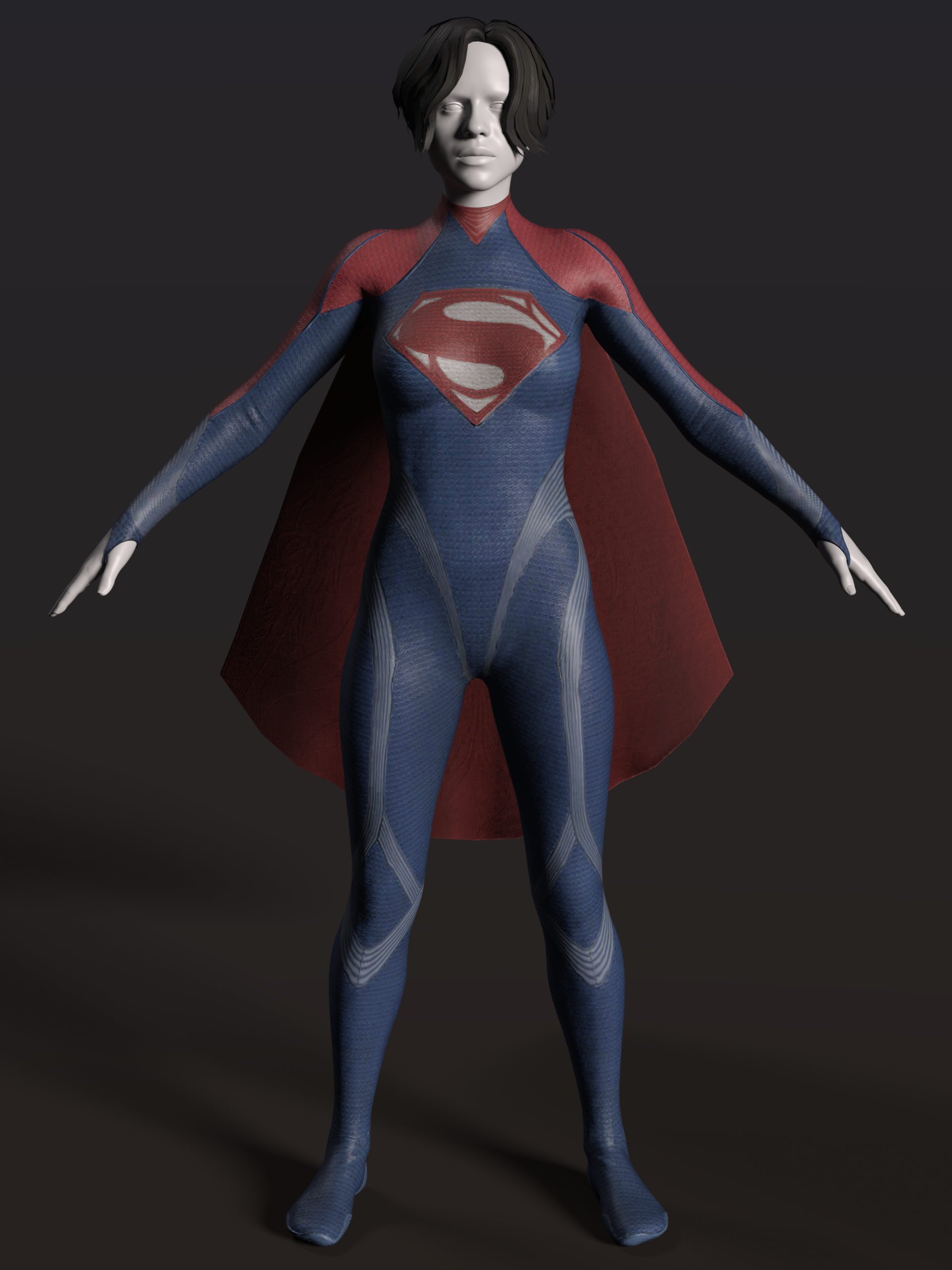
https://www.deviantart.com/magnus1781/art/DCEU-Supergirl-968746122Celebrity Look-a-Likes for 3D figures part 3Does anyone know of a Doja Cat morph? Marcius has a character called Doja at Renderhub but it's not a good likeness.can you find this character?Has anyone identified the morph/textures used?
Outdoor winter wear for extreme cold climates pleaseI tried that, but I couldn't get rid of the Lorem Ipsum filler. I tried, it drove me crazy, I never had that issue before.
Someone was concerned with if autofit would work without a lot of girations needed. So I did a straight, no messing around transfer.
As far as a tougue, or ski hat, PhilW has https://www.daz3d.com/dforce-beanie-hair-for-genesis-8-and-81-females which might work. I am currently looking at my library of hairs and have found two that came with hat fits, so people could check hairs out for that then pick a hat out, or use https://www.daz3d.com/sy-hat-and-hair-helper-genesis-8 (I haven't seen one for G9 yet, she has a large library to move up.) to squash down any hair with any hat.
Mary
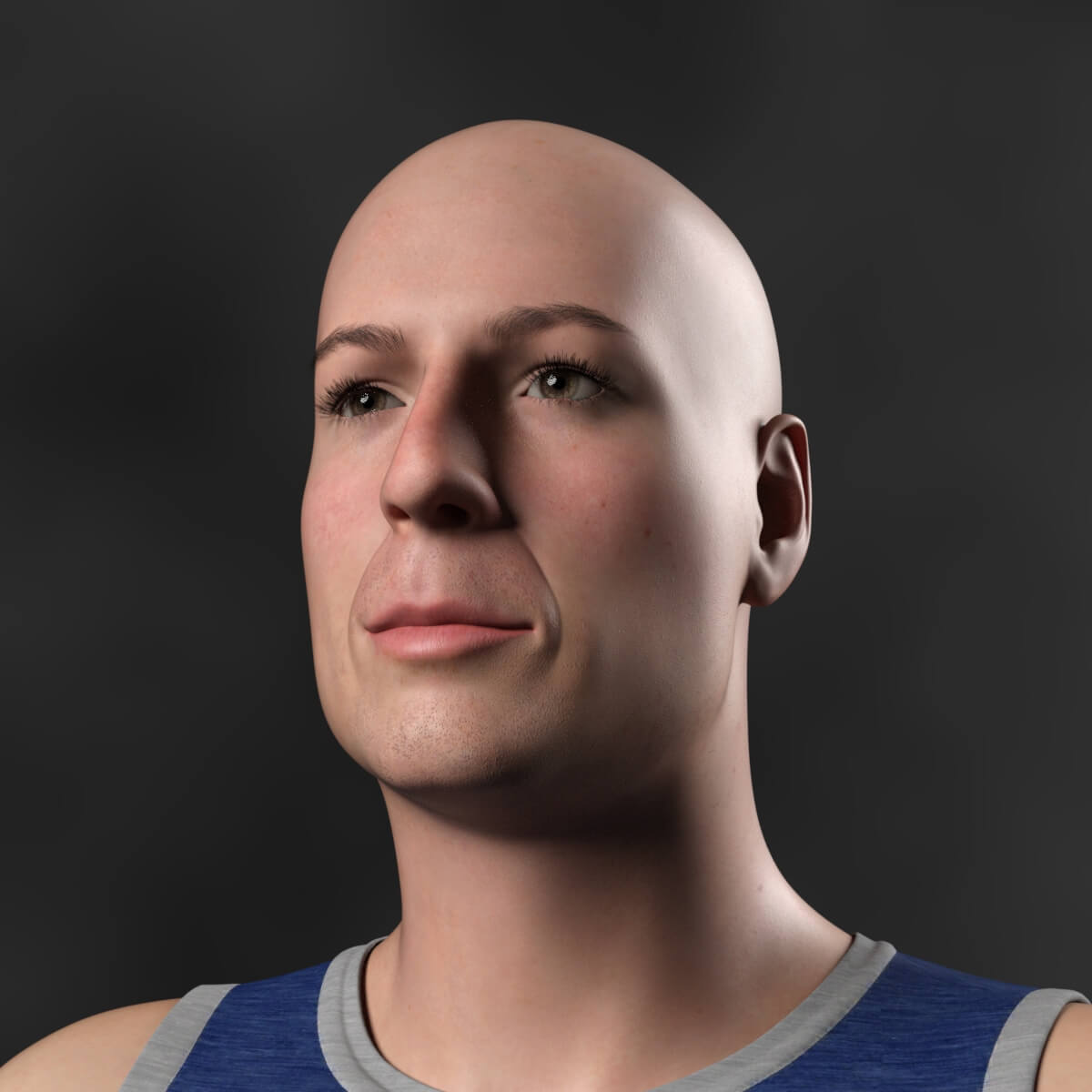
Celebrity Look-a-Likes for 3D figures part 3HumanXYStudio has released a free Genesis 9 morph called Korben Dallas at RenderHub. Obviously, looks like Bruce Willis :)
 Chibi Morphs?
Hello Taoz,
Thank you for the link. Bugga-Boo is now in my wishlist. I took a stroll over to Rendo and found the Universal Anime Head and the Universal Chibi Head both of which work with all the Genesis figures. It looks like it might be a bit fiddlely but once done can be saved as a character file. Theres a detailed pdf with each on how to use the heads on a vast array of figures. They don't work on G9 but as that one has Anime Heros (which I have) and its own chibi morph thats no biggy.
I remember a long time ago when I used poser it was possible to to "flatten" the Y axis (I think) which created a "2 dimensional" cell shaded character as seen in tradtional anime. I tried doing it in Studio and it mashed up the mesh. I might have been using the wrong axis. Do you know if it is possible to create this effect in Studio?
Many thanks
Andrew
 Is it possible to make Arcane Enchantress Hair Longer?
Nope~ as an SBH, it has no length / long morph... let alone 'waist length'...
IRAY Photorealism?lilweep said:
charles said:
lilweep said:
I also use the Uber Iray shader for skin also.
It doesnt have the microdetail maps options, but with good maps it's not totally necessary. 8.1 and Gen 9 have good UV layout for all UDIMs so 4K is usually fine for getting enough detail. Maybe with extreme closeup it would be good to have microdetails, or otherwise use 8K maps. These details can also be baked into HD morph or Displacement map rather than using a Normal map, so again not totally necessary.
Dual Lobe Specular should provide some variation to get the appearance of microfacet detail in the specular property, so can give illusion of more detail
I do prefer the DLS, it sometimes can be frustrating like if not done right you will get seems that are not always obvious that's where it's coming from.
You can do 8k or 16k on whatever model you want, this isn't unique to g9, it's just the file sizes are so insane and most artist believe 4k is "good enough". But I've got some 8ks for g8 that are amazing. I also made my own 8k microskin which can be used on the thin film channel or top coat or wherever. Only instead of having a small map that tiles it was done via wrapping in Susbstance very large textures for the main body skin maps...so VRAM overhead on those can be tight.
I also have some 8k textures for every single channel for G8.1 and G9 that i custom made, but i never use them as they dont seem to be necessary.
But this doesn't mean squat if you have left your texture compression to default.
Are we supposed to be changing this from the default 512-1024? What does this do? I never once changed this setting.
Yes, when Daz hands off your textures to your video GPU or IRray it compresses them based on that, I have mine set to medium=6000 and high=10000
IRAY Photorealism?charles said:
lilweep said:
I also use the Uber Iray shader for skin also.
It doesnt have the microdetail maps options, but with good maps it's not totally necessary. 8.1 and Gen 9 have good UV layout for all UDIMs so 4K is usually fine for getting enough detail. Maybe with extreme closeup it would be good to have microdetails, or otherwise use 8K maps. These details can also be baked into HD morph or Displacement map rather than using a Normal map, so again not totally necessary.
Dual Lobe Specular should provide some variation to get the appearance of microfacet detail in the specular property, so can give illusion of more detail
I do prefer the DLS, it sometimes can be frustrating like if not done right you will get seems that are not always obvious that's where it's coming from.
You can do 8k or 16k on whatever model you want, this isn't unique to g9, it's just the file sizes are so insane and most artist believe 4k is "good enough". But I've got some 8ks for g8 that are amazing. I also made my own 8k microskin which can be used on the thin film channel or top coat or wherever. Only instead of having a small map that tiles it was done via wrapping in Susbstance very large textures for the main body skin maps...so VRAM overhead on those can be tight.
I also have some 8k textures for every single channel for G8.1 and G9 that i custom made, but i never use them as they dont seem to be necessary.
But this doesn't mean squat if you have left your texture compression to default.
Are we supposed to be changing this from the default 512-1024? What does this do? I never once changed this setting.
IRAY Photorealism?lilweep said:
I also use the Uber Iray shader for skin also.
It doesnt have the microdetail maps options, but with good maps it's not totally necessary. 8.1 and Gen 9 have good UV layout for all UDIMs so 4K is usually fine for getting enough detail. Maybe with extreme closeup it would be good to have microdetails, or otherwise use 8K maps. These details can also be baked into HD morph or Displacement map rather than using a Normal map, so again not totally necessary.
Dual Lobe Specular should provide some variation to get the appearance of microfacet detail in the specular property, so can give illusion of more detail
I do prefer the DLS, it sometimes can be frustrating like if not done right you will get seems that are not always obvious that's where it's coming from.
You can do 8k or 16k on whatever model you want, this isn't unique to g9, it's just the file sizes are so insane and most artist believe 4k is "good enough". But I've got some 8ks for g8 that are amazing. I also made my own 8k microskin which can be used on the thin film channel or top coat or wherever. Only instead of having a small map that tiles it was done via wrapping in Susbstance very large textures for the main body skin maps...so VRAM overhead on those can be tight.
but also it depends on what one is doing, if you're doing portrait head shots then you definantly want those higher detailed maps, but body shots ehh, you can get by fine with 4k. But this doesn't mean squat if you have left your texture compression to default.
Something else I'm not sure has really been addressed here much regarding "photorealism" is what camera settings you are using. The standard camera is like 65mm focal length and this is not common. This does usually feel out the viewport nicely, it's not what we are use to seeing from "photos".
IRAY Photorealism?I also use the Uber Iray shader for skin also.
It doesnt have the microdetail maps options, but with good maps it's not totally necessary. 8.1 and Gen 9 have good UV layout for all UDIMs so 4K is usually fine for getting enough detail. Maybe with extreme closeup it would be good to have microdetails, or otherwise use 8K maps. These details can also be baked into HD morph or Displacement map rather than using a Normal map, so again not totally necessary.
Dual Lobe Specular should provide some variation to get the appearance of microfacet detail in the specular property, so can give illusion of more detail
[Released] RSSY Character And Material Conversion Bundle Genesis 8 to Genesis 9 [Commercial]
In that case, I suggest deleting the eyelash etc. Morphs and letting them auto generate. You can see morphs of conformers to delete them by checking Show Hidden in your Parameters tab. If that doesn't help I'm afraid neither autoconform nor the script can help.Sylvan said:Hi River! Thanks for the product, it's very helpful :)
I am running into a slight problem with the eyebrows, tear, mouth and eyes though. (see screenshot)
The eyescript helps with the eyes, but the other parts stay in the wrong place.
The PDF does address this:With extreme head morphs, the convert scene character conversion process can leave the Genesis 9 Eyebrows, Eyelashes, and Tears in the wrong place after conversion. Load the Genesis 9 character into a new scene to fix this
I restarted DAZ and the morph is there but even though I reload G9 into a new scene, the unwanted morphs are still applied.
I am pretty sure I am missing a step, but where?
Thanks in advance for your time! Is there a way to disable the influence of a morph only on certain area of the cloth in daz3d?
James said:
The only way to selectively block is to create a custom morph for the ones you want to block (which must use the same name, not label, to work).
So... there will be another morphs to specially counter the effect?
Can't the existing morph be somehow edited in daz?
Sorry I don't get it.No, instead of lettign DS create a morph on the fly you make one explicitly to match the shape and adjust it as required. The posts above offer one fix, but a smoother option would be to export the morphs clothing as OBJ, making sure the name matches the morph name, making a note of the rpeset used (Daz studio would be logical), then apply a dForm to the clothing and paint in a weight map to mask out (or in) the areas you don't want affected - then you can clear the morph from the base figure, reload the clothing (so it doesn't have the generated morph - though you an also clear generated morphs from the figure menu if you just zero the morph on the base figure) and open Morph Loader Pro you can import the OBJ and in the Attenuate section select the dForm with the weight map - you can then choose whether the weight map excludes or includes the morph, depending on what you painted in.
Chibi Morphs?Does anyone know of a chibi morph for the G8 figures? I know there is one with G9 but can't find one for G8. I have the chibi figures which were made for the original Genesis figure and was wondering if there is a way of turning them into morphs and then applying them to G8.
Many thanks
Andrew
 CGI Pupil Utilities for Genesis 9 I can't make it work
As per title, I've done as the Help tile [for CGI Pupil Utilities for Genesis 9] says and selected the Eyes. When I click on the morph I want, it does nothing and I cannot find any sliders for them in the Shaping nor Parameters Tabs. What am I missing?
Daz 3D is part of

Connect
DAZ Productions, Inc.
7533 S Center View Ct #4664
West Jordan, UT 84084Licensing Agreement | Terms of Service | Privacy Policy | EULA
© 2026 Daz Productions Inc. All Rights Reserved.