-
Freebie Challenge May 2023 - "Sweet Music" - Main Thread
emanuela1 said:
Sweet street Music with Bob
nspired by the movie "A Street Cat Named Bob", 2016.
It's the true story of James Bowen, a street musician playing the guitar, with drug addiction problems in rehabilitation treatment. One day a stray and injured ginger cat enters his apartment. Thinking the cat is lost, he asks the neighbors, who don't seem interested, so he decides to keep and look after him and calls him BOB. A deep friendship is born, with the cat following the owner everywhere, even when busking on the streets of touristy London. The two become a London legend and hit the media.
The cat's presence and affection gave the protagonist the strength and motivation to complete the detox treatment.The author said Bob had saved his life.It is a touching story of hope, friendship and redemption.
The author wrote a book in 2012 about his friendship with BOB entitled "A Street Cat Named Bob" from which the film of the same name was made in 2016.Both the book and the film were very successful.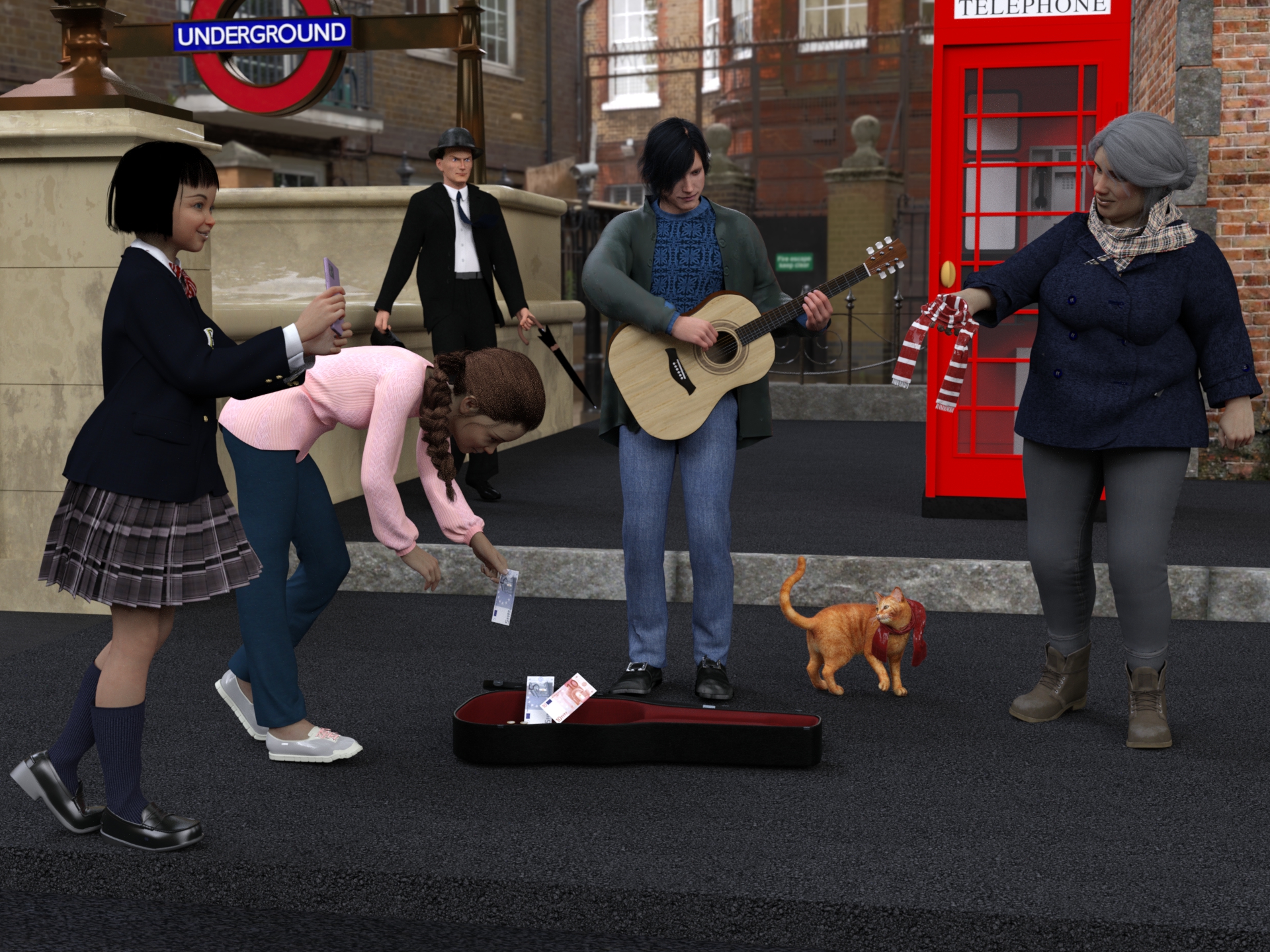
Freebies
TelephoneBox for POSER by paul_gormley
https://www.renderosity.com/freestuff/items/88019/telephonebox-for-poserSubway-entrance
https://www.turbosquid.com/it/3d-models/subway-entrance-3d-fbx/913817London Street (HDRI)
https://hdri-haven.com/hdri/london-streetwool scarf Free 3D model
https://www.cgtrader.com/free-3d-models/character/clothing/wool-scrafDavid10 for G8M
https://sharecg.com/v/94874/browse/21/DAZ-Studio/David10G8M dforce 40's inspired suit - high res version
https://www.deviantart.com/perlk/art/G8M-dforce-40-s-inspired-suit-high-res-version-963511567"Bowler Hat" (https://skfb.ly/66OnJ) by Joycestick is licensed under Creative Commons Attribution (http://creativecommons.org/licenses/by/4.0/).
https://sketchfab.com/3d-models/bowler-hat-3c3f5bfb98284924a70cf410ab532bc9Umbrella
https://www.turbosquid.com/it/3d-models/3d-umbrella-object-1270697Brown Leather Briefcase 3D Model
https://open3dmodel.com/3d-models/3d-model-brown-leather-briefcase_196422.htmlEveryday Hair Style for Genesis 8 Male(s) by zoro_d
https://www.renderosity.com/freestuff/items/80194/everyday-hair-style-for-genesis-8-male-s-Leisure Pants & Top for G8F
https://www.wilmapsdigitalcreations.co.uk/view_product.php?id=462Allegro Trainers for Genesis Female 8 by Rapier69
https://www.renderosity.com/freestuff/items/88819/allegro-trainers-for-genesis-female-8Candy Braids Hair for Genesis 8 Female(s) by zoro_d
https://www.renderosity.com/freestuff/items/88062/candy-braids-hair-for-genesis-8-femalesLily Character Morph For G8 and G8-1 Female Free 3D model
https://www.cgtrader.com/free-3d-models/character/woman/lily-character-morph-for-g8-and-g8-1-femaleNanami Genji Anime Charachter For Genesis 8 Female Free 3D model
https://www.cgtrader.com/free-3d-models/character/fantasy-character/nanami-genji-anime-charachter-for-genesis-8-femaleFree: Bob haircut for Genesis 8
https://www.deviantart.com/perlk/art/Free-Bob-haircut-for-Genesis-8-887913550Smartphone Prop by Foxclaw
https://www.renderosity.com/freestuff/items/87343/smartphone-propUpdate Sailor Uniform Winter Set Part 1
https://sharecg.com/v/94617/gallery/21/DAZ-Studio/Update-Sailor-Uniform-Winter-Set-Part-1Update Sailor Uniform Winter Set Part 2
https://sharecg.com/v/98662/gallery/21/DAZ-Studio/Update-Sailor-Uniform-Winter-Set-Part-2Fisherman Outfit4
https://www.deviantart.com/kalhh/art/Fisherman-Outfit4-858253233Genesis 8 Male Knitted Sweater
https://www.wilmapsdigitalcreations.co.uk/view_product.php?id=477G8M Polo Shirt & Jeans Trousers
https://www.sharecg.com/v/89614/Freebie Ferrieroutfit by Paspu (shoes)
https://www.renderosity.com/freestuff/items/91974/freebie-ferrieroutfitUPDATE - V Devil May Cry 5 Hair Prop for G8M
https://sharecg.com/v/93558/related/21/DAZ-Studio/UPDATE-V-Devil-May-Cry-5-Hair-Prop-for-G8MEl Mariachi Guitar Part 1 by sadrielxv
https://www.renderosity.com/freestuff/items/93700/el-mariachi-guitar-part-1El Mariachi Guitar Part 2 by sadrielxv
https://www.renderosity.com/freestuff/items/93701/el-mariachi-guitar-part-2El Mariachi Guitar Case by sadrielxv
https://www.renderosity.com/freestuff/items/93706/el-mariachi-guitar-caseMolly for Gf8.1 Charakter Shape
https://sharecg.com/v/98445/gallery/21/DAZ-Studio/Molly-for-Gf8.1-Charakter-ShapeBlazer Uniform Set for G8F
https://www.sharecg.com/v/94694/gallery/21/DAZ-Studio/Blazer-Uniform-Set-for-G8FGwennili Hair
https://www.deviantart.com/kayleyss/art/Gwennili-Hair-670556854TMWOutfit for Genesis 8 Female
https://www.deviantart.com/innmodels/art/TMWOutfit-for-Genesis-8-Female-878611570No count
"House on Suburb" free in the 2020 Renderosity giveawayPaid
DAZ House catI had problems uploading the attachment, I put the link to the gallery
All freebies checked please move to Entries
and yes I heard that there are again problems with attaching images, so link to gallery is fine
G9 Custom Face Morph How To Combine Eye Morph With It?- Set your morphs, and make sure nothing else is set.
- Right-click to put the Parameters pane in Edit mode (if it isn't already)
- Right-click in the property group you want to use for the cotnroller>Create New Property
- Name the property, set its label, adjust limits if desired (you may not want it to go below 0%).
- Set the new property to 100%
- Right-click on the new proepety>ERC Freeze
- Make sure that the listed subcomponents are just the two morphs you want applied, then click Accept
- Check that everythign works.
- Assuming all is well, zero the new property (otherwise it will load on every character for the base figure)
- File>Save As>Support Assets>Morph Asset
- The Author and product names in the option dialogue are used for folder names in /Data/Publisher>Figure>Morphs
G9 Custom Face Morph How To Combine Eye Morph With It?Hello. Can anyone please be kind to share me their knowledge, with how to combine a custom Face Morph along with Eye Morph and turn these 2 morphes into 1 morph, so when drag the slider, the Custom Face Morph and Eye Morph follows together. I would really appreciate any help on this, as I struggle so hard to find out how to do this.
[Released] RSSY Character And Material Conversion Bundle Genesis 8 to Genesis 9 [Commercial]Eboshijaana said:
Artini said:
Eboshijaana said:
I know this is a bit of a cop-out, but turning the figure into a single morph, then splitting it with the free character splitter and THEN converting the resulting character gets the best results.
It is an interesting idea.
What is this free character splitter, you are talking about?
https://www.daz3d.com/forums/discussion/617476/character-splitter This.
The script does split the morphs based on what the morph affects. The NECK_RANGE variable in the constants file specifies the low and high Y value for the cutoff for whether a morph affects the body or the head only.
Load a G8 figure, paste the following into the IDE pane and execute (change the NAME (not label) and the low, high in the GetMorphTypeFromName function call to try out different morphs and different ranges):
function GetMorphType( oGeom, oMorph, neckLow, neckHigh )
{
if (oMorph.name.toUpperCase().startsWith('FHM')) return 'Head';
else if (oMorph.name.toUpperCase().startsWith('FBM')) return 'Body';
// do it the hard way
var oDeltas = oMorph.getDeltas();
oDeltas.loadDeltas();
if (oDeltas.getNumDeltas() == 0)
{
if (output_debugL2) print('%1 morph does not have deltas'.arg(oMorph.getValueChannel().getLabel()));
return '';
}
var bAffectsHead = false;
var bAffectsBody = false;
var y;
for (var i = 0; i < oDeltas.getNumDeltas(); i++)
{
y = oGeom.getVertex(oDeltas.getDeltaIndex(i)).y;
if (y < neckLow) bAffectsBody = true;
else if (y > neckHigh) bAffectsHead = true;
if (bAffectsBody && bAffectsHead) return 'Full';
}
if (bAffectsHead) return 'Head';
else if (bAffectsBody) return 'Body';
return ''; // basically neck
}
function GetMorphTypeFromName(name, neckLow, neckHigh)
{
var node = Scene.getPrimarySelection();
if (!node) return 'Select a figure';
var morph = node.getObject().findModifier(name);
if (!morph) return 'Morph name not found';
return GetMorphType( node.getObject().getCurrentShape().getGeometry(), morph, neckLow, neckHigh )
}
print(GetMorphTypeFromName('Sylvian Head', 151, 165));
[Released] RSSY Character And Material Conversion Bundle Genesis 8 to Genesis 9 [Commercial]Artini said:
Eboshijaana said:
I know this is a bit of a cop-out, but turning the figure into a single morph, then splitting it with the free character splitter and THEN converting the resulting character gets the best results.
It is an interesting idea.
What is this free character splitter, you are talking about?
https://www.daz3d.com/forums/discussion/617476/character-splitter This.
[Released] RSSY Character And Material Conversion Bundle Genesis 8 to Genesis 9 [Commercial]Eboshijaana said:
I know this is a bit of a cop-out, but turning the figure into a single morph, then splitting it with the free character splitter and THEN converting the resulting character gets the best results.
It is an interesting idea.
What is this free character splitter, you are talking about?
[Released] RSSY Character And Material Conversion Bundle Genesis 8 to Genesis 9 [Commercial]I know this is a bit of a cop-out, but turning the figure into a single morph, then splitting it with the free character splitter and THEN converting the resulting character gets the best results.
Combining Multiple Converted G8 Morphs in a G9 Figure: Help!I tried using the clone suit method to convert my G8 character with a lot of morphs into a G9 character using several morphs that I wanted to maintain as separate in the final G9 character. Each of the individual morphs is great (and a good argument for something like the Riversoft/SickleYield morph converter, which I think automates the process). However, when I dial in more than one morph, they "multiply" their results and it gets bad quickly—the character gets taller and more distorted with each morph beyond one.

Part of the reason I want to do this is that my G8.1 character started out as a G3 character and the conversion to G8 lost some details that converting the G3 character to G9 promises to restore. But the G3 character is only a 3rd of the character now, so as it stands, either I need to take the distorted G8 version of it combined with all of the other G8 morphs and see that distored by the G9 conversion process even more—not ideal. I'd also like to maintain flexiblity to swap native G9 morphs for older ones when that feel like it would benefit my artistic process.
Is there a way to convert a morph that will act as a morph, not a character? E.g., a morph that can be added to others? Or is it an all or nothing process right now
UltraScenery - new territory [Commercial]Petercat said:
barbult said:
Petercat said:
I must be doing something wrong. I click on the UltraSceneCreator script, everything looks good (Except that in features/ecology/water panes it takes forever to scroll through the options)... but then in the "build" pane, all of the boxes are empty. If I click on any of them, the options are "Browse" and "Apply to All Layers".
Browsing takes me to My DAZ 3D Library/Runtime/Textures/Exnem/Steak BBQ.
If I go to Runtime/Textures/HowieFarkes, all I see is the original Harpwood Trail.
Installed via manual download to USB drive, transfer to art computer, into Install Manager Downloads, then open DAZ install Manager, and install.
What is wrong and how do I fix it?i7 8700
1080ti
64G RAM
Studio 4.12The boxes are optional layer masks. Empty is the normal default state.
What is a layer mask?
And I have Accelerator, how long should it take the program to finish running?
Say, with everything at default?
Because it's been over twenty minutes and the yellow bar hasn't moved. It's been at
about 3%, and I don't see anything relevant in Task Manager except that one CPU core
is bouncing off of 100% while the other seven are almost idling.
Frustrating.It should take about a minute or so to build a default scene with the Accelerator. Not twenty.
Layer masks are explained in the user Manual that comes with UltraScenery - Realistic Landscape System.
Check the first post in this thread for troubleshooting tips.
Check the Daz Studio log file to see if there are any related errors or warnings.UltraScenery - new territory [Commercial]barbult said:
Petercat said:
I must be doing something wrong. I click on the UltraSceneCreator script, everything looks good (Except that in features/ecology/water panes it takes forever to scroll through the options)... but then in the "build" pane, all of the boxes are empty. If I click on any of them, the options are "Browse" and "Apply to All Layers".
Browsing takes me to My DAZ 3D Library/Runtime/Textures/Exnem/Steak BBQ.
If I go to Runtime/Textures/HowieFarkes, all I see is the original Harpwood Trail.
Installed via manual download to USB drive, transfer to art computer, into Install Manager Downloads, then open DAZ install Manager, and install.
What is wrong and how do I fix it?i7 8700
1080ti
64G RAM
Studio 4.12The boxes are optional layer masks. Empty is the normal default state.
What is a layer mask?
And I have Accelerator, how long should it take the program to finish running?
Say, with everything at default?
Because it's been over twenty minutes and the yellow bar hasn't moved. It's been at
about 3%, and I don't see anything relevant in Task Manager except that one CPU core
is bouncing off of 100% while the other seven are almost idling.
Frustrating.UltraScenery - new territory [Commercial]Petercat said:
I must be doing something wrong. I click on the UltraSceneCreator script, everything looks good (Except that in features/ecology/water panes it takes forever to scroll through the options)... but then in the "build" pane, all of the boxes are empty. If I click on any of them, the options are "Browse" and "Apply to All Layers".
Browsing takes me to My DAZ 3D Library/Runtime/Textures/Exnem/Steak BBQ.
If I go to Runtime/Textures/HowieFarkes, all I see is the original Harpwood Trail.
Installed via manual download to USB drive, transfer to art computer, into Install Manager Downloads, then open DAZ install Manager, and install.
What is wrong and how do I fix it?i7 8700
1080ti
64G RAM
Studio 4.12The boxes are optional layer masks. Empty is the normal default state.
FaceGen vs Face Transfer vs Headshop 12. Pros & Cons?Artini, what trouble are you running into with Face Transfer? I happen to be most at home with FT, though of late, I've been testing/retesting various products and processes, including all of these in this thread. It's kind of a transitional time for my character creation as I've been doing a lot of experimenting while I decide whether to stay with G8/8.1 or go to G9, or to move to PBR from Iray Uber. (And yes, you can get FT shapes and mats usefully into G9.)
Whichever product someone prefers, I like to encourage and support the character-creating community, since there's some subjects and issues that only apply to us.
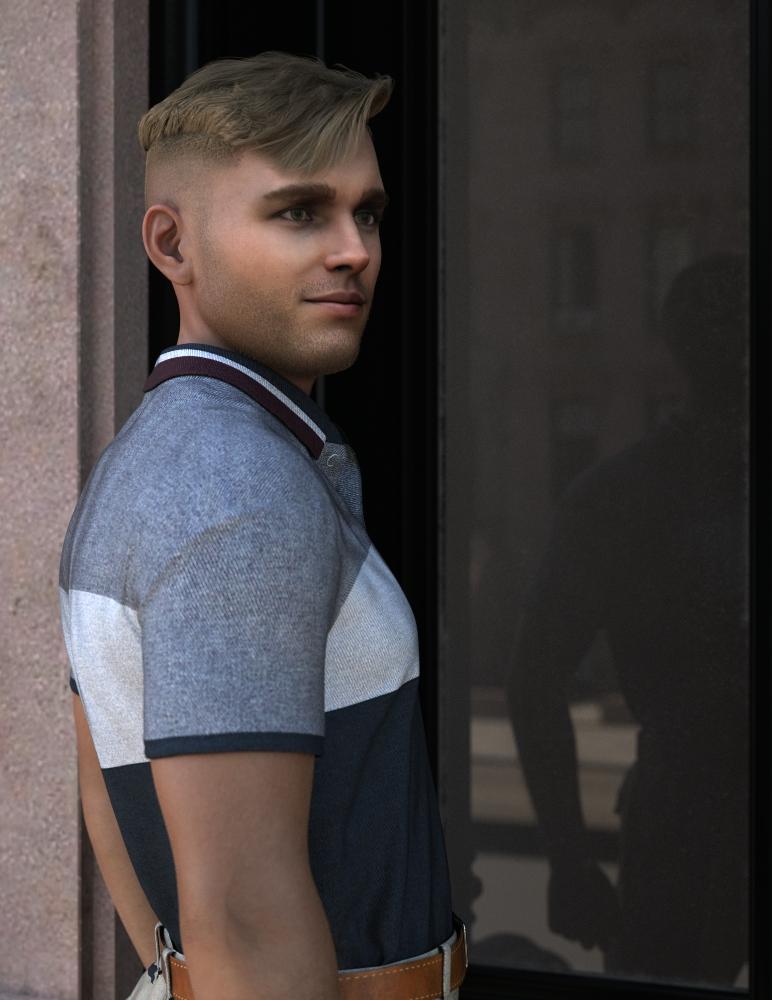
This guy is typical of my existing Face Transfer G8/8.1 - Iray Uber process; he took about 5 minutes to create just now from an undoctored Artbreeder source image and while he's not good enough to be a real character, I think he's sufficiently decent for product testing - which is mostly what I'm doing right now until I have a final path forward with my real characters.
UltraScenery - new territory [Commercial]I must be doing something wrong. I click on the UltraSceneCreator script, everything looks good (Except that in features/ecology/water panes it takes forever to scroll through the options)... but then in the "build" pane, all of the boxes are empty. If I click on any of them, the options are "Browse" and "Apply to All Layers".
Browsing takes me to My DAZ 3D Library/Runtime/Textures/Exnem/Steak BBQ.
If I go to Runtime/Textures/HowieFarkes, all I see is the original Harpwood Trail.
Installed via manual download to USB drive, transfer to art computer, into Install Manager Downloads, then open DAZ install Manager, and install.
What is wrong and how do I fix it?i7 8700
1080ti
64G RAM
Studio 4.12Name of model in this imagedan_thomas said:
I am looking for a model in this promo. If it is customized, I want to know what was the base model.
Thanks
I think I've figured it out mostly. Skin was Babina 8 with low translucency weight and base model is close to G8F, possibly with another character morph of low weight.
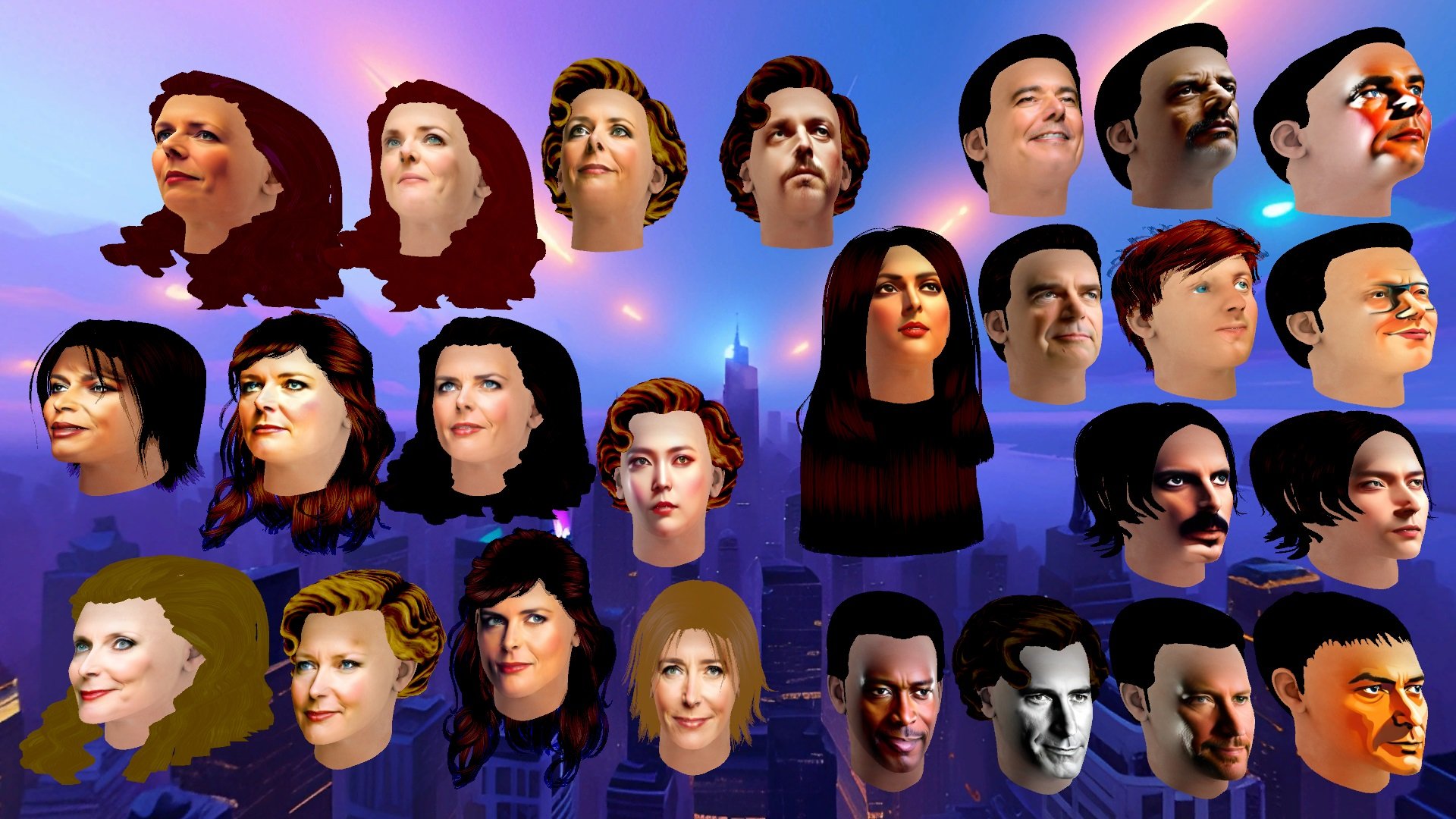
FaceGen vs Face Transfer vs Headshop 12. Pros & Cons?Have tested recently Face Transfer, but could not get some good results,
so have come back to Avatar Maker in Unity, which I think Face Transfer is based on.
It is a pity, that Avatar Maker produce only the heads...
 Freebie Challenge May 2023 - "Sweet Music" - Main Thread
Sweet street Music with Bob
nspired by the movie "A Street Cat Named Bob", 2016.
It's the true story of James Bowen, a street musician playing the guitar, with drug addiction problems in rehabilitation treatment. One day a stray and injured ginger cat enters his apartment. Thinking the cat is lost, he asks the neighbors, who don't seem interested, so he decides to keep and look after him and calls him BOB. A deep friendship is born, with the cat following the owner everywhere, even when busking on the streets of touristy London. The two become a London legend and hit the media.
The cat's presence and affection gave the protagonist the strength and motivation to complete the detox treatment.The author said Bob had saved his life.It is a touching story of hope, friendship and redemption.
The author wrote a book in 2012 about his friendship with BOB entitled "A Street Cat Named Bob" from which the film of the same name was made in 2016.Both the book and the film were very successful.Freebies
TelephoneBox for POSER by paul_gormley
https://www.renderosity.com/freestuff/items/88019/telephonebox-for-poserSubway-entrance
https://www.turbosquid.com/it/3d-models/subway-entrance-3d-fbx/913817London Street (HDRI)
https://hdri-haven.com/hdri/london-streetwool scarf Free 3D model
https://www.cgtrader.com/free-3d-models/character/clothing/wool-scrafDavid10 for G8M
https://sharecg.com/v/94874/browse/21/DAZ-Studio/David10G8M dforce 40's inspired suit - high res version
https://www.deviantart.com/perlk/art/G8M-dforce-40-s-inspired-suit-high-res-version-963511567"Bowler Hat" (https://skfb.ly/66OnJ) by Joycestick is licensed under Creative Commons Attribution (http://creativecommons.org/licenses/by/4.0/).
https://sketchfab.com/3d-models/bowler-hat-3c3f5bfb98284924a70cf410ab532bc9Umbrella
https://www.turbosquid.com/it/3d-models/3d-umbrella-object-1270697Brown Leather Briefcase 3D Model
https://open3dmodel.com/3d-models/3d-model-brown-leather-briefcase_196422.htmlEveryday Hair Style for Genesis 8 Male(s) by zoro_d
https://www.renderosity.com/freestuff/items/80194/everyday-hair-style-for-genesis-8-male-s-Leisure Pants & Top for G8F
https://www.wilmapsdigitalcreations.co.uk/view_product.php?id=462Allegro Trainers for Genesis Female 8 by Rapier69
https://www.renderosity.com/freestuff/items/88819/allegro-trainers-for-genesis-female-8Candy Braids Hair for Genesis 8 Female(s) by zoro_d
https://www.renderosity.com/freestuff/items/88062/candy-braids-hair-for-genesis-8-femalesLily Character Morph For G8 and G8-1 Female Free 3D model
https://www.cgtrader.com/free-3d-models/character/woman/lily-character-morph-for-g8-and-g8-1-femaleNanami Genji Anime Charachter For Genesis 8 Female Free 3D model
https://www.cgtrader.com/free-3d-models/character/fantasy-character/nanami-genji-anime-charachter-for-genesis-8-femaleFree: Bob haircut for Genesis 8
https://www.deviantart.com/perlk/art/Free-Bob-haircut-for-Genesis-8-887913550Smartphone Prop by Foxclaw
https://www.renderosity.com/freestuff/items/87343/smartphone-propUpdate Sailor Uniform Winter Set Part 1
https://sharecg.com/v/94617/gallery/21/DAZ-Studio/Update-Sailor-Uniform-Winter-Set-Part-1Update Sailor Uniform Winter Set Part 2
https://sharecg.com/v/98662/gallery/21/DAZ-Studio/Update-Sailor-Uniform-Winter-Set-Part-2Fisherman Outfit4
https://www.deviantart.com/kalhh/art/Fisherman-Outfit4-858253233Genesis 8 Male Knitted Sweater
https://www.wilmapsdigitalcreations.co.uk/view_product.php?id=477G8M Polo Shirt & Jeans Trousers
https://www.sharecg.com/v/89614/Freebie Ferrieroutfit by Paspu (shoes)
https://www.renderosity.com/freestuff/items/91974/freebie-ferrieroutfitUPDATE - V Devil May Cry 5 Hair Prop for G8M
https://sharecg.com/v/93558/related/21/DAZ-Studio/UPDATE-V-Devil-May-Cry-5-Hair-Prop-for-G8MEl Mariachi Guitar Part 1 by sadrielxv
https://www.renderosity.com/freestuff/items/93700/el-mariachi-guitar-part-1El Mariachi Guitar Part 2 by sadrielxv
https://www.renderosity.com/freestuff/items/93701/el-mariachi-guitar-part-2El Mariachi Guitar Case by sadrielxv
https://www.renderosity.com/freestuff/items/93706/el-mariachi-guitar-caseMolly for Gf8.1 Charakter Shape
https://sharecg.com/v/98445/gallery/21/DAZ-Studio/Molly-for-Gf8.1-Charakter-ShapeBlazer Uniform Set for G8F
https://www.sharecg.com/v/94694/gallery/21/DAZ-Studio/Blazer-Uniform-Set-for-G8FGwennili Hair
https://www.deviantart.com/kayleyss/art/Gwennili-Hair-670556854TMWOutfit for Genesis 8 Female
https://www.deviantart.com/innmodels/art/TMWOutfit-for-Genesis-8-Female-878611570No count
"House on Suburb" free in the 2020 Renderosity giveawayPaid
DAZ House catI had problems uploading the attachment, I put the link to the gallery
Is there any need for classic Hollywood G9 head morphs?I haven't tried G9 yet. However, I went from Poser to Daz in 2018.
I used V4, then learned to use all of the Genesis generations up to G8.
So, I'm still loving G8 and just using G8.1 :)
I would love a Judy Garland morph. When she was in "Meet Me in St. Louis!" I so love your morphs and you are one fantastic artist!!!
Best place to commission a new modelI'm wondering if there's a site, or perhaps a space here in these forums, to commission some Daz work? I'm trying to create a figure from some old photos, none of which have the right quality or angles to use any face creator software. It would have to be done by hand and my fledgling skills don't seem to be up to the task.
I tried hiring various folks on fiverr.com, but it turned out that was a waste of time, no one seemed to understand that I don't have the pictures necessary for face transfer to work (or I'd have done it myself) and one guy actually tried to sucker me into sending him cash via PayPal. So I'm hoping to find a site with decent and skilled folks who have experience building from scratch.
v4 skirt morph problem when fit to G8FThe only way of reserving bones is to use Transfer Rigging without Auto-fit... I roughly showed the steps as attached... but still had to make a fixing morph for G8F in Blender...
Based on the converted skirt, dForce modifier could be further added as you wish.[Released] RSSY Character And Material Conversion Bundle Genesis 8 to Genesis 9 [Commercial]echoesc said:
I started out with almost all bonzai trees, as Gabriel-C referred to them (that cracked me up, although I was kind of frustrated at the time). Dialing down Full body, and using People morph or vice versa was a compromise, and usually didn't look great. But I did find my solution by only using single morph dials for my G8 characters.
Here's what I did.
(There are better tutorials out there for converting multiple morphs into a single morph, but this is my short version, and these are mostly the defaults.. If you want pictures and/or videos, or more options, you can just google or bing for them)
If you're going do multiple custom conversions, I would advise settinnng up custom actions for creating Genesis 8 Basic Female, and Genesis 9- Load Genesis 8 with all custom morphs. Delete everything else - hair, clothing AND eyelashes. Make sure any HD morphs are changed to 0 and I also change Nails and Nipples to 0 if those are dialed up.
- Parameters-General-Mesh Resolution. Change Resolution Level from High Resolution to Base, and SubDivision Level to 1. Render SubD Level to 1
- Export - Choose a folder where this will be easy to find. I used Daz/Studio 4/OBJ Files, but use whatever you like. Save as type - chooose Wavefront Object (*.obj
- In the dialog box that comes up, for "To" choose DAZ Studio (1 unit - 1 cm). Click on Accept.
- Clear scene, and bring up a clean Genesis 8 Female.
- Edit->Object->Morph Loader Pro
- Click Choose Morph Files. Go to the OBJ you previously created. Open. It should show up under Item. Click Accept. Message should say Created morph successfully. Click Okay
- Parameters->Morphs. Your new morph should be there. Dial to 100%
- Tools-> Joint Editor
- With your Genesis 8 selected, Right click in the viewport, then Edit-> Adjust Rigging to Shape. Click Accept.
- Parameters->Morphs, Right click the Morph name. Click "Edit mode". Right click again. Click ERC Freeze. Accept/
- File->Save As-> Support Asset-> Morph Asset. Under Properties, Genesis 8 Female > Morphs > Morph Loader > Your new morph - check this box. Accept.
- This next step is optional, but I just do this to make sure everything is working before I start the conversion.
- Clear the scene. Dial up a fresh Genesis 8 female. Go to Parameters-->Morphs and dial up your character. Load the Material for character.
- Load G9
- Ctrl-Click G8 and then G9, and click the script!
It's worked for 100% of my conversions so far (albeiet with a few glitches here and there, but minor)- even V3 and V4, that were converted to G2, then G3 then G8, and finally G9! Below are a V3 and V4 characters that went through multiple conversions on the way to G8 and now G9. And those are also the original materials, that have been converted along the way.
The V3 is Real Woman, and V4 is Naiad. Not sure how i managed to break her arm, and I didn't spend time fixing the hair and skirt surfaces, but but you get the ideaThanks for sharing!
Daz 3D is part of

Connect
DAZ Productions, Inc.
7533 S Center View Ct #4664
West Jordan, UT 84084Licensing Agreement | Terms of Service | Privacy Policy | EULA
© 2026 Daz Productions Inc. All Rights Reserved.