-
Belly problem
and this one: https://www.daz3d.com/body-mixer-bundle-for-genesis-3-and-8-male-and-female
If you know Zbrush or Blender, you can fix the morph by yourself...
Maxx HD Mega Pack for The Brute 8 [Commercial]How morph accurate is maxx without brute?
Adding Dual Quaternion support to UnrealEngine4 (Images inside)Anybody else's mesh absolutely explode after adding the DQ deformers? Morph or standard, same issue.
[Released] Character Converter from Genesis 3 Male to Genesis 8 Male (Now Conv JCMs) [Commercial]Anxious3102 said:
Anxious3102 said:
RiverSoftArt said:
Anxious3102 said:
RiverSoftArt said:
Anxious3102 said:
I've tried using the G3 Male to G8 Male character converter following the instructions from the tutorial video, but every character converted ends up with a weird neck deformity. Am I doing something wrong or is there a way to fix it?
It sounds like you moved the G3 Male or G8 Male and the morph is trying to pull the neck across to the other figure. You need to go and delete the converted morphs. Restart a scene with G3 and G8 in the default pose and at the default, origin position, and then do conversions.
I'm confused. I didn't have any figures in the scene at all when I began. I started with a blank scene like the instructions said, picked the character presets and told it to execute.
Just deleted all the morphs and tried it again using the same process, and ended up with the same result. Neck's are still pulled out.
'
You mean the neck is pulled to the side? Then, at some point, you used the custom scene converter script with the characters out of position. There is a morph being pulled in for every conversion and messing them up. Go to My Library/data/Daz 3D/Genesis 8/Male/Morphs and rename the Morphs directory to something like "Temp Morphs". This will hide the converted morphs and you can start from scratch.
Deleted the morphs just as you instructed, and even deleted all the previous attempts at conversion. For some reason when it gets to this step of the process, the clone it creates to transfer the morphs, is always to the right, and the finished conversion has the head pulled all the way over to where the clone was. Any other suggestions?
Nevermind! Found where you had given someone instructions a while back in the female version about deleting the clone when it got messed up for her, and that fixed my issue too!
Awesome! That is just what I was going to suggest.
 Let's appreciate/discuss today's new releases - ongoing thread
xyer0 said:
I wish dForce Sexy Suspender Outfit had a shirt closed morph. It's a great looking shirt. I guess I could put a t-shirt under it.
I played with it in Blender and i was able to close it. It's not perfect. I'm not very experienced with Blender, so I'm sure somebody else could do a better job. None of the included FMBs really work after closing it, because they expect the vertices to be in very different places. Between smoothing and dForce, I didn't have a problem fitting it to Kala 9.
(My rendered image won't attach. Usually it works very late at night. Not this night.This forum is really falling apart.)
Edit: Another day, another change in forum behavior. I was able to upload my image tonight.
 [Released] Character Converter from Genesis 3 Male to Genesis 8 Male (Now Conv JCMs) [Commercial]
Anxious3102 said:
RiverSoftArt said:
Anxious3102 said:
RiverSoftArt said:
Anxious3102 said:
I've tried using the G3 Male to G8 Male character converter following the instructions from the tutorial video, but every character converted ends up with a weird neck deformity. Am I doing something wrong or is there a way to fix it?
It sounds like you moved the G3 Male or G8 Male and the morph is trying to pull the neck across to the other figure. You need to go and delete the converted morphs. Restart a scene with G3 and G8 in the default pose and at the default, origin position, and then do conversions.
I'm confused. I didn't have any figures in the scene at all when I began. I started with a blank scene like the instructions said, picked the character presets and told it to execute.
Just deleted all the morphs and tried it again using the same process, and ended up with the same result. Neck's are still pulled out.
'
You mean the neck is pulled to the side? Then, at some point, you used the custom scene converter script with the characters out of position. There is a morph being pulled in for every conversion and messing them up. Go to My Library/data/Daz 3D/Genesis 8/Male/Morphs and rename the Morphs directory to something like "Temp Morphs". This will hide the converted morphs and you can start from scratch.
Deleted the morphs just as you instructed, and even deleted all the previous attempts at conversion. For some reason when it gets to this step of the process, the clone it creates to transfer the morphs, is always to the right, and the finished conversion has the head pulled all the way over to where the clone was. Any other suggestions?
Nevermind! Found where you had given someone instructions a while back in the female version about deleting the clone when it got messed up for her, and that fixed my issue too!
[Released] Character Converter from Genesis 3 Male to Genesis 8 Male (Now Conv JCMs) [Commercial]RiverSoftArt said:
Anxious3102 said:
RiverSoftArt said:
Anxious3102 said:
I've tried using the G3 Male to G8 Male character converter following the instructions from the tutorial video, but every character converted ends up with a weird neck deformity. Am I doing something wrong or is there a way to fix it?
It sounds like you moved the G3 Male or G8 Male and the morph is trying to pull the neck across to the other figure. You need to go and delete the converted morphs. Restart a scene with G3 and G8 in the default pose and at the default, origin position, and then do conversions.
I'm confused. I didn't have any figures in the scene at all when I began. I started with a blank scene like the instructions said, picked the character presets and told it to execute.
Just deleted all the morphs and tried it again using the same process, and ended up with the same result. Neck's are still pulled out.
'
You mean the neck is pulled to the side? Then, at some point, you used the custom scene converter script with the characters out of position. There is a morph being pulled in for every conversion and messing them up. Go to My Library/data/Daz 3D/Genesis 8/Male/Morphs and rename the Morphs directory to something like "Temp Morphs". This will hide the converted morphs and you can start from scratch.
Deleted the morphs just as you instructed, and even deleted all the previous attempts at conversion. For some reason when it gets to this step of the process, the clone it creates to transfer the morphs, is always to the right, and the finished conversion has the head pulled all the way over to where the clone was. Any other suggestions?
Content Library repair after Duplicate Formulas Found errorgepetersiii said:
crosswind said:
gepetersiii said:
crosswind said:
Just attach your Log if you'd like... we may help to check.
In the event that you can see something here that would prevent me from reloading my library which is nearly 400 GB, I would certainly appreciate the multiple sets of eyes on this. Thank you!
In your log, there's only one dsf file (ESS Euni Head.dsf) comes from a product named ESS-Euni (from Rendo site)... and it's not a typical Duplicate formulas errors resulting from conflict url, just the wrong formula definition .
If you don't need this character product, go to your Daz Library - /data/DAZ 3D/Genesis 3/Female/Morphs/ESS, delete all sub-folders there related to Euni, and refer to the folder structure in its Prodcut ZIP file to delete other folders under People, Runtime...
If you still need this character, use a text editor (Notepad++, Emeditor, etc.) to open the file "ESS Euni Head.dsf" in the folder "/data/DAZ 3D/Genesis 3/Female/Morphs/ESS/ESS Euni Head/", delete the lines from 5666 to 5681, and save. Reload your G3F...
Wow! That's incredible. Thank you for finding that. I knew that the ESS Euni character was the conflict but I could not figure out how to fix it. I ad deleted it but did not get the files that were in the runtime apparently.
What is it about those lines that are causing the conflict?
Just because those code lines push values to the same partial head morph (PHMMouthRealismHD) and partial body morph (PBMNavel) twice... one time is correct and enough
 Content Library repair after Duplicate Formulas Found error
In fact you can easily find the 'culprit' in Log file after you load a Base figure while checking the morph dials in Parameters pane at the same time, where you may quickly locate the 'problematic dsf files' ...
If you don't need the relevant product(s), just delete the files from your library by refering to the 'folder structures' in product ZIP file(s). If you DO need the product(s), you may also simply change the 'confilict IDs' by yourself...
I've ever given a guideline in here, the approach is almost the same -: https://www.daz3d.com/forums/discussion/comment/8210916/#Comment_8210916
Just attach your Log if you'd like... we may help to check.
[RELEASED!!!] Dynamic Character Animation in Daz Studio [commercial]WendyLuvsCatz said:
Phatmartino said:
I'm really enjoying this and learning a lot! I got through Part 2-2 and wanted to stop and practice making some Pose Controls while the info was fresh in my mind (these are so awesome, even beyond their use in animating), so I loaded in a Base Genesis 9 as that's what I've mainly been using. I created a few Controls, boy were you right, especially after the way you went through it, slowly, repeating the important things, it really is fast and easy.
One detail I'm missing, and I went back through a couple of the vids to try to find it, but what I'm not sure about is if there is a step necessary to "Save" the Pose Controls you create so that it's available for any character of the same generation... I found a mention when you were looking for a rogue improperly pathed dial, you mentioned saving the ones that you could find... but not what that process is, if there is any. All I've done is left Edit Mode and saved the Scene with the G9 that has the Controls I made (which work great!), that's obviously not enough to have the Controls be there on another character I loaded into another new Scene. I apologize if I'm missing where you mentioned it or if it's something obvious... my brain is stuck, apparently.
EDIT: I think I found my answer in the Daz3D Documentation of all places... It looks like it's Select the Figure, Save As->DSF Morph File, Name it, tick the boxxes of the Controls you made, hit Go... Sorry again if I missed you explaining this. Maybe let me know if this is either wrong or not entirely right.
Thanks for this Tutorial. It is fun and it is exciting to me to learn these kinds of things that open tons of doors in DS!!
Dartanbeck will probably answer but I do this
(is for triax figures but steps the same)
Cool! I just learned a new way!
FYI, the method I describe above has the exact same result. That DSF Morph way just seems faster. Less digging.
[RELEASED!!!] Dynamic Character Animation in Daz Studio [commercial]Phatmartino said:
I'm really enjoying this and learning a lot! I got through Part 2-2 and wanted to stop and practice making some Pose Controls while the info was fresh in my mind (these are so awesome, even beyond their use in animating), so I loaded in a Base Genesis 9 as that's what I've mainly been using. I created a few Controls, boy were you right, especially after the way you went through it, slowly, repeating the important things, it really is fast and easy.
One detail I'm missing, and I went back through a couple of the vids to try to find it, but what I'm not sure about is if there is a step necessary to "Save" the Pose Controls you create so that it's available for any character of the same generation... I found a mention when you were looking for a rogue improperly pathed dial, you mentioned saving the ones that you could find... but not what that process is, if there is any. All I've done is left Edit Mode and saved the Scene with the G9 that has the Controls I made (which work great!), that's obviously not enough to have the Controls be there on another character I loaded into another new Scene. I apologize if I'm missing where you mentioned it or if it's something obvious... my brain is stuck, apparently.
EDIT: I think I found my answer in the Daz3D Documentation of all places... It looks like it's Select the Figure, Save As->DSF Morph File, Name it, tick the boxxes of the Controls you made, hit Go... Sorry again if I missed you explaining this. Maybe let me know if this is either wrong or not entirely right.
Thanks for this Tutorial. It is fun and it is exciting to me to learn these kinds of things that open tons of doors in DS!!
OMG!!! How did I omit that?
Here's what we do:
- After we create the new dials
- Select the Actor (Genesis 9, for example)
- File > Save As > Figure/Prop Asset > Morph Asset
- Give it a name, author, etc., the actual directory is automatic (data/DAZ 3D/Genesis 9(example)/base/morphs/<author>)
in the dialog, the morph dials will be under the top figure heading, so expand that. Go through the Pose Controls to find your morphs and check them. This is why I like to make my own custom categories - it makes it easier to save them.
AIUTO...CHI CONOSCE L’ITALIANO? PARTE QUATTORDICI
La prossima volta faccio come in TBBT e metto il cartello "Ironia".Imago said:Crios said:
Ehm, For all proprio no, e vogliamo scordare V4/M4/G4/A4/H4/F4/V3/M3/Etc. Etc.
Per molti, ma non per tutti.
(Mi sa che questa è la dimostraizone che le persone sono ancora attaccate alle vecchie figure)
Una volta che hai il vestito adattato a Genesis, ti basta attivare uno dei vari cloni per V4,M4, V3,M3 e via dicendo che sono usciti per Genesis1, esportare il vestito e i suoi morph e poi applicarlo a V4,M4, V3,M3 e via dicendo tramite Transfer.
Ragazzo, basta leggere le istruzioni e ti si apre un intero mondo.
Con un pochino di pazienza riesci ad usare perfino i vestiti di Cookie e Chip su Genesis9!
 This character like ?
https://image.noelshack.com/fichiers/2023/27/7/1688919560-4071b39994129c8477dd36dd21626af4.jpg
https://image.noelshack.com/fichiers/2023/27/7/1688919566-photo-2023-07-06-14-11-39.jpg[Looking for a character with a] with face morph like that ?
DAZ Horse 3 - will there actually be any support this time?3D Universe made a really cute toon horse for DAZ Horse 3! I didn't even notice that until today when looking through their back catalogue. I'm starting to see the appeal of DAZ Horse 3 for all the cool critters it can morph into.
[RELEASED!!!] Dynamic Character Animation in Daz Studio [commercial]Phatmartino said:
I'm really enjoying this and learning a lot! I got through Part 2-2 and wanted to stop and practice making some Pose Controls while the info was fresh in my mind (these are so awesome, even beyond their use in animating), so I loaded in a Base Genesis 9 as that's what I've mainly been using. I created a few Controls, boy were you right, especially after the way you went through it, slowly, repeating the important things, it really is fast and easy.
One detail I'm missing, and I went back through a couple of the vids to try to find it, but what I'm not sure about is if there is a step necessary to "Save" the Pose Controls you create so that it's available for any character of the same generation... I found a mention when you were looking for a rogue improperly pathed dial, you mentioned saving the ones that you could find... but not what that process is, if there is any. All I've done is left Edit Mode and saved the Scene with the G9 that has the Controls I made (which work great!), that's obviously not enough to have the Controls be there on another character I loaded into another new Scene. I apologize if I'm missing where you mentioned it or if it's something obvious... my brain is stuck, apparently.
EDIT: I think I found my answer in the Daz3D Documentation of all places... It looks like it's Select the Figure, Save As->DSF Morph File, Name it, tick the boxxes of the Controls you made, hit Go... Sorry again if I missed you explaining this. Maybe let me know if this is either wrong or not entirely right.
Thanks for this Tutorial. It is fun and it is exciting to me to learn these kinds of things that open tons of doors in DS!!
Dartanbeck will probably answer but I do this
(is for triax figures but steps the same)
Tafi Announces Revolutionary Text-to-3D Character EngineThis sounds more like a text-to-morph generator. Like they're giving ChatGPT a descriptive list of all their morphs (male,female,young,old,etc..), and AI is turning that into a character, via morphs.
My question is, what is the output of what this creates? Is it just a render, a 3D model, etc... What do we get from it?
They're obviously not going to let us download all the resources being used to create it.A text-to-pose AI generator would probably be more useful for my needs. Let me type in something like "a pose of a running man", and let me download that pose.
How to use morphs I purchasedkatherine said:
Thank you for your help, SofaCitizen. These morphs are not appearing in the Shaping-morphs section. I used Morph Loader Pro to load some standard Genesis 8 morphs in there and they work. So, I seem to be in the right place.
And thank you, Richard Haseltine. "How did you install the morphs?" is the problem. I don't seem to be able to install them at all. In the Order list in the store, when I click download it goes to a page for the product, but there is never any download link, no zip file or download and install link.
I got a freebie in the same order, and it has a download link which works and a Download_And_Install which reports that the account referenced is not set up in Install Manager.
The morph package, however, doesn't do anything.
And Daz doesn't respond to "Submit a Request" questions anymore.
Which morph package?
Freebie Challenge JUN/JUL 2023 - Holes, Gaps, Caves, Tunnels - Main Thread3D Art Freebie Challenge June-July 2023 "Holes, Gaps, Caves, Tunnels"
My second entry.
[Best watched at full size for details.]
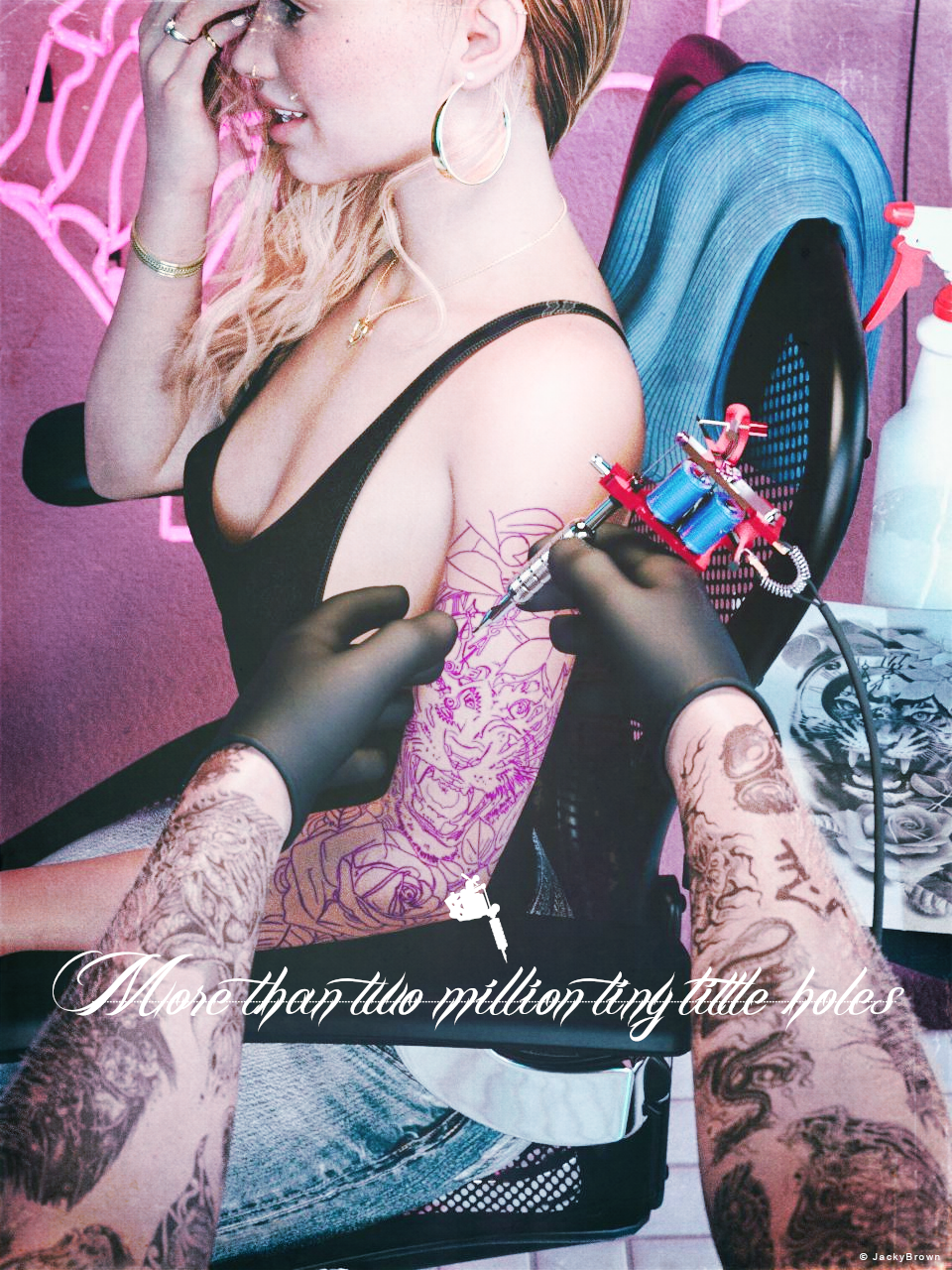
"More than two million tiny little holes"
Starring: TaylorLasha-AngelieThe tale: (Entirely fictional)
"Well, here we go! Are you ready for it? Please move your arm a little more towards me and try to relax some more. For a first tattoo you have chosen a very large one, most people choose a small one to start with. I think setting the lines alone will take two hours or more..."
Non-motion Picture Soundtrack:
Kai September - Hole In My Heart (© 2021) https://www.youtube.com/watch?v=D90_aodEldA
COUNTABLE FREEBIES: (Alphabetic order)#01! Bezel Set Ring for G3F G8F by AllenArt
https://sharecg.com/v/95896/gallery/21/DAZ-Studio/Bezel-Set-Ring-for-G3F-G8F **#02! Braid Bracelets for G3M, G3F, G8M, and G8F by Fisty
https://www.sharecg.com/v/92874/gallery/21/DAZ-Studio/Braid-Bracelets-for-G3M-G3F-G8M-and-G8F **#03! Chameleon ROse2 for Genesis 8 Female by zoro_d
https://www.renderosity.com/freestuff/items/85859/chameleon-rose2-for-genesis-8-female **
[Lashes morph used]#04! ED's Brick Shader (Iray) by Edheldil3D
https://www.deviantart.com/edheldil3d/art/Freebie-ED-s-Brick-Shader-Iray-788871766 **#05! Flo Makeup For Genesis 8 Females by AprilYSH
https://shop.aprilsvanity.com/flo-makeup-for-genesis-8-females.html#06! Free Update for Biker Outfit G8F and Sideswept Hair by zoro_d
https://www.renderosity.com/freestuff/items/85860/free-update-for-biker-outfit-g8f-and-sideswept-hair **
[Side Swept ROse Hair update used only]#07! Genesis 2 Female Short Skirt & Jumper by Wilmap's Digital Creations
https://www.wilmapsdigitalcreations.co.uk/view_product.php?id=217 **#08! Hoop Earrings for Genesis8 Female by Afrodite-Ohki
https://www.renderosity.com/freestuff/items/92631/hoop-earrings-for-genesis8-female **#09! Iray car related shader presets 'megapack' by Tom2099
https://www.deviantart.com/tom2099/art/Iray-car-related-shader-presets-megapack-539622361 **#10! Iray Jewelry Shaders by AllenArt
https://sharecg.com/v/95893/gallery/21/DAZ-Studio/Iray-Jewelry-Shaders **#11! Kiara Interior HDRI by Poly Haven
https://polyhaven.com/a/kiara_interior#12! Laptop Table 3D Model by Kavisubish
https://www.renderhub.com/kavisubish/laptop-table **#13! Lights for Daz Studio w/ Iray by DrBoots
https://www.deviantart.com/drboots/art/Freebie-Lights-for-Daz-Studio-w-Iray-579993105 **#14! Little Flower Studs for Genesis 8 and/or 8.1 Female by AllenArt
https://sharecg.com/v/98499/gallery/21/DAZ-Studio/Little-Flower-Studs **#15! Maddy for GF8 Charakter Shape by MysticArtDesign
https://sharecg.com/v/98461/browse/21/DAZ-Studio/Maddy-for-GF8-Charakter-Shape **
[LIE Blush Make up & freckles, customized]#16! Morph Expansion Pack for Wilmap's G2F Short Skirt by BlackFeather1973
https://www.sharecg.com/v/76461/gallery/21/DAZ-Studio/Morph-Expansion-Pack-for-Wilmaps-G2F-Short-Skirt **#17! Morphing Poster by SquarePeg3D
https://www.renderosity.com/rr/mod/freestuff/morphing-poster/87552 **#18! My Heart Necklace for Genesis 8 Female by Amy Aimei
https://www.deviantart.com/amyaimei/art/My-Heart-Necklace-for-Genesis-8-Female-729010047 **#19! Nail Art for Genesis 8 and 8.1 Female(s) by zoro_d
https://www.renderosity.com/freestuff/items/92918/nail-art-for-genesis-8-and-81-females **#20! New Walther 2.0 tanned skin + hair system by Ruslanomar
https://sharecg.com/v/98463/browse/21/DAZ-Studio/New-Walther-2.0-tanned-skin-%2B-hair-system **#21! Office Chair by inLite Studio
https://inlitestudio.com/3d/product/office-chair/ **#22! Pd-Soft Leather Daz Studio Shaders for Iray by Parrotdolphin (Janet)
https://sharecg.com/v/80223/gallery/7/Material-and-Shader/Pd-Soft-Leather-Daz-Studio-Shaders-for-Iray **#23! Piercing Gaze for Genesis 8 Females by SWTrium
https://www.renderosity.com/freestuff/items/83703/piercing-gaze-for-genesis-8-females **#24! Police Gloves for Genesis 8 by zoro_d
https://www.renderosity.com/freestuff/items/82851/police-gloves-for-genesis-8 **#25! PS Angelie for Genesis 8 Female or Genesis 8.1 Female by pixeluna
https://www.renderosity.com/freestuff/items/90309/ps-angelie-for-genesis-8-female-or-genesis-81-female **#26! Side Swept ROse Hair (G3F,G8F) Part 1&2 by zoro_d
https://www.renderosity.com/mod/freestuff/side-swept-rose-hair-g3f-g8f-part-1/79533 **
https://www.renderosity.com/mod/freestuff/side-swept-rose-hair-g3f-g8f-part-2/79534 **#27! SoulTrain Pants G8F_FREE by SdeB
https://www.sdebstore.com/collections/free-stuff/products/soultrain-pants-g8f_free **#28! SY 200 Morphs for Genesis 8 Head and Body by SickleYield
https://sharecg.com/v/91888/view/21/DAZ-Studio/SY-200-Morphs-for-Genesis-8-Head-and-Body **#29! TaylorLasha For Genesis 8 Female by MagicMaiden
https://www.renderosity.com/freestuff/items/92992/taylorlasha-for-genesis-8-female **#30! Wesley Shirt for G8F by kemel
https://www.renderhub.com/kemel/wesley-shirt-for-g8f **
NO-COUNT ITEMS:--- Neon Sign - Skull (OBJ) by Shane Vince Marcos
--- Nose Ring 01 for G2F, G3F and/or G8F by AllenArt
--- Scene Lights for Iray by Lali Kamala (Holiday Loyalty Sale 2021 Free Item)
--- Tattoo Kit by Stegy [Glove cuffs, Spray bottle, Tattoo machine]SPECIAL THANKS:
Copyright® Tattoo stencil and sketch by garsone
https://www.fiverr.com/garsone/draw-tattoo-stencil-for-thermal-printerPURCHASED/PAID FOR ITEMS: None 100% Freebies
*1 E-mail address required
** Registration required
#x! Countable Items (Bold ones are used by me for the first time I think.)
--- No longer available freebies
++ Free with DAZ Studio (or the Essentials)
$x. Purchased/Paid For Item
Rendered with DAZ Studio 4.10.0.123 (nVidia Iray®)Other free software used: GIMP v2.10.34 and Irfanview 4.62
Postwork: Used some filters that come with GIMP. Also used mcjDenoise (https://sites.google.com/site/mcasualsdazscripts9/mcjdenoise) and mcjLut by mcasual (https://sites.google.com/site/mcasualsdazscripts9/mcjlut) with the free FilterGrade Cinematic LUTs Pack (https://filtergrade.com/free-cinematic-luts-video-editing/) and the Vintage-Look Photoshop Effects Pack/Light Leaks Effect Pack by Michael Jarrott (https://creativecloud.adobe.com/discover/article/vintage-look-photoshop-effects-pack).
"More than two million tiny little holes"
How to use morphs I purchasedkatherine said:
Thank you for your help, SofaCitizen. These morphs are not appearing in the Shaping-morphs section. I used Morph Loader Pro to load some standard Genesis 8 morphs in there and they work. So, I seem to be in the right place.
And thank you, Richard Haseltine. "How did you install the morphs?" is the problem. I don't seem to be able to install them at all. In the Order list in the store, when I click download it goes to a page for the product, but there is never any download link, no zip file or download and install link.
I got a freebie in the same order, and it has a download link which works and a Download_And_Install which reports that the account referenced is not set up in Install Manager.
The morph package, however, doesn't do anything.
And Daz doesn't respond to "Submit a Request" questions anymore.
You shouldn't have to use Morph Loader Pro to activate morphs that you have installed correctly.
If you have bought products you don't need to click on anything, just fire up DIM and it will look for any purchased products that are not installed and offer them up in the first tab.
Currently, my experience is that they are responding to support tickets but a bit slower than they were a few months ago. In addition, I am seeing updated packages in DIM so perhaps there is more of a back-log than usual?
How to use morphs I purchasedThank you for your help, SofaCitizen. These morphs are not appearing in the Shaping-morphs section. I used Morph Loader Pro to load some standard Genesis 8 morphs in there and they work. So, I seem to be in the right place.
And thank you, Richard Haseltine. "How did you install the morphs?" is the problem. I don't seem to be able to install them at all. In the Order list in the store, when I click download it goes to a page for the product, but there is never any download link, no zip file or download and install link.
I got a freebie in the same order, and it has a download link which works and a Download_And_Install which reports that the account referenced is not set up in Install Manager.
The morph package, however, doesn't do anything.
And Daz doesn't respond to "Submit a Request" questions anymore.
Daz 3D is part of

Connect
DAZ Productions, Inc.
7533 S Center View Ct #4664
West Jordan, UT 84084Licensing Agreement | Terms of Service | Privacy Policy | EULA
© 2026 Daz Productions Inc. All Rights Reserved.