-
Is there any need for classic Hollywood G9 head morphs?
I haven't tried G9 yet. However, I went from Poser to Daz in 2018.
I used V4, then learned to use all of the Genesis generations up to G8.
So, I'm still loving G8 and just using G8.1 :)
I would love a Judy Garland morph. When she was in "Meet Me in St. Louis!" I so love your morphs and you are one fantastic artist!!!
Best place to commission a new modelI'm wondering if there's a site, or perhaps a space here in these forums, to commission some Daz work? I'm trying to create a figure from some old photos, none of which have the right quality or angles to use any face creator software. It would have to be done by hand and my fledgling skills don't seem to be up to the task.
I tried hiring various folks on fiverr.com, but it turned out that was a waste of time, no one seemed to understand that I don't have the pictures necessary for face transfer to work (or I'd have done it myself) and one guy actually tried to sucker me into sending him cash via PayPal. So I'm hoping to find a site with decent and skilled folks who have experience building from scratch.
v4 skirt morph problem when fit to G8FThe only way of reserving bones is to use Transfer Rigging without Auto-fit... I roughly showed the steps as attached... but still had to make a fixing morph for G8F in Blender...
Based on the converted skirt, dForce modifier could be further added as you wish.[Released] RSSY Character And Material Conversion Bundle Genesis 8 to Genesis 9 [Commercial]echoesc said:
I started out with almost all bonzai trees, as Gabriel-C referred to them (that cracked me up, although I was kind of frustrated at the time). Dialing down Full body, and using People morph or vice versa was a compromise, and usually didn't look great. But I did find my solution by only using single morph dials for my G8 characters.
Here's what I did.
(There are better tutorials out there for converting multiple morphs into a single morph, but this is my short version, and these are mostly the defaults.. If you want pictures and/or videos, or more options, you can just google or bing for them)
If you're going do multiple custom conversions, I would advise settinnng up custom actions for creating Genesis 8 Basic Female, and Genesis 9- Load Genesis 8 with all custom morphs. Delete everything else - hair, clothing AND eyelashes. Make sure any HD morphs are changed to 0 and I also change Nails and Nipples to 0 if those are dialed up.
- Parameters-General-Mesh Resolution. Change Resolution Level from High Resolution to Base, and SubDivision Level to 1. Render SubD Level to 1
- Export - Choose a folder where this will be easy to find. I used Daz/Studio 4/OBJ Files, but use whatever you like. Save as type - chooose Wavefront Object (*.obj
- In the dialog box that comes up, for "To" choose DAZ Studio (1 unit - 1 cm). Click on Accept.
- Clear scene, and bring up a clean Genesis 8 Female.
- Edit->Object->Morph Loader Pro
- Click Choose Morph Files. Go to the OBJ you previously created. Open. It should show up under Item. Click Accept. Message should say Created morph successfully. Click Okay
- Parameters->Morphs. Your new morph should be there. Dial to 100%
- Tools-> Joint Editor
- With your Genesis 8 selected, Right click in the viewport, then Edit-> Adjust Rigging to Shape. Click Accept.
- Parameters->Morphs, Right click the Morph name. Click "Edit mode". Right click again. Click ERC Freeze. Accept/
- File->Save As-> Support Asset-> Morph Asset. Under Properties, Genesis 8 Female > Morphs > Morph Loader > Your new morph - check this box. Accept.
- This next step is optional, but I just do this to make sure everything is working before I start the conversion.
- Clear the scene. Dial up a fresh Genesis 8 female. Go to Parameters-->Morphs and dial up your character. Load the Material for character.
- Load G9
- Ctrl-Click G8 and then G9, and click the script!
It's worked for 100% of my conversions so far (albeiet with a few glitches here and there, but minor)- even V3 and V4, that were converted to G2, then G3 then G8, and finally G9! Below are a V3 and V4 characters that went through multiple conversions on the way to G8 and now G9. And those are also the original materials, that have been converted along the way.
The V3 is Real Woman, and V4 is Naiad. Not sure how i managed to break her arm, and I didn't spend time fixing the hair and skirt surfaces, but but you get the ideaThanks for sharing!
v4 skirt morph problem when fit to G8FThere is an old product EaraneOutfit which is old but pretty, product ID is 5661, it has a V4ESkirt which is a .cr2 file.
As shown in attached pictures, it can be used on V4.2, no problem, the skirt keeps its own bones so that it can be adjusted by the 'other' slidder. But when applied to G8F, the skirt changes to the G8F bones, the consequence is, all its own morphs such like SFBendAll don't work anymore, so the skirt is no use for G8F under whatever poses.
Any idea to let the skirt keep its own bones when fit to G8F so that its own morphs can be used? The product 'RSSY Clothing Converter from Victoria 4 to Genesis 8 Female' has no use since it gets the same result as the DAZ default fit, bones changed.
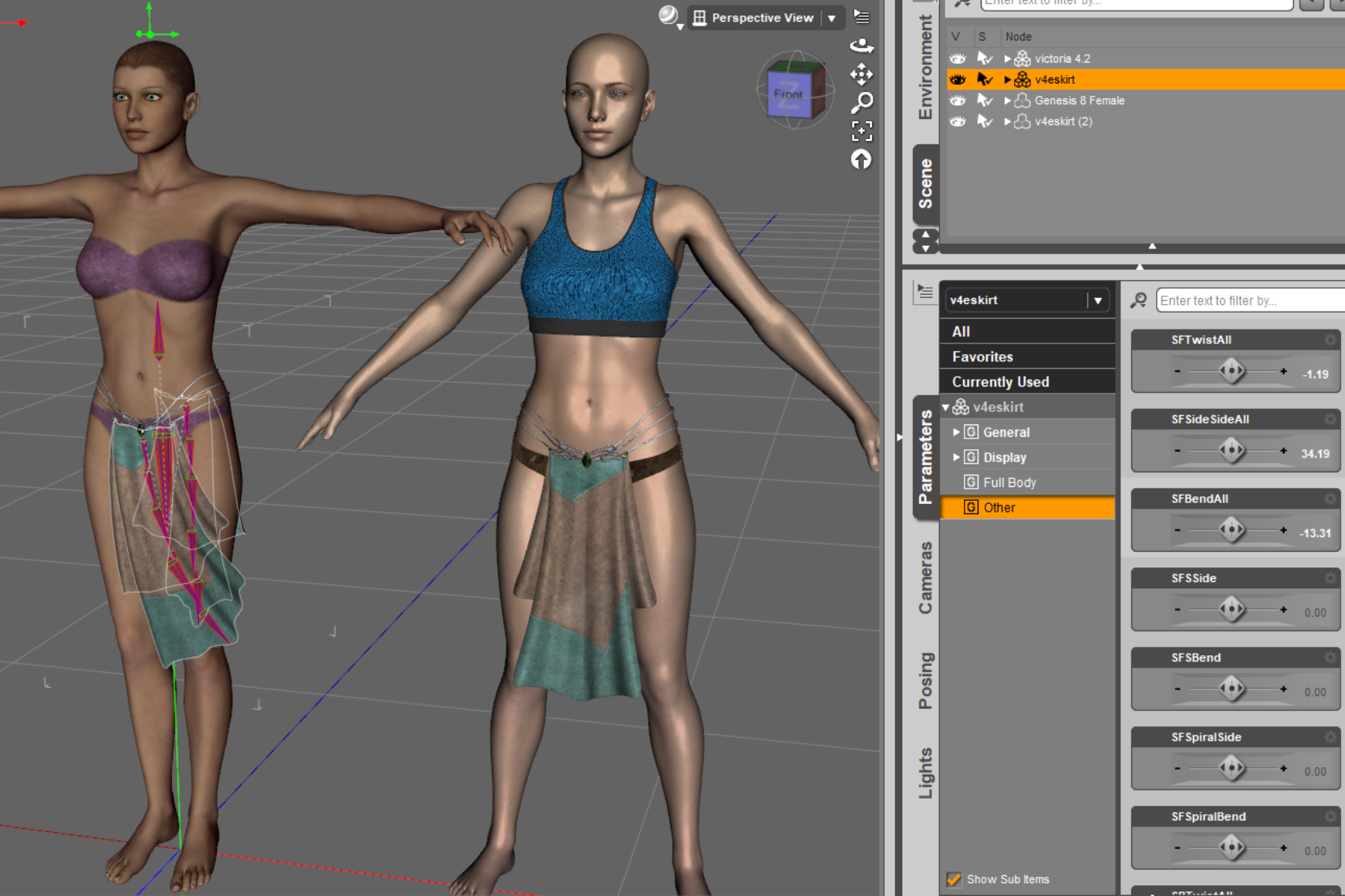
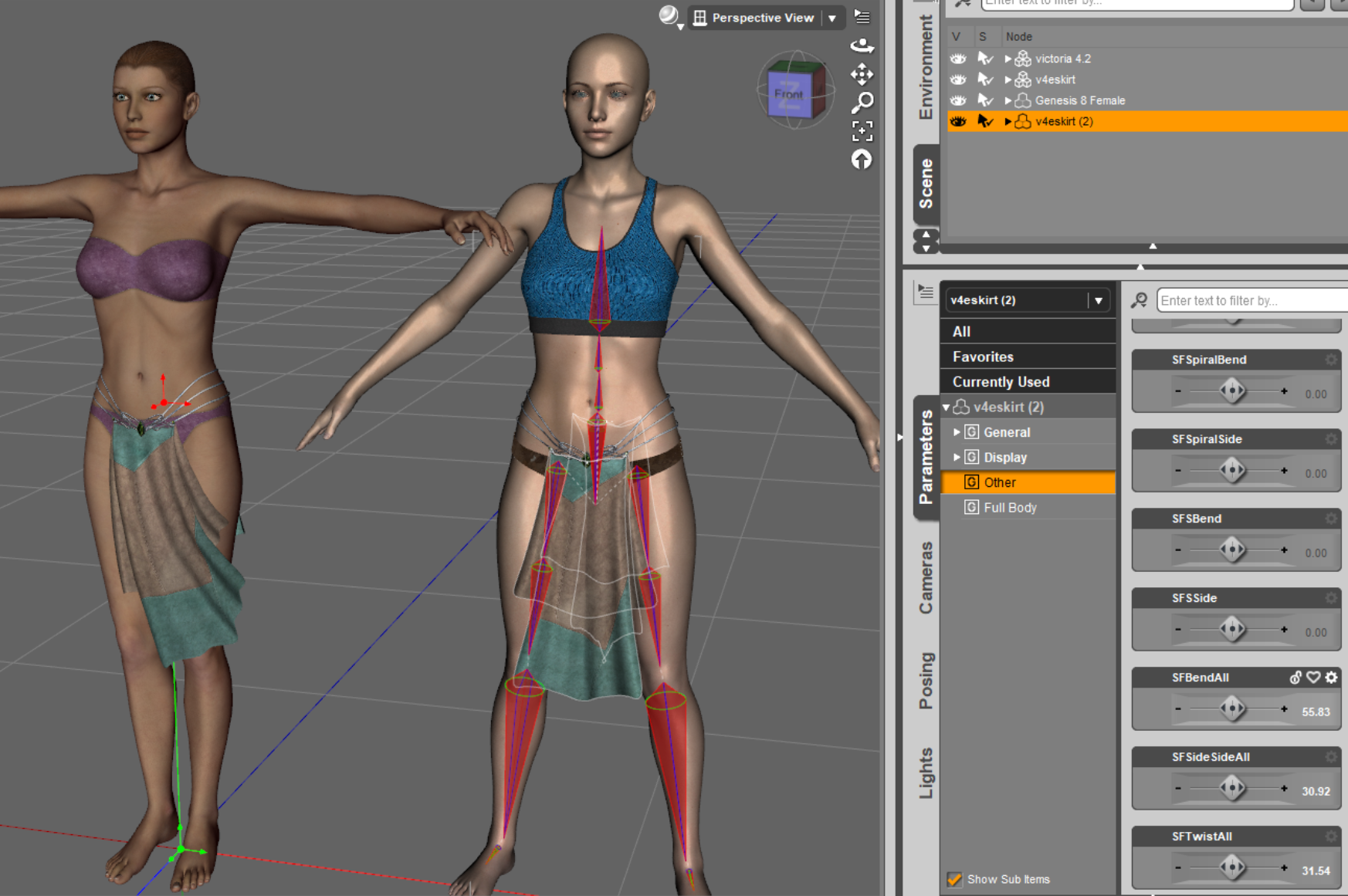 [Released] RSSY Character And Material Conversion Bundle Genesis 8 to Genesis 9 [Commercial]
I started out with almost all bonzai trees, as Gabriel-C referred to them (that cracked me up, although I was kind of frustrated at the time). Dialing down Full body, and using People morph or vice versa was a compromise, and usually didn't look great. But I did find my solution by only using single morph dials for my G8 characters.
Here's what I did.
(There are better tutorials out there for converting multiple morphs into a single morph, but this is my short version, and these are mostly the defaults.. If you want pictures and/or videos, or more options, you can just google or bing for them)
If you're going do multiple custom conversions, I would advise settinnng up custom actions for creating Genesis 8 Basic Female, and Genesis 9- Load Genesis 8 with all custom morphs. Delete everything else - hair, clothing AND eyelashes. Make sure any HD morphs are changed to 0 and I also change Nails and Nipples to 0 if those are dialed up.
- Parameters-General-Mesh Resolution. Change Resolution Level from High Resolution to Base, and SubDivision Level to 1. Render SubD Level to 1
- Export - Choose a folder where this will be easy to find. I used Daz/Studio 4/OBJ Files, but use whatever you like. Save as type - chooose Wavefront Object (*.obj
- In the dialog box that comes up, for "To" choose DAZ Studio (1 unit - 1 cm). Click on Accept.
- Clear scene, and bring up a clean Genesis 8 Female.
- Edit->Object->Morph Loader Pro
- Click Choose Morph Files. Go to the OBJ you previously created. Open. It should show up under Item. Click Accept. Message should say Created morph successfully. Click Okay
- Parameters->Morphs. Your new morph should be there. Dial to 100%
- Tools-> Joint Editor
- With your Genesis 8 selected, Right click in the viewport, then Edit-> Adjust Rigging to Shape. Click Accept.
- Parameters->Morphs, Right click the Morph name. Click "Edit mode". Right click again. Click ERC Freeze. Accept/
- File->Save As-> Support Asset-> Morph Asset. Under Properties, Genesis 8 Female > Morphs > Morph Loader > Your new morph - check this box. Accept.
- This next step is optional, but I just do this to make sure everything is working before I start the conversion.
- Clear the scene. Dial up a fresh Genesis 8 female. Go to Parameters-->Morphs and dial up your character. Load the Material for character.
- Load G9
- Ctrl-Click G8 and then G9, and click the script!
It's worked for 100% of my conversions so far (albeiet with a few glitches here and there, but minor)- even V3 and V4, that were converted to G2, then G3 then G8, and finally G9! Below are a V3 and V4 characters that went through multiple conversions on the way to G8 and now G9. And those are also the original materials, that have been converted along the way.
The V3 is Real Woman, and V4 is Naiad. Not sure how i managed to break her arm, and I didn't spend time fixing the hair and skirt surfaces, but but you get the ideaFreebie Challenge May 2023 - "Sweet Music" - Entries Thread OnlyMy random out-of-the-blue entry...
The Demonlord of Chaos loves music, he loves it even more when he pours his magic into it and summons a young lady to dance for him while he plays.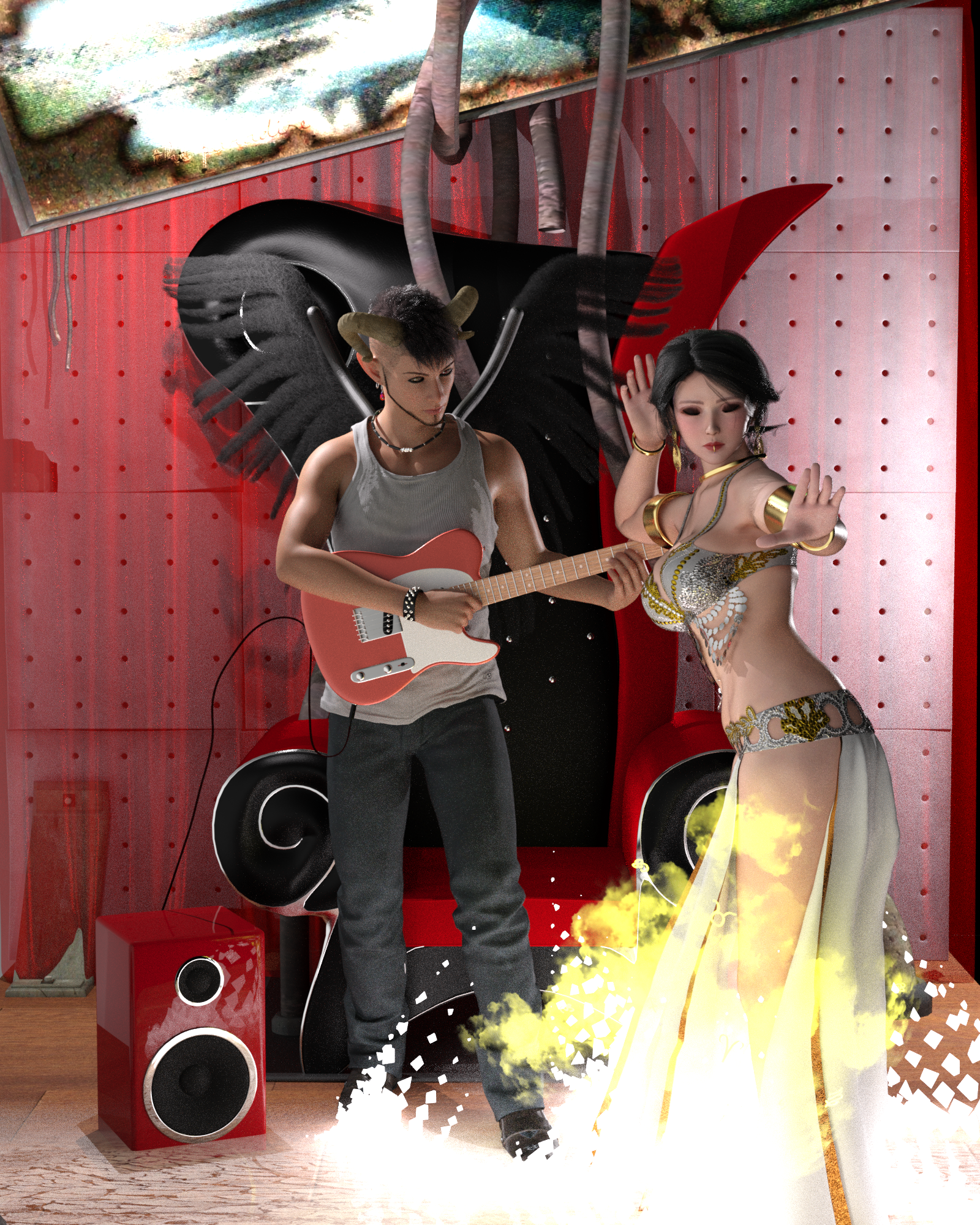
Lighting:
HDRI: https://www.renderosity.com/freestuff/items/51980
converted to PNG for color change at: https://convertio.co/hdr-png/
Point lights: https://www.deviantart.com/valzheimer/art/VA2015-2Point-Lights-Iray-Freebie-566465998Scene:
Guitar: https://digi-dotz.com/index.php/props/guitar-for-daz-studio-and-g8-pose-preset
Speaker: https://www.digi-dotz.com/index.php/props/speakers-prop-for-daz-studio
Chair: https://www.renderosity.com/freestuff/items/65680/mf-chair
Curtain: https://www.renderosity.com/freestuff/items/83637/realistic-curtains
Grunge wall: https://web.archive.org/web/20100305130251/http://www.aerysoul.com/board/showthread.php?t=2630
Hanyma set (both mirrors work): https://web.archive.org/web/20080115071902/http://aerysoul.com/free/hanymascene/hanymascene_main.html
Magic Effect: https://sharecg.com/v/74191/gallery/11/Poser/Fantasy-Effects-Power-Up-FX
AND: https://sharecg.com/v/92198/gallery/21/DAZ-Studio/Fire-of-MagicChaos:
M4 Jewelry Pack 5 (earrings): https://www.renderosity.com/freestuff/items/67453/m4-jewelry-pack-5
M4 Jewelry Pack 4 (wristband): https://www.renderosity.com/freestuff/items/64199/m4-jewelry-pack-4
M4 Jewelry Pack 2 (necklace): https://www.renderosity.com/freestuff/items/56723/m4-jewelry-pack-2-version-01
Oni Horns for M4/V4: https://www.renderosity.com/freestuff/items/58335/oni-horns-for-m4-v4
Wings: https://www.renderosity.com/freestuff/items/89971/angel-wings-bundle-for-gf8
Shirt: https://www.sdebstore.com/collections/free-stuff/products/bnj-tanktop-g8m-free
Pants and shoes: https://www.patreon.com/posts/ignis-scientia-60258396Dancer:
Shape & texture: https://www.renderhub.com/merade/doa-elise-for-genesis-8-and-8-1-female
Additional morphs: https://sharecg.com/v/91888/view/21/DAZ-Studio/SY-200-Morphs-for-Genesis-8-Head-and-Body
Hair: https://www.deviantart.com/kayleyss/art/Gwennili-Hair-670556854
Outfit & pose: https://www.renderosity.com/freestuff/items/82950
Piercings: https://poserdazfreebies.miraheze.org/wiki/Face_piercings_for_Victoria_4_and_Alice
Navel piercing: https://www.renderosity.com/freestuff/items/93693/navel-piercings-g8f-g9
Earrings: https://www.sdebstore.com/collections/free-stuff/products/snail-earrings-g8f-free
Jewelry: https://www.deviantart.com/runecarve/art/bracelet-for-v4-and-a4-91516165
Shoes: https://www.renderosity.com/freestuff/items/76738/drusilla-sandals-for-genesis-3-femaleShaders:
http://rawart3d.deviantart.com/art/Iray-Bone-Shader-607569104
https://sharecg.com/v/95898/gallery/21/DAZ-Studio/Shimmery-Sheer-Fabrics-II
https://sharecg.com/v/95893/gallery/21/DAZ-Studio/Iray-Jewelry-Shaders
https://sharecg.com/v/81213/gallery/7/Material-and-Shader/DAZ-Iray-car-related-shader-presets-megapack
https://sharecg.com/v/95937/gallery/21/DAZ-Studio/Shiny-PVC-Latex-Shaders-Iray
https://sharecg.com/v/80223/gallery/7/Material-and-Shader/Pd-Soft-Leather-Daz-Studio-Shaders-for-IrayNo Count:
Cute L.I.E. Makeup for Genesis 3 and 8 Female (Free during Xmas 2019 from Daz)
Merrymaking Style for Genesis 8 Female (Free during Xmas 2019 from Daz)Paid:
Chaos Character: https://www.daz3d.com/kyoji-for-yuzuru-8
Chaos Ear morph: https://www.daz3d.com/luca-for-genesis-8-male
Chaos Hair: https://www.daz3d.com/asher-hair-for-genesis-3-male-s
Chaos Facial hair: https://www.daz3d.com/maxx-hd-mega-pack-for-the-brute-8do some functions on the new version lag for you too?TBH, I found no really ‘’big change‘’ but LIE enhancement and Transfer Utility fixing which I use frequently, as I use Public Build most of the time...
[Released] RSSY Character And Material Conversion Bundle Genesis 8 to Genesis 9 [Commercial]lwaves said:
I'm putting this here in case anyone else finds it useful.
Using the main converter, I was having issues with the resulting morphs being garbled, like others here. It was nowhere near as bad for me as it is for others but still, it wasn't correct. I could dial in a great head morph or a great body morph but not both together. I'd tried renaming morphs with FBM and FHM, I'd dialled out any other morphs and resaved (there weren't any as it's a custom character with head and body morps only) and so on. No joy there but the material suit worked great, so that was something.
I moved over to the scene converter which went through it's processes before throwing up something like an 'error converting morphs' box. I was about to give up and try to fully manual route. Then I noticed that my custom character was in the viewport and looking spot on. I checked the dials and they worked - no distortions, so I quickly saved off those morphs, cleared the scene, loaded a default G9, dialled the morphs and.....they worked perfectly. Huzzah!!
Now it's worth bearing in mind that I've only tried this once as of typing but I thought it was worth sharing. So hopefully, if I get garbled morphs again, I can use a mix and match of the two coverters to get the required result. The material suit from the main converter and the morphs from the scene comverter, while deleting the morphs that aren't needed. It's not ideal but if it keeps working then that's good enough for me.Hopefully others might find this useful and I'll be trying more characters later.

Thanks for sharing your experience.
[Released] RSSY Character And Material Conversion Bundle Genesis 8 to Genesis 9 [Commercial]Astroz said:
Hey,
I don't have such big distortions, but I got this eyball shrink on left side, no idea why & how to fix it permanently.
It always reset, when I change poses or expressions back to this distortion.
I tried all methods mentioned in the PDF...
Replacing eyballs was the only option.
The Eylashes never fit, but Hair & skin seems to be converted well.
So far only one figure had bad overall shape, Melina from maelwenn.
Additional none of my shoes fit to the converted characters & the toes are always disshaped.
They seem to stick together. When I move one toe the neighbouring toe is following partialy & disshape because of it.
The skin & overall shapes seems to be ok for most Individual & Original Characters, like Mousso's Aakash in the picture here.
But Victoria 8 had also distoretd toes after conversion to 9....
What i am doing wrong & is there a chance to autifix this issues in an update?
For the eyes, I would suggest looking in the My Library\data\DAZ 3D\Genesis 9\Genesis 9 Eyes\Morphs. Perhaps you used the Eye Placement dialog for only one eye and a morph was created that is messing things up. Rename the morph directory so it is not seen.
For the toes, depending on the figure, I can have some distortion in the toes but they are not stuck together. I think it depends on the original geometry of the G8 character. I will ask SickleYield if there is anything you can do.
Alvin Bemar's Gescon: Very close but not usable :(Dolce Saito said:
yes, slip is a problem, I tried rigid method before, also has a little bit slip problem. But the cutout map will not slip, so how about put a bloody cylinder ( '>' cutted) inside the limb?geograft I never used, but yesterday I saw a thread talked about this, here: https://zonegfx.com/forums/topic/any-good-tutorials-for-geografts/
they also talked about Mesh grabber, I thought this is an idea, maybe you can try to modify the limb by Mesh grabber, then save as a custom morph.
I tried cutout before. Unfortunately, it causes light to enter into the figure, so that is a no go. Mesh-grabber is not animatable, so that limitation eliminates the option.
Yes, you are right, cutout doesn't work, light enter problem.
I made a quick test, the Geograft method works, see attachments.
I cutted a small piece of leg surface, bridge to Blender, Boolean it, save as .obj, import the obj to DAZ, use Transfer Utility to add bones on it, then Geometry Editor to assign the graft as the toturial, finally Fit it to the figure, done, no slip anymore.
Freebie Challenge May 2023 - "Sweet Music" - Main ThreadChelle the Cat said:
My random out-of-the-blue entry...
The Demonlord of Chaos loves music, he loves it even more when he pours his magic into it and summons a young lady to dance for him while he plays.Lighting:
HDRI: https://www.renderosity.com/freestuff/items/51980
converted to PNG for color change at: https://convertio.co/hdr-png/
Point lights: https://www.deviantart.com/valzheimer/art/VA2015-2Point-Lights-Iray-Freebie-566465998Scene:
Guitar: https://digi-dotz.com/index.php/props/guitar-for-daz-studio-and-g8-pose-preset
Speaker: https://www.digi-dotz.com/index.php/props/speakers-prop-for-daz-studio
Chair: https://www.renderosity.com/freestuff/items/65680/mf-chair
Curtain: https://www.renderosity.com/freestuff/items/83637/realistic-curtains
Grunge wall: https://web.archive.org/web/20100305130251/http://www.aerysoul.com/board/showthread.php?t=2630
Hanyma set (both mirrors work): https://web.archive.org/web/20080115071902/http://aerysoul.com/free/hanymascene/hanymascene_main.html
Magic Effect: https://sharecg.com/v/74191/gallery/11/Poser/Fantasy-Effects-Power-Up-FX
AND: https://sharecg.com/v/92198/gallery/21/DAZ-Studio/Fire-of-MagicChaos:
M4 Jewelry Pack 5 (earrings): https://www.renderosity.com/freestuff/items/67453/m4-jewelry-pack-5
M4 Jewelry Pack 4 (wristband): https://www.renderosity.com/freestuff/items/64199/m4-jewelry-pack-4
M4 Jewelry Pack 2 (necklace): https://www.renderosity.com/freestuff/items/56723/m4-jewelry-pack-2-version-01
Oni Horns for M4/V4: https://www.renderosity.com/freestuff/items/58335/oni-horns-for-m4-v4
Wings: https://www.renderosity.com/freestuff/items/89971/angel-wings-bundle-for-gf8
Shirt: https://www.sdebstore.com/collections/free-stuff/products/bnj-tanktop-g8m-free
Pants and shoes: https://www.patreon.com/posts/ignis-scientia-60258396Dancer:
Shape & texture: https://www.renderhub.com/merade/doa-elise-for-genesis-8-and-8-1-female
Additional morphs: https://sharecg.com/v/91888/view/21/DAZ-Studio/SY-200-Morphs-for-Genesis-8-Head-and-Body
Hair: https://www.deviantart.com/kayleyss/art/Gwennili-Hair-670556854
Outfit & pose: https://www.renderosity.com/freestuff/items/82950
Piercings: https://poserdazfreebies.miraheze.org/wiki/Face_piercings_for_Victoria_4_and_Alice
Navel piercing: https://www.renderosity.com/freestuff/items/93693/navel-piercings-g8f-g9
Earrings: https://www.sdebstore.com/collections/free-stuff/products/snail-earrings-g8f-free
Jewelry: https://www.deviantart.com/runecarve/art/bracelet-for-v4-and-a4-91516165
Shoes: https://www.renderosity.com/freestuff/items/76738/drusilla-sandals-for-genesis-3-femaleShaders:
http://rawart3d.deviantart.com/art/Iray-Bone-Shader-607569104
https://sharecg.com/v/95898/gallery/21/DAZ-Studio/Shimmery-Sheer-Fabrics-II
https://sharecg.com/v/95893/gallery/21/DAZ-Studio/Iray-Jewelry-Shaders
https://sharecg.com/v/81213/gallery/7/Material-and-Shader/DAZ-Iray-car-related-shader-presets-megapack
https://sharecg.com/v/95937/gallery/21/DAZ-Studio/Shiny-PVC-Latex-Shaders-Iray
https://sharecg.com/v/80223/gallery/7/Material-and-Shader/Pd-Soft-Leather-Daz-Studio-Shaders-for-IrayNo Count:
Cute L.I.E. Makeup for Genesis 3 and 8 Female (Free during Xmas 2019 from Daz)
Merrymaking Style for Genesis 8 Female (Free during Xmas 2019 from Daz)Paid:
Chaos Character: https://www.daz3d.com/kyoji-for-yuzuru-8
Chaos Ear morph: https://www.daz3d.com/luca-for-genesis-8-male
Chaos Hair: https://www.daz3d.com/asher-hair-for-genesis-3-male-s
Chaos Facial hair: https://www.daz3d.com/maxx-hd-mega-pack-for-the-brute-8All Freebies checked, please move to entries
Freebie Challenge May 2023 - "Sweet Music" - Main ThreadMy random out-of-the-blue entry...
The Demonlord of Chaos loves music, he loves it even more when he pours his magic into it and summons a young lady to dance for him while he plays.Lighting:
HDRI: https://www.renderosity.com/freestuff/items/51980
converted to PNG for color change at: https://convertio.co/hdr-png/
Point lights: https://www.deviantart.com/valzheimer/art/VA2015-2Point-Lights-Iray-Freebie-566465998Scene:
Guitar: https://digi-dotz.com/index.php/props/guitar-for-daz-studio-and-g8-pose-preset
Speaker: https://www.digi-dotz.com/index.php/props/speakers-prop-for-daz-studio
Chair: https://www.renderosity.com/freestuff/items/65680/mf-chair
Curtain: https://www.renderosity.com/freestuff/items/83637/realistic-curtains
Grunge wall: https://web.archive.org/web/20100305130251/http://www.aerysoul.com/board/showthread.php?t=2630
Hanyma set (both mirrors work): https://web.archive.org/web/20080115071902/http://aerysoul.com/free/hanymascene/hanymascene_main.html
Magic Effect: https://sharecg.com/v/74191/gallery/11/Poser/Fantasy-Effects-Power-Up-FX
AND: https://sharecg.com/v/92198/gallery/21/DAZ-Studio/Fire-of-MagicChaos:
M4 Jewelry Pack 5 (earrings): https://www.renderosity.com/freestuff/items/67453/m4-jewelry-pack-5
M4 Jewelry Pack 4 (wristband): https://www.renderosity.com/freestuff/items/64199/m4-jewelry-pack-4
M4 Jewelry Pack 2 (necklace): https://www.renderosity.com/freestuff/items/56723/m4-jewelry-pack-2-version-01
Oni Horns for M4/V4: https://www.renderosity.com/freestuff/items/58335/oni-horns-for-m4-v4
Wings: https://www.renderosity.com/freestuff/items/89971/angel-wings-bundle-for-gf8
Shirt: https://www.sdebstore.com/collections/free-stuff/products/bnj-tanktop-g8m-free
Pants and shoes: https://www.patreon.com/posts/ignis-scientia-60258396Dancer:
Shape & texture: https://www.renderhub.com/merade/doa-elise-for-genesis-8-and-8-1-female
Additional morphs: https://sharecg.com/v/91888/view/21/DAZ-Studio/SY-200-Morphs-for-Genesis-8-Head-and-Body
Hair: https://www.deviantart.com/kayleyss/art/Gwennili-Hair-670556854
Outfit & pose: https://www.renderosity.com/freestuff/items/82950
Piercings: https://poserdazfreebies.miraheze.org/wiki/Face_piercings_for_Victoria_4_and_Alice
Navel piercing: https://www.renderosity.com/freestuff/items/93693/navel-piercings-g8f-g9
Earrings: https://www.sdebstore.com/collections/free-stuff/products/snail-earrings-g8f-free
Jewelry: https://www.deviantart.com/runecarve/art/bracelet-for-v4-and-a4-91516165
Shoes: https://www.renderosity.com/freestuff/items/76738/drusilla-sandals-for-genesis-3-femaleShaders:
http://rawart3d.deviantart.com/art/Iray-Bone-Shader-607569104
https://sharecg.com/v/95898/gallery/21/DAZ-Studio/Shimmery-Sheer-Fabrics-II
https://sharecg.com/v/95893/gallery/21/DAZ-Studio/Iray-Jewelry-Shaders
https://sharecg.com/v/81213/gallery/7/Material-and-Shader/DAZ-Iray-car-related-shader-presets-megapack
https://sharecg.com/v/95937/gallery/21/DAZ-Studio/Shiny-PVC-Latex-Shaders-Iray
https://sharecg.com/v/80223/gallery/7/Material-and-Shader/Pd-Soft-Leather-Daz-Studio-Shaders-for-IrayNo Count:
Cute L.I.E. Makeup for Genesis 3 and 8 Female (Free during Xmas 2019 from Daz)
Merrymaking Style for Genesis 8 Female (Free during Xmas 2019 from Daz)Paid:
Chaos Character: https://www.daz3d.com/kyoji-for-yuzuru-8
Chaos Ear morph: https://www.daz3d.com/luca-for-genesis-8-male
Chaos Hair: https://www.daz3d.com/asher-hair-for-genesis-3-male-s
Chaos Facial hair: https://www.daz3d.com/maxx-hd-mega-pack-for-the-brute-8Head gamesbarbult said:
AllenArt said:
barbult said:
@AllenArt, That is a nice looking guy. What manual technique did you use to convert him?
Thanks. I used the tutorial from Catherine3678ab in the freebies section, but before I exported the morph I changed the size to as close as default G9 as I could get it. Then I used RSSY's Eye Adjuster script to get the eyes in the right place (because they weren't). Then I exported the "morphed" eyes and brought those back in with a controller and pointed them at the Torian 9 morph. It took awhile for everything to get adjusted let's say...lol. If I do it for every one of my favorite characters I'll still be at it when I'm dead. LOL
I didn't immediately find Catherine's tutorial (I'll have to look harder). I found one by Jay Versluis that I followed. I definitely need to try your suggestion of adjusting the size before exporting. Anyway, I converted Kala 8 and Charlotte 8 and mixed them 50/50 and applied Kala 9's skin and HD morphs. I think it is a beautiful combination.
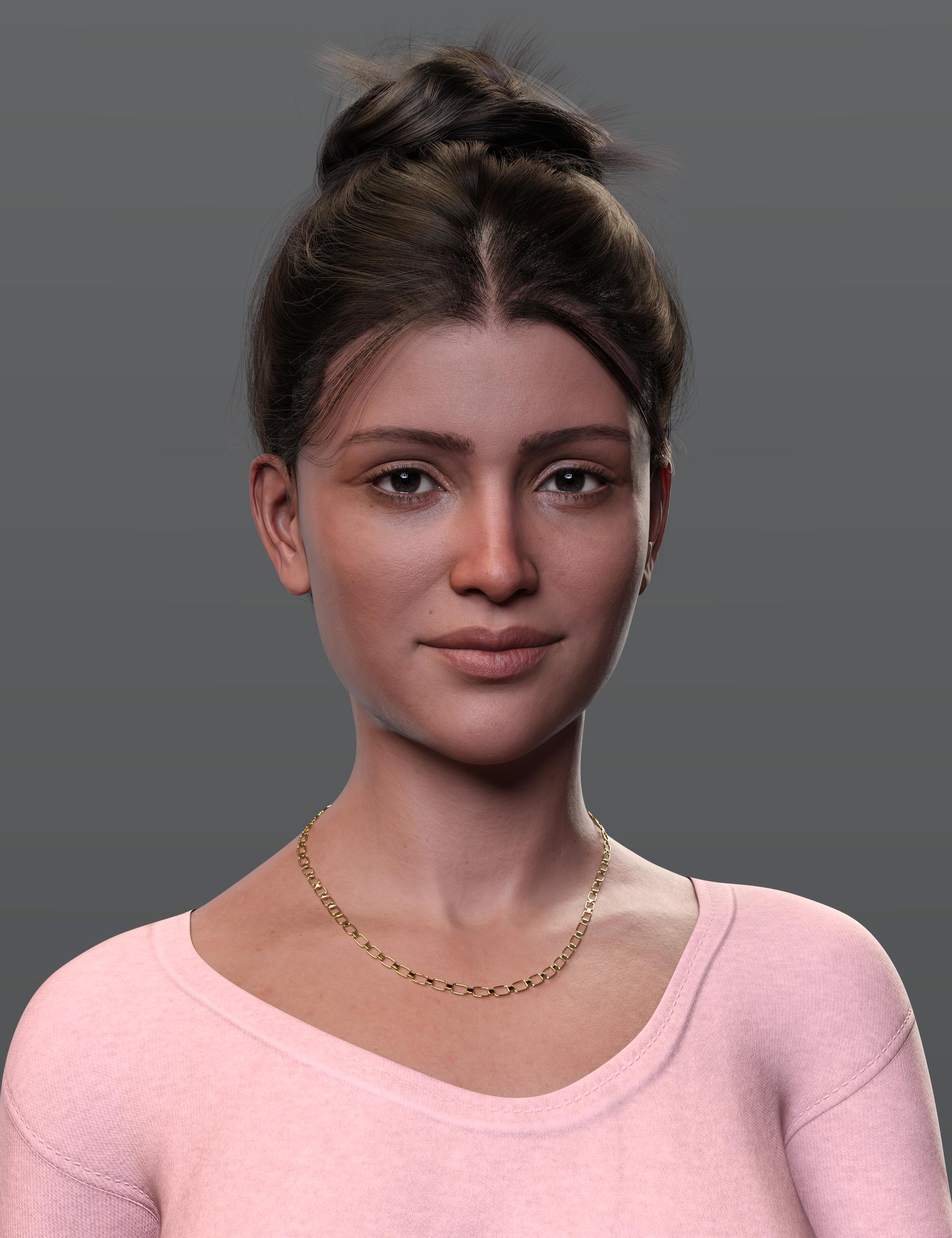
Lovely :). And I like your older men too :)
You said you used Jay's tutorial and it's basically the same as Catherine's...lol. I mean, there's really only one way to get an earlier generation over to the current one (that's available to the average user anyway) other than a converter or manually.
Need 30 children's book illustrations -- willing to pay -- or partnerrnollman said:
I wrote a children's book years ago for a young adult audience which I had envisioned with illustrations. However, my wife was a librarian and while attending a library conference with her in Chicago, had by chance shared a cab with the marketing director for children's books for Houghton Mifflin. She told me that older kids think pictures are too childish and want to read like adults.
So I did my due diligence, got the Writer's Handbook, and found all the publishers that might consider my book. In the end, I narrowed it down to 32. I sent out query letters in the spring and by the fall of the year had received rejections from 31 publishers. Then, in December of that year, I got a call from a literary agent with a large literary agency in New York. The agent who was interested in my book was a former Simon and Schuster children's book editor. She was excited about my book and was "100% sure" she could sell my book. I was ecstatic. I felt like this was it, fame and fortune were on my doorstep.
However, a year later, she called me and told me that she had given up. I was devastated. So I gave up on getting the book published. Now, I am retired and thinking that I always envisioned the book with illustrations, decided that I would break the book into five volumes so that I can turn it into a picture book for a younger audience.
The book is a fantasy about a set of glasses that when put on, transported the wearer to another world, an alternate world where people took on the characteristics of their own personalities and inanimate objects become animate. At this point, I do not care as much about making money and becoming a famous children's book author as just wanting to see the book become a reality before I die. I.
So, at the suggestion of my nephew, who has a very successful industrial design firm, I sought some help on Upwork. I found a firm that I thought understood what I wanted and could produce detailed and realistic images for the book. I contracted with them to do the first volume of the book. I used DAZ studio characters and rendered images to help them to see what I wanted the characters to look like. I created many reference files to help them understand my vision for the book. They used Maya to produce their illustrations, so I felt it was a good fit. I thought that they would be able to transfer my characters from DAZ to Maya. It would enable us to work together to produce scenes and so on. Well, months went by and they were unable to make the transitions. Finally, they stopped answering my emails and taking my phone calls. Bummer. So I gave up on the project. They took my money (the first third) and did not produce anything useful.
Now, I am again seeking help in creating the illustrations for my book. There are five volumes with approximately 30 to 40 illustrations per volume that I want to be created for the series: Jonathan and the Animal, Vegetable, and Mineral Glasses. I have been looking at illustrators on various websites and created a Word file with the list and examples of their illustrations that fit the quality and level of realism that I feel is necessary to bring the book to life. I sent emails to these illustrators or their agents and got only one response, a man who was a very talented illustrator whose estimate for the work on the first book (about three months) would be around $10,000, which was way over my budget. If I could afford it, I would love to work with him, but I simply could not afford it. Well, I actually could afford it, but it would be a hard sell to my wife, who also just recently retired.
I love the work I see from DAZ artists and from DAZ vendors who create the images for their product pages and am wondering if I could find someone who is willing to work with me to produce the 30 images for the first volume. DAZ Studio is the perfect vehicle for creating the quality illustrations that I seek for my books. I have advertised in the past (a year or so ago) on Commons and received zero responses. I am not sure why. I also have many other ideas for children's books. I have been a technical writer for over 30 years so I know a lot about publishing large complex books with lots of cad and photo images. I am also currently working on a novel.
So, if there is anyone interested in working with me on this, please contact me. I have a limited budget, but it is not insubstantial. Or, we could work as a team and try to get the first volume into libraries and possibly get a publisher to market the book. My wife is a former librarian and was a former Director of the Board of Library Commissioners in Massachusetts, where we live, and has connections with many librarians. My strategy would be to create the first book and to shop it around to librarians in the New England area to see if I could get some traction. I am an artist, myself, and could print the images on canvas and stretch them on a frame, then use them in readings at libraries to promote the book.
One question that one might ask is why, if you have some knowledge of DAZ, do you not do the illustrations yourself? Well, I started with DAZ at its inception decades ago and every time I try to work with it, I get frustrated and have to give up. I just cannot seem to get the results I want and the amount of effort to learn just never seems to pay off. I do not have the ability or the patience to create the level of illustrations that I see from DAZ vendors and artists. I have decided that it would be best to partner with someone who already has the skills with DAZ to produce the quality of illustrations that I seek. Maybe over time, working with that person, I could develop the skills to do my own illustrations using DAZ Studio.
If you are interested, I can send you the first two volumes of Jonathan and the Animal, Vegetable, and Mineral Glasses (or all five volumes for that matter so you can really immerse yourself in the world that Jonathan finds himself and become as excited as I am with the prospect of actually bringing the book to life). I can also send you the Word file with the list of illustrators and samples of their work to show you the quality and type of illustrations that I seek for the book.
I believe that working with a DAZ artist might be the best way to go.
One more thing. When I originally created the young-adult version of the novel, it was only the first novel in a series. Much like Lord of the Rings or Harry Potter, the first book would simply be the introduction to Jonathan's world. The threat from the world of the glasses would continue after the first book as the two worlds (the two realities) merged. This means that if the first volume for the younger audience gets any traction, there could be many more books in the series beyond the five volumes that I have already written.
you sure it wasnt a novel?
Controlling morphs in sequenceHa! I totally misunderstood what you want...
 So set them as below:
I could not scroll down to capture the full screenshot but I believe you'll know how to set it for Child 4 morph... For Child 1, you also can use 'Keys' option...other than Scalar. I just kept it simpler...
Controlling morphs in sequenceHey Crosswind thanks for the response, the problem I'm having is that it fires all the children at once. I'm trying to get the parent dial to progressively dial in each in turn until the parent reaches 100%
so the parent dial would be:
1-25%: Child morph 1: 0 - 100%
26-50%: Child morph 2: 0-100%
41-75%: Child Morph 3: 0-100%
76-100%: Child Morph 4: 0-100%
[Released] RSSY Character And Material Conversion Bundle Genesis 8 to Genesis 9 [Commercial]I'm putting this here in case anyone else finds it useful.
Using the main converter, I was having issues with the resulting morphs being garbled, like others here. It was nowhere near as bad for me as it is for others but still, it wasn't correct. I could dial in a great head morph or a great body morph but not both together. I'd tried renaming morphs with FBM and FHM, I'd dialled out any other morphs and resaved (there weren't any as it's a custom character with head and body morps only) and so on. No joy there but the material suit worked great, so that was something.
I moved over to the scene converter which went through it's processes before throwing up something like an 'error converting morphs' box. I was about to give up and try to fully manual route. Then I noticed that my custom character was in the viewport and looking spot on. I checked the dials and they worked - no distortions, so I quickly saved off those morphs, cleared the scene, loaded a default G9, dialled the morphs and.....they worked perfectly. Huzzah!!
Now it's worth bearing in mind that I've only tried this once as of typing but I thought it was worth sharing. So hopefully, if I get garbled morphs again, I can use a mix and match of the two coverters to get the required result. The material suit from the main converter and the morphs from the scene comverter, while deleting the morphs that aren't needed. It's not ideal but if it keeps working then that's good enough for me.Hopefully others might find this useful and I'll be trying more characters later.
Controlling morphs in sequence1st create the morph dials (Properties), then use Property Hierarchy (Window - Panes - Property Hierarchy) to assign the Parent morph as the controller of each Child morph, and set the scarlar values as needed. Pls refer to the attached screenshot...
I'm not sure if there's a full tutorial demonstrating these... you may search 'Daz Josh' or 'Daz Sickleyield' on youtube to check their channels... there should be some relevant videos.
PS: If you wanna 25%, 50%, 75% and 100% as the max value of each child morph, just enter them in Max Value fields accordingly...
[Released] RSSY Character And Material Conversion Bundle Genesis 8 to Genesis 9 [Commercial]Keiron said:
Hi
Continuing on the following have issues the rest of my actors starting with B and C had issues with the nails which is corrected by setting any nail morph to 0
BJ Yoemi Eyes Cornea Bulge causes an issue set to 0 to correct
Noem HD details causes an issue set to 0 to correct
Candida Fittness detail causes an issue set to 0 to correct
Cb Cara eylashes grey around eyes
Hope that helps
Thanks for sharing!
Daz 3D is part of

Connect
DAZ Productions, Inc.
7533 S Center View Ct #4664
West Jordan, UT 84084Licensing Agreement | Terms of Service | Privacy Policy | EULA
© 2026 Daz Productions Inc. All Rights Reserved.