-
Recommended laptop specs for scene creation only
I'm not sure this is really viable.
From a technical point of view it's perfectly possible and so far we've got two interpretations of how to do this, but is it really worthwhile?
1 - @RobertDy - Create the scenes using Daz resources stored on a laptop without using Iray. He'll upload the finished scenes to his home PC and render them there, using some remote desktop software. That laptop will need a lot of drive space for the models and a fair chunk of RAM to run three instances of Studio. I don't know why he uses 3 instances of Studio that but that's his workflow. 32GB minimum. Enough storage for the assets he wants to use.
Without using Iray to preview the scenes you will not get an accurate depiction of the final results. Pokethrough, lighting, nada. I fail to see the point of this as you will essentially be using your main PC, sight unseen, to render an image and you have no idea how it will turn out. You can always correct minor errors with spot rendering but how on earth will you know how the lighting will pan out?
The only way this is viable is with either a very, very fast CPU for CPU preview rendering or a gaming GPU to preview Iray which is something he doesn't want. Both are not cheap. Impasse.
2 - @thistledownsname - all you want is a remote desktop. You'll need Windows 10/11 Pro (or alternative remote desktop software) for the host and the fastest wifi/LAN connection you can buy. This is the option that is more usable in my opinion as a relatively low spec laptop could be used. However, the latency between the client and the host will likely prove infuriating.
How do I know? We've tried it. A commercial mobiles games company. You can do it, but it's a pain. Try repositioning a figure, tweaking a pose...good luck! Perhaps you have better internet infrastructure than we do, faster speed etc., but if you have romantic ideas of creating a scene whilst sitting in first class on a train... think again!
My opinion is dialling it in from a low-spec machine is not an option. The only solution that works for us is a powerhouse of a laptop that can preview scenes you've made *on that laptop* and you then transfer them to your rendering PC.
Weird G9 BendsClick the gear icon in Parameters tab next to those offending character CBS sliders and see if it has ERC[Multiply] as one of the Controllers. The ERC[Multiply] controller should be the character body morph. E.g., for ESD Alina Shin CBS, the ERC[Multiply] should be ESD Alina Body
Doing what Matt said is best, report issue and hope they fix it. Can uninstall thsoe characters in meantime.
Otherwise you can fix it manually, but it isnt the job of Daz users to fix PA's mistakes (asuming that's what's going on here)
I guess its understandable that this could get past QA since if just testing the character itself, you wouldnt see this issue pop up, only when testing other characters would you see it.
Weird G9 BendsHello Matt_Castle and Lilweep,
Here is just G9 Feminine in the Easy Days Pose#28, and again, the cbs/jcm's for FN Edith and ESD Alina are firing. I reset their sliders, and the deformations are gone. Note that it is the shin_x155p slider causing the divot, as well as other cbs sliders. Odd thing is that it's doing this without loading FN Edith nor ESD Alina characters. Not sure if this is something accidently baked into the pose set or crosstalk with sliders. I'll try with another pose set to see if the issue duplicates. Also, I just uninstalled the Vinme morphs, as I was getting the duplicate morph errors, as indicated in another thread.
Thanks, -David
How do I resize the pupil and iris, make them smaller?crosswind said:
It's not suggested to modify texture maps (more work... ), better tweak morphs.
G8.x - If you own G8F/M Head Morphs products (42075, 42085), just adjust Eyes Iris Size and Eyes Pupils Dilate.
G9 - If you own Genesis 9 Head Shapes product (86960), adjust Eye Iris Size Larger/Smaller and Eye Pupils Dilate.
Or use Blender or Zbrush to create iris size and pupil size morphs of your own, as needed...PS: Yes, as Richard mentioned above, Eye Pupils Dilate on G9 is a FACS Pose Control morph, so it'll be zeroed each time you zero figure's pose / expression. Better lock it or create a separate morph (Modifier/Shape) based on it and save it as a morph asset to your Vendor path...
Thank you for your response Crosswind.
The problem that exists is that converted characters from Gen 8 to Gen 9 are sort of in limbo. The Gen 8 iris and pupil scale morphs in the products (42075, 42085) work with the Genesis 8 eyes.
The Gen 9 iris and pupil scale morphs in the products (86960) work with the Genesis 9 eyes.
But the converted characters from Gen 8 to 9 use neither the Genesis 8 nor 9 eyes...
They use the Gen 8 and 8.1 "eye suit" and the respective morphs have no effect on the eye suit.
Weird G9 BendsStarkdog said:
Hello Nakamuram002 and Matt_Castle,
I tried this pose again, but with HID Ruby. Again, I saw the weird deformations. Amongst the hundreds of hidden cbs sliders, somehow, sliders for FNEdith and E3DAlina were activated. Once I zeroed out those character sliders, the deformations went away. It seems like there is more cross-talk and inadvertent cbs/jcm activation in the G9 series than G8.
Thanks, -David
Thats not a G9 problem, thats a HID Ruby or FNEdith and E3DAlina problem you are describing. Just inept PA's.
In Property Heirarchy, the Shin155x CBS morph for the characters should be set up with 'Controller' 2nd Stage as 'ERC [Multiply]' for the Character's body morph so it is only active when the character body morph is dialled in.
If the PA didnt do this, then their CBS are being dialled in when they are not needed, i.e., when the character morph is not even loaded.
You can check (in Parameters tab or in Property Heirarchy tab) that the morphs were set up correctly with appropriate 2nd stage Controllers
-
E3DAlina_body_cbs_shin_x155p_l.dsf
-
E3DAlina_body_cbs_shin_x155p_r.dsf
-
FNEdith_body_cbs_shin_x155p_l.dsf
-
FNEdith_body_cbs_shin_x155p_r.dsf
Weird G9 BendsFrom your screenshot it looks like the Shin x155 CBS/JCM is dialling in too early.
Go to Parameters tab and make sure you have 'Preference>Show Hidden Properties' on.
Look at 'Currently Used' parameters to see active morphs.
Toggle them until you find faulty one(s).
Once you know which one is faulty you can either leave it turned off for temporary fix for current scene, or permanently fix it (in Property Heirarchy if set up incorrectly, e.g., keyed to dial in too early, or else make new corrective morph) and then resave morph. Otherwise can try to remove it (or the character it belongs to) from your content library in such a way that you wont get missing files errors.
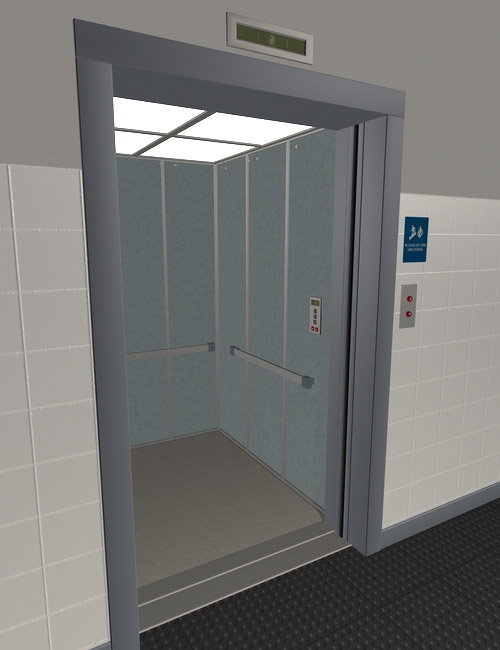
Elevator Doors?I don't have the product, but in the promo image, there does look like doors slid back into the cavity. Try to select those doors and check if there is a morph slider or a translation slider for the doors in the parameters tab.
The image you posted shows the doors closed, and the image I am posting shows them open, there likely is a slider to move them.
 Weird G9 Bends
It looks like you've probably got some bugged package that's got JCMs (or CBs as they now are on G9) that aren't properly linked to their master morph.
Weird G9 BendsG9 has terrible bends in the legs and elbows. That is why I have stuck to G8. Look for a morph called "Base Joint Cottectives" and set it to 100%. Hopefully, that will improve your shin bend issue.
Attached is screenshot of G8 (left) vs G9. "Base Joint Cottectives" is at the left top of the screenshot.
BLENDER TO DAZ...The problem with that is the vertices have to match and since this is a blender character and not a genesis one, I highly doubt the vertices match. Morphs are based off of the geometry of the genesis figure you are creating the morph for.
BLENDER TO DAZ...OK I get it...Thank you for your answer.
Would it be then more interresting to import it as morph with morph loader pro and use it, for exemple, on G8F ?Insane long delay when saving a new sceneHi Richard,
Should I be reporting this as a bug to tech support?
Having to shut down CMS in order to work with just a subset of the full content library, seems kind of a bug to me.
Not sure why others haven't reported this issue. Maybe they don't have as many assets and can just work with their full library and don't mind the waiting?
I mean, there a utilities that are trying to improve G8 loading times when a lot of morph assets are installed. Not sure how anyone can stand waiting for > 8 minutes to load a G8 into the scene and not use content subsets.
What do you think?Identify a Genesis 9 modelMetalSunde94 said:
Cris Palomino said:
Moved to Product Suggestions as it was not a Daz Studio discussion.
Ok, it wasn't really a suggestion but I just wanted to what character that is or what the morph mix was!?
Also, arguing with moderators about their decisions is not a recipe for success.
[Released] RSSY Character And Material Conversion Bundle Genesis 8 to Genesis 9 [Commercial]RiverSoftArt said:
aaráribel caađo said:
I'm having a very frustrating time converting my character via the Fit Clone method that I think underlies this product. Does it create morphs that can be combined, or just single characters? I want the flexibility of converting G8 morphs and character presets that I can combine together. I've seen somebody combined G9 and G8 characters, but don't know if that works with multiple G8 characters. If this can solve my problem, it's an insta purchase :)
The product converts each used morph individually. It does not combine the used G8 morphs into one combined morph before converting. (I thought about it after seeing all the issues people had. I still may add that feature if I end up doing the G3-G9 conversion but right now I need a break from Character Conversion).
On this note, just a question: I noticed when I converted PedroFurtadoArts Alistair that a secondary morph, something like Alistair Chin Correction, and it didn't "break" the head/body morphs (it doesn't appear to also contain the G8M head shape baked in). I believe I noticed that it had PHM in the name, is the script not baking the body/head morphs for these PHM/PBM morphs? I'm not complaining, just noticing, especially since this character didn't use the FHM/FBM naming conventions for the head/body morphs.
Identify a Genesis 9 modelCris Palomino said:
Moved to Product Suggestions as it was not a Daz Studio discussion.
Ok, it wasn't really a suggestion but I just wanted to what character that is or what the morph mix was!?
Combining Multiple Converted G8 Morphs in a G9 Figure: Help!aaráribel caađo said:
Okay, after a failed attempt where the same problems reoccurred even with the reverse + delta, got it sorted.
@crosswinds, how did you save the preset on Morphloader Pro? I don't see any way to do that and that would make my life easier.
@Lilweep, I didn't know that about transfer utility. Good to know
Thanks, both of you.
Yea, pls refer to the attached screenshot...
Combining Multiple Converted G8 Morphs in a G9 Figure: Help!Okay, after a failed attempt where the same problems reoccurred even with the reverse + delta, got it sorted.
@crosswinds, how did you save the preset on Morphloader Pro? I don't see any way to do that and that would make my life easier.
@Lilweep, I didn't know that about transfer utility. Good to know
Thanks, both of you.
Repackaging morph assets used in presetsI have a bad feeling I know the answer but here it goes:
Over the last year I've been compiling a series of pose morphs, but initially didn't have the foresight that they would all be in the same "theme" for lack of a better word. As a result, I initially saved them as two separate "products" when using Save Support Asset>Morph Asset. Over the course of that same year, many pose presets utilizing the various morphs have been developed.
Now I realize they should have been packaged in the same product all along. I can move them to the same "Property Group" in the Parameters pane simple enough but...there's no way I'd be able to change which Product they belong to without breaking all the pose presets, is there? I'm afraid to even try lol
Shape Shift for Genesis 9 (Commercial)Fairyteller said:
jhemonts_6fd79136bd said:
Today (2023/06/10) I applied the update for Shape Shift for Genesis 9 offered in Install Manager.
Now every time I load a new Genesis 9 character, or an existing scene containing a Genesis 9 character, I get the error message: "Duplicate formulas found in files. Make sure that the content is properly installed. See the log file for more details". After acknowledging the message the scene seems to load allright, but the error message is distracting. Could you please fix this?I have the same issue. For me it's the Vinme Abdomen Length morph from https://www.daz3d.com/vinme-morphs-for-genesis-9 that conflicts with SS_body_bs_Abdomen Length from Shape Shift, but only with the latest update.
That sounds like a reversion - there was a conflict, though i thought both products were updated so it may be worth checking you haven't missed an update for the Vinme set.
Mechasar's Characters Catalog: Who's next? (commercial)Rod Wise Driggo said:
Really looking forward to this Pack. Since it is a "MEGA" Pack I hope you don't take any inspiration from DAZ with regards to the pricing. DAZ MEGA mostly means > $100 ;-)
Really looking for the smoothed abdomen morph for Zuna. Some smoothed back morphs for Berverly and Gladys would also be quite nice. Don't know it it's the right muscle but the "Erector spinae" next to the spine is quite strongly articulated as well IMO:
If you need any further inspiration for Pack 2:
- Gladys needs some VR goggles
- Mr. Gammon a board game to make him Mr. Backgammon
- The Mad Scientist could be the basis for an alien-morph like Crypto from "Destroy all humans"Hope for some nice deals on your back catalog as well once this gets released. Still need to get Slime Attack ;-)
You can rest easy, it’s way far from that price :) The pack will include (among other things) morphs, textures and attachments that will allow you to achieve a completely new character, or add improvement and new features in other cases. So, Gladys will become a seductive monster, Mr. Gammon (without a backgammon board XD) switched to the punk style and the mad scientist will be… halfway through his final transformation ;)
Daz 3D is part of

Connect
DAZ Productions, Inc.
7533 S Center View Ct #4664
West Jordan, UT 84084Licensing Agreement | Terms of Service | Privacy Policy | EULA
© 2026 Daz Productions Inc. All Rights Reserved.