-
Wacky Modelling ~ In Carrara ~
Stezza said:
thanks @UnifiedBrain
I have always liked modelling and drawing, way back when I was just 4 years old I would model stuff with plasticene and lego and I guess I never stopped doing wacky stuff. So to model something and render it is just what I like to do, as long as it doesn't take too long to do

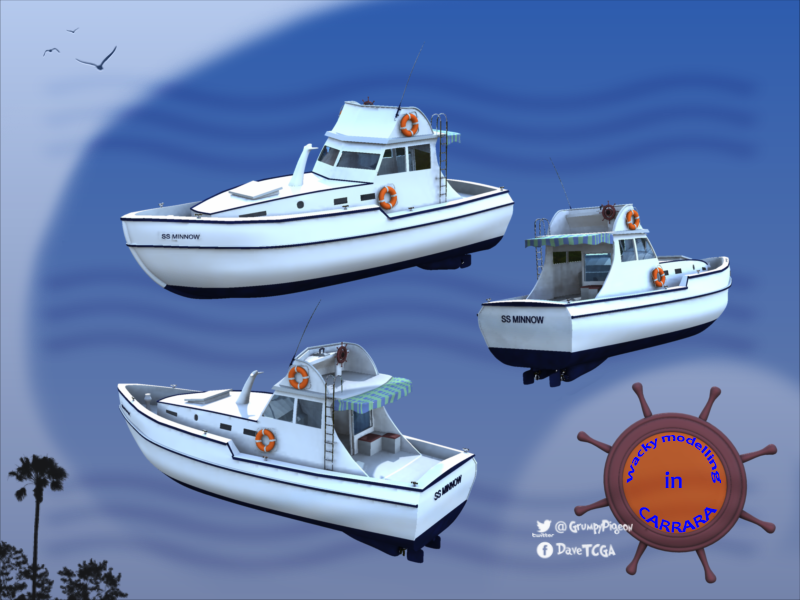
like this SS Minnow ... I started it a couple days ago and did some more on it yesterday and I'll post it today for anyone who wants to experiment or improve upon..
It has a couple morphs which has to be looked for... the basic shell is there but instruments and other details are waiting to be done if anyone wants to model them.
The model was started from a cube and everything except the text and wheel and lifebuoy was extruded and/or extracted from the mesh.

have fun it's all marooned in the zip

Thank you so much for all your models.
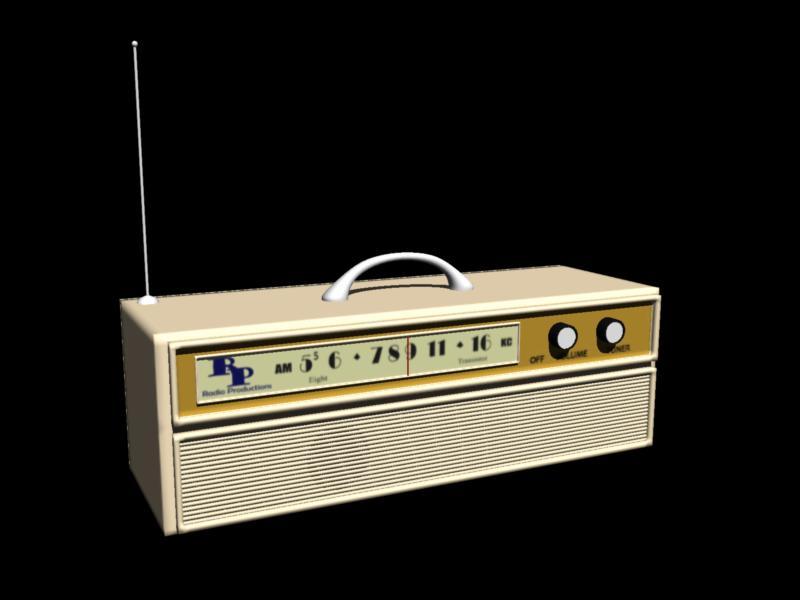
Here, give the castaways a radio. I purposefully did not remain completely faithful to the Packard Bell model used on the show. Should still be recognizable in fanart and parody scenes. Of course, started as a cube.
See attached zip.
Argh! Forum uploads still yucky. I will try again later.
EDIT: Success! Enjoy. Note - you will probably want to swap out some of the shaders, like metal for the antena and glass for the glass.
 Big Afro Hair
richardandtracy said:
Wendy, I tried to find the referenced plugin & failed. Could you link to it or a post describing it? The only reference I have found is included in an imaginary announcement of Carerra 2022 by Dartanbek. I have been wondering about Carrera as an alternative to Blender (which I'm finding a touch difficult given the mistique associated with it & it's deliberately obtuse naming & operating conventions). If there is a way of getting models out & into DS, that could be extremely useful.
Regards,
Richard
ETA: maybe I found it: https://sourceforge.net/projects/carrara-time-savers/ However.. not a huge amount of documentation to describe what it does and whether it might make Carrera the modeller I'd go to for DS problems.
I will try to find forum posts
https://www.daz3d.com/forums/discussion/181751/carrara-hair/p1
Remixing your art with AIInteresting. Am still torn on this A.I. schtick. I've been intrigued by some of the images that have been blowing up on social media etc, but the ethics of it still bothers me, especially as an original content creator. So for example over on Artstation, since they've provided the facility to do so, I have applied the option that prevents A.I. from using my artwork to contribute to its search for content to input into its algorithm.
But back to your work. It certainly illustrates the limitations of the process. The least successful by far is the armoured soldier, I really hate how it has modified that image, the proprortions are all wrong, and it really hasn't added anything of significance to the original image. And with hands on show, we can see what a mess it has made of those. The weapon modification is also a little naff too. The image of the girl is much more successful, arguably giving you a more realistic image of the girl than the original. The cityscape is also quite successful, it has managed to keep the atmosphere and intent of your original image, but come up with far more complex and interesting shapes and layouts for your cityscape. I'd say that is the image that has been improved the most by the application of A.I.
Very High Ram UsagePerttiA said:
globally said:
After having a similar issue I had a search and found this thread but the resolve of allocating more vram didn't help. May still be conencted so I will post here.
I am trying to render a scene that I have rendered 5-6 times with no issues and then all of a sudden Iray is filling all memory and falling back to cpu. I am getting this error in the log: "Unable to allocate 463.380mib from 100.322mib of available device memory"
I have a laptop 3060 so I think 6-8gb of ram and I am running nothing but Daz. Like I said the same scene has been rendered before so what could be cas using this memory issue? I did recently update to the latest studio drivers but I'm sure I had rendered after that with no issue, and I tried downgrading to the last driver with no change to the outcome.
any ideas what could be happening here?
cheers
This thread was about high consumption of RAM.
Consumption of VRAM is something different, and the only way to increase VRAM is to get another GPU with more VRAM, one cannot just "allocate" more VRAM.
sorry for the mistake, I am still very new to windows and graphics ram. I just thought as the og poster was also experiencing high ram usage it may be related. Sorry to be off topic. I shall ask elsewhere.
Very High Ram Usageglobally said:
After having a similar issue I had a search and found this thread but the resolve of allocating more vram didn't help. May still be conencted so I will post here.
I am trying to render a scene that I have rendered 5-6 times with no issues and then all of a sudden Iray is filling all memory and falling back to cpu. I am getting this error in the log: "Unable to allocate 463.380mib from 100.322mib of available device memory"
I have a laptop 3060 so I think 6-8gb of ram and I am running nothing but Daz. Like I said the same scene has been rendered before so what could be cas using this memory issue? I did recently update to the latest studio drivers but I'm sure I had rendered after that with no issue, and I tried downgrading to the last driver with no change to the outcome.
any ideas what could be happening here?
cheers
This thread was about high consumption of RAM.
Consumption of VRAM is something different, and the only way to increase VRAM is to get another GPU with more VRAM, one cannot just "allocate" more VRAM.
Missing product in store3 days ago I've purchased "dForce SU Cute Dress Bundle for Genesis 8, 8.1, and 9". According to the bundle description it contains 3 products:
dForce SU Cute Dress for Genesis 8, 8.1, and 9
SU Cute Dress Shoe for Genesis 8 , 8.1, and 9
SU Cute Shoes for Genesis 9, 8, and 8.1
But I can only download 2 of these items, because one item is duplicate. The missing item is "SU Cute Dress Shoe for Genesis 8 , 8.1, and 9". When I download it, I also get "SU Cute Shoes for Genesis 9, 8, and 8.1" for a second time instead. I already did contact the PA (Sue Yee), but no answer yet, although he/she was online in the last 3 days. I also contacted the DAZ support, but also got no answer for 3 days. That's why I now want to raise attention by opening this forum thread. And I'm pretty sure that other buyers may have the same issue. I hope that this will be fixed soon.Very High Ram UsageAfter having a similar issue I had a search and found this thread but the resolve of allocating more vram didn't help. May still be conencted so I will post here.
I am trying to render a scene that I have rendered 5-6 times with no issues and then all of a sudden Iray is filling all memory and falling back to cpu. I am getting this error in the log: "Unable to allocate 463.380mib from 100.322mib of available device memory"
I have a laptop 3060 so I think 6-8gb of ram and I am running nothing but Daz. Like I said the same scene has been rendered before so what could be cas using this memory issue? I did recently update to the latest studio drivers but I'm sure I had rendered after that with no issue, and I tried downgrading to the last driver with no change to the outcome.
any ideas what could be happening here?
cheers
Using DAZ3d to create anime.SasquatchIsCool said:
vrba79 said:
Well done. Going for that anime look is something a bunch of us in the Art Studio sub-forum have been striving for.
Do you think folks in that forum would like to learrn how to animate and create anime with DAZ?
Yup. Here in the Art Forum, there's a multi page thread that is nothing but people posting their attempts anime-style art.
Any Model Conversion Artists around? Convert model to GenesisQuick Google search, not advisable ;-) ... something about lawyers ;-)
Will there be a texture set for the Seljuk Turkish Princess Outfit? [Solved...finally]You are welcome.
I was not expecting to see the 2 sided mat in the node tree. Must be a PA thing?
I am creating a mask for the dress, so you can change the color of the dress and keep the designs on it. I will also create a weighted layer material so the mask can be easily used.
I will upload them to this thread when done (if the forum upload feature is working)
Blender 3.4 Import/Export OBJ settingslilweep said:
marble said:
Jeez - now it works!
I really don't know what I changed but I decided to take screen shots to show my settings (see attached) and in doing so I created a test morph and it just worked fine with the new OBJ importer/Exporter.
I must have changed something before but I went over the settings and I have no idea what it was. Anyhow, here are my screen shots.
Ah, wouldn't you know it - the crappy forum image attach is not working again. I'll try later.
while forum not working, you can just upload them to your gallery as a draft gallery (dont publish) and then past the image links here or embed the images.
I've never used the Gallery so I'll need to check whether I actually have access. I tried to do as you suggest only using Google Drive but can't get the image links to work (I did check permissions, etc.). The file attachment feature of this forum has been on and off for several days now and I, for one, will be happy when they finally abandon this awful forum software in favour of something that works.
Yes, the Gallery links do work, thanks.

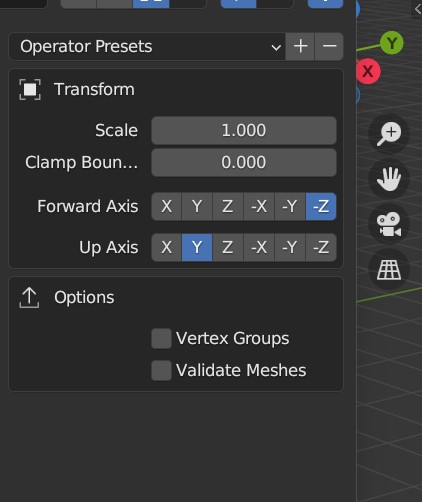
 Blender 3.4 Import/Export OBJ settings
marble said:
Jeez - now it works!
I really don't know what I changed but I decided to take screen shots to show my settings (see attached) and in doing so I created a test morph and it just worked fine with the new OBJ importer/Exporter.
I must have changed something before but I went over the settings and I have no idea what it was. Anyhow, here are my screen shots.
Ah, wouldn't you know it - the crappy forum image attach is not working again. I'll try later.
while forum not working, you can just upload them to your gallery as a draft gallery (dont publish) and then past the image links here or embed the images.
More Non-photorealistic Renders (NPR III)but sometimes, I would like to have some advice from the NPR thread.
Just ignore my posts and work on your art.
My friend, help me understand something. On one hand you're looking for advice from this forum, but on the other hand you ask that your posts be ignored. How do we give feedback to something we're supposed to turn a blind eye to?
 I hope you see the contradiction there.
I'm like you. I enjoy sharing my work and receiving feedback. But what I've learned over the years is that simply posting images is not enough. Why? Because a lot of people can do it. Daz, Unity, Blender ... all these tools make it very easy to generate images. With a fair amount of skill, at least.
Let me help you out. Here's what I've learn about encouraging people on a forum to give feedback:
(1) Post good work, preferrably your best.
(2) Be generous about giving constructive feedback to others. In fact, give more than you take.
(3) Stand aside and let other people receive the time and attention their work deserves; in short, don't post a lot, and don't post too often.
It's all about being part of a community. In that spirit, I'd like to hear your thoughts on my earlier proposal:
... as more and more people post, it makes sense to moderate ourselves. Instead of posting immediately after someone has shared their work, I propose that we each hold back for at least 24 hrs before doing so.
Cheers!
New Genesis, New Sales Thread: Report Issues Here "Reporting Only"Not a sales issue, but um, I'm used to receiving a lot of email for posts to the forum and lately have been receiving none.
Then last night the store was acting goofier than usual in not recognizing which products I already owned -- After about 5 min. of refreshing pages it eventually cottoned on.
And yes I also was receiving the punch card notice. Decided it was a good time to chuck the card and wait for a new one. Cheers.
ByeAs I have commented on the Bryce forum. I started out with Povray, Ray Dream Studio, and Bryce (Poser was a little bit later.) This was all under Meta Creations ( A great company for its time). When Carrara 1.0 was released it was incredible software. It was exactly what I need as I could not afford 3D Studio Max or Lightwave 3D (The 2 major apps at the time). Over the years I eagerly purchased the newer versions and I was pleased with each upgrade.
On my original PC, it took days to render a scene(486 with megs of ram not gigs). I did a test render in Carrara and Cinema 4D of as close as I could get to the same scene, Carrara was painful but still capable.
I installed Carrara yesterday for nostalgia purposes. I have lots of fond memories and it brought back some excitement. As someone has commented that it's the artist and not the tool, to some extent I might agree. The tools I use now are faster with many more options and provide me with extensions that allow for faster creativity. My renders have better clarity and are faster. This is in no way dissing Carrara as I have said it was/is still a good piece of software.
Currently, I use Cinema 4D, Blender, Modo, and Daz Studio each of which has its purpose in my workflow. over the last two years, I have come to appreciate Blender more and more.
As said above is it the artist or the brush? maybe both. when the brush is old and the hairs are left on the canvas it's time for a new brush.
For me, it has been sad to see this and other MetaCreations software suffer a slow death. It would be nice to see Daz Open-Source Carrara and Bryce so as to let the community develop it.
Blender 3.4 Import/Export OBJ settingsJeez - now it works!
I really don't know what I changed but I decided to take screen shots to show my settings (see attached) and in doing so I created a test morph and it just worked fine with the new OBJ importer/Exporter.
I must have changed something before but I went over the settings and I have no idea what it was. Anyhow, here are my screen shots.
Ah, wouldn't you know it - the crappy forum image attach is not working again. I'll try later.
How To Make Character Appear to Have Collapsed ?nonesuch00 said:
Lots of movies and other images online of such situations. Look them up, with strict filters on so you won't be mentally abusing yourself when the results are pulled by your search, and then pose according to the photos you choose.
This is an EXCELLENT idea. Thank you!
Announcing: Daz Deals Browser Add-on IIzombietaggerung said:
barbult said:
zombietaggerung said:
Kerya said:
zombietaggerung said:
Glad to hear Ati is on the mend, and I'm sorry for your loss Overdrawn.
I do have one question though, are the "Sort by Wishlist" filter in the main store, and the Forum/Gallery links on the store pages pro features now? Because they haven't been working for me for quite awhile. Unless I disable the extension, then the Forum/Gallery links will show briefly on the store page, but disappear as soon as I navigate away.
According to the Daz-Deals Options page:
moz-extension://c4802315-6743-4aba-9bbf-87fb26263f23/options/options.html
Show filter for wishlisted and owned items + "% off" sort filter is a Pro feature
Show gallery images and forum links for products
should still be non Pro, but I am not getting them either
All right thanks for the info. That's a shame.
It wasn't done maliciously. Daz terminated their affiliate status, so they needed another form of income to pay for the services that cost them the most money to provide. We who benefit from it can't expect them to pay for this service out of their own pocket. I get a lot of value for the annual fee I paid.
I understand and appreicate that. However, I also have bills to pay and I don't spend enough money here to maintain a membership. I'm not even Daz+ anymore. Times are tight for everyone and hobbies are the first thing to be cut out. It is what it is.
I agree with both sides. Sucks that affiliate status got revoked. Compensation is warranted. Sucks that some of us are in a position where paying the fee makes no sense or is not possible. I will say, any long-time user of Daz and Daz products may have a ton of stuff not yet rendered. Perhaps now is a good time to fix that? Pausing procurement does not mean giving up the hobby. It may, in fact, mean more meaningful participation. At least, that's where I'm at with all of it.
Freebie Challenge JAN 23 - "Speed Demons and Slowpokes" - Main ThreadUploading images in the forum is currently a struggle, but uploading to the gallery should work... so please upload your entries to the gallery and link to this thread as long as forum uploads aren't working.
Freebie Challenge JAN 23 - "Speed Demons and Slowpokes" - Main ThreadSo... I finally have the cover render for January ready but I can't upload to the forum or the gallery

Daz 3D is part of

Connect
DAZ Productions, Inc.
7533 S Center View Ct #4664
West Jordan, UT 84084Licensing Agreement | Terms of Service | Privacy Policy | EULA
© 2026 Daz Productions Inc. All Rights Reserved.