-
Add on's for Predatron's Low Res figures.
OK forum not showing posts again, see my previous one for attachments
Brand New Graphic Novel Made in Daz Studio!Jay Jay said:
As mentioned above it was strange in that no matter what we did with the line spacing and kerning we ended up with some lanes looking more cramped than others and as pointed out its probably because of the alignment. Going forward we'll probably look at something other than Photoshop just so we don't run into these issues again. Also I think we may use this forum section for feedback while we're in the compiling stage as all the feedback we've had here has been invaluable.
Griffin made a great point about doing a tool preset in photoshop to keep your text matching.
Interesting comment about the ellipsis needing to be 3 dots. I wasn't aware of that so that is really good to know for future thank you!
Great!
Really agree with the cinematography comments also. Unfortunately that shuttle while awesome to use did make for some cramped shots which agreed did make leading lines and frame composition more of a challenge. Hopefully you'll notice an improvement as the story progresses.
This is where section planes can come in handy. You can learn more about them in this video. Alternatively, fellow PA Riversoft Art did a product that you might want to take a look at: https://www.daz3d.com/camera-cutaway. It can also be purchased as part of a bundle.
Camera wise I'll be honest I went with Daz's default focal length, but while working on it I got to thinking about different lenses which I'm looking into for our next project. For this one I didn't think it would be good to start doing that halfway through the story as I think that would have affected the continuity. But yes you're right a wideshot to emphasise the gravity of him not remembering his name would have really sold the shot.
I'm a HUGE fan of fellow PAs' IDG Designs' & InaneGlory's excellent Cinematic Cameras Products and highly recommend them. You can find the first pack here and the second one here. I use these all the time because they are such a time saver.
Again though, thank you for taking the time to have a look and the feedback and sourcing of the links has been incredibly valuable and really appreciated. Definitely food for thought!
Thanks again
Jay
My pleasure!
Daz Studio Pro BETA - version 4.22.0.15! (*UPDATED*)johndoe_36eb90b0 said:
You should not render icons to 800x800 -- for asset.duf you should render asset.png at the icon size (91x91), and asset.tip.png at the size you want (say 800x800). That way icon doesn't have to be resized to be displayed in the user interface, and when you mouse over the icon you get shown larger image as a tooltip.
/re-wrote below as had more time to say why doing this.
DS protocol with that has been a great management addition.
I went straight to 800x800 .png, skipping/deleting .duf.png years ago already.
Have 100s and 100s of such 800px x 800px. Zero issue. But have 128gb ram, and watching ram use. May have to adapt my usage depending on plans going forward.
***Important reason: When first set-up this image improvement, i liked this process, because any resave of the duf and DS auto-makes a new .*duf.png. Delete this and my custom *.png is still there and not auto-replaced. This way the grainy non-iray .duf.pngs are avoided.
That said, the 91x91 seems partly a remnant where old computer systems had way less computing power. Though that protocol is there for good reasons, especially for less ram systems.
Lots less ram, like 8-16gb should still be careful depending how many icons they make at higher res, and what else they usually have open at same time on PC.
For those with 64gb ram, would guess lots of images at 400px x 400px for *.png would be fine. Or just keep using .duf.png for tips.
@Marble. Guessing the .tip.png only gets read into ram when you hover over it. Whereas all *.pngs are part of DS load. Just a guess though. Haven't micro-tested that. So guessing eventually could add up depending on how many and size. Something to monitor if not following protocol. In a good way, the .png vs duf.png is a helpful system for many users.
Edit: Just Win 10 default with a few background processes on and DAZ forum tab &DAZ store tab = 6.4GB ram.
Edit 2: Decided just to make time and test.
Opened DS. Firefox closed. RAM = 6.0GB
High-lighted over 150+ high-res icons to preview quick without opening any scene. Ram = 6.1GB
With system rounding and pc changes to ram within +- 0.1gb anyway, am not really concerned.
Performance is instant. But have a high-end machine. So user mileage may vary.[Released] Real Neon Signs [Commercial]AnEye4Art said:
By the way, Goblin Balls are a chocolate covered snack sold in Elven convenience stores.
Ok. Not "11" convenience stores. But "Elvin" as in Elves, fake and not real. Right? 'Cause I was about to look up Goblin Balls fuh real.
Make sure you turn on "safe search" before you do that...
 V4 poses on Genesis 9 - via Zev0's converters
I've spent a couple of days converting my (huge) collection of poses to Genesis 9 using 3 of Zev0's conversion products, and I thought people might like to see how well many of the V4-M4 generation of poses work on Genesis 9. These images are the raw converted poses with no tweaking, except for the last example where I show the raw vs. a minorly tweaked version. In general, "open" poses where the limbs aren't touching each other work better than "crunched" poses where the figure has a lot of intersections going on. I find that the tweaks required to make those work are still pretty minor--upper arm & thigh and sometimes some spinal adjustments, as well as flattening the feet when the original pose is for high heels - a whole lot of V4 poses defaulted to high heels, back before we all started including foot poses with outfits & shoes. There are more intersection problems where the original pose is for a scaled character like Freak4 or Kids4, but overall they aren't any worse than using base poses on a strongly morphed figure.
At each step, I converted all the native poses for each generation along with the converted poses from the previous generation, so the list got longer and longer as I went. Fortunately the scripts also get faster and faster; the G9 conversion script is super fast. After a couple of days of doing this in between other things, I've got about 400 pose sets in my Genesis 9 library. I am storing them separately from native Genesis 9 pose sets, to maintain my sanity.
Here are the steps in my workflow:
1. Convert from Victoria 4 or any of her "cousins" (Michael 4, Kids 4, Freak 4 etc.) to Genesis 2 Female with V4 Pose Converter by Zev0 & Draagonstorm. This converter runs pretty slowly (for me, anyway) so plan to run it overnight or while you're cooking dinner or something. Also, I have a lot of poses from this generation; if you're just doing one set at a time it's not a big deal to wait while it runs. Make sure you're putting these into their own folder, not mixing them in with "real" Genesis 2 poses, or things will get confusing quickly. Reminder: V4 poses are usually in .pz2 format so you'll find them in the Poser Formats part of your library, in the poses folder. Another reminder: a good 2/3rds of the stuff in your poses library is likely to be MAT files and shape injections, if you have a lot of content from that generation, so don't try batch-running the whole library folder. You can move or copy all of the actual poses into their own sub folder.
2. Convert the converted V4 poses from Genesis 2 Female & Male to Genesis 3 with Genesis 2 to Genesis 3 Pose Converter by Zev0 & Draagonstorm. You can ignore the reminder to run the ZUnlocker script, for continuing conversion, although you do need to run it to use the poses on Genesis 3. This script runs very fast, even on fairly large batches. If I tried to do more than about 10 sets at once, it would have trouble loading up the list, so I temporarily moved everything into a sequence of subfolders, 10 per subfolder, and then ran the batch several times against that.
3. Convert the poses again, this time from Genesis 3 to Genesis 9, with Genesis 3 and 8 to to Genesis 9 Pose Converter by Zev0 & Bitwelder. This goes lickety-split, but it still will hang up if you feed too many folders into it at once. I also ran this for all of the Genesis 8 poses in my library.
Genesis 1 poses are a bit of a pickle because the hands are terrible, and there's not (AFAIK) a batch utility for conversion, because other than the terrible hands, Genesis 1 poses work directly on Genesis 2. I use Handy Dandy by Sloshwerks to fix the hands on a pose-by-pose basis, but I don't like most of my G1 collection enough to do that without a batch option. RiversoftArt's Bone Minion products also let you convert poses as needed across every generation, so if you're not a batch-y person, check those out for sure. Personally, I like to batch pre-convert everything so that when I'm feeling actually creative (as opposed to merely liking to compulsively organize things, which is how I interact with my collection much of the time), I don't have to use any scripts or extra steps.
Anyway, here are some examples, including what sets they originally came from. I think the Freak 4 poses were part of the base character, because I definitely never bought anything extra for that dude! But I might have picked them up as a freebie at some point. You can click the images to embiggen them.
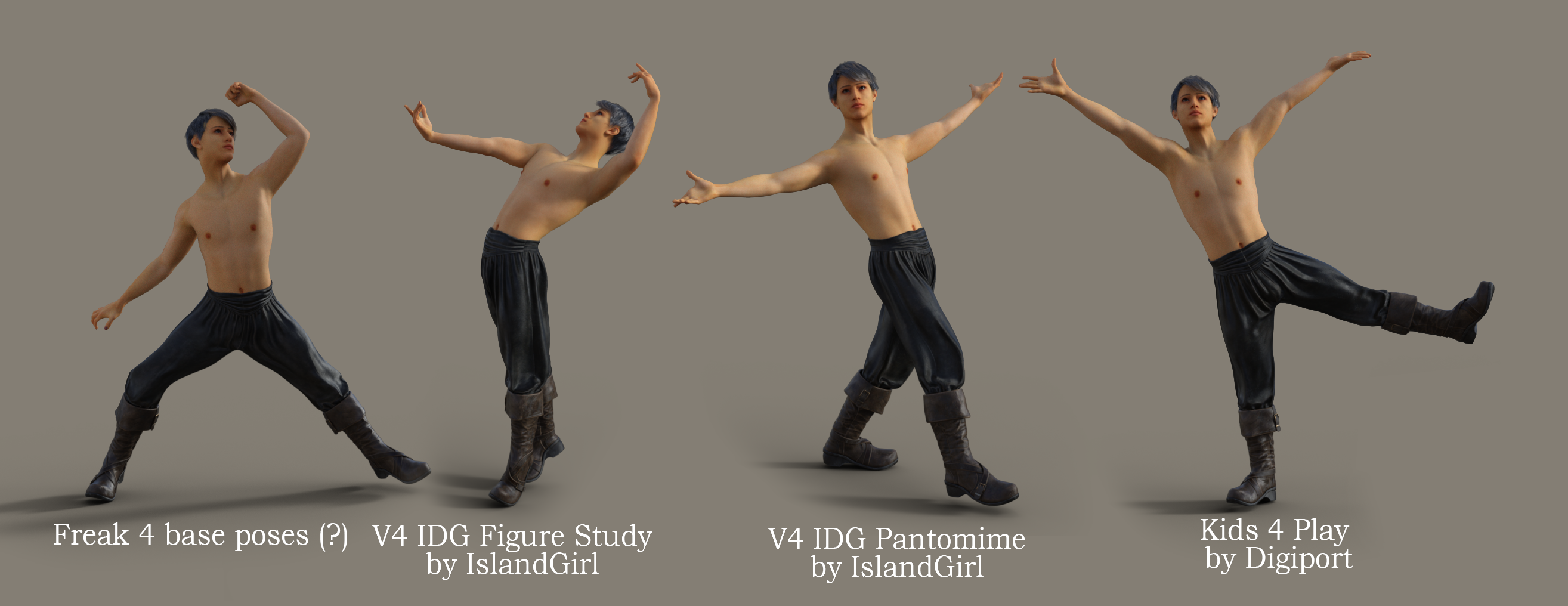
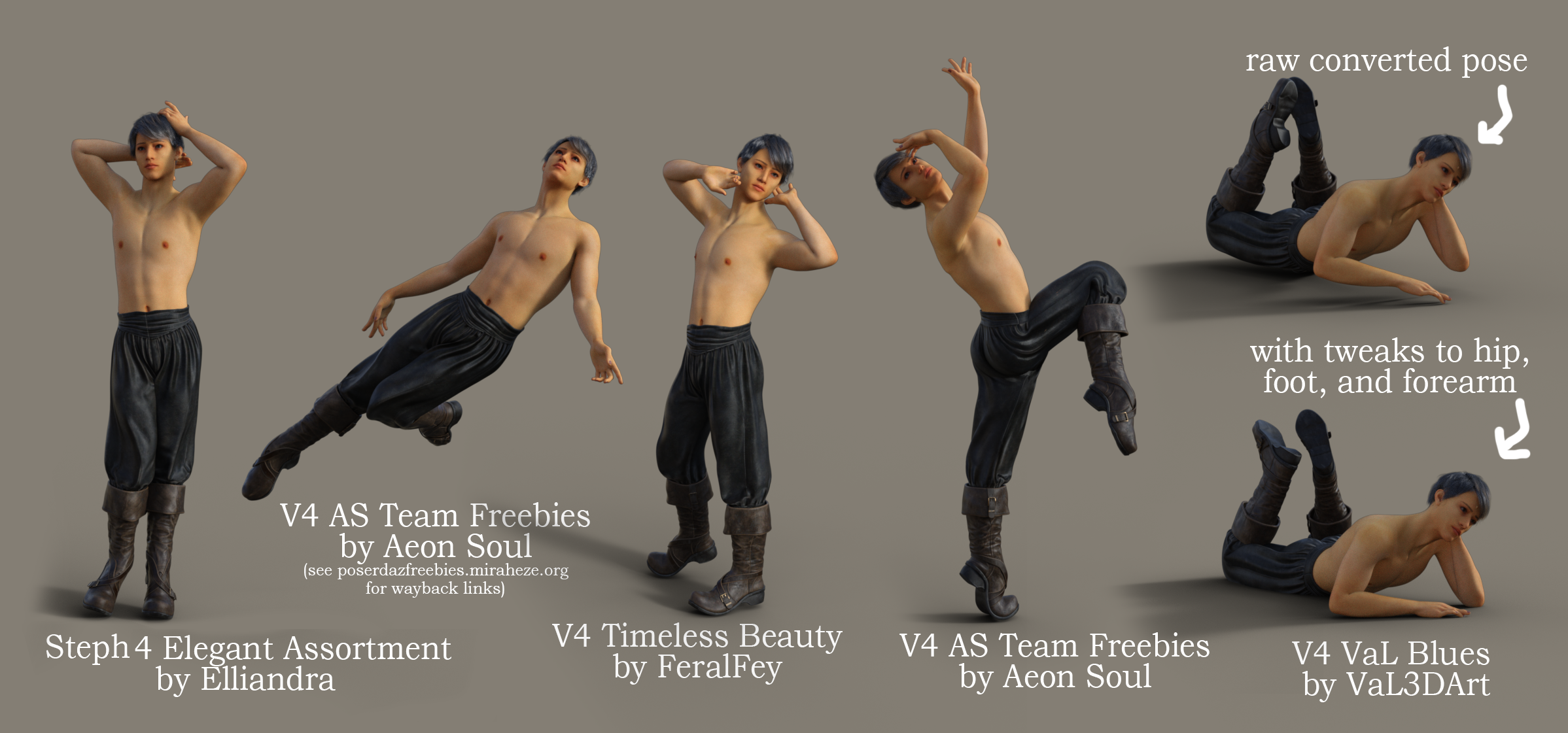
p.s. this character is one of my WIPs (hence the seam around his collarbones and his lack of bod fuzz); he's not in the store yet but hopefully will be once I finish him.
Genesis 9 nipples?Renderotica has realistic add-on nipples for G3 and G8. I haven't checked, but if they
don't have them for G9 yet, they probably will soon. They also have better genitals.
Search for "headlights".Genesis 9 nipples?I am just now starting to look at the new Genesis 9 character and I have noticed that unlike the Genesis 8 characters they do not have nipples. Is this because these morphs are now in a morph add-on pack? Or are these morphs expected to be provided in the new characters that PAs are creating? And if so, how does this work for mixing characters to create unique ones?
I have tried to search the forums for answers to these questions but I have had no luck, but that may be due to the fact that my search skills are not that strong. So any help answering these questions would be appreciated.
Thanks in advance for any replies.
nabob21
Looking for suggestions of DAZ-made video games on SteamAs an aside, this reminds me of a story I heard at work years ago regarding Betamax and VHS. If only by its technical merits, Betamax was superior to VHS. But the later eventually won the videocasette wars primarily because ... smut was widely produced, copied and re-distributed worldwide on VHS.
Unrelenting the Metaverse marches onwards, thanks to Meshed VR and similiar vanguards.

Cheers!
FSMCDesigns said:
I really don't know of any 'good' games using Daz assets. Most are cheesy adult ones or 2D games on patreon. DAZ isn't the goto source for developers looking to create a quality game, it's more the "I don't want to invest the time and effort into learning to create my own assets" place to get 3D models for a game. The most quality game i have found using DAZ assets is VAM, a VR and desktop sandbox game using the genesis 2 and soon to be using newer generations figures. just search Meshed VR on patreon
Does Anyone Have the Intrepid Explorer Phoenix Spaceship? SOLVEDIf anyone reading this has Petipet's Intrepid Explorer Phoenix (Atlantida related) could you please try loading it to see if it does load as today I've discovered I have missing files and when I try to load a scene with the ship in it it only appears as a grey blob. Via DIM I then uninstalled and reinstalled it, but it made no difference only I now don't get the blob. What is missing is the DS prop, materials and 2 pilot poses for G2F. Other files are still there as are the 2 pilot poses for M4. If I search in Products it shows the latter, while when I search under Vehicles the DS icons appear for the ship prop and 2 materials, but when I try to load the prop nothing happens as it can't be found!
Can't get Manitou character to use symmetryAh, right - sorry, I ddi search earier and then misrembered that nothing stand-alone had come up. Well, in that case they can at least do a good check and try to figure out why it fails.
Partial Shape Loading?I searched the forum and could not find a thread for this. It may be too stupid of a question to have been asked previously. :)
I have a ful body morph (shape) that I like. For the character I am working on, I only want to use the legs portion of that shape. Is there a way to lock the mesh, much like locking portions of the body for poses? Or i s there a tool that will let me manage which portion of a morph is applied, or how the shape is applied? I realize that loading part of a body shape may leave an unnatural junction and may need blending of some sort.
I am curious to know what the art of the possible is and I am not opposed to purchasing tools. I prefere a non-modeler opton (Daz) but I realize there are ways to do this in Blender. Before I got that route, I wanted to ask the Daz Power Users.
Looking for suggestions of DAZ-made video games on SteamFSMCDesigns said:
I really don't know of any 'good' games using Daz assets. Most are cheesy adult ones or 2D games on patreon. DAZ isn't the goto source for developers looking to create a quality game, it's more the "I don't want to invest the time and effort into learning to create my own assets" place to get 3D models for a game. The most quality game i have found using DAZ assets is VAM, a VR and desktop sandbox game using the genesis 2 and soon to be using newer generations figures. just search Meshed VR on patreon
I'm not really looking for a masterpiece, rather something entertaining with some pretty renders, and I'm kinda limited to Steam because of the gift card (well, of course I can buy at other place but I would really have the gifted money used on this.) I will still check that of course !
Looking for suggestions of DAZ-made video games on SteamI really don't know of any 'good' games using Daz assets. Most are cheesy adult ones or 2D games on patreon. DAZ isn't the goto source for developers looking to create a quality game, it's more the "I don't want to invest the time and effort into learning to create my own assets" place to get 3D models for a game. The most quality game i have found using DAZ assets is VAM, a VR and desktop sandbox game using the genesis 2 and soon to be using newer generations figures. just search Meshed VR on patreon
Brand New Graphic Novel Made in Daz Studio!Morning FenixPhoenix
Thank you for the detailed post and the accompanying links. We really appreciate you taking the time to look into it and also provide some incredibly valuable feedback. No problem either in you using screenshots to highlight your points.
As mentioned above it was strange in that no matter what we did with the line spacing and kerning we ended up with some lanes looking more cramped than others and as pointed out its probably because of the alignment. Going forward we'll probably look at something other than Photoshop just so we don't run into these issues again. Also I think we may use this forum section for feedback while we're in the compiling stage as all the feedback we've had here has been invaluable.
Interesting comment about the ellipsis needing to be 3 dots. I wasn't aware of that so that is really good to know for future thank you!
Really agree with the cinematography comments also. Unfortunately that shuttle while awesome to use did make for some cramped shots which agreed did make leading lines and frame composition more of a challenge. Hopefully you'll notice an improvement as the story progresses.
Camera wise I'll be honest I went with Daz's default focal length, but while working on it I got to thinking about different lenses which I'm looking into for our next project. For this one I didn't think it would be good to start doing that halfway through the story as I think that would have affected the continuity. But yes you're right a wideshot to emphasise the gravity of him not remembering his name would have really sold the shot.
Again though, thank you for taking the time to have a look and the feedback and sourcing of the links has been incredibly valuable and really appreciated. Definitely food for thought!
Thanks again
Jay
Looking for suggestions of DAZ-made video games on SteamHello !
I've received a Steam gift card at Christmas, and I would like to find some game made with DAZ there, preferably medieval fantasy themed, and really preferably where I can play as female.
Adult games are fine. Not even mandatory, but OK. Though it may not be allowed to link them here but I guess you can PM me.
There is no DAZ tag so I can't really search efficiently.
If you know some good ones I would welcome the suggestions !
G8F Walking & Everyday Doorway Poses SetsMy 30 Doorway poses are now collected together in a collection of over on Renderosity for a single download. May be more convenient that way. The collection is called 'G8F Everyday Door Poses 01 to 30 Collection'. The collection is too big to be attached to a forum post and I can't link due to forum rules about unsolicited links to pages with adverts on them. You can get to my freebies through the link in the signature line of this post visible on the desktop version of this post. Regards, Richard.Add on's for Predatron's Low Res figures.I really like them as well, I hope there's going to be a new set someday, but considering how old the last one is, I doubt it.
You can find some outfits for Loretta / Lorenzo on sharecg, just search for lorez, but those are the only ones I know of.
Icons on installed content (Smart Content view)Unfortunately no change after reinstalling. If I search for another product with texture addon (dforce medieval barmaid), I do see a separate entry for it. I do not see the same for breezy outfit, even if I load the poncho in the scene first and select it. I am debating on doing a full reset database and just downloading all the metadata again. Not sure what else to do.
 Speed test 4.21.1.13 beta vs. ...26 beta (test scene included)
outrider42 said:
- Avoided some severe performance overhead (around 1.2x, depending on rendering setup and scene) for enclosing glossy transmission-only hulls, like found in a popular public benchmark scene (nvbugs 3846081).
So they are blaming this a certain glossy surface. I find it funny that they say it is found in a popular benchmark scene. Pretty much every scene I made was slower than 4.16. But this regression may only apply to what happened between 4.20 and 4.21.1.13. Perhaps the cause of the regression after 4.16 is still unknown.
That's because I opened that ticket # with NVIDIA back on Oct 26, 2022, and pointed them to the forum benchmark scene. There's nothing funny to it -- they worked with what was reported to them.
If you can construct any other scenes that still exhibit performance regressions then post them and I can create another ticket.
The I Miss the Old Days Complaint ThreadAnd although I could finally insert an image into my posts (yay!)
 , I now can't delete the one that I inserted.
 Stop improving the forum software!
Daz 3D is part of

Connect
DAZ Productions, Inc.
7533 S Center View Ct #4664
West Jordan, UT 84084Licensing Agreement | Terms of Service | Privacy Policy | EULA
© 2026 Daz Productions Inc. All Rights Reserved.