-
Let's appreciate/discuss today's new releases - ongoing thread
frank0314 said:
tsroemi said:
I've just bought the 3du male toon character for G9, and I can't seem to find a morph to open the pants pockets as shown in most of the promos - https://www.daz3d.com/cartoon-adult-male-character-hair-and-outfit-for-genesis-9. Has anyone else bought this and can help me? Am I just being stupid somehow?
I'm not seeing anything from the file list on the readme that explicitly says anything about the pockets so it must be embedded in with another option not clearly marked for that particular function.
Yes, I checked the file list too after I couldn't find it. I've sent in a ticket, maybe DAZ can just check in with the vendor and ask them about it. Still, if anyone solved the mystery, it'd be cool to know!
Let's appreciate/discuss today's new releases - ongoing threadtsroemi said:
I've just bought the 3du male toon character for G9, and I can't seem to find a morph to open the pants pockets as shown in most of the promos - https://www.daz3d.com/cartoon-adult-male-character-hair-and-outfit-for-genesis-9. Has anyone else bought this and can help me? Am I just being stupid somehow?
I'm not seeing anything from the file list on the readme that explicitly says anything about the pockets so it must be embedded in with another option not clearly marked for that particular function.
Let's appreciate/discuss today's new releases - ongoing threadI've just bought the 3du male toon character for G9, and I can't seem to find a morph to open the pants pockets as shown in most of the promos - https://www.daz3d.com/cartoon-adult-male-character-hair-and-outfit-for-genesis-9. Has anyone else bought this and can help me? Am I just being stupid somehow?
Natural Movements Pack for Genesis 9sid said:
I'm very happy to support this product, I don't think we have anything like it for Genesis 9. It can't fix every character in every pose, but for the most part it makes things look better to my eyes and I've been waiting so long for something like this to come out!
I'll have to do some before and afters for this thread.
It has that quirk mentioned earlier, when you turn it on and bend an arm for example, the morph kicks in as intended, yet if the arm is still posed and you turn off the global morph controller, the arm morph is still activated until you un-bend the arm... So it has one-way switching as long as the limb is bent and while it's not like with other corrective morphs, it's not a deal-breaker for me as it's easily corrected by un-posing the figure/parts.
Mechasar said:
Thank you, I'm glad you like it. Here's the thread were we can discuss about everything related to my catalog ;)
Definitly pinned that tab!
Natural Movements Pack for Genesis 9takezo_3001 said:
@ Mechasar
After playing around with this further I must commend your work here, the attention to detail is pretty extensive, and accurate as well I mean, you even creased/corrected the feet bends so yeah, I can respect the effort put into this and why I'm definitely keeping it!
I was too hasty to take in consideration the vastly different topography between the G8.1 and 9, so I can recognise the differences and how you made them work as you have no musculature guide like with the previous generations, I'm still getting used to it myself!
I wish you had a forum thread in the products subforum, but I'm now guessing your time is not as generous for you...
NOTE: I was holding off on using G9 exclusively due to the lack of realism with her bends, but now... I can definitely add you to my list of coveted morph resources as this is definitely a game-changer for me!
Thank you, I'm glad you like it. Here's the thread were we can discuss about everything related to my catalog ;)
Natural Movements Pack for Genesis 9@ Mechasar
After playing around with this further I must commend your work here, the attention to detail is pretty extensive, and accurate as well I mean, you even creased/corrected the feet bends so yeah, I can respect the effort put into this and why I'm definitely keeping it!
I was too hasty to take in consideration the vastly different topography between the G8.1 and 9, so I can recognise the differences and how you made them work as you have no musculature guide like with the previous generations, I'm still getting used to it myself!
I wish you had a forum thread in the products subforum, but I'm now guessing your time is not as generous for you...
NOTE: I was holding off on using G9 exclusively due to the lack of realism with her bends, but now... I can definitely add you to my list of coveted morph resources as this is definitely a game-changer for me!
Natural Movements Pack for Genesis 9I have only tried the Natural Movements Pack on one character in one pose so far, but I'm not thrilled at this point.
- There is a control for "Natural Movements Active All". If I turn it to On, lots of morphs get activated, as I expect. But when I turn it to Off, they don't all get reset to 0. The body morphs are left On. Why? This seems like a bug. Edit: I can't reproduce this problem now, even though it happened repeatedly in this one scene. So, it might be fine. Edit 2: Oops the problem is happening again. I don't know what's up.
- The Auto On looks too extreme on my character in her pose. There is no mechanism to attenuate the overall effect. The Auto is simply On or Off. To adust the strength, each individual morph has to be adjusted separately and manually. I would like to just dial down the overall effect.
I'll wait until I try a few more scenes, before I decide whether to keep this.
Hi there! I think that’s not a bug, and here’s why: there was a huge amount of work on the interconnection between individual morphs in order to make the result as good as possible. As I wrote in the product description, a lot of morphs (especially the Hidden Morphs) are triggered automatically when two or more morphs are active, so they can smooth or moderate the effects of one morph over the other. But that behavior is not limited to the Hidden Morphs only, e.g. the “Arm Left/Right Front” morph turns off the effect of the “Arm Left/Right Down” automatically, in order to reduce the effect of a pressed arm when you bend it in front. So keep in mind there’s a dense network between all the morphs.
Now, if you turn the “Active All” button on, every other “Active X-Body Part” will remain active even if you try to turn them off, because the “Active All” button has priority. So, just use the individual body-part buttons if you need to enable or disable independently.
If you manually adjust some automatic morphs, for what has been said above, there’s the possibility that some other morphs could not go to zero automatically when you try to zero the pose of your model's limbs. This is just how coding works, so I can’t do miracles :)Aaaand, if you want to moderate the effect of the morphs, right click on the “Parameters” pane and select “Edit Mode”. Select all the morphs you need using the ctrl or shift key, then right click on them and select “Set/Min-Max Limits”. Put the max limit to a lower value. By doing this all the morphs will be softened. Hope this can help.
Natural Movements Pack for Genesis 9barbult said:
I look forward to hearing your impression when you try it. See if you have the same issue I have sometimes with the Off not clearing everything.
Cool, I'm glad you're interested! :^)
I'm using it right now as we speak, and I have to take back what I said about the morph anatomical accuracy, as I was doing a direct comparison with the ultimate morph series, and not on its own merits... Unfortunately, I cannot confirm your issue, but I may have a solution as I was having some JCM problems as well that I cleared up by un/reinstalling DS and PostgreSQL, I was going to suggest that it may be a plugin conflict or some such, but I'm guessing you've already since checked your log.
I'm sorry that I don't have a definite solution, I'd write a ticket to tech support if you haven't already, and I hope the PostSQL reinstallation helps!
barbult said:
There are some interesting manual adjustments for sitting that look promising.
Indeed, I really love the extra crease morphs included with the bends, so on that, I may just keep the prog!
Natural Movements Pack for Genesis 9takezo_3001 said:
barbult said:
Thanks, for the update. I'm not very good at deciphering acronyms.
I have only tried the Natural Movements Pack on one character in one pose so far, but I'm not thrilled at this point.
- There is a control for "Natural Movements Active All". If I turn it to On, lots of morphs get activated, as I expect. But when I turn it to Off, they don't all get reset to 0. The body morphs are left On. Why? This seems like a bug. Edit: I can't reproduce this problem now, even though it happened repeatedly in this one scene. So, it might be fine. Edit 2: Oops the problem is happening again. I don't know what's up.
- The Auto On looks too extreme on my character in her pose. There is no mechanism to attenuate the overall effect. The Auto is simply On or Off. To adust the strength, each individual morph has to be adjusted separately and manually. I would like to just dial down the overall effect.
I'll wait until I try a few more scenes, before I decide whether to keep this.
Thanks for doing a deep-dive on this, and for the invaluable info, I'll take a look myself as well, it's disappointing to read though, as the PA doesn't have a thread, so the issue may stay unless the PA "happens" upon this thread... I'm on the fence now, though it only cost me $6, still, I don't care for plugins that don't work properly, and require the end-user to fix them!
I look forward to hearing your impression when you try it. See if you have the same issue I have sometimes with the Off not clearing everything.
Natural Movements Pack for Genesis 9barbult said:
Thanks, for the update. I'm not very good at deciphering acronyms.
I have only tried the Natural Movements Pack on one character in one pose so far, but I'm not thrilled at this point.
- There is a control for "Natural Movements Active All". If I turn it to On, lots of morphs get activated, as I expect. But when I turn it to Off, they don't all get reset to 0. The body morphs are left On. Why? This seems like a bug. Edit: I can't reproduce this problem now, even though it happened repeatedly in this one scene. So, it might be fine. Edit 2: Oops the problem is happening again. I don't know what's up.
- The Auto On looks too extreme on my character in her pose. There is no mechanism to attenuate the overall effect. The Auto is simply On or Off. To adust the strength, each individual morph has to be adjusted separately and manually. I would like to just dial down the overall effect.
I'll wait until I try a few more scenes, before I decide whether to keep this.
Thanks for doing a deep-dive on this, and for the invaluable info, I'll take a look myself as well, it's disappointing to read though, as the PA doesn't have a thread, so the issue may stay unless the PA "happens" upon this thread... I'm on the fence now, though it only cost me $6, still, I don't care for plugins that don't work properly, and require the end-user to fix them!
Diffeomorphic DAZ Importer version 1.7.0 releasedPadone said:
You can check the figure if there's a vendor morph for the eyemoisture. If yes then it should be used and the morph should be the same as daz. If no then trasferring is approximated by the nearest vertex and there may be differences with daz. If the issue is limited to a specific figure then may be vendor morphs are not provided. I tried Victoria 9 and everything works fine here.
Then if you believe there's a bug feel free to report at bitbucket for Thomas to check.
https://bitbucket.org/Diffeomorphic/import_daz/issues
I did some more testing and it turns out that even in daz it does deform the eyemoisture like that, so it's a daz problem as you have suggested. Thank you for your help, i feel better now knowing that the problem is on the daz side and that i can keep doing my usual workflow.
Natural Movements Pack for Genesis 9takezo_3001 said:
barbult said:
UNBM? I have no idea what that stands for.
Sorry, it's a bit of laziness on my part, it's Ultimate Natural Bend Morphs, I can't type for S*** so I'll take the easier route every time! x^D.
EDIT: I edited my previous post.
Thanks, for the update. I'm not very good at deciphering acronyms.
I have only tried the Natural Movements Pack on one character in one pose so far, but I'm not thrilled at this point.
- There is a control for "Natural Movements Active All". If I turn it to On, lots of morphs get activated, as I expect. But when I turn it to Off, they don't all get reset to 0. The body morphs are left On. Why? This seems like a bug. Edit: I can't reproduce this problem now, even though it happened repeatedly in this one scene. So, it might be fine. Edit 2: Oops the problem is happening again. I don't know what's up.
- The Auto On looks too extreme on my character in her pose. There is no mechanism to attenuate the overall effect. The Auto is simply On or Off. To adust the strength, each individual morph has to be adjusted separately and manually. I would like to just dial down the overall effect.
I'll wait until I try a few more scenes, before I decide whether to keep this.
Natural Movements Pack for Genesis 9I have the product installed, and it works fine, yet it's not as realistic as UNBM, as the realism more stylised than strict, but it does improve the bends somewhat, and it will serve well as a starting point for my morphs, (Plus I got it for under $6) but it will not replace UNBM at all, for example, the scapula is not anatomically accurate, and a lot of PAs (Not all obviously) just copy shapes instead of sculpt from anatomical knowledge, and it shows especially when you know what to look for.
I'm hopefull that we'll be getting UNBM at some point as I just got an update for UNBM for G8.1!
EDIT: I take back what I said about the morph anatomical accuracy, as I was doing a direct comparison with the ultimate morph series, and not on its own merits...
Genesis 9 clothing questions & answersDforcing a chain necklace with actual links would be a lot of work to set up, not something I would attempt because of the time needed - but the rigging would be the same as for a conforming item.
Is this for Genesis 9? If it is then I would use the transfer utility with the tight bodysuit template. I assume you want to chain to fall away from the body when posing - for that I either add morphs, or an extra bone to swing it out from the chest. You won't get the draping effect though.
For the chain slipping off the model during dforce- you can choose a chain link right at the back of the neck and add a dforce weightmap set to a low value - that will keep it in that area and stop it from slipping off. If you're using smoothing set the collision iterations to zero - that will prevent links pushing into itself where they collide with genesis but still give you the smoothing effect.
The best results I got with dforce was to have it all as one tube, and add a morph to turn the shape into beads - and a dynamic surface add on to keep the beads from distorting too much. Because its all one piece I don't have to worry about it seperating during a sim.
Daz bridge to Blender and back to Daz as morphI send OBJ files over from DAZ Studio to Blender every day and I use Blender to create morphs. I have also noticed that change in resolution when switching to Sculpt Mode (which is what I use for making morphs as I am not proficient with the Edit tools). I just thought it was a quirk of Blender and I know that I am limited to the actual base resolution (no subdivision) of the exported OBJ from DAZ Studio. I don't have ZBrush but I had assumed that you would have to work with Base resolution there too - is that not so?
By the way - I don't use any bridges to send content to Blender as I assumed that they (The DAZ bridge and also Diffeomorphic) were intended to transfer scenes for rendering or animation, not for morphing purposes.
Diffeomorphic DAZ Importer version 1.7.0 releasedYou can check the figure if there's a vendor morph for the eyemoisture. If yes then it should be used and the morph should be the same as daz. If no then trasferring is approximated by the nearest vertex and there may be differences with daz. If the issue is limited to a specific figure then may be vendor morphs are not provided. I tried Victoria 9 and everything works fine here.
Then if you believe there's a bug feel free to report at bitbucket for Thomas to check.
https://bitbucket.org/Diffeomorphic/import_daz/issues
Celebrity Look-a-Likes for 3D figures Part 4Pokimane:
https://hanyodaz.gumroad.com/l/pokimane_3dmodel-Daz?layout=profile
Ana Kasperian:
https://hanyodaz.gumroad.com/l/ana-kasparian-G8-3D?layout=profile
Emma Stone:
https://hanyodaz.gumroad.com/l/Emma-Stone-G8?layout=profile
Lauren Boebert:
https://hanyodaz.gumroad.com/l/lauren-boebert-3d-Gensis8?layout=profile/
Thomasin-Mckenzie:
https://hanyodaz.gumroad.com/l/thomasin-mckenzie-3d-daz-g8?layout=profile
Georgia Dow (Youtuber)
https://hanyodaz.gumroad.com/l/ClaireforGenesis8?layout=profile
Shakira:
https://hanyodaz.gumroad.com/l/Shakira-3d-daz?layout=profile
Ebba Busch (Swedish Politician):
https://hanyodaz.gumroad.com/l/EbbyforGenesis8?layout=profile
Annie Loof (Swedish Politician):
https://hanyodaz.gumroad.com/l/AnnikaforGenesis8?layout=profile
Stormfront (The Boys Actress) - Aya Cash:
https://hanyodaz.gumroad.com/l/Stormfront-outfit-the-boys
Victoria Newman (The Boys):
https://hanyodaz.gumroad.com/l/Vicky-for-Genesis-8-Female?layout=profile
Queen Maeve (The Boys)
https://hanyodaz.gumroad.com/l/Vera-Genesis-8-Female-Queen-Maeve?layout=profile
Sanna Marin (Freebie):
https://hanyodaz.gumroad.com/l/Sanna-morph-Genesis-8-female?layout=profileHas Studio changed the way it imports old Poser content?Odd, I suspect it's a synergy (misynergy?) with another product as I have no sign of "circular" in my log from loading Victoria 4.2 and the morph packs listed in my previous post.
Why does Daz3D zombie on?From my own experiments I know that when one has a bunch of duplicate morphs, the shutdown process can literaly take forever. It's like the process knows that it has unloaded a morph from memory and when it stumbles on that same morph again, it doesn't know what to do with it anymore.
In shutting down DS is one of the kind, it is as if it is doing low level formatting to a disk, instead of just Quick Format
3D Model CommissionsThe one click solutions, does not always deliver expected results.
But you can do it with dial spins. You need two images to the face and head of the model you want to make. One straight looking at the camera (no smile) with hair up in a bun, so the head shape can be clearly seen with all the features, and one image in profile, so the exact features on the nose, relative to chin and mouth, and forehead can be accurately referenced, again hair out of the way to see the feature accurately.
then you get morph packages that can be used to move each of these individual features on the 3d model to emulate those features.
You then pick a character figure that is already close to your intended model. In your particular case you would search through characters with search terms like Japanese or Asian
It usually takes about a couple hours. These morph packs are for Genesis 8 Female.
The daz official head morphs package, Genesis 8 Female Head Morphs | Daz 3D
and this morph colletion should get you pretty close. Face Morphs Collection for Genesis 8 Female | Daz 3D
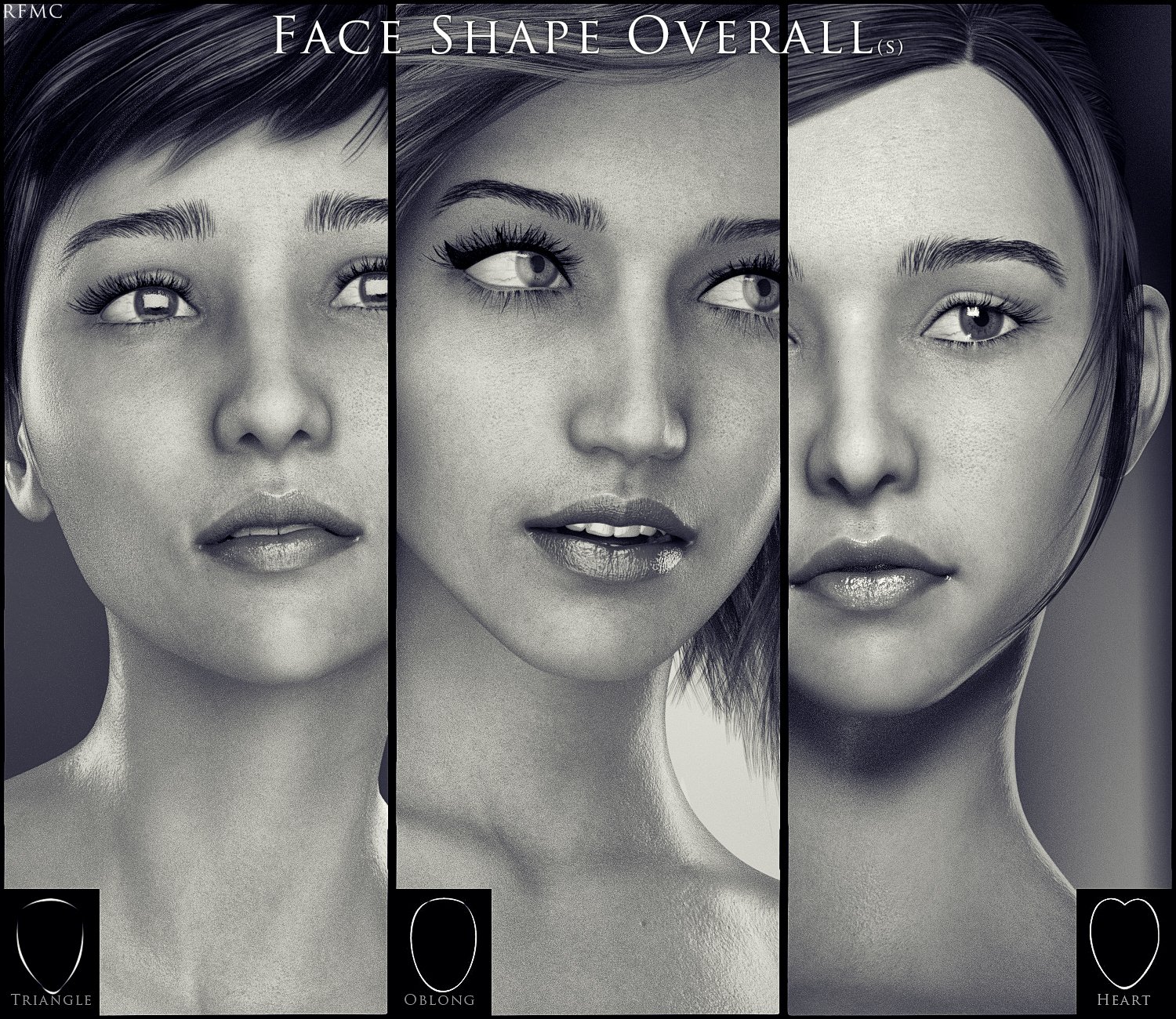
Fine tunig the location of the nose, the lips, and chin/jaw relative to each other will make the shape right. Then depending on the character, you need to remember that a skin texture that has the similar skin tone as your character will help it all look more accurate. try diferent texture with the same morphs and notice the slight differences until you find the one you are happy with. Then you need eye brows and hair.
Do the same for the body.
Daz 3D is part of

Connect
DAZ Productions, Inc.
7533 S Center View Ct #4664
West Jordan, UT 84084Licensing Agreement | Terms of Service | Privacy Policy | EULA
© 2026 Daz Productions Inc. All Rights Reserved.