-
Help with G8 eye mistake when sculpting morph
Hi all,
I've been using Daz for around 2 years and never made a post here before. I use this forum all the time to help me problem solve. I hope I'm posting my question in the correct place.
I have been learning to sculpt my own morphs with Nomad Sculpt on my ipad and after a rough start it has been going suprisingly well. I was pretty happy with my fullybody morph, focusing on the face but upon loading Iray mode I've realized I've made a mistake. At some point in my sculpting I've accidentally touched the eyeballs of my G8M. So when I load up the morph I made, the eyes are no longer perfectly round on the surface and while it's doesn't look too bad in texture mode, it is incredibly noticable in Iray and creates these horrible cracks all through any eye texture I try and use.
My question is, is there an easy fix for this besides going back into Nomad and trying my best to smooth them out/making a new morph? Is there a way to either seperate the eyeballs from the morph completely so they're not going to be changed when I dial it up? Is there a way to delete the eyeballs with the morph active and then import in new default G8 eyes and have them not changed by the morph or will they just immediately be effected? Can you even delete the eyeballs?
Sorry for so many questions. I just reallyyy don't want to go back to the drawing board with the morph. Especially seeing as I'm a beginner with sculpting it is liable to happen again.
Thanks in advance for any replys.
ATTN: G9 UNBM users, an issue with bends and solution!barbult said:
Daz doesn't uses the "JCM" or "pJCM" nomenclature for corrective morphs on Genesis 9. The new terminology is "cbs". So, it seems unlikely that it is a name conflict with a Daz 3D created morph. I also wonder why a PA is not following the proper new naming convention for Genesis 9 corrective morphs, and why Daz QA accepted that. Does the UNBM bend distortion happen on a base Genesis 9 or just a morphed character? I don't own the product to try it.
The base G9 with no other morphs, I would have posted a pic, but I already moved the morph, but I can put the morphs back and test it and provide pics to illustrate the issue clearly, so watch this post until then...
EDIT: I did not consider the name conventions, so nice catch, and no, it does not conflict with anything, as I un/reinstalled both G9 and her accesories/morphs and every other corrective morph pack, and yeah, it seems like it's by design, so maybe it's an oversight.
Genesis 9 eye morphs export/import and movement woescrosswind said:
Not so sure but are you fixing eyes rigging of your customized G9 head morph? There's a function - Adjust Eye Rigging in G9 Dev Tools, have you tried that?
It worked! Thank you so much :)
For posterity
Enable the G9 developer tools pane.
Search for developer in the properties of Genesis 9, and click it. You will be able to dock it afterwards. If you have used it in the past, it will show up in the panes menubar.

Add the G9 dev tools pane
(Window --> Panes (Tabs) --> G9 Dev Tools v0.3)
With your character / head morph selected (not eye morph) in edit mode
Go to the newly added pane, and press Adjust Eye Rigging

Then let it do its thing, and re-save your character/head (not eyes!) morph.
ATTN: G9 UNBM users, an issue with bends and solution!Daz doesn't uses the "JCM" or "pJCM" nomenclature for corrective morphs on Genesis 9. The new terminology is "cbs". So, it seems unlikely that it is a name conflict with a Daz 3D created morph. I also wonder why a PA is not following the proper new naming convention for Genesis 9 corrective morphs, and why Daz QA accepted that. Does the UNBM bend distortion happen on a base Genesis 9 or just a morphed character? I don't own the product to try it.
Washcloth (glove) for the hand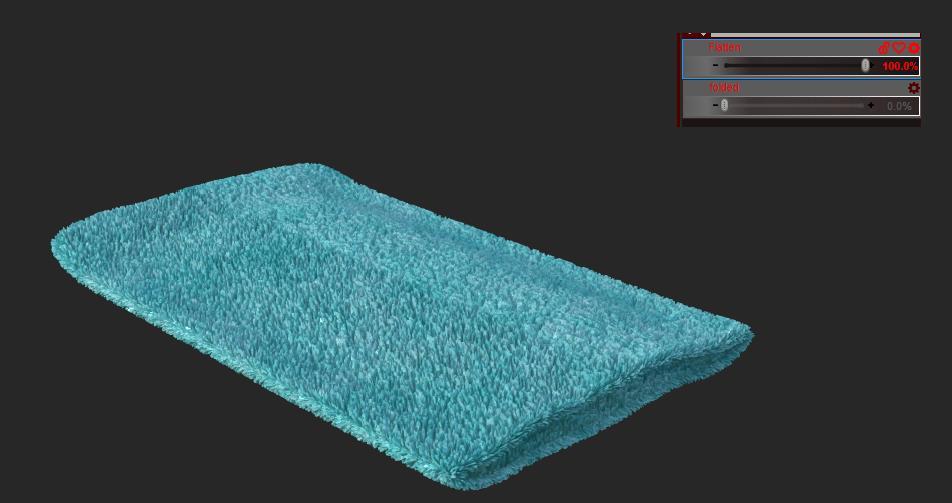
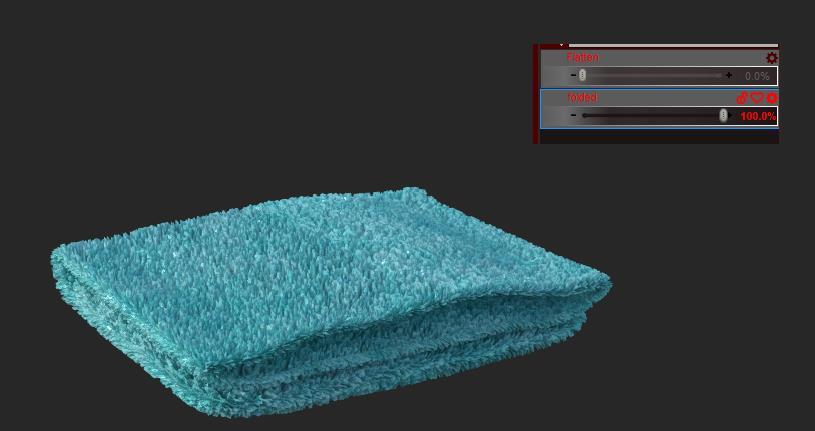
Thanks, looks cool. I prepared also a fun scene to show it but... it takes too much work xD.
(the morph names got sadly bad visible in the screenshot because I use often 90% jpg^^)
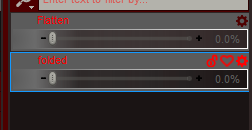
Here in clean :D..↑
(I will add my render later)
Created morphs for daz studio not working. - Resolved!I was suggesting importing the OBJ as a new, static model (a statue) using the same settings as in Morph Loader - that way you can see what the importer makes of the OBJ. If that looks right then we really need to see screenshots of the figure (untextured or in an untextured DrawStyle) and settings.
What is the difference between "saving ."scene subset" & "subset asset/prop asset"?First, there're two major file types in DS: *.duf (DSON User File) and *.dsf (DSON Support File)
- *.duf : user-facing files that're shown in your Daz Libraries. *.duf are mainly used for saving scene file, various presets, etc. Actually it can store all types of data but just depending on the figures / objects you're gonna save.
- *.dsf : non user-facing files that're not shown in your Daz Libraries but just in 'Daz Library\data' folders. *.dsf are mainly used for storing base geometry / rigging, morph data , UV data, etc.Scene Subset : mainly used for saving a Set of figures / objects in your scene, as per your selection. Then you may load / merge the Subset into other scene(s). It never saves any *.dsf but *.duf only. When saving, it'll check if there's any *.dsf file 'supports' the figures / objects you select. If not, all geometry / UV / rigging... data will be saved in duf file. For newly-created/imported objects that you've never saved any figure / prop assets, the duf file size may be pretty big after saving. So if you're a content creator, save figure / prop assets first.
Scene Assets: save everything in the scene, both *.dsf and *.duf. It'll save one single duf file for loading all objects, and save multiple duf files for each single object in the scene.
Figure / Prop Assets: save a single object only, both *.dsf and *.duf. This function could be frequently used if you're a content creator.
So you may choose to use the proper function depending on your cases and needs...
Created morphs for daz studio not working. - Resolved!Ascania said:
You imported the morph at the wrong scale.
Thanks, but I dont think that is the problem. Tried using morph loader from 10% to 1000%, with no luck. I alway use the Hex-bridge, which has worked for years, but not lately.
Tried using morph loader just as a work-around.
I'm thinking this is a Studio problem as the problem started after my last studio update - to 4.21.05.
Ill keep working at it ... probably something simple i've overlooked.
Thanks
"duplicate formulas found in file" questionmarth_e said:
BTW, I have notice that sometimes they add a -1 in the scene/modifiers section in the ID.
For example:
"scene" : {
"modifiers" : [
{
"id" : "MyMorphV01-1",
"url" : "#MyMorphV01"
}
]
Does anyone know what's the idea behind adding a -1. Does this help avoiding the duplicate IDs found in files warning?In DS General Release, when the strings defined in "id" and "name" are the same (as default - line 16 and 17 in dsf file), DS will automatically add a suffix '-1' to the "id" in scene - modifier section when you save morph asset(s), because "id" and "urI" in this section have to be different. However, PAs can edit *.dsf files... so you may not see such a suffix in some of those files.
In the latest DS Public Build, there's a new mechanism of automatically generating a unique urI ("id" - line 16 in dsf file) when saving morph asset. So this "id" in scene - modifiers section is the very same as "name" in line 17.
I believe such a mechanism has been implemented in Publishing Build (used by PAs) as well, so there won't be 'duplicate formulas' error from new products in the future...hopefully.
Created morphs for daz studio not working. - Resolved!You imported the morph at the wrong scale.
Created morphs for daz studio not working. - Resolved!Thanks ...
The figure distorts like a stretched Gumby. Tried saving as .obj and import via Morph Loader, still same.
Tried about every combination I can think of.
Seems that previos version of Studio worked fine, but after updating to latest Studio and Beta a few weeks ago, nothing works right.
I could simply be having a senior moment!!
Thanks
Legacy UVs for Genesis 9 [Commercial]Cayman Studios said:
OK Matt, I have submitted a correction to the two main Genesis 9 Legacy products by adding 8 facets to the geograft which seal the affected edges. Although it is barely noticeable I should really have picked up on it, so apologies. I shall update this post when the Updates go live. EDIT (September 11): Updates are now live.
Looks good. Looking closely at the new version, I see I managed to miss the spots near the armpits (I only initially noticed the back), but you obviously caught that.
Your project looks quite ambitious, and I wish you luck. A script to change the facet surface assignations seems to me like the Holy Grail, and would make all manner of tasks so much easier.
My coding is very rusty and I'm going to have to acquaint myself with DazScript, but it's possible to manually reassign faces in the geometry editor, so a script that can be given a list of face IDs and what surfaces to assign them to sounds possible in theory, assuming those functions are accessible via script.
For my own holy grail, I'd want to be able to edit all kinds of things that aren't currently redistributable - new surface assignments are one thing, but being able to inject new weight maps/rigging would allow for redistributable conversions of an asset to a different base (such as the old V4 internal organs being updated to G9 without ending up with bendy auto-fit rigging).
~~~~~
As far as doing things manually, I have been able to achieve what I want with manual reassignment of surfaces. I updated the new version of the geograft so that it had the current G9 UV, and split up the surfaces further so I could handle things like the areas that want to use G8 body textures but G9 arm textures (the aim being to get the geograft so it could be configured to fully support both UV sets), and after that I was able to use it as a tool to permanently bake G8 textures to the G9 UV with only DS's internal Map Transfer tool.
This was my first test, a G8F character and textures to G9. (Well, the character was originally G2F, but I'd already converted her to G8F some time ago and was working from that version)

Whether I can turn that into something automated and potentially redistributable is going to be a different matter, but the core question of whether the graft can be used as a path to permanently transfer the textures is "yes". (And I realise there's a certain irony in using the geograft in order to not need the geograft, but it has its benefits when it comes to other geografts, geoshells and HD morphs).
Created morphs for daz studio not working. - Resolved!Distort in what way? Check that the import option still give a correctly oriented and scaled figure (set the morph to 100% and see what you get, or try importing the OBJ itself into the scene with the same preset/settings).
Created morphs for daz studio not working. - Resolved!For years I created custom body morphs in Hexagon for use in Daz Studio. On my last studio update these no longer seem to work.
The morph completely distorts the chatacter - tried setting preserve deltas to yes and no, but no difference. The character continues to distort.
Even tried and older version of studio - 4.16, same issue.
Did something change, or am I not remembering the right process
Uinstalled/reinstalled both Studio and Hexagon - no change.
If issue already discussed, please point to that thread.
Any advice???
Thanks
Can't apply any shaping or morph [SOLVED]Hi! Hope you're all having a nice day.
Since i installed my Daz3D i can't apply some shapings or morphs and in some cases, materials.
Yesterday i bought the' 200+ Genesis 9 Edition' and none of the shaping parameters appears to me, neither in parameters nor shaping.
I created a ticket and left it alone until today, i bought some other resources including 'CHB Charlotte for Genesis 9' and still, no morph or shaping applying.
I turn the 'Charlotte' parameters to maximum and nothing happens.
I have the Essentials pack, otherwise i know it wouldn't work. I tried installing it manually, no results. And of course, i'm selecting the correct object at the scene.
Charlotte Materials doesn't work as well. When i create the "Charlotte" figure it loads a generic G9 female.
I had no problem with other packages for example my G9 Grunge Fasion Outfit works normally, materials and all.
Can someone help, please? I read all discussions at the first 12 pages on google, saw videos and nothing.
And i'm confused because for example my "Soft Curls Long Hair" shaping works normally and they were installed the same way.
P.s: Also are the expressions that comes in 'Genesis 9 expressions' so vague that most of them do nothing or am i having the same problem above?Genesis 8 Male Fig neck problems (geometry)Most likely it is a corrective morph, to make the bend look good when there is a very different character shape applied, that is kicking in when it shouldn't (i.e. when the shape it goes with is not applied). Apply the minimum pose that will trigger the defect (the -30 X bend on the neck) and then seelct the figure and follow what crosswind wrote about identifying hidden morphs that are in effect - one of those will belong to a character set and that is almost certainly the culprit. Check if there is an update for the character, if not report it (to the maker for other stores or freebies or to Daz for products sold here).
Genesis 8 Male Fig neck problems (geometry)There must be some character's morph(s) wrongly dialed as default. Reset pose, select Currently Used (with Show Hidden Properties), check if there's any character or weird morphs dialed.
FBM for Genesis 8 FemaleAs per the SOP, you should create an eJCM (Expression JCM) rather than an FBM for fixing the facial morph when Mouth Open is dialed on the figure...
- Export Mikasa with Mouth Open dialed and fix the morph in Blender
- Import the fixed obj with the Name - 'eJCMMikasaMouthOpen' as a delta, and no need to dial it
- Your steps in Property Hierarchy was correct - Mouth Open to 1st Stage, Mikasa Head to 2nd
- Modify its properties properly and save it as a morph assetIs AniMate2 an orphan product or what?benniewoodell said:
With keyframes on the timeline, you have to open up the tree far enough until you see the dot is more of a circle with a T L or C written inside (those are the interpolation abbreviations). Those you can move around and delete and see them gone. The reason a keyframe would still be there regularly if you highlight and delete it is because that one has another movement or morph associated with it. Like, for example, you delete all the keyframes on the head, but you have an expression dialed in. That will still show in the head line as a keyframe even though it's actually in the properties section above. Once you delete that keyframe, then everything will be gone in the head line for that particular keyframe. I have spent way more time than I'd like to admit hunting down what a rogue keyframe is in the tree. And a lot of times you'll never even see what the keyframe could be unless you change types at the bottom of the timeline to include everything. Once you click all the checkboxes, they stay that way so it's something you only have to do once, not every time you restart Daz, thank goodness. I hope this all makes sense, I animate with Daz every single day and these are some of the many frustrations.
And, yeah, copy and pasting is incredibly frustrating as well. The trick there is if the body moves wonky after you copy and paste a keyframe in-between the two keys, as long as Daz doesn't freeze and you're able to move around the timeline, highlight the first and last keyframe from where you copy and pasted, and change the interpolation to linear and then change it back to TCB and the wonkiness nine out of ten times is gone. If Daz freezes though after you paste the keyframe, it probably won't unfreeze. I've left my computer sitting there for like five hours once and it just kept having the blue circle thing thinking.
I don't know much about animate 2 except how to put an animate2 walk cycle in and then bake the keys to the timeline so I can make adjustments there as aniamte 2 just has never clicked with me.
Happy animating!
Thank you very much! This is more information than I've been able to find so far. I greatly appreciate your help!
FBM for Genesis 8 FemaleI'm not sure why I can't get it right.
I want to fix the mouth of a G8F - Mikasa for 'Mouth Open'
I fixed it on Blender
Import it back to DAZ
Set Mouth Open controoler and the FBM to 100%
Go to erc hierarchy, dragged the Mouth Open controller to the 1st stage controller.
I also dragged the Mikasa Head controller to 2nd stage controllerTest it, didin't work.
The FBM didn't follow the Mouth Open controller.
Then I tried ERC bake the Mouth open controller, tick the FBM.
It worked.
I checked the FBM on the ERC hierarchy, strangely it made the same structure like my first attempt.
Then...
if I save the morph, load a new mikasa, tested it, didn't work.
I check the FBM on ERC hierarchy, the 1st stage controller is suddenly empty, leaving only the 2nd stage controller with Mikasa Head.
How to do this right?Daz 3D is part of

Connect
DAZ Productions, Inc.
7533 S Center View Ct #4664
West Jordan, UT 84084Licensing Agreement | Terms of Service | Privacy Policy | EULA
© 2026 Daz Productions Inc. All Rights Reserved.