-
AIUTO...CHI CONOSCE L’ITALIANO? PARTE QUATTORDICI
Imago said:
Crios said:
Avrei preferito qualcun altro, magari Harrison Ford, che I vestiti già c'eranoGreedo aveva sparato per primo.

Con Ford c'è un problema: E' vivo.
Connery no e non può opporsi al suo "duplicato irreale".
Hanno dimenticato il morph "Draco". E se ricordo bene (?) anche Mufasa.
Are there any Gen 8 females that closely resemble Marilyn Monroe?Morning!
I found a couple of really nice freebies of Marilyn in the Celebrity Look-a-like thread!!
AOBB's Sweetheart - She is non-commercial use only
Devandvan's Marie - Also non-commercial
There were a few more in the thread but not all of them were free. They are morphs only so you would need to find a skin/makeup setup that works but AOBB lists what he used in his renders of her to make it a little easier! Also LIE makeups are really nice if you find a skin you love but the makeup isn't what you need!
ElliG8F Walking & Everyday Doorway Poses SetsWith my convertor you need to have a G8 and a G9 in the scene.
Apply the pose to the G8 figure.
Run the script.
In the little script window, Select the hip node of the G8 figure in a drop-down combo box labelled 'G8 Character' (I think). Select the hip node of the G9 figure in a drop-down combo box labelled 'G9 Character' (I think, or something similar). (The reason for selecting the hip is that the internal DAZ Studio Skeleton data structure needs to be identified for the script and if your figure has clothing etc then it's possible that it won't chose the main character and sometimes the script will find the clothing skeleton and throw an error because the clothing may not have finger or foot bones.) If you want as much of the expression as possible to come over, tick the 'Transfer Face Rig' checkbox. Press the 'Accept' button to get it to run.
That should be all you need to do. Not everything comes over, as the script transfers the poses applied to bones in the figure. Things like 'Bend Ring Finger' ERC causes the finger bones (Ring1 Bend, Ring2 Bend and Ring3 Bend) to move, and those values will be transferred, but the value of the equivalent G9 'Bend Ring Finger' ERC will not be updated. Also, custom expressions that rely on a morph will not be transferred. If the expression is created by moving the eyebrows, eyelids, cheek bones etc, then that will be transferred to G9 as well as possible.
The script will make as much of the G8 pose appear on the G9 figure as possible.
There is a thread on it: https://www.daz3d.com/forums/discussion/598316/g8f-m-pose-transfer-to-g9/p1, with a YouTube video explanation linked to on page 3 if that helps (https://www.daz3d.com/forums/discussion/comment/7804911/#Comment_7804911).
Regards,
Richard
Oh my Lord why has Sean got boobsIt is a quite good job. He also has the Angela Jolie morph in his store. I didn't know she was in Fatal Attraction.
200 Plus Genesis 9 Edition (Commercial)I just got back in town to internet service, and I wanted to thank you for making and releasing 200 Plus G9. Thanks for adding new morphs like Brows Thickness, which does a better job than what I used Brows Arch for. Also, the new Brows Height lowers the brows (something I often do for leading ladies and men) without adding a nose notch and outer eye crease---which every brow height morph I've previously used does add if dialed past minus 50. You must've applied smoothing to those areas so it wouldn't happen, and I'm very grateful.
You really are a Daz community treasure.
Oh my Lord why has Sean got boobsI used a different body morph. Also, if I load a gen 9 figure, then add his morph, the chest somehow doesn't seem as bad. For whatever reason, when I loaded the character, riversoft's look at me couldn't find the eyes.
I also discovered that if you remove the hd morphs and put on Julian's texture, he looks a LOT like the figure back in the 007 era.
looking for three fingers and toes for genesis 9Not had any luck finding these.
So anyone know of a morph set for Genesis 9 that has less fingers and toes.
Something like "HFS Ultimate Shapes for Genesis 8" would be good
Thanks all ahead of time
G8F Walking & Everyday Doorway Poses SetsMust admit I'd do as Faeryl Womyn suggests, myself. I have done a freebie pose transfer script where the pose is applied to G8F, then the script copies the pose (modifying it as needed to suit) to G9. There are other scripts that do similar things, some paid, some for free. Not sure what your problem is with the convertors, maybe that's what needs addressing. Regards, Richard.Nagalean Serpent for G9 [commercial]Let your Serpent Cult grow...with Nagalean
https://www.daz3d.com/nagalean-for-genesis-9
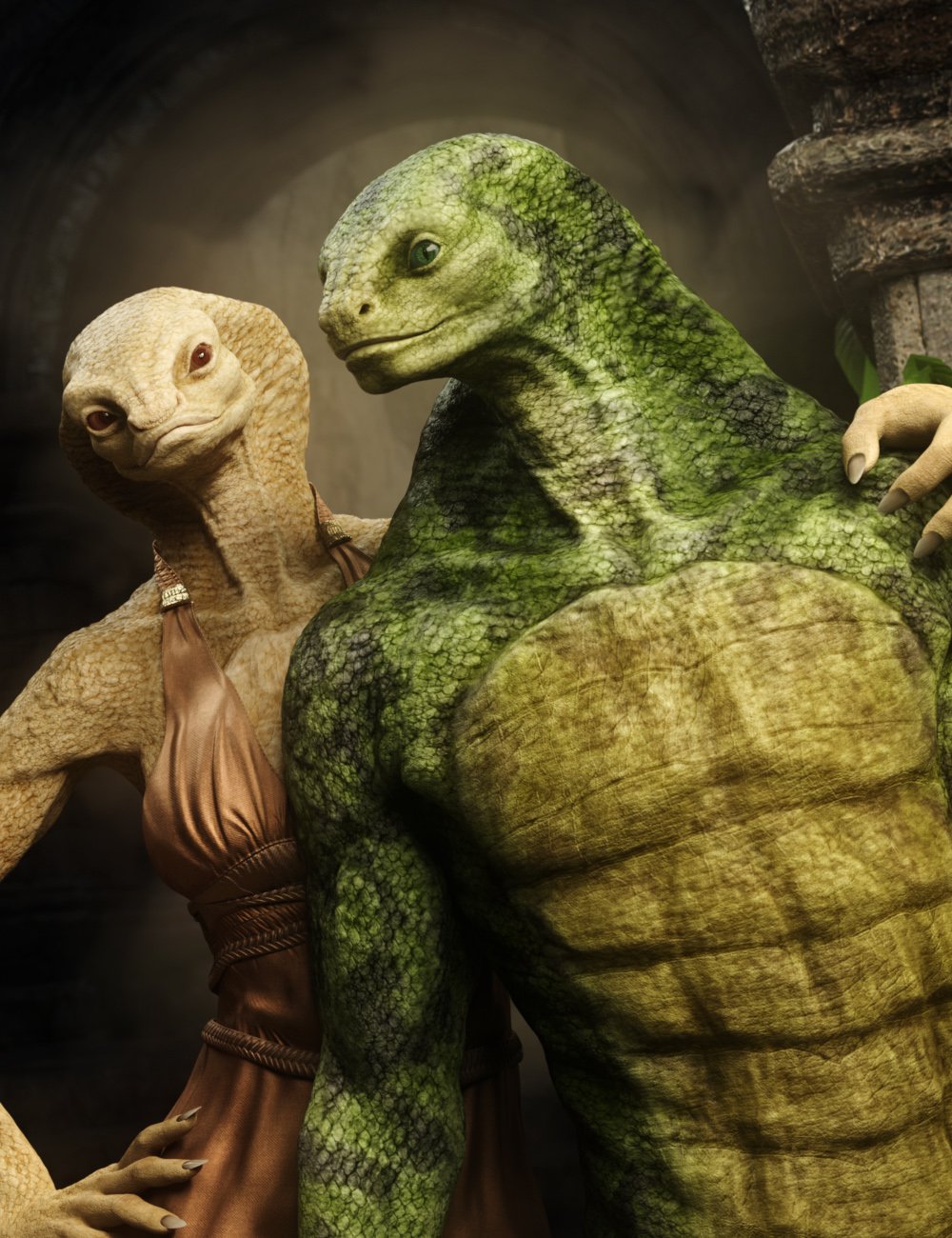
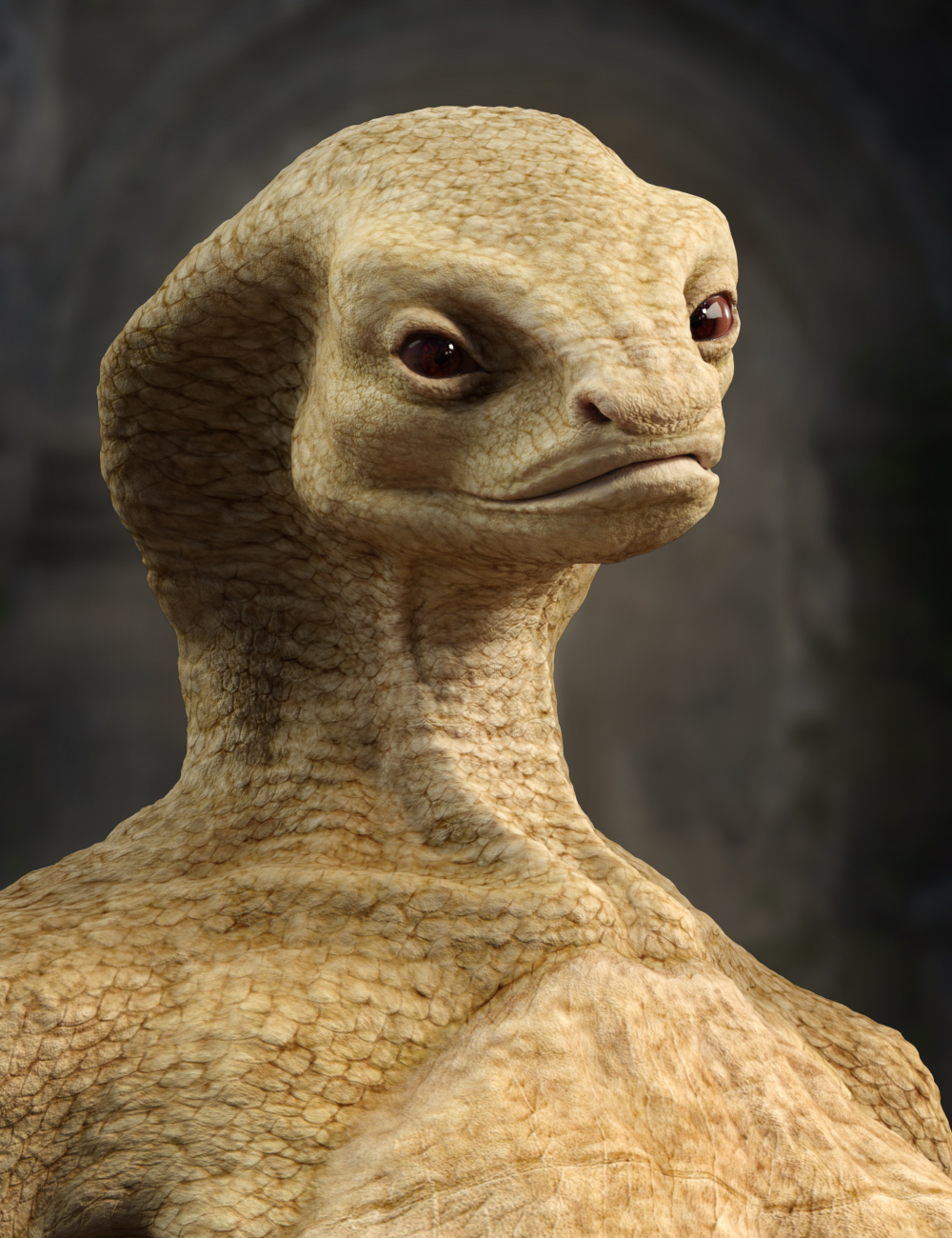
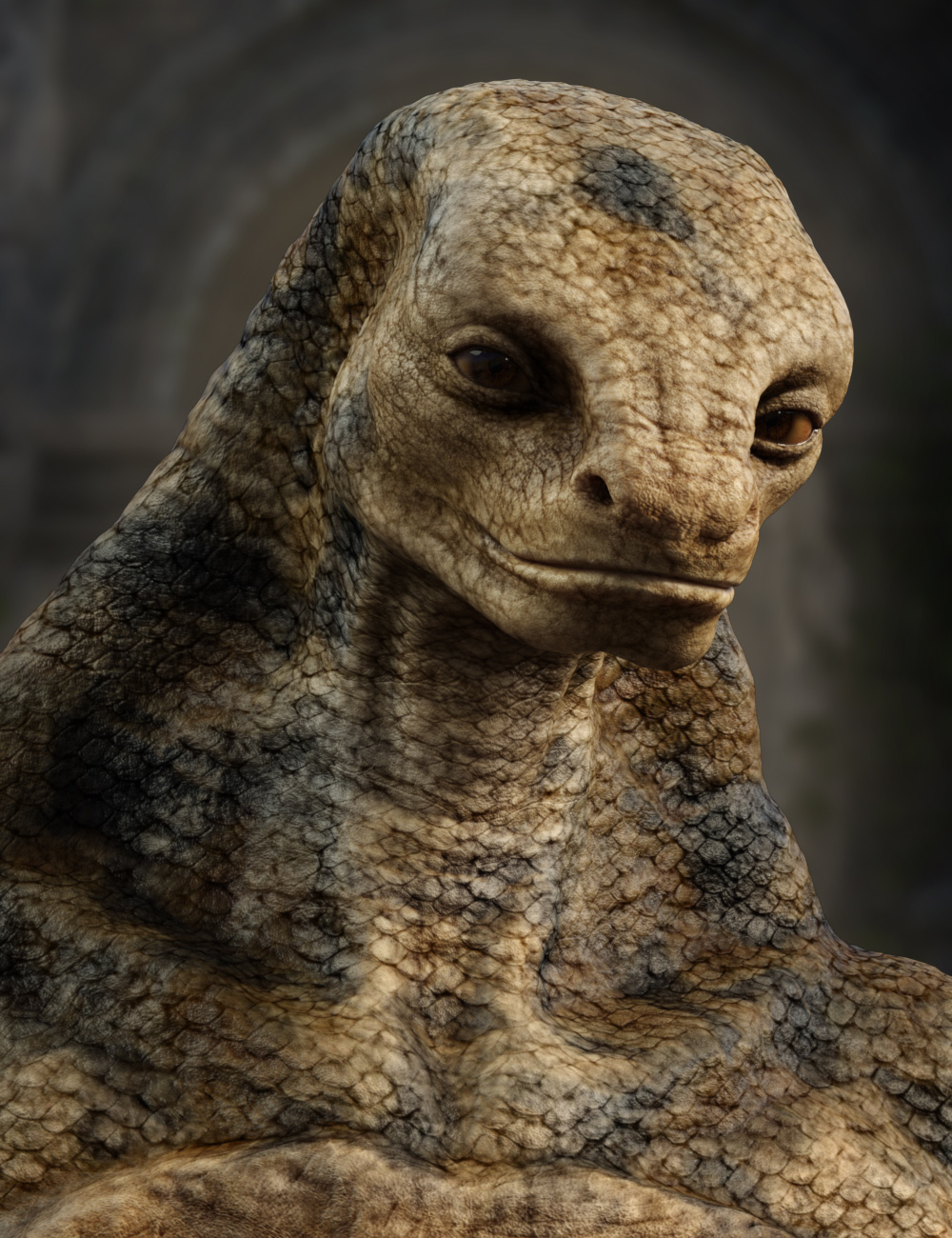
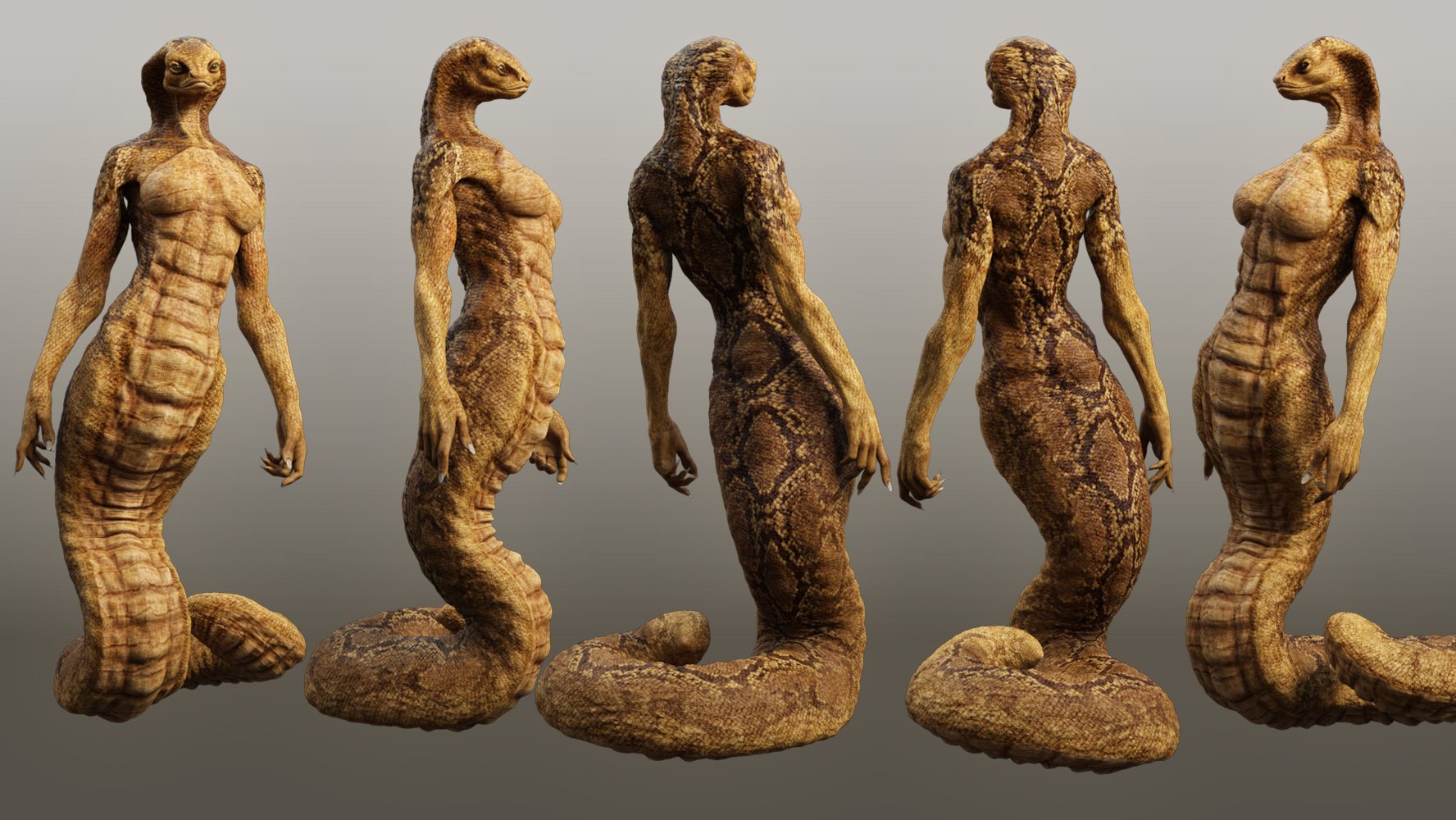
Worshiped as mystical deities, the Nagalean are a proud race of serpent beings. Whether an alien or creature of fantasy, Nagalean is a very realistic-looking snake character set with an optional highly posable snake tail geograft.
Built off of Genesis 9, this set has distinct Male and Female morph variations.
This set was designed with ultra-realistic PBR skin techniques. The high-definition morphs and high-quality textures will really bring this character to life for your renders.
What's Included and Features
- Nagalean for Genesis 9: (.DUF)
- Nagalean Character Preset
- Nagalean Female Shaping Preset
- Nagalean Male Shaping Preset
- Nagalean Female Shaping Preset with Legs
- Nagalean Male Shaping Preset with Legs
- Nagalean Snake Tail
- Material Options:
- 08 Skin Mats without Anatomical Elements
- 05 Eye Material Presets
 Lowpoly version of genesis 9 for Unity
Hi everyone,
I'm working on a mobile game and I want to use genesis 9 figure as a start for the characters.
From a topdown view, 20-30 characters will be available in the game scene at a time, hence the need for lowpoly versions of the characters. But we'll also need a high quality/poly version to show in character selection menu.
- Is there a way to create a lowpoly version of the figure beyond what the Base resolution provides? I'm considering to manually dissolve loops using blender but then I lose the ability to seamlessly add new content later (for example, a new morph target).
- If there's a better workflow I'm open for suggestions.
Thank you!
Question: Diffeomorphic, Posing, Mesh DeformationIf you use easy import then jcms are transferred to the outfit, vendor morphs are used if available, and you get the same deformations as daz studio. If you don't use easy import then you have to transfer by hand. Then if you don't like the deformations you can sculpt over, and/or edit or disable the affected jcms in the blender shapekeys list, and/or edit the weightmaps. The choice is wide and up to you.
https://bitbucket.org/Diffeomorphic/import_daz/wiki/Import/Easy Import DAZ
Does anyone have a solution for tis annoying problem?PerttiA said:
This has a morph for "Eyelashes Length"
Thanks for pointing that out. I checked, and although I purchased and installed the head morphs - they are definitely not included in the figure. I loaded the Gen 2 Male from scratch from the Smart Content folder, but no -- no additional morphs!
Question: Diffeomorphic, Posing, Mesh DeformationAt this stage I'm interested in generating images from static poses. I haven't gotten my feet wet in Blender animation yet.
After importing with Diffeo, a figure with all its attire in rest pose looks good. However once I apply a pose, the attire mesh begins to deform, as expected, following the underlying bone system. (See image below, for example). To correct these, I resort to JCM adjustments or go into sculpt mode and adjust the mesh accordingly. Yet in some cases, no matter how I try, the adjustments don't come out well.
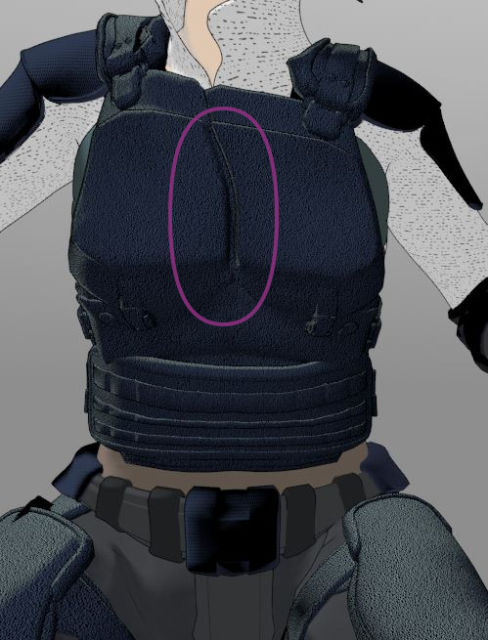
Naturally I'd like to minimize these types of deformations. Are there settings in the Diffeo apply-pose process that I should check? Are there adjustments in the DIffeo Morph panel that I overlooked? Lastly, as I'm beginning to understand the rigging and mesh deformation system in Blender, would skinning/weight painting be a factor that helps overcome these posing deformations?
Thanks.
Export character from Win to Mac (FaceGen)The facegen shape should be saved as a morph, somewhere where it is also available on the other computer.
Then you can save a character preset, you can load on the other machine.
Legacy UVs for Genesis 9 [Commercial]Matt_Castle said:
Cayman Studios said:
OK Matt, I have submitted a correction to the two main Genesis 9 Legacy products by adding 8 facets to the geograft which seal the affected edges. Although it is barely noticeable I should really have picked up on it, so apologies. I shall update this post when the Updates go live. EDIT (September 11): Updates are now live.
Looks good. Looking closely at the new version, I see I managed to miss the spots near the armpits (I only initially noticed the back), but you obviously caught that.
Your project looks quite ambitious, and I wish you luck. A script to change the facet surface assignations seems to me like the Holy Grail, and would make all manner of tasks so much easier.
My coding is very rusty and I'm going to have to acquaint myself with DazScript, but it's possible to manually reassign faces in the geometry editor, so a script that can be given a list of face IDs and what surfaces to assign them to sounds possible in theory, assuming those functions are accessible via script.
For my own holy grail, I'd want to be able to edit all kinds of things that aren't currently redistributable - new surface assignments are one thing, but being able to inject new weight maps/rigging would allow for redistributable conversions of an asset to a different base (such as the old V4 internal organs being updated to G9 without ending up with bendy auto-fit rigging).
~~~~~
As far as doing things manually, I have been able to achieve what I want with manual reassignment of surfaces. I updated the new version of the geograft so that it had the current G9 UV, and split up the surfaces further so I could handle things like the areas that want to use G8 body textures but G9 arm textures (the aim being to get the geograft so it could be configured to fully support both UV sets), and after that I was able to use it as a tool to permanently bake G8 textures to the G9 UV with only DS's internal Map Transfer tool.
This was my first test, a G8F character and textures to G9. (Well, the character was originally G2F, but I'd already converted her to G8F some time ago and was working from that version)

Whether I can turn that into something automated and potentially redistributable is going to be a different matter, but the core question of whether the graft can be used as a path to permanently transfer the textures is "yes". (And I realise there's a certain irony in using the geograft in order to not need the geograft, but it has its benefits when it comes to other geografts, geoshells and HD morphs).
Well, it's good to know that my geograft can be used beyond its original purpose!
Help with G8 eye mistake when sculpting morphRemoving the eyes is quite easy. make your morph a favourite (click the ehart icon on the slider) and make sure you don't have any other favourited morphs (that should affect the eyes). Switch to the Geometry Editor tool and select the eyes (should be a mayyer of clicking the + next to the group or surface names in the Tool Settinsg pane), then right-click>Geoemtry Selection>Convert Seelction>Convert to Vertex Selection (morphs work on vertices, but it is easier to select the eyes in polygon mode and convert). Now right-click>Morph Editing>Clear Selected deltas from Favourites (this will remove the deltas, the changes in position, from the currently selected vertices in all favourited morphs).
Of course you may then need to adjust your morph around the eyes, either using the same feature in DS or in Nomad Sculpt, but this should give you clean, round eye shapes at least. Resave the morph when done.
Help with G8 eye mistake when sculpting morphHi all,
I've been using Daz for around 2 years and never made a post here before. I use this forum all the time to help me problem solve. I hope I'm posting my question in the correct place.
I have been learning to sculpt my own morphs with Nomad Sculpt on my ipad and after a rough start it has been going suprisingly well. I was pretty happy with my fullybody morph, focusing on the face but upon loading Iray mode I've realized I've made a mistake. At some point in my sculpting I've accidentally touched the eyeballs of my G8M. So when I load up the morph I made, the eyes are no longer perfectly round on the surface and while it's doesn't look too bad in texture mode, it is incredibly noticable in Iray and creates these horrible cracks all through any eye texture I try and use.
My question is, is there an easy fix for this besides going back into Nomad and trying my best to smooth them out/making a new morph? Is there a way to either seperate the eyeballs from the morph completely so they're not going to be changed when I dial it up? Is there a way to delete the eyeballs with the morph active and then import in new default G8 eyes and have them not changed by the morph or will they just immediately be effected? Can you even delete the eyeballs?
Sorry for so many questions. I just reallyyy don't want to go back to the drawing board with the morph. Especially seeing as I'm a beginner with sculpting it is liable to happen again.
Thanks in advance for any replys.
ATTN: G9 UNBM users, an issue with bends and solution!barbult said:
Daz doesn't uses the "JCM" or "pJCM" nomenclature for corrective morphs on Genesis 9. The new terminology is "cbs". So, it seems unlikely that it is a name conflict with a Daz 3D created morph. I also wonder why a PA is not following the proper new naming convention for Genesis 9 corrective morphs, and why Daz QA accepted that. Does the UNBM bend distortion happen on a base Genesis 9 or just a morphed character? I don't own the product to try it.
The base G9 with no other morphs, I would have posted a pic, but I already moved the morph, but I can put the morphs back and test it and provide pics to illustrate the issue clearly, so watch this post until then...
EDIT: I did not consider the name conventions, so nice catch, and no, it does not conflict with anything, as I un/reinstalled both G9 and her accesories/morphs and every other corrective morph pack, and yeah, it seems like it's by design, so maybe it's an oversight.
Genesis 9 eye morphs export/import and movement woescrosswind said:
Not so sure but are you fixing eyes rigging of your customized G9 head morph? There's a function - Adjust Eye Rigging in G9 Dev Tools, have you tried that?
It worked! Thank you so much :)
For posterity
Enable the G9 developer tools pane.
Search for developer in the properties of Genesis 9, and click it. You will be able to dock it afterwards. If you have used it in the past, it will show up in the panes menubar.

Add the G9 dev tools pane
(Window --> Panes (Tabs) --> G9 Dev Tools v0.3)
With your character / head morph selected (not eye morph) in edit mode
Go to the newly added pane, and press Adjust Eye Rigging

Then let it do its thing, and re-save your character/head (not eyes!) morph.
ATTN: G9 UNBM users, an issue with bends and solution!Daz doesn't uses the "JCM" or "pJCM" nomenclature for corrective morphs on Genesis 9. The new terminology is "cbs". So, it seems unlikely that it is a name conflict with a Daz 3D created morph. I also wonder why a PA is not following the proper new naming convention for Genesis 9 corrective morphs, and why Daz QA accepted that. Does the UNBM bend distortion happen on a base Genesis 9 or just a morphed character? I don't own the product to try it.
Daz 3D is part of

Connect
DAZ Productions, Inc.
7533 S Center View Ct #4664
West Jordan, UT 84084Licensing Agreement | Terms of Service | Privacy Policy | EULA
© 2026 Daz Productions Inc. All Rights Reserved.