-
Star Wars Renders 2013 +
smoke14 said:
@Shimrian It was there earlier...this forum software has been a real pain with uploading images. I linked it from my gallery...hopefully that works.
I see a blank square for the upload, but I can see the linked image fine. Great job on the likeness
 December 2022 - Daz 3D New User Challenge - Open Render Challenge
Lots of great entries!!
marconft6: Fantastic render and style! Thanks for sharing your process.
Shimrian: Love that you recreated your profile image sketch. Lovely render!I'm going to add to all the beach entries already here with one of my own.
Title: Monochrome Beach Series I-3
Intermediate Entry, DAZ Studio IrayI wanted to work on a romantic beach series in BW. With this image in the series, I wanted to improve my posing, expressions, weight-bearing adjustments, and try out a dforce wind node on hair.
I started out with a pose that I modified to suit, but the weight-bearing aspects didn't look right. And I wanted things to be more dynamic, with the hair blowing away from the girl. I've put the original tweaked pose and regular dforced hair pic as an attacment for comparison with the updated inline image.
Posing and weight-bearing: I leaned both characters back more and used Auto Shape Enhancer for G8F/M and Muscle Morphs for G8F/M to make the guy lifting the girl more believable. I applied bicep morphs on both characters and back muscle flex morphs on the guy. It made a subtle but meaningful difference I think. If anyone has any suggestions for how to tackle this aspect of posing better or other products that would help, I'm all ears!!
Dforce wind node: I don't have any useful experience with dforce wind nodes, but realized after trying it a few times today and looking it up in the forums, that it doesn't work as is with dforce hairs like this one. I found a helpful forum post about reducing the hair density by 90% and then trying it out. Whatever I got working after that looked good enough to me for this image. I definitely want to practice with dforce wind on hair more. It does really add to the feel and believability of an image. Cheers!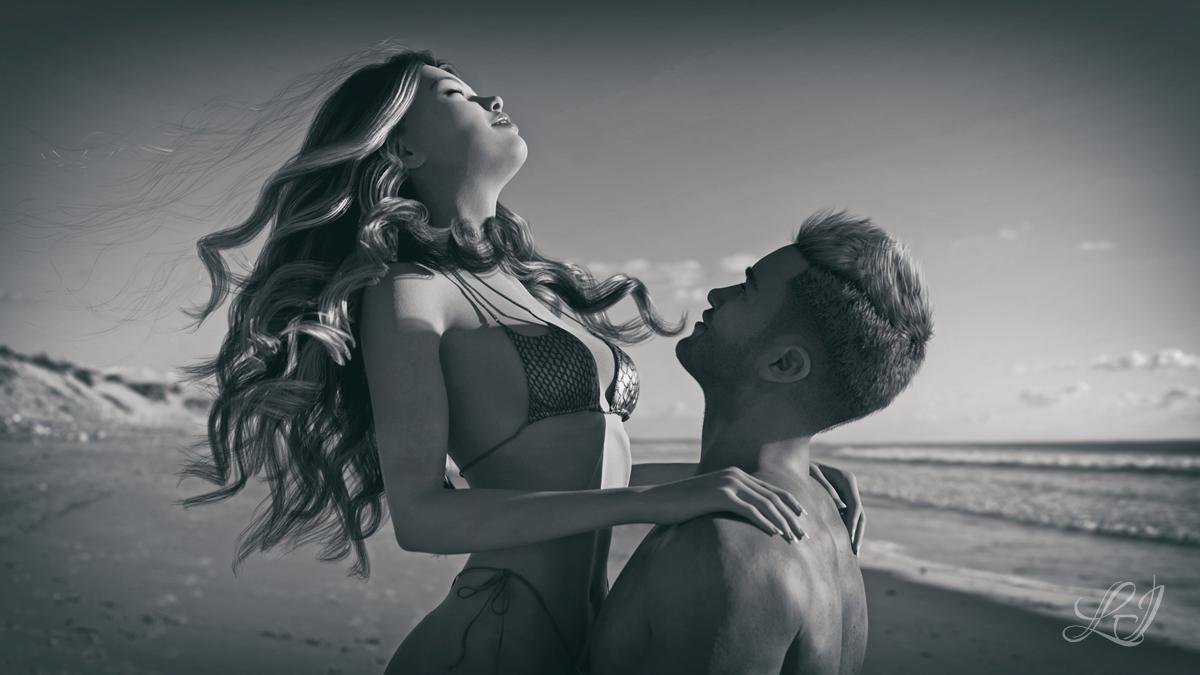 Iray Lighting Environment
Artini said:
Looks nice with UltraScenery - it is well lighted, but just grey blue background.
Still cannot upload images to the forum, so you need to guess only, how it looks...
That's what I forgot! Did you render with dome visibility off? I was wondering if it worked like Ghost Lights where the light source is invisible. I guess it wouldn't be.
UltraScenery - new territory [Commercial]Artini said:
I cannot upload the image to the forum, so below is the ASCII representation of it.
Hope, you will get an idea...
MMMMMMMMMMMMMMMMMMMMMMMMMM"MMMMMMMMMMMMMMMMMMMMMMMMMMMMMMMMMMMMMMMMMMMMMMMMMMMMM
MMMMMMo"oMMMMMMMMMMMMMMMMMMMMMMMMMMMMMMMMMMMMMMMMMMMMMMMMMMMoMM"MMMMMMMMMMMMMMMM
MMMMMMMoMoMMMMMMMMMMMMMMMMMMoMMMMMMMMMMMMMMMMMMMMMMMMMMMoMMMMMMMMMMMMMMMMMMMMMMM
MMMoMoMMMMMMMMMMMMMMMMMMMMMMMMMMMMMMMMMMMMMMMMMMMMMMMMMMMMoMMMMMMMMMMMMMMMMMMMMM
MMMMMMMMMMMMMMMMMMMMMMMMMMMMMMMMMMMoMMMMMMMMMMMMMMMMMMMMMMoMMMMMMMMM"MMMMMMMMMMM
MMMMMMMMMM"MMMMMMMMMMMMMMMMMMMMMMMMMMMMMMMMMMMMMMMMMMMMMM"MMMMMMMMMMMMMMMMMMMMMM
MMMMMMMMMMMMMMMMMMMMMMMMMMMMMMMMMMMMMMMMMMMMoMMMMMMMMMMMM"Mo"MM"MMMMMMMMMMMoMMMM
MMMMMMMMMMMMMMMMMMMMMMMMMMMMMMMMMMMMMMMMMMMMMMMMMM"MMMMMMMMoMMMMMMoMMM"MMM"M"MMM
MMMMMMMMMMMMMMMMMMMMMMMMMMMMMMMMMMMMMMMMMMMMMMMMMMMMMMMMMoMM"MMMMM"MMM"MMMMMMMMM
MMMMMMMMMMMMMMMMMMMMMMMMMMMMMMMM"MMMMMMMMMMMMMMMMMMMMMMMMMMMMMMMMMMMMMMMMMMMMMMM
MMMMMMMMMMMMMMMMMMMMMMMMMMMMMM    MMMMMMMMMMMMMMMMMMMMMMMMMMMMMMMMMMMMMMMMMMMMMM
MMMMMMMMMMMMMMMMMMMMMMMMMMMMMMM"M"MMMMMMMMMMMMMMMMMMMMMMMMMMMMMMMMMMMMMMMMMMMMMM
MMMMMMMMMMMMMMMMMMMMMMMMMMMMMMo ooo"MMMMo"MMMMMMMMMMMMMMMMMMMMMMMMMMMMMMMMMMMMMM
MMMMMMMMMMMMMMMMMMMMMMMMMMMMMMMMoMMMMMMMoMoMMMMMMM"MMMMMMMMMMMMMMMMMMMMMMMMMMMMM
MMMMMMMMMMMMMMMMMMMMMMMMMMMMMMMMMMMMMMMMMM oo"MMoM"M"MMMMMMMMMMMMMMMMMMMMMMMMMMM
MMMMMMMMMMMMMMMMMMMMMMMMMMMMMMMMMMMMMMMMMMMo"MMMoM"M"Mo"MMMMMMMMMMMMMMMMMMMMMMMM
MMMMMMMMMMMMMMMMMMMMMMMMMMMMMMMMMMMMMMMMMMMMMMMMo"M M M"o"MMMMMMMMMMMMMMMMMMMMMM
MMMMMMMMMMMMMMMMMMMMMMMMMMMMMMMMMMMMMMMMMMMoMMMM"Moo M MMMMMMMMMMMMMMMMMMMMMMMMM
MMMMMMMMMMMMMMMMMMMMMMMMMMMMMMMMMMMMMMMMMMMMMMMMMMo"M"MMMMMMMMMMMMMMMMMMMMMMMMMM
MMMMMMMMMMMMMMMMMMMMMMMMMMMMMMMMMMMMMM"MMoMMMMMM"MM"M"MMMMMMMMMMMMMMMMMMMMMMMMMM
MMMMMMMMMMMMMMMMMMMMMMMMMMMMMMMMMMMMMMMMoMMMMMMMMMM"M"MMMMMMMMMMMMMMMMMMMMMMMMMM
MMMMMMMMMMMMMMMMMMMMMMMMMMMMMMMMMMMMM MMoMMMMMMMo"MM"MMMMMMMMMMMMMMMMMMMMMMMMMMM
""""""""""""""""""""""""""""""""""""""" """"""""""""""""""""""""""""""""""""""""
Nope!
 Ron's Vintage Backgrounds and Overlays We users like to help each other. The forum is usually the best place to seek technical help.Deformations between higher res HD Morph and Geograft figure need advise for better transition
I have tried adding the subD property to my geograft. It still seems to have an odd line of deformity that seems to be the same line that is used for creating the geograft. I have tested this myself using Genesis 9 with the Victoria 9 HD morphs on and a geograft I created as a replacement for the arm. Its the same arm geometry I just made it into a geograft instead to be used as an example.
I'm having trouble uploading the images to the forum for some reason.
The line is even more pronounced with higher levels of subdivision. I had suspected that it is due to the way that the HD Morphs are deforming the mesh in a different way than the Geograft geometry since the Geograft Geometry doesn't have an HD Morph to it. Or maybe I need to do something else to accomodate the higher resolutions?
Steps taken
Export G9 at base resolution with Zeroed shape in obj and import to blender.
Remove all polygons except for the arm and export to obj.
Import the arm as obj and apply subD to the imported arm.
Use transfer utility to transfer rigging from G9 to the arm.
Go into geometry tools and select the geograft faces on G9 corresponding to the faces that will be replaced by the arm's edge and assign for grafting.
Add the faces for the rest of the arm for hiding and assign for auto hiding.
Unfit and fit the arm to G9 figure.
Apply the PBR Skin shader to the Arms surfaces.
Copy the G9 surfaces to the Arm figure.
Apply Victoria 9 HD Morph
You should be able to see the line deformation that happens to align with faces used for the grafting.
This should allow you to reproduce the issue, but hopefully others may provide some more suggestions on how to fix this or how to mitigate this. Crossing fingers that someone in the forum might know.
DAZ is losing salesDrogo Nazhur said:
Since the last website revamp several months, I have been buying less and less content from here and more from second party suppliers because this site is not smart phone friendly anymore. See attachments. If the powers that be want more of my business, it needs to go back to the previous layout.
Based on what I am seeing from your screenshot, I would tend to agree with you and not shop here either, but based on what I see on my hubby's Samsung s21, which is something totally different, I would tend to disagree. He upgraded because the Samsung Note5 he had was older technology and about to become obsolete. According to Team Mobile he needed a 5G capable device. Unlike me, he prefers the mobile for Daz shopping (he adds things to my cart while I build cat climbers etc) and later, I select what I want, toss some, add some etc. I never check out or browse products on a mobile device. Anyhow, his view screen looks much different than yours. For starters the menu, in portrait mode is in two columns, a much smaller font and takes up only 1/4 of the screen space. Obviously he sees 2.5 rows of images. Could it be a settings issue that makes yours so large? I have three mobile phones here, one is an iphone and the other is his old samsung. I use it to watch my animals via the yi cam. On his old samsung the Daz site looks exactly the same as it does on his new phone. Nothing wrong with the site view at all. The shopping experience could be improved in my mind, from a search & features standpoint, but I think the site has improved from what it was a year ago.
And sometimes when trying to edit this happens on any device . . . a 504.
3Delight Useful Stuff?-Put It Here:)pavsikakyj said:
Sven Dullah said:
I'll upload some screenshots when the forum gods allow...meanwhile I can tell you I had no problems using the shader in 4.20 (a standard spotlight and UE2). How it behaves depends so much on your lighting philosofy. You probably need to set light density to a much larger number first. Or increase light strength a lot. Also, if you set opacity density to a small negative value, you can use scatter color (if opacity density is zero there is no scatter). Also a general tip, first set up lighting the way you want it before bringing in the volume;) Let me know how it goes! The size of the volume is also a thing to play with, along with the start- and end- falloffs. And remember, camera MUST be outside the volume.
Ok. I use UE2 with standart settings anf standart point light. And no matter how I increase Light density or Opacity dencity - I get the same result. Since i use cube primitive for the volume, I got rear wal of the cube scattered where the light desn't fall on it. The rest is totally opaque.
The volume shader has Opacity Color. It should be set to pure black after posing the volume prop. This simply hides the geometry. Light Density controls how dense the fog is when lit by a light. Opacity Density controls the overall opacity and is linked to scatter color, so these two can be used to design the way the fog reacts to light. If you set Opacity Density to 0, scatter is disabled and the fog reacts only to light color. Hope this clarifies things a bit.
Try a standard spotlight instead of a pointlight! The light is more concentrated and easier to work with if you set light spread to around 30-60°. Set light falloff to 2,set light intensity scale to a high enough number (10000-100000) depending on distance from the object you wish to light, enable raytraced shadows and adjust spread and softness to your liking. When you can light up your object sufficiently create the volume etc.
Add GI like UE2 lastly, it will save you time, as there is less tracing going on without it. And adding GI as a final step will help you find the right levels of ambient light, hopefully:) If you wish to use a pointlight instead that's fine, just set it up the same way as the spot. You will get a more foggy effect with a dim light bloom, as the light is unidirectional, but it is useful.
Announcing: Daz Deals Browser Add-on IIGlad to hear Ati is on the mend, and I'm sorry for your loss Overdrawn.
I do have one question though, are the "Sort by Wishlist" filter in the main store, and the Forum/Gallery links on the store pages pro features now? Because they haven't been working for me for quite awhile. Unless I disable the extension, then the Forum/Gallery links will show briefly on the store page, but disappear as soon as I navigate away.
Iray Lighting EnvironmentLooks nice with UltraScenery - it is well lighted, but just grey blue background.
Still cannot upload images to the forum, so you need to guess only, how it looks...
3Delight Useful Stuff?-Put It Here:)Sven Dullah said:
I'll upload some screenshots when the forum gods allow...meanwhile I can tell you I had no problems using the shader in 4.20 (a standard spotlight and UE2). How it behaves depends so much on your lighting philosofy. You probably need to set light density to a much larger number first. Or increase light strength a lot. Also, if you set opacity density to a small negative value, you can use scatter color (if opacity density is zero there is no scatter). Also a general tip, first set up lighting the way you want it before bringing in the volume;) Let me know how it goes! The size of the volume is also a thing to play with, along with the start- and end- falloffs. And remember, camera MUST be outside the volume.
Ok. I use UE2 with standart settings anf standart point light. And no matter how I increase Light density or Opacity dencity - I get the same result. Since i use cube primitive for the volume, I got rear wal of the cube scattered where the light desn't fall on it. The rest is totally opaque.
UltraScenery - new territory [Commercial]I cannot upload the image to the forum, so below is the ASCII representation of it.
Hope, you will get an idea...
MMMMMMMMMMMMMMMMMMMMMMMMMM"MMMMMMMMMMMMMMMMMMMMMMMMMMMMMMMMMMMMMMMMMMMMMMMMMMMMM
MMMMMMo"oMMMMMMMMMMMMMMMMMMMMMMMMMMMMMMMMMMMMMMMMMMMMMMMMMMMoMM"MMMMMMMMMMMMMMMM
MMMMMMMoMoMMMMMMMMMMMMMMMMMMoMMMMMMMMMMMMMMMMMMMMMMMMMMMoMMMMMMMMMMMMMMMMMMMMMMM
MMMoMoMMMMMMMMMMMMMMMMMMMMMMMMMMMMMMMMMMMMMMMMMMMMMMMMMMMMoMMMMMMMMMMMMMMMMMMMMM
MMMMMMMMMMMMMMMMMMMMMMMMMMMMMMMMMMMoMMMMMMMMMMMMMMMMMMMMMMoMMMMMMMMM"MMMMMMMMMMM
MMMMMMMMMM"MMMMMMMMMMMMMMMMMMMMMMMMMMMMMMMMMMMMMMMMMMMMMM"MMMMMMMMMMMMMMMMMMMMMM
MMMMMMMMMMMMMMMMMMMMMMMMMMMMMMMMMMMMMMMMMMMMoMMMMMMMMMMMM"Mo"MM"MMMMMMMMMMMoMMMM
MMMMMMMMMMMMMMMMMMMMMMMMMMMMMMMMMMMMMMMMMMMMMMMMMM"MMMMMMMMoMMMMMMoMMM"MMM"M"MMM
MMMMMMMMMMMMMMMMMMMMMMMMMMMMMMMMMMMMMMMMMMMMMMMMMMMMMMMMMoMM"MMMMM"MMM"MMMMMMMMM
MMMMMMMMMMMMMMMMMMMMMMMMMMMMMMMM"MMMMMMMMMMMMMMMMMMMMMMMMMMMMMMMMMMMMMMMMMMMMMMM
MMMMMMMMMMMMMMMMMMMMMMMMMMMMMM    MMMMMMMMMMMMMMMMMMMMMMMMMMMMMMMMMMMMMMMMMMMMMM
MMMMMMMMMMMMMMMMMMMMMMMMMMMMMMM"M"MMMMMMMMMMMMMMMMMMMMMMMMMMMMMMMMMMMMMMMMMMMMMM
MMMMMMMMMMMMMMMMMMMMMMMMMMMMMMo ooo"MMMMo"MMMMMMMMMMMMMMMMMMMMMMMMMMMMMMMMMMMMMM
MMMMMMMMMMMMMMMMMMMMMMMMMMMMMMMMoMMMMMMMoMoMMMMMMM"MMMMMMMMMMMMMMMMMMMMMMMMMMMMM
MMMMMMMMMMMMMMMMMMMMMMMMMMMMMMMMMMMMMMMMMM oo"MMoM"M"MMMMMMMMMMMMMMMMMMMMMMMMMMM
MMMMMMMMMMMMMMMMMMMMMMMMMMMMMMMMMMMMMMMMMMMo"MMMoM"M"Mo"MMMMMMMMMMMMMMMMMMMMMMMM
MMMMMMMMMMMMMMMMMMMMMMMMMMMMMMMMMMMMMMMMMMMMMMMMo"M M M"o"MMMMMMMMMMMMMMMMMMMMMM
MMMMMMMMMMMMMMMMMMMMMMMMMMMMMMMMMMMMMMMMMMMoMMMM"Moo M MMMMMMMMMMMMMMMMMMMMMMMMM
MMMMMMMMMMMMMMMMMMMMMMMMMMMMMMMMMMMMMMMMMMMMMMMMMMo"M"MMMMMMMMMMMMMMMMMMMMMMMMMM
MMMMMMMMMMMMMMMMMMMMMMMMMMMMMMMMMMMMMM"MMoMMMMMM"MM"M"MMMMMMMMMMMMMMMMMMMMMMMMMM
MMMMMMMMMMMMMMMMMMMMMMMMMMMMMMMMMMMMMMMMoMMMMMMMMMM"M"MMMMMMMMMMMMMMMMMMMMMMMMMM
MMMMMMMMMMMMMMMMMMMMMMMMMMMMMMMMMMMMM MMoMMMMMMMo"MM"MMMMMMMMMMMMMMMMMMMMMMMMMMM
""""""""""""""""""""""""""""""""""""""" """"""""""""""""""""""""""""""""""""""""
3Delight Useful Stuff?-Put It Here:)I'll upload some screenshots when the forum gods allow...meanwhile I can tell you I had no problems using the shader in 4.20 (a standard spotlight and UE2). How it behaves depends so much on your lighting philosofy. You probably need to set light density to a much larger number first. Or increase light strength a lot. Also, if you set opacity density to a small negative value, you can use scatter color (if opacity density is zero there is no scatter). Also a general tip, first set up lighting the way you want it before bringing in the volume;) Let me know how it goes! The size of the volume is also a thing to play with, along with the start- and end- falloffs. And remember, camera MUST be outside the volume.
3Delight Useful Stuff?-Put It Here:)Sven Dullah said:
pavsikakyj said:
Sven Dullah said:
pavsikakyj said:
I got this in both 4.9 and 4.21. What am I doing wrong?
I'll try it in 4.20 in a while...rendering at the moment.
Edit: You do use raytraced shadows? I see no shadows in your attachment? Or you do have a sufficient raytrace depth in rendersettings/sampling? 1 is minimum, 2 is a good number.
Had to get back 4.21 since 4.9 has no dForce. In 4.20 I experience total catastrophe with 3DL lights. See below some renders. First two made with default spot light without/with volume shader. Second two made with omniffreaker's mesh. Without/with volume shader either.
F...k. I can't get what is wrong with this forum. Images don't load
...while waiting, just a thought if you're running multiple DS builds - make sure all light shaders and plug-ins are properly installed for each DS version. If you use AoA products, lights, cameras etc, try reinstalling...
Yeah I had uploading issues yesterday, haven't tried today.
Reinstalling helped. So thank a lot. But it still looks like picture I allredy posted, except for the shadows to appear. Can you probably give a step-by-step advice for the dummy like me? What cam should I use, what options should I set in surface tab for shader. Sorry to bug you. But posibillity to get volumetriv light effect is so much wanted by me.
New Genesis, New Sales Thread: Report Issues Here "Reporting Only"Artini said:
Cannot upload images to the forum - does anybody notice that?
Yes there has been issues with that for about a week off and on.
New Genesis, New Sales Thread: Report Issues Here "Reporting Only"Cannot upload images to the forum - does anybody notice that?
New! Novica & Forum Members Tips & Product Reviews Pt 14Samantha (G8F) Eilis Hair (G8F) dF Chic Party Fashion (G8F) Studio Light Pro HDRI Iray Wow Lights
I hadn't tried the Wow Lights, many of the results when clicking around the various options seemed the same to me. The arrow selections are what really move the lights and you'll see a difference. I rotated the dome on my own too. If you haven't tried these lights, see what you get with them. I like the results and will do a few more characters with them to play around when I get time. Relatives are in town (my sister, niece, etc) to see mom (she is 95 so we're taking one Christmas at a time at this point) so I'll be gone most the day. I'll see if I can setup and render while I'm gone.Have any of you noticed how the search in your Product Library continues to be garbage? It broke about two years ago (when we had all that trouble with the website, gallery images going ka-put, etc) and hasn't been right since. I typed in Chic Party Fashion and GOT NOTHING. Come on! How much more does the stupid thing need? Just because dForce wasn't in front of it, it refused to show anything.
 Daz to Blender Bridge
Thank you for the answers so far. And apologies for the absence, i had to bump into the forum account page with the "my threads" option, first.
What i tried is not much;
- Install Blender 3.4 somehow, update to the latest version.
- Reinstall Daz-to-Blender in DIM several times / somehow.
To clarify: i find Edit->Settings ~ Add-ons... relevant sources are checked (default) - but i can't find anything "daz" with the search, nor by scrolling. All sorts of import-tools, nothing with "armature", nor "daz".
Should i be using Blender 2.8 / 3.0 / 3.2 instead? Should i uninstall Blender completely? Reinstalling DAZ would take a long time, because i was shopping too much. And before putting it on the real machine, i would like to have had some basic success with DAZ-Blender (-Godot).
Edit: "1.6.2 works fine here with blender 3.4.1, be sure to clean install" according to @Padone / I'll give it another shot with diffeomorphic then.
Daz Studio Iray - Rendering Hardware BenchmarkingRayDAnt said:
outrider42 said:
System Configuration
System/Motherboard: MSI MPG x570
CPU: AMD 5800x
GPU 0: EVGA 3060 Black @ stock
GPU 1: Nvidia Founder's 3090 @ stock
System Memory: GSkill 64GB (16x4) 3200Mhz
OS Drive: Inland M.2 2TB
Asset Drive: Samsung 870 EVO 4TB
Power Supply: EVGA 1000 GQ
Operating System: Windows 10 Pro 22H2 19045.2364
Nvidia Drivers Version: 527.56 SD
Benchmark ResultsDaz Studio Version: 4.21.1.013 Beta x64
3090+3060
2022-12-27 21:22:02.313 [INFO] :: Total Rendering Time: 1 minutes 21.78 seconds
2022-12-27 21:22:19.260 Iray [INFO] - IRAY:RENDER :: 1.0 IRAY rend info : CUDA device 1 (NVIDIA GeForce RTX 3060): 502 iterations, 1.038s init, 78.865s render
2022-12-27 21:22:19.260 Iray [INFO] - IRAY:RENDER :: 1.0 IRAY rend info : CUDA device 0 (NVIDIA GeForce RTX 3090): 1298 iterations, 0.940s init, 78.570s renderIteration Rate: 22.824 per second
Loading Time: 2.915 seconds
3090 alone
2022-12-27 21:25:24.608 [INFO] :: Total Rendering Time: 1 minutes 49.90 seconds
2022-12-27 21:25:35.765 Iray [INFO] - IRAY:RENDER :: 1.0 IRAY rend info : CUDA device 0 (NVIDIA GeForce RTX 3090): 1800 iterations, 0.932s init, 107.757s renderIteration Rate: 16.704 per second
Loading Time: 2.143 seconds
3060 alone
2022-12-27 21:31:01.549 [INFO] :: Total Rendering Time: 4 minutes 34.57 seconds
2022-12-27 21:34:21.293 Iray [INFO] - IRAY:RENDER :: 1.0 IRAY rend info : CUDA device 1 (NVIDIA GeForce RTX 3060): 1800 iterations, 0.690s init, 272.670s renderIteration Rate: 6.601 per second
Loading Time: 1.9 seconds
So...I am not seeing any difference. I updated my driver and restarted my PC to double check it took. I verified that my Iray version is build 363600.1657, 14 Dec 2022.
I was not sure what is going on there, but then I compared my 4.21 time and found that WAS slower. I forgot that 4.21 was even slower than 4.20, yikes. My times in 4.21 were at 88 seconds for both cards, compared to 78 here. But I was getting about 78 in 4.20, so this improvement only gets us back to 4.20, NOT 4.16. My times in 4.16 are hitting 66 seconds. 4.20 was when the complaints started happening. So the newest Daz slots between. I will try some other tests, but not right now, I just don't feel that motivation. IMO it seams like the Iray Dev Team stretched the truth a bit. They may have improved the speed, but their claim they "fixed" a regression is not accurate if you consider 4.16, and that is the speed I want to see again.
We also have reports that some EXR based HDRIs are not working in this new version. I have not tested this.
Re-check your installed Daz Studio Beta version. The latest and only release so far to use Iray 2022.1.1 or newer (where the "fixes" happened) is DS 4.21.026 - you listed .013 above. Which is back on Iray 2022.0.1
That was a copy-paste mistake to the forum.
*Which I have now fixed. I actually copied part of you post as a quick template, lol. I just forgot to change that line. I assure you is 4.21.1.026.
UltraScenery - new territory [Commercial]One of my first renders of UltraScenery made with Daz Studio 4.21.0.5 Pro.
I have placed a white spotlight (150000 lumen) slightly above the yellow meshlight (prop with the emission material)
and have used one of the presets from:
https://www.daz3d.com/skies-of-gaia-volume-2--40-8k-hdris-for-iray
Edit: forum does not take images, at the moment :(
Daz 3D is part of

Connect
DAZ Productions, Inc.
7533 S Center View Ct #4664
West Jordan, UT 84084Licensing Agreement | Terms of Service | Privacy Policy | EULA
© 2026 Daz Productions Inc. All Rights Reserved.