-
Legacy UVs for Genesis 8 [Commercial]
If I'm not mistaken, the Genesis Base UV is virtually identical the V4 (except for the eye); so, the V4 to G8F version of this product should work. Please double check and verify that the V4 UV is the same as Genesis Base.
Legacy UVs for Genesis 8 [Commercial]Greetings,
I'm at a complete loss, unfortunately. Can any of these products allow me to use a Genesis (base!) skin on G8? I get the geoshell, which is awesome, but I can't seem to apply a _base_ Genesis texture to the shell.
I'm specifically trying to apply the Foxy texture from Foxy and Wolfy, but it seems not to work at all.
- Prepare Genesis 8 Female
- The UVs available on the 'Legacy UVs Geograft' are only Genesis 2 Female and Victoria 4.
- Try to apply Foxy texture anyway. Looks like attachment. Makes sense, because the UV isn't the Genesis base UV.
What product or process gives a base Genesis UV for a geoshell on Genesis 8?
-- Morgan
Victoria 4.2 & Morphs ++ Show as not Installed in Studio Via DIM InstallationIf you try installing soemthign else via DIM, such as the weekly freebie, does that work? It does sound as if either the directories don't match or there is a failure to communicate with the Content Management System.
Victoria 4 base, and the ExP expansions, cannot be isntalled via Connect at this time.
Hi Richard, everything else installs just fine via DIM... Have attempted another go at it with these 6 installers - DIM shows they downloaded and installed just fine but Studio shows them as Greyed Out Icons with the same Triangle and ! symbol... I can Right Click on those icons but there is no option to install them. Only options showing are to update MeteData, which i did, Export MetaData, some additional options and viewing the file(s) location(s), which when clicked on does nothing... Therefore I have downloaded all 6 files manually from My Product Library @ DAZ but do not know how to proceed as there are both DS & Poser software showing in the unzipped files and the Readme's are so old now that i am unable to make sense of the info as it is very sketchy... How did you all do these installations prior to DIM?
Thanks for your prompt reply and hopefully we can get this resolved soon...
Victoria 4.2 & Morphs ++ Show as not Installed in Studio Via DIM InstallationIf you try installing soemthign else via DIM, such as the weekly freebie, does that work? It does sound as if either the directories don't match or there is a failure to communicate with the Content Management System.
Victoria 4 base, and the ExP expansions, cannot be isntalled via Connect at this time.
Does Victoria-7-for-Victoria-8 product work with Victoria-7 addon characters?Note it adds the Victoria 7 head and body shape to Victoria 8, it does not let you use Genesis 3 Female morphs on Genesis 4 Female.
Victoria 4.2 & Morphs ++ Show as not Installed in Studio Via DIM InstallationHelp! All of a sudden the complete Victoria 4.2 & Morphs ++ downloaded and installed via DIM will not run, show as being uninstalled in DAZ Studio 4.10, are greyed out and have a triangle with an ! in both Smart Content as well as the Content Library... I cannot even access the installer(s) inside Studio as they are greyed out. I have never manually installed content as it has always been installed via DIM so I do not know where to begin... Especially since these files are so critical to be able to use any of my V4 content, which i have a lot of...
Please note the DAz Content folder is on its own drive (G), however it is not an external drive. Also I have run the uninstall program via the Installed Tab for all 3 installers for both V4.2 as well as V4.2 ++ within DIM. I then took the extra steps of deleting all of those installer Packages in the To Be Installed Tab. I have rerun both the download(s) and installation(s) multiple times yet with the same results even though DIM shows the installations were completed!! What's additionally starnge is all of the other Characters within this series have installed and run just fine! Only V4.2 has this problem. Therefore could there be something new within this 4.10.0.123 in the 64 bit version of Studio that would cause this as this problem has not occurred with prior versions starting with 4.8 and why all of a sudden would it be happening?? I have been using 4.10... ever since it came online as the full version... I do not install Beta versions of any of my software especially when it involves such complexities as in Studio.
Therefore I am reaching out to you the experts on how to proceed as I am totally stumped realizing that since the installers have both Studio and Poser files within their respective installation progams. I have looked all over the Forums but have found nothing pertaining to this particular issue.
Thanks in advance for anyway you can assist me in resolving this most perplexing problem.
Universal Pose Splitter [Commercial]Universal Pose Splitter will allow you to split Poses and Timeline Animations as Partial Pose Presets, or Partial Animation Presets. Those Partial Pose or Animation Presets will then apply only to the bones you defined when you created them. It includes batch tools so that you can create you own libraries of “lower body poses” or “upper body poses” or “head poses” or “eyes poses” or “wings poses” or “tail poses” or, etc, etc…
Single Save or Batch Process:
- Universal Pose Splitter can process either the current Pose or Timeline Animation of your scene, or you can decide to use a Batch Process on a large number of existing files. Using a Batch Process will be great to create full Libraries of "Left Arm Only" or "Right Hand Only" or "Head and Neck Only", or "Lower Body Only", "Tail" etc, etc.. Pose or Animation presets. This way you will be able to efficiently build new poses by combining the Partial Presets split from the Pose Presets already existing in your Smart Content or your Content Library.
- Many tools and options have been included to create and manage the list of files to be processed, and the characteristics of the output file names, with two level of details for the output path, an optional suffix to the names, and the possibility to re-use the original thumb.
- In all cases (Single Save or Batch), you have the opportunity to decide whereas you want to save the Type only of the file (Pose or Animation), or to add Smart Content information such as category and compatibility. You can even add sub categories if you want!
Any Figure you want, any Split you want:
- You can process this way any figure you want: human, animal, creature, robot, vehicle. The only constraint is that it must be a figure! The dynamic interface will adapt to your choices.
- Either you decide to work with the Classical Settings provided for Daz Human Figures (from Victoria 4 to Genesis 8 including all the Genesis generations), or you decide to work with the Advanced Settings interface parts exploiting your own custom list of bones and properties for any figure. In the Advanced case of figure, all the tools you need have been included to create rapidly your own presets of bones to be saved, and to save and reload them as soon as you need them. Lists of bones can be added to each other to create more complex lists. In the case of Human Figures, you can also set your current choices as default for the next sessions.
Any Frame you want:
- You can save either the current frame, or a custom list of frames from an animation, or an animation within the Frame Range you decide. For Batch Process of Animations, you can choose to process the whole animation for each file, or to keep the current Frame Range you set.
Designed for a Maximum Efficiency:
- Universal Pose Splitter has been conceived to save a maximum of time.
- All the key settings can be set as default for the next sessions, so that you don't lose time doing the same steps over and over from one session to another.
- Even better: you can save a huge amount of time by saving full configuration files for your interface, including absolutely everything! You can this way create configuration files including the output path for the files -also remembered from one session to another-, your choice in term of "Human" or "Advanced" settings, your choices for the bones and properties to be saved, the list of bones if they exist, all the "frame" options, the Smart Content options, for a batch process the list of files to be processed, the Batch options, etc, etc.., well, everything!
- You can create as many configuration files as you want, and reload any of them totally or partially thanks to check boxes allowing you to define exactly what you want to reload. And you can even set those check boxes status as default! This way you can for instance save and reload bones and properties configurations (for instance Dragon Wings, or Dog Tail, or Genesis 8 Left Hand). You can also reload only the list of files for a Batch Process and/or the Batch Process options if you want to. You can reload in any session anything you want from any configuration file finally, which is a huge time saver!
- Many other options are available such as buttons to remove an animation, or to add this script to the Main Menu of Daz Studio.
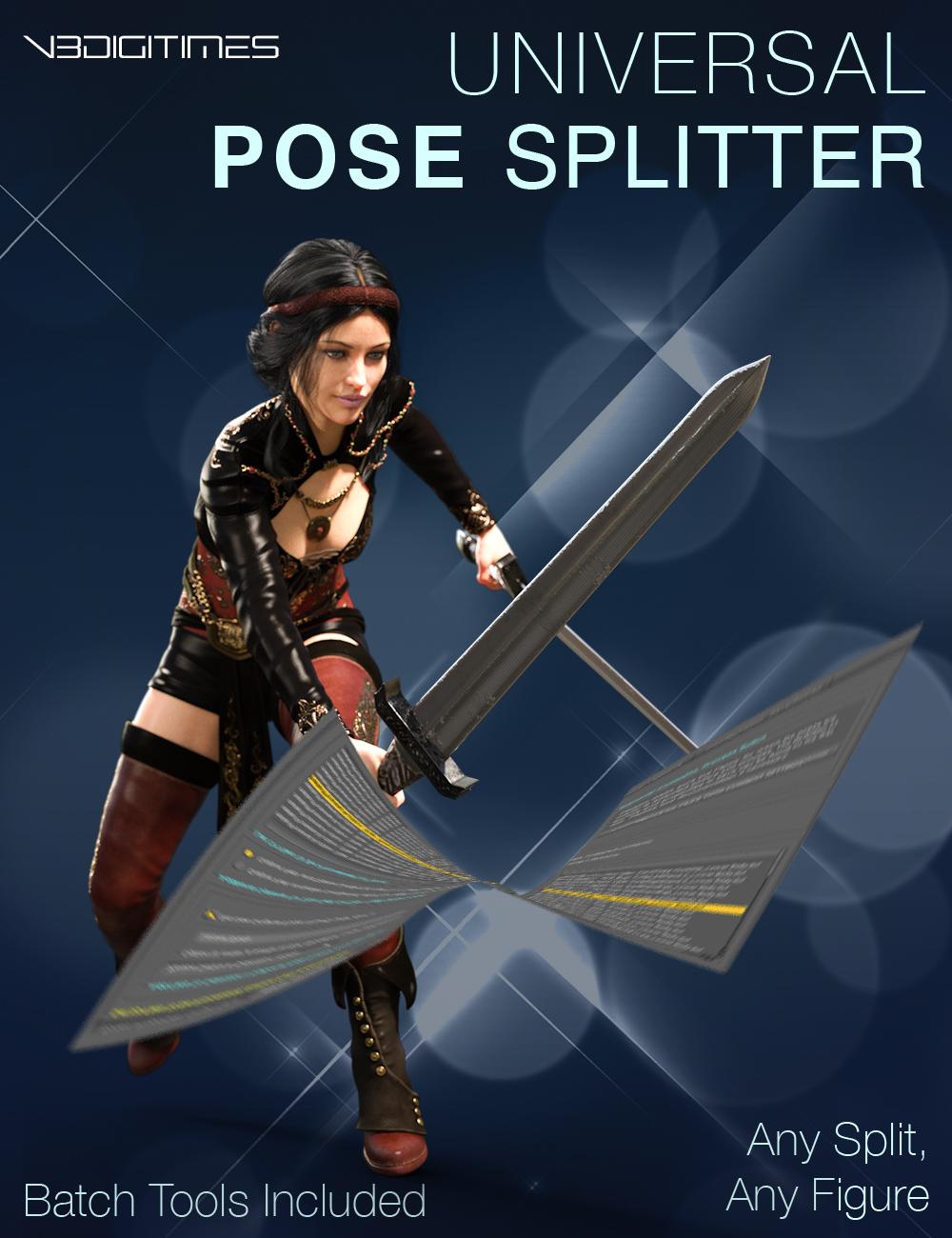
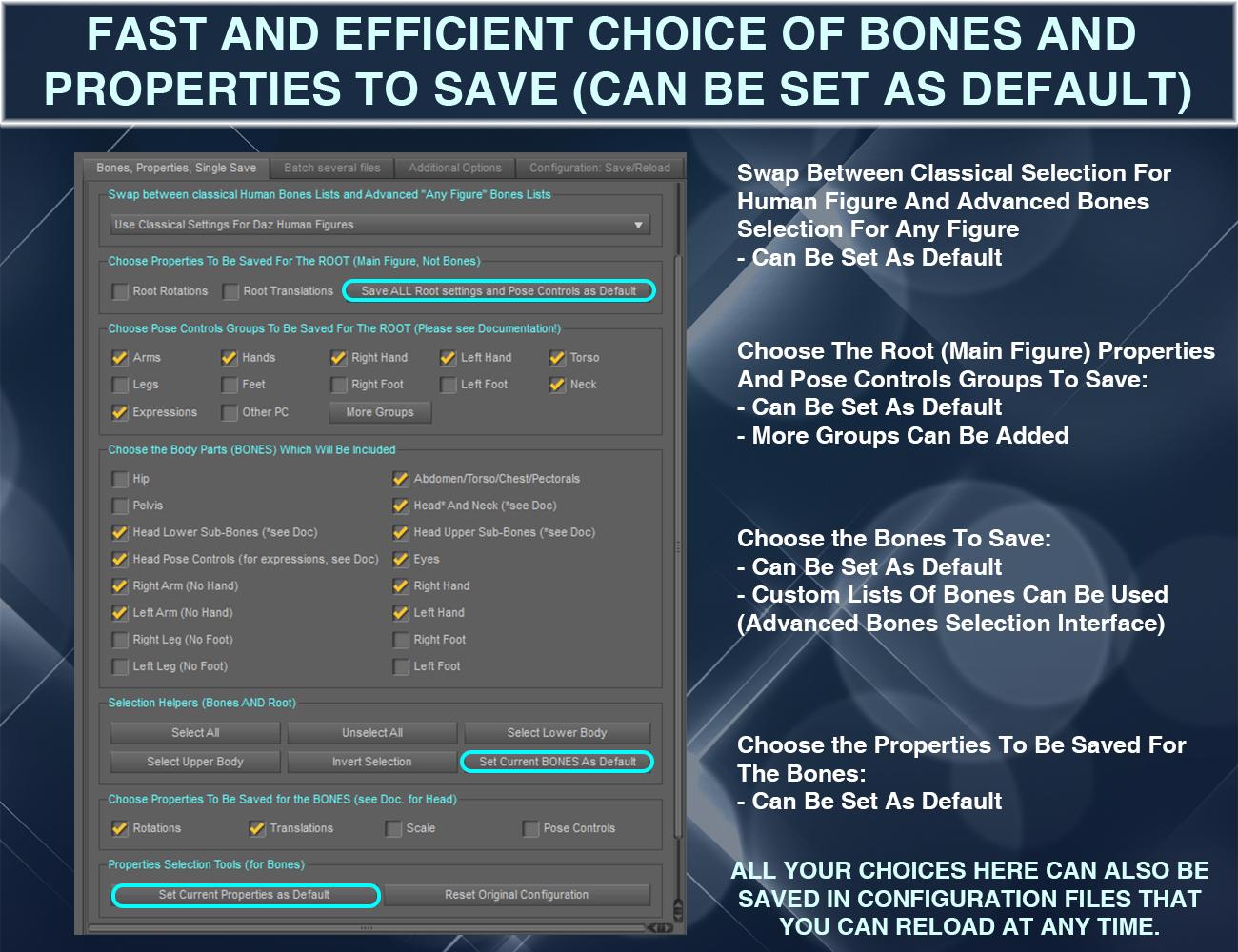
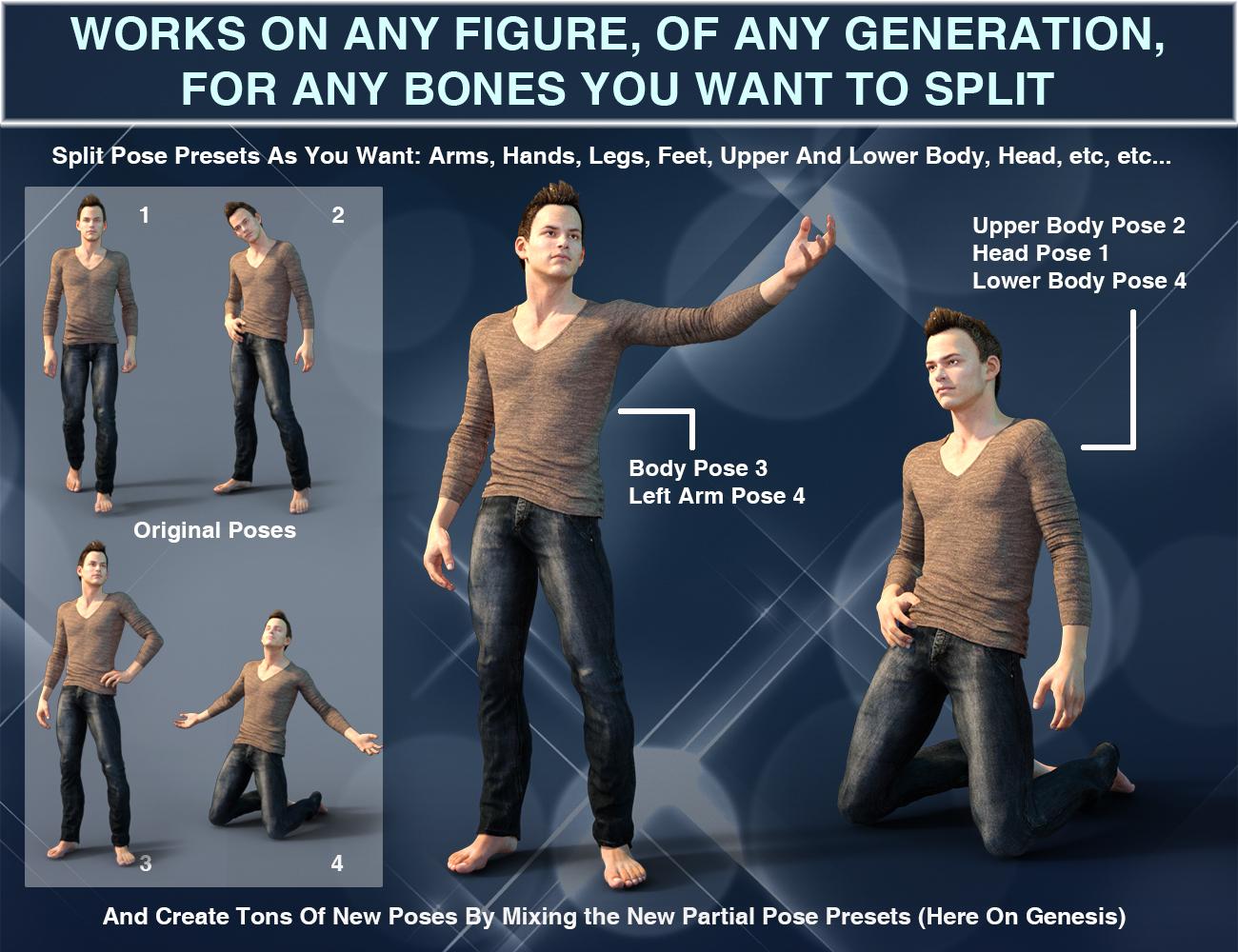
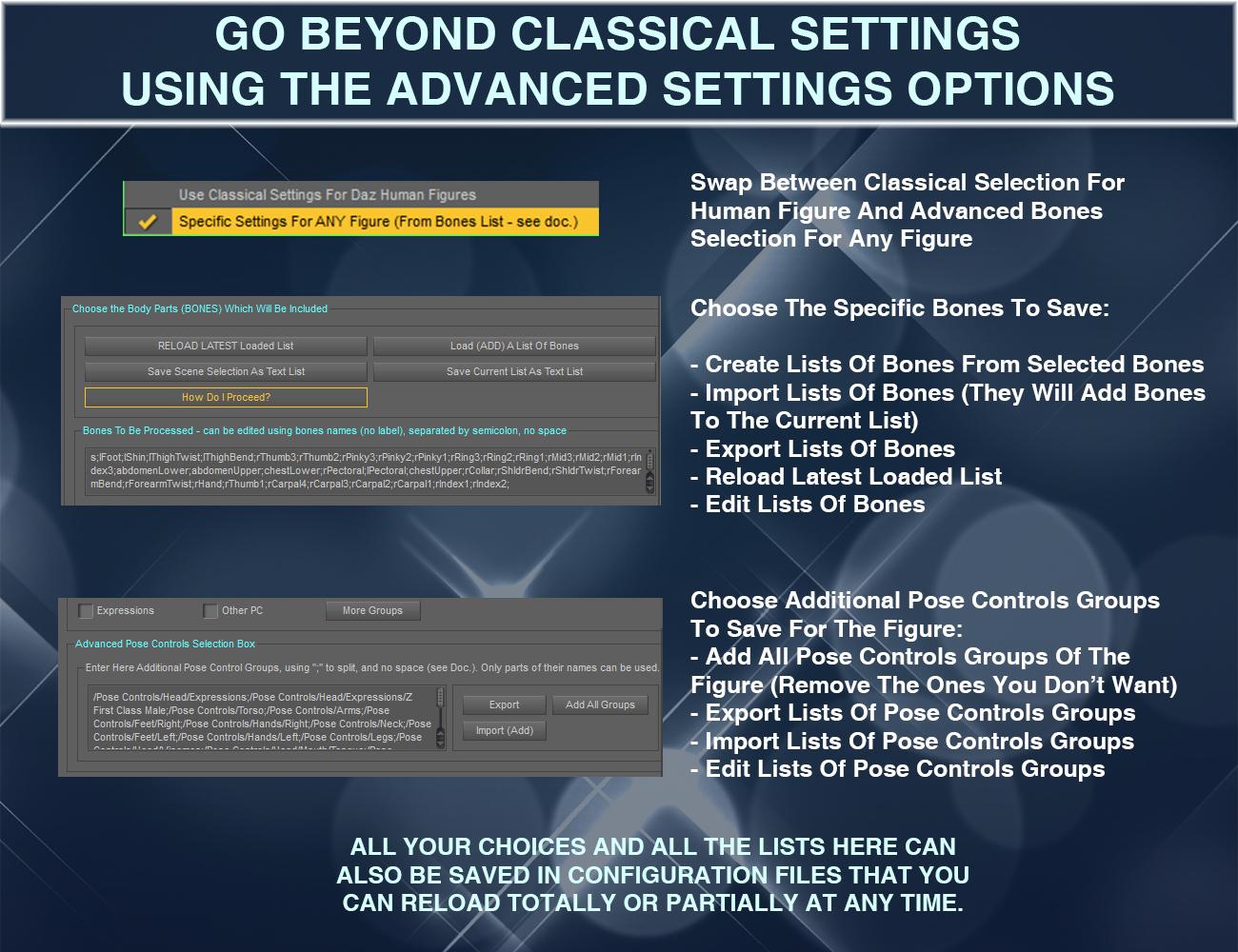
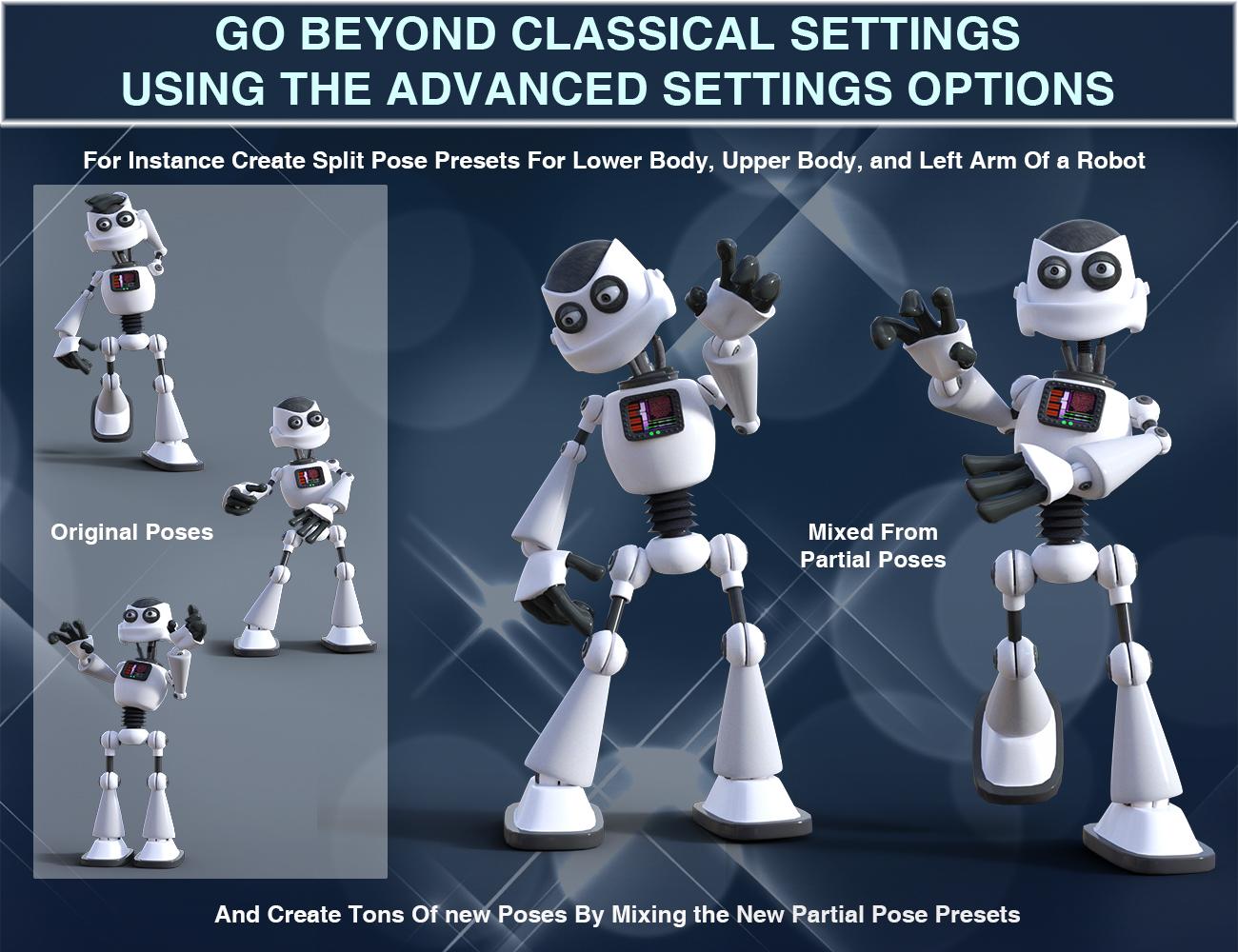
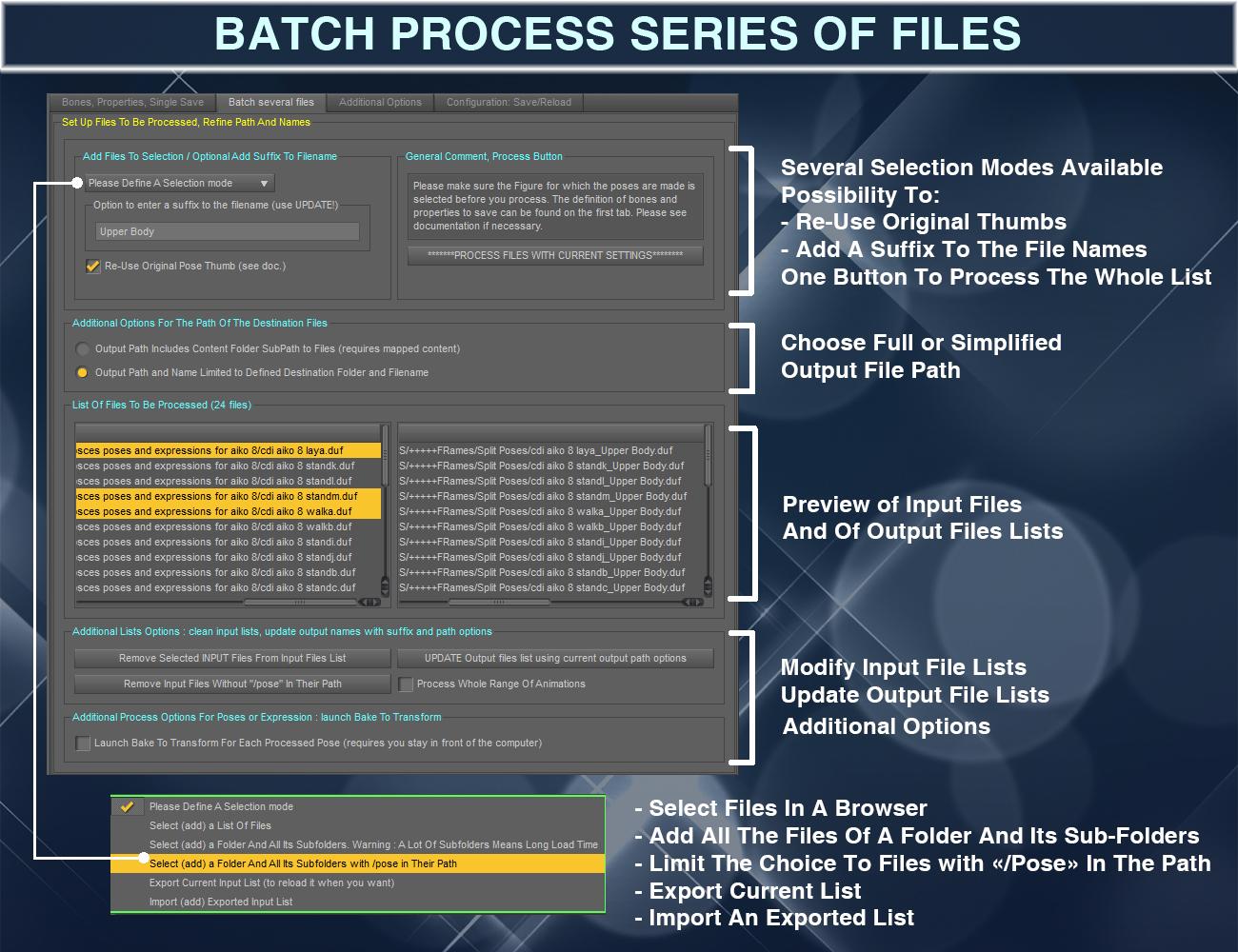
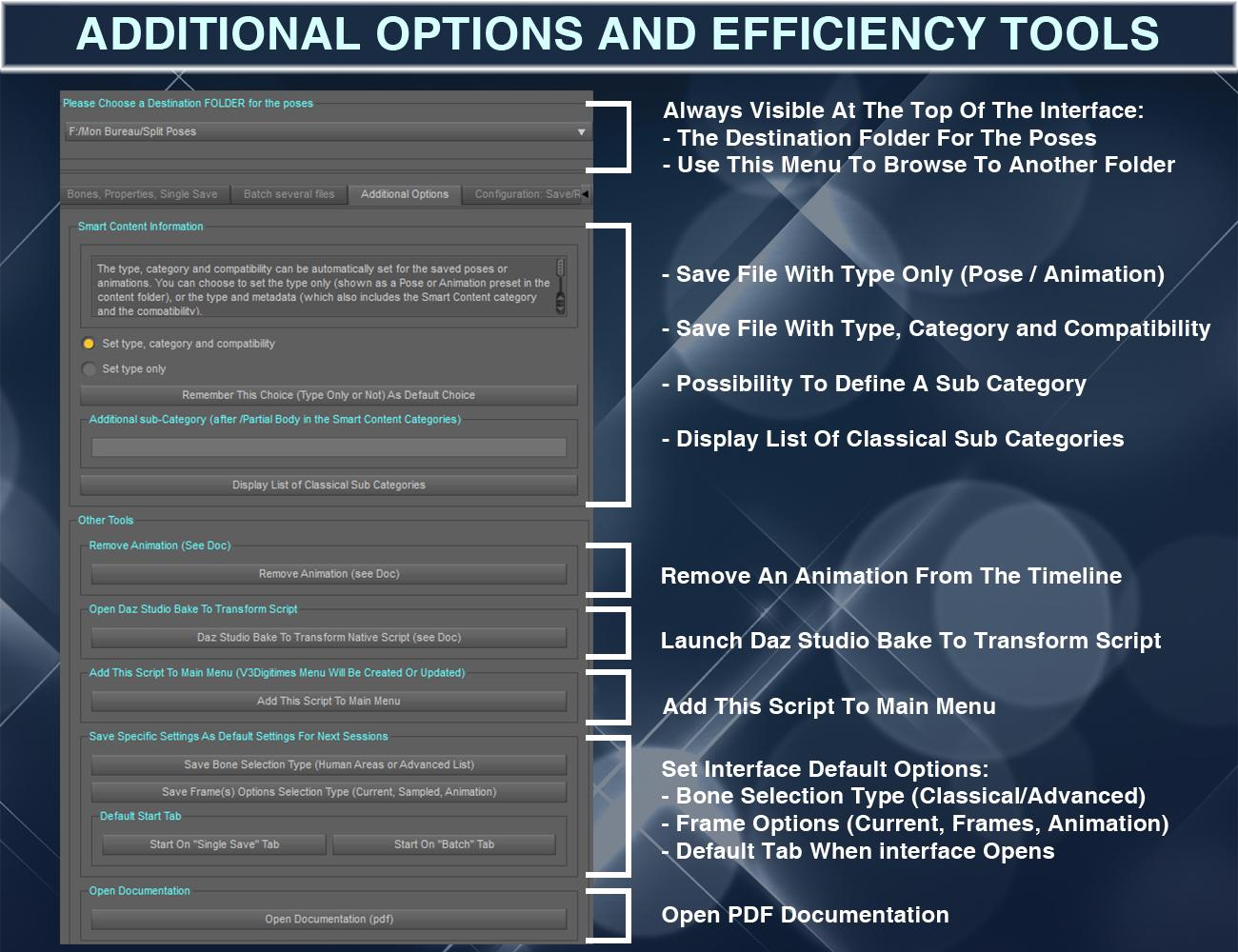

The product is well documented with a full pdf documentation, and I added two quick start videos, one concerning the classical way to work with Daz Human figures, and the other one to show how to work on any figure, or on very specific bones selections.
For Human Figures:
For Any Figure, any bones:
 Does Victoria-7-for-Victoria-8 product work with Victoria-7 addon characters?
@FSMCDesigns Ok got it, thank you.
Youi need victoria 7 to get the full effect of the V7 addon products. You can also use the V7 addon products with genesis 7 female, but you don't get the V7 parts that were used with the addon character.
The V7 for V8 product it to bring in the V7 morphs and textures over to V8.
Does Victoria-7-for-Victoria-8 product work with Victoria-7 addon characters?Youi need victoria 7 to get the full effect of the V7 addon products. You can also use the V7 addon products with genesis 7 female, but you don't get the V7 parts that were used with the addon character.
The V7 for V8 product it to bring in the V7 morphs and textures over to V8.
Where can i get free female models?The PoserDazFreebies wiki has a list of a TON of free female characters, free textures, free clothing and hair, etc. What generation do you want to work with?
Genesis 3 Female:
https://poserdazfreebies.miraheze.org/wiki/Genesis_3_Female/Faces_and_Morphs
https://poserdazfreebies.miraheze.org/wiki/Genesis_3_Female/Materials_and_Shaders
https://poserdazfreebies.miraheze.org/wiki/Genesis_3_Female/Wardrobe
https://poserdazfreebies.miraheze.org/wiki/Genesis_3_Female/Hair
Genesis 2 Female:
https://poserdazfreebies.miraheze.org/wiki/Genesis_2_Female/Morphs
https://poserdazfreebies.miraheze.org/wiki/Genesis_2_Female/Materials_and_Shaders
https://poserdazfreebies.miraheze.org/wiki/Genesis_2_Female/Wardrobe
https://poserdazfreebies.miraheze.org/wiki/Genesis_2_Female/Hair
There is also a few freebies for Genesis 8 Female and they have quite a few listed for Genesis as well. I think the figure with the most freebies is probably going to be Victoria 4 - since she was the main figure for longest. However she's pretty old, so her bends and stuff aren't nearly as good as the new generation figures. BUT if you know what you're doing you can still create some beautiful art with Victoria 4 figures.
https://poserdazfreebies.miraheze.org/wiki/Victoria_4
They have a ton of poses, props, and environments listed as freebies as well. When I first started out with 3D art I had a teeny tiny budget so I relied very heavily on freebies. That PoserDazFreebies wiki was a Godsend for me. :) I never would have been able to learn nearly as much about 3D art without the generosity of those who've made and given away those freebies to the community. :) I hope you find that wiki as helpful as I did. :D
Does Victoria-7-for-Victoria-8 product work with Victoria-7 addon characters?Does this product https://www.daz3d.com/victoria-7-for-victoria-8 work with all Victoria 7 add-on characters too? Or would I need the actual Victoria 7 model to work with add-on characters such as https://www.daz3d.com/fwsa-hannah-hd-for-victoria-7?
HD add on’sTwo general questions, with Victoria HD and Gia HD as examples, but it could be any HD:
1) When I use Victoria HD on Gia instead of the Gia HD, what is the difference?
2) If I dial out Gia from Gia HD and Victoria from Victoria HD, they should be identical?
*closed* RRRR - What can go wrong when moving - Render Contestwelll.... since the contest isn't officially closed I'll give it a shot I'll post it here and add it into the Entries only if the Grand Marshall declares an extension ;)
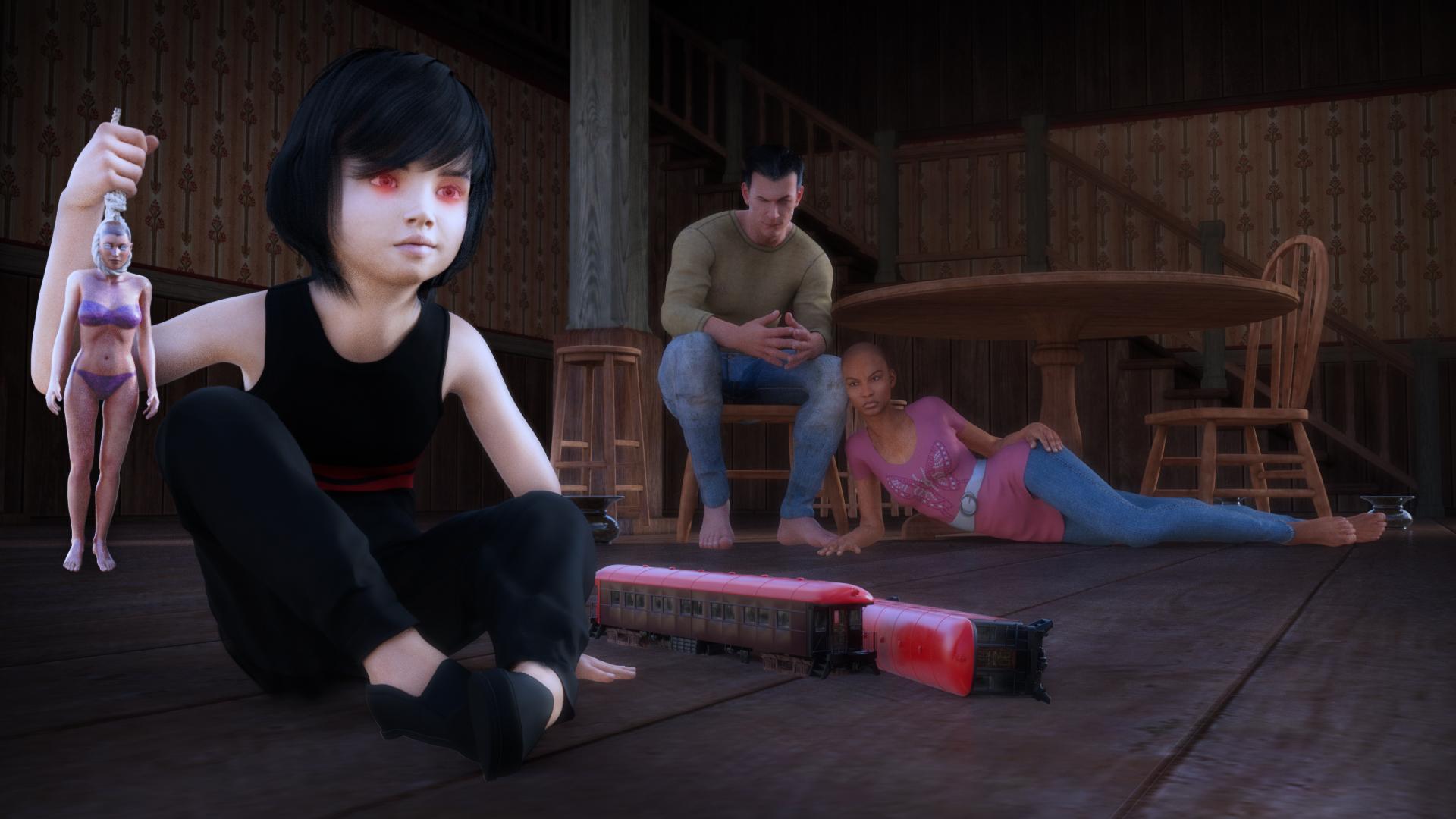
Bohemian3 #1 - Moving Into the First Home
The Commander and his wife move into their very first home with their son Dammie, born the Sixth of June, coming into the world at six am sharp, punctilious like his dad.
- Parkside Passenger Car
- Old West Saloon Interior
- Subtle Poses for Victoria 6
- Brandan Hair
 It Problem to Install "Anatomy Pro Bundle"
Also, the Michael 4 product is in Smart Content too. It has a broken icon & is called 'Michael 4 Base Puppeteer StudioCF and has a preset called 'Michael 4.cr2'
Victoria 4 is listed as Victoria 42 Base with a preset called 'Victoria 4.2.cr2.
It Problem to Install "Anatomy Pro Bundle"In your DAZ Studio go to the
a) tab: Content Library
b) scroll in the left hand side of that tab until you get to: Products
c) click the arrow - scroll to D - scroll to DAZ Brain
d) click the arrow - scroll to M - scroll to Michael 4 Internal Organs / Michael 4 Muscle Maps / Michael 4 Muscle Morphs / Michael 4 Skeleton
e) click the arrow - scroll to V - scroll to Victoria 4 Internal Organs / Victoria 4.2 Muscle Maps / Victoria 4 Skeleton / Victoria 4.2 Muscle Morphs
f) Alternatively you could also at the top of the Content Library tab search for the product names individually.
It Problem to Install "Anatomy Pro Bundle"Actually I just switched on my other PC (where DAZ Studio is installed) and looked for myself. I can find the Michael 4 Skeleton, Internal Organs and Muscle Maps, Victoria 4, her Skeleton, Internal Organs and Muscle Maps and the DAZ Brain in Smart Content. The only one that is missing is the Michael 4 character.
V4 and the Skeletons appear in the "Figures" category, the Organs and Brain in the "Anatomy" category, the Muscle Maps in the "Materials" catergory - are you not seeing them there?
In Smart Content, it's not the same. and I install Daz3d in new computer it's not the same. i'm so sad T T
34th Daz3D Bryce Render challenge ■■ Robots and Robotics ■■@hansmar...Robotization in Ag... it is a great success... really like the perspective of the road in the distance
@sray.... No Man's Land is a great almost photographic image
@henryhor... The Offering.. Great image... very exotic hydroponic setup there lots to look at
@adbc... FAmily Gathering beautiful image...love the sun ray effectthis is my first entry... I've been playing around with this in that all the makeup that she has applied was via several spot lights...just imagining in the future makeup being applied using lasers.. instead of smearing on a physical material of some sort.
Title: Getting Ready for a Hot Date!
used: Cyborg Generation 8 Female, Victoria 4.2 (face only) from DazIt Problem to Install "Anatomy Pro Bundle"Actually I just switched on my other PC (where DAZ Studio is installed) and looked for myself. I can find the Michael 4 Skeleton, Internal Organs and Muscle Maps, Victoria 4, her Skeleton, Internal Organs and Muscle Maps and the DAZ Brain in Smart Content. The only one that is missing is the Michael 4 character.
V4 and the Skeletons appear in the "Figures" category, the Organs and Brain in the "Anatomy" category, the Muscle Maps in the "Materials" catergory - are you not seeing them there?
Export from Daz (.dae) with UV mapsHello guys,
Goal: export Victoria 8 (Marigold) with UV Map to blender
I can view UV Maps of Victoria 8 on Daz (attach 1).
I export as .dae (collada) with settings (attach 2).When opened in Blender, UV Map is not there.
Do I need to configure anything before experting UVs?
Thanks
"Fundamental" Genesis 8 ProductsG8 head and body morphs for male and female, of course.
200+ Head Morphs - for more morph dials.
Fit Control - I find it particularly useful to use items from older generations, or to kit-bash.
V4 & M4 Clones - There's a way to auto-fit M4 and V4 items to G8 without additional products, but I find that this product handles some items better. I hear that the recently released clothing converter for M4 and V4 works even better still, but I don't own those products so I can't confirm.
Hair, hair, hair... but needless to say, it's highly subjective which ones.
Personally I found the V4 and M4 clones product gave horrible results and had to return it. Same for the riversift art conversion product. I get a much more perfect fit autofitting to G3 first and then saving that version to fit to G8.
Other than the G8 head and body morphs for male and female, there is nothing on your list that I would consider essential or fundamental which is why it's hard to give answers to questions like this, eveyone has their own preferences and the list can get really long, real fast.
Daz 3D is part of

Connect
DAZ Productions, Inc.
7533 S Center View Ct #4664
West Jordan, UT 84084Licensing Agreement | Terms of Service | Privacy Policy | EULA
© 2026 Daz Productions Inc. All Rights Reserved.