-
SereneNight’s Sci-Fi Fun Thread 3
Serene Night said:
So with the figure converter by Manfriday. The manual is obviously incorrect and I redownloaded it twice, thinking maybe there was something wrong with my install because the screenshots depicted are not what I see as there is no option to save the morph with the adjust rigging to shape option chosen.This is disappointing and very unclear. And yes, read the commercial thread, after I tried to figure out why it wasn't working properly, and learned the feature was removed but its still not really clear what the average person is to do when using this product to save it correctly.
So I am assuming I'm expected to finish up fix and resave the product correctly? Er, isn't that why I buy products to do that for me?
The manual doesn't say, but what are the next appropriate steps for the average user to use and save these individual morphs without buying another product.
This is what I said about that step in my review over on DA:
I did do both "Adjust rigging to shape", which ManFriday states, in the PDF that comes with the program, might be needed. Also did ERC Freeze, which is needed after doing "Adjust rigging to shape", and which is not mentioned in the manual, so remember to do that step. Then, once the ERC Freeze has completed, dial your character back to zero, with none of your converted morphs active, and Save Morph Assets for those morphs. One thing to note, however: for me, at least, ERC Freeze somehow turned the BODY slider into a controller for both Body and Head, so that when I dial in the Body, the Head comes along for the ride. It's not a huge deal -- the head can be dialed out without affecting the body, if needed, and can be dialed in separately by itself -- but it was unexpected.
Shape Splitter - Divide, Combine and Save (The new version is already available. 1.2.1)[Commercial]I recommend:
That you use two morphs.
The first ArmLeftXenoman morph, include the hand, and increase the smoothing, 5cm is too little for the arm, 10 or 15cm would be fine.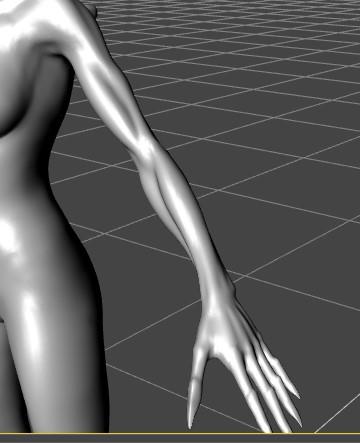
Then for the new morph "ArmLeftXenoman", you use the script again but now only for the hand.
And now you set -100% for the hand (morph negative).ArmLeftXenoman 100%
Left HandArmXenoman -100%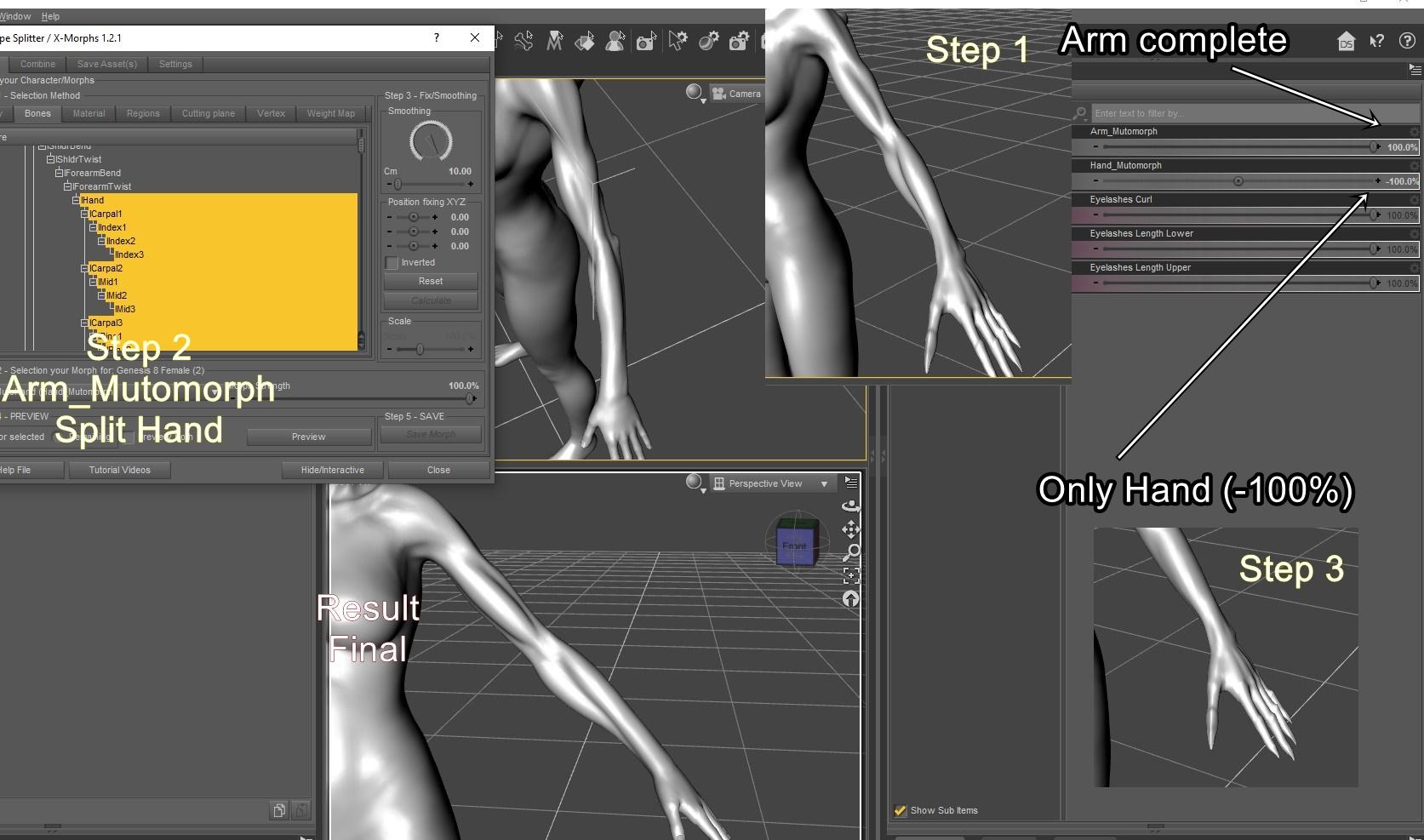 New TriAx Character, clothing to moving with character morph - Solved
Sven Dullah said:
Did you switch to edit-mode and check auto-follow for those morphs?
You need to re-fit all clothing etc after making changes in there.
I have done this, and it doesn't seem to work. Odd. When I select the smaller chest morph, the clothes remain in the same place & a gap develops between the clothes & the character.
Do I need to put 'fbm' in the name or something similar? Or something in the parameter type. At the moment it has type 'None', but changing it to Modifier or Modifier/Shape seem to have no effect.
Regards,
Richard
Regards,
Richard.
The older generation: Victoria 2/3, Michael 2/3 and their children rendersHmm, I am having trouble with G8F sleeves and simulation. It doesn't seem to work well. However, conforming clothing works better. Having said that, I can't get clothing to follow character morphs at the moment - so the GV3 BreastSizeAA morph leads to a big gap between the chest & clothing as the standard character has a B Cup.
Nonetheless, it's amazing to have a wider range of clothes available.
The second attached file is unsimulated, the third is simulated & fits the arms less well.
Regards,
Richard
New TriAx Character, clothing to moving with character morph - SolvedCrosswind: No, V3 as a parametric figure does not. The figure is no longer a parametric figure, having been converted to TriAx weighting. As with every other TriAx figure created from scratch, the effect of morphs seems to need to be set so it'll affect the clothing.
The only tool available that I know of (Gen-X2) does not effectively permit character transfer from V3 - the transfer is on the unrecognisable side of not-good. Further, using tools written by someone else does not help me learn how to create a character from scratch in DS, which is part of the point of this. I want to use G8F clothing on this figure (and I can at the moment) not use this figure on G8F. There are some G8F features that work due to the settings in DS, and I want the V3 based character to be able to take advantage of the same settings. Just severely hampered by the lack of DS documentation.
Regards
Richard.
False Nails for Genesis 9 HALLOWEEN EDITION [Released]Angela3D said:
Is there any way to morph the nails so that they are longer?
I'm not sure if I am double replying to you, but I recieved this as a question yesterday, this was part of my response to that person "If I were to add something like that to the product it would likely have to be as part of an addon pack. I'm not sure how well the patterns would translate on shapes that much longer as the UVs have to be shared with all of the nails and the extent of the "sheet" was already used. Unfortunatly there's no quick, easy way of making them longer, making it something of an undertaking. Is there a specific reason you would want them that long? I'm curious to know if it's a popular style that I'm not aware of?" I'd be interested to hear if it's something that users are missing with the product, and if I should consier including it in a future release?
problem with creating new morphIf you just saved the scene file (duf) rather than any support asset, it should not impact anythying. Still, did you set Reverse Deformation + Delta Only when importing obj with Morph Loader Pro on this customized figure? Have you fully tested the morph dial from 0 to 100% after import, anything wrong?
CHB PhilippaA while back, I created UVs that add basic support for the G9 torso UVs to the Daz Anatomical Elements. They might stretch textures (well, they definitely will in the case of the male anatomical elements), there's no overlays, no extra detail, just a new UV option that will allow the torso materials to function without massive seams, but they may be useful. (Vendors are not obliged to provide materials for the anatomical elements, by any means).
https://www.mediafire.com/file/8bg0k5kkuao3vd1/G9F_Genitals_Torso_UVs_20230722.zip
https://www.mediafire.com/file/f0jsj3th9sogvl5/G9M_Genitals_Torso_UVs_20230927.zipOne use case is using Map Transfer to put the textures on the standard genitals UV, from which you can then use an image editor to combine this with another character's anatomical textures. (Using the border of the transferred texture to match the main character skin, then blending into the detailed elements of another character's textures).
problem with creating new morphcrosswind said:
yuyu.atem said:
TimberWolf said:
This video covers the whole process, including the settings for Morph Loader Pro. Setting the morph import options is obvious once you see it demonstrated but the UI is a little counter-intuitive in this regard and doesn't follow the usual Daz conventions.
It's worth watching it all the way through for an overview but the part you specifically require is at 17:00.
Thank you very much!
 It seems to work better, now!
Just a thing I don't understand: after saving the DS character file (just the file itself, not the morph as an asset), when I click on the "reset" button of the new morph, the character doesn't come back to the shape it had before I create the new morph. It chages, but it is not it's origonal shape. Is it normal? It didn't seems do that before I save the file...
Thank you in advance for your answer!
Not normal... even if Jay used older Blender version and Legacy obj format, they should all work fine. Double check your Morph Loader settings. You may record and poset your process... we may find out why...
make sure that the morph is zeroed when you save it as an asset.
problem with creating new morphyuyu.atem said:
TimberWolf said:
This video covers the whole process, including the settings for Morph Loader Pro. Setting the morph import options is obvious once you see it demonstrated but the UI is a little counter-intuitive in this regard and doesn't follow the usual Daz conventions.
It's worth watching it all the way through for an overview but the part you specifically require is at 17:00.
Thank you very much!
It seems to work better, now!Just a thing I don't understand: after saving the DS character file (just the file itself, not the morph as an asset), when I click on the "reset" button of the new morph, the character doesn't come back to the shape it had before I create the new morph. It chages, but it is not it's origonal shape. Is it normal? It didn't seems do that before I save the file...
Thank you in advance for your answer!
Not normal... even if Jay used older Blender version and Legacy obj format, they should all work fine. Double check your Morph Loader settings. You may record and poset your process... we may find out why...
problem with creating new morphTimberWolf said:
This video covers the whole process, including the settings for Morph Loader Pro. Setting the morph import options is obvious once you see it demonstrated but the UI is a little counter-intuitive in this regard and doesn't follow the usual Daz conventions.
It's worth watching it all the way through for an overview but the part you specifically require is at 17:00.

Thank you very much!
It works perfectly, now!Just a thing I don't understand: after saving the DS character file (just the file itself, not the morph as an asset), when I click on the "reset" button of the new morph, the character doesn't come back to the shape it had before I create the new morph. It chages, but it is not it's origonal shape. Is it normal? It didn't seems do that before I save the file...
Thank you in advance for your answer!
New TriAx Character, clothing to moving with character morph - SolvedI wonder if someone could help me please. I have converted Victoria 3 from Parametric joints to TriAx Weight Mapping. This means I can get autofit clones to fit clothing to the character, and have a rough & ready G8F autofit clone that allows G8F clothing to fit V3.
I do have one problem, though. The clothes don't follow the base character morphs such as 'Slender_Hips'.
I was wondering if that's due to the way I saved the character or whether it's due to something else.
I saved the character using menu item: File| Save As| Support Asset| Figure/Prop Asset... and then in the Figure/Prop Assets Save Options Window, I set the 'Set Content Type' to 'Actor'. Should this have been set to 'Actor/Character' to get the character morphs to follow through to the clothing? Or is there something else I should have done?
Thanks in advance,
Richard.
SereneNight’s Sci-Fi Fun Thread 3So with the figure converter by Manfriday. The manual is obviously incorrect and I redownloaded it twice, thinking maybe there was something wrong with my install because the screenshots depicted are not what I see as there is no option to save the morph with the adjust rigging to shape option chosen.This is disappointing and very unclear. And yes, read the commercial thread, after I tried to figure out why it wasn't working properly, and learned the feature was removed but its still not really clear what the average person is to do when using this product to save it correctly.
So I am assuming I'm expected to finish up fix and resave the product correctly? Er, isn't that why I buy products to do that for me?
The manual doesn't say, but what are the next appropriate steps for the average user to use and save these individual morphs without buying another product.
Shape Splitter - Divide, Combine and Save (The new version is already available. 1.2.1)[Commercial]Well, I wanna apply a xenoman arm on my Nix, but I can't get a good result, even with the position fix. Is it because it's a HD morph ?
problem with creating new morphThis video covers the whole process, including the settings for Morph Loader Pro. Setting the morph import options is obvious once you see it demonstrated but the UI is a little counter-intuitive in this regard and doesn't follow the usual Daz conventions.
It's worth watching it all the way through for an overview but the part you specifically require is at 17:00.
problem with creating new morphThank you very much!
When I use the DTB, there is several "forms" around the character in Blender:
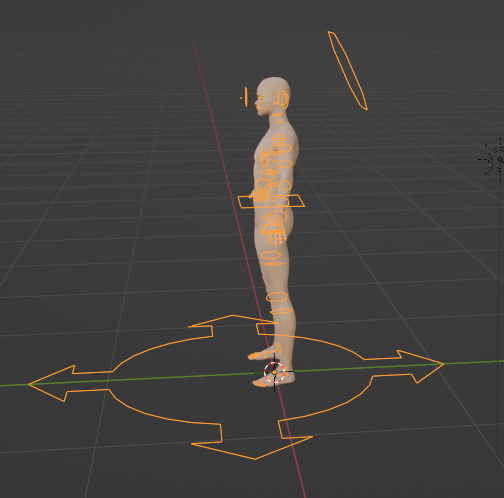
But they don't seem appear on the video. Is it normal I have it? And when I export the character from Blender into an obj format, have I to import these forms too?
I wached the video but I don't understand what I did wrong...
Richard Haseltine said:
When importing the morph make sure the figuer is still in the same state as when you sent it across, then in the more Options section check Reverse Deformations - that will leave the morph applying only your changes from Blender.
Could you tell me where is the more option section, please? I don't find it...
Edit:
I made another test to try to understand what happens. I reimport the DD Keita into Blender with the DTB (there are still several morphs already applied) and I create a simple "horn":
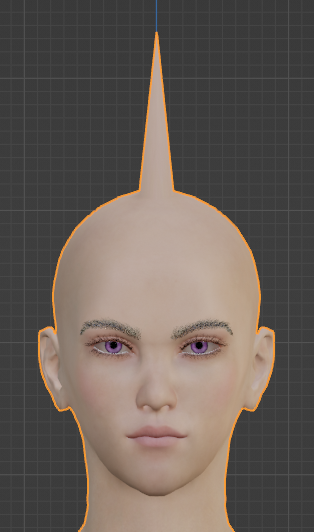
Then, I loaded it with the Morph Loader Pro, and here is what I obtained:
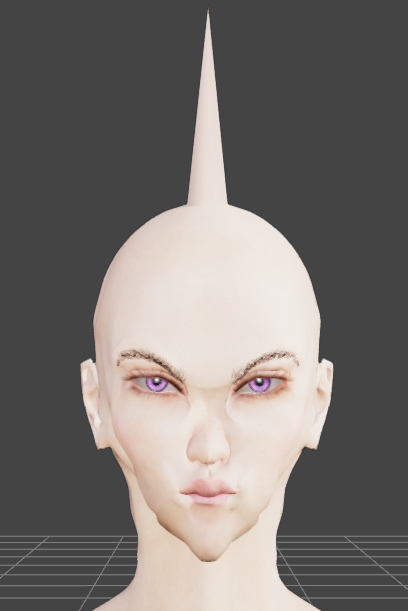
The horn appears, but the rest of the head (and body) is also modified.
Then, I opened a new DS file and loaded the DD Keita character, without to apply any morph, and I reimpoted it into Blender with the DTB. I recreated a new horn:
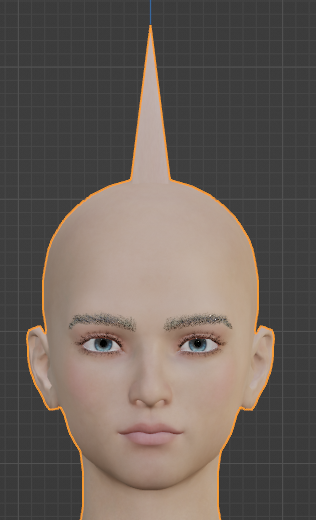
But when I load it as a morph with the Morph Loader Pro, the rest of the head and body is still modified too:
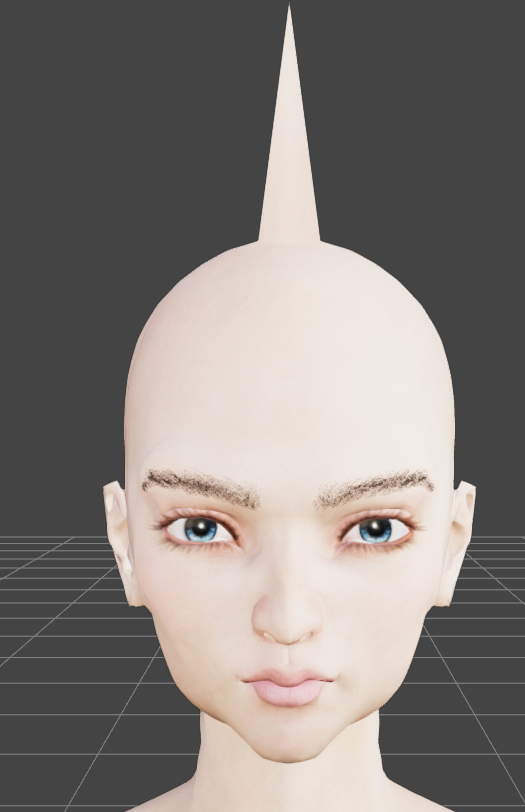
So, it doesn't seem to be due to the other existant morphs already applied... I don't understand at all what is my mistake...

Thank you in advance for your help!
False Nails for Genesis 9 HALLOWEEN EDITION [Released]felis said:
Angela3D said:
Is there any way to morph the nails so that they are longer?
There is something like this in the store https://www.daz3d.com/long-nails-salon-for-genesis-9
and other similar products.
But you can also create a morph yourself in a modeller.
Thanks Felis :)
False Nails for Genesis 9 HALLOWEEN EDITION [Released]Angela3D said:
Is there any way to morph the nails so that they are longer?
There is something like this in the store https://www.daz3d.com/long-nails-salon-for-genesis-9
and other similar products.
But you can also create a morph yourself in a modeller.
Diffeo export at base level with geograft, import as morphThanks for the answers.
I decided to work without the geograft, but ran into the next problem.
I exported the figure in A-pose at base level, imported it with easy import and imported a Daz animation by using import action.
Did some cloth simulation in Blender and exported the figure as an obj sequence.
When I import an obj as a morph on the Daz Figure at the right keyframe it looks ok.
As it's an animation I decided to convert the Daz Figure to a prop to use the obj animation importer.
Which is working, but some parts of the prop are slightly different posed compared to the figure. For example the arms are bend a little bit more on the prop, compared to the figure.
I know that's a very unusual workflow, but I know it works.
Any idea what could cause this difference?[Released] Turbo Loader for Genesis 8 and 8.1 [Commercial]Hellboy said:
Hi.
I got Turbo Loader for G8 and the Turbo Loader Utilities.
I was hoping for something that would allow me to load a "blank" G8 figure for whem I'm creating products and need to quickly load the base figure constantly. But also I need the morphs for promos or personal stuff. So I'm switching regularly.
The issue is, disabling/enabling all the morphs takes too much time. It's much quicker for me to just use the figures regularly.
Am I misusing the product?
Thanks.
As RiverSoft already pointed out thats where the configurations come in handy. Just disable everything and save a "disable everything"-configuration. You can then apply that configuration quickly. I myself use configurations for...
- base figures (including things like the character, add-ons, expressions etc.)
- heavy morph packs I do not constantly need
- clothing pressure morphs on vendor basis
It takes a little time to set those configurations up but makes everything a lot faster once they are in place.Daz 3D is part of

Connect
DAZ Productions, Inc.
7533 S Center View Ct #4664
West Jordan, UT 84084Licensing Agreement | Terms of Service | Privacy Policy | EULA
© 2026 Daz Productions Inc. All Rights Reserved.