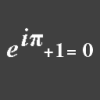
-
Custom (non-Daz) character Mixamo animation import into Daz3d?
This is why DAZ needs to put more work into their "import" functions. Not everyone wants to use DAZ content outside of DS
to the OP, I have never been able to import a functioning rigged FBX figure into DS, the FBX import option just doesn't work for me. Even if you did, mixamo rigging and DS rigging are very different, so you would probably have to rerig it anyway. Your best bet is to import your OBJ, line it up with a DAZ figure and transfer the rigging
[Released] dForce2Morph [Commercial]WendyLuvsCatz said:
I believe I tried Casual's script already but it didn't work on the Sagan obj sequence but I will revisit it in case I am mistaken
there is more than one script out there and I hadn't gotten any to work
I've just done a quick test of Casual's script I referenced in my post above, and it worked as expected: (using DS v4.15.0.30)
1) New Scene: Loaded G8F, in default pose and position, Base resolution, deleted EyeLashes wearable.
File > Export to 000.obj
Copied 000.obj to 002.obj and 004.obj
In an external 3d App I created 2 simple quick mods from 000.obj:
001.obj = "Belly in"
003.obj = "Belly Out"
2) New Scene: Timeline = 31 frames, File > Import 000.obj, selected it.
Loaded Casual's mcjAnimObjsToMorphs.dsa into the Script IDE Pane (to see if it threw any errors when I ran it - it did not).
(mcjAnimObjsToMorphs.dsa has file date 2012-06-01 17:32)
Ran the script:
[Browse...] - selected 000.obj
obj import scale = DAZ Studio (1:1)
[Objs to Morph] ...(Took about 5 secs per Frame)
[Animate Morphs] ...NB: Casual's instructions seem to omit saying you must do this. If you don't then the Morphs and sliders will exist but will not be animated.
[Exit]
That created a new "Morphs" section in the Parameters Pane, containing 4 sliders named fr_1, fr_2, fr_3, fr_4, corresponding to Morphs 001.obj, 002.obj, 003.obj, 004.obj - In the Parameter Settings dialog of each one you can see the KeyFrame values in the Keys sub-Page. Because the Frame Range was 31 frames, the 5-Frame .obj sequence is repeated (30/5) = 6 times.
When I Play the Timeline, the G8F belly snaps In/Out as expected.
Of course, the result is not an animated morph of G8F - its an animated morph of a G8F-shaped Prop, but the script can easily be changed to create morphs of G8F, e.g. using Casual's technique per https://sites.google.com/site/mcasualsdazscripts4/mcjaddstretchmorph - see https://www.daz3d.com/forums/discussion/47183/mcjaddstretchmorph-add-stretcher-morph-to-usually-a-prop
[Released] dForce2Morph [Commercial]RiverSoftArt said:
WendyLuvsCatz said:
I posted here because I couldn't find this thread but now here it is

https://www.daz3d.com/forums/discussion/comment/8277551/#Comment_8277551
to recap
sigh
if only we could bake Dforce to keyframes along the timeline like Optitex
I used compare on saved uncompressed scenes in Notepad++ and the vertex information is there after simulation
Dforce2morph can only destructively do one frame, what's needed is a way to queue up reloading the scene in one frame increments and saving a morph each frame, preferably in the scene NOT the data folder for the clothing
or alternatively a cache of obj exports (Sagan can do this) that can be loaded into morphloader and keyframed along the timeline
vertex animation
there is a script for Marvellous Designer that does this but it doesn't work on other obj series
yes I can load all the obj's into morphloader but that's a lot of morphs to manually keyframe 100% then 0 each preceding and subsequent frames
also the issue of just exporting the base resolution clothing so vertex order matches
BTW like Optitex freeze an obj with a series of morphs is wanted not a fitted figure with saved morphs
Not sure what you are asking or why, but clearing the simulation is a necessary step of the procedure.
What Wendy wants can be done via DAZ Script, and Casual uses the technique in a number of his scripts, e.g.:
https://sites.google.com/site/mcasualsdazscripts2/mcjobjstomorphingprop
For each relevant animated Node you end up with 1 Property slider per Frame, which holds the Morph Deltas for that Frame and has a Value of 0 for all Frames except that Frame #. You then just Play the animation via the TimeLine (and watch the sliders in the Parameters Pane making like a Player Piano).
That's a lot of sliders, but it has worked well for me for animations up to 360 Frames. (I haven't tried it for longer - could be no problem.)
The advantages include being to save any of those Morphs as an Asset, or as Wendy said convert to aniBlocks, etc.
AIUTO...CHI CONOSCE L’ITALIANO? PARTE QUATTORDICICrios said:
Per causa di forza maggiore (era finita l'offerta), ho preso quello di Zeddicus, ho convertito il mio Morph, Elektra, ed è venuto proprio bene.
Ah, bene! Ora non resta che metterle i baffi e commercializzarla!

A me, invece, piacerebbe molto un bel convertitore serio da G1 a G9 ma dubito che qualcuno si prenda la briga di farlo... Per cui mi dovrò ingegnare io come al solito.
 AIUTO...CHI CONOSCE L’ITALIANO? PARTE QUATTORDICIPer causa di forza maggiore (era finita l'offerta), ho preso quello di Zeddicus, ho convertito il mio Morph, Elektra, ed è venuto proprio bene.[Released] ManFriday’s Figure Converter for Genesis 9 [Commercial]
ManFriday said:
the_untold said:
hi, this is what i get....even with a basic female 8 item.
Critical error...Could not convert figure: failed to find new morph “Temporary high-res morph” in node “tempg8-tgt-yguZacdG” figure after conversion; Morph Loader Pro returned
It seems like the figure converter is not working correctly if the source figure still has the default name of "Genesis 8 Female" (or that of the other figures). The converter loads several temporary figures into the scene during conversion and needs to identify them by label during the process and then gets confused. Can you rename your source figure to something else before converting to see if that fixes the problem? Thank you!
I get the same error with my own custom character and she has a custom name, there is a morph loaded in the scene when convertor is finished, but it looks like a basic G9 obj...
update: it worked after deleting the additional items (eyebrows,lashes,and some parts...)
still not perfect but she looks alot like my char, a few issues i see on the mesh, especially the feet, but i can fix that...good job Manfriday!
Genesis 9 lost default shape in my libraryIf you look in the code for the morph it will be the default value. When you load a figure Daz builds all the morphs it can find and applies them to the figure. If you have a morph with a non-zero default then it will apply on every figure of that generation.
Genesis 9 lost default shape in my libraryMy offending morph was not visible in Currently used either.
I found The morph which I made and which was messing up my G9 base on load. I removed it from the library and things are back to normal.
There must be somting in the code of this morph that makes it load automatically when G9 or G9 based chracters load, since i was messing wirh property herarchy and ERC freezing, without exactly knowing what I was doing. I looked in the code of the morph help file but it is beyond my abilty to find out what it is. It is quite interesting thou.
If here is someone here profficient at code analisis, I can send the file. Would be interesting to know. Good learning exercise that was for me.
Thanks a lot for all your comments. It seems that DAZ deep mind is sort of obscured even for the most seasoned ussers... well I am not...
[Released] dForce2Morph [Commercial]WendyLuvsCatz said:
I posted here because I couldn't find this thread but now here it is
https://www.daz3d.com/forums/discussion/comment/8277551/#Comment_8277551
to recap
sigh
if only we could bake Dforce to keyframes along the timeline like Optitex
I used compare on saved uncompressed scenes in Notepad++ and the vertex information is there after simulation
Dforce2morph can only destructively do one frame, what's needed is a way to queue up reloading the scene in one frame increments and saving a morph each frame, preferably in the scene NOT the data folder for the clothing
or alternatively a cache of obj exports (Sagan can do this) that can be loaded into morphloader and keyframed along the timeline
vertex animation
there is a script for Marvellous Designer that does this but it doesn't work on other obj series
yes I can load all the obj's into morphloader but that's a lot of morphs to manually keyframe 100% then 0 each preceding and subsequent frames
also the issue of just exporting the base resolution clothing so vertex order matches
BTW like Optitex freeze an obj with a series of morphs is wanted not a fitted figure with saved morphs
Not sure what you are asking or why, but clearing the simulation is a necessary step of the procedure.
[Released] ManFriday’s Figure Converter for Genesis 9 [Commercial]3DRT said:
Successfully converted a couple of my G8Ms over the weekend and am generally happy with the results. I have the following questions:
- The manual made reference to an auto-rig option that I'm not seeing in the UI. Will this feature be available in a future version?
I'm sorry, the automatic running of "adjust rigging to shape" was originally part of the converter but removed at the last minute because it didn't work correctly. I forgot to update the screenshots in the manual.
- This plugin doesn't scale the eyes which are now a separate attachment, so some of the characters eyes will be too small/large for the sockets post-conversion. Any chance this can be automated so we don't have to manually translate/scale eyeballs and link them to the morph?
The reason that the eyes (and teeth) can become distored is because with Genesis 9 eyes are separate geometries (separate nodes in the scene tree under the main figure), whereas with Genesis 3 and 8 they were part of the main figure. (Genesis 8 did the same thing with eyelashes already.) So the converter converts all the geometry but cannot change the eyes or teeth. I don't see a way to automate this, I'm sorry!
[Released] ManFriday’s Figure Converter for Genesis 9 [Commercial]the_untold said:
hi, this is what i get....even with a basic female 8 item.
Critical error...Could not convert figure: failed to find new morph “Temporary high-res morph” in node “tempg8-tgt-yguZacdG” figure after conversion; Morph Loader Pro returned
It seems like the figure converter is not working correctly if the source figure still has the default name of "Genesis 8 Female" (or that of the other figures). The converter loads several temporary figures into the scene during conversion and needs to identify them by label during the process and then gets confused. Can you rename your source figure to something else before converting to see if that fixes the problem? Thank you!
[Released] ManFriday’s Figure Converter for Genesis 9 [Commercial]hi, this is what i get....even with a basic female 8 item.
Critical error...Could not convert figure: failed to find new morph “Temporary high-res morph” in node “tempg8-tgt-yguZacdG” figure after conversion; Morph Loader Pro returned
dForce is Awesome!WendyLuvsCatz said:
sigh
if only we could bake Dforce to keyframes along the timeline like Optitex
I used compare on saved uncompressed scenes in Notepad++ and the vertex information is there after simulation
Dforce2morph can only destructively do one frame, what's needed is a way to queue up reloading the scene in one frame increments and saving a morph each frame, preferably in the scene NOT the data folder for the clothing
or alternatively a cache of obj exports (Sagan can do this) that can be loaded into morphloader and keyframed along the timeline
vertex animation
there is a script for Marvellous Designer that does this but it doesn't work on other obj series
yes I can load all the obj's into morphloader but that's a lot of morphs to manually keyframe 100% then 0 each preceding and subsequent frames
also the issue of just exporting the base resolution clothing so vertex order matches
I agree with all of this - at least I think I do but I might not really understand some of it.
Anyhow, my own oft-repeated request/wish is for saving out individual frames from the timeline, whether they be dForce or animation frames. I had to do this just a few minutes ago and my cumbersome method is to copy the keyframe and paste it into frame 0 (copy/paste in the DAZ Studio timeline is a challenge in itself). Then I deleted all frames after frame 0 and save the scene with only that single frame. Then I re-open that scene and add a required number of frames to the timeline (if necessary).
Genesis 2/3/8 Morphsdylan_borg_d673e29d8d said:
Not in the Parameters pane, or Shaping Pane. G2 / G3 / G8 Males do have tons of morphs options, right ?!
That depends which morph packs you have puchased and installed (or SickleYield has a free pack, for some figuers, as I recall).
Genesis 2/3/8 MorphsI loaded a new scene, loaded in various Genesis Males, then Females. Where is my Morphs, like Skinny, Weight, Body Size, BoBody, Glutes Size, Glutes Width ? Normally I have pages of Morph options.
Am I missing something ?!
Genesis 9 lost default shape in my libraryLoaded Genesis 8.1 Female Dev Load to an empty scene
"Currently used" shows only "Render SubD Level (minimum) at 3
"Currently used" does not show "Legacy Eyelashes Curl", "Legacy Eyelashes Length Lower" or "Legacy Eyelashes Length upper" which all have their default value set at 100%Dialed a morph to 100% and memorized the figure
Dialed another morph to 100% and didn't memorize
Saved a character preset and a scene subsetClosed DS and opened again, loaded the scene subset to an empty scene
"Currently used" shows both dials, one in black (memorized) and the other on white
"Currently used" does not show "Legacy Eyelashes Curl", "Legacy Eyelashes Length Lower" or "Legacy Eyelashes Length upper" which all have their default value set at 100%Closed DS and opened again, loaded the character preset to an empty scene
"Currently used" shows both dials, now both in black
"Currently used" does not show "Legacy Eyelashes Curl", "Legacy Eyelashes Length Lower" or "Legacy Eyelashes Length upper" which all have their default value set at 100%Using DS 4.15.0.2
Where is Julia 9 HD's teen morph as shown in the promo images?I got fairly close using just Julia 9, the Teen skin textures and Zev's Growing up morphs, but it does look like there's a touch of Pixie or some similar morph tossed in there as the chin is just a bit more pointy and the mouth a little more bow lipped. I also got pretty close using the Olypia 9 Teen morph, but the GU version is definitely closer. I'd attach an image but... yep, the forum doesn't seem to want to do attachments today...
Hair converter add-on for BlenderPadone said:
Of course it is also possible to use multiple particle systems and only apply dynamics to some of them, that may be what you want. To do that you can separate the hair before conversion. You can also use multiple emitters by separating or duplicating the scalp.
i stand corrected doesnt matter what i do the hair still messes up.
did you saw the img? i dont want to do nothing i just want to apply a pose to the character but every time i do that the hair messes up and i dont know why, i tryed upping and lowering the single strand width, upping and lowering the strand radius, tryed with and without morph on character, tryed with a bones merged character and without bones merged but still the hair messes up
and its not only with oot hair its with every hair i tryed
Genesis 8 Female Head morphs installed BUTRichard Haseltine said:
Do other morphs (e.g. from characters, even As far as I can tellif you don't have other morph sets) show correctly?
THANKS! i FOUND THEM! I thought they were availible on the shaping tab/presets. (they seemed like they would be presets to my mind) But they are found in the shaping tab/editor.
Genesis 9 lost default shape in my libraryRichard Haseltine said:
PerttiA said:
There is a difference between morphs the are set at non-zero default value within the code of the morph and ones that are memorized with non-zero value (saved in the preset or the scene), the first does not show in "Currently Used" but the latter does.
I just checked, saved a preset with a morph aplied and a new, dForm-geenrated morphs aplied and noth memorised before saving. Neither appeared in the Currently Used filter.
That's strange...
Daz 3D is part of

Connect
DAZ Productions, Inc.
7533 S Center View Ct #4664
West Jordan, UT 84084Licensing Agreement | Terms of Service | Privacy Policy | EULA
© 2026 Daz Productions Inc. All Rights Reserved.