-
Released : V3D FilaToon Converter, Manager and Tools (Commercial)
Lol thanks for your many share Artini :) I love the mood of your renders :)
edit : @Artini :
--> OK I'll have a look at the eyes issue on Generation 4 (Victoria/Michael 4), there is probably a specificity I did not see, but this should normally be pretty easy to fix! (I "skipped" Generation 4 during the test stage because in my memory, it was exactly like Genesis in term of surfaces)...
--> For the eyelashes : have you tried to "Store Trans Maps" before conversion, "Restore Trans Maps" after Conversion, and then adjust EyeLashes with the opacity tools included.
@Barbult :
OK thanks for all the inputs.
I had a brief look. Indeed, the opacity at 1 is actually embedded in the shaders (General, Hair, Constant, Metallic) provided by Daz.On the short term (on your side) there is a 2 or 3 minutes solution, using the "Create Custom Conversion Preset", to replace the shader currently used for conversion (Skin/General probably) on your problematic surfaces by the "Filatoon - Base" base shader located in the Default Resources Daz Package, category Shaders, which preserves opacity values and does not add outlines. In order to go faster to create your custom preset :
- find "FilaToon-Base" in your content Library (Daz Default Content/Shaders/Filament in Smart Content), right click the thumb and make "browse to file location"
- in your windows explorer, copy the folder path of your shader.
- Launch the Custom Preset Creator and (for General For instance if your surfaces are processed as General), click the corresponding button, and paste the folder path you just copied, and select the FilaToon-Base shader and accept.
- Save your new Preset and Close the Custom preset Creator. YOU ONLY HAVE to do it once, since after that you can reuse your preset as often as you want :)
- Launch the converter and immediately click on Load A Shader Conversion Preset (below the 3 buttons). You can check on the dedicated tab (with the path) that the new shader is now the one you chose
- Load the preset you saved and make the conversion.
I just tried on several 0 opacity objects, this way they remain with a 0 opacity, and use FilaToon Base Shader. (Note that this procedure does not add outlines on these nodes so you can use the outline add utility if you need it).On my side I'm going to try to implement a better solution (more straight forward) but I don't know which one to chose. I cannot do this tomorrow because I have some family I haven't seen for a while coming to visit me, but on monday I'll have a look :
- either if I can include the Opacity VALUE in the "Store trans Maps" text file and if I can easily add a "Restore Opacity Values" in the "Restore or Remove Trans Maps" script (I'm not sure how I can rewrite the reload to properly use either the maps or the values)
- OR I can include as an option the "keep Cutout Opacity Values" directly in the conversion script (this should be doable, but may slow down a bit the conversion, and I would like to be sure it does not add issue with semi transparent surfaces).Going to bed now, I'll do my best to answer tomorrow if there are still more questions, but tomorrow is an heavy day for me where I will be less available than usually (come on it does not happen often!).
Carrara Community Art Gallery - Show us your Renders!!!WendyLuvsCatz said:
Steve K said:
WendyLuvsCatz said:
a Mixture of Carrara, DAZ studio and AI with AI generated music
Merry Christmas

would have done it all in Carrara if my Win7 hadn't been out of action the past week, pulled a RAM stick out yesterday and now it boots up
8GB enough for the VWD sims fortunately, I send it to the Win 10 to render with Octane
Very nice, I lke Joe's coat.

old PoserWorld Biblical robe for P4 male converted using EviliInnocence Crossdresser4
PoserWorld - I bet I have some zip files remaining. Should dig through my stuff.
RE: EvilInnocence Crossdresser. I am really missing the 'Wardrobe Wizard' that used to be incorporated in Poser. It was by PhilC (not our PhilW). I wonder if Crossdresser would solve the same issues (getting Poser 7 conforming clothing converted to Genesis 2 via Michael 4).
Animate Shivering?Most studio animators actually have mirrors at their desks so that they can act out motions themselves to help determine how to pose the character, and will often camera record themselves doing motions like that to get the timing right.
Something like Shivering can be quite an advanced task to get it to look just right - even a toon style shiver.
GoFigure has a nice one. It's only one within a pack, but it's actual motion capture, so it looks great.
The downside for some is that it's made for Michael 4.
I no longer have a problem with any of that. I have purchased many of those back then, love them, and so I continue to collect those few that I might not have - all because of the wonderful invention of Bone Minion. There are other ways to convert animations across generations, but I find that: as I collect more and more Bone Minions the stronger my workflow becomes - for example I have no second thoughts about buying a whole pack just for one animation, even if it's for M4.
Anyways, if you have Bone Minion for Michael 4 Poses for your intended figure base, aniMate Gesture Pack 1 has the animation you're looking for ;)
Bone Minion - Generation 4 Poses for Genesis 9
Bone Minion - Generation 4 Poses Bundle - Includes Bone Minions for all Genesis generation except Genesis 9.
Question about saving a prop from an outfit autofittedcrosswind said:
I don't understand... since you've created a M4 clone for G8M, why didn't you Auto Fit the Bonnet to G8M by using the clone ?
I thought that it was what I did: at the biggining, I loaded the bonnet with G8M selected, and the, the autofit dialog appeared to ask me what was the original figure the prop was created for. I said Michael 4 and the bonnet was autofitted:
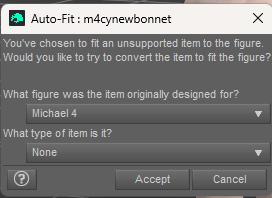
But in fact, it was a bit to large for the head:
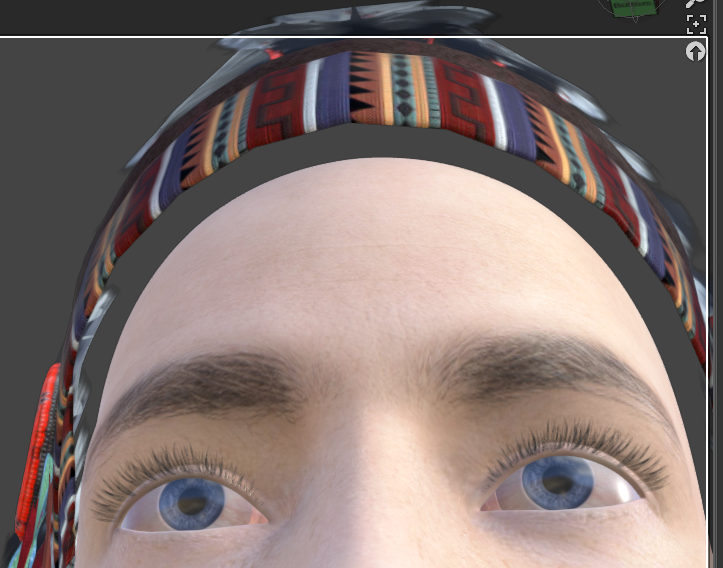
So I used the existing morphs to adjust it:
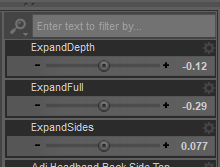
But I couldn't find an adjustment that matches perfectly, that is why I needed to adjust it in Blender...
Or, at least make it as a Smart Prop on G8M ?
Ah? I don't know what it is or how to do that...
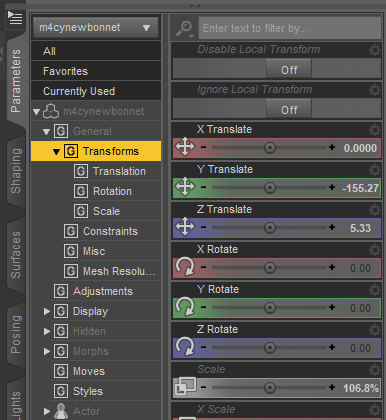
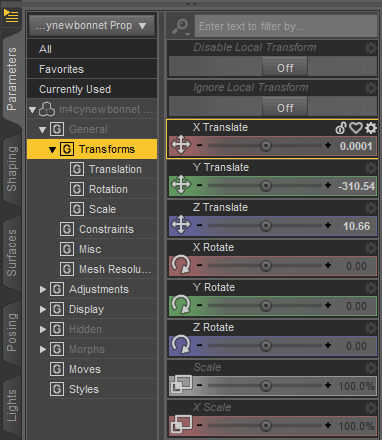
Besides, have you noticed there's a value of -155.27 on Y Axis of the loaded Bonnet Prop in your video...? That is why it's on the ground.... so it was a wrong saving of Prop asset. You should've zeroed transforms before saving.
Ah ok, since the bonnet was correctlu positionned on the character when I saved it, I thought that I could save it like that... Furthermore, I am noticing that the position values are not the same between the original bonnet (autofitted to G8M) and the new prop; is it normal?
 AIUTO...CHI CONOSCE L’ITALIANO? PARTE QUATTORDICIQuesta ve la devo raccontare: Stavo preparando un render con Elebeast per Genesis, quando ho fatto la prova del prerender, cioè renderizzare nella scene view per vedere se andava tutto a posto. Quando aveva finito, mi sono accorto che la pelle di Elebeast usciva troppo chiara, quasi rosa. Così mi sono messo a smanettare con le surface, cambiando i colori dei parametri, e ho scoperto una cosa strana: Elebeast usa l'UV map di Michael 4! Non di Genesis o del Troll di cui è un character, ma quella di Michael 4. Questo mi fa pensare che forse doveva essere realizzato per M4, ma poi è uscita per Genesis. Chissà.Native American clothing.
If you mean V4 and M4, no they're not included with DS, only the figures from the Genesis line are.
Generation 4 bases are here: https://www.daz3d.com/victoria-4-2-base and https://www.daz3d.com/michael-4-base-male-3d-model
Some of the bundles they're included in have been offered for free from time to time.
For the record, Genesis 1 includes autofit clones to use clothes made for M4 and V4, and there are also clones available for sale to autofit them to G2, 3 and 8 directly.
FilaToon / Cell shaded rendering with FilamentCES3D said:
Wonderland said:
CES3D said:
Wonderland said:
Just playing...
 BTW, is there a clone for V4 to G9 for auto fit? I only have Genesis and up.
With this script, you can create V4 clone for Genesis 9.
This script uses Victoria 4, Michael 4, and The Kids 4 clones included in Genesis (the first) as templates to create V4, M4, and K4 clones for Genesis 9.
I already have clones for G1 up for G9. That product seems to do the same and I don't want conflicts with what I already have. I also have all the Gen 3 and Gen 4 clones for Genesis 1 but is there a way to make them usable for G9 (or even G8/G3)? Is there a way to duplicate them and put them in a different folder so they show up under G9? This may be the wrong thread for this question though.
While this might be a tangent from the main topic, I'd like to clear up a misunderstanding you might have.
The script I provided is designed to create clones of V4, M4, and K4 characters for Genesis 9.
By running this script once, you'll have clones of V4, M4, and K4 characters within your Genesis 9.
After that, you can directly Auto-Fit V4, M4, and K4 clothing onto your Genesis 9 without needing to use this script again.Ah, OK, thanks. Just downloaded it.
New Year, New Sales Thread: Report Issues Here "Reporting Only"https://www.daz3d.com/amal-my-protector should have https://www.daz3d.com/moroccan-dreams-for-victoria-4 & https://www.daz3d.com/moroccan-dreams-for-michael-4 as required products.
FilaToon / Cell shaded rendering with FilamentWonderland said:
CES3D said:
Wonderland said:
Just playing...
BTW, is there a clone for V4 to G9 for auto fit? I only have Genesis and up. With this script, you can create V4 clone for Genesis 9.
This script uses Victoria 4, Michael 4, and The Kids 4 clones included in Genesis (the first) as templates to create V4, M4, and K4 clones for Genesis 9.
I already have clones for G1 up for G9. That product seems to do the same and I don't want conflicts with what I already have. I also have all the Gen 3 and Gen 4 clones for Genesis 1 but is there a way to make them usable for G9 (or even G8/G3)? Is there a way to duplicate them and put them in a different folder so they show up under G9? This may be the wrong thread for this question though.
While this might be a tangent from the main topic, I'd like to clear up a misunderstanding you might have.
The script I provided is designed to create clones of V4, M4, and K4 characters for Genesis 9.
By running this script once, you'll have clones of V4, M4, and K4 characters within your Genesis 9.
After that, you can directly Auto-Fit V4, M4, and K4 clothing onto your Genesis 9 without needing to use this script again.FilaToon / Cell shaded rendering with Filament3Diva said:
Wonderland said:
Just playing...
BTW, is there a clone for V4 to G9 for auto fit? I only have Genesis and up. That is super cute! Nicely done! As for the clones, if you have a clone for V4 to any of the other Genesis figures, you can leap frog it to G9. A product like one of these:
https://www.daz3d.com/rssy-clothing-converter-from-victoria-4-to-genesis-8-female
https://www.daz3d.com/sy-victoria-4-and-michael-4-clones-for-genesis-8
That can get it to G8, then you can autofit to G9 by having both a G8 and G9 in the scene. Load the clothes onto G8 then autofit them to G9.
Or you can go from G3 to G9:
https://www.daz3d.com/wear-them-all-autofitting-clones-and-clothing-smoothers-for-genesis-3-female-s
https://www.daz3d.com/wear-them-all-autofitting-clones-and-clothing-smoothers-for-genesis-3-male-s
You could even go back as far as V3 M3 A3 to G3: https://www.daz3d.com/wear-them-all-autofit-clones-expansion-for-genesis-3-male-s-and-genesis-3-female-s
Then from there to G9 since G9 comes with clones for G1, G2, G3, and G8.
As long as you can get the clothing item onto any of the past-generation Genesis figures, you can then get it onto G9.
Thanks but I already have all the converters but would like a simple clone for V4 and also all the old Gen 3 stuff that is right in the drop down menu so I don't have to go through all that. I have all the old clones for Gen 4 (V4, Kids 4)) and 3 (V3, A3, H3, etc...) for Genesis 1 but is there a way to get them in the drop down menu for G9? Sorry if this is a repeat of my question above.)
FilaToon / Cell shaded rendering with FilamentCES3D said:
Wonderland said:
Just playing...
BTW, is there a clone for V4 to G9 for auto fit? I only have Genesis and up. With this script, you can create V4 clone for Genesis 9.
This script uses Victoria 4, Michael 4, and The Kids 4 clones included in Genesis (the first) as templates to create V4, M4, and K4 clones for Genesis 9.
I already have clones for G1 up for G9. That product seems to do the same and I don't want conflicts with what I already have. I also have all the Gen 3 and Gen 4 clones for Genesis 1 but is there a way to make them usable for G9 (or even G8/G3)? Is there a way to duplicate them and put them in a different folder so they show up under G9? This may be the wrong thread for this question though.
FilaToon / Cell shaded rendering with FilamentWonderland said:
Just playing...
BTW, is there a clone for V4 to G9 for auto fit? I only have Genesis and up. With this script, you can create V4 clone for Genesis 9.
This script uses Victoria 4, Michael 4, and The Kids 4 clones included in Genesis (the first) as templates to create V4, M4, and K4 clones for Genesis 9.FilaToon / Cell shaded rendering with FilamentWonderland said:
Just playing...
BTW, is there a clone for V4 to G9 for auto fit? I only have Genesis and up. That is super cute! Nicely done! As for the clones, if you have a clone for V4 to any of the other Genesis figures, you can leap frog it to G9. A product like one of these:
https://www.daz3d.com/rssy-clothing-converter-from-victoria-4-to-genesis-8-female
https://www.daz3d.com/sy-victoria-4-and-michael-4-clones-for-genesis-8
That can get it to G8, then you can autofit to G9 by having both a G8 and G9 in the scene. Load the clothes onto G8 then autofit them to G9.
Or you can go from G3 to G9:
https://www.daz3d.com/wear-them-all-autofitting-clones-and-clothing-smoothers-for-genesis-3-female-s
https://www.daz3d.com/wear-them-all-autofitting-clones-and-clothing-smoothers-for-genesis-3-male-s
You could even go back as far as V3 M3 A3 to G3: https://www.daz3d.com/wear-them-all-autofit-clones-expansion-for-genesis-3-male-s-and-genesis-3-female-s
Then from there to G9 since G9 comes with clones for G1, G2, G3, and G8.
As long as you can get the clothing item onto any of the past-generation Genesis figures, you can then get it onto G9.
3delight question(solved)Drip said:
Genesis 1 and 2 are generally set up for 3delight, iray was introduced only shortly after the release of Genesis 3, so many Genesis 3 figures will have materials for 3delight as well.
Then, there are the special characters, like all the Victorias, Michaels, Ophelias and other named Daz Original characters that are sold in pro- and starterbundles.
Victoria 5 and Michael 5 are basically Genesis 1 figures for the purpose of outfits, hairs and poses, but NOT for their skin textures, for some complex reason, the skintextures of these named characters do not match the Genesis 1 figures.
The same applies to the named Victoria 6, Michael 6, and other "6" characters in relation to their equivalent, Genesis 2.
This also applies for Victoria 7, Michael 7 and several other of the earlier "7" characters in relation to Genesis 3, but was fixed for later Daz Original "7" characters.
By extension, Victoria 4 and Michael 4 figures should work too, especially the 4.2 versions.If you want to have the "adult bits below the belt", you'll also need to get at least one pro-bundle for the base figures, so, for example, the Victoria 7 pro-bundle to get the adult bits for Genesis 3 Females, the Michael 7 pro-bundle for the Genesis 3 Male adult bits, the Victoria 6 pro-bundle for the Genesis 2 female adult bits, and so on.
But you'll want to check the products pages to see whether iray and/or 3delight materials are specifically mentioned. Sometimes, products specify iray and daz3d materials, which basically means iray and 3delight materials. But, lately, I've seen daz3D materials being specified, meaning iray materials. So don't take "Daz3D" materials for granted to mean 3delight, especially not on more recent products.
Are Genesis 8 and 8.1 also iray?
If so I think I will download the essential packages for Genesis 3, 2, etc. Also, Generation 8 is very confusing because of 8.1, it's like there are two versions of the same generation. Do you recommend I download Genesis 3 and earlier?3delight question(solved)Genesis 1 and 2 are generally set up for 3delight, iray was introduced only shortly after the release of Genesis 3, so many Genesis 3 figures will have materials for 3delight as well.
Then, there are the special characters, like all the Victorias, Michaels, Ophelias and other named Daz Original characters that are sold in pro- and starterbundles.
Victoria 5 and Michael 5 are basically Genesis 1 figures for the purpose of outfits, hairs and poses, but NOT for their skin textures, for some complex reason, the skintextures of these named characters do not match the Genesis 1 figures.
The same applies to the named Victoria 6, Michael 6, and other "6" characters in relation to their equivalent, Genesis 2.
This also applies for Victoria 7, Michael 7 and several other of the earlier "7" characters in relation to Genesis 3, but was fixed for later Daz Original "7" characters.
By extension, Victoria 4 and Michael 4 figures should work too, especially the 4.2 versions.If you want to have the "adult bits below the belt", you'll also need to get at least one pro-bundle for the base figures, so, for example, the Victoria 7 pro-bundle to get the adult bits for Genesis 3 Females, the Michael 7 pro-bundle for the Genesis 3 Male adult bits, the Victoria 6 pro-bundle for the Genesis 2 female adult bits, and so on.
But you'll want to check the products pages to see whether iray and/or 3delight materials are specifically mentioned. Sometimes, products specify iray and daz3d materials, which basically means iray and 3delight materials. But, lately, I've seen daz3D materials being specified, meaning iray materials. So don't take "Daz3D" materials for granted to mean 3delight, especially not on more recent products.
Baseball Uniform for a maleCybersox said:
There's also a very basic but free referee outfit for Genesis1 at sharecg that can be retextured. Last time I needed a male baseball uniform I used one for Michael 3 from Poserworld that I don't believe is available anymore. DAZ/Poser support for sports illustration is quirky at best. LOTS of sweatsuits, warm ups, baseball jackets, gym uniforms, etc. but only a tiny handful of professional looking uniforms... despite there often being multiple environment and prop sets for the same sports.
The one for Michael 3 is still available and called Old style baseball uniform. There is also one for Michael 4 called Baseball player for Michael 4
LIVE! In the store NOW!! LowPi - the Low Poly Figure, and Crowd Creator ScriptsThe mummies were converted from this Egyptian bundle. Since then, I've also converted the old M4 bandages.
animation anti blocksOh I meant load those particular antiblocks to the figure it still doesn't do that animation inspite. Those did work before but quit working all of a sudden. I have Alive for Michael 4 but all those haven't given me any trouble. What could be causing that issue?
Quest of the Key - Animated Fantasy Adventure Series3WC said:
Awesome. I have only watched chapter one so far, but definitely want to continue.
Animation is very smooth and natural, just the right amount of humor. It is interesting to notice what is going on in the background during certain scenes, nice attention to detail.
I hardly want to watch DS animations anymore because the quality is generally poor, but this is a notable exception. (I assume it is animated in DS, if I am wrong I apologize. Maybe it was exported to Blender or Carrara?)
Thank you! I hope you like the other chapters. A lot of fun of animation can be the little details you put in the background that you don't know if anyone will notice, but it's fun to just add them. I used to animate in Daz & Poser (my Star Trek: Aurora episodes were done that way), but I finally had to bail because some of the essential plugins I used (particularly Mimic lip sync) aged out. Doing animation well on this level is a lot of work and requires a lot of patience--it can take a year to create 10 minutes of animation when you do it yourself--but I enjoy the process and the challenge, so I'm able to have fun with the journey as well as the destination. It also doesn't hurt to have some expensive hardware and an understanding wife LOL. I still use a lot of Daz assets--most of the characters began as Michael 4 and Victoria 4--but I bring them into iClone to animate there. By and large, Daz assets are better than those from iClone, so I keep coming back for sets, props, and characters. CC/iClone does a pretty good job importing the Daz characters, tho I wouldn't mind if Daz worked more directly with iClone. Any, afgain, I hope you enjoy the other chapters!
Will iRay rendering in Daz Studio work good with this laptop w. nVidia Card.Good day, about 7 years ago I started into Daz and had a laptop with an nvidia 960M with 4GB RAM ... Genesis 3 was just coming out. It did quite well for the older stuff (Victoria and Michael 4 era) ... but as it gets increasingly new (with larger models and maps),, it would get bogged down or not be able to handle it at all.
The system you describe will not get you much as far as Iray rendering goes. It would probably be hopeless on Genesis 8 and 9.
Also, if you do not have a good cooling fan, the long intense rendering that Iray can produce can sometimes be too much for laptops.
Daz 3D is part of

Connect
DAZ Productions, Inc.
7533 S Center View Ct #4664
West Jordan, UT 84084Licensing Agreement | Terms of Service | Privacy Policy | EULA
© 2026 Daz Productions Inc. All Rights Reserved.