-
Loading G3M Morph
I have tried it but had a different issue to you: in my case when I installed the package the Acrondroplasia morph did not show up at all (the other two from the same package did).
To fix the morph so that it worked for me I did the following:
- Unzip Acrondroplasia.dsf
- Open Acrondroplasia.dsf in a text-editor
- Add the correct type to line 20: Modifier/Shape
After doing that and re-ading G3M the morph showed up as an option and also morphed the figure. Don't know if that will definitely fix the error message that you received but worth a go.

Obviously, I am not able to send you the modified file but here is a screnshot of the amended line 20 to help you modify it yourself:
 Celebrity Look-a-Likes for 3D figures Part 4
nemesis10 said:
Haruchai said:
Choppski said:
Does anyone know of a good Jon Snow (Kit Harrington) morph?
The only one I know of that I think is meant to be him is Winter Prince by Tempesta3d at Rendeosity. It is for Genesis 3 Male.
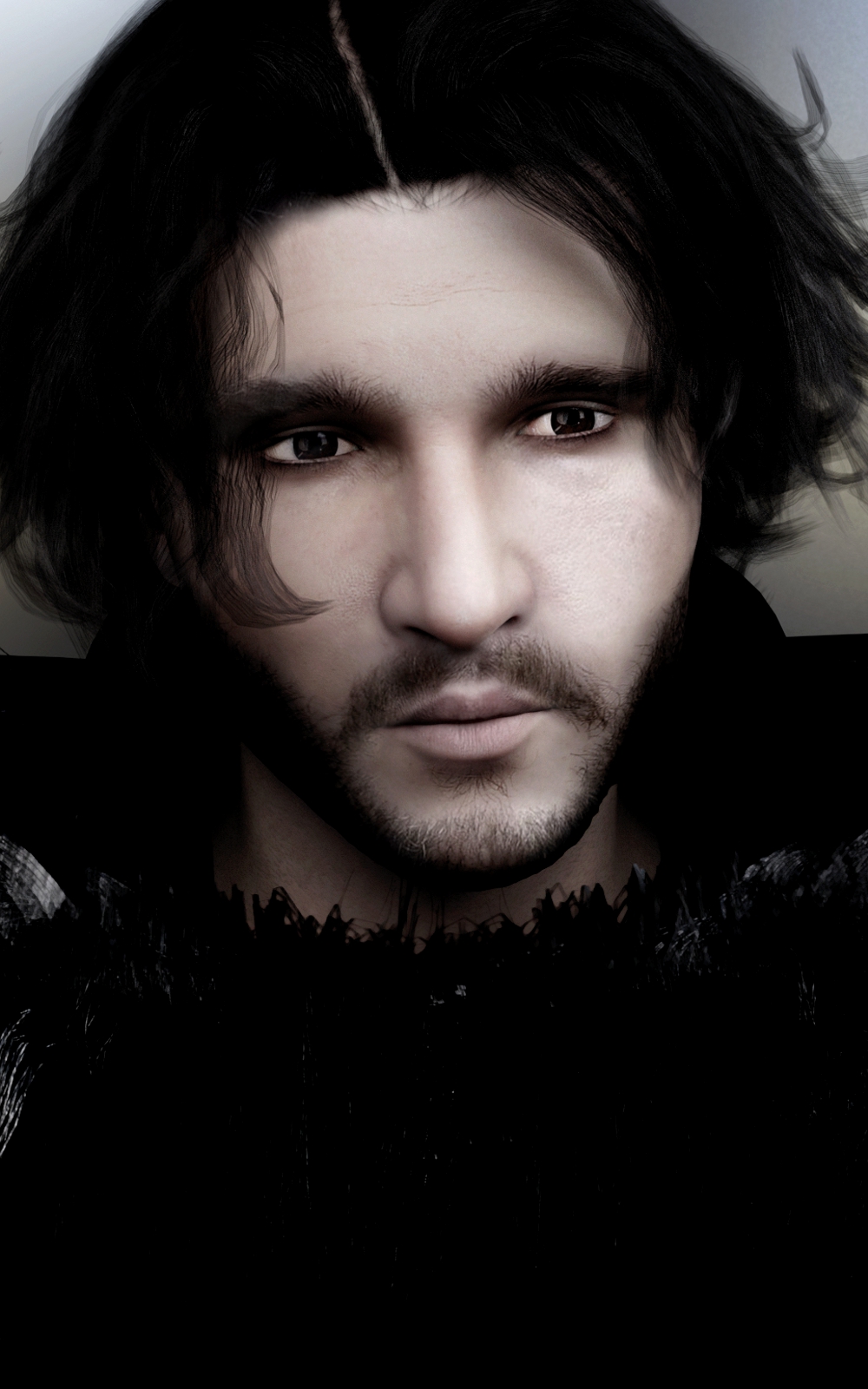
there is https://www.daz3d.com/hinkyhunks-john-crow-for-michael-4 but I don't think it is the best resemblance
Celebrity Look-a-Likes for 3D figures Part 4nemesis10 said:
Haruchai said:
Choppski said:
Does anyone know of a good Jon Snow (Kit Harrington) morph?
The only one I know of that I think is meant to be him is Winter Prince by Tempesta3d at Rendeosity. It is for Genesis 3 Male.
there is https://www.daz3d.com/hinkyhunks-john-crow-for-michael-4 but I don't think it is the best resemblance
Loading G3M MorphYou shouldn't need to show hidden properties for the morph to work. Have you checked the log to see if there is a duplicate formula or other error that may be linked?
Are you able to link to the freebie at all?
Loading G3M MorphI downloaded a freebie to turn G3M into a Dwarf (Acrondroplasia), loaded G3M, applied Morph. But no change, SHOW Hidden Properties, turned on. Nothing new in either Shapes or Parameters.
Please help!
Celebrity Look-a-Likes for 3D figures Part 4nemesis10 said:
Haruchai said:
Choppski said:
Does anyone know of a good Jon Snow (Kit Harrington) morph?
The only one I know of that I think is meant to be him is Winter Prince by Tempesta3d at Rendeosity. It is for Genesis 3 Male.
So do I, now
 Celebrity Look-a-Likes for 3D figures Part 4
Haruchai said:
Choppski said:
Does anyone know of a good Jon Snow (Kit Harrington) morph?
The only one I know of that I think is meant to be him is Winter Prince by Tempesta3d at Rendeosity. It is for Genesis 3 Male.
Celebrity Look-a-Likes for 3D figures Part 4Choppski said:
Does anyone know of a good Jon Snow (Kit Harrington) morph?
The only one I know of that I think is meant to be him is Winter Prince by Tempesta3d at Rendeosity. It is for Genesis 3 Male.
Celebrity Look-a-Likes for 3D figures Part 4Does anyone know of a good Jon Snow (Kit Harrington) morph?
looking for a bra that opens from the front-middle outwardsfelis said:
I assume it isn't sufficient that the bra is modelled as front-opened, but also have a morph to open it?
preferbly yes but either really.
looking for a bra that opens from the front-middle outwardsI assume it isn't sufficient that the bra is modelled as front-opened, but also have a morph to open it?
Dartanbeck's Journey - CG FilmmakingMeshgrabber is really cool!
We can even adjust simulated items and save it as a morph (temporarily or add it to the item) so we can dial back the change anywhere we need to in time. So beneficial!
Thanks Crosswind for turning me onto this great thing!
Daz Studio Face Transfer Problemperphyg said:
Hi:
Face transfer looks fantastic.
But I find lots of headphoto won't work.
How can I fix it.
@perphyg Another option is to upscale those low-resolution images and enhance their details before bringing them into Face Transfer. Gigapixel AI by Topaz Labs is a great photo upscale/enhancer app. It's usually heavily discounted during their Black Friday sale in November. You can check it out here:
https://www.topazlabs.com/gigapixel-aiTopaz Labs also offers Topaz Photo AI for similar results (and includes sharpen, denoise, and upscale):
https://www.topazlabs.com/topaz-photo-aiAlias Property Not Added to NodeI've noticed my load times for g8male figures has become a lot slower. I looked at the log and there are about 300 entries that say this:
2023-08-12 15:06:27.688 [WARNING] :: ..\..\..\..\..\src\sdksource\fileinput\dzassetdaz.cpp(9345): Alias property not added to node.
2023-08-12 15:06:27.688 [WARNING] :: ..\..\..\..\..\src\sdksource\fileinput\dzassetdaz.cpp(1744): Property alias not created!
2023-08-12 15:06:27.688 [WARNING] :: ..\..\..\..\..\src\sdksource\fileinput\dzassetdaz.cpp(9345): Alias property not added to node.
2023-08-12 15:06:27.690 [WARNING] :: ..\..\..\..\..\src\sdksource\fileinput\dzassetdaz.cpp(1744): Property alias not created!
2023-08-12 15:06:27.690 [WARNING] :: ..\..\..\..\..\src\sdksource\fileinput\dzassetdaz.cpp(9345): Alias property not added to node.
2023-08-12 15:06:27.690 [WARNING] :: ..\..\..\..\..\src\sdksource\fileinput\dzassetdaz.cpp(1744): Property alias not created!
2023-08-12 15:06:27.690 [WARNING] :: ..\..\..\..\..\src\sdksource\fileinput\dzassetdaz.cpp(9345): Alias property not added to node.
2023-08-12 15:06:27.691 [WARNING] :: ..\..\..\..\..\src\sdksource\fileinput\dzassetdaz.cpp(1744): Property alias not created!
2023-08-12 15:06:27.691 [WARNING] :: ..\..\..\..\..\src\sdksource\fileinput\dzassetdaz.cpp(9345): Alias property not added to node.
2023-08-12 15:06:27.691 [WARNING] :: ..\..\..\..\..\src\sdksource\fileinput\dzassetdaz.cpp(1744): Property alias not created!
2023-08-12 15:06:27.691 [WARNING] :: ..\..\..\..\..\src\sdksource\fileinput\dzassetdaz.cpp(9345): Alias property not added to node.
2023-08-12 15:06:27.693 [WARNING] :: ..\..\..\..\..\src\sdksource\fileinput\dzassetdaz.cpp(1744): Property alias not created!
2023-08-12 15:06:27.693 [WARNING] :: ..\..\..\..\..\src\sdksource\fileinput\dzassetdaz.cpp(9345): Alias property not added to node.
2023-08-12 15:06:27.693 [WARNING] :: ..\..\..\..\..\src\sdksource\fileinput\dzassetdaz.cpp(1744): Property alias not created!
2023-08-12 15:06:27.693 [WARNING] :: ..\..\..\..\..\src\sdksource\fileinput\dzassetdaz.cpp(9345): Alias property not added to node.
2023-08-12 15:06:27.695 [WARNING] :: ..\..\..\..\..\src\sdksource\fileinput\dzassetdaz.cpp(1744): Property alias not created!
2023-08-12 15:06:27.695 [WARNING] :: ..\..\..\..\..\src\sdksource\fileinput\dzassetdaz.cpp(9345): Alias property not added to node.
2023-08-12 15:06:27.695 [WARNING] :: ..\..\..\..\..\src\sdksource\fileinput\dzassetdaz.cpp(1744): Property alias not created!
2023-08-12 15:06:27.695 [WARNING] :: ..\..\..\..\..\src\sdksource\fileinput\dzassetdaz.cpp(9345): Alias property not added to node.
2023-08-12 15:06:27.696 [WARNING] :: ..\..\..\..\..\src\sdksource\fileinput\dzassetdaz.cpp(1744): Property alias not created!
2023-08-12 15:06:27.696 [WARNING] :: ..\..\..\..\..\src\sdksource\fileinput\dzassetdaz.cpp(9345): Alias property not added to node.
2023-08-12 15:06:27.696 [WARNING] :: ..\..\..\..\..\src\sdksource\fileinput\dzassetdaz.cpp(1744): Property alias not created!
2023-08-12 15:06:27.696 [WARNING] :: ..\..\..\..\..\src\sdksource\fileinput\dzassetdaz.cpp(9345): Alias property not added to node.
2023-08-12 15:06:27.698 [WARNING] :: ..\..\..\..\..\src\sdksource\fileinput\dzassetdaz.cpp(1744): Property alias not created!
2023-08-12 15:06:27.698 [WARNING] :: ..\..\..\..\..\src\sdksource\fileinput\dzassetdaz.cpp(9345): Alias property not added to node.
2023-08-12 15:06:27.698 [WARNING] :: ..\..\..\..\..\src\sdksource\fileinput\dzassetdaz.cpp(1744): Property alias not created!
2023-08-12 15:06:27.698 [WARNING] :: ..\..\..\..\..\src\sdksource\fileinput\dzassetdaz.cpp(9345): Alias property not added to node.
2023-08-12 15:06:27.699 [WARNING] :: ..\..\..\..\..\src\sdksource\fileinput\dzassetdaz.cpp(1744): Property alias not created!It's actually not about the load times as it is that my basic figure has a morph applied by default. I've zeroed it out and saved it. I deleted the genesis 8 male starter and reinstalled it. I can't figure out what character did this. I follow a guy on Patreon that creates characters as well as some Renderosity purchases. Could that have made some changes to the base character? None of my morphs (when I look at the sliders) is on.
Here are a couple of examples I found in the log file about morphs being automatically installed.
Here are what the character looks like by default and when I zero it out.
The other issue is that because the Basic Male loads with these defaults it screws up any morphs.
Here is an example of when I apply the "Ali" morph to both.
Any help would be greatly appreciated.
Sorry, I tried uploading the images directly but it stalled.
Hair parting "flipped" feature for hairdosWell put, richard, and thank you for the transfer utility idea! It would be nice though not to have to "jump through all those hoops" but simply have the "flipped" option available without any hassle....
Hair parting "flipped" feature for hairdosI do agree with you AOBB. It would be useful. My favourite character lives with an X axis -100% scale 'Robin Hair for G8F' as the +100% version doesn't suit her. I think the -100% X-Scale trick does mostly work for conformal and fabric dForce hair provided the hair isn't much more than shoulder length. (Don't know about SBH as I haven't yet found any that work well enough to persist with beyond 30mins.) To improve things - and it has only just occurred to me so I've not tried it, take the warning! - you could export the -X100% hair as an obj file. Then import as a prop, convert to a figure and use the transfer utility to get the original hair rigging back, but on the mirrored hair. That way the character's shoulder movements should be followed rather better. May have to go through all the morphs in a similar way to get the morphs working on the new native inverted hair, but it could well work. Might be a reasonable substitute until PA's provide the mirrored version we'd both like with the original... Regards, Richard.How to fix a bending heels?The problem is that when the weights are projected into the model by the Transfer Utility it goes by proximity, and the heels are closer to different parts of the foot along their length. Anything distant from the body is going to require progressively more adjustment compared to a skin-tight item.
G8 hair on G9 does not saveWouldn't Riversoft Art's dForce2Morph be of some use here? You still won't be able to save the draped hair in a file, but you could drape the hair, export a morph of that drape using Riversoft Art's utility, then delete the hair, reimport a fresh copy of same (but don't run dForce this time), dial in the created morph into the freshly loaded hair, and save that version in your file -- if I'm following all this correctly.
Xiu Lin 9Thanks to the people that posted in this thread and shared their renders! I wanted to get a new skin for an east asian looking character I was creating for a story inspired image and was on the edge until I read this thread on how good the male morph looked. This totally sold me since I eventually also wanted to make a male character in addition to a female one! My render is not anywhere as cool looking as the one that @carlosgimpera created (with Aroon face and other normal maps added in - not sure how to do that yet), but my newbish efforts of an out of box male (base masculine slider at 100%) let me create this render!
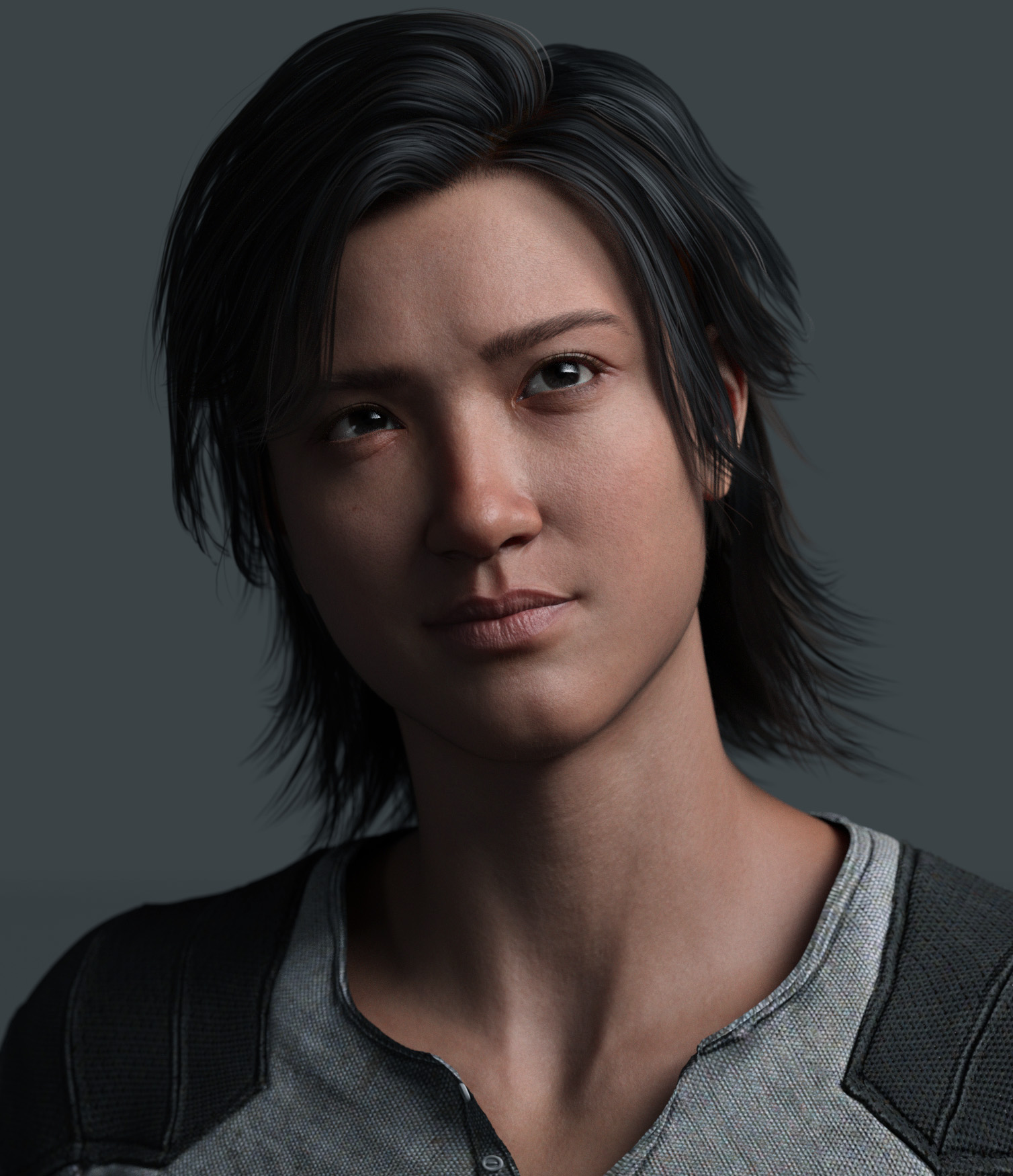
I think there are some wonky issues with the cheeks (pointed out by @outrider42) and skin around the eyes (also mentioned), but overall I think he looks pretty good! I didn't even have to change out the eyebrows. FACs is at 100% for the render and I might have added vellus hair. The hair on him is a Genesis 2 hair (Drifter Hair) with backlight shaders, so not the best hair, but I liked the hairstyle on him.
Seeing another Aroon render by @Zicon makes me wish I had that bundle, but the Xiu Lin 9 HD and Fanny Bundle was on sale the other day and I was able to get it for $22, so I couldn't resist! That bundle also had another skin included (a Mousso character), so I'm pretty happy! :D
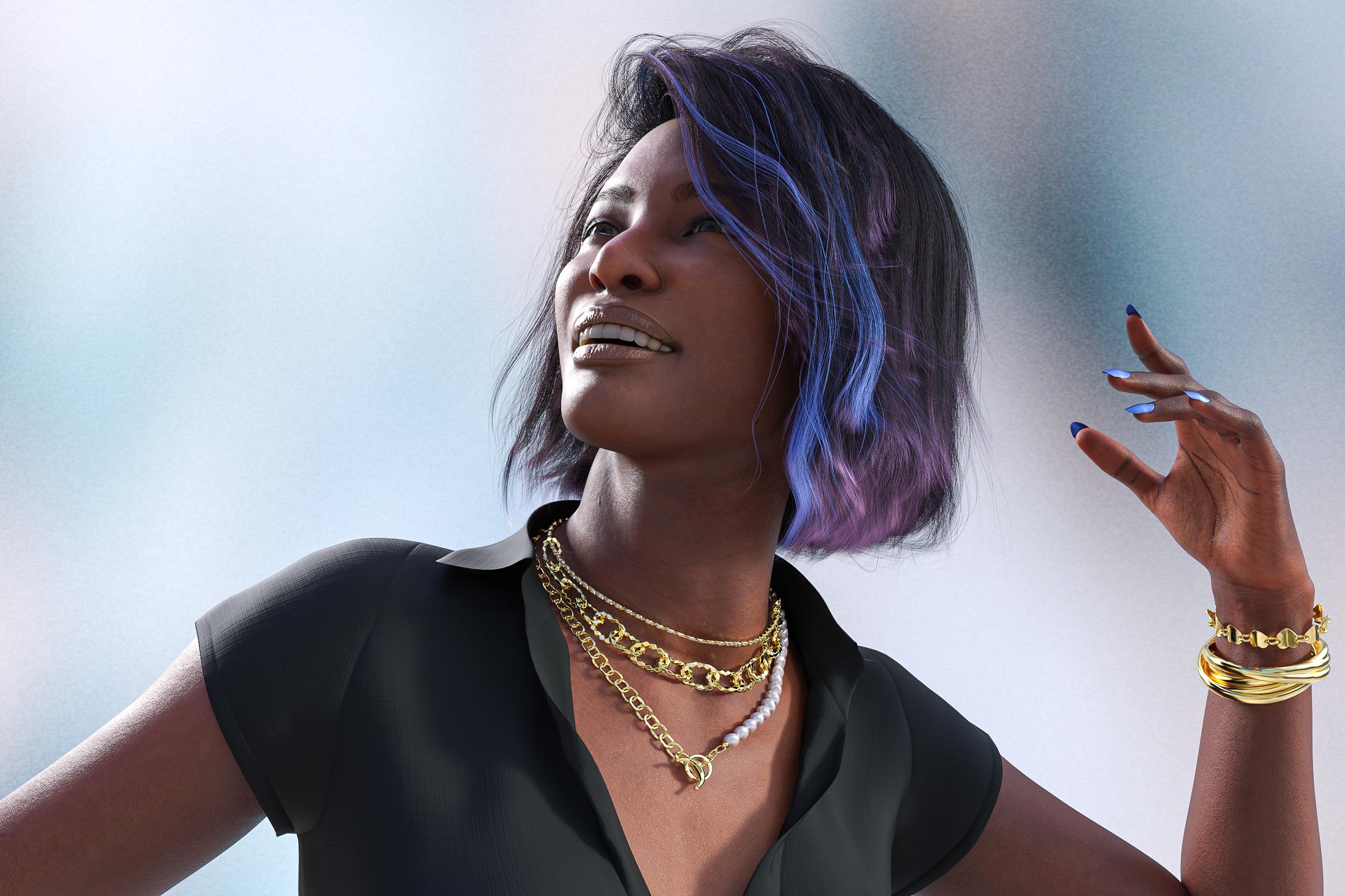
New! Novica & Forum Members Tips & Product Reviews Pt 14@Chevybabe25 new hair Bodacious Bob Hair on London by Faber Inc and Elvina outfit by Arryn and Onnel.
I wanted to post a review which I haven't done in awhile. This render took around 50 minutes set at 5000 max samples at 2500 px on the long side.
Bodicious Bob is a fun style. It has many color options including tips and streaks; it also renders and sims fast with the default settings. I did not see a lot of movement from the simulation but it is not an extreme pose. I like touch of color with the streak, this is the default color that it loads with. I did not tweak it at all.
London and her sibling Cairo are great characters and set to be siblings they are both well done characters my only complaint is the makeup and to me they are a little on the orange side but thats not a difficult fix for me. While there are several options the eye and lip makeup are not seperate. I know that the way the new shader is it makes it difficult. Love the characters!
Elvina Outfit comes with the dress, shoes, bracelets and necklace. They come with several morph and color options. To be honest I buy alot of there clothing because of shoes and jewelry. My biggest complaint is that the jewelry come with no adjustment options; which isn't really much of a complaint for what is all included it is well worth the purchase.
Daz 3D is part of

Connect
DAZ Productions, Inc.
7533 S Center View Ct #4664
West Jordan, UT 84084Licensing Agreement | Terms of Service | Privacy Policy | EULA
© 2026 Daz Productions Inc. All Rights Reserved.