-
Question about the leg bends on the G9 figures
- Go to Parameters, make sure you have Show Hidden Properties on (from hamburger menu in Parameters tab)
- Put G9 back to its default pose
- Bend only the Shin bone
- Go to 'Currently Used' in parameters
- Look at active and hidden morphs to see what is firing.
It is not G9 issue, it is faulty character.
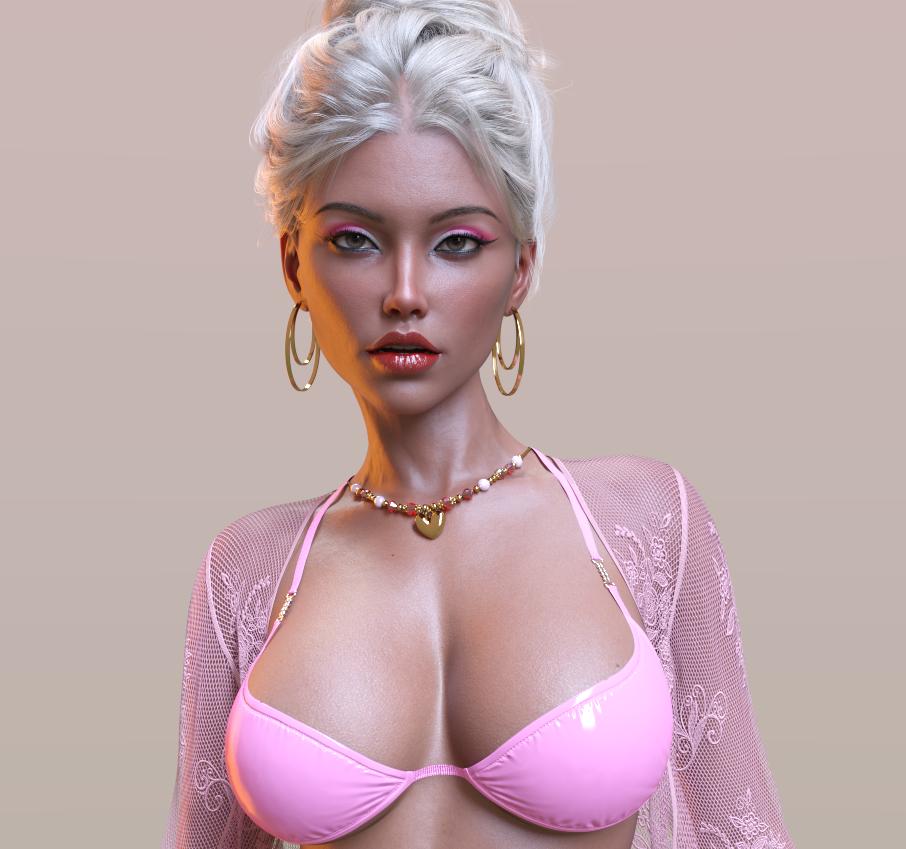
Head gamesWith all the morph transfer apps, this thread isn't that unique as it once was, but I still enjoy seeing what users come up with.
Here is a face I did for a project. G9 with lots of little morphs and some addon characters mixed in.
 Quick Geografting Question
Richard Haseltine said:
crosswind said:
If you just sculpt and import a pure morph on the graft with no change of relevant joints' positions, the bones won't follow the morph dial. If you change, for instance, scales of toes or metatarsals, and ERC Freeze on the morph, the bones will follow.
Only after Adjusting Rigging to Shape.
Though I am not following the basic issue here.
All good, Richard. Thank you for the response. This is basically what I decided to do was just get everything on the base G8F in place and then use Shape Rigger to line everything up. Figured even at the lower density it could still get things in the rough position I would need and I can do the smaller details once the geograft is applied.
I guess the best way to describe the question was how to realign G8's bones to a morphed Geograft without having to manually reposition them. SInce that geograph just follows G8's rigging and if you do Shaper Rigger or Adjust Rigging, it follows the hidden part of the G8 instead of the geograft.
I have a hard time putting thoughts into words sometimes :(. I can be big dumb here and there lol.
Thank you again!
How many use Photoshop elements, Paintshop?I have used Paint Shop Pro since Jasc Paint Shop Pro 6...then 8.01...then 9. I guess Corel purchased it then and I have X2. X4 Ultimate, X6 Ultimate, X8 and finally Paint Shop Pro 2023.
I am extremely dissappointed that many of my plug-ins do not work in 2023. They work in X8, however, after installing Paint Shop Pro 2023, Paint Shop Pro X8 crashes. Those plug-ins were awesome!! Half the time, X8 doesn't recognize my plug-ins and I have to restart it when it wasn't crashing.
When I was still working I purchased all of the Alien Skin plug-ins, Autofx software (which can be stand alone,) Redfield software, Flaming Pear (some work in 2023) and others.
I can dabble in Adobe Photoshop Elements 15 when I need to. This is the one I would really like to learn. I know that if I Google something I need to do, I can transfer my knowledge from Paint Shop Pro to Photoshop Elements. I think this is the one I would chose. I just need to force myself to post work my DS renders in Photoshop Elements.
I definiitely can import Photoshop brushes in Paint Shop Pro.
So, I use Paint Shop Pro 2023 mostly...I want to learn Photoshop Elements!!!
I need mesh smoothing toolsCatherine3678ab said:
Works best with 'faces' selected, I tend to favour a brush size of 5, and 'gently' make the smoothing requests. If one can, avoid shading domain/material seam areas. Click the 'accept' button to finish the action. Edit, undo may work but don't get excited if the shading domains vanish. Indeed unselect and reselect the clothing so that field is refreshed. Important tip at times is to start using the brush in the viewport and quickly slide over to where you want to work, not letting up on the brush until wanting to click accept. Do as little as possible - just making the adjustment morph, accept, send it back over the bridge to D/S. btw - be sure in D/S that the Edit/Preferences, scroll sideways for bridge options - is set to Advanced. When making the morph, reverse deformations so nothing doubles up. Another tip, yes one can return to Hexagon and continue working, maybe fixing that morph abit more -- just give it another name when making it. Save the morphs at zero of course unless you want it loading dialed in. However upon returning to Hexagon FIRST one MUST click Accept again. This finishes the transfer action allowing one to continue working. Also while working in Hexagon that D/S opened, keep D/S open. If the Hexagon work is going to take awhile, save as then save the Project file. Save periodically while working. Incre saves are very handy too. When D/S starts Hexagon, if D/S is closed, it closes Hexagon hard and fast too.
I must study this response and do a lot of testing.
This response is full of lots of very useful instructions.
I will try lots of these things, so I am proficient with these tools before I ask for any more help.
I could not get the tool to do anything before so selecting faces was the first big very helpful tip!
I did some edits, brought my assets back to Daz and then could not get Hexagon to reopen with my assets so you have foreseen my obstructions well in advance.
If you are able to, I would love to see a YouTube video demonstrating how smoothing is done in Hexagon, I think lot of people would benefit from knowing how to do this.
Thank you very much Catherine for your help here!


If you know of any videos showing this info, please post links here. Thank you!
Diffeomorphic DAZ Importer version 1.7.0 released@aweswan It depends. The morphs imported by diffeomorphic work the same as daz studio, that means they drive both bones and geometry, and possibly a HD layer if you use the Xin addon. You can convert such morphs to shapekeys but the interpolation will not be the same, that means intermediate poses may be different. Then of course to transfer the shapekeys the source and target geometries must be the same, otherwise you can use an addon to transfer among different geometries, or you may also try a surface deform.
https://bitbucket.org/Diffeomorphic/import_daz/wiki/Advanced/Morphs/Convert Morphs To Shapekeys
Diffeomorphic DAZ Importer version 1.7.0 releasedHi,
The diffeoMorphic looks awesome! Thanks for the work on it.
Can I transfer my Daz character Blendshapes exported to Blender to the same(similar) Character Creator model exported to blender?
Why? I'm trying to get the best characters possible in Unity.
Daz has Blend shapes, but Character Creater does not allow you to export body/face morphs etc to Unity. Character creater has great Materials, skeleton setup and eyes in Unity, so I want to combine the two by adding the morphs "back in" in blender.
So I've tried exporting Victoria 8 to CC
Then Export both CC victoria and Daz victoria to Blender, and hopefully "Add back" the morphs from Daz Victoria 8 to the cc Victoria 8. Please let me know if there is a better way!
I tried using the transfers shapekeys to the new cc model, But it complain that that "CC_base_Body" parent is not the same as Victoria8HD"
Quick Geografting Questioncrosswind said:
If you just sculpt and import a pure morph on the graft with no change of relevant joints' positions, the bones won't follow the morph dial. If you change, for instance, scales of toes or metatarsals, and ERC Freeze on the morph, the bones will follow.
Only after Adjusting Rigging to Shape.
Though I am not following the basic issue here.
Gen 8 to 9 Tunic/Loincloth/Dress Triangulator Problems? [Solved]Daz Studio already has a Smoothign modifer, though i do wish it could be weight-mapped to cotnrain its effect the way most other modifiers can be (this my be a limit of SubD algorithms, though - the Smoothing Modifier, as I understand it, applies the same smoothing as SubD but without additional mesh divisions).
It's very hrd to follow what is the issue with morphs, but are you using the Reverse Deformations option when you import them (on the figure in the same pose as when exporting the OBJ to create the morph)? That will subtract out the initial state, leaving just your corrections - otherwise you are doubling the shaping/posing.
Morph Splitter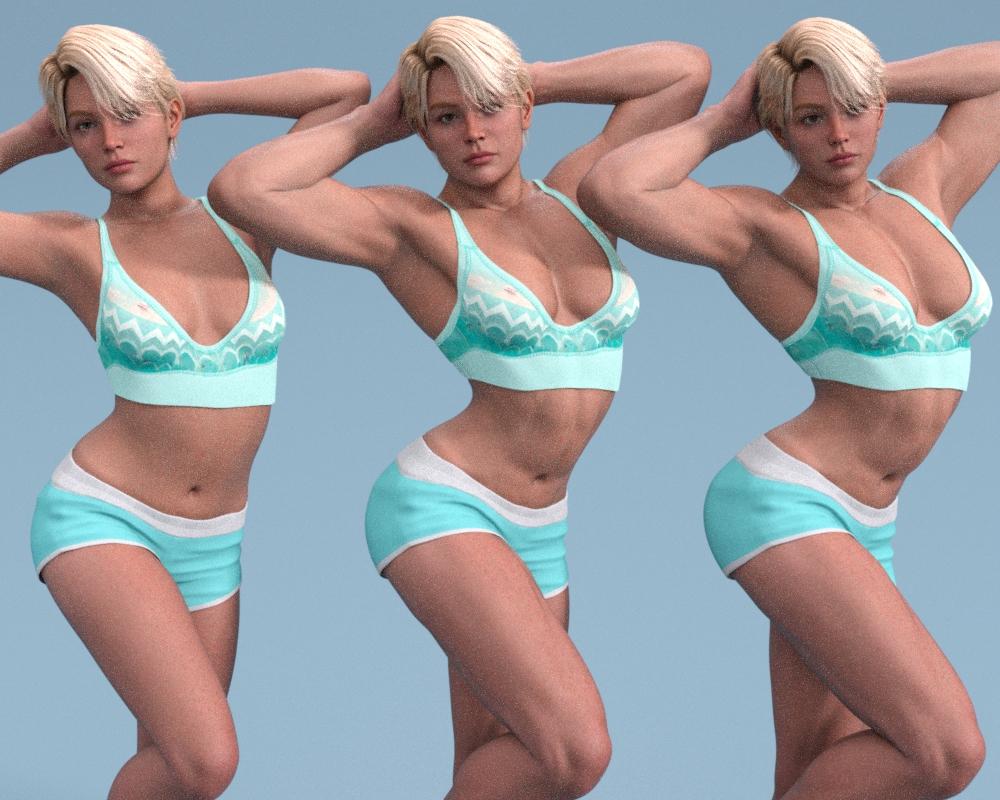
Bunyip02 said:
Has anyone been able to get this to work with Genesis 9 or does it need an upgrade by the PA ?
I have been using it without any issues, will post an example when I get a little free time. TD
Edit: Quick 50% example render, forgot how much resources having 3 G9's require! Wanted to be able to use the Male Fibo morph on females, the morph comes with a highly masculine head morph. Used the splitter to create a head morph, which I then reversed into a negative head morph to take out the Fibo head as desired. Left is my starting G9 character, center has 30 % Fibo dialed in. Note the masculine head and face changes. The right figure has my created negative head morph dialed to 30% also to return the feminine features to the character. TD
what are the "must have"/"Essentials" needed to get Daz Studio to work and run?If you use DIM, it will give you the basic list of all the necessary products needed to install when it opens the first time or when re-installing.
After that, I would look at any DO morph pack that you have purchased for each generation as they might be needed for PA characters.
If you purchased any plug-ins, decide for yourself if you want to install them again.
Clothing, sets, shaders, hair, props as you desire or find you enjoy using. This is totally based on your preferences and what you own now and your storage capability.
The videos by Jay Verlius are great for showing how to do things with the tools built into Daz Studio.
(This is from my experience from re-installing and new installs on three computers since 2016.)
Mary
Quick Geografting QuestionIf you just sculpt and import a pure morph on the graft with no change of relevant joints' positions, the bones won't follow the morph dial. If you change, for instance, scales of toes or metatarsals, and ERC Freeze on the morph, the bones will follow.
I need mesh smoothing toolsWorks best with 'faces' selected, I tend to favour a brush size of 5, and 'gently' make the smoothing requests. If one can, avoid shading domain/material seam areas. Click the 'accept' button to finish the action. Edit, undo may work but don't get excited if the shading domains vanish. Indeed unselect and reselect the clothing so that field is refreshed. Important tip at times is to start using the brush in the viewport and quickly slide over to where you want to work, not letting up on the brush until wanting to click accept. Do as little as possible - just making the adjustment morph, accept, send it back over the bridge to D/S. btw - be sure in D/S that the Edit/Preferences, scroll sideways for bridge options - is set to Advanced. When making the morph, reverse deformations so nothing doubles up. Another tip, yes one can return to Hexagon and continue working, maybe fixing that morph abit more -- just give it another name when making it. Save the morphs at zero of course unless you want it loading dialed in. However upon returning to Hexagon FIRST one MUST click Accept again. This finishes the transfer action allowing one to continue working. Also while working in Hexagon that D/S opened, keep D/S open. If the Hexagon work is going to take awhile, save as then save the Project file. Save periodically while working. Incre saves are very handy too. When D/S starts Hexagon, if D/S is closed, it closes Hexagon hard and fast too.Celebrity Look-a-Likes for 3D figures Part 4Choppski said:
Does anyone know of a good Jon Snow (Kit Harrington) morph?
If you're not in a hurry, I'd wait for this.
He should be released, but I don't know when... It's by the deviant's UncannyValet. He's the best Kit Harington's character I've ever seen.dForce Lea Hair 2 issue on custom G8F characterRight, the solution to this one is pretty straightforward. We've all been looking for complex answers and ignoring the obvious one!
The hair has a fault in how it's set up, and this bug manifests on any character where one shaping morph makes it shorter than the default G8. The ponytail is fitted to the wrong object... that's all it is.
Load Kalei, load the hair (with floating ponytail) and then expand the hair hierarchy. You'll see that the 'Lea Plait Base' node is fitted to the Lea Hair Base in the parameters tab. This is the problem. Select the button and fit the ponytail (Lea Plait Base) to the Lea Hair Bun instead. Et voila.
Quick Geografting QuestionHey guys,
So recently I decided to replace G8F's feet with the same feet but at a higher resoultion for more accurate sculpting. I did not create new bones for the geograft rather it is following G8F's bones and weight map. This way all the base morphs and bought morphs I have work. This works perfectly.....My problem comes in when I start to create custom morphs. Idealy, I would like to simply morph the geograft I made, however due to it not having unique bones, G8F's bones do not follow the morph I create for the geograft. This forces me to have to morph G8F which unfortunately defeats the purpose of what I am trying to accomplish because I would be scuplting the lower poly counts of the base mesh. Also, if I do morph the base mesh, once that morph is apply, the geograft deforms funny due to it having a denser poly count, would be my guess.
Am I missing a technique to be able to make this work? I would really like to be able to have this geograft just follow G8F's rigging and make use of the feet / leg morphs while also being able to morph that geograft freely.
Thank you guys in advance for any assistance!
dForce Lea Hair 2 issue on custom G8F characterSo this appears to be an odd interaction with Kalei HD for Genesis 8 Female.
I first took Gordy's suggestion to reset the rigging using TimberWolf's method:
ALT SHIFT J (or Tool Settings -> Joint Editor)
Right click in the scene window and select Edit -> Adjust Rigging to Shape (at the bottom, go with the defaults)
I did go with the defaults, Accepted... and nothing changed. Ponytail still levitating.
I checked the character's morphs (THANK YOU, DIAL CONTROL FOR GENESIS TO GENESIS 8, this utility has been one of the best purchases I've made) and saw that I had dialed in Kalei HD for Genesis 8 Female as a base to build the character from. And when I dialled it down to zero, POOF! The Lea braid popped into place.
I experimented by loading the Kalei HD Actor into the scene and fit the Lea hair set onto Kalei HD. Same thing, levitating braid. So it seems to be that hair asset interacting with the Kalei HD morph.
Oddly, the Lea hair works fine with Elora for Genesis 8 Female even though they are both made by the same creator.
Knowing this, i can either
A) reshape the model without the Kalei morphs,
B) adjust the rigging on the braid and hope I get it right and it doesn't cause any complications later on, or
C) or just use a different hair set.
I might just go with C) and use the Lea hair for a different character.
Is it possible to properly fix genesis 9 clothing to a genesis 8 character?Simple way -: Auto-fit with clones + Importing 'pJCMs' from G9's clothing...
Precise way -: Bones mapping + Transfer Rigging + Manual fixing...
Procreate and 3D TexturingI've got Procreate, but I haven't bothered to dabble much in the 3D painting feature for a couple of reasons...
1- The concept of doing this in Procreate is appealing because it's convenient using an iPad (not sure if it's for other tablets) and you need to have a pre-mapped model... For me I'm really only interested in painting models I made and that requires me to map them on my computer, being there is no dedicated mapping app (like UV mapper or Roadkill) for the iPad*... I feel like that breaks the workflow, even though it's way easier now to transfer files back and forth between the iPad and my Dell...
2- I'm using a regular iPad, not an iPad Pro and most videos imply the universe will explode if you don't have a Pro... there are workarounds, but I hate workarounds because they often are more trouble then they are worth and eventually you end up realizing there were six better ways to accomplish whatever because you inadvertently chose to follow the wrong tutorial.
3- I like painting with images, not just colors, like one can do with 3D Coat, but unless I'm mistaken 3D painting in Procreate is only handpainting using colors and brushes... which is great, but sometimes you just want to spray paint a rust texture or worn paint texture using an image based material onto object, not create that effect from scratch using your mad skills...
4- Unless I'm incorrect or this information is outdated, from what I found, there is no symmetry feature in Procreate's 3D painting mode, which makes it more time consuming to paint in certain circumstances... Honestly, that's most circumstances.
5- Also another big issue is finding current information/tutorials that are accurate about these kind of programs... stuff often changes fast and you can find out an app does something, watch a video about it and try it out, but since that was from a year back, features have been added or fixed or reconjigured and no long work the way you just learned them to... I breaks one's little brain to keep going through that...
*Technically... there are workarounds, and both Forger and Nomad Sculpt (as mentioned previously) have basic auto map features, but I'd prefer to have a dedicated mapping app on at least the level of RoadKill or UVmapper that would allow me to do the seams and unwrapping... I keep hearing murmurs of various apps that are coming soon or someone it working on, but nothing solid yet... I thought ArmorPaint was going to have that function, but unless I'm mistaken it's still only 3D painting (more like 3Dcoat or Substance), but no mapping feature.
Distorted hands and Teethcrosswind said:
For 1), you need to do "Adjust Rigging to Shape" before testing poses on the figure (Edit - Figure - Rigging - Adjust Rigging to Shape), then do "ERC Freeze" if there's no problem.
For 2), I don't use Hexagon but pls try to set the morph dial "Mouth Realism 8.1 HD" to zero before making your "mixed morphs" as a single dial... After importing the morph, then dial "Mouth Realism 8.1 HD" as needed. I don't use Genesis 1 either but the dial "Mouth Realism HD" on G3 is 100% as default, so try to zero it first in the same way...
Thank you so much Crosswind, I will definitly try these sugestions when I get home tonight. 'ERC freeze' sounds like what I was vaguely remembering, but I had no clue where to do it. And I know for sure that the mouth realism 8.1 HD is dialed up in both figures, and good chance it was dialed up in the previous generations for the one character... I had no clue that would effect things in a conversion to a higher generation.
Thank you again :D
Daz 3D is part of

Connect
DAZ Productions, Inc.
7533 S Center View Ct #4664
West Jordan, UT 84084Licensing Agreement | Terms of Service | Privacy Policy | EULA
© 2026 Daz Productions Inc. All Rights Reserved.