-
Asian morph for Victoria 9?
Hello,
I have Victoria 9 HD Intro Bundle, and that morph is not included with Victoria 9. I doubt it's in any of the other three bundles which are heavily leaning toward a medieval Europe setting.
Distorted hands and TeethCactuskim said:
crosswind said:
It's great that you got it done with 'dental issue' !
 As for the new 'ungual issue', it's annoying to have it on a default Base figure... Here're some steps for trouble-shooting -:
- Press F2, clear DSON cached files there, then reload G8.1 base figure.
- In Parameters pane, enable 'Show Hidden Properties' from Preferences, select Currently Used, then see if there's any morph dialed unexpectedly from some characters or partial head / body morph. Or from menu -: Edit - Figure - Zero - Zero Figure, then see if there's any strange dial with 0 value(s) in Currently Used.If there's some morph dialed, then we proceed... as there might be different reasons and resolutions.
Thank you Crosswind, I will try what you have sugested and let you know the results :D.
Hi Crosswind,
Thank you again for your help, I really appriciate it so much.
Well, That was interesting. I did what you sugested, and when I looked at the hidden but currently used dials in the paramiters, the only thing listed was 'Render SubD level minimum <?>, Mouth realism 8.1 HD at 100%, Mouth realism HD at 0%, and Fit to which was set to Genesis 8.1. The finger nails on the left hand were still distorted on the left hand at this point, but when I Did the Edit>Figure>Zero etc. the Mouth HD 8.1 went to 0%, and the finger nails went back to normal :D. I then deleted that figure and loaded him again, and the fingernail distortion was back. It cleared when I Zeroed him again, and I tested applying other morphs and they worked fine, but each time I load a figure, I have to zero it first. I tried the same thing with the developer's version, and same thing.... needs to be zeroed before anything else. Good to know I have a work around for the problem by using the Zero right after loading a new figure, but still scratching my head over the cause.
Cactuskim
PS... the fingernails are baked into my Hexagon converted figure now even though the teeth are fixed, *Rolls Eyes* Oh well, If I practice converting over and over and over again, I might get good at it some day ;p.
Adding clothing and hair to daz figure in blenderIt depends, in general you may want to trasfer the figure weightmaps to the outfit so it deforms with the figure, you can do it with object > link/transfer data > transfer mesh data. Then you parent the outfit to the figure with parent > armature deform.
Or you can try with a surface modifier, if the outfit is "tight" it may be enough.
How do I hide the lower half of g9 if I use centaur or spiderfolk bodyRichard Haseltine said:
Those would have been set up as GeoGrafts on the original figure, and would hide specified areas of the mesh when fitted 9and weld to the edges left). Using them on a different figure, with different geeomtry and presumably parenting rather than fitting (to avoid AutoFit removing al the custom rigging) that won't work.
One option would be to create a simple primitive (say a 0.01m cube), rig it via the Transfer Utility (Edit>Figure>Transfer Utility) setting Genesis 9 as Source and the Cube as Target, then make sure it is fitted to the Genesis 9 figure. Now use the Geometry Editor to select the areas of the Genesis 9 figure you need to hide, right-click>Geometry Assignment>Create AutoHide Group for fitted Figures, and select the cube figure. If you then save a Wearables Preset for both the fitted Cube and the parented add-on you will be able to load that and have the lower body hidden (when using a regular pose tool - Geometry editor and soem other tools turn off the hiding). Of course that may leave some fiddling in the join area
How and where would I add the bottom half?
Distorted hands and Teethcrosswind said:
It's great that you got it done with 'dental issue' !
As for the new 'ungual issue', it's annoying to have it on a default Base figure... Here're some steps for trouble-shooting -:- Press F2, clear DSON cached files there, then reload G8.1 base figure.
- In Parameters pane, enable 'Show Hidden Properties' from Preferences, select Currently Used, then see if there's any morph dialed unexpectedly from some characters or partial head / body morph. Or from menu -: Edit - Figure - Zero - Zero Figure, then see if there's any strange dial with 0 value(s) in Currently Used.If there's some morph dialed, then we proceed... as there might be different reasons and resolutions.
Thank you Crosswind, I will try what you have sugested and let you know the results :D.
Distorted hands and TeethIt's great that you got it done with 'dental issue' !
As for the new 'ungual issue', it's annoying to have it on a default Base figure... Here're some steps for trouble-shooting -:- Press F2, clear DSON cached files there, then reload G8.1 base figure.
- In Parameters pane, enable 'Show Hidden Properties' from Preferences, select Currently Used, then see if there's any morph dialed unexpectedly from some characters or partial head / body morph. Or from menu -: Edit - Figure - Zero - Zero Figure, then see if there's any strange dial with 0 value(s) in Currently Used.If there's some morph dialed, then we proceed... as there might be different reasons and resolutions.
CBS/ JCMs HelpYes, restore G9's pose first, delete the hijab and reload it to G9. If you ever saved morph assets of fixed CBS, and you wanna rework on them, firstly delete the relevant dsf files from the data folder of your product.
But if you just wanna rework on weight maps, there's nothing to do with CBS morphs or files, you just go for tweaking weight on bone nodes. Node weight data are stored in the geometry dsf file of your hijab figure in data folder. If the weight are all messy but you don't have the original version of your hijab, you may re-transfer the weight from G9 to the hijab with Transfer Utility.
CBS/ JCMs HelpNope, you don't need to create new CBS... As for 'body_cbs_upperarm_y110p_r', the cloth of your hijab around the areas of shoulder and armpit will be folded and squeezed, you may use dForce or re-simulate it in MD with morph target, then smooth it with Blender if needed..
For G9, official CBS morph files locate in the sub-folders from this path - : \data\DAZ 3D\Genesis 9\Base\Morphs\Daz 3D. The full file list is in here -: http://docs.daz3d.com/doku.php/public/read_me/index/86958/file_list
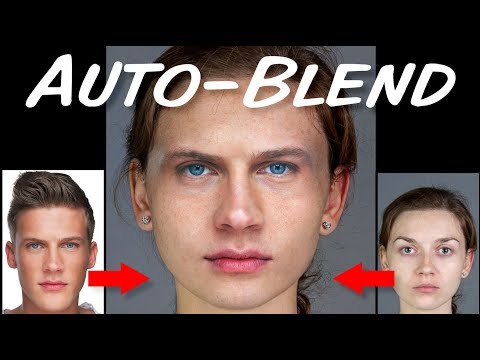
Face Transfer TipsI've only recently discovered this, but apparently Photoshop has had this tool since CS6, and I thought I share it.
Photoshop has a tool called Auto-Blend Layers that can blend two layers, and does a very good job matching up their exposure and color.
And it's not just for Face Transfer users. You can also use it to seamlessly remove eyebrows.
One small tip using the tool, if it creates a transparent ring around your pasted layer, it means you didn't create a large enough edge for blending. So, instead of contracting your selection by 16 pixels, try contracting your selection by 32 or more pixels.
Photoshop QUICK Tip: Auto-Blend (CS6 and later)
 Asian morph for Victoria 9?
Hi everyone!
I'm looking to reproduce the model used on https://www.daz3d.com/cyber-edge-hair-for-genesis-8-81-and-9.
It is clear to me that the skin is from Victoria 9 but the face looks like it has an asian morph added to it. Does anyone knows if Victoria 9 comes with this morph?
Victoria 9 is kinda pricey so I don't wanna end up buying her for nothing.
Thanks in advance.
Distorted hands and TeethCactuskim said:
crosswind said:
For 1), you need to do "Adjust Rigging to Shape" before testing poses on the figure (Edit - Figure - Rigging - Adjust Rigging to Shape), then do "ERC Freeze" if there's no problem.
For 2), I don't use Hexagon but pls try to set the morph dial "Mouth Realism 8.1 HD" to zero before making your "mixed morphs" as a single dial... After importing the morph, then dial "Mouth Realism 8.1 HD" as needed. I don't use Genesis 1 either but the dial "Mouth Realism HD" on G3 is 100% as default, so try to zero it first in the same way...
Thank you so much Crosswind, I will definitly try these sugestions when I get home tonight. 'ERC freeze' sounds like what I was vaguely remembering, but I had no clue where to do it. And I know for sure that the mouth realism 8.1 HD is dialed up in both figures, and good chance it was dialed up in the previous generations for the one character... I had no clue that would effect things in a conversion to a higher generation.
Thank you again :D
Hi Croswind,
Thank you again, I did what you sugested and it worked great :D. Teeth are fixed and I now longer need a digital orthodontist. ;p. It took a bit of time to find out which generation was messed up on my one multi-generation conversion character (and yup, the HD mouth realisem was defaulted on on all of them), but it is finally done a looking good.
I do have a new problem now that has me totally scratching my head. All of a sudden, the fingernails on the left hand of my Gen 8.1 figure are slightly distorted.... left hand only... and it is happening on a defaulted freshly loaded Gen 8.1 with no morphs in a new scene, and it gets worse when I dial in a character (Not just mi characters, but any character including popular ones I have bought at DAZ). It doesn't seem to be related to anything I have worked on, and I have gone back and looked at all my previous renders and it was not a problem before. I considered that maybe my Gen 8.1 figure got corrupted somehow, so I uninstalled Genesis 8 starter esentials, and reinstalled it again. Still happening! I'm stummped. Any clue, Or should I start a new post.
Moves by Maxon Genesis 8.1 Connect Facial Capture not workingHello!
I was hoping I coud get some help on this. I'm importing a DAZ character with the DazToC4D Bridge and I then want to connect the facial mocap from the moves by maxon app to my existing character. I used to be able to do this just fine but now when I import a character with the face morphs, it doesn't have a Morph controller group to link it to.
I tried a bunch of different combinations which somehow managed to move the head but not anything else. There is a pose morph in Genesis8_1Female.Shape that is functional so I'm not sure where the link isn't being made.
Hopefully I'm just being silly and it's an easily fixable thing.
The first image is how it used to look with the morph controller that had to go into morph controller and the second one is how my hierarchy gets imported with no morph controller with the plugin showing as well.CBS/ JCMs HelpIn my type of clothing, where shoulder corrective morph influences most of the surface area, do I even need to use weightmap?
--------------
update:I've tested it on
body_cbs_upperarm_y110p_r.objweightmap has its usefullness which help when the smoothing is on.
It help to shape /cover the upper arm.
Else the intersection will become worstI wonder, maybe I should make two or three more jcm to help the smooth transition.
----
update:
I wonder, maybe I should make two or three more jcm to help the smooth transition.
Nope, doesn't work that way
CBS/ JCMs HelpThere's no problem with SY's tutorial as it's the typical fixing process of corrective morphs. But JD's video related to G2 on which there's no Base Joint Correctives mechanism (and no Property Hierarchy either if I remember correctly) so he had to create a JCM and ERC Freezed it manually. From G3 on, you don't fix morphs in that way.
- When we import the corrective morph, wouldn't it already saved somewhere replacing the old one(s)?
Yes, it will overwrite the auto triggered JCM dial and update the mesh (vertex positions) of your garment in Viewport but just in RAM. Then you must save the fixed morph assets (*.dsf files) in 'your product folder' with 'your vendor name'.- The first time I use ERC [delta add] (default) but then a problem...
A weight just determines how the mesh (vertex positions) are influenced. Actually it has nothing to do with the percentage of a corrective morph.- as for auto follow..
Auto Follow are checked on all default corrective morphs dials of the figure, and I mentioned we normally don't touch it because the pJCM / CBS will be automatically triggered on the garment and adopt the settings of relevant pJCM / CBS on the figure, i.e. the corrective morph will be 'delta added' by its Controllers - a Joint + necessary multiplied conditions.
But if you want a pJCM / CBS to have more complex formulas (like Keyed), i.e. to override the default settings, or create a series of corrective morphs of your own, you should deactivate Auto Follow and set 'your rules' there in Property Hierarchy other than modifying the existing default 'rules'. That is the key difference.
Celebrity Look-a-Likes for 3D figures Part 4menghienrico said:
Choppski said:
Does anyone know of a good Jon Snow (Kit Harrington) morph?
If you're not in a hurry, I'd wait for this.
He should be released, but I don't know when... It's by the deviant's UncannyValet. He's the best Kit Harington's character I've ever seen.Thank you. It was released today, so should be up on one of my stores and then on others shortly.
CBS/ JCMs HelpSo here's two examples of video of making clothing JCM:
By Sickle Yield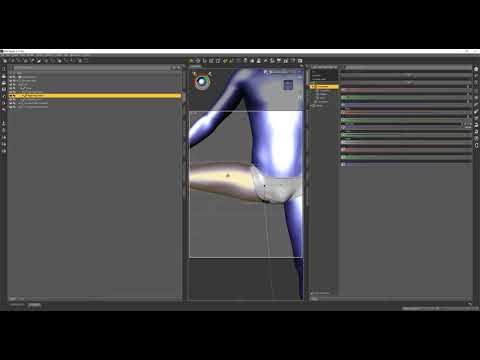
By Josh Darling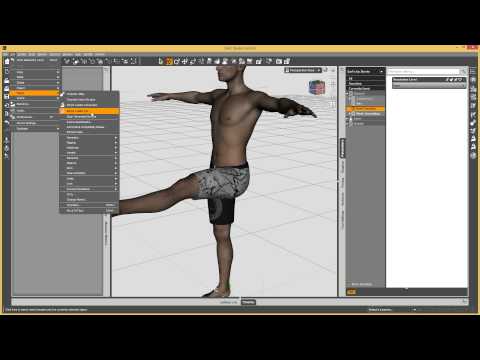
The reason why we fix pJCM/CBS on a garment is that the auto triggered corrective morph on the garment is not correct in terms of geometry, then we must save the fixed / imported corrective morphs as morph assets along with the garment (in the data folder of the garment), to override the auto triggered corrective morphs.
When we import the corrective morph, wouldn't it already saved somewhere replacing the old one(s)?
For such a case on a garment, I'm still not sure why you have to give it a 'threshold' of a certain value or percentage,
The first time I use ERC [delta add] (default) but then a problem appears as shown on the screenshot above.
So I thought maybe... I should let the weight map handle the situation up to certain degree, and then let the corrective morph kicks in.
But it make the looks weird, cos the transition looks popping out.---
Hemm... I think can just use smoothing modifier to handle the intersection.
---
I saw your video.
What is the effect of turning on / off the auto follow in this case.
I know autofollow useful to make the cloth follow the change of the body. if it's off, when there's body change morph, the cloth wont follow the change..
But this body_cbs_shoulder_z55n_r isn't related to body change.
So, is autofollow on or off makes any difference?Star Trek Builders Unite 8: THE REBOOTRedfern said:
Ryuu@AMcCF said:
...I might very well have beat Redfern to to the punch by posting something Caitian-related ...
Well, a few reasons for that.
* Niketa is more "pantherine" than how I imagine M'Ress. Despite the tufted tail and mane, I see her as more cat-like than leonine.
* The set lacks a digitigrade option. When the G8 sets had them, this seems a "downgrade".
* I've been living on my life savings since a forced retirement on late '21. I'm spendingf VERY little on non-essentials.
* I'm still a "Poser Luddite". I'm too lazy (stubborn, whatever) to learn a few workflow.
I fully get what you're saying. TBH, there were several things I never liked with how the animators drew M'Ress for the show:
The billowing hairstyle the animators drew her with--a leonine mane that belongs on a MALE cat, for one. *roll eyes*
The pawlike hands were okay, but then they drew them as THREE fingers. *shakes head*
Those two features made it very hard to get any of the previous feline figures to fit her as drawn, and they forced me to invest in lots of "external" modifications for those earlier generations, such as the various Creature Creator-type products. Fortunately, for G9, they've come out with the Phenotype (that I got after I made that render) to do the digigrade feet--and Oso's Cat Character lets us pull off the pawlike hands--unfortunately, I still don't see a 3-Fingered morph yet for G9. OTOH, I was able to get her slitted pupils using another of Oso's morphs (probably from his G9 Cat Character, again).
Plus, every single tail ever made are those bloody "belt tails" that attach at the figure's waist line rather than at the base of their spines *facepalm* But at least thie one is a prop that can be relocated (with a little effort).
As for the tuffed tail----*cough*----you'll be greatly disappointed, but that was a kitbash from DAZ's Big Cat 2's lion/lioness that I glued to the tip of Niketa's tail--yeah, the artists blew that detail. But hey, I must have done something right for you to miss that. I'm honestly surprised you didn't recognize where it came from

And I truly understand the need to cut back to "just the essentials", but cats and felinoids ARE ALWAYS essential

As for being a Poser Luddite, I used to be one, too. But I mostly gave up on Poser when so much stuff wouldn't import well into it. The question I have is, CAN one even get anything from DAZ into Poser these days--especially the later Genesis generations???

Still, what we're talking about.... It's given me an idea.
I'll be back in a few days, assuming my machine survives the attempt.....
Sickleyield, Cobra morph/textures for The Constrictor?Better yet an actual cobra instead of a morph (with poses)
Sickleyield, Cobra morph/textures for The Constrictor?There's a lack of a good looking Cobra in Daz Studio land, despite it being an extremely iconic form of snake.
Maybe a cobra add-on for The Constrictor?Needing some help with a JCM (Solved)crosswind said:
The issue might come from Min and Max values. Pls check if they're absolute values or %... if they're -65 to 40, set the key as 40:1, while if they're -65% to 40%, set the key as 0.4:1...
A clip as below - : https://mega.nz/file/6CxRRQBJ#0uCjh8mQ6Ntj2qmnKQ_I88LMZ37KhHubTNVh9HD-ns8
So after the long night I decided to get some rest. When I woke up it just kinda clicked what I needed to do after processing everything you guys have been trying to help me with. When you do the ERC freeze, it takes any morph that is applied and will add it as a sub component (this is why in some of my images you see two of the same controller / components). This was the issue with the not saving and also, me and my small brain was over thinking how this would work for this scenario. All I needed to do was set the corrective morph as a sub component to the X Rotation Bend but rather than manually dragging and dropping it into the X Bend sub component, I let the ERC Freeze do it for me.
Everything saved and is working now.
I really appriciate all of your guy's help. It's a little convoluted for someone like myself but I started to wrap my head around how these connections work with your guy's assitance.
Take care all!
Daz 3D is part of

Connect
DAZ Productions, Inc.
7533 S Center View Ct #4664
West Jordan, UT 84084Licensing Agreement | Terms of Service | Privacy Policy | EULA
© 2026 Daz Productions Inc. All Rights Reserved.