-
RRRR - "Back from the dead" - Entries only thread
Tag: Totte #3
An eye for an eye
When 005 was having his morning coffee, someone broke down his door and entered his flat at the 29th floor in Central Manhattan. It was the GRU Colonel Vladimir Kotchenkov, who 005 was sure he had killed on an assignment two months earlier.
005: -"But, you are supposed to be dead!"
Vladimir Kotchenkov: - "You are truly mistaken 005, let's call it an eye for an eye."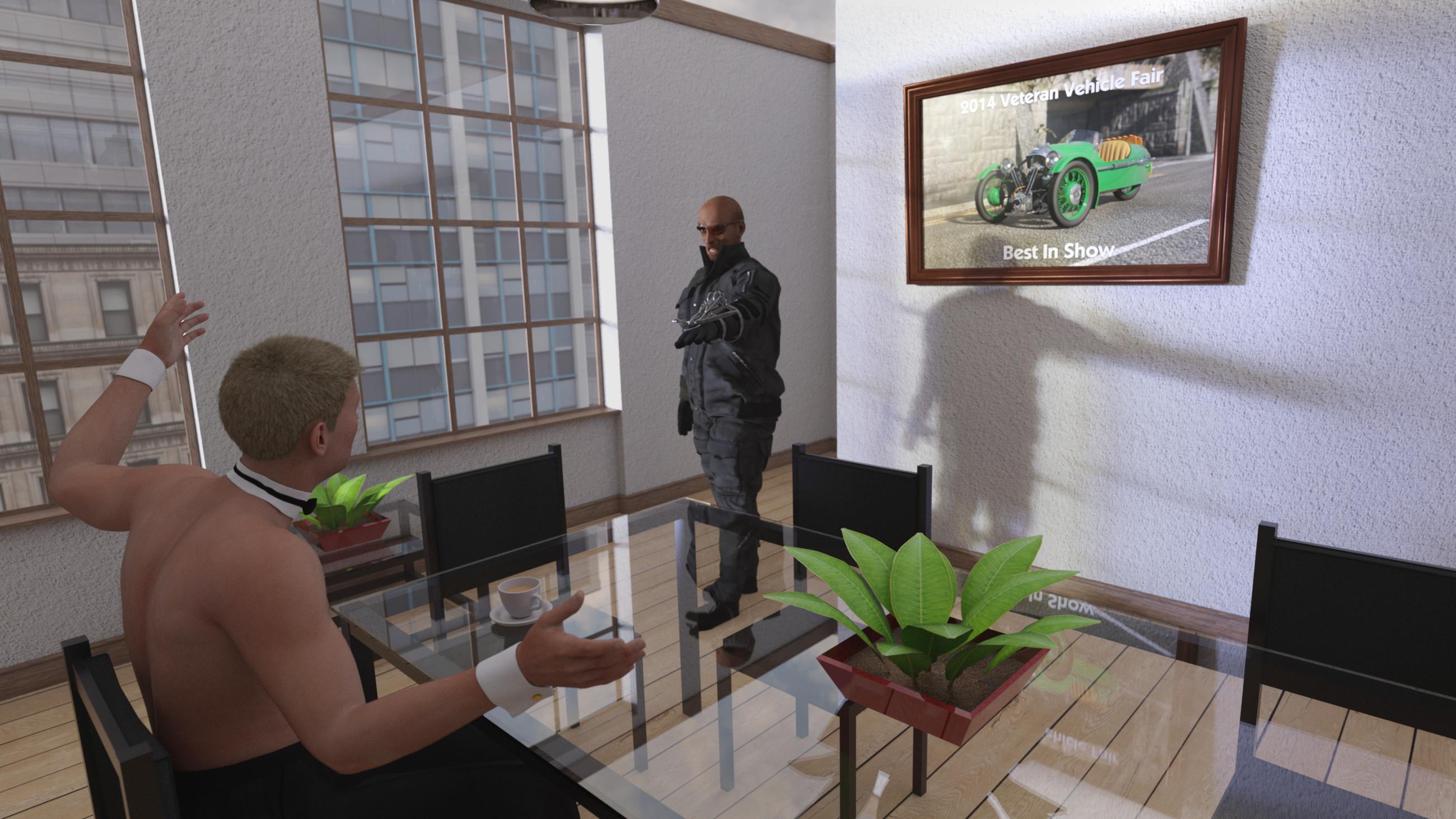 * Closed * RRRR - "Back from the dead" Render Contest
Totte: #3
4647 MORGAN 3-WHEELER 1911-1939 (Rendo)
5023 Wrist Crossbow (Rendo)
2267 Cozy Dining Room (SKU::51245)
2108 Formal Accents for Genesis 8 Male(s) (SKU::49283)Also used:
The Poster: Skies of Economy + RSSY 3DL to Iray + PBS Shaders Vol 3 + Santa's Normal Maker + Unused RailBridge
005: KOO Malcom for Genesis 8.1 Male + Secret Service Hair + PRZ White Tie
Vladimir Kotchenkov: Anatoly HD for Genesis 8 Males + MI Tactical Outfit + Mr Banks Hair + Scallywag for Genesis 8 Male
Code66 Toolbox - Volume 1
Patio Dining
Urban Sprawl 3An eye for an eye
When 005 was having his morning coffee, someone broke down his door and entered his flat at the 29th floor in Central Manhattan. It was the GRU Colonel Vladimir Kotchenkov, who 005 was sure he had killed on an assignment two months earlier.
005: -"But, you are supposed to be dead!"
Vladimir Kotchenkov: - "You are truly mistaken 005, let's call it an eye for an eye."So, Easter Eggs?ArtAngel said:
Xellosz said:
JOdel said:
Nice to get a freebie, but are these only accessible through DAZ Central? There's no download link in my product library.
Visit the Daz store each day to collect a new Easter Egg
Collect all 4 in a series to get a FREE* Item!
If you collect every Easter Egg in the month of April, you’ll also get a bonus Item FREE!*4 eggs = 1 free product
all eggs = +1 free product
So probably we are speaking about 5-7 free items for April which is a nice change for PC+
You may be right. My mathimatical guess is 12 free products. A daily offering for four days, the extra freebee on the 5th day because 5x6 = 30)
Four partial items = 1 product. (4 days of easter hunting)
1 product = 1 extra Freebee (if released on 5th).
Subtotal = 2 items in 5 days (then we hunt again for 4 days)
Total =12 freebies
But who knows? This is simply a guess. Which is what easter hunting is all about :) Thank you DAZ.
daveso said:
I get it. Gets you to check the store everyday, which I do anyway unless out in the woods where there's no cell coverage. So its not a different product for each egg but 4 eggs equalks 1 product? Then if you get all 4 you get another product? PITA for something so simple, but free is free, I guess.
Maybe I'm so old now that playing games to me isn;t what I wnt to do with my time, but I'm here anyway.Lucky you. I miss the woods. They were a big part of my past until I left Canada in 1999.
We started on the 8th so there were no eggs on the first 7 days.... that leaves just 23 days. 23 days is just 5 products it's missing a day to be 24 days and 6 products. (+1 Extra for collecting all eggs)
Another way to think about it is if there are 4 days with egg and the 5th will be the product day. (They might do this not to mess up things.) If they do this there will be 4 free products (+1 Extra for collecting all the eggs)
If you collect every Easter Egg in the month of April <= This is just the end of the month, not every 4th-5th day.
So, Easter Eggs?Xellosz said:
JOdel said:
Nice to get a freebie, but are these only accessible through DAZ Central? There's no download link in my product library.
Visit the Daz store each day to collect a new Easter Egg
Collect all 4 in a series to get a FREE* Item!
If you collect every Easter Egg in the month of April, you’ll also get a bonus Item FREE!*4 eggs = 1 free product
all eggs = +1 free product
So probably we are speaking about 5-7 free items for April which is a nice change for PC+
You may be right. My mathimatical guess is 12 free products. A daily offering for four days, the extra freebee on the 5th day because 5x6 = 30)
Four partial items = 1 product. (4 days of easter hunting)
1 product = 1 extra Freebee (if released on 5th).
Subtotal = 2 items in 5 days (then we hunt again for 4 days)
Total =12 freebies
But who knows? This is simply a guess. Which is what easter hunting is all about :) Thank you DAZ.
daveso said:
I get it. Gets you to check the store everyday, which I do anyway unless out in the woods where there's no cell coverage. So its not a different product for each egg but 4 eggs equalks 1 product? Then if you get all 4 you get another product? PITA for something so simple, but free is free, I guess.
Maybe I'm so old now that playing games to me isn;t what I wnt to do with my time, but I'm here anyway.Lucky you. I miss the woods. They were a big part of my past until I left Canada in 1999.
So, Easter Eggs?JOdel said:
Nice to get a freebie, but are these only accessible through DAZ Central? There's no download link in my product library.
Visit the Daz store each day to collect a new Easter Egg
Collect all 4 in a series to get a FREE* Item!
If you collect every Easter Egg in the month of April, you’ll also get a bonus Item FREE!*4 eggs = 1 free product
all eggs = +1 free product
So probably we are speaking about 5-7 free items for April which is a nice change for PC+
So, Easter Eggs?JOdel said:
Nice to get a freebie, but are these only accessible through DAZ Central? There's no download link in my product library.
There are no Daz Central only items. If the download links are missing, the product is not available for downloading yet.
Did you read the text on the product page?
So, Easter Eggs?Nice to get a freebie, but are these only accessible through DAZ Central? There's no download link in my product library.
An Ability to Download Bundles in DIM and CentralI think most people would like this feature as well. Insteading of downloading one piece of a bundle at a time, we could simply put all of the bundle into a queue and just start it up. If there is a way to do this already, please show me how.
Thanks!
UltraScenery - new territory [Commercial]I tried Stones 3 and Grassland 1. It worked fine.
You said you checked Things to Try, but let's just double check the most common trouble causers:
1) What installation method do you use to install content? DIM is the best IMO. If you intentionally or accidently install any UltraScenery products from inside Daz Studio by clicking on Install, they will not work, even if you also install the product some other way (DIM, Daz Central, manually).
2) Do you have anything related to Octane Render installed?
Daz to Blender bridge problemHi there, Have installed Daz Blender bridge but there seems to be no evidence of it in Daz. There is no scipts tab or any reference to blender in the file menu although Daz central is giving me the option of uninstalling it. Also I'm finding Install manager very difficult to use . Have i done something wrong I wonder.
DazCentral Useless?Is DazCentral outdated now ?
Download Daz Studio for FREE when you download Daz Central
But the link redirects to DIM
https://www.daz3d.com/get_studio -> https://www.daz3d.com/install-manager-info
DazCentral Useless?Havos said:
PerttiA said:
And... If one is using DAZ Central, Daz Install Manager (DIM) or manual installation, one should never log in to Daz Studio.
I disagree with that. I only use DIM, but logging in using Daz Studio every now and again will fetch the latest metadata.
Another major advantage is that should you use a file from a product not yet installed, then DS will prompt you with the name of the missing product, rather than just the names of the files it can not find. I will then install that product via DIM (not connect as prompted) and then the asset will load as required.
Yeah, but that requires that one knows what one is doing, which usually is not the case with users that are not familiar with inner workings of DS.
The default installation and start-up procedure for DS is prone to get new users in trouble, or at least wasting storage space with installing everything twice.
DazCentral Useless?PerttiA said:
And... If one is using DAZ Central, Daz Install Manager (DIM) or manual installation, one should never log in to Daz Studio.
I disagree with that. I only use DIM, but logging in using Daz Studio every now and again will fetch the latest metadata.
Another major advantage is that should you use a file from a product not yet installed, then DS will prompt you with the name of the missing product, rather than just the names of the files it can not find. I will then install that product via DIM (not connect as prompted) and then the asset will load as required.
DazCentral Useless?And... If one is using DAZ Central, Daz Install Manager (DIM) or manual installation, one should never log in to Daz Studio.
DazCentral Useless?You shouldn't use DAZ Central and DIM both. One or the other, preferably DIM. At least, that's what I've been told.
I myself had to reinstall DAZ a few months ago and ended up uninstalling onedrive because it was messing with stuff.
Daz Install Manager (DIM) 1.4.1.87, Now Available! (*UPDATED*)Richard Haseltine said:
They do communicate, but if a product has been installed through DIM (or Daz Central) it is still, correctly, shown as cavailable for a Connect install. If you don't want to use DS to install then don't have it go online and it won't know about newer products.
Ah, I see what you mean. Still, I feel like that's something the Connect and DIM could do a bit better; if a product is installed through one method, disable the means to install it a second time through the other method. Or at perhaps include some kind of toggle option that does that.
Richard Haseltine said:
Did you try right-click>Refresh on the top-level container in the pane?
I did, and no dice. Cave Ogre still wouldn't show up.
Richard Haseltine said:
That sounds as if they had been installed through DS.
But that's the weird thing - they weren't! I built a new PC last year and did a clean install of all my Daz products through DIM. I only started downloading some products through DS/Connect recently, and none of the West Part series products were among those.
Richard Haseltine said:
Things that are not installed at all will have a grey thumbnail.
Well, that's one method I suppose. But trawling through 4000+ products in my Smart Content looking for the odd greyed-out thumnail isn't exactly enticing,
Richard Haseltine said:
That's User data, which uninstalling will not remove. You can remove it by right-click menu, then replace the emtadata by letting DS go online or reinstalling the product through DIM/Daz Central
But I've uninstalled the products through DIM (I'm sorry, but I'm not touching Daz Central with a barge pole), reinstalled them, and still no dice. Tried that method you mentioned, and they've at least moved out of the "Available" tab. I had to click "Work Offline" first, then right-click and update their metadata, at which point Das logged me back in, and redownloaded/updated the products in quetion.
I'm sorry if I sound like I'm being bitchy, I honestly don't mean to. It's just that when I set up Daz on this new PC I was extremely careful not to mess up my directories or installation paths, and I've tried to keep things as well organised and tidy as I can. Then weird stuff like this happens seemingly at random, and it gets frustrating.
Daz Install Manager (DIM) 1.4.1.87, Now Available! (*UPDATED*)Whiskeyjack said:
Richard Haseltine said:
If it has the downloadable icon and Install in the right-click menu then that is fine, it means 9as long as the thumbnail is coloured) and the DIM version is being seen and used. You can use whichever method you like (but there is no point in using more than one for any given product, and you need to be aware that many script-based products are not written in a way that work when installed through DS). The doubled-up products, however, are very odd.
So, the option to install products with Daz Connect, even if they’re already installed through DIM, is normal behaviour? Well, I'm glad nothing is screwed up that might require a fresh install of Daz, but it seems like a bizarre oversight if DIM and Daz Connect don’t communicate with each other about which products are installed and which aren’t.
They do communicate, but if a product has been installed through DIM (or Daz Central) it is still, correctly, shown as cavailable for a Connect install. If you don't want to use DS to install then don't have it go online and it won't know about newer products.
That still leaves the question of why DIM is being so wonky when it comes to installing and uninstalling some products however. As I mentioned, I was able to install the Cave Ogre product I’d just bought through DIM with no issue, and I was able to uninstall it immediately afterward with no problem either. But when I tried to reinstall it through DIM again straight away, it wasn’t showing up in Daz, even though DIM was listing it as installed. But I could hop over to the “Available” tab in Smart Content and find it ready to download through Daz Connect.
Did you try right-click>Refresh on the top-level container in the pane?
That’s not the only product either; I was uninstalling a bunch of older products I don’t use recently, including all of the “West Park” series by Jack Tomalin. I uninstalled every “West Park” product through DIM, yet they all remained installed in Daz when I loaded it up immediately afterward. In the end, I had to manually delete the content folders within Smart Content, and manually delete each folder within my directories to get rid of them. They’re all showing up in my “Available” tab in Smart Content now too.
That sounds as if they had been installed through DS.
Honestly, I’m very tempted to just stop using DIM entirely and just install everything through Daz Connect from now on, because DIM seems to be getting very unreliable at even installing and uninstalling content. However, that then leaves the problem of how do I go about finding and installing products that can’t be installed through Daz Connect, such as the scripts you mentioned? If Dim would at least communicate with Daz Connect and filter out the products that already installed with Daz Connect, that’d at least be something.
Things thata re not installed at all will have a grey thumbnail.
As for the duplicate products; I had the same problem with the same products a year or two ago, and even after a fresh install of Daz with all the default settings and installation paths on a brand new, blank PC, it’s still happening. So, it’s not something on my end from what I can tell.
And while I’m at it, here’s one more question. Can you tell me what the dotted outline and little binder icon around these products in the attached screenshot is meant to indicate? They’re installed through DIM, and they’re all working fine (for the most part). But not only to they show up in the “Available” tab of Smart Content, but I don’t have the option to install them through Daz Connect, even though it says on their product page that they can be installed through Daz Connect.
That's User data, which uninstalling will not remove. You can remove it by right-click menu, then replace the emtadata by letting DS go online or reinstalling the product through DIM/Daz Central
Daz Install Manager (DIM) 1.4.1.87, Now Available! (*UPDATED*)Richard Haseltine said:
Whiskeyjack said:
Is anyone else having an issue where you uninstall products through DIM, but they remain installed in Daz Studio? Can't seem to narrow it down to a specific criteria, it just seems to be happening with some products and not others.
That sounds as if the product was also installed through Daz Studio (Daz Connect) - the Daz Central/Install Manager installations are entirely separate from the internal installations, the latter (if present) take precendent. If youi don't intend to install through Daz Studio there is no need for the application to connect to your account at all.
Well, here's the thing; almost every product I download through DIM shows up in Daz with the “Daz Connect” icon in the thumbnail. And when I right-click on the product, I’m given the option to Install through Daz Connect, even though the product is already installed through DIM. You can that in the attached screenshot.
Should I just mass-uninstall everything through DIM, mass-uninstall everything Daz Connect, and then mass-reinstall everything through Daz Connect and stop using DIM altogether? Because it seems like the two are just not communicating with each other, and it’s causing funky stuff to happen. For instance, I’m finding several products are being installed twice, as two separate products; one is installed through DIM, the other is installed through Daz Connect.
Moving my library and having Daz Central find itIt would be a lot of items to reinstall with connect, or I might just. I did update the metadata, and it still isn't showing as installed, but I haven't cleared the database yet. Might be worth a try.
I'd rather have everything installed via Daz Central or the install manager if I can.
I appreciate all your help so much!Moving my library and having Daz Central find itThe screenshot is what I get when I right click.
If you mean the content library tab, yes I can see her, and the other new content there. It's the smart content tab that doesn't seem to think it's installed.
As far as Daz Connect goes, I think I might have used it to install 5 or 6 things, mostly by accident or when I was in the middle of something and went "ooh. I haven't downloaded that and I could use it." and wasn't feeling like opening Daz Central. So no, I don't really use it much. I do use the Smart Content tab to browse though, unless it's content I've installed from elsewhere. It's just easier for me.
Daz 3D is part of

Connect
DAZ Productions, Inc.
7533 S Center View Ct #4664
West Jordan, UT 84084Licensing Agreement | Terms of Service | Privacy Policy | EULA
© 2026 Daz Productions Inc. All Rights Reserved.