-
Show Us Your Bryce Renders! Part 9
The brick building (middle) is my own creation which I've built on 23 July 2015 in SketchUp (my 1st building model ever!!). All the props in the fashion shop building are from the Google SketchUp Warehouse, including the left building combo and building to the right.
Only the characters are from Daz3D's Daz Studio 4 - Genesis 2 Female/Genesis 2 Male/Kids 4. The K4 character is clothed with a paperboy set by Cybertenko.
Laura
Out of Memory ... even now on my new system!New Laptop with Windows 7 - Intel(HR) Graphics
Intel Core i5 notebook, 64 bit operating system
4.00 gb ram memory
500 gb space hard disk
I thought with my much older system (win XP and 1gb ram) I could have expect problems as were the case. But now again!? I want to add Genesis 2 Male to the attached scene but it keeps saying 'out of memory'. Are there too much objects in the scene? My shop building have quite some props in but I thought it could handle this on my new system. I even want to add a vehicle or two also in the scene. All the stuff are Sketchup models except Genesis 2 Females (2x)
Introduce Yourself, Hello, my name is.....Hello Al, Leyla, John and pfunkyfize (hope I haven't missed anyone?)
Welcome to the forums, and I hope you enjoy your time here.
There are plenty of members ready to help with any questions you may have about DAZ Studio or the store here. Why not try the New Users forum where we do our best to help new people get started, and try to explain anything that is keeping you back.
See you all soon!
Thanks for the welcome aboard! I will definitely be asking questions... Lots of questions... *grin*
Hello, I'm call Darce. I recently found interest in 3d rendering and found a reference to Bryce today while search some cartographer’s map renditions. The reference came from Anna B. Meyer (http://ghmaps.net/greyhawk-maps/online-map/). She's been working on her maps with Bryce for 15 years now. I downloaded it immediately. I've been using Blender, Make Human, Photoshop, and SketchUp. One of my interests is making a map of the World War 2 Omaha Beach. I found a LiDar point cloud of the whole beach area from a current aerial scans by a research company in France. I would also like to create original maps for Fantasy Gaming like Anna's.
Thanks for that awesome link Darce, I am an old school AD&D fanatic (since early 1980s) with Greyhawk Campaigns that I'd like to draw 3d art for. Welcome aboard!
Show Us Your Bryce Renders! Part 9This render is actually still a WIP, as I want to add people and vehicles to the scene but first I have to install Daz Studio latest version to my new laptop. The brick building is my own creation which I've built on 23 July 2015 in SketchUp (my 1st building model ever!!). All the props in the fashion shop building are from the Google SketchUp Warehouse, including the left building combo.
Laura
Introduce Yourself, Hello, my name is.....Hello, I'm call Darce. I recently found interest in 3d rendering and found a reference to Bryce today while search some cartographer’s map renditions. The reference came from Anna B. Meyer (http://ghmaps.net/greyhawk-maps/online-map/). She's been working on her maps with Bryce for 15 years now. I downloaded it immediately. I've been using Blender, Make Human, Photoshop, and SketchUp. One of my interests is making a map of the World War 2 Omaha Beach. I found a LiDar point cloud of the whole beach area from a current aerial scans by a research company in France. I would also like to create original maps for Fantasy Gaming like Anna's.
Animate DAZ with iClone 6 - REFERENCE GUIDEEverything you need to know on how to animate DAZ content in iClone 6. This thread is going to serve as an index/link guide for all the iClone 6 tutorials and informative posts. DAZ users can use this as a quick reference guide to access all relevant information.
http://www.reallusion.com/reallusiontv/youtubega.aspx?url=//www.youtube.com/embed/_mPgBEmwD4U
-----------------------------------------------------------------------------
Index:Basics
iClone Beginner’s Guide: Intro to iClone 6 UI
iClone Beginner's Guide: Animating with Motion Clips
iClone Beginner's Guide: Importing Props with 3DXchange
iClone Beginner's Guide: Basic Camerawork
iClone Beginner's Guide: Basic Scene Lighting
iClone Beginner's Guide: Scene Creation Part 1
iClone Beginner’s Guide: Scene Creation Part 2Import
iClone Beginner’s Guide: Importing/Preparing Characters with 3DXchange
How to Import DAZ Genesis 2 characters into iClone 6
How to Import/Customize DAZ motions in iCloneAnimate
How to use over 600 default iClone Motions
How to apply Soft Cloth Physics to DAZ Characters in iClone 6
How to fix Soft Cloth Collision Shapes for DAZ characters in iClone 6Export
Rendering DAZ Genesis 2 Characters in iClone-Indigo
How to convert a Sketchup prop into a photo-realistic Indigo render
3DXchange 6 Tutorial - Exporting iClone Content to Unreal Part 1
User Tutorial
SoftCloth Physics to Daz CharacterStar Trek Builders Unite 7: The Continuing MissionAshe5k, if you are ok with converting models I think there are some for several games, Bridge Commander and there is one in the Armada 3 mod for Sins of a Solar Empire. I think there is also one for Sketchup.
I didn't see one for Sketchup when I did a google search. Now that you mention the games of course I find a few. I'll take a look at them, but I might end up modeling it anyway depending on the detail level. Thanks for pointing me in the right direction!
Star Trek Builders Unite 7: The Continuing MissionAshe5k, if you are ok with converting models I think there are some for several games, Bridge Commander and there is one in the Armada 3 mod for Sins of a Solar Empire. I think there is also one for Sketchup.
My first 3D building with problems in Bryce (Fixed) :)Hi, Laura and welcome to the forums!
Models don't always behave well when imported into Bryce, but I suspect this one should be an easy fix. I believe your error lies with a mesh smoothing issue; Bryce has smoothed it when it shouldn't have. Select the arch portion of the model and click on the "E" button that appears along with several other buttons. This will let you adjust the smoothing of the object. There will be two large buttons that appear: One to smooth, the other to un-smooth. Click the un-smooth and then the checkmark to accept the change. Try rendering again and see if that did the trick. You may have other meshes that require attention as well. Let us know if this did/didn't work.
We hope you stick around and share your renders with us.
Cheers.
Art
Art, thank you for your advice which is much appreciated, it works like a charm! Something new I have learned today. :)
I still have to try placing the shop window props to go down exactly to the ground as it was a nightmare in SketchUp, which I am also learning, to do so. Even the rotating was a nightmare but works much better in Bryce!
Regards,
Laura
My first 3D building with problems in Bryce (Fixed) :)This week I have created my 1st building ever in SketchUp and today took the model over to Bryce 7.1.
All the textures, except those on props in shop window, are those in SketchUp. The problem now is the front arch where it touches the base. In SketchUp it looks kind of ok but after render in Bryce it shows a bad black kind of shadow effect. If you will notice it's having full sun in the front. Could it be the way it was created in SketchUp? The arch part was made afterwards and was not part of the building originally. Maybe it's sunken in too much, do you think? I am a beginner and have to learn a lot! The building is actually a WIP. I even have removed the logo and made another render but same effect so that's not it.
Any advice and help is much appreciated. :)
Laura
July Freebie Challenge ☼ ☼Summer fun and Pin Ups.☼ ☼Well, I've got one more entry for this month. It's not related to the others, however, except it's Tommie.
Tommie's enjoying a cold drink on a hot summer day at the garage while taking a break from working on her Li'l Tonka.
Little Girl, Big Truck
Character is Genesis 1 Base
Freebies
Die_trying's V4 morphs for Genesis (Tommie)*
Pin-up Girl Pack (Tommie)*Ella V4 (Tommie's eyes)*
Sandra for V4* (Tommie's skin)*Genesis Lacy Female Underwear (Tommie)*
Bossy Boots for Genesis (Tommie)*
M3 Baseball Cap (Tommie)*V4 Wrist Watch (Tommie)*
Cross My Heart Pendant (11th down) (Tommie)Ultimate Shader Pack (Truck mirror, detailing, suspension, and rims, Tommie's watch band, and necklace chain)*
Super Shine Shader pack (Truck paint job)*
R72 Leather shaders (Truck interior)*Post Apocalyptic Vehicle Accessory Pack (Truck Flood lights)*
License Plate and Frame (Truck license plate)*Truckbed Tool Chest (In Truck bed)*
Light Recon Vehicle (LRV)*
LRV add-ons (LRV)*Dystopia Motorpool (Garage)*
Dystopian Console Station (Garage computer, with custom monitor textures)
Garage Shop Scooter (in garage, Tool Chest's wheels)*
Tool Chest and Socket Set (Tool Chest)*Dystopia Beverege Can (Soda can)
Scifi tablet (diagnostic tablet on tool chest)*
Dystopia City Blocks 11-20 (sky, city skyline, asphalt)
Speed Lights Outdoor set 1 (set to Ray Traced) (lights)
Paid For Items
Genesis Starter Bundle (For Genesis Evolution head and body Morphs) (Tommie and Kageto)
Willow for Genesis 2 Female (Tommie's, shirt, shorts, pose, and shape)Marja Hair (Tommie)
No-Count Items
Ramwolf's Morphs for Genesis (Tommie)
Blue F-150 (Truck)
Ford Emblem (Truck)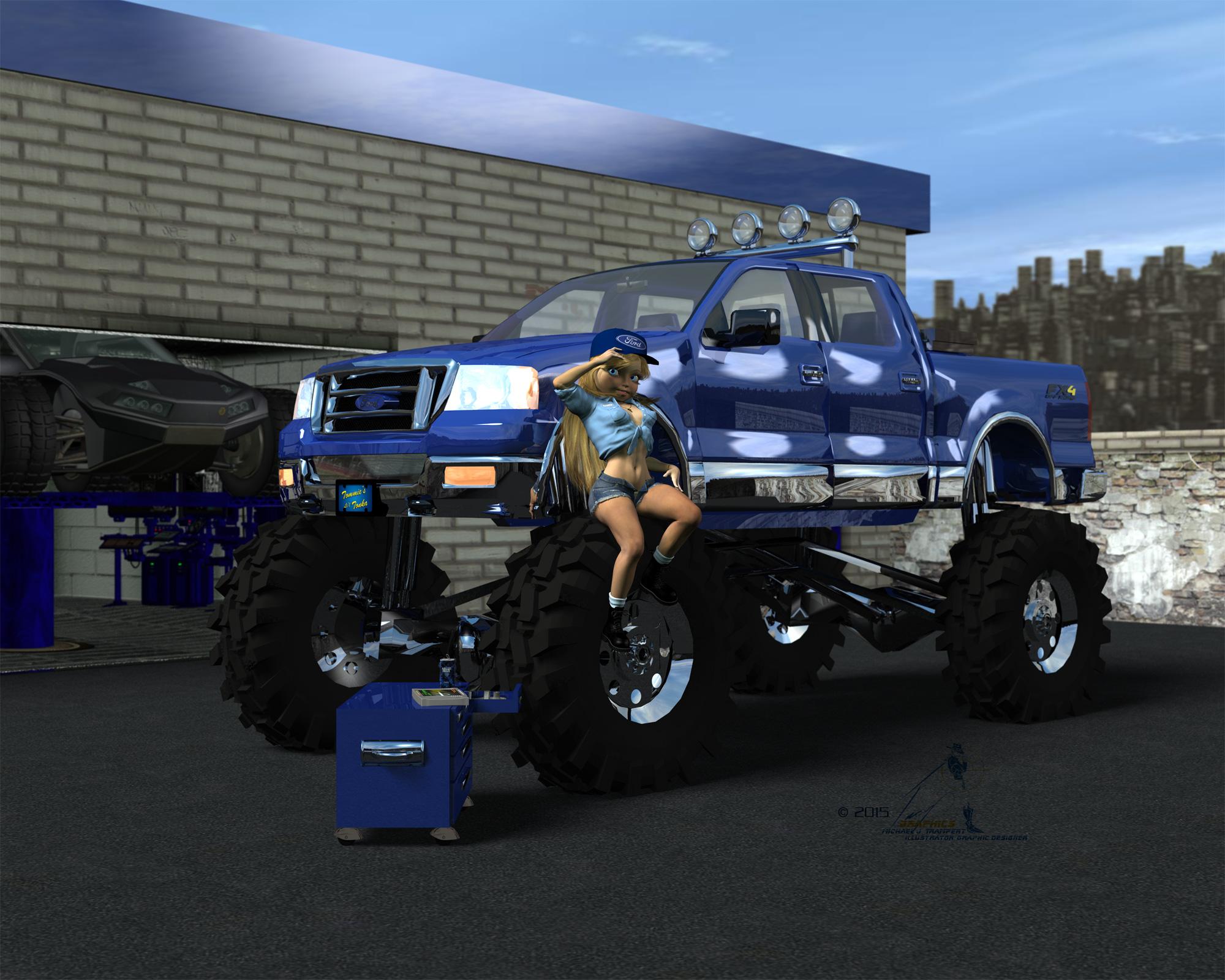 Hexagon crashes very often
Great advice Roygee - thanks. I will stick with Hexagon. Sure it's old and could do with an update but I'm finding it way easier than blender. For the record, I spent £500 on sketchup pro which I use in a lot of projects and that crashes a fair amount as well if you ask it to do too much. Blender never seems to crash but hurts my brain every time I use it :)
Star Trek Builders Unite 7: The Continuing MissionI'm starting to lean in that direction. I found the chair. It doesn't have the command control panels, but I can add those. I have to make new textures anyway, so I might as well make the panels, too.
That would solve the chair problem, with those in the sketchup model you'd have the set the way you want it.
Star Trek Builders Unite 7: The Continuing MissionThat would solve the chair problem, with those in the sketchup model you'd have the set the way you want it.
3D Traveller Vehicles and SpaceshipsVesbin, there aren't any commercial sources but there are about a dozen or so of the traditional starships up on 'SketchUp - 3D Warehouse' in Sketchup format (Do a search for scout/courier, traveller, cyberia23, etc). Your mileage will vary in quality and finish, especially when converting from sketchup to obj format for Daz/Poser usage.
An alternate source might be to contact several of the Deviantart artists making them for their private usage. Have a look in 'TheTravellerGroup' on Deviantart, or drop a note up on the 'Traveller-RPG' Facebook page (tis a closed group).
Brad
Show Us Your Iray Renders. Part IVAfter 30 days the trial will revert to the Free version. The different is primairly the Layout capability. I do frequently use Sketchup for woodworking design and planning. The free 2015 version seems to be more than sufficient for needs up to building desing and layout. To be honest, I do get the feeling that Trimble may have a plan to ultimately eliminate or cripple the free version.
Snapseed is dead, but you can still buy the Nik Collection from Google. Oddly you need to Google "Google Nik" or similar to find it fast.
Development on the Nik suite does seem to be dead. I have the suite and OnOne Perfect Photo 9.5 and feel the OnOne surpassed the Nik Suite in integration and result (arguably perhaps) at version 8 of the Perfect Suite.
FWIW as far as I know the Free version of Sketchup isn't any more limited than the free version ever was.
...I went there for the free version and ended up with a 30 day trial of the pro version for some reason.
Show Us Your Iray Renders. Part IVSnapseed is dead, but you can still buy the Nik Collection from Google. Oddly you need to Google "Google Nik" or similar to find it fast.
Development on the Nik suite does seem to be dead. I have the suite and OnOne Perfect Photo 9.5 and feel the OnOne surpassed the Nik Suite in integration and result (arguably perhaps) at version 8 of the Perfect Suite.
FWIW as far as I know the Free version of Sketchup isn't any more limited than the free version ever was.
...I went there for the free version and ended up with a 30 day trial of the pro version for some reason.
Show Us Your Iray Renders. Part IVSnapseed is dead, but you can still buy the Nik Collection from Google. Oddly you need to Google "Google Nik" or similar to find it fast.
Development on the Nik suite does seem to be dead. I have the suite and OnOne Perfect Photo 9.5 and feel the OnOne surpassed the Nik Suite in integration and result (arguably perhaps) at version 8 of the Perfect Suite.
FWIW as far as I know the Free version of Sketchup isn't any more limited than the free version ever was.
Show Us Your Iray Renders. Part IVYes, you might not be able to get NIK or Snapseed anymore. Possibly through Amazon... There is a lot of overlap between it and OnOne but there are some differences and the workflows are different so some people like one for some things, the other for others. For instance, at least at one time Nik's 'Silver Efex' for doing a grayscale was considered better then OnOne's, but OnOne has improved theirs since so... Mostly I think it's the different workflows at this point, they just work different. Of course Filter Forge is in it's own class, totally different then other post production software.
...sure about Snapspeed/NIK? When I tried to link to any information on their site, I was redirected to a Google Snapspeed help page.
Clicking the Buy Snapspeed Desktop link took me to a page that said "an error has occurred".
Did a bit more digging and found this article:
...interesting it was Google who killed it. I would have expected such from the likes of MS (which bought then killed TrueSpace), but Google?
Then again they did sell off Sketchup and now you can only get a limited demo version for free.
Why DAZ only?if you want poser products you may need to start looking at those shops as well for deals. which usually their products cost much less then daz . but the quality is not as good either .
Hello, Ivy. I'm not sure which sites you have in mind, but I have certainly found very high quality Poser products at other sites, and for prices similar to DAZ. Like you, I have favorite vendors at various sites, and in general I have as many preferred vendors at other sites as at DAZ. Since they continue to provide new Poser format products, I have been purchasing more at those sites recently, and have cancelled my DAZ PC membership.
Hi Steve I have been gearing myself up for a change as well I have been starting to learn towards Autodesk software. I figure in another month or so I will be able to get the full version of Autodesk pro suite. so I have started building my library with models that use obj files which can also be used in poser as well just stay away from turbosquid their have a hypocrite license agreement and they stuff cost you a arm and a leg.
But you should check out runtimedna and 3d traders then there is sites I use for my 3d printer content like.shapeways.com/ & 3docean.net/ 3d oceans has alot of unquine and affordable products as well that can be used in poser I use these sites because they don't require any extra licensing to 3d print their product, so i can produce ceramic molds.
3d export is a great site for blender and maya and poser users with super top quality models but are rather costly to buy some of their stuff //3dexport.com/ form fonts is a awesome site for textures http://www.formfonts.com/
Like I said there are so many 3d stores to shop , some are affordable some not so much but it depends on your need of a product at least products that use the OBJ. files are much easier to work with in poser and Maya than daz DUF files which require you use the dfs tool box if want to make it poser compatible but that is even becoming less and less useful tool to extract the OBJ file from DUF files
Edit: i should add you can use google sketch up to make basic models as well http://www.sketchup.com/
Daz 3D is part of

Connect
DAZ Productions, Inc.
7533 S Center View Ct #4664
West Jordan, UT 84084Licensing Agreement | Terms of Service | Privacy Policy | EULA
© 2026 Daz Productions Inc. All Rights Reserved.