-
Can you add existing morphs to clothes for export?
Hi,
To export to unity, I export the base character with morphs /no clothes hair etc.
Then I add the clothes to the figure, unparent the clothes, delete the figure, and export the clothes by themselves.
However sometimes the morphs on the body do not show up in the list of morphs for the clothes, so I can't export morphs like "pear shape" with the cothes.
Is there a way to add the morphs to the clothes for export ?
The pear morph, for example, works on the clothes in daz with the slider.
It just isn't there as an option for export.
Render your buys! Use buys from the current month and the previous month of salesA few days since I did this, but I put together my own skinny leg morph for Aeon Soul's new Metro Style Outfit (specifically the G8F version, I don't use G9 quite enough at the moment to merit buying both variants at release price).
Genesis 9 - DazToUnity - Bad fingers / bonesArtini said:
Maybe you could look at:
which are used for Tafi characters at Unity store.
These are Genesis 8 based.
I'm just looking at what they have in Unity. They have a free starter pack with Seb and the Scifi Settler outfit (I did buy a couple of others when they were on sale and have a few other freebies from them).
There are not many morphs that alter the overall scale of the character and even then they make very little adjustment. You select the morphs to add, so will work very simarly to the MCS code with morphs files.
99% of the code is through dll's too
If I use the FBMHeight morph on the Tafi/Linteum characters it breaks the Humanoid animation too
Goblin PackProblem has now been solved. Thanks for the morph pack.
Is the official daz to blender bridge doesn't have a way to transfer the pose back?Back to DS by using DTB bridge? Nope... only Diffeomorphic can.
As for rig manipulation, you can transfer to Rigify for better manipulation.
But still recommend Diffeormorphic Daz Importer (DDI).
Is the official daz to blender bridge doesn't have a way to transfer the pose back?Is the official daz to blender bridge doesn't have a way to transfer the pose back?
and why the IK FK, everytime I switch it, the pose changes a bit, for example the arm or the leg.
Switch, switch, switch, the arm/leg moves around.Clothing StretchingRev said:
crosswind said:
Rev said:
crosswind said:
If you used auto f-fit, the corrective morphs (cbs) on clothing for arm bend on G9 need to be fixed...
If it's with dforce, try a simulation first.
dforce sim doesn't do anything, just the point stays in place while the rest of the item moves as it should.
Which product?
If sim with dForce, turn on Start Bones From Memorized Pose first.
So I applied a G8 Veil and done the simulate from meorized poses and it seemed to work good. I tried simuating with memorized poses turned off and got the same stretching effect in the image. I don't want to have to simulate from memorzied poses every single time as it's very time consuming. The corrective morphs (CBS) is that a fix that could help with this problem?
Thank you very much for your help.
Thank you :)
Nope... especially after you auto-fitted this G8 Veil on G9...A couple of ways...you may try some tricks as below:
1. With "Simulate from Mem...", yes the simulation will turn slow especially when there're multi-pieces of garments on the figure with Smoothing Modifiers. You may multi select those garments and turn Enable Smoothing - Off. If the simulaton is fairly slow on your machine, you even can save a Wearabe Preset for them except for the Veil, then delete them before simulation, it'll be much faster. Then load Wearable preset back to the figure after simulation.
2. For some frquently used poses, like the pose in your screenshot, anothe trick is to save the dforced result as a morph (an interim shape...) for re-use as well as saving some time for a future simulation : a short video of showing you how to do that: https://mega.nz/file/2KYxjYja#U9ZEdxJdueQhQlMyUwOpNeqwKOd6wIg0vZxy3HwBPzQ
3. If you know a modeling / sculpting softwear like Hexagon or Blender, for instance...you can fix the distortion in Blender and import the morph back.
Ethin's Art and ... stuff.Ethin said:
Fae3D said:
Ah, I see. Very clever to use some of the different morphs from the separate characters! I just sort of assumed that they just had one "breed" type morph, instead of separate morphs for arms and such. I have mainly just tried using the basic morphs packs. Will wishlist those products, thank you!
I decided I should make sure I wasn't leading you astray, and I was. Sorry.
you are correct, those characters are just full body "breed" morphs.
The Wyverdreki does have one utility morph to "hide" the arms by shrinking them down to nothing, an effect that can be ruffly duplicated by manually selecting the arms from the collars down and scaling them, using the morph was just a quick short cut.
I also found the geo-graft that hides the wings comes with the base figure. Face meet palm.
No problem! I go through phases where I just really want to work on dragons, so the next time I do that I'll just go back and look at some of your pictures for inspiration. Playing around with the morphs is part of the fun, after all ^_^
Can a Wearable Preset's pose override limits?Sevrin said:
Most vendors just include a note to Turn Off Limits before applying poses to avoid complicating things unnecessarily. Some people either don't read or ignore this advice and things don't look right, but I've seen this with many pose products.
Not really true... less vendors from Daz3D store include such a note... even there's usually no such a note in pose products from Daz Originals.. There're a few but mostly from 3rd-parties... esp. in those special pose products ...
Besides, carefully use Turn Limits Off and meanwhile better control the extent of over-limits when rotating joints, because limits are just turned off on rotation properties but not on corrective morph properties, then in most of the "over-limits' cases, the shape around joints looks ugly... Most of the users don't know how to well fix them.
Star Trek Builders Unite 8: THE REBOOTRyselle-Ryssa said:
Hi!
A while ago I promised something next to cardassian starships and now I can proudly say I can deliver :-)
I begun to recreate clothing and props from the Game "Star Trek: Infinite" to supplement the Cardassians, but I also took a break in the Delta Quadrant to catch you a Hirogen Armor and Species 8472 (the latter standalone and rigged). Everything free to use and made for G8.
Since downloads on DeviantArt cannot be linked directly, I will just link to my Freebie gallery: https://www.deviantart.com/ryselle-chan/gallery/67668353/ressources-and-tutorials
PS: The Cardassian morph and much more is provided by TheFigureGuy: https://www.deviantart.com/thefigureguy/gallery
really nice work
Trying to identify a characterI have a feeling that it's either one of these, or one of these with morph adjustments
Characters not ported correctly shoulders and feet G8Hi I tried to port characters from DAZ to Blender using the plugin send to blender from daz / import from daz in blender, however when using a basic G8 or G8.1 with no morph or addition of any kind, as soon as the character is imported in blender the shoulders and feet are not in the correct position (causing problems later with IK). I attached a screenshot to show.
Can someone help me and tell me what I'm doing wrong? I tried the same with G9 and this issue doesn't happen.
Tutorial: Making TriAx Figures from Old Parametric CharactersTutorial about using Group Morph Dials by Dimension 3D
Recently RichardandTracy have published a tutorial about updating the classic Generation 3 parametric characters to use as Triax weight-mapped characters based on fan-favourite Aiko 3.
Unfortunately their way to bring the classic Aiko 3 morphs was tedious as hell. As an old grognard of Daz Studio, having started all the way back to one of the last Beta versions, I remembered an old Poser freebie that could help with the process.
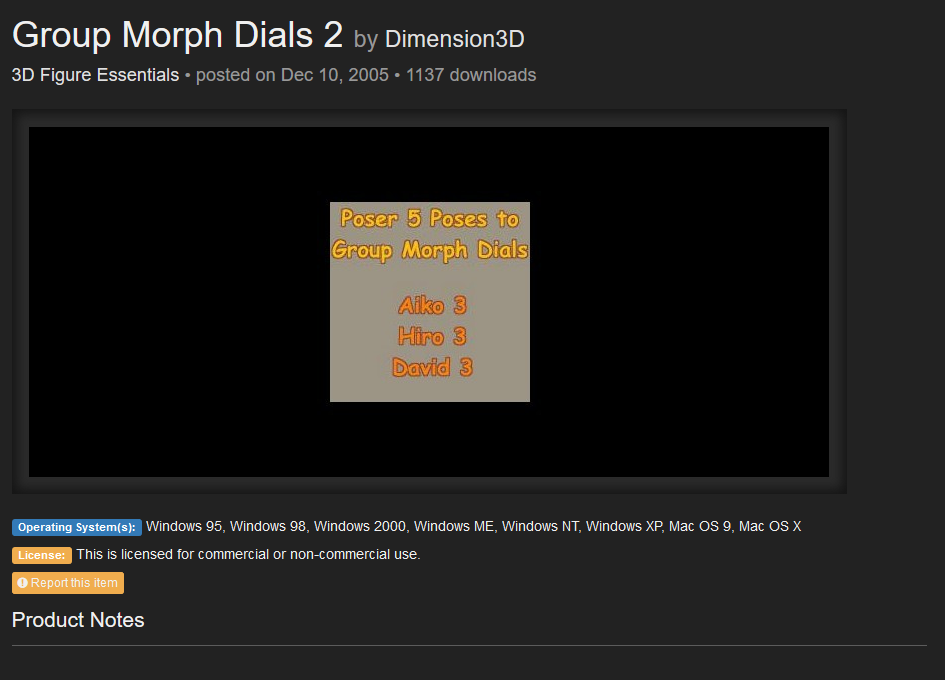
https://www.renderosity.com/freestuff/items/31148/group-morph-dials-2
Dimension3d Group Morph Dial 2, does exactly what it says, grouping the morph dials into groups similar to the ones in Victoria 4.
But let’s go step by step.
-
Download the zip file from R-osity.
-
Unzip it in a Poser directory, preferably in the one where you have Aiko 3 installed.
-
Run Daz Studio
-
Load Aiko 3
-
Zero the figure as seen in Richardandtracy tutorial
-
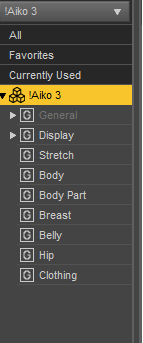
Go to parameters and highlight the Aiko 3 part of the figure. For some reason, that’s where the Aiko Morphs ended when we loaded the figure, it’s just to illustrate the mess we’re dealing with.
-
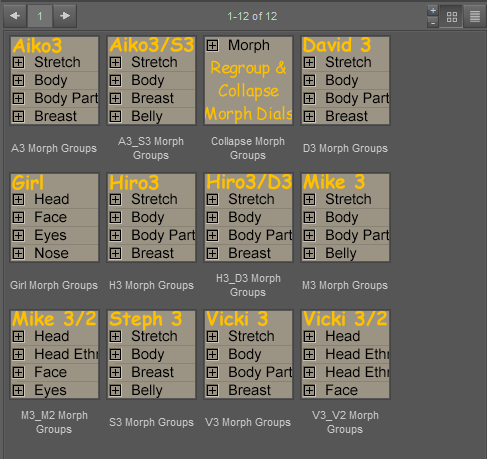
Now, go toward where the poses are installed, runtime/pose/Morph Dial Groups/. You should see something like this, just with less icons (I have installed the other Morph Dial Groups freebie, you don’t need that).
8)Keeping Aiko selected use A3 Morph groups on her, you should see that now the morphs are neatly grouped.
9)Now follow Richardandtracy tutorial for converting it to Triax, and the morphs should work now.
And this is the tutorial. If you have any problem understanding it, I’ll modify it or add further images.
I am about to go Unreal on you all!WendyLuvsCatz said:
geografts work for me in iClone 6 and subsquently FBX export from 3DX6 to Unreal but I do do it all manually no live links and use my own bone not morph based retargetting profiles
Thanks you very kindly for your help WendyLuvsCatz!

It is nice to hear that geographs work for you in Iclone 6! Hopeful! As for 3DX6 is that specifically for Genesis 2 characters or is it used to convert all Genesis characters? In other words, if I plan to bring in mostly Genesis 8 and 9 characters to Iclone 8 and Character Creator 4 do I need to buy this? And will I be able to apply Character creator skins and modifications to these imported characters?
..and, if I need to buy these to convert Gen8 and 9, do I need the full 3DXchange 6 Pipeline version or can I do the same with 3DXchange 6 PRO?
Now I am noticing a 3DX7 as well and something about it being discontinued and added directly into Iclone 8.
I am hoping if I wait on buying 3DX7(6) I will not regret it.
Also a question, Reallusion has a 50% off sale right now.
Anyone know if the sale may get any better than that on black Friday? (I am poor, and this endeavor is putting me into huge debt.)
Ethin's Art and ... stuff.Fae3D said:
Ah, I see. Very clever to use some of the different morphs from the separate characters! I just sort of assumed that they just had one "breed" type morph, instead of separate morphs for arms and such. I have mainly just tried using the basic morphs packs. Will wishlist those products, thank you!
I decided I should make sure I wasn't leading you astray, and I was. Sorry.
you are correct, those characters are just full body "breed" morphs.
The Wyverdreki does have one utility morph to "hide" the arms by shrinking them down to nothing, an effect that can be ruffly duplicated by manually selecting the arms from the collars down and scaling them, using the morph was just a quick short cut.
I also found the geo-graft that hides the wings comes with the base figure. Face meet palm.
more....Wacky Modelling ~ In Carrara ~Stezza said:
Added a wacky Bert morph to the wacky pumpkin and a morphing eyebrow which is attached but hidden for Ernie ( just unhide it for Bert )
the wacky morphing pumpkin head is in the zip file attached if you feel the urge to be wacktacula!


Thank you, thank you! Your newest models are wactacular, wactastic, and wackirific. Long live the cube!
Wha's the next Character PFAChoppski said:
He is pretty amazing. Looks great with the supplied texture, but as I like to mix and match, I have tried him with several others and wow. Even some of the female textures look great on him.I also picked up that age morph set, because I thought it was required, and the different characters you get by adjusting your skins and those morphs is just great. Thanks for this guy!
So I basically created "the age" to go alongside with all of my g9 character , The age has the general morphs that help characters look younger or older however with my characters like Alvaro I sculpted a specific youthfully morph for him so he looks the way I want when he is younger ... I hope I am making sense hahah it's a bit hard to explain but yeah , All my character like Alvaro will have additional designed morphs for the age .
Sub-D Back & Forth: DAZ & ZBrushGordig said:
Dartanbeck said:
Daz Premiere Artists are granted an "HD Morph" plugin for Studio, which is needed for this.
As far as I'm aware, it's not a plug-in per se: their version of Morph Loader Pro just lets them import subdivided meshes, while ours doesn't.
I've seen PAs' workflow. That IS a multi-resolution plug-in which can be loaded in Morph Loader Pro of the same version as ours...
Ethin's Art and ... stuff.Ethin said:
Fae3D said:
These look really amazing, and are such a creative use of morphs! Do you happen to remember how you made any of them? Especially the green aquatic one and the last one, those are super impressive. I have a bunch of morphs for the Dragon 3, but I've never had much luck with them myself.
Thanks. I guess doing stuff like this is just normal for me at this point.
Let see I have-
-DAZ Dragon 3 & Morphs
-Spectral Dragon
-Legendary Wings & Fins
-Crystal Dragon
-Zilladreki
-Wyverdreki
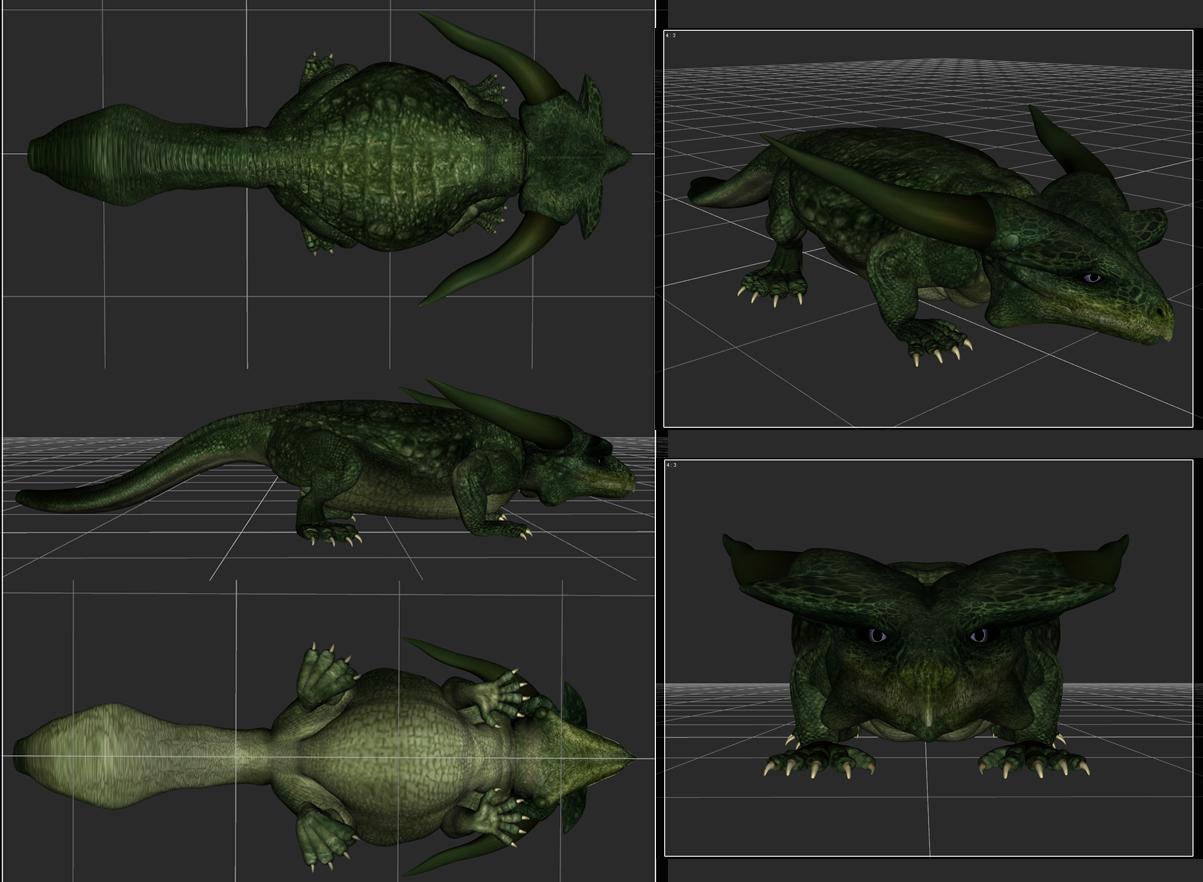
Mostly I just used the Dragon 3 Morphs and the wingless geo-graft from Zilladreki. I used the arm-less morph from Wyverdreki to shrink the arms on a few and a D-former here and there as well as the spike/plate/fin add-ons.
So mainly just lots of messing with morphs (with their limits turned off), scaling body parts and creative posing.
"... and that is how you make a baby dinosaur"
Ah, I see. Very clever to use some of the different morphs from the separate characters! I just sort of assumed that they just had one "breed" type morph, instead of separate morphs for arms and such. I have mainly just tried using the basic morphs packs. Will wishlist those products, thank you!
Ethin's Art and ... stuff.Fae3D said:
These look really amazing, and are such a creative use of morphs! Do you happen to remember how you made any of them? Especially the green aquatic one and the last one, those are super impressive. I have a bunch of morphs for the Dragon 3, but I've never had much luck with them myself.
Thanks. I guess doing stuff like this is just normal for me at this point.
Let see I have-
-DAZ Dragon 3 & Morphs
-Spectral Dragon
-Legendary Wings & Fins
-Crystal Dragon
-Zilladreki
-Wyverdreki
Mostly I just used the Dragon 3 Morphs and the wingless geo-graft from Zilladreki. I used the arm-less morph from Wyverdreki to shrink the arms on a few and a D-former here and there as well as the spike/plate/fin add-ons.
So mainly just lots of messing with morphs (with their limits turned off), scaling body parts and creative posing.
"... and that is how you make a baby dinosaur"
Daz 3D is part of

Connect
DAZ Productions, Inc.
7533 S Center View Ct #4664
West Jordan, UT 84084Licensing Agreement | Terms of Service | Privacy Policy | EULA
© 2026 Daz Productions Inc. All Rights Reserved.