-
Tutorial: Making TriAx Figures from Old Parametric Characters
I can confirm Objaction Mover, RTE Encoder and Morph Manager all work fine on Windows 10, at least on older files. I used all of them recently without issues. I was away from anything 3D for the better part of a decade and lost some files in the interim. I had to redownload them and go through the process of making them usable again.
Generation X2 - Anyone recall this?crosswind said:
Muon Quark said:
Was wondering if anyone recalled this issue with Generation X2 and if there was a fix? The attached is the Genesis 3 maile with the Genesis 2 dwarf base dial in. The eyes stay and don't move. I vaguely recall an issue with either the genesis 2 male eyes in Morphs maybe needing an edit or I need to transfer more than the basic dwarf shape? Sorry I can't remember more, just that I had an issue with this when Generation X2 first came out. Thought I would reach out and see if anyone remembered anything. Thanks.
Edited for typo
Yes... old but still have that memory. Because of the rigging and ERC Freezing issue of Dwarf Base(eyes have translate values...), you have to create another single dial by export / import Dwarf Base, re-rigging ( use Rigger Plus! default Adjust Rigging to Shape is not perfect, with artifacts...) and ERC Freezing. Reload G2M, then go for conversion with GenX. (...while GenX is not perfect though)
If you know Hexagon or Blender, etc, finetune it a bit (smoothe torso, refine limbs, etc...)
Thanks for that tip as well!! I really like the Gen2 Male dwarf and wanted to see if I could get it to Gen3 Male.
Can you separate skeleton/weight mapping from a copyrighted mesh for redistribution?Squishy said:
Looking at the contents of the DSF file, I can see where it defines the geometry - can I instead have this point to and load a separate file e.g. an OBJ export of the copyrighted mesh that I can instruct users to create? That might be OK
e: on second thought I guess that is pretty unlikely as I doubt OBJ would be a safe format to depend on vertex order for things like geograft boundaries and weight maps
Nah... but..well, it'll be just a little cubersome if you wanna do so... You said asset owner is DAZ, I assume you've modified a Genesis Base Figure, probably...
For the figure, let's say a Genesis 9, all the geometry (vertices), rigging and weight data are stored in data\DAZ 3D\Genesis 9\Base\Genesis9.dsf. You cannot distribute it and its derivatives at all. You've saved a new figure asset with all the modification, so it's a 'derivative'.
In this case, you need to 'recreate' a modified figure with no DSON Support Files (dsf), i.e. a pure 'scene-based' modified figure, then save the scene file.... Let's still use G9 as an example:
1) New scene. Load your modified G9 figure (A) into the scene, Zero it. Load default G9 (B).
2) Transfer Utility - Source: A, Target: B. Distance Tolerance: 0. Only check Weight Maps in General Options ! Uncheck everything in Post Transfer Options. Accept...
3) Memorize Figure Rigging.
4) Delete A. Save the scene file. Now all rigging / weight data are saved within the scene file. Check duf file with Notepad++.
* If you have also rigged attachments (anatomical elements, etc.), as well as weights, replicate the process on them accordingly.PS: As for morph files if there's any, always import objs with Reverse + Delta Only. Then they could be shared.
How remove watermark from DAZ face transfer----SOLVEDSo you did purchase https://www.daz3d.com/face-transfer-unlimited (adding the link for future readers)
How remove watermark from DAZ face transfer----SOLVEDJust started playing around with this, and like it so far-but the water mark...I havent seen where it says purchase something, so how do I remove the water mark?
Star Trek Builders Unite 8: THE REBOOTRyselle-Ryssa said:
Hi!
A while ago I promised something next to cardassian starships and now I can proudly say I can deliver :-)
I begun to recreate clothing and props from the Game "Star Trek: Infinite" to supplement the Cardassians, but I also took a break in the Delta Quadrant to catch you a Hirogen Armor and Species 8472 (the latter standalone and rigged). Everything free to use and made for G8.
Since downloads on DeviantArt cannot be linked directly, I will just link to my Freebie gallery: https://www.deviantart.com/ryselle-chan/gallery/67668353/ressources-and-tutorials
PS: The Cardassian morph and much more is provided by TheFigureGuy: https://www.deviantart.com/thefigureguy/gallery
Amazing site! Thank you for sharing
Tutorial: Making TriAx Figures from Old Parametric CharactersHmm.
The place I'd look to do it is in the .dsf files attached to the figure's data folder and then look for the morph related to the shape you want, but to be honest, I have no idea which ones to look for. They'd have to be the weight mapping ones, so a list of vertex numbers and a weighting 0 to 1. Beyond that, I've not looked at that sort of thing yet. You're sort-of wanting a character distribution pack, just less the mesh deltas. It may be worth looking up some of the body shape morphs distributed at Rendo that only add a single shape morph, then see if you can find which are the rigging/weight map files in that pack as opposed to the morph deltas. The files are supposed to be in ascii, so should be readable, but if the content creator compressed the files, they'll be zipped up inside, which isn't helpful.
Sorry to be so little help
Regards,
Richard
Generation X2 - Anyone recall this?Muon Quark said:
Was wondering if anyone recalled this issue with Generation X2 and if there was a fix? The attached is the Genesis 3 maile with the Genesis 2 dwarf base dial in. The eyes stay and don't move. I vaguely recall an issue with either the genesis 2 male eyes in Morphs maybe needing an edit or I need to transfer more than the basic dwarf shape? Sorry I can't remember more, just that I had an issue with this when Generation X2 first came out. Thought I would reach out and see if anyone remembered anything. Thanks.
Edited for typo
Yes... old but still have that memory. Because of the rigging and ERC Freezing issue of Dwarf Base(eyes have translate values...), you have to create another single dial by export / import Dwarf Base, re-rigging ( use Rigger Plus! default Adjust Rigging to Shape is not perfect, with artifacts...) and ERC Freezing. Reload G2M, then go for conversion with GenX. (...while GenX is not perfect though)
If you know Hexagon or Blender, etc, finetune it a bit (smoothe torso, refine limbs, etc...)
Daz 4.22 insists I use 'Restore' when I want/need to use 'Zero'?!!PerttiA said:
crosswind said:
PerttiA said:
crosswind said:
skboa said:
Why does a corrective morph have to be a different value than zero, if the figure is zero'ed. This is a very wrong design philosophy. Instead of doing it the right way, we get another unnecessary popup, great! But hey, we can use/make a script to help with that...
Is it so hard to just fix the issue, instead of having the user to find a workaround?
If Zero Figure, figure's pose will be reset to A-Pose, and all values of corrective morphs (pJCMs / eJCMs /cbs...etc.) will be reset to 0. This 'design' has never been changed.
"Base Joint Correctives" needs to be at 100% (=default value), that is one dial that can't be zeroed if one wants G9 to work as expected.
Yup, that's right~~ but BJC is just a control dial or a utility dial rather than a corrective morph. And the % of this property can be tweaked by users to control the "strength of corrections", that's why it turned from a boolean toggle on G8 to a floating point property on G9 ( another new feature...) .
Does not matter if BJC is a control dial or a corrective morph itself, if one zeroes the figure, the BJC dial gets zeroad as well and G9 no longer works as intended. There were no such dials in previous generations.
Right.... probably one way - Utility properties with "by design" features could've been excluded from Zero functions because they should be kept with "default values" to enable "default functions", e.g. Base Correctives...
Daz 4.22 insists I use 'Restore' when I want/need to use 'Zero'?!!crosswind said:
PerttiA said:
crosswind said:
skboa said:
Why does a corrective morph have to be a different value than zero, if the figure is zero'ed. This is a very wrong design philosophy. Instead of doing it the right way, we get another unnecessary popup, great! But hey, we can use/make a script to help with that...
Is it so hard to just fix the issue, instead of having the user to find a workaround?
If Zero Figure, figure's pose will be reset to A-Pose, and all values of corrective morphs (pJCMs / eJCMs /cbs...etc.) will be reset to 0. This 'design' has never been changed.
"Base Joint Correctives" needs to be at 100% (=default value), that is one dial that can't be zeroed if one wants G9 to work as expected.
Yup, that's right~~ but BJC is just a control dial or a utility dial rather than a corrective morph. And the % of this property can be tweaked by users to control the "strength of corrections", that's why it turned from a boolean toggle on G8 to a floating point property on G9 ( another new feature...) .
Does not matter if BJC is a control dial or a corrective morph itself, if one zeroes the figure, the BJC dial gets zeroad as well and G9 no longer works as intended. There were no such dials in previous generations.
Daz 4.22 insists I use 'Restore' when I want/need to use 'Zero'?!!PerttiA said:
crosswind said:
skboa said:
Why does a corrective morph have to be a different value than zero, if the figure is zero'ed. This is a very wrong design philosophy. Instead of doing it the right way, we get another unnecessary popup, great! But hey, we can use/make a script to help with that...
Is it so hard to just fix the issue, instead of having the user to find a workaround?
If Zero Figure, figure's pose will be reset to A-Pose, and all values of corrective morphs (pJCMs / eJCMs /cbs...etc.) will be reset to 0. This 'design' has never been changed.
"Base Joint Correctives" needs to be at 100% (=default value), that is one dial that can't be zeroed if one wants G9 to work as expected.
Yup, that's right~~ but BJC is just a control dial or a utility dial rather than a corrective morph. And the % of this property can be tweaked by users to control the "strength of corrections", that's why it turned from a boolean toggle on G8 to a floating point property on G9 ( another new feature...) .
Daz 4.22 insists I use 'Restore' when I want/need to use 'Zero'?!!crosswind said:
skboa said:
Why does a corrective morph have to be a different value than zero, if the figure is zero'ed. This is a very wrong design philosophy. Instead of doing it the right way, we get another unnecessary popup, great! But hey, we can use/make a script to help with that...
Is it so hard to just fix the issue, instead of having the user to find a workaround?
If Zero Figure, figure's pose will be reset to A-Pose, and all values of corrective morphs (pJCMs / eJCMs /cbs...etc.) will be reset to 0. This 'design' has never been changed.
"Base Joint Correctives" needs to be at 100% (=default value), that is one dial that can't be zeroed if one wants G9 to work as expected.
Daz 4.22 insists I use 'Restore' when I want/need to use 'Zero'?!!skboa said:
Why does a corrective morph have to be a different value than zero, if the figure is zero'ed. This is a very wrong design philosophy. Instead of doing it the right way, we get another unnecessary popup, great! But hey, we can use/make a script to help with that...
Is it so hard to just fix the issue, instead of having the user to find a workaround?
If Zero Figure, figure's pose will be reset to A-Pose, and all values of corrective morphs (pJCMs / eJCMs /cbs...etc.) will be reset to 0. This 'design' has never been changed.
Daz 4.22 insists I use 'Restore' when I want/need to use 'Zero'?!!Why does a corrective morph have to be a different value than zero, if the figure is zero'ed. This is a very wrong design philosophy. Instead of doing it the right way, we get another unnecessary popup, great! But hey, we can use/make a script to help with that...
Is it so hard to just fix the issue, instead of having the user to find a workaround?
Dforce ghost sheet rigging transferHi,
I want to use this:
https://www.daz3d.com/dforce-sheet-ghost-for-genesis-8-female
on a boy, I could manage it one time to transfer the product to the boy, I loaded a G8F char, then the ghost on it, then I let it jump over to the boy, but no idea how I did that xD
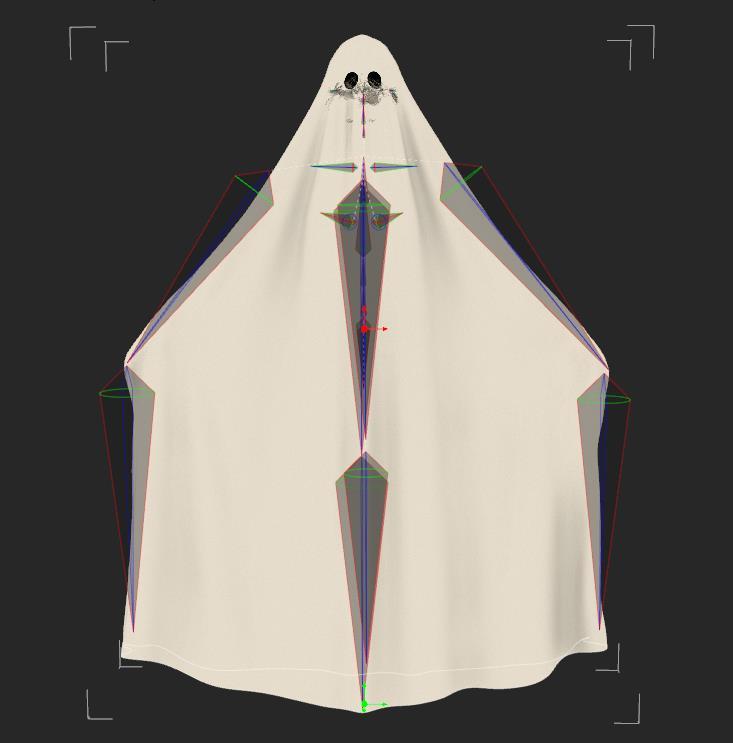
When I do it now, it does delete the ghost rigging and replace it with the G8M rigging.
This is how the rigging SHOULD look, then you can use the Active pose tool to move it.
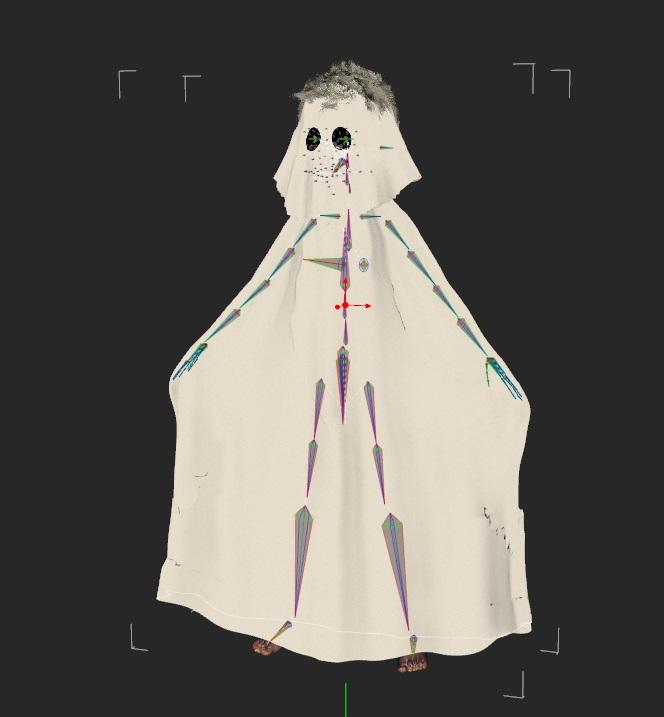
Okay... for some reason can I now also not move the ghost of the girl anymore xD...
maybe my software has just a hiccup who knows...
If anyone knows an alternate product to make a boy into a ghost, then throw it in :)
Clothing StretchingRichard Haseltine said:
That looks more like a post-conversion, or newly Transfer Utilityed, weight issue, needing the weight maps edited to make more sense - the edge of the sleeve may well be weighted for the torso bones, since it was closer to them in the zero pose..
I understood everything you said up until the weighted to the torso bones. Could you expand on that so I can look at a possible fix please. Thank you.
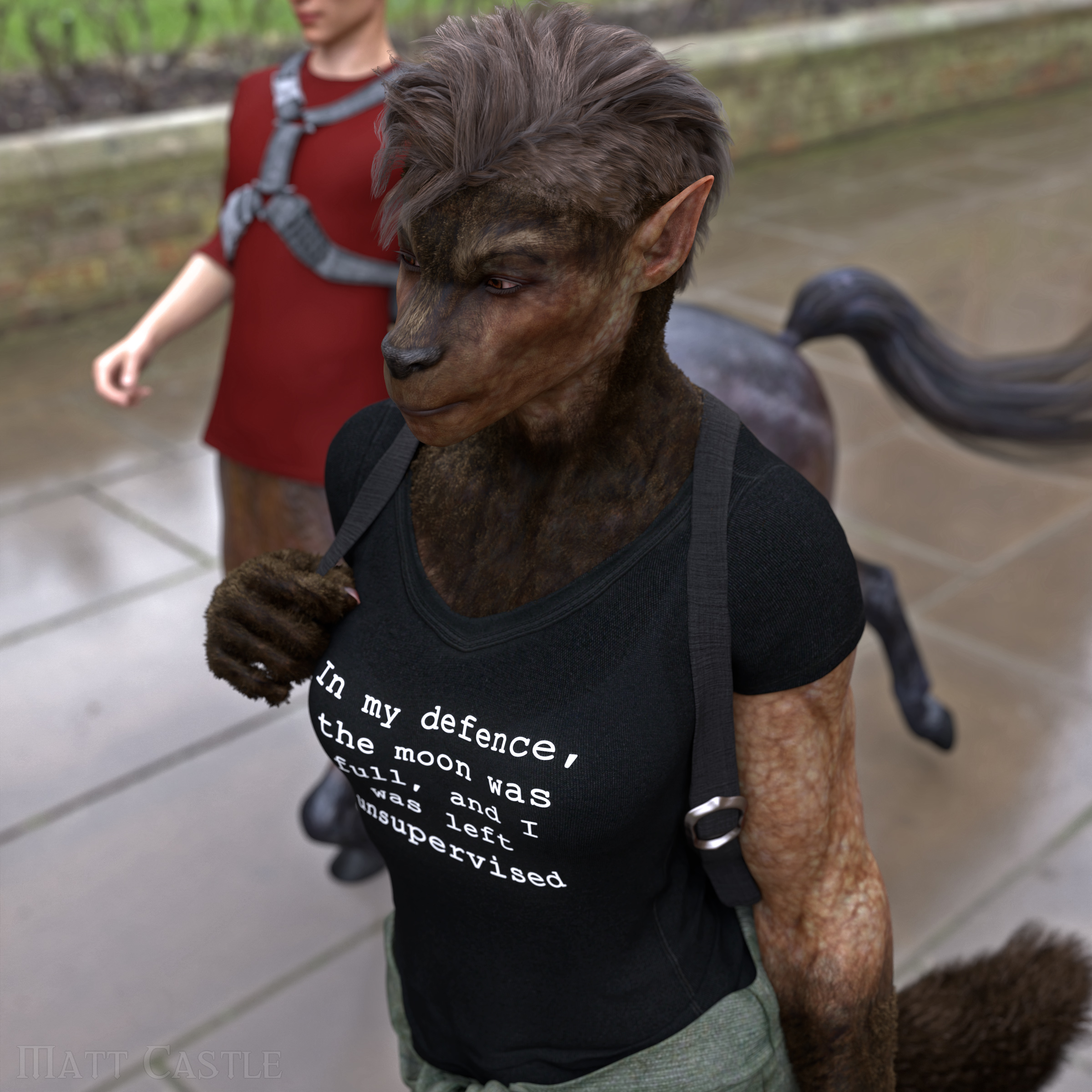
Werewolf morphs for g8 femaleA lot of the generic fantasy/alien morph packs include morphs that can morph the face into more of a snout, so you can manipulate details like that.
This is admittedly actually an 80% Werwulf, 20% Skinchangers (transferred from G3F as earlier suggested) mix with an additional morphs to extend the muzzle, but you don't have to only use one shape.
Tutorial: Making TriAx Figures from Old Parametric Characters@Eustace Scrubb. Thanks for the info. Never knew about the Gen3 kids being the same mesh and I had entirely forgotten about David 3. Only yesterday I found about the M3 to M2 morph character. I was also totally unaware that V3's shape was the same as V1/2. I knew V2 was an improved rigging version of V1, but I didn't know V1 to V3 all had the same general shape. Interesting how this comes out. Thanks. Regards, Richard.Morph conundrum for G9Morph conundrum for G9
So I'm having a pretty successful time getting my many many morphs for Genesis 8 moved over to Genesis 9. Issue is the chest. Esp where the nipples land. I thought it would be an easy fix but it's not since there's not allot of geometry to work with in that area, esp if I'm doing breast morphs. Pecs will be slightly easier to rangle into shape but breasts are quite daunting and I have 13 breast shapes and about 10 full females shapes. So wondering from a more pro persepctive, how one goes about working with this mesh to get breasts (and pecs) to line up with the default texture maps for Genesis 9? I THINK I opted for the male maps for the base I'm working with right now and I know the placement of the nipple and areola's are different for both male and female so that's probably contributing to what I'm seeing (and not liking) when morphing up the figure into one of my female shapes.
Thanks for tips, tricks and info.
Richard
Werewolf morphs for g8 femaleI'm looking for a more wolf-faced werewolf (similar in shape to the various Anubis character morphs available here). Werewulf just doesn't have enough of a snoot. I don't currently have what I need to transfer all my characters to G9 (and my laptop definitely can't hold that much), nor will I be jumping back towards G2F, so I'd be interested if anyone has more wolf-like (long snout) morphs for G8F out there.
Daz 3D is part of

Connect
DAZ Productions, Inc.
7533 S Center View Ct #4664
West Jordan, UT 84084Licensing Agreement | Terms of Service | Privacy Policy | EULA
© 2026 Daz Productions Inc. All Rights Reserved.