-
Daz Studio Pro BETA - version 4.20.0.17! (*UPDATED*)
Richard Haseltine said:
second_technician_rimmer_9571136c47 said:
While 4.20.0.6 seems capable of retaining the way you set it up between sessions, it looks like it's still unable to import the UI settings (layout, toolbars, actions, menus) created from a 4.16.
As a result; one would have to readjsut all of these settings manually and recreate all custom actions again.
What do you mean - Window>Workspace>Select Layout? Or trying to copy from another release channel? Or something else?
Ok Richard, I just gave it another go and it looks like it could just me not understanding how this works. I managed to export from 4.16 my layout, toolbars, and menus but not my actions. And I did it through Window>Workspace>customize. On the other hand, it works with the script you once linked to me named "Copy_UI_From_Channel.dsa" . So of course, I can always add my stuff to a beta from the main channel, but why won't exporting actions manually work? I cranked the actions export open in notepad++ and it even seems like the file didn't take in my list of customa ctions. Isn't that odd? O_o
Daz Studio Pro BETA - version 4.20.0.17! (*UPDATED*)second_technician_rimmer_9571136c47 said:
While 4.20.0.6 seems capable of retaining the way you set it up between sessions, it looks like it's still unable to import the UI settings (layout, toolbars, actions, menus) created from a 4.16.
As a result; one would have to readjsut all of these settings manually and recreate all custom actions again.
What do you mean - Window>Workspace>Select Layout? Or trying to copy from another release channel? Or something else?
Daz Studio Pro BETA - version 4.20.0.17! (*UPDATED*)While 4.20.0.6 seems capable of retaining the way you set it up between sessions, it looks like it's still unable to import the UI settings (layout, toolbars, actions, menus) created from a 4.16.
As a result; one would have to readjsut all of these settings manually and recreate all custom actions again.
Daz to Maya Update 1.7Hi,
I get this issue on the option "Rig or Re-target Skeleton" - DazToMaya 1.8 with Maya 2020 or 2022 versions. When I click on the option, nothing change on the model. No new rig. The model stay in T position. But these new things appears in the Maya's Outliner (Wich doesn't comes as seen on the DAZ videos with the same hierachie):- Geometry
- ExportSetup
- hip_ctrl_zero
And I get this error message:
"// Error: file: C:/Users/MACPRO03/Documents/maya/modules/DazToMaya/scripts/DAZTools.mel line 1694: Could not add constraint or connections."The Basic Genesis 8 model stay in the T pose. I have tried to reinstall several time the DazToMaya plugin. Doesn't want to work even with the github files...
Is someone to help or get same issue ? Thank you in advance for a help ;-)The complete log error is:
1- For the import sequence:
import maya.cmds as cmds
import DazToMaya
if int(cmds.about(v=True)) > 2020:
import importlib
importlib.reload(DazToMaya)
else:
reload(DazToMaya)
DazToMaya.run()
# pymel.core : Updating pymel with pre-loaded plugins: mayaHIK, invertShape, curveWarp, substanceworkflow, hairPhysicalShader, ATFPlugin, ikSpringSolver, retargeterNodes, RokokoMotionLibrary, sweep, AutodeskPacketFile, lookdevKit, Type, Boss, bifrostGraph, meshReorder, modelingToolkit, MayaMuscle, matrixNodes, bifmeshio, deformerEvaluator, shaderFXPlugin, objExport, bifrostshellnode, ufeSupport, GPUBuiltInDeformer, mayaVnnPlugin, substancemaya, svgFileTranslator, GamePipeline, tiffFloatReader, MASH, poseInterpolator, bifrostvisplugin, cacheEvaluator, mtoh, ik2Bsolver, xgenToolkit, AbcExport, gameFbxExporter, OpenEXRLoader, Unfold3D, mayaCharacterization, mtoa, rotateHelper, AbcImport, autoLoader, sceneAssembly, gpuCache, Substance, mayaUsdPlugin, OneClick, renderSetup, ArubaTessellator, substancelink, quatNodes, fbxmaya #
Daz to Maya, run() method
win32
d2m start
file -f -new;
// Result: untitled //
file -f -new;
// Result: untitled //
Importing Daz...
// Logfile: "C:\Users\MACPRO03\Documents\maya\FBX\Logs\2020.1\maya2022imp.log" //
setAttr -type "string" Genesis8Male.StudioNodeName "Genesis8Male";
setAttr -type "string" Genesis8Male.StudioNodeLabel "Genesis 8 Male";
setAttr -type "string" Genesis8Male.StudioPresentationType "Actor/Character";
setAttr -type "string" Genesis8Male.StudioPresentationAutoFitBase "/Genesis 8/Male";
setAttr -type "string" Genesis8Male.StudioPresentationPreferredBase "";
setAttr -type "string" Genesis8Male.ControllerScales "Youth Morph=-0.445;CTRLGunnar=0;CTRLCaspian=0;CTRLHugren=0.0599999;CTRL-RSC-GarethHD=0.036;FBMRealBodiesJules=-0.0324572;Beast HD=0.17;CTRL-FIYousef=0.03;CTRL-E3DYonni=0.021;CTRL-E3DWalker=0.065;CTRL-E3DTamati=-0.014;CTRL-E3DSeb=-0.025;CTRL-E3DLeonard=0.03;CTRL-E3DLeon=0.02;CTRL-E3DKichiro=-0.0499999;CTRL-E3DGui=-0.025;CTRL-E3DGanaatarDemon=0.026;CTRL-E3DGanaatar=-0.026;CTRL-E3DDonovan=0.012;CTRL-E3DBjarke=0.032;Daniel=0.0650001;CTRLVladimir8=0.056;CTRLValentino8=-0.048;CTRLTheBrute8=0.17;CTRLScar8=0.056;CTRLMrWoo8=-0.105;CTRLMichael8=0.04;CTRLLee8=-0.06;CTRLLandon8=0.04;CTRLKjaer8=-0.02;CTRLJonathan8=0.04;CTRLHolt8=0.068;CTRLDiego8=-0.018;CTRLDasan8=-0.02;CTRLDain8=0.044;FBM_CGI_Miklos_Body=0.03;FBM_CGI_HKClaus_Body=0.02;CCRafael=-0.018;CCMagnus=0.1515;CCJack=-0.0172213;CCDragomir=0.0453";
AutoIK...
namespace fix finished
// Error: line 1: No source attribute was specified. //
// Error: line 1: The source attribute 'm5philliplashes.outColor' cannot be found. //
// Error: line 1: setAttr: No object matches name: Genesis8Female.drawStyle //
------------------------------------
------------------------------------
// Error: line 1: Non-deletable node 'perspShape' cannot be deleted. //
// Error: line 1: Non-deletable node 'persp' cannot be deleted. //
// Error: line 1: Non-deletable node 'topShape' cannot be deleted. //
// Error: line 1: Non-deletable node 'top' cannot be deleted. //
// Error: line 1: Non-deletable node 'frontShape' cannot be deleted. //
// Error: line 1: Non-deletable node 'front' cannot be deleted. //
// Error: line 1: Non-deletable node 'sideShape' cannot be deleted. //
// Error: line 1: Non-deletable node 'side' cannot be deleted. //
// Error: line 1: setAttr: No object matches name: Genesis3Male.drawStyle //
// Error: line 1: setAttr: No object matches name: Genesis3Female.drawStyle //
// New character 'Character1' was created.
parentConstraint -mo -weight 1;
// Result: lBigToe_parentConstraint1 //
parentConstraint -mo -weight 1;
// Result: lSmallToe1_parentConstraint1 //
parentConstraint -mo -weight 1;
// Result: lSmallToe2_parentConstraint1 //
parentConstraint -mo -weight 1;
// Result: lSmallToe3_parentConstraint1 //
parentConstraint -mo -weight 1;
// Result: lSmallToe4_parentConstraint1 //
parentConstraint -mo -weight 1;
// Result: rBigToe_parentConstraint1 //
parentConstraint -mo -weight 1;
// Result: rSmallToe1_parentConstraint1 //
parentConstraint -mo -weight 1;
// Result: rSmallToe2_parentConstraint1 //
parentConstraint -mo -weight 1;
// Result: rSmallToe3_parentConstraint1 //
parentConstraint -mo -weight 1;
// Result: rSmallToe4_parentConstraint1 //
// New Rig: Character1_ControlRig was created.
// Error: line 1: setAttr: No object matches name: Scalp.cosinePower //
// Error: line 1: setAttr: No object matches name: SummerLash_1006.alphaGain //
DazToMaya Complete!
2- For the Retarget Skeleton sequence :
---- Running DAZ Rigger v1.02 ----
// Warning: file: C:/Users/MACPRO03/Documents/maya/modules/DazToMaya/scripts/DAZTools.mel line 491: New name contains invalid characters. Illegal characters were converted to "_". //
---- Geometries grouped ----
// Error: file: C:/Users/MACPRO03/Documents/maya/modules/DazToMaya/scripts/DAZTools.mel line 1694: Connection not made: 'hip_scaleConstraint1.constraintScaleX' -> 'hip.scaleX'. Destination attribute must be writable. //
// Error: file: C:/Users/MACPRO03/Documents/maya/modules/DazToMaya/scripts/DAZTools.mel line 1694: Could not add constraint or connections. //Blender Addon: Daz For Blender Bridge: Everything from DTB 2022 + 14 more featuresopppoe_c02b0d86 said:
sorry for another problem
After DAZ export,
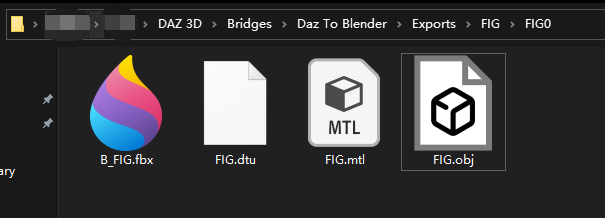
Blender pressing Import New Genesis Figure Supports Genesis3, 8, and 8.1 displays "Appropriate FBX does not exist!"C:\Users\c\Documents\DAZ 3D\Bridges\Daz To Blender\Exports\FIG\FIG0
There are four files such as B_FIG.fbx and FIG.objIt looks like there is something wrong with your installation.
In this addon, there is a Global.py file in it. Every time when your opening blender, it will run a getRootPath() function, to get your model's folder path.
Seems in your installation, it does not run at all.
So, you better try to re-install it.
The best way to install this addon in blender, is copy DTB folder into:
C:\Users\Your User Name\AppData\Roaming\Blender Foundation\Blender\3.0(your blender version)\scripts\addons
Then go to this DTB folder, delete "__pycache__" folder.
Post your DAZ to Unity renderskrislott98 said:
This is the highest quality skin shader I've seen come out of Unity, and trust me I've searched high and low. Whatever changes you made to the dual lobe worked! Is there any way you could release it in its current state?
Thanks. It's already available, just download uDTU: https://www.daz3d.com/forums/discussion/529086/released-unofficial-dtu-bridge-v1-2-2021-10-31/p1
To enable new skin shaders:
From Main menu, click Daz3D -> Open DazToUnity Bridge window -> select Options tab -> check "Use New Shaders". Then import from Daz model or reimport from existing DTU file.
Autofitting G8F eyelashes to G8M issueEdit Metadata is still in the right-click menu on a product.
Autofitting G8F eyelashes to G8M issuenemesis10 said:
Ah, they have changed the selection of compatability base in the newer versions of Daz Studio... there used to be an edit metadata dialog which is now missing....
Thank you for your trouble anyway! Looks like I might be buying one of those other products after all.
Autofitting G8F eyelashes to G8M issueAh, they have changed the selection of compatability base in the newer versions of Daz Studio... there used to be an edit metadata dialog which is now missing....
DAZ and world creator?Bryce is finish.... xD
And Import is limited, need CLoud fractal, atmosphère, Plants, rock....
Import Mesh for Terrain about 100km we need Fractal technologie :)
DAZ and world creator?you can import terrains from Bryce to DAZ studio too via a bridge if that is your only need.
for $20 often cheaper it's a steal.
Is the bridge abandoned?kromekat said:
piefr1 said:
Honestly export in fbx in you get the same thing no need of this bridge....
Well, no you don't really, because you don't get the full rigging setup with IK etc, which is a huge time saver.
I just wish there was a similar setup for iClone/Character Creator to import characters with full IK rigs etc, as its a much more advanced set of tools. I just don't want to be animating in iClone personally!
Maybe they meant like quality of the Bridge's export is similar to a File->Export->FBX operation?. Except for some Genesis figures, that's all you really get when exporting figures with the Bridge. Joint weights are messed up, orientation is off, morphs don't export, materials are C4D native and pretty standard, etc. Genesis figures have usually better weighting/orientation and MOST morphs work but not all, but figure clothing is a "Do it yourself" thing in my experiences. Haven't had a single clothing piece export out with weighting information yet.
Being able to bring in the IK's though is a nice addition that FBX Export doesn't do.
Blender Addon: Daz For Blender Bridge: Everything from DTB 2022 + 14 more featuressorry for another problem
After DAZ export,
Blender pressing Import New Genesis Figure Supports Genesis3, 8, and 8.1 displays "Appropriate FBX does not exist!"C:\Users\c\Documents\DAZ 3D\Bridges\Daz To Blender\Exports\FIG\FIG0
There are four files such as B_FIG.fbx and FIG.obj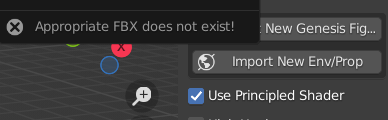
 VDB products question (Stonemason, Sickleyield,...)
Hello Sickleyield !
I had success to import your VDB files in Octane standalone and yes I had to do some rotation but also placement. Not a problem as I use to merge different source objects in the same octane render scene. Thanks for your support
fitting issue with object transfer utility *FIXED*HI
sorry for the maybe noob question but i have an issue with fitting an outfit to my genesis 8.1
i created a shirt in Marvelous Designer based on exactly the avatar i m using on DAZ (exported it to make sure size fits)
then I import the shirt at fbx and it fits perfectly (as i d expect)
then I use the object transfer utility to fit it to the avatar (see screenshot)
BUT as soon as i do that the shirt shrinks a bit and parts are inside the body of the avatar
i watched a couple of videos on the topic but none had that issue :(
Diffeo vs FBX when to switchPadone said:
As for diffeomorphic, I see there's a minor caveat with the cookie rig because daz studio can't keep dforms when converting to general weight. This may apply to other legacy figures too if they use dforms so I'm reporting here a easy workaround. Basically you export the figure converted to prop and use it as shapekey in blender.
in daz studio:
- make a copy of the figure and convert to prop (edit > figure > rigging > convert to prop)
- convert the figure materials to uber (select the materials and apply the uber shader)
- convert the figure rig to general weight (edit > figure > rigging > convert to weight mapping), here you will lose the dforms
- export to blender
in blender:
- import the figure
- use the prop as shapekey for the figure (shape keys panel > menu > join as shapes)
Below we see the cookie eyes that pop out when converting to general weight in daz studio because they lose the dform. Then the result in blender after applying the prop as shapekey.
Thanks for tips that really handy information
Daz to Blender , Leg skin weight looks weirdPadone said:
The daz bridge is discontinued atm and the unofficial version by @butaixianran is for game export. You can use diffeomorphic and import jcms to preserve the figure deformations.
https://diffeomorphic.blogspot.com/p/morphs-section-version-16.html
very powerful tool , I haven't read the tutorials well before,Thank you , after I import JCM`s ,Its correct
Daz to Blender , Leg skin weight looks weirdThe daz bridge is discontinued atm and the unofficial version by @butaixianran is for game export. You can use diffeomorphic and import jcms to preserve the figure deformations.
https://diffeomorphic.blogspot.com/p/morphs-section-version-16.html
Diffeo vs FBX when to switchAs for diffeomorphic, I see there's a minor caveat with the cookie rig because daz studio can't keep dforms when converting to general weight. This may apply to other legacy figures too if they use dforms so I'm reporting here a easy workaround. Basically you export the figure converted to prop and use it as shapekey in blender.
in daz studio:
- make a copy of the figure and convert to prop (edit > figure > rigging > convert to prop)
- convert the figure materials to uber (select the materials and apply the uber shader)
- convert the figure rig to general weight (edit > figure > rigging > convert to weight mapping), here you will lose the dforms
- export to blender
in blender:
- import the figure
- use the prop as shapekey for the figure (shape keys panel > menu > join as shapes)
Below we see the cookie eyes that pop out when converting to general weight in daz studio because they lose the dform. Then the result in blender after applying the prop as shapekey.
edit. You can also convert the dform to a morph in daz studio using the dform panel, that's probably easier. This way you don't need the prop. Please note that for cookie the dform is used to animate the eyes, so it's not only for deformation but for animation too. In this case in blender you can animate the eye texture instead, that's a easy workaround.
Diffeo vs FBX when to switch
That Mixamo control rig add-on only works with Characters that have been uploaded/re-rigged with a mixamo skeleton Just FYIjuvesatriani said:@Wolf359 @Padone @Nonesuch00 Thanks for information. I`ll try each technique to see which handy for different scenarios .
One thing I need to know more about Hybrid/Frankestein method and how to export correctly without double mesh or skeleton rig .
I.E I`m using Chip /Cookie /Gumdrop head in G8 body . In Daz Studio I can easily hide body parts I dont need it .
Exporting in OBJ format definetly can help making those hybrib to be one mesh , but the rig will be lost right ? With Mixamo I can easily give them new rig but thats mean I cannot import G8 pose anymore .
Fortunately there is Mixamo Control Add on for blender so that will make easy for me to pose and animate those hybrid .
So I want to know if using FBX exporter I can ignore invisible body parts like G8 Head but keeping rig in another body part ? Or maybe there are another solution for my case ? Like Modifying Cloth to fit the original /non hybrid Cookie -Chip -Gumdrop models or doing frankenstein in Blender ?
Ohh I need to mention that main reason I`m doing hybrid so I can accessing G3-G8 Wardrobe library
Thanks again guys
Daz 3D is part of

Connect
DAZ Productions, Inc.
7533 S Center View Ct #4664
West Jordan, UT 84084Licensing Agreement | Terms of Service | Privacy Policy | EULA
© 2026 Daz Productions Inc. All Rights Reserved.