-
"Ps" files with duplicate content and no thumbnail appearing in Smart Content?
@Spacious, tried updating metadata and they're still showing up.
Seems I've found a solution though. Just browse to the Poser-duplicate in the content library, delete the product from there, and it vanishes from the smart conent library. The original Daz files all still load and work perfectly fine without them.
"Ps" files with duplicate content and no thumbnail appearing in Smart Content?Sounds like we've pretty much eliminated all of those ideas then maybe. Have either of you tried the Update Metadata command under the Connect menu inside DAZ? You've got to log in DAZ first if you're not already.
Animation issueHey guys, i've spend the last 6 hours trying to figure out but ...
The animations don't export anymore, i've tried by daz to unreal but i've got a single frame of the original animation and i also tried to do a simple export (animation checked) and import into unreal, the skeletal is here but not the animation.
Do i miss something? i mean, the animation is in the timeline so what do i miss ?What is a good free video editor for windows 10?When I render animation in DAZ, I render to a PNG image sequence and use blender to turn that into a movie if that's what you're asking. It's quite easy. Sometimes I render with no background and Blender makes it easy to put whatever background and even animate that too. Like the way they used to do animation in the Looney Tunes / early Disney days.
I must have deleted my bookmark to a simple tutorial on it, but if you Open New Video Editing Project in Blender. I think you want to set the frame rate you want before you import the images. Under the Add Menu will be Image Sequence, and if your images are aleady numbered they'll just pop in as frames. Choose what folder to render to, what file type you want and push render. It almost couldn't be simpler.
There's also lots of Fade and Wipe effects for scene transitions or whatever, if you need that.
[Released] Turbo Loader for Genesis 8 and 8.1 [Commercial]FSMCDesigns said:
I was excited about this till I read this part
Products installed manually or with products like Content Wizard do not have morphs recognized by the Daz Studio database. They will be organized as unknown products with a name from their parent directory.
2/3's of my content is from other stores, installed manually and I never use smart content, so I am guessing this won't be of much use for me
As @Mark_e593e0a5 helpfully replied, it will work with anything, with or without metadata. As long as Daz Studio finds the morph to load on a figure, the script can find them too.
Off Topic Thread #2no Filament hasn't even got compatible shaders in DAZ studio except for some glass ones I bought, not shader bricks for them, DAZ needs to do something about that if they want to keep depriving users of Nvidia cards by supporting the cryptobros with their (3 letter word).
I use Unreal Engine which has its own dedicated material system and usually need to manually import maps other than diffuse.
Likewise with Twinmotion which was built using Unreal Engine, is like a game for Achitects to do Archvis!
[Released] Turbo Loader for Genesis 8 and 8.1 [Commercial]FSMCDesigns said:
I was excited about this till I read this part
Products installed manually or with products like Content Wizard do not have morphs recognized by the Daz Studio database. They will be organized as unknown products with a name from their parent directory.
2/3's of my content is from other stores, installed manually and I never use smart content, so I am guessing this won't be of much use for me
Same here, majority of figures are either kitbashed or from other stores. You do not need SmartContent at all for TurboLoader to work. As @RiversoftArt already mentioned, the tool will generate an "Unknown Product" with the identified morphs in one directory, and the base directory where the morphs are installed will be shown. As long as you do not install your character morphs all over the place it should be fine.
I have added a screenshot
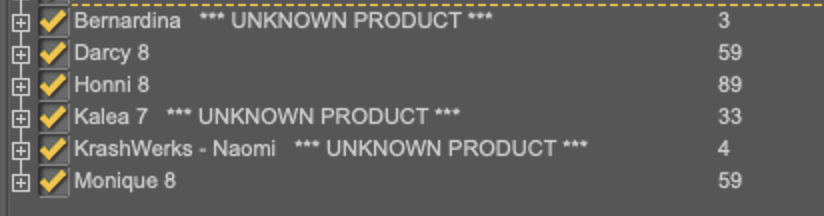
Bernadina and Naomi are from the other store, Kalea 7 is a Genesis 3 character converted to Genesis 8 (thus, no Daz metadata exist).
importing 3D models not made specifically for DSLot's of times 3D models from random sources are made with whatever shader settings from the software they were created in. Depending on what file type the original creator exported them out of the original software many shader settings or even entire shader channels get lost, or botched up somehow. It sounds like you've already figured out that the model you're using needed to have the Opacity changed from 0 to 100. I've never figured out why some models have the Opacity at 0, but there's alot of them floating around out there.
Pretty much every 3D software seems to use a different scale, so sizing issues are almost always a problem. I find it easiest to create a cube primitive in DAZ that's about the size I think whatever model should be, and then just scale the model until it fits in the cube.
What file type or types are you trying to import? Each of them has their own strengths and weeknesses, especially when trying to use them in DAZ. I usually download as many different file types of the same model as I can, so I can attempt to mix and match various parts from each.
I like OBJ usually, and will often convert to that in Blender if there isn't an OBJ to start with. Materials are usually the tricky part, and ObJ isn't the best at carrying all the channels over, so If there's an entire folder of materials included with one of the file types I'll usually manually add them back inside DAZ.
SurveyI filled in mine with a migraine and I barely remember what I wrote. But a few things I do remember:
That scoring chart of sites made no sense to me. I use Daz3D primarily and have issues, I sometimes use Rendo and have to use Content Wizard to upload. The others, some I never heard of.How to improve Daz Studio - bring back the dates that the sort function in Smart Content is based on. It was messed up when the store was 'upgraded' in the Fall of 2020 or 2019 not sure if it was pre-Covid or not. What dates are there are often wrong.
Get Filament working for the Mac computers since Iray doesn't. I think I also asked if attention could be given to the older software sold by Daz.
Did ask for documentation, but also tutorials for each section by Jay Versalis (sp?). I found his You Tube sessions highly instructive and easy to follow. (Just at a horribly busy time for me personnally.) He didn't talk down, nor over my head with techno talk and lose me five words in. And yeah, I can see keeping up with what is going on in D|S is probably hard, just look at how many updates we have had in the past few months.
Clothing for the average, man or boy, either today, historical, or science fiction that is not a noble or a mercenary. (esha did some wonderful medieval ones for M4, would love to see more like that in different periods, ethnicities, regions, seasons.) But women too. Sets for average people in history or in the future. And yeah, women need real working clothes too. Unless they are all hookers or party girls or mercenaries. I also put a word in for aliens that physiology makes sense, with matching males and females. And less monsters for the males and sex pots for the females.
NFTs are a total buzz kill for me. I don't like to see them on sales pages, on the emails, or shoved down my throat. Same with DAZCentral. Give people a choice and leave them alone. And if they pick that sucky DAZCentral, well, they will learn the hard way like a lot of us. My recommendation is to get rid of it altogether. Stick with DIM or Daz Connect.
I am on the borderline right now if I am going to renew my DAZ+ membership. Things are costing more, the two week release price is not lasting even a week, before it gets booted up a dollar. Sales are scewed so our coupons are not able to be used very often. I think 3 months I never used them. But, the freebies are good, but are generally available to non-DAZ+ customers too, if they buy X# items. So what is the incentive?
Marketing just closed out five reports I made, saying they were fixed. I had to check them out, sent two back to DAZ, one saying I had given up one of them, but with a very pointed comment that this teen looked like a traffick child sex worker, instead of an older sister to other characters, coming in at 3'1" and dark red makeup. Both are back in Tech Support who was very nice about it. Quality control seriously needs to be brought back up to the standards I found when I first started in 2016.
Get over kids showing shoulders, and make sure Thumbnails show up, or the metadata makes sense or doesn't create new categories or go back to old-style Poser ones.
Test things before you install and break the public systems. (Store framework, Forums, Gallery)
That is what I can remember.
importing 3D models not made specifically for DSI am having difficulty importing a 3D model into DS. The cutout opacity is zero which apparently makes the item not show up in the preview scene. I didn't render it before I made the item visisble in preview.
Why does the import section make the item so big? I realized that it was some big percent but when I reduce it to 100% it fit the bird I wanted to sit in it. (oh the figure is a bird, but the prop is a bird cage.)
My render is still rendering or I would post it here. Basically asking what is the best way to import 3D assets from other sources.
[Released] Turbo Loader for Genesis 8 and 8.1 [Commercial]second_technician_rimmer_9571136c47 said:
After reading this... I could cry judt because it's too much bliss :D I *never* install products otherwise than manually because I organize with my own custom folders. For example, I could have a People/001 - CHARACTERS/G8F/CAUCASIAN/BLUEJAUNTE/ path, with let's say the character Murphy in there, all done manually with no metadata and I could switch her on/off selectively, effectively including or excluding her of the data that DS loads for G8F?
...
I have died and I'm going to Heaven then? :D
As long as DS can find the morphs on your G8F/G8M, it doesn't matter where they are. The script will find them. And then yes, it would use the parent directory as the "product" name. The script can then turn them all off (and turn on only what you want).
[Released] Turbo Loader for Genesis 8 and 8.1 [Commercial]After reading this... I could cry judt because it's too much bliss :D I *never* install products otherwise than manually because I organize with my own custom folders. For example, I could have a People/001 - CHARACTERS/G8F/CAUCASIAN/BLUEJAUNTE/ path, with let's say the character Murphy in there, all done manually with no metadata and I could switch her on/off selectively, effectively including or excluding her of the data that DS loads for G8F?
...
I have died and I'm going to Heaven then? :D
Best 3dsMax obj export settings for DAZ import?One other thing I do is upscale on import to about 1200% depending on what it is. I worked that out awhile ago.
Daz import does not appear among the tools in BlenderHi there
I have followed the procedure but still Daz import does not appear on blender interface.
Any help please?
UltraSceneryXT - large terrain/landscape generatorThis new product is great because I can now use world creator and daz together effectively; I can import the heightmap from WC as seen in the picture, but I want to apply the color map from WC to the terrain in daz. Is there a way to do this in UltraSceneryXT or should I try it with L.I.E? It will be awesome once I get this to work.
Rig HumanoideAnd I will try to be even clearer: Daz studio, for me, is complete in absolutely everything. I've been researching a lot of things that automate the work involving modeling, rig, animation, this has been happening for some time and Daz manages to be - for me - perfect, even to work with a 'game engine' (I'm currently studying Unity and C#) . Just export a base model, import it the right way (either via bridge or FBX) and it's all there, so to speak. Just narrating my personal experiences of a mere 'amateur'.
So I thought, since I like human models, I like 'shapes', I really like 'animations' (philosophy of movement - maybe my personal real-life predilection for dance) and since I like 3d, why not try 're-starting' ' making models for software that I really think is good and has great potential (Daz)? That's what I thought. :)
Making games, Richard, is a very difficult thing to do - if not 2D games, and yet it requires a lot of coding knowledge. You must have years of experience with this. As for Daz, I've known him the longest (and I always learn something new - which always surprises me). I think I mentioned to you once that I was studying Zbrush. I improved a little on it, managed to make some models - nothing compared to the perfection of a g8 model, of course; along the way, I got to know retopology software - which automatized work time a lot (I used to do it in Maya). Rig, in Maya, is currently something automated, but I thought of Daz for the quality and speed that this gives to the volume of work for those who want to work with it.
Sorry for this long post, Richard :) (google translate)
Geoshell to geometry/prop?Yep, that worked. Thanks! However, I overlooked the fact that geoshell creates separate islands of geometry for the rivets. Oh well, my search continues :)felis said:
Well, I would assume the following should work.
Create a geoshell, hide the character and eyelashes, and export it as an obj. Then you can import it as a new object.
How to use vMaterials 2 library in Daz Studio?https://www.daz3d.com/forums/discussion/315701/how-to-import-a-mdl-file-into-daz-studio
This appears to be useful thread regarding this topic, still trying to figure it all out.
Geoshell to geometry/prop?Well, I would assume the following should work.
Create a geoshell, hide the character and eyelashes, and export it as an obj. Then you can import it as a new object.
Adobe Substance 3D Stager - Just a general set of questionsMy first thought is I did not see any use of rigged models in the intro video. Doesn't mean it isn't possible, just odd that they would not pose and change the pose of an imported character asset if it is possible. Seems like it would be an important promotional point.
I did not see FBX or Collada among the file formats. There are plenty of converters out there, but would you have to change poses externally and import a new file every time you wanted to change?
Don't know. Just asking questions.
Daz 3D is part of

Connect
DAZ Productions, Inc.
7533 S Center View Ct #4664
West Jordan, UT 84084Licensing Agreement | Terms of Service | Privacy Policy | EULA
© 2026 Daz Productions Inc. All Rights Reserved.