-
Saving Presets
I wish I could show you the proof. I no longer have my old files with my characters. In 4.22, I had 2 models, Victoria 8 and Babina 8. Victoria had face and body morphs with ana elements saved and they would load in with the presets saved as well as Babina 8 may skin, the tan one on Victoria 8. I believe I had post(not sure if you can see it within my profile), in a recent one; July. I believe where I had black lines on a model. The way you see her, is all the presets saved on her as well as a different model in the render. Besides the clothes and hair, everything else was saved as a character preset; Face Morphs, Body Morphs, Eyebrows, eye colour, and skin(only Victoria 8 had a different colour skin; Babina 8 MDL). All my renders that I have posted here have been presets I have saved and used on how to improve. So I'm not sure what has changed to where the presets don't save the character morphs and skin. If you'd like to check, all of my models I have posted have been edited and saved and loaded into a new scene. My favourite is the purple hair model with the gun. Slight face morph, glutes/leg/breast morphs, all of that was edited and saved as a preset. The ones I have saved, haven't loaded in the same way as in 4.22. Sorry if I keep repeating myself. It's just something I noticed since I haven't touched Daz since July and found it strange that something changed between then and now.Richard Haseltine said:I don't belive that a Character preset has ever included fitted/parented items. Hierarchical materials presets do do that, as long as the item is parented as well as/instead of fitted (but they don't load the item). A Wearables preset will load the item, with materials applied - I suspect you may have been using that before.
Celebrity Look-a-Likes for 3D figures Part 4ChangelingChick said:
rokkr said:
I think "any" was a rhetorical exaggeration, right? But I agree you can create real-world look-a-likes using many different Daz characters, doing a little research finding a good skin and brows, and knowing how to apply the right morphs. Then, it's just characterization with the right hair and clothes.
About the Daz Core Os, I feel a little relieved. I thought one day I'd see Victoria 7, Teen Josie 8, or even The Girl walking in the streets

Exaggeration, maybe a bit, but a lot of the celebrity lookalikes that people have mentioned in this thread haven't really looked like the celebs, but definitely had the dressing to put them in mind.
I'd be very concerned if you saw The Girl walking down the street XD
Oh... That I agree... Many of those "look-a-likes" here are just a characterization. Usually, the main promo and, when you look at the other ones, surprise, surprise... But those ones I don't consider look-a-likes but by decree... I see an evolution in many PAs, and that's great, but there are others... Well... I ain't even gonna start... Better talk about meeting The Girl wandering around :P
RRRR - Weird Holiday Traditions Render Contest *CLOSED*Totte said:
Tag: Totte #01
#5056 FR-Simonee (Rendo)
#1492 AH_Vestibule Iray AddOn (#33451)
#4649 German E Boat (for Poser) (Render) (Hmm, will see if it loads)
#5160 LoREZ Rat 2 (#91291)Also Used:
Fletcher Class Destroyer (glass box)
ECLO PT Boat
Victoria 4 + Val AngieLee + Yolande Hair
Dinner at the Orient Express (tables)
AH_Vestibule
Monty for Genesis 8 Males + Naval Officer Outfit + Mr Banks Hair
Nautical Whimsey Vol 1Script, Lights and Shaders used:
Legacy Set Converter
Advanced Material Converter
JM Human Shaders
3DL To Iray
UHT2 Ultra Saloon
Invisi Lights
iRadianceLightProbesThe Navy Day Rat Fight
Every morning on the annual Navy Day, the retired fleet commander Sir Monty Winterbottom III and his stepdaughter Angie Winterbottom has a traditional rat fight. A rat fight much like the sailors did during the age of pirates, but today, they are using fake movie prop rats.
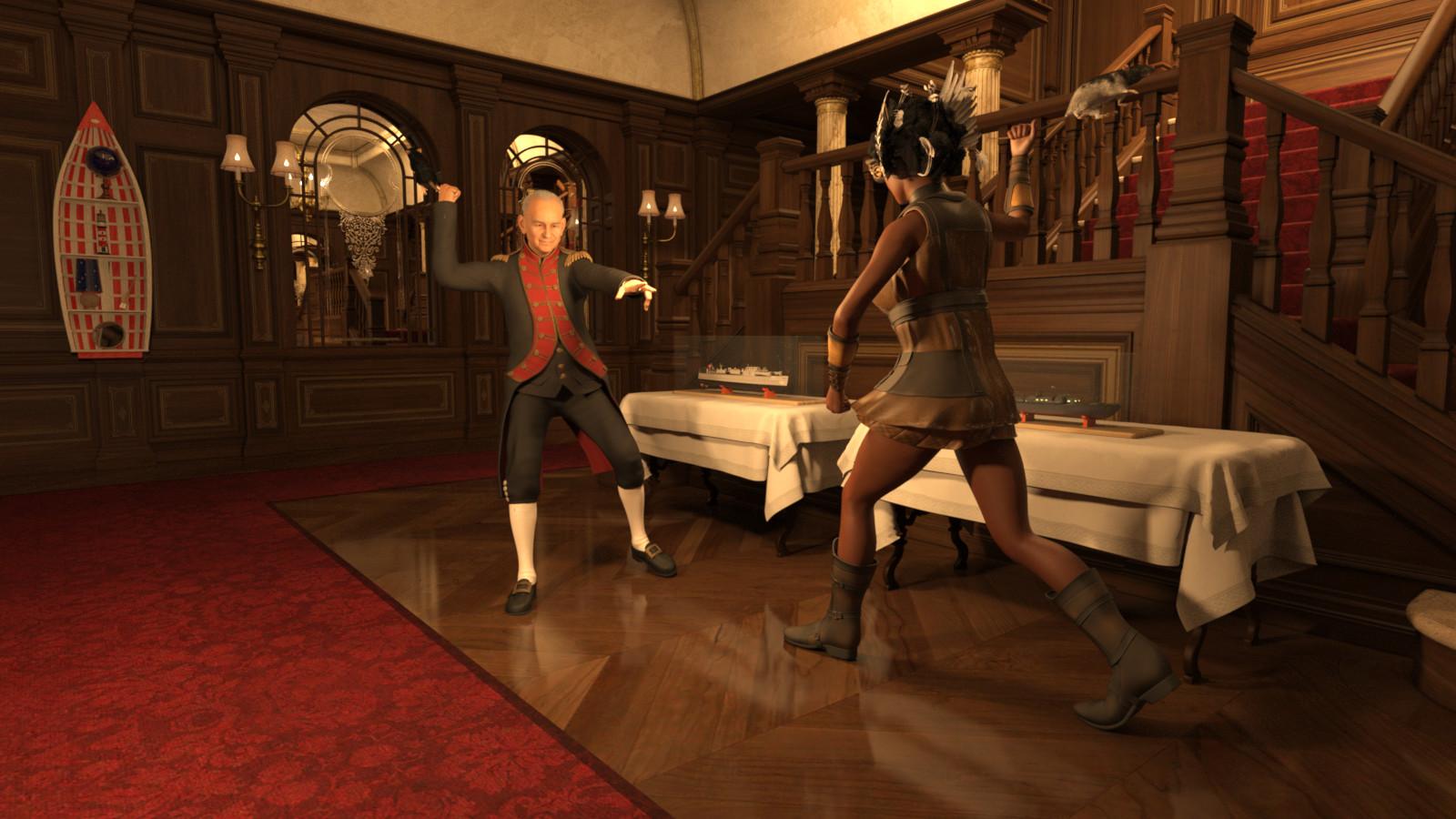
HAHA This is very funny! I was worried for the rats -so glad they use movie prop fake rats! :D
RRRR - Weird Holiday Traditions Render Contest *CLOSED*Tag: Totte #01
#5056 FR-Simonee (Rendo)
#1492 AH_Vestibule Iray AddOn (#33451)
#4649 German E Boat (for Poser) (Render) (Hmm, will see if it loads)
#5160 LoREZ Rat 2 (#91291)Also Used:
Fletcher Class Destroyer (glass box)
ECLO PT Boat
Victoria 4 + Val AngieLee + Yolande Hair
Dinner at the Orient Express (tables)
AH_Vestibule
Monty for Genesis 8 Males + Naval Officer Outfit + Mr Banks Hair
Nautical Whimsey Vol 1Script, Lights and Shaders used:
Legacy Set Converter
Advanced Material Converter
JM Human Shaders
3DL To Iray
UHT2 Ultra Saloon
Invisi Lights
iRadianceLightProbesThe Navy Day Rat Fight
Every morning on the annual Navy Day, the retired fleet commander Sir Monty Winterbottom III and his stepdaughter Angie Winterbottom has a traditional rat fight. A rat fight much like the sailors did during the age of pirates, but today, they are using fake movie prop rats.
Celebrity Look-a-Likes for 3D figures Part 4rokkr said:
I think "any" was a rhetorical exaggeration, right? But I agree you can create real-world look-a-likes using many different Daz characters, doing a little research finding a good skin and brows, and knowing how to apply the right morphs. Then, it's just characterization with the right hair and clothes.
About the Daz Core Os, I feel a little relieved. I thought one day I'd see Victoria 7, Teen Josie 8, or even The Girl walking in the streets
Exaggeration, maybe a bit, but a lot of the celebrity lookalikes that people have mentioned in this thread haven't really looked like the celebs, but definitely had the dressing to put them in mind.
I'd be very concerned if you saw The Girl walking down the street XD
Celebrity Look-a-Likes for 3D figures Part 4ChangelingChick said:
rokkr said:
I think the guy is just trolling... Anyway, do all Daz Core characters are based on someone? I know we always have some inspiration (even if it's just a subconscious thing), but I thought some if not most Daz Core characters were meant to be original creations (in the sense of not resembling any real person). Now I'll be itching to know who is who!
The best way to make a character realistic is to use real-world references, but the last time I spoke to one of the creator's about it, they go to pains to make sure that the character at most resembles the reference and isn't a dead ringer. Most are going to reference several people. But the thing is, with the right lighting, hair and dressing, any character in the store can look like anyone really (just like real people). The point is to put the person you want it to resemble in the mind of the viewer (with a signature hair style or set around them), then the viewer fills in the details with the original reference. There are a lot of characters in this look alikes thread that, without the hair and sets around them or specific poses, they don't look a thing like the person they've been associated with, especially in profile. Or the skin will be dead on but the features really aren't at all (or vice versa).
For Daz O's there are few that, in my opinion, are really, *really* obvious (I mean, we did have an official Reby Sky that she modeled for and everything), but for the most part they're going to be blends of people the artist themself knows personally, broader references and creativity. Most artists tend to make themselves because that's the face they're most familiar with (you may notice several particularly common features among my characters, and those are my features basically-- I actually have a dial I've made for myself to de-CC my characters XD at least the ones that weren't supposed to be me). So, generally, that's where most characters will have started.
I think "any" was a rhetorical exaggeration, right? But I agree you can create real-world look-a-likes using many different Daz characters, doing a little research finding a good skin and brows, and knowing how to apply the right morphs. Then, it's just characterization with the right hair and clothes.
About the Daz Core Os, I feel a little relieved. I thought one day I'd see Victoria 7, Teen Josie 8, or even The Girl walking in the streets
Extremely bad performance with DAZ charactersPadone said:
In general it certainly depends on the figure and assets you load of course. It is also true that some daz assets are extremely heavy so to be avoided for animation. However, here I have a very basic hardware with a old GTX 1060, and with "normal" figures I don't experience much lag in the viewport. Using the Victoria 8 pro bundle I loaded Victoria 8 with Voss hair and the Defender armor. It runs at 30 fps both in solid mode and material preview.
I just use easy import with the preset for G8 so everything is included from jcms to correctives to morphs. Of course with simplify enabled, I woldn't dare anything without.
p.s. For heavy items, using the hide icon in the outliner doesn't affect the viewport performances. You have to use the disable icon instead, which will hide and disable the item so viewport performances are affected. There's no need to delete the item from the scene, just disable it.
Thank you for your response. I’ve already found the reason and managed to fix the issue
Actually, I was really surprised to find out it’s the brows. The character with the worst performance had brows from the 'Echo HD for Genesis 8.1 Female' model, and they have over 480,000 faces. When I checked about 10 other brows from my assets, they were all somewhere between 40,000 and 80,000 faces. I have no idea what went wrong when someone created this model, but that’s just insane
After using 'unsubdivide' on the brows, the face count dropped from 480,000 to 120,000, and now there's no more lag. A lot of my characters are based on Mousso models (the creator of Echo HD), and it seems like the high face count issue is common with many of their brows (at least for me)
However, problem solved! Thanks :)
Extremely bad performance with DAZ charactersIn general it certainly depends on the figure and assets you load of course. It is also true that some daz assets are extremely heavy so to be avoided for animation. However, here I have a very basic hardware with a old GTX 1060, and with "normal" figures I don't experience much lag in the viewport. Using the Victoria 8 pro bundle I loaded Victoria 8 with Voss hair and the Defender armor. It runs at 30 fps both in solid mode and material preview.
I just use easy import with the preset for G8 so everything is included from jcms to correctives to morphs. Of course with simplify enabled, I woldn't dare anything without.
p.s. For heavy items, using the hide icon in the outliner doesn't affect the viewport performances. You have to use the disable icon instead, which will hide and disable the item so viewport performances are affected. There's no need to delete the item from the scene, just disable it.
p.p.s. shaders. Also shaders and textures can slow down the viewport, so using solid mode for animation is generally faster, especially for complex scenes.
RRRR - Weird Holiday Traditions Render Contest *CLOSED*Welcome to yet another round of RRRR. This time we're having a theme, and the theme is Weird Holiday Traditions. It can be weird fictiona traditions for an existing or a fully fictional holiday, Do you celebrate Serenity day by dressing as a space cowboy shouting gorram at all people you meet? Do you, as Jack in the entries only thread drink tea scented with fermented herring for Easter? You options are endless, just limited by your imagination and the gods of random.
RRRR stands for Random Runtime Roulette Renders, and it's a contest that has been running for over twelve years now, on and off. We invite anyone to enter, specially all those new users who have shown up the past years. This is not the usual make a very nice render contest but more like tell a really great story, often fun, with your render!
How does it work?
Make your pull of 4 items, and if your any Lucky Bastards, you pull one extra item per LB.Who can play?
Anyone can play!How do you prepare yourself for play?
The rules are very simple, but first you need to have all your items in some kind of order in a text file, dumped from the itemized history into a text file or a spread sheet. Remove things like software, gift certs, and special plugins from the list and items that wil not work with the software you work with. For example if you have items for Poser, Bryce or Carrara, and want to use DAZ Studio, remove those other items from your list. If you have loads of older figures, M3, M4, a ton of non Iray stuff and you only want to use Studio with Iray, remove all the junk from you list.Then you use a randomizer to randomly pick items from your list (your Runtime/My Library) for your start pull . You can use items from any store. Now build a scene with those 4 items plus any other items you want to add to make a fun scene. For newcomers I heartly recommend looking at the previous contests below to get ideas how you can do this.
Working randomizer:: https://www.random.org/integers
There are some situations where you allowed to redraw, these are:
- You pulled something that doesn’t work, broken thing, only works in a version / software not used etc etc, or you forgot to remove that item from you list even though you knew it wont work, or figure that out later.
- You pulled a software or add-on to a software or anything you should have filtered out from the list.
- You pulled only huge environment props and will not be able to render a scene without crashing.
- You pulled an item you already have been using in two RRRR renders in this content and that was picked randomly. Three is a curse - rule!Lucky Bastard Rule!
I say this again: If you have Lucky Bastards, you pull one extra item for each LB you have, simple as that.
Explaination of Lucky Bastards.
Lucky Bastards, or LBs, are a form of handicap system which makes the contest a little more difficult for those who have won. No lucky bastards are in play now, but will be for the next run.Lucky Bastard Standings Player Current LBs Luci45 3 acb 3 How to play?
You pull, you compose and you Render. You post your images and pulls in this thread (Don't miss that, entries without pulls and posts in this thread will be disqualified!!).
Then the entry should also be posted in the Entries only threadBundles
If you pull a bundle, use two or three complete items from it, or more if you like, but you do not need to use all, but only picking a hairpin from Victoria 8 Pro Bundle is “too little”. Clarification: A bundle still counts as only one pulled item.Poses, Expressions and textures/colors
If you pull a pose pack, an expression pack or a texture/color pack, you only need to use one of them, not all. For example if you pull 500 expressions for Genesis 8 Female, use one, if you pull 128 colors for Frappe Hair, use one.
Accidenty breaking the TOS
If your entry is removed by the forum mods because it accidentally, not deliberate, broke the TOS, you do not have to redo that entry but can move on and make a new pull.The rules of madness!
Now you have successfully and randomly picked your items, make a scene, you can add other items as well but the one you picked should be prominent or cleverly used. Render it, post it and make us all laugh! Remember though that the renders must follow the TOS of the forum. As we have a theme on the contest, the render should in some way touch that theme.The contest categories!
There are two categories Best and Funniest. Every image will compete in both categories.Contest duration!
It starts now at Saturday October 19, 2024, and will go on until Sunday January 12, 2025 at 23:59:59 local DAZ time. Yes, a long run, but I thought what is better to do in the holidays than render what you do not do in the holidays?This months sponsors so far:
Totte (Code 66) is sponsoring with two items from his store
Elliandra is sponsoring with two items from her store
3Diva is sponsoring with two items from thier store
(Sponsored items does not include any Daz Originals, as it has never done)We want more sponsors!
Do you want to sponsor the RRRR?
Please chip in a gift card sponsorship, sponsors can play, they should play, they are even extra encouraged to play, as sponsors always plays for keeps.Maximum number of entries?
For this round it will be a maximum of 12 entries per player.So, good luck and start your render engines!
There's Always Another Sale Thread -- Discussions Only Pt 3
Yep. The preorder for Victoria 9 launched on September 21, 2022 - and there have been a LOT of G9 characters since:daveso said:joanna said:
Maybe not exactly from day one, but MMX Genesis 9 Clones was released about 2 months after the introduction of Genesis 9. The product's almost 2 years old by now :)
G9 is that old already? Seems like a few months only. No wonder I'm so old.
https://www.daz3d.com/forums/discussion/642596/list-of-g9-core-figures
(And that list isn't quite up-to-date since I'm not motivated to continue chronicling the line when I'm not allowed to purchase some of its core figures, with Aiko 9 and who knows how many future characters being exclusive to Premier.)Limited Time Freebies Discussion ThreadAnd now another nice set of freebies including
https://www.daz3d.com/sci-fi-space-ship
https://www.daz3d.com/aaron-hair-for-genesis-3-males
https://www.daz3d.com/i13-home-time-relaxing-poses-and-props
https://www.daz3d.com/the-back-fence-3
https://www.daz3d.com/ronan-genesis-3-male
https://www.daz3d.com/couple-in-love-poses-for-michael-7-victoria-7
https://www.daz3d.com/textures-for-aether-outfit
https://www.daz3d.com/allure-chemise-for-genesis-2-female-s
https://www.daz3d.com/florida-hair-for-genesis-2-female-s
https://www.daz3d.com/casual-denim-2-xtra
https://www.daz3d.com/latex-hero
and the usual Kin items.
Problems loading and saveing in DAZ Studio 4.23Hello,
i have problems loading and saveing
Saveing scenes over File / Save as / Scene.. says it is saveing but than the destination directory remains empty. Try to save again and it works. But when scene was loaded modified, and saved with the save button, the changes are not saved.
When loading old scenes (with Victoria 4) figure loads but clothes and hair is not loaded, error message comes, that certain files are not found. Checking the directory - files are there.
I created my own startup scene. Even this could not be loaded at program start. But there is a hint in the log:
2024-10-17 12:04:33.079 [INFO] :: Begin asset load (open): /D:/DefaultStartSczene.duf
2024-10-17 12:04:33.079 [ERROR] :: File Format Error: D:/DefaultStartSczene.duf
2024-10-17 12:04:33.079 [WARNING] :: Error loading asset: D:/DefaultStartSczene.duf
Operation failedCan anywone help me with this problems?
There's Always Another Sale Thread -- Discussions Only Pt 3TriCounter said:
Arrived today for the 80% off Bundles lol ... 20 year old content and down to 50% for Genesis 3 which was released over 10 years ago.
Now that we've got Daz 2D catoonz II'll hope to see if there's a Victoria abstract expessionism release next week.
I am wondering if Hiro9 will be necromanced since they killed him off a few generations back and seemed intent on shipping Aiko with a line of swole GigaChads
There's Always Another Sale Thread -- Discussions Only Pt 3Arrived today for the 80% off Bundles lol ... 20 year old content and down to 50% for Genesis 3 which was released over 10 years ago.
Now that we've got Daz 2D catoonz II'll hope to see if there's a Victoria abstract expessionism release next week.
Trying to match character in imagesFauvist said:
I looked at the OP original post and sample image. I believe the figure/character is just Victoria 8. I believe the texture is Fane Hair and Character for Genesis 8 Female(s), using the Tan Diffuse Preset for that character. I believe the eye and lip textures are from the original Vicoria 8 figure.
no. i'm wrong
Trying to match character in imagesI looked at the OP original post and sample image. I believe the figure/character is just Victoria 8. I believe the texture is Fane Hair and Character for Genesis 8 Female(s), using the Tan Diffuse Preset for that character. I believe the eye and lip textures are from the original Vicoria 8 figure.
Creating adult content with daz how to get started?Richard Haseltine said:
I have adult content all the time. Stuff with kids, people in diners... I'm thinking of doing a series where someone is trying to figure out their taxes.
Oh, you mean porn? Oh.
I just would like to make a sex story of mine, how can I find the organs like " penis and vagina", I installed the DAZ 3D , but I can't find the adult stuff on it, should I buy some products? what are they? please advice!
thank yoy
Actually, he didn't - which was rather the point.
However, the anatomical elements are included only in (some of) the pro Bundles for adult characters - e.g. Victoria 8 Pro and Michael 8 Pro. However you need to bear in mnd that the daz products are only the base mesh, daz does not sell shaping options and certainly not "action" shapes/poses.
so technically you mean we only do modeling here ha? seems fair i mean at least for modeling
Can turbo loader be applied to only specific character?
From independent character product perspective, they don't share any of their exclusive morphs from one another.James said:If Aiko is G8 Figure, why it doesn't share the same morphs as Victoria 8 which is also G8?
Can turbo loader be applied to only specific character?If Aiko is G8 Figure, why it doesn't share the same morphs as Victoria 8 which is also G8?
Anime Toons and Filatoon Shader Q&AMada said:
Petra said:
Can one put normal Iray shaders on the new Victoria 9 toon shape?
Yes but you won't have the outline, and the normal G9 eyeballs would probably work better with Iray Textures.
If you're just after the iray texture but still want the outline and render in filament, just drop the base colour texture used in iray into the right channel.
In this image I loaded Vicky Toon, and then applied Josie's Iray shader, and then removed the maps from the normal and specular channels to get a flatter look
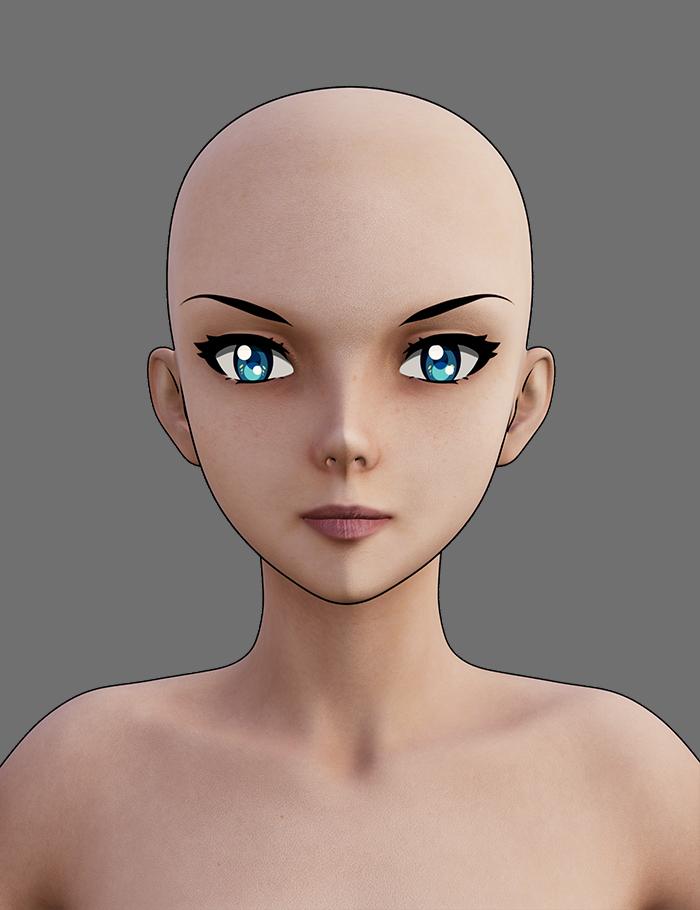
Thank you so very much Mada, that is lovely. Is there a light that you could recommend that works good with filament renders?
Daz 3D is part of

Connect
DAZ Productions, Inc.
7533 S Center View Ct #4664
West Jordan, UT 84084Licensing Agreement | Terms of Service | Privacy Policy | EULA
© 2026 Daz Productions Inc. All Rights Reserved.