-
Upside down hair
If you simulate with the Geometry Editor tool selected, the hair seems to lose its baked in stiffness and will drape a lot. That's really the best way to make upside down morphs or droopy wet looks, I think. After simulation, always select another tool, like the Node Selection Tool, before Iray rendering. The dForce hairs won't render all the strands with the Geometry Editor (or Mesh Grabber, etc.) tools selected. You can create a morph of your draped hair by exporting it, clearing the simulation and importing the exported OBJ with Morph Loader Pro or MorphMaster.
There are more tips and some examples in the dForce Hair Thread. Look at the various examples I did with Toyen's Linet Hair in that thread.
Character Mixer 2 by 3D Universe - operational questionsCharacter Mixer Version 2 for Genesis 8 and 9 | Daz 3D
If I have a G9 female character loaded, and I hit the FEMALE button in the app, should I get a female character? I didnt, but got a male character ...
How do you add morphs to the list? It searches for them, but it does not grab the 200 plus morphs from Zevo, for instance. Is there a way to expand the search parameters to include all morphs or does it just grab from other characters.?
I think , overall, from what I've seen so far first time using it, it is somehwat limited. You cannot use too many morphs for sure at a time. I bought the previous version but ended u0 not using it, and this might be the same unless I can keep gender the same, and the ability to use more morph products, not just characters, which seem to be limited by the morphs that reside with each one.Genesis 2 Appreciation ThreadThat Cheongsam looks lovely, @mding.
I've had the joy of my fourth dose of COVID in the last couple of days, and have managed to sit upright for a few hours this morning. The characters are Naida and Alessa. The train is FG luxury train. The clothing on Naida is by Wilmap Top & Bottoms . Naida's hair is Lady Florence Hair , Alessa's hair is Ranger Hair . Can't remember Naida's shoes. Alessa's shoes are those with the Cheogsam set. Naida Jewellery : Earrings Allen Art Briolete Hoops , Bicep Ring is Allen Art 'Genny Bracelet' moved to the bicep (Can I say here, AllenArt's jewellery is saleable quality, really is). Glasses are Octagonal Highball glasses by me. Poses: scratchbuilt from default pose - I haven't got a G8F toG2F pose transfer script to make things easier yet.. Hrrumph. The background is Moulton Falls West railway cutting HDRI from PolyHaven. I spent a fairly unproductive time trying to get the train and track to align until I went to a wide top view and could see when the train and track on the HDRI were in alignment.


Regards,
Richard
Wrong Default values on Genesis 2 in scene file?You may have used one of the memorise commands (Memorise = set default values) at some point when the morph was set.
Wrong Default values on Genesis 2 in scene file?I recently had a very peculiar bug in some of my scene files where my genesis 2 female had a really wrong and distorted face.
Looking into it further I saw that Valerie Head was always on because the default value was set to 0.5. Also other face morphs like brow depth and eye height also had non-zero default values.
If I just fresh open up Daz Studio and load in a Genesis 2 Female, the default values of these particular morphs is zero, so it doesn't look like the base morph default values got scrambled, somehow just non-zero face values got baked into the scene file.
I was able to debug my scene file by combing through the face morphs and reseting the morphs' default values to 0 but how could this have happened in the first place?Alien Eyes on old V4 Charactersmaybe a cornea bulge morph and apply a thin glass shader to the cornea?
the morph might place the 2 surfaces too close
Stockings clipping through shoes - ideas how to fix?Several solutions come to mind:
1. Fix in post: Render twice, once normally, the second time with hidden stockings The second time a spot render is enough for the affected area). Combine both in post processing
2. Use geometry editor to create a new surface. Assign the affected parts of the stockings to the new surface. Hide the new surface in the shader settings by modifying opacity settings.
3. Mesh grabber (which is a separate add-on) and modify the geometry of the stockings in the affected areas.
4. Generate a morph in an external application.
Daz loading new installs into Lost and Found, Why? and How to fix?barbult said:
nemesis10 said:
Yep, the PA's I communicate with create their own metadata. This comes up occasionally when two PA's create assets with the same name and create a conflict or when a PA creates a strange new folder for their products such as "Praps" rather than Props. Customers complain and it must be explained that Daz3d didn't name the character or decide where products go and what the folders are called. So Daz3d has to go to the artist and ask them to change it.
PAs create their folder structure and content filenames, morph names, etc. File and folder names and morph names are not metadata, though.
Metadata is database information, like asset type, category, compatibility base, compatibility, etc.Two PAs have already responded to my question, and have confirmed that Daz (QA) creates the metadata for their products. That is consistent with what I have been told in the past.
Edit: Third PA chimed in and confirmed that he has never created metadata for his products himself. Daz does it.Yes, this is correct.
Let's appreciate/discuss today's new releases - more ongoinger threadcrosswind said:
barbult said:
crosswind said:
Lorraine said:
Perhaps Timbales means the buttons being on the wrong side for a man's shirt
Ah... got it. If so, a man style can be easily added to the shirt with a morph plus flipped Bump and NM maps.
It's always nicer for customers when the vendor does that ONCE instead of every interested customer having to do it individually. Many customers won't have the skill to do that. If a masculine morph is included in a shirt product, it seems like a masculine button placement is reasonable to expect. Don't you think?
Yea, I totally agree with you. And in this case for Sue Yee, it could've been a piece of cake for her to make a man's version within the product.
Sue Yee clothes actually generally have a lot of wrinkles in the wrong place, for the wrong position. I didn't notice it myself, but I have a friend who is trained as a tailor, and she took one look at these jeans with the red belt that I thought was so realistic looking and said, But how do these creases happen? The character is standing, why are the legs wrinkled like this? And she was right, and basically all Sue Yee clothes are like this.
I'm also unhappy that they seem to have stopped supporting G8.
Daz loading new installs into Lost and Found, Why? and How to fix?nemesis10 said:
Yep, the PA's I communicate with create their own metadata. This comes up occasionally when two PA's create assets with the same name and create a conflict or when a PA creates a strange new folder for their products such as "Praps" rather than Props. Customers complain and it must be explained that Daz3d didn't name the character or decide where products go and what the folders are called. So Daz3d has to go to the artist and ask them to change it.
PAs create their folder structure and content filenames, morph names, etc. File and folder names and morph names are not metadata, though.
Metadata is database information, like asset type, category, compatibility base, compatibility, etc.Two PAs have already responded to my question, and have confirmed that Daz (QA) creates the metadata for their products. That is consistent with what I have been told in the past.
Edit: Third PA chimed in and confirmed that he has never created metadata for his products himself. Daz does it.Let's appreciate/discuss today's new releases - more ongoinger threadbarbult said:
crosswind said:
Lorraine said:
Perhaps Timbales means the buttons being on the wrong side for a man's shirt
Ah... got it. If so, a man style can be easily added to the shirt with a morph plus flipped Bump and NM maps.
It's always nicer for customers when the vendor does that ONCE instead of every interested customer having to do it individually. Many customers won't have the skill to do that. If a masculine morph is included in a shirt product, it seems like a masculine button placement is reasonable to expect. Don't you think?
Yea, I totally agree with you. And in this case for Sue Yee, it could've been a piece of cake for her to make a man's version within the product.
Let's appreciate/discuss today's new releases - more ongoinger threadcrosswind said:
Lorraine said:
Perhaps Timbales means the buttons being on the wrong side for a man's shirt
Ah... got it. If so, a man style can be easily added to the shirt with a morph plus flipped Bump and NM maps.
It's always nicer for customers when the vendor does that ONCE instead of every interested customer having to do it individually. Many customers won't have the skill to do that. If a masculine morph is included in a shirt product, it seems like a masculine button placement is reasonable to expect. Don't you think?
Let's appreciate/discuss today's new releases - more ongoinger threadLorraine said:
Perhaps Timbales means the buttons being on the wrong side for a man's shirt
Ah... got it. If so, a man style can be easily added to the shirt with a morph plus flipped Bump and NM maps.
Let's appreciate/discuss today's new releases - more ongoinger thread
Yes. The buttons and placket are reversed on men's clothing. And the extra folds of fabric on the male morph look odd to me.Lorraine said:Perhaps Timbales means the buttons being on the wrong side for a man's shirt
Let's appreciate/discuss today's new releases - more ongoinger threadTimbales said:
https://www.daz3d.com/dforce-su-loose-shirt-for-genesis-9
Nice shirt, too bad there isn't a men's version
It has a dedicated morph for G9 Masculine ...
i am looking to manually install a .dsf file with body morphs after a computer failureI got a new computer recently and was able to download all of the files I had purchased directly through the DAZ storefront. I'm glad for that. However I had purchased one of SickleYield's Genesis 8 morph products from another storefront, and that file was not reinstalled. These are important to me as they're my only real way of distinguishing characters by facial features.
I have access to the files, and have followed a few different suggestions from tutorials, but I can't get the DAZ program to recognize the files. For example, putting them in the Genesis 8 Male directory didn't work. Putting them in the root directory didn't work either.
The closest I can get is to have them appear in "Scan Results", but it does not add a Morphs folder in the main list in the Content Browser and they do not appear on the figure's Shape properties or anywhere else. Is there a way to manually import files into Daz Studio after a scan? That's the one thing I haven't found a tutorial for so far.
Thanks for any help you can give. Please let me know if I can give more information that will help me solve the problem faster.
Can you help me with a college project?- How long have you used Daz 3D Studio?
- 13 months, end of August 2024
- Do you use any other software with Daz 3D? (bridges, photo editing, or other rendering software)
- GIMP 3
- How easy or difficult was it to learn Daz Studio?
- I'm not sure I would say I "know" Daz Studio. There are thousands of places where I find out something does or doesn't exist all the time. Sure I can navigate the product, pose figures, load assets. But have I learned Daz? Hardly.
- Did you have to purchase a specific computer to use the application?
- My prior computer was a low end CPU with an Intel motherboard GPU. Yes. I did buy a new computer for Daz.
- How much money have you spent at the marketplace or other third-party sites for content?
- Far, far too much. It is my primary hobby and I have disposable income. I'm in 5 digits already. (Nearly 6 based on MSRPs according to Daz-Deals plugin.)
- What kinds of bugs or errors have you ran into?
- Far too many to list. Random crashes, figures that suddenly morph and tracking down the culprit morph taking forever, etc.
- Is there anything you would change about the application?
- Far too many to list. The absolute worst part of the current design is that when you load a figure, it loads EVERY possible morph for that figure onto it. As I said above, I have a lot of assets and it takes forever to go through every DUF/DS? file and load all those morphs. I'd far prefer it if assets with figure morphs had to have Attach/Detach scripts to make changes to the figure. And then only the morphs necessary would exist. I don't often need vampire teeth, why do they always load? Sure. Turbo Loader can change this but that means I need to know ahead of time if I need vampire teeth. It's just clunky.
LJ Studios - Art Work and TipsHere is my take on G2F(left) and V3(right). I wanted to see just how different or better or worse the models are when compared side by side. The image consists of the two figures using a texture called Yarishan by Dreampaint. It was a character set with morph, textures and props for the character V3 in this case (2005). I had converted the base texture to V4 and I used the V4 UV mapping change on G2F to apply the texture. The leotard that the twins are wearing is a 2003 freebie by Specs2. (Simple LeotardV3 - Poser and Daz Studio Free Resources Wiki). Who by the way was a published artist for DAZ in the early days. If you have the freebie Princess Akkan which is for V3, as well, you have one of the DAZ products Specs2 created. I took an older free hair called Simple Hair by Mark003 (2010) at Rendersoity as my product I wanted to see if I could make it work in the more advanced setting of an iRay render. I used a shader set by Astuceman (https://github.com/Astuceman/Daz-Iray-Shaders-and-Lights) He has several hair iRay presets. The original hair is on G2F and the modified hair is on V3. To update the skin I used VRX iRay Skin Shader by vrxitachi. (Sharecg). The feather boa is by StudioArtVartanian. So in conclusion. I think 20+ year old stuff does have a chance of competing with the big boys. I give you the twins.
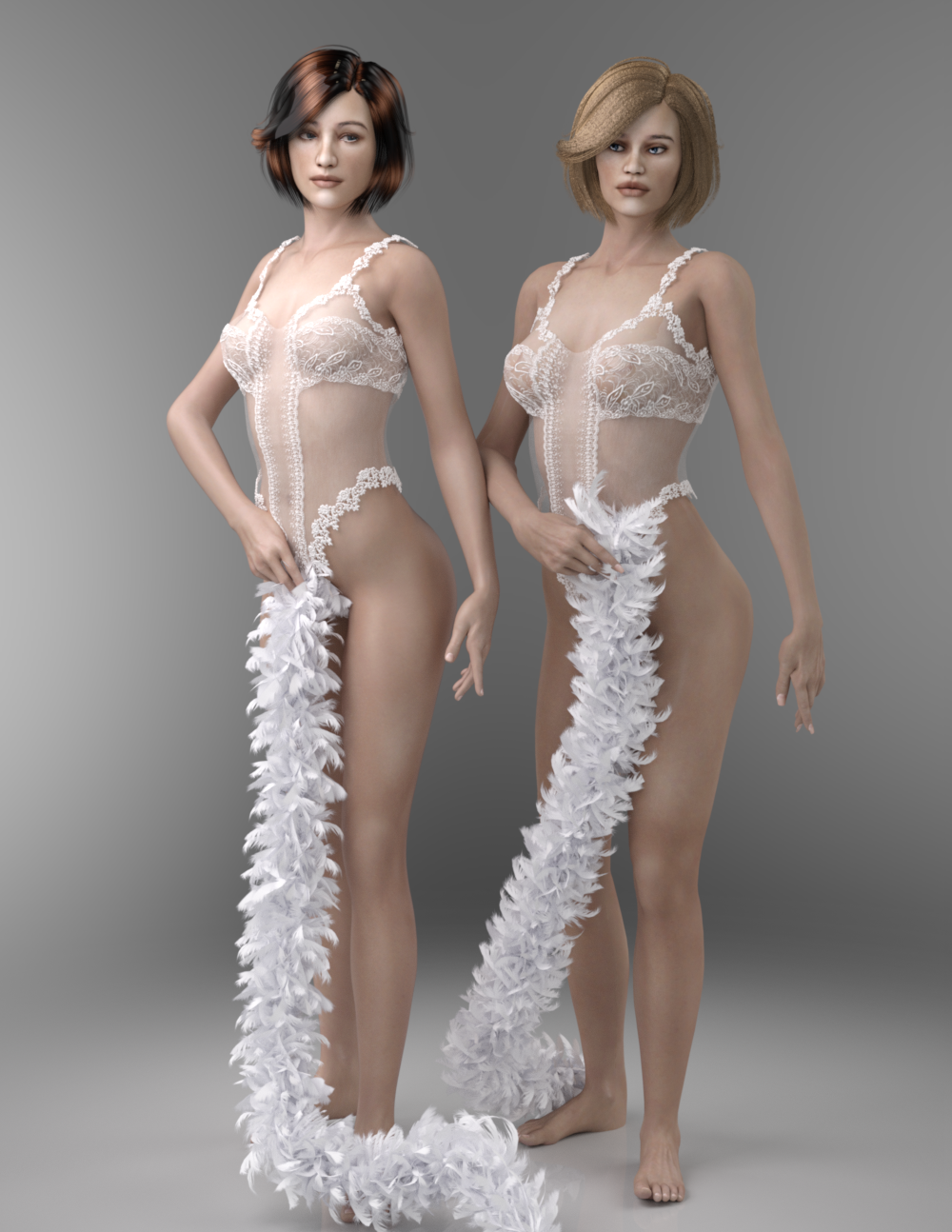 The older generation: Victoria 2/3, Michael 2/3 and their children renders
Here is my take on G2F(left) and V3(right). I wanted to see just how different or better or worse the models are when compared side by side. The image consists of the two figures using a texture called Yarishan by Dreampaint. It was a character set with morph, textures and props for the character V3 in this case (2005). I had converted the base texture to V4 and I used the V4 UV mapping change on G2F to apply the texture. The leotard that the twins are wearing is a 2003 freebie by Specs2. (Simple LeotardV3 - Poser and Daz Studio Free Resources Wiki). Who by the way was a published artist for DAZ in the early days. If you have the freebie Princess Akkan which is for V3, as well, you have one of the DAZ products Specs2 created. I took an older free hair called Simple Hair by Mark003 (2010) at Rendersoity as my product I wanted to see if I could make it work in the more advanced setting of an iRay render. I used a shader set by Astuceman (https://github.com/Astuceman/Daz-Iray-Shaders-and-Lights) He has several hair iRay presets. The original hair is on G2F and the modified hair is on V3. To update the skin I used VRX iRay Skin Shader by vrxitachi. (Sharecg). The feather boa is by StudioArtVartanian. So in conclusion. I think 20+ year old stuff does have a chance of competing with the big boys. I give you the twins.
Corrective morph problem.barbult said:
surv0101 said:
crosswind said:
Check this thread to see why the issues happen and how to fix them.
And then fill a support tickets,
... Can't the vendors make the morphs only apply to the characters they were made for?
Yes, they can, and they are supposed to. But mistakes are made, as you've seen. We would hope that Daz QA would check for things like that ask the vendor to fix the product before putting it in the store. I don't know if they try to check for that or not.
It would be a huge selling point, if vendors advertise, if they have custom automatic corrective morphs/ JCMs with their characters.
Just sayingDaz 3D is part of

Connect
DAZ Productions, Inc.
7533 S Center View Ct #4664
West Jordan, UT 84084Licensing Agreement | Terms of Service | Privacy Policy | EULA
© 2026 Daz Productions Inc. All Rights Reserved.