-
Sagan: A DAZ Studio to Blender Alembic Exporter
Hi @starslinger
The config file behavior you cite is indeed how it shoudl work. I did find a bug in the code that is already fixed and will be in the next iteration.
The order of the material slots is an issue that has been known about for a long time. Diffeo gets the materials from the JSON. Sagan gets them from the SDK API. They are generally not gong to match. Recently, I've found that Diffeo creates fewer material slots than Sagan does. It seems like Diffeo is wrong, but I haven't investigated very far, yet. I'm considering putting back in the code that gets the materials from the JSON, like Diffeo does. It was removed because it required parsing the JSON, which just bloated the code, but since I've got to parse the JSON anyway for fiber eyebrows, I may as well fish out the materials data since I've already got the JSON parsed. I'm aware of the UV problem as well, and I, too, find it annoying. In the end, I'll probably output a script to convert diffeo's naming scheme to Sagan's, not the other way around because Sagan utilizes the human readable label one sees inside DAZ Studio, while Diffeo uses the ID from the JSON which may or may not even correspond to what the user sees in Daz Studio.
When the implementation settles, I'll explain all the metadata that gets generated.
Your hotkey is coming along. I'm killing two birds with one stone by using essentially the same code to make your hotkey work as to collaborate with the creator of the Daz To Houdini plugin. If anyone is doing God's work, it's that guy... amazing stuff.
Stay tuned.
Sagan: A DAZ Studio to Blender Alembic ExporterSo I've been working with sagan for couple of days now and there are a few things that bother me. The settings still dont save per scene file, they seem to be global. Im not sure if you plan to change this so I'm mentioning it. I think it is really important to have settings save per scene file, like for example frame range so that when you open the older project you know what you are working with and not have to constantly fiddle with frame ranges especially if you work with multiple files. Another thing is, the order of material and the uv naming does not follow diffeomorphic template. I've tried fiddling with diffeomorphic material order settings but no success, this fix used to work in older versions of sagan. My suggestion is, keep uv naming same as diffeomorphic and keep material order/index the same as diffeomorphic default import because this simplifies the material transfer by an order of magnitude. Currently as it is you have to fiddle with both the uv's and material orders just to get a single piece of clothing working and then you have to do it for every single unique piece. I saw sagan exports some scripts also, I am not sure if and how they are supposed to be used.
Importing rigged fbx modelsYou don't have to need any commercial options ~~ just import FBX files with DS 4.22+ (in which FBX Importer has been enhanced and bug fixed...). Older DS versions brings you no expected result.
The imported FBX figures can be posed... but with no joint corrective morphs.
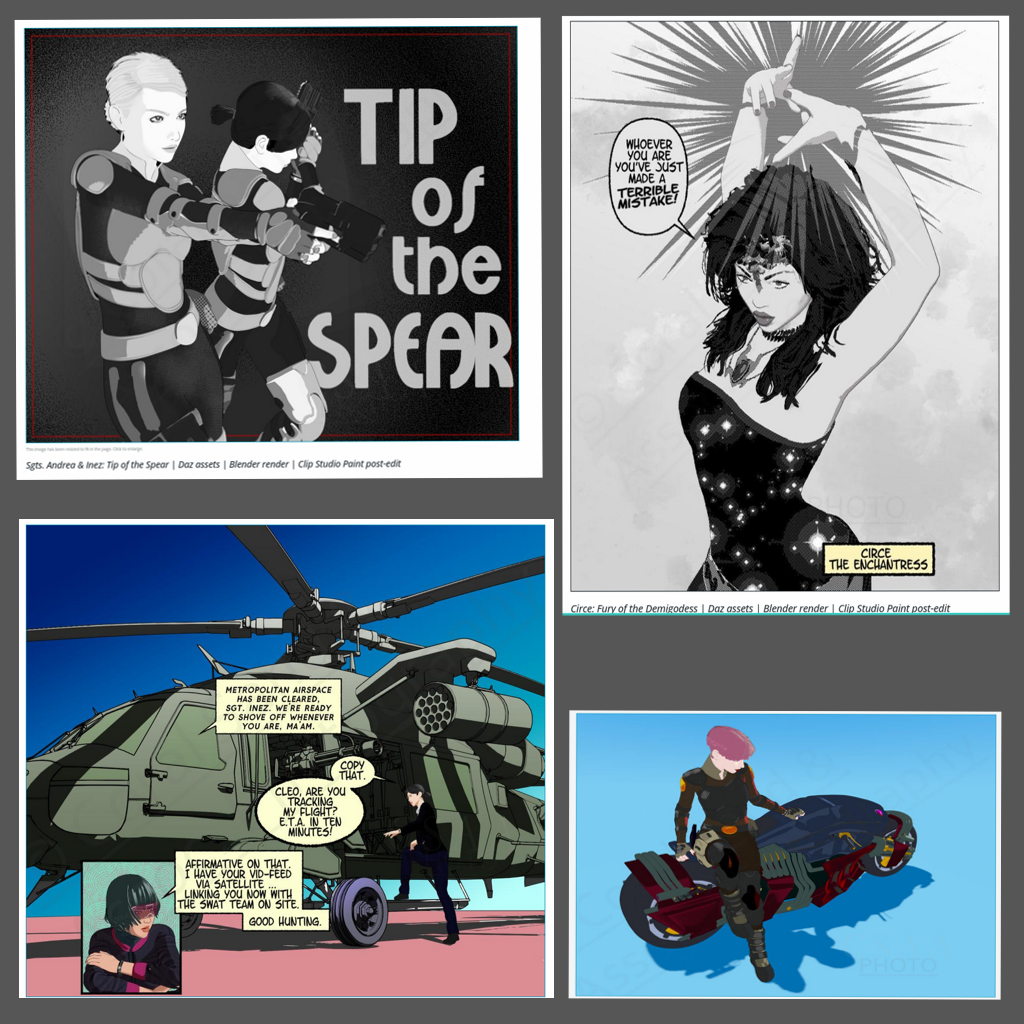
Has anyone tried Clip Studio Paint?CSP is primarily for creating 2D art. As others point out, it's known for the creation of comics (manga or manhuwa) and still images but also for animation. As an animation software, I can't say how CSP stacks up against other industry tools, but it certainly shines when it comes to its asset store. There's just tons of brushes, templates and image assets to meet a 2D artist's needs -- in most cases, affordably priced.
Recent version of CSP started adding 3D functionalities. Starting with rag doll figures that an illustrator can pose and use as reference, CSP can now import OBJ (and FBX, I think) and process the accompanying UV and textures. The pose functionality now includes shape keys; a growing number of 3D figures have adjustable facial expressions. It goes without saying: Daz3D is lightyears ahead of CSP in this regard. In general though, the idea is to import 3D assets into CSP. The other way going out to external content creation tools isn't there yet at all.
When I was still tinkering, my toolchain included CSP. I'd start with Daz3D, export assets to Blender (via Diffeomorphic) to customize the texture; then I'd render a 2D scene and open the image file in CSP for final editing. Below are some of the images I've made this way (apologies for the slight distortions).
Cheers!
 Just got a notice about 3Delight being retired.....
Padone said:
My personal opinion is that iray is capable enough to convert 3delight shaders, indeed this is how we import 3dl in blender converting it first to iray.
Iray dosn't do anything in that context, Daz wrote code to convert 3Delight materials to Iray materials.
There may be some bump map to adjust as iray can't convert the bump height correctly, or some complex materials may need some adjustement too, but in general the conversion is good. As for the speed iray used with the cpu is far superior to 3dl with full ray tracing, while for 3dl without raytracing you can use filament instead, though in this case the shader conversion is not that good unfortunately as filament can't do most iray features, particularly transmapped hairs don't come good with filament.
The real advantage of 3dl is memory, as iray requires a vast amount of ram to render the scene while 3dl is tiled thus a small ram is enough. But ram alone doesn't cost much and most PCs can be upgraded for that.
SOLVED - "Drako for Ivan 7” does not work and displays an error message. Please help.Maybe someone here can help me. I get the following error message when I try to load a character (Drako for Ivan 7): "An error occurred while reading the file. See the log for more details."
The relevant part of the log file is as follows:
"2025-12-28 23:45:43.352 [INFO] :: Prepare asset load (merge): /People/Genesis 3 Male/Characters/Drako.duf
2025-12-28 23:45:43.353 [INFO] :: Locking viewport redraw...
2025-12-28 23:45:43.353 [INFO] :: Viewport redraw locked.
2025-12-28 23:45:43.751 [VERBOSE] :: Native format content directories: 1
2025-12-28 23:45:43.751 [VERBOSE] :: Poser format content" directories: 1
2025-12-28 23:45:43.751 [VERBOSE] :: Other import format content directories: 1
2025-12-28 23:45:43.752 [INFO] :: Begin asset load (merge): /People/Genesis 3 Male/Characters/Drako.duf
2025-12-28 23:45:43.752 [INFO] :: C:/Users/Ingo/Documents/DAZ 3D/Studio/My Daz Connect Library/data/cloud/1_32417/people/genesis 3 male/characters/drako.duf (1,1): Syntax error - expected '{' or '['
2025-12-28 23:45:43.753 [WARNING] :: Error loading asset: C:/Users/***/Documents/DAZ 3D/Studio/My Daz Connect Library/data/cloud/1_32417/people/genesis 3 male/characters/drako.duf
Operation failed
2025-12-28 23:45:44.336 [INFO] :: Unlocking viewport redraw...
2025-12-28 23:45:44.336 [INFO] :: Viewport redraw unlocked.
2025-12-28 23:46:50.319 [INFO] :: Prepare asset load (merge): /People/Genesis 3 Male/Characters/Drako.duf
2025-12-28 23:46:50.319 [INFO] :: Locking viewport redraw...
2025-12-28 23:46:50.319 [INFO] :: Viewport redraw locked.
2025-12-28 23:46:50.749 [VERBOSE] :: Native format content directories: 1
2025-12-28 23:46:50.749 [VERBOSE] :: Poser format content directories: 1
2025-12-28 23:46:50.749 [VERBOSE] :: Other import format content directories: 1
2025-12-28 23:46:50.749 [INFO] :: Begin asset load (merge): /People/Genesis 3 Male/Characters/Drako.duf
2025-12-28 23:46:50.750 [INFO] :: C:/Users/***/Documents/DAZ 3D/Studio/My Daz Connect Library/data/cloud/1_32417/people/genesis 3 male/characters/drako.duf (1,1): Syntax error - expected '{' or '['
2025-12-28 23:46:50.751 [WARNING] :: Error loading asset: C:/Users/Ingo/Documents/DAZ 3D/Studio/My Daz Connect Library/data/cloud/1_32417/people/genesis 3 male/characters/drako.duf
Operation failed
2025-12-28 23:46:51.345 [INFO] :: Unlocking viewport redraw...
2025-12-28 23:46:51.345 [INFO] :: Viewport redraw unlocked."
What could be wrong and, most importantly, how can I fix it?
Any explanations or technical instructions should be written in a way that even a complete beginner can understand.Thanks in advance.
Announcement about phasing out 3Delight - do we lose our 3Delight products?ArtAngel said:
Richard Haseltine said:
manekiNeko said:
so... i think i managed to find and copy in a separate folder what is probably the install files for my 4.22 public build beta, since i usually keep the install files, and i had them in my DIM download folder. ofc, impossible to download from daz any old beta versions, so i'm not sure if this is enough, like i couldn't find the scene builder for 4.22 in my downloaded DIM files. i have an update for it that i can see in DIM but it's for 4.23+.
think and probably being the operative words... i vaguely get the whole concept, makes sense, the details much less...i also downloaded from the daz site the most recent version i.e. 4.24 general release, just in case, but i'm not really interested in installing a full version (general release) since i also have installed 4.11 to keep functionality of a few products that don't work in later versions. unless there's suddenly some catastrophe with my laptop (or maybe i get a new one) and my saves to reinstall 4.22 public beta fail and i still need a pre-4.24 dec 29 version.
my point is more to have some install files to continue working with 4.22 beta + 4.11, my actual setup, in case my old laptop breaks down - or i manage to get a new one. as long as those 2 versions work, i can render in iray as i generally do, but also in 3dl for a few niche products (special shaders, camera effects). i'm also not interested in any form of subscription/mandatory online use with any server, and my old laptop might crash anyway with 4.22+.
but i'm still not sure if i have saved/re-saved everything i need for those 2 versions to be reinstalled in case i need it - for the sake of 3dl, but also just anyway.
what is scene builder anyway? and what "plugins that need to be saved" are meant?? i understand the concept of some plugins - especially from daz - being specific for each version, but i have no idea what/where they are nor what they're called...
i suck at tech tutorials and understanding comments/posts, my focus isn't the best - see my sig - so this whole thing with 3dl, that i only noticed a few days ago btw even i open the daz site every day, (and this made me also realize that i actually barely made saves to reinstall DS, especially with my special needs), is an absolute nightmare :/
If you look at the filter text given in https://www.daz3d.com/forums/discussion/comment/9400371/#Comment_9400371 , the numbers after sku:: are the SKUs (product numbers) of the things that need to be backed up.
Scene Builder is the tool that you can use to build a scene up from multiple-choice options - it can have custom recipes created but I havent seen many. It isn't required for anything but itself, as far as I know.'
Richard and everyone thanks for this heads up and the sharing. Seeking answers to a few things . . .
1. Is there a way to filter for products DIM does not download? Inactive seems to work a bit but not the word manual. I do know how to filter DIM download queries but what is the easiest way to find the parts of a Daz 3D purchase, that DIM leaves behind?
Well, for a product that has no DIMmable parts https://www.daz3d.com/forums/discussion/comment/557867/#Comment_557867 should help - but it doesn't seem to work as described at the moment.
2. The reason I as is when a product is updated for meta data or for other issues, the readme is not always showing an update. I am thinking (see the smoke?) the entire package of zips are updated. If that is the case and only half the package is downloaded by DIM then maybe I should pay attention those updates in DIM and go snag the manual downloads? Would you have any advice on a easy solution?
In the past packages have not always been updated for purely metadata changes - so in those cases using daz Connect might give different results from DIM. I am not sure if that is still true, however.
3. Relating to the above an example. Anilip2 was released and purchased and manually downloaded by me on 2019-01-07. It was updated for resolved issues on 2019-03-12 for among other things config files, and updated again on 2021-01-13 for revised rules and expanded languages etc. The product has 4 download files. Two, the content and tutorial, are both DIM Downloads but the executable programs are manual downloads. Would all 4 of those files be updated as a package or just the affected zips.
Only affected zips would usually be updated, but as far as I know this would not be a product changed by the 3Delight removal or updated aplication package.
4. Do manual downloads ever get updated? Do templates zips ever get updated? Is there a way to identify such or do I have to meander each leaf/item of each product/branch and each tree/order in the library forest?
The manual doewnloads are, as far as I know, the same as the DIM downloads where they exist in both; manual-only stuff may or may not get updated, I doubt if templates often need it.
How to transfer in Daz simulated cloth to blender?Import morph dbz does the trick for my project. Thank you.
Can't Load Materials for dForce Space Commander for Genesis 9Well, there was a LOT in that log file, but I copied all the relevant data, I think (still a lot, though).
Loaded the jumpsuit, tried to apply Neckline only material but failed. Tried Neckline and Short Sleeves material, but only sleeves was applied.
2025-12-28 02:18:13.828 [INFO] :: Prepare asset load (open): /People/Genesis 9/Clothing/!!Sci-Fi/dForce Space Commander for Genesis 9/Materials/Legion Space Commander/Legion Space Commander Jumpsuit.duf
2025-12-28 02:18:13.828 [INFO] :: Locking viewport redraw...
2025-12-28 02:18:13.828 [INFO] :: Viewport redraw locked.
2025-12-28 02:18:13.868 [VERBOSE] :: Native format content directories: 4
2025-12-28 02:18:13.868 [VERBOSE] :: Poser format content directories: 6
2025-12-28 02:18:13.868 [VERBOSE] :: Other import format content directories: 0
2025-12-28 02:18:13.869 [INFO] :: Begin asset load (open): /People/Genesis 9/Clothing/!!Sci-Fi/dForce Space Commander for Genesis 9/Materials/Legion Space Commander/Legion Space Commander Jumpsuit.duf
2025-12-28 02:18:13.881 [INFO] :: Clearing the scene...
2025-12-28 02:18:13.887 [INFO] :: *** Scene Cleared ***
2025-12-28 02:18:13.887 [INFO] :: Determining missing assets...
2025-12-28 02:18:13.927 [WARNING] :: Invalid node selection for "preset_material" type.
2025-12-28 02:18:13.927 [WARNING] :: Error loading asset: F:/My Secondary Library/People/Genesis 9/Clothing/!!Sci-Fi/dForce Space Commander for Genesis 9/Materials/Legion Space Commander/Legion Space Commander Jumpsuit.duf
Operation failed
2025-12-28 02:18:13.954 [INFO] :: Unlocking viewport redraw...
2025-12-28 02:18:13.954 [INFO] :: Viewport redraw unlocked.
2025-12-28 02:18:25.043 [INFO] :: Prepare asset load (open): /People/Genesis 9/Clothing/!!Sci-Fi/dForce Space Commander for Genesis 9/Space Commander Jumpsuit & Accesories.duf
2025-12-28 02:18:25.043 [INFO] :: Locking viewport redraw...
2025-12-28 02:18:25.043 [INFO] :: Viewport redraw locked.
2025-12-28 02:18:25.077 [VERBOSE] :: Native format content directories: 4
2025-12-28 02:18:25.077 [VERBOSE] :: Poser format content directories: 6
2025-12-28 02:18:25.078 [VERBOSE] :: Other import format content directories: 0
2025-12-28 02:18:25.078 [INFO] :: Begin asset load (open): /People/Genesis 9/Clothing/!!Sci-Fi/dForce Space Commander for Genesis 9/Space Commander Jumpsuit & Accesories.duf
2025-12-28 02:18:25.113 [INFO] :: Clearing the scene...
2025-12-28 02:18:25.116 [INFO] :: *** Scene Cleared ***
2025-12-28 02:18:25.116 [INFO] :: Determining missing assets...
2025-12-28 02:18:25.209 [INFO] :: Setting textures...
2025-12-28 02:18:25.210 [WARNING] :: \src\sdksource\fileinput\dzassetdaz.cpp(6486): Node parent not found.
2025-12-28 02:18:25.277 [INFO] :: Scanning for addons...
2025-12-28 02:18:25.310 [INFO] :: Creating node geometry...
2025-12-28 02:18:25.316 [INFO] :: Creating UV sets...
2025-12-28 02:18:25.316 [INFO] :: Creating materials...
2025-12-28 02:18:25.434 [INFO] :: Resolving legacy figures...
2025-12-28 02:18:25.434 [INFO] :: Preparing modifiers...
2025-12-28 02:18:25.435 [INFO] :: Creating modifiers...
2025-12-28 02:18:25.444 [INFO] :: Resolving 2 formulas...
2025-12-28 02:18:25.444 [INFO] :: Finding formula properties...
2025-12-28 02:18:25.445 [INFO] :: Sorting formula properties...
2025-12-28 02:18:25.445 [INFO] :: Creating ERC Links...
2025-12-28 02:18:25.445 [INFO] :: Finished resolving formulas.
2025-12-28 02:18:25.445 [INFO] :: Finalizing modifiers...
2025-12-28 02:18:25.445 [INFO] :: Sorting property groups...
2025-12-28 02:18:25.446 [INFO] :: Setting up follow targets...
2025-12-28 02:18:25.446 [WARNING] :: \src\sdksource\fileinput\dzassetdaz.cpp(2833): Failed to follow node.
2025-12-28 02:18:25.446 [INFO] :: Start following: Space Commander Jumpsuit << Space Commander Belt
2025-12-28 02:18:25.447 [INFO] :: Following started: Space Commander Jumpsuit << Space Commander Belt
2025-12-28 02:18:25.447 [INFO] :: Connect base morphs: Space Commander Jumpsuit << Space Commander Belt
2025-12-28 02:18:25.447 [INFO] :: Base morphs connected: Space Commander Jumpsuit << Space Commander Belt
2025-12-28 02:18:25.450 [INFO] :: Creating morph projection map: Space Commander Jumpsuit << Space Commander Belt
2025-12-28 02:18:25.450 [INFO] :: Start following: Space Commander Jumpsuit << Space Commander Epaulettes L
2025-12-28 02:18:25.450 [INFO] :: Following started: Space Commander Jumpsuit << Space Commander Epaulettes L
2025-12-28 02:18:25.450 [INFO] :: Connect base morphs: Space Commander Jumpsuit << Space Commander Epaulettes L
2025-12-28 02:18:25.450 [INFO] :: Base morphs connected: Space Commander Jumpsuit << Space Commander Epaulettes L
2025-12-28 02:18:25.451 [INFO] :: Creating morph projection map: Space Commander Jumpsuit << Space Commander Epaulettes L
2025-12-28 02:18:25.451 [INFO] :: Start following: Space Commander Jumpsuit << Space Commander Epaulettes R
2025-12-28 02:18:25.451 [INFO] :: Following started: Space Commander Jumpsuit << Space Commander Epaulettes R
2025-12-28 02:18:25.451 [INFO] :: Connect base morphs: Space Commander Jumpsuit << Space Commander Epaulettes R
2025-12-28 02:18:25.452 [INFO] :: Base morphs connected: Space Commander Jumpsuit << Space Commander Epaulettes R
2025-12-28 02:18:25.452 [INFO] :: Creating morph projection map: Space Commander Jumpsuit << Space Commander Epaulettes R
2025-12-28 02:18:25.453 [INFO] :: Start following: Space Commander Jumpsuit << Space Commander Chest Loops
2025-12-28 02:18:25.453 [INFO] :: Following started: Space Commander Jumpsuit << Space Commander Chest Loops
2025-12-28 02:18:25.453 [INFO] :: Connect base morphs: Space Commander Jumpsuit << Space Commander Chest Loops
2025-12-28 02:18:25.453 [INFO] :: Base morphs connected: Space Commander Jumpsuit << Space Commander Chest Loops
2025-12-28 02:18:25.454 [INFO] :: Creating morph projection map: Space Commander Jumpsuit << Space Commander Chest Loops
2025-12-28 02:18:25.454 [INFO] :: Finished asset load (open): 0m 0.376s - /People/Genesis 9/Clothing/!!Sci-Fi/dForce Space Commander for Genesis 9/Space Commander Jumpsuit & Accesories.duf
2025-12-28 02:18:25.512 [INFO] :: Unlocking viewport redraw...
2025-12-28 02:18:25.512 [INFO] :: Viewport redraw unlocked.
2025-12-28 02:18:25.730 [INFO] :: Loaded image: 02_Base_color_1001.png
2025-12-28 02:18:25.920 [INFO] :: Loaded image: 01_Base_color_1001.png
2025-12-28 02:18:26.130 [INFO] :: Loaded image: 01_Base_color_1001.png
2025-12-28 02:18:42.674 [INFO] :: Prepare asset load (merge): /People/Genesis 9/Clothing/!!Sci-Fi/dForce Space Commander for Genesis 9/Materials/Legion Space Commander/Space Commander Jumpsuit Neckline and Short Sleeves.duf
2025-12-28 02:18:42.674 [INFO] :: Locking viewport redraw...
2025-12-28 02:18:42.674 [INFO] :: Viewport redraw locked.
2025-12-28 02:18:42.719 [VERBOSE] :: Native format content directories: 4
2025-12-28 02:18:42.719 [VERBOSE] :: Poser format content directories: 6
2025-12-28 02:18:42.719 [VERBOSE] :: Other import format content directories: 0
2025-12-28 02:18:42.719 [INFO] :: Begin asset load (merge): /People/Genesis 9/Clothing/!!Sci-Fi/dForce Space Commander for Genesis 9/Materials/Legion Space Commander/Space Commander Jumpsuit Neckline and Short Sleeves.duf
2025-12-28 02:18:42.741 [INFO] :: Determining missing assets...
2025-12-28 02:18:42.812 [WARNING] :: Invalid hierarchy for selected node(s) and "preset_hierarchical_material" type; no root(s) found.
2025-12-28 02:18:42.812 [WARNING] :: Error loading asset: F:/My Secondary Library/People/Genesis 9/Clothing/!!Sci-Fi/dForce Space Commander for Genesis 9/Materials/Legion Space Commander/Space Commander Jumpsuit Neckline and Short Sleeves.duf
Operation failed
2025-12-28 02:18:42.849 [INFO] :: Unlocking viewport redraw...
2025-12-28 02:18:42.850 [INFO] :: Viewport redraw unlocked.
2025-12-28 02:18:46.375 [INFO] :: Prepare asset load (merge): /People/Genesis 9/Clothing/!!Sci-Fi/dForce Space Commander for Genesis 9/Materials/Legion Space Commander/Space Commander Jumpsuit Short Sleeves.duf
2025-12-28 02:18:46.375 [INFO] :: Locking viewport redraw...
2025-12-28 02:18:46.375 [INFO] :: Viewport redraw locked.
2025-12-28 02:18:46.416 [VERBOSE] :: Native format content directories: 4
2025-12-28 02:18:46.416 [VERBOSE] :: Poser format content directories: 6
2025-12-28 02:18:46.416 [VERBOSE] :: Other import format content directories: 0
2025-12-28 02:18:46.416 [INFO] :: Begin asset load (merge): /People/Genesis 9/Clothing/!!Sci-Fi/dForce Space Commander for Genesis 9/Materials/Legion Space Commander/Space Commander Jumpsuit Short Sleeves.duf
2025-12-28 02:18:46.422 [INFO] :: Determining missing assets...
2025-12-28 02:18:46.445 [INFO] :: Setting textures...
2025-12-28 02:18:46.445 [INFO] :: Creating materials...
2025-12-28 02:18:46.448 [INFO] :: Applying animations...
2025-12-28 02:18:46.468 [INFO] :: Finished asset load (merge): 0m 0.52s - /People/Genesis 9/Clothing/!!Sci-Fi/dForce Space Commander for Genesis 9/Materials/Legion Space Commander/Space Commander Jumpsuit Short Sleeves.duf
2025-12-28 02:18:46.505 [INFO] :: Unlocking viewport redraw...
2025-12-28 02:18:46.505 [INFO] :: Viewport redraw unlocked.
2025-12-28 02:18:46.688 [INFO] :: Loaded image: 02_Base_color_1001.png
How to transfer in Daz simulated cloth to blender?No diffeomorphic can't import dforce simulations, it's not its purpose. However you can import dforce clothes to simulate in blender. Also, if you need a single frame of the dforce simulation then you can export as dbz and load the morph from there, kinda like morph loader.
https://bitbucket.org/Diffeomorphic/import_daz/wiki/Setup/Morphs/Import DBZ Morphs
p.s. In general if you want to animate in daz studio then Sagan is the way to go. If you want to animate in blender it's Diffeomorphic.
Turning off highlighting of unselected objects? (solved)SnowSultan said:
I have another odd issue, neither the new alpha or my public release versions of Studio have the Premier features now. I've signed in while using Studio and it updates metadata, but the plugins aren't listed. Could someone post a direct link to download a version that does have these features? I am a Premier member.
edited: My Public version does have the Premier features, it's just the alpha that doesn't. Is that normal?
If you look at my comment at the end of this thread: https://www.daz3d.com/forums/discussion/comment/9404191/#Comment_9404191
Turning off highlighting of unselected objects? (solved)I have another odd issue, neither the new alpha or my public release versions of Studio have the Premier features now. I've signed in while using Studio and it updates metadata, but the plugins aren't listed. Could someone post a direct link to download a version that does have these features? I am a Premier member.
edited: My Public version does have the Premier features, it's just the alpha that doesn't. Is that normal?
1953 George Pal MartianI want to import this into blender is this rigged to also work in blender?
Missing texture filesI never did get an update with the missing texture files but there's a tutorial item called "S1M Scarlet: Developer's Resource - Texturing with bonus instructional videos" which is currently in a sale on Renderosity. So I bought that a couple of hours ago and got a version of the default textures included in the package. However, Sixus Media seems to be a bit of a tricky road to follow because the textures in the tutorial package are in a multi-layered PSD format which can only be opened by a few softwares. I don't have Photoshop so I downloaded and installed the free version of Artweaver. Then, when I got the PSD files open in Artweaver I was able to export the layers (defuse, normal, displacement, masks etc) separately from each other and import them into Poser's material room. So, eventually I was able to do some Firefly renders of Scarlet.
AMD 9060 XT and just general rendering questionAND VUE is now free from Bentley. The only thing is Vue does not support Iray materials so some tweaking is required or use 3D Delight materials. Vue does support PBR.
I see the excellent tutor Vladimir Chopine (Geek at Play) has a tutorial here on the DAZ store which I just purchased but did not watch yet on using DAZ scenes and objects in Vue.
He is my go to guy on youtube for anything related to Vue. And a tremendous asset to not only the Vue community but to many 3D and 2D graphics apps.
Another option could be Blender, which I love but only for modeling and some UV texturing. But not for rendering. However some users produce awesome renders in Blender's Cycles.
More questions about using Cascadeur with DAZ Studioa) Generic FBX is the format used for transferring 3d animation data between all these programs. (Unreal, Blender, Daz, Cascadeur) Cascadeur has a dedicated "Export to DAZ" menu option, but that still exports an FBX (in one click)
b) Cascadeur can definitely import and retarget Unreal Engine animations (as FBX). It should work for any bone-based character rig but humanoids are easiest to work with. You can also add Blender to your pipeline and use retargeting tools or plugins from its marketplace (eg AutoRig Pro) if you are working with a lot of unusual rigs.
I don't know if youtube links are allowed but here are some resources. If the links get removed you can still look up the videos by title.
"Animating Daz Characters with Cascadeur: Part 1" from
@Daz_3Dhttps://www.youtube.com/watch?v=Ch7VV9T3GL0"Animating Daz Characters with Cascadeur: Part 2" from
@Daz_3Dhttps://www.youtube.com/watch?v=DxpEZf_8mWw"Cascadeur to Daz 3D - How to Export Animation" from
@Cascadeurhttps://www.youtube.com/watch?v=wHiKCx8nj5k&t=7s[solved] Diffeomorphic - How to import the non standard Morphs?Genesis 9
How to import the non standard Morphs?
Such as PTF Life - Angry, etc.I tried to use Favorite morphs.
I selected some morphs as fav.
But then what get's imported is nothing I've selected.It just import the same standard FACS morphs.
****
After reading other thread, it turns out pose control is not a morph.
But it can still be imported to blender by using custom morph.
I just need to get the path
And select all the files using import custom morph in blender.
Not sure if clicking as favorite is needed though.[Released] Blender to Daz Studio Plugin released!!! Official support thread [Commercial]You can skip my suggestion about FBX import to Daz Studio.
I have tried to import FBX of Hidden Alley and Daz Studio just crashed after a while.
Hidden Alley contains 404 texture files and Blender file size is 459 MB.
It is a huge asset, so I need to take another approach.
On my computer Blender with this file opened take 3156 MB.
[Released] Blender to Daz Studio Plugin released!!! Official support thread [Commercial]Just a thought - please try to export scene from Blender as FBX and import it directly to Daz Studio.
You will probably not get materials transferred nicely, but you can examine in Daz Studio how much RAM it will take.
[Released] Blender to Daz Studio Plugin released!!! Official support thread [Commercial]I'm trying to import the Hidden Alley from Polyhaven and so far, without success (I was able to import other smaller scenes like the Pawn Shop or the Blue Wall scenes).
I'm trying it on my Macbook Pro (M1 Pro with 32 GB of RAM), using Blender 4.5 LTS and the latest version of Daz Studio 4.24.
https://polyhaven.com/collections/hidden_alley
I tried to import the whole scene, Blender went up to 60GB of memory consumption, got non responsive and didn't finish copying textures into the directory I set. After killing the Blender process, I decided to start with a smaller selection of items (selecting only the plants) but then, it was Daz Studio that got stuck for a very long time at around 3%.
Was someone able to import that scene from Blender into Daz Studio?
Other questions:
- Why does the plugin rename files during the export process? I ended with a lot of .png.png or .jpg.jpg or even stranger, .png.jpg or .jpg.exr which doesn't feel useful at all.
- Why does the pluging open a new Daz Studio process each time, even when one is already running?
Daz 3D is part of

Connect
DAZ Productions, Inc.
7533 S Center View Ct #4664
West Jordan, UT 84084Licensing Agreement | Terms of Service | Privacy Policy | EULA
© 2026 Daz Productions Inc. All Rights Reserved.