-
any news on the hd plugin?? :D
there has been some great deals on G1&2 stuff lately too, I have almost given up on G3&8 now even with Misty's presets because the earlier figures are just so easy to animate and import BVH to using the Carrara plugin called DAZ studio too.
Can't rename older Custom Categories?ManFriday said:
Hi all! I ran into the same problem after installing Daz on a new computer and exporting and re-importing my content database with a lot of custom categories to organize my assets. All my custom categories were read-only. I couldn't find any solution and only found this post, so I took a look at the contents of the database.
The table "tblCategories" in the CMS contains the category definitions. The "fldIsVendor" column marks if a category is considered vendor-defined; this is a boolean, and if it's true, the category is read-only in Daz Studio and cannot be renamed. There seems to be a bug with the database export or import in that the flag is not correctly exported or imported (haven't checked which).
I'll also file a bug report about this.
For now, here's how to fix this. PostgreSQL comes with a command-line interface that you can use to modify database contents, so for this you'll need to be comfortable with a command-line terminal. This can probably also be done with some database GUI but I'm not familiar with those as I find the terminal more convenient.
BE VERY CAREFUL WHEN MESSING WITH THE DATABASE DIRECTLY, ONE TYPO CAN MESS UP A LOT OF DATA. Make a full database backup before attempting this.
- Make sure the PostgreSQL server is running, e.g. by starting Daz Studio and keeping it running in the background.
- Use the "psql.exe" client to connect to the database: open a terminal window, "cd" to the "bin" directory under the PostgreSQL directory (on my system, "C:\Program Files\DAZ 3D\PostgreSQL CMS\bin".
- Verify with "dir" that there is a "psql.exe" in that directory.
- Type: "psql -p 17237 -U dzcms Content". This connects to the PostgreSQL server, which Daz configures to listen on port 17237 on localhost. "dzcms" is the user account, it exists only in the database and is not known to Windows. "Content" is the name of the database.
- You might get a warning about console codepages, we can ignore this for now as we'll only deal with ASCII characters.
- In SQL databases like Postgres, data is organized in tables with rows and columns. To change the read-only flag for a category, you need to know its row index. To find a category by name (without respect to case), type:
-
select * from "tblCategories" where "fldCategoryName" ILIKE '%my favorite piece of clothing%';This doesn't modify anything yet, the SELECT statement in SQL is for looking at data only. The asterisk (*) means "print all columns of the matching rows", ILIKE is for case-insensitive searching, the percent (%) characters in the search strings are wildcards like "*" in DOS, meaning that there can be any leading or trailing characters. Use the double and single quotes exactly as above. SQL is old and sometimes bizarre, and PostgreSQL is also more picky than other SQL databases (table and column names use double quotes, strings use single quotes).
-
This should print something like:
-
 RecID | fldIsVendor | fldIsUnassigned | fldNewCount |     fldCategoryName           | fldCategoryParent
-------+-------------+-----------------+-------------+-------------------------------+-------------------
   701 | t           | f               |           0 | My Favorite Piece Of Clothing |               585
701 is the row index we're looking for. "fdIsVendor" is "t" for "true" here, so the row is read-only. We need to change it to "f" for "false":
-
update "tblCategories" set "fldIsVendor" = 'f' where "RecID" = 701;Or, to change all child categories that have that same parent, use the number from the "fldCategoryParent" column, like:
-
update "tblCategories" set "fldIsVendor" = 'f' where "fldCategoryParent" = 585;
DO NOT JUST COPY AND PASTE THE NUMBERS; THEY WILL BE DIFFERENT ON YOUR SYSTEM. You need to find out the row IDs on your system with the "select" statement first.
Keep the terminal open, go back to Daz Studio, click on the "Categorize" menu item of any piece of clothing, and the category should be editable now. Daz seems to be reloading the list of categories from the database every time the dialog opens, but I guess clicking "Refresh" in the content library or smart content won't hurt either.
Hope this helps!
ManFriday
Thank you very much!
After I transfered all my content to a new PC (Windows11), all my categories became read-only. Fortunately I've enough knowledge in SQL ;-)
BTW: This happend for the latest DAZ-Studio Version 4.20.0.2 and PostgreSQL 9.3.4 (I never had to upgrade from the old database)
Diffeomorphic DAZ Importer version 1.6.0 releasedPadone said:
You don't need the HD addon for that. Just export as HD from daz and you'll get the multires version. The HD addon by Xin is mainly intended to export HD normal maps for eevee.
You find the docs in "test0.7z" as explained by Xin.
https://bitbucket.org/Diffeomorphic/import_daz/issues/814/blender-addon-to-generate-rigged-hd-meshes
Well, I know. But I tend to have trouble when importing from Daz as usual, with the Diffeo importer. There usually is some distortion in the mesh geometry. Although I do know about the geometry mode export fix as suggested here:
http://diffeomorphic.blogspot.com/2020/09/hd-meshes-and-geografts-revisited.html.
If I don't use that method, the multires modifer will not generate on import, even if I have that option selected in the global settings for the importer. Last night I tried to import my G8.1F figure doing it, and the script had problems with the Golden Palace geograft, as well, although the multires did generate on the body of the figure. I'm going to try again here, and see if I can get it to work properly though. Basically, the problems I had were the reason I wanted to try HD Morphs addon instead.
Diffeomorphic DAZ Importer version 1.6.0 releasedSpeaking of importing Daz figures into Blender, I need some help with Xin's HD Morphs addon. I have it installed, but... well, I don't know really know to use it. I can't find useful information on how to get it working, on Diffeo's blogspot site. There doesn't seem to be a step-by-step tutorial there, or at least I can't find it.
Until recently I would just pose characters in Daz, import into Blender, set up textures, and render them, as is, without modifying the pose. However I realized that's not the ideal method, and I've learned that it's possible to do just about everything inside Blender. Worse, it's even less practical for me, as I'm primarily a Linux user, and keep Windows on a second SSD, dual-booting. I'd prefer not to reboot and go back and forth between the OS's if I don't have to, anyway.
So, is there a good tutorial out there on how to use it? Preferably not video, all I need is a step-by-step instruction manual or something like it.
Edit: I should clarify I'm trying to get an HD multires modifer onto my G8.1F, and then add shapekeys, then sculpt the multires to add details to the figure, to improve realism. I'm trying to work towards more photorealistic renders here, and basically revamping my entire workflow, as I need to do more to get the results I desire.
Can't Insatl Gelatoo Loverslou_harper said:
zombietaggerung said:
They're OBJ format, which means they will not show up in smart content. They have to be imported into your scene using the OBJ import options in DS. And I'm sure the textures will have to be applied manually.
That is nuts! I expect something like that when I buy something from Turbosquid, but somethind sold in the DAZ store should load like all other products.
That is unfortunately the way that product is. You can follow IceCrMn's instruction to save it out yourself, or if you bought it within 30 days you can return it and get your money back. If you are looking for ice cream props that are ready to use in DS, I would suggest looking on Renderosity, there are a few sets of ice cream props for DS available there.
Can't Insatl Gelatoo LoversYou only need to do it once if you save your work.
Then you will have a prop you can import into any scene.
If you make custom poses for characters to hold it, I would save those as also. :)Maybe even save it as a wearable preset.
Not the only obj only product in the store, be careful and read the descriptions fully..
No, all of the descriptions aren't as useful as they should be, but some are.
In this case it actually says it's in obj format.
Very handy if you want to use it in something other than DS as most other software can't use DS native format files.
None that I can think of at the moment.Can't Insatl Gelatoo Loverszombietaggerung said:
They're OBJ format, which means they will not show up in smart content. They have to be imported into your scene using the OBJ import options in DS. And I'm sure the textures will have to be applied manually.
That is nuts! I expect something like that when I buy something from Turbosquid, but somethind sold in the DAZ store should load like all other products.
Working with design company -- need to export files for use with Maya
I am working with a design company. I need to export my DAZ figures, scenes, props, and so on so that they can be used in Maya. I used the export command and saw that there were various folders created. I created a Dropbox link and sent it to the design company in the hopes that they can use those files to recreate my figures, scenes, props, and so on using Maya.Will that work? I am wondering if I need to have Maya installed on my machine to use the DAZ to Maya bridge? Is that correct? If so, Maya is way too expensive for me to buy just to do the export of the files.
As an alternative, could I use Blender to do the same thing, simply using the DAZ to Blender bridge to create the necessary output files and send a Dropbox link to the design company so that they can import the files into Maya.
Will this work?
What do the DAZ to Maya and DAZ to Blender bridges actually create? Do they take an entire scene and export it or do I have to export each object individually?
Model looks shattered when I sent it to Mayaalthorn said:
I think I'm having the same problem here:
Tried deleting exports folder and changing import options, but it doesn't help. Can't find any documentation regarding import/export options either. This way I might as well give up on Daz and build characters from scratch - it'll save time and headache.
I was looking for a fix for that and stumbled upon this thread. Now I've found a fix that worked for me. The solution was to select SubDivision Level 0 when using the bridge in DAZ. Anything above that, will turn it into a mess. You can just add subdivisions afterwards in Maya, via the Smooth Mesh option on the geometry itself. I hope this helps someone.
"Ps" files with duplicate content and no thumbnail appearing in Smart Content?robertswww said:
Whiskeyjack said:
@Spacious, tried updating metadata and they're still showing up.
Seems I've found a solution though. Just browse to the Poser-duplicate in the content library, delete the product from there, and it vanishes from the smart conent library. The original Daz files all still load and work perfectly fine without them.
@Whiskeyjack Yep, that's the proper way to remove bad entries in Smart Content...
Right-Click on the Product in Smart Content and Select “Show Product in Content Library”. After a few moments, Daz Studio will show the product in the Products list of the Content Library.
Right-Click on the title of the product and Select “Delete…”. Click OK when the confirmation dialog appears. The offending Smart Content for the product has been deleted, but not the product files.Since you are using DIM to install products into Daz Studio... If a product has 2 types available such as: Video Arcade Ds and Video Arcade Ps - Don't bother installing the Ps (Poser Version) as it's basically a duplicate of the Daz files for Poser users.
Yeah, I was fairly certain I had made sure to hide Ps files in DIM so they wouldn't be downloaded, but I guess I must have misclicked something.
Seems to be fixed now anyway. Thanks for the help!
Marketing Team Daz closing dozens of help requestsYesterday DIM had an update for Sakura 8. The readme said that the problem I had reported had been fixed. (This was one of the help requests I had to respond to to get it back open.) I thought, "Great, that was fast!". But when I installed the update, the problem was not fixed at all. It was a metadata issue, so I examined the nwely downloaded and installed metadata file. Sure enough, it contained exactly the same error. I had to respond again that it was not fixed.

Edit: Daz QA has updated the metadata in the DIM package, but that change will not show up in my Daz Studio, in spite of uninstalling and reinstalling the product and updating metadata with Content DB Maintenance. I'm still hoping to get customer service help to resolve the problem with the update not taking effect.
Can't Insatl Gelatoo LoversThey're OBJ format, which means they will not show up in smart content. They have to be imported into your scene using the OBJ import options in DS. And I'm sure the textures will have to be applied manually.
"Ps" files with duplicate content and no thumbnail appearing in Smart Content?Thanks for the clarificaion, Richard. I was going based on what I may have been nisinformed about this in the conversations I had at the beginning of my endeavors.
Spacious said:
Ryuu@AMcCF The screenshot you're showing of DAZ behind the DIM window is showing the Available tab. If you're using DIM to install, and you're not trying to install items multiple times with multiple methods, then you can pretty much ignore that Available tab. What items are in the Installed tab right next to that? From the DIM window I would guess that those items are all in there, but I could definitely be wrong.
If you're sure that they are indeed not installed, then that would suggest that you installed them with DIM and then uninstalled them some other way that DIM is not aware of, manually for example. If that's the case, I would try uninstalling them with DIM, since it's giving you that option. Then I would completely close DAZ, and after waiting for that, I would reboot my system, open DIM and install the items that I wanted to have installed. Then when that was done I would open DAZ to see if it worked.
Except for the fact that only some of the items appearing in the Available tab show up in the Installed tab:
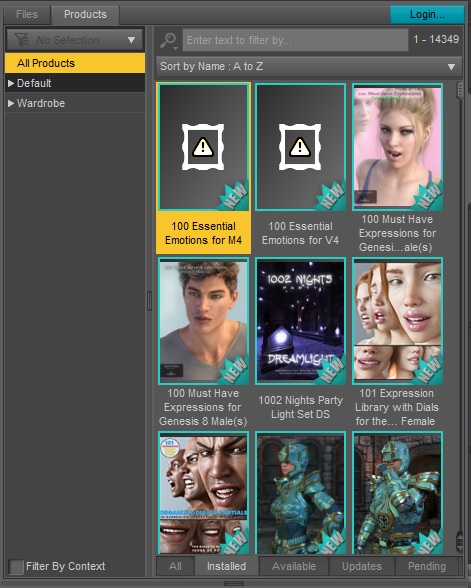
If you compare to the picture I posted earlier, you can see an example: "10 Faces of Asia" is not present in the Installed tab, even though DIM says they are installed & the .dsa and .dsx files show up in the Runtime\Support\ folder. Also, there are a number of items that are in the Available tab & not in the Installed tab, yet do not have the "notebook" icon, many of them were items I used to use quite frequently and would still like to make use of--hense my desire to get them fully installed through means that are still compatible with DIM and NOT involving Daz Connect.
And where items do show up in the Installed tab, like the "100 Essential Emotions for M4" for example, the Installed icons are completely empty:
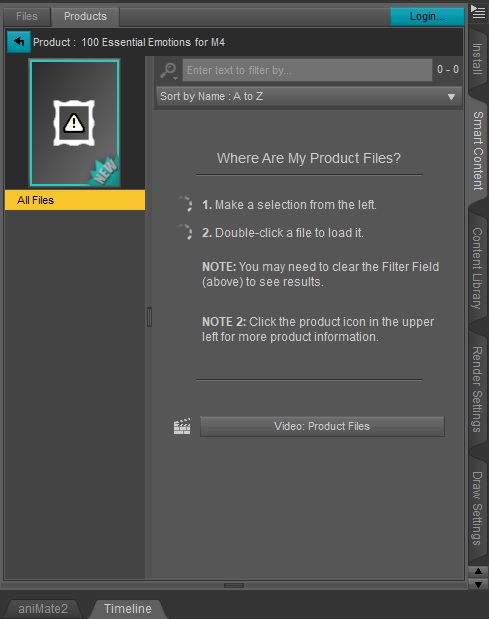
When trying to access them through rightclicking the icon in SmartContent and pull up the "100 Essential Emotions for M4" in ContentLibary, that fails to get any results either.
The thing is, my database had gotten hopelessly FUBAR'd and while looking for a way to fix it, I learned that we should not mix installing through DIM and D|S Connect. At the same time, I was running into a very bad issue with LAMH crashing DAZ everytime I tried to do more than one instance of it in a scene--which after talking with AlessadroAM about it, had prompted me to try rolling back to DAZ 4.10. To do that, I had to slick everything related to DAZ out of my Program Files\ and Program Files (x86)\ installations and restart with a brand new fresh install, strickly using DIM to do any installs.
I have only recently finished reinstalling everything and have meticuouly gone through the Runtime\Support\ folder to chase down those missing pictures for the SmartContent--so it's not a matter of anything from D|S Connect has infected things because I haven't allowed DAZ Connect to make any downloads. Nor have I done anything to uninstall or remove files through other means, as I never got to such a stage at this point to need removing anything--I've been too busy getting them all loaded in and their pictures to match up with the files during all this time! Manually checking 16000+ products for Poser-related files doesn't leave a lot of time to fart around with removing anything.
I'm afraid if they're not working, it's most likely because the products being installed by DIM are corrupted from the source.
The /Runtime/Support/ folder does contain a copy of the metadata in .dsx format, but that is not used in regular operation - it is read only when reimportting metadata, and modified only when saving new or modified metadata
So, quick question, Richard--is it okay to try using Daz Connect to load in those products available, despite relying on DIM for most of my installs?? As I mentioned earlier, I actually preferred the DAZ Connect because the file structure of the data\cloud\ folder made life so much easier in finding and making stuff for modificaitons.
Unfortunately, the other issue I was having: LAMH is still kaput. And in addition, the Garibaldi/dForce Hair is also kaput because *something* in DAZ doesn't like my GPU card (supposedly because it's "obsolete", even though DAZ has NEVER recognized I HAD an Nvidia card!) and even with the attempt at rolling back to an earlier D|S, there's likely a updated .dll or other file being loaded even with the 4.10 installer package that is still rejecting my GPU card--so, if I'm going to do any hair simulations at all, my only option at this point is to maybe try learning to do it in Blender.
Thanks,
Ryuu
"Ps" files with duplicate content and no thumbnail appearing in Smart Content?Whiskeyjack said:
@Spacious, tried updating metadata and they're still showing up.
Seems I've found a solution though. Just browse to the Poser-duplicate in the content library, delete the product from there, and it vanishes from the smart conent library. The original Daz files all still load and work perfectly fine without them.
@Whiskeyjack Yep, that's the proper way to remove bad entries in Smart Content...
Right-Click on the Product in Smart Content and Select “Show Product in Content Library”. After a few moments, Daz Studio will show the product in the Products list of the Content Library.
Right-Click on the title of the product and Select “Delete…”. Click OK when the confirmation dialog appears. The offending Smart Content for the product has been deleted, but not the product files.Since you are using DIM to install products into Daz Studio... If a product has 2 types available such as: Video Arcade Ds and Video Arcade Ps - Don't bother installing the Ps (Poser Version) as it's basically a duplicate of the Daz files for Poser users.
"Ps" files with duplicate content and no thumbnail appearing in Smart Content?Ryuu@AMcCF said:
Whiskeyjack said:
I've noticed that my Smart Content tab seems to have an awful lot of duplicates of products, but these duplicates have no thumnail and have the letters "Ps" at the end of their filenames.
If I understand it correctly, these are Poser files, and sometimes are needed for the product to work properly in Daz. But they really only seem to contain the same stuff as what's coantined in the Daz equilivents, and as I can access everything I need through the product that actually has a thumbnail, there doesn't seem to be much reason for both files to be showing at all. Some of these "Ps" products don't even appear to contain any content at all, oddly enough.
I've tried uninstalling the "Ps" files through DIM, but they still appear in the Smart Content even after uninstalling them. I'm wondering is there some way to filter these "Ps" files out of my Smart content, because they're really just a bit on an eyesore now, especially as there seems to be so many of them.
Any help would be appreciated!
Hi Whiskenjack,
I'm seeing something similar to your complaint.
I recently needed to purge and reload everything & I was advised to do everything through DIM and NOT use DAZ Central or allow D|S to log in and download any products. The reason is that D|S is installing the files in an encrypted state, while DIM installs them in an unencrypted state. Because of this, they can interfere with one another and result in you not being able to access various product fuctions.
No, Daz Central will install them compressed rather than as plain ASCII, which may or may not be the case with the other methods, but they are not encrypted - they can be uncompressed through the Batch Convert pane or with an archive tool such as 7Zip. Daz Central installs the same files from the same zip as Install Manager - the differences are that it doesn't have the option to retain the zips, it places everything in sub-folders of a user-specified folder rather than having multiple user-specified folders, and it cannot install some content types (e.g. betas). If you install both through Daz Studio itself and through one of the other emthods then the Daz Studio files wil be the ones used. Some products, mainly scripts or files called by scripts, will not work through Connect due to the way the scripts were written.
By default, D|S will normally install the product files in a path like [your harddrive]:\users\[your account]\Documents\DAZ 3D\Studio\My Daz Connect Library\data\cloud\[1_ProductID#s\]. Also by default, DIM will normally install them in a path like [your harddrive]:\users\[your account]\Documents\My DAZ 3D Library\Runtime\Support\. Of course, all of that can vary depending on what you set up, but troubleshooting gets to be a royal pain if you change them too drastically. DIM is also supposed to allow for proper installations into Poser, Carrara, and other programs--but from my experience, that expectation is a bit overly optimistic. There are tons of other locations, but the paths listed above are where DAZ and DIM will store the files that direct their product installers to scatter the complete database throughout your system--and if you move any of those files, you can totally FUBAR your entire database. When you run into problems, these are the locations you need to start from for troubleshooting your issues.
The database stors only relative paths - the locations within the content directory. As long as those don't chnage the location and name of the content directory can be freely modified. Daz Central and Isntall Manager dos tore the absolute location for files they install.
FYI: the stuff in red are variable locations. By default, the Harddrive would be you C:\ drive, but the C:\ drive should be reserved to your OS and should NOT be the repository for programs or data files--best practices and industry standards are that you should use a dedicated Program&Date harddive separated from where your OS resides. your account under users\ is whichever account you're using for DAZ & DIM--they advise using Public\ if you're trusting your Public user account to exist. Finally, ProductID#s are the SKU numbers from the DAZ Store, but the folder format takes the form of "1_####..." (for example: it would create a folder "1_85029\" in the Cloud\ for the ECK Amma for Genesis 8.1 Female).
Unfortunately, since I have to abandon the D|S install route, I can't tell you much about how the Daz Connect Library works other than it DOES NOT like you putting any new files (like modified textures) in the Data\Cloud\ folders! For that, I needed to create a mirrored setup of that path for any of my personal modifications. Other than that, I generally liked the layout as it made finding the files associated with the products SO much easier--all you needed was the product's SKU#!
For the DIM, it's putting your initial product files in the Runtime\Support\ folder. You will see a slew of .dsx files--you may also have some .dsa or some other extensions along with them, but the .dsx are the ones you need to pay attention to--those are the ones that are getting listed out in your SmartContent with the nice pretty pictures (or even the ones that don't have pretty pictures). For each one that does have a pretty picture, there's a corresponding picture file with the EXACT-SAME-FILENAME as the .dsx file-- they can be .jpg, .png, or someover format. So, for the ones without pretty pictures, like your _Ps, you may also see files with _PoserCF, _Legacy, and/or _StudioCF. As you know, Ps, PoserCF, and Legacy files all have something to do with using them in Poser and/or interacting with Poser. "CF" stands for Companion Files, but I have no idea what's up with that, nor do I understand the purpose of the StudioCF. All I know is, if you want the pretty pictures instead of the ugly ⚠, then you need to make a copy of the product's picture and rename the file EXACTLY as it appears in the .dsx file--note: characters such as quotes, colons, prarentheses, spaces, or any other nonnumeric/nonalfabetic characters will appear as extra underscores in the filenames.
The /Runtime/Support/ folder does contain a copy of the metadata in .dsx format, but that is not used in regular operation - it is read only when reimportting metadata, and modified only when saving new or modified metadata
In my case, after getting everything done through DIM [~16,000+ items], I chased down the missing pictures for all those .dsx files in my E:\users\Public\Documents\My DAZ 3D Library\Runtime\Support folder--the Ps, the PoserCF, the StudioCF, the Legacy--and there were even a handful of evidently corrupt or misnamed product pictures I had to creatively rename to get the pictures to appear, too! (After about a month of agressive searching, I have about 100 or so of those left to chase down, but I think that's doing pretty good out of a database the size of mine--the urgency is starting to wind down a bit)
The new urgency is now coming from those files showing up in the "Installed" tab, and like your issue, when I go to any of those those Poser & CF products, there are no files available to load into a scene.
Also, there are a ton of items in the "Available" tab. DIM says the products [shown in my picture below] are installed--D|S says they're not. When I try to access them through D|S, D|S wants me to log in and download them through DAZ Connect--which I was advised NOT to do!
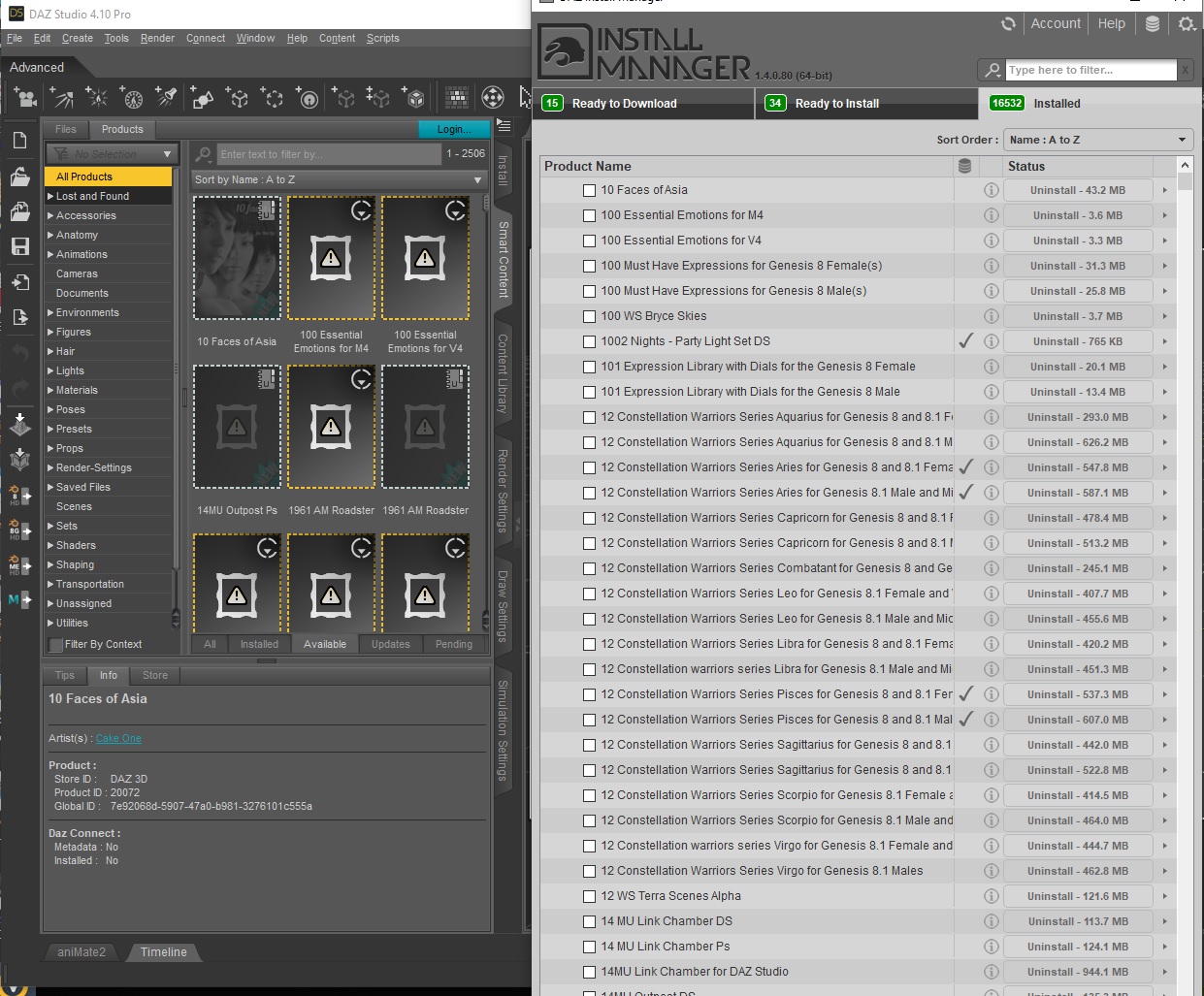
So, my big questions are-- How do I recover these 2500+ items in the "Available" tab if DIM can't properly install them? What's up with those items that have the little icon of a notebook labled "U"? And how do I find the missing files currently residing by the thousands in the "Installed" tab under the Ps, CF, and Legacy products?
I hope someone can help us.
Thanks,
Ryuu
"Ps" files with duplicate content and no thumbnail appearing in Smart Content?@Spacious, tried updating metadata and they're still showing up.
Seems I've found a solution though. Just browse to the Poser-duplicate in the content library, delete the product from there, and it vanishes from the smart conent library. The original Daz files all still load and work perfectly fine without them.
"Ps" files with duplicate content and no thumbnail appearing in Smart Content?Sounds like we've pretty much eliminated all of those ideas then maybe. Have either of you tried the Update Metadata command under the Connect menu inside DAZ? You've got to log in DAZ first if you're not already.
Animation issueHey guys, i've spend the last 6 hours trying to figure out but ...
The animations don't export anymore, i've tried by daz to unreal but i've got a single frame of the original animation and i also tried to do a simple export (animation checked) and import into unreal, the skeletal is here but not the animation.
Do i miss something? i mean, the animation is in the timeline so what do i miss ?What is a good free video editor for windows 10?When I render animation in DAZ, I render to a PNG image sequence and use blender to turn that into a movie if that's what you're asking. It's quite easy. Sometimes I render with no background and Blender makes it easy to put whatever background and even animate that too. Like the way they used to do animation in the Looney Tunes / early Disney days.
I must have deleted my bookmark to a simple tutorial on it, but if you Open New Video Editing Project in Blender. I think you want to set the frame rate you want before you import the images. Under the Add Menu will be Image Sequence, and if your images are aleady numbered they'll just pop in as frames. Choose what folder to render to, what file type you want and push render. It almost couldn't be simpler.
There's also lots of Fade and Wipe effects for scene transitions or whatever, if you need that.
[Released] Turbo Loader for Genesis 8 and 8.1 [Commercial]FSMCDesigns said:
I was excited about this till I read this part
Products installed manually or with products like Content Wizard do not have morphs recognized by the Daz Studio database. They will be organized as unknown products with a name from their parent directory.
2/3's of my content is from other stores, installed manually and I never use smart content, so I am guessing this won't be of much use for me
As @Mark_e593e0a5 helpfully replied, it will work with anything, with or without metadata. As long as Daz Studio finds the morph to load on a figure, the script can find them too.
Daz 3D is part of

Connect
DAZ Productions, Inc.
7533 S Center View Ct #4664
West Jordan, UT 84084Licensing Agreement | Terms of Service | Privacy Policy | EULA
© 2026 Daz Productions Inc. All Rights Reserved.