-
Daz Studio Pro BETA - version 4.22.0.15! (*UPDATED*)
is bone minion working properly in 4.22?
I will try 4.21 on my other PC later to rule out user error because it is M4 hand poses I want to transfer and full poses work
I used the apply changes script
maybe it doesn't do hand movements alone?
the minion's hands move with the animation but G9 doesn't
OK UPDATE
apparently a limitation of bone minion, it doesn't do the hands
Vo Zoe HD for Genesis 9 is breaking all my G9s...I recently purchased Zoe and while trying to convert a custom G8M to G9M with RSSY's converter it Failed spectacularly! The end result of my G9 was a character that came in inverted at a scale of around Negative 9534, and nicely curshed skull to go along with it... Any way after TO MANY HOURS of trying to get that converter to work, i finally decided to try it manually, and this is when i noticed that both my G9 Dev load and G9 base characters were coming in at a scale of 97.8 (or .6) and had a bunch of proportions dialed in... I zeroed the the dev load figure and manually converted my character and the results were as intended. Then went back to RSSY converter used the scene converter (zeroed G9 Dev again before starting) and results were as intended. So then the hunt began as to what caused the problem. I eventually narrowed it down to VOOTW charcters as the cause and then further down to Zoe herself.
The reason i could not find her as the cause of the problem by looking under CURRENT is that the her "Vo Zoe Proportions" morph comes in at 100% as Defualt (and is grayed out) so wasn't showing that it was actually in use.... So here is what you need to do to fix her:
You need to decompress the Vo Zoe_figure_ctrl_Proportions.dsf (use batch converter under window/pane and browse to it in your "data/daz 3d/Genesis 9/Base/morphs/vootw/vo zoe" Dir. After decompressing open with Notepad ++ and change line 31 "value" : 1, to "value" :0,
if you're using notepad look for this under "modifier_library"
"channel" : {
"id" : "value",
"type" : "float",
"name" : "Vo Zoe_figure_ctrl_Proportions",
"label" : "Vo Zoe Proportions",
"value" : 1,
and again change that to "value" : 0,
I also tried to Zero that morph under parameters then erc freeze it to save it out from within daz as another option for a fix, but Daz was chewing on that for more then 5 mins so i gave up on that route, anyway someone else is welcome to try that.
of course another "Easy" solution is just to search Vo Zoe under parameters and dial that to zero manually.... I'm sure that won't get old at all having to do that for Every G9 you load...
Anyway Hope that helps someone else in the future. Fixing the DSF is the best solution, and no i did not submit a ticket about this. Have other stuff to fix...
Free Genesis 1 Animation HelpersAre any of you working with motion capture on Genesis 1?
These Genesis 1 Animation Helpers can save a lot of time messing around with key frame edits, deletion, graph editor tweaks and the like.
 What are they?
Genesis 1 MorphForms + is a small set of additional Pose dials for Genesis 1. They don't add shapes, they simply provide a few global sliders on the Actor level for ease of tweaking animations.
Let's explain:
I enjoy using BVH or aniBlock motion data to at least get my animations close to how I need them, then tweak them from there with some good ol' hand key-frame animation techniques.
Well after finding myself constantly in the graph editor to change the global bend of certain skeletal joints, I decided to make pose-morph dials so that I could achieve the same effect easily with the turn of a dial.
Genesis 1 MorphForms + adds an Arms Twist dial to the Genesis > Pose > Arms category in the Parameters tab, and several torso sliders in the Genesis > Pose > Torso category: Neck Bend (just the neck, not the head, for refinement), Torso Slump (Chest and Abdomen 2), Chest Bend, Abdomen Bend and Abdomen 2 Bend.
I feel that these additional bend helpers round out the pose dials to better equip us with an easier to use and faster method of these simple, yet essential tweaks.
Sometimes I use the Head/Neck Bend dial that's located in the Head of Genesis and find that either the head or neck is either bent too far or not far enough compared to the other. By simply having this extra Neck Bend dial, we can very easily tweak between them.
Torso Slouch bends the chest and abdomen 2 opposite each other, which can be very handy to correct joint issues, but also to assist with secondary movements and things like breathing, for example.
Then the chest, abdomen and abdomen 2 bends help us to tweak the posture of our character, making it much easier to keep each individual behaving in their own style. It makes it a Lot easier to make a slowed-down walk cycle more suitable for a slumped over elderly character, for example.
 You can Download them HERE - There are also installation/unistall instructions. These files are in DropBox and it'll ask you to Sign In. You don't have to and can just close that popup altogether, Then just look in the upper right corner and click the little download icon.
In the recently released course for Dynamic Character Animation in Daz Studio, there's a whole video on making these things for yourself, but it's amazing how well this small set works for correcting most of the glaring things we might want to fix.
Problem with VO LisaI didn't try all the eye colors but at least one of them removed all the skin tweaks I had done and LIE makeup. I got so pissed off, I'm returning it. Without the Mousso morphs, it's not even a smile, just puffy cheeks and a bit of squinty eyes. I have the Mousso character that's needed but it seems wrong to use another PA's morph, especially not listing it as a requirement. I don't trust the authencity of this PA anymore,
Diffeomorphic DAZ Importer version 1.6.0 releasedI sailed passed most things easily that I needed, but I am left with one question. I want to use the "breast control" morphs in Blender to simulate a push up behaviour in clothes. It succesfully applied them in the finished import, but I don't see how or where I can change the values (I found all the other properties easily like FACS control and other pose controls)
I mostly followed the tutorials found at : https://diffeomorphic.blogspot.com/p/advanced-morph-section-version-16.html
But I am still a bit stuck. Any help would be much appreciated!
Remixing your art with AIArtini said:
Diomede said:
Stable Diffusion with ControlNet has a menu for loading rigged FBX, JSON, and similar models. But my custom toon Marx brothers do not appear to transfer correctly from Carrara FBX to Stable Diffusion.

Have you tried to transfer your Carrara FBX to Blender
and then export from Blender as FBX or any other format, that ControlNet accepts.
I am going via Blender when I need to export FBX models from Shape-E to Daz Studio, for example.
Awesome work and your thoughts about you experiments with Stable Diffusion.
I am also doing my experiments with AI for the same reasons.
Thanks for the suggestion. I tried for a similar model some time ago but have forgotten the details. I think I had to look up FBX versions on the web and use a conversion, but I don't remember for sure. Given how crude my toon figures are (intentionally), I would probably be better off just transferring the mesh to Blender and rigging there. I have successfully done something similar with Mixamo.
Information of file type based on extension?Bejaymac said:
They are for Omnifreaker's shader systems for use with the 3Delight render engine, so do not delete them.
DAZ - scene file - was used in every version of DS until the launch of DS4.5.
DSO - converted mesh file
DSD - converted morph delta file
DSV - converted UV coordinates file
DS/DSA - ASCII script file mostly used for presets
DSB - binary script file
DSE - encrypted binary script file
Those are the standard files used in DS up until the launch of DS4
Thanks a lot.
I also found DSJ files in the Genesis8MaleStarterEssentials
- CloneGenesis.dsj
- CloneGenesis2Female.dsjI also found GFA files here IM00042071-01_Genesis8FemaleStarterEssentials\Content\aniBlocks\aniMate\Gestures
These extension has not been listed so far
Shape Rigger Plus G9 Edition (Commercial)If a morph has been previously saved and exists in your data you can only rerig/update save via the script. You cannot save it to a new path. That can only be done to newly imported morphs that require a first time save where your name and product name gets filled in.
Daz > Marvelous > Daz | HELP!!Saxa -- SD said:
tskprof said:
Saxa -- SD said:
How did your axis change?
When exporting from MD the coordinates were wrong. Should be x,y,z instead of y,x,z
And everything worked.
That is awesome you got.
But when check my MD settings for export to DAZ they are proper.
Just curious how your settings got "not Dazzy synced"?
I've done the morph similarly a hundred times. I don't know how, but I must have accidentally changed the coordinate.
Transfer Utility FreezesI think I found a stable workflow now, in case somebody else is doing this for Unity export of clothes only with morphs. This freezing happened to me when I was using Transfer Utility on them a second time, to get the morphs, too, but actually this is not needed.
This works for me:
- Have the weight painted and rigged clothes first saved as Figure/Prop Assets
- Have a Gen 8 character selected when adding the clothes prop oin the character. It will be parented to the character and the morphs get transferred at this stage.
- Right-click on the clothes and select "Unparent", unparenting it from the character (otherwise you get the character too in the export).
- Having the clothes selected, export it.
I am using Unofficial DTU bridge and doing this:
- In the export dialog, make sure to first check the Asset Name to match the clothing, because the exporter wants to save it under the character's name
- Select Show FBX Dialog
- In the FBX Dialog, select Include Morphs, and check the Export Rules that the desired morphs are included
Free: Gelatin dessert for Daz Studio IrayTo go along with the freebie challenge theme for this month (or in case you were planning on hosting a 3D Thanksgiving dinner), I modeled a gelatin dessert for you all. It has 10 different flavors, 2 plate colors, and a wobble morph in case you accidentally tip over your dessert or want to poke it.
Now at Deviant Art:
https://www.deviantart.com/perlk/art/Free-Gelatin-dessert-prop-for-Daz-Studio-Iray-994472030
And Renderosity:
https://www.renderosity.com/freestuff/items/96545/free-gelatin-dessert-for-daz-studio-iray
 Remixing your art with AI
Diomede said:
Stable Diffusion with ControlNet has a menu for loading rigged FBX, JSON, and similar models. But my custom toon Marx brothers do not appear to transfer correctly from Carrara FBX to Stable Diffusion.
Have you tried to transfer your Carrara FBX to Blender
and then export from Blender as FBX or any other format, that ControlNet accepts.
I am going via Blender when I need to export FBX models from Shape-E to Daz Studio, for example.
Awesome work and your thoughts about you experiments with Stable Diffusion.
I am also doing my experiments with AI for the same reasons.
Daz > Marvelous > Daz | HELP!!Hey, everybody. I decided to make a morph for a dress for a particular scene in Marvelous. I haven't done it for a long time, but I seem to do everything as usual. But when I use the morph, the dress flies away to other coordinates. Something I can not understand what's wrong. Screenshots of the settings below. Everything was fine before. Help, I'm already out of ideas.


P.S. Sorry about my English
The #1 thing I need far above all is mesh smoothing and contouring tools...RexRed said:
The whole point I am making is smoothing should be done directly within Daz.
Hi RexRed, when i read your OP and following posts, for sure understood your expressed hope that it can all be done in DS. Would be thrilled myself if that was possible. Listed those 2 ways to show that (1) Hex and DS were never merged - probably reasons? and (2) MarvellousDesigner way of colliding using GPU does exist, but that's a different 3d program with high levels of sophistication and differnt focus. So totally share your wish that DS could be further featurized to include that. By my estimation, that may happen, but not counting on it any time soon. Like decades. Would be delighted to be wrong.
Yes, I can export and smooth but it is very inconvenient.
I am working on an animation, I have 1400 frames. My figure is dancing in jeans and every time he does a twist or stretch his jeans are pulled in odd ways distorting the fabric texture.
To export this figure for each frame when the fabric goes out is impossible. So do I just decide to not animate in Daz and do it elsewhere? That would be terrible.
only tips i can give is (1) make bigger morphs allowing more range of movement and/or add ercs that trigger and work with various differnt morphs for that clothing item. Like jcms that figures have and clothes autfollow. Problem is the weights on figure vs clothing is still too large scale to accomodate all those deforms, especialy the tighter clothes are, like jeans.
the DS smoothing goes a long way. Have been thrilled with what it can overcome. Another big tip is turn off your clothing smoothing when poke-through is happening. Most often than not i find the failure is so big it is a wonder how much the native DS smoothing made that look better. Then make moprh to fix that etc. For now and long time forward, would say use the steps i listed plus ercs for that outfit if you really want. Still VERY frustrating when Viewport shows all smooth, but render is different even when both set to same level of subD. But seems it is what the current and future state of affairs.
Also very important, make sure your jeans are at subD similar to figure. Lots of clothes are at base res. Those extra polygons usually help alot..
Lots of peeps still just do 1 frame and not huge anims like you which is essentially 1400 different frames. Whole chapters are written with 1400 frames:)
In a way anims is sadly still a secondary and expensive activity, because ai and collision are not sufficiently advanced.
All of my figures textures are made to look right in Daz Iray, all of my props and environments are in Daz and Daz hair only looks right in Daz.
It is better to bring the mountian to Mohammad in this case.
A smoothing tool(s) could work on a per frame basis and correct all of my animation clothing stretches right in Daz.
Notice the fabric, the image I included is a frame in an animation, the moment he goes into another pose, the clothing will get taut in another location and again, need smoothing.
This smoothing needs to be done in Daz to be feasible.
How do you mean mesh grabber not animatable? Output is a static morph that you could reuse and keyframe?
Even dForce system 'as Is' cannot be paused and resumed. You probably know of the 2 main dF products dF2Morph by Riversoft and latest dF product by Silas and JoshDarling?
As for dancing, it would BE so next level if DS could incorporate a bullet physics real-time. But fear the demands of IRAY photoreal vs more toony 3d physics with no jcms is just too different and techno is not there to bridge gap.
Otherwise, i share your dreams and frustrations. Would love to be surprised.
AIUTO...CHI CONOSCE L’ITALIANO? PARTE QUATTORDICIPuoi aggirare il limite con l'ennesimo workaround, devi rimuovere il clamp dal file di settaggi del render come si fa con i morph.
Fai conto che è come se stessi parlando con un deficiente, un Dazmente: non ci capisco un beneamato bafanzio. Ti prego quindi, spiegami come si fa.
 [Fisio SB addOn released] Fisio: Physics Simulator
Saxa -- SD said:
Hi Alberto, hey finally made time to try this SoftBody toolset.
Bought way back when you released as support, but summer was busy so left this to now.Objective was a hand on a breast. And breast was a geograft.
Followed your Ollie-nose example to start.
Ended up shell did not work for hand. Deforms were just wrong for a hand. Used springs, and then instant worked! Yay!
Took a few hours to figure out.
Before that had to test quite a few different settings.This will save me TONS of time now.
Takes like less than 10 seconds to sim on timeline a 22 frame collision.
To sculpt that would take forever for hands. Even arms will be so much faster etc.Made a hand-arm with changed origin for quicker easier posing to act as rigid node, so quite a few polygons. Changed timeline to Linear for O and finish positions for posed hand-arm.
And to finish using your create Morph function worked flawless!
So anyway, wanted to THANK YOU for this product!

You're welcome! And thanks to your words, also.
Saxa -- SD said:
Ps. should also mention. When did a quick rough test this summer, FisioSB worked.
Just knew it was too involved without spending lots of hours and focus.
So, today when I started to reproduce your Ollie-Nose tut, it said no FisioEngine.dll (see screenshot)
Yet had worked this summer.
Looked and there was no such file.
Manual DL'd the files and copy and pasted that file and sorta worked.
The selected facets kept falling to figure origin.
So copied and pasted the content and plugin files too, and now it all worked!
That was a new one and have seen some wierd ones.
Anyway just to let you know.It seems that the installation is incomplete in the two folders ("DazStudio4" and "DazStudio4 Public Build"). But your method works anyway.
Mechasar's Characters Catalog: Who's next? (commercial)Mechasar said:
kirbawirba said:
I just bought the pack recently and am having trouble understanding this. So, if I try to use the new morph for Beverly without owning all of the products, does that mean the rest of the characters will be distorted?
Also, I'd like to encourage you to keep making stuff. Gladys is one of my favorite characters. If you ever do get around to it, do you think you can look at original Beverly's textures? It seems like she loses SSS properties in her hands. In some lighting situations they look bleached, or like she was washing dishes all day! Not something I'd ever let her do, btw! :D
You have some of the most unique and interesting characters on the market. Love them! Someday I will get enough money to buy them all!
EDIT: just read a post above this that mentions Smart Content. Can confirm that Smart Content does not show the vast majority of anything installed from the pack. It takes some hunting through SC to find anything, let alone everything.
EDIT 2: I CAN'T WAIT for your next release... They look fantastic!
Hi there! Thank you for your kind appreciation!
The Mega Add-Ons Pack, as the name suggests, consists of add-ons for my characters catalog only. Now, as you can see in your products library, the pack is split into 23 different zip folders, each one related to a different character (keep in mind that some add-on related to a single character can be further divided into 2 folders due to their size, something along the lines “folder 1of2”). This distinction is important because indicates that you should download and install ONLY the add-ons for those characters already installed in your Daz library, leaving aside the other add-ons. If you install an add-on for a character that you don’t yet own, the add-on won’t work and there is a chance that some hidden morphs could cause mesh distortions while you are using your Genesis 8/8.1 models. So, long story short, I strongly recommend to not install an add-on without first installing its related character.
That said, the “Bryana for Beverly” add-on needs the Beverly character, but you don’t need Brooke 8.1 in this case. In other words:
• Owned: Beverly + Brooke --> Obtainable characters: Beverly
• Owned: MMAP1 + Beverly + Brooke --> Obtainable characters: Beverly + Bryana
• Owned: MMAP1 + Beverly --> Obtainable characters: Bryana
• Owned: MMAP1 + Brooke --> Obtainable characters: none
• Owned: MMAP1 --> Obtainable characters: none
About her hands look, Iray makes the characters skin heavily influenced by the light color. I can suggest you to play with the environment lights, her translucency color, and you can also lower the values of her normal maps to make her skin smoother. These work pretty well. Or you can use the Bryana colors on Beverly, but keeping Beverly's normal maps, personally I love the result ;)Got it, thanks! I guess I'll try to uninstall the ones I don't have then! Also, the Bryanna mats are very nice! All in all, great stuff, and I hope to see a lot more!
Newbie Tip (Ctrl + L)Morph Loader Pro shortcut:
Right-click on the "Scene" tab > Assets > Morph Loader Pro
►►► aniMate 2 - Real aniMating Power for Daz Studio!Pose Splines
In my course, we'll be making wonderful Control Dials that allow us to manipulate the outcome of Any joint rotation, shape, or morph.
GoFigure has added Amazing functionality to aniMate 2+ that actaully allows us to manipulate the path of motion of the major joints of our figures - visually, directly in our viewport!
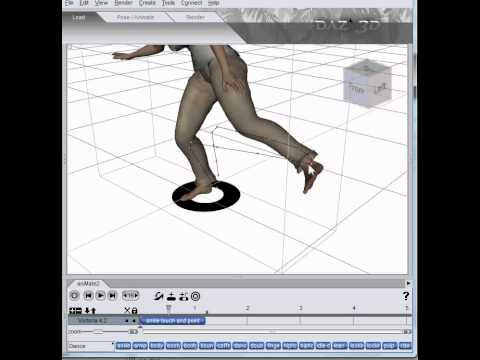
I agree with him: That IS Magic! :)
Remixing your art with AIStable Diffusion with ControlNet has a menu for loading rigged FBX, JSON, and similar models. But my custom toon Marx brothers do not appear to transfer correctly from Carrara FBX to Stable Diffusion.
Daz 3D is part of

Connect
DAZ Productions, Inc.
7533 S Center View Ct #4664
West Jordan, UT 84084Licensing Agreement | Terms of Service | Privacy Policy | EULA
© 2026 Daz Productions Inc. All Rights Reserved.