-
Create Objects in Blender based Daz Figure
I don't know if you're still interested in getting an answer since it's been a few months since you made this post but, yes, there is a "simpler way" of doing this.
Unlike DAZ Studio, Blender can do almost anything (I'm using Blender 3.1.2, DAZ to Blender Bridge 2.4.0, & DAZ Studio 4.2 to demonstrate this).
Once you're finished creating your mask in blender,
Select your mask, then use Object > Apply > All Transformations (better known as Crtl + A on your keyboard).
This will freeze all the transformations you made on your mask so when you're exporting/importing, all the transformations you made would carry over as well.
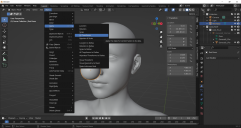
Make sure your mask is still selected and Export as a Wavefront(.obj) file.
I don't know if you noticed but, the DaztoBlender Bridge converts the scale of models to 1/100 when importing into Blender.
At some point we would need to rescale your mask to the 'DAZ Studio size' when exporting out of Blender or importing into DAZ Studio.
Personally, I would re-scale when Exporting from Blender.
Select 'Selection Only' next to 'Limit to' and type '100' next to 'Scale' to re-scale your mask.
Those two things are the most important when exporting from Blender in my opinion (you can select 'Keep Vertex Order' in Geometry as stem_athome sgueested but it isn't really necessary for non-morphs).

Since we did all the important things, press OK when importing back to DAZ Studio (There's no need to change much of the importing settings in DAZ Studio).
I have my import settings set as 'Custom' and 'Scale: 100%'.

Hope this helps anyone who was wondering about this as well.
 Looking for Metadata file specification
Hi Folks,
I realize I'm waking up a 10-year-old thread, but I'd very much like to find a copy of the current metadata spec if it's circulating out there somewhere :) I've downloaded the SDK and can't find any reference docs about it in there either. Are you still around, Kat? :)
New Computer and Daz Connect problemDo the Pro bundles have their own files? If not they will not show as instalalble - you just get the constituent products.
No icon and coloured thumbnail means either isntalled through Connect or installed through another emthod and Daz Studio not allowed to update metadata online since before the item was purchased.
UltraSceneryXT - large terrain/landscape generatorAnEye4Art said:
I thought that I had the terrain banding in USXT figured out but I am still getting very terrible banding mostly from imported maps and I think I know why. The greyscale hight map is the a scaled down version of the high resolution hieghtmap that I imported. Well the scaled down version is what's causing the banding. What ever compression method being employed by USXT is causing the severe banding. My imported heightmaps are 4096x4096 but USXT's version is only 1024x1024, which causes the banding. The greyscale is from the USXT's map folder and the *red map is the imported one. A closer look at USXT's map one can see the visible banding and image tiling squares. No smoothing is fixing it. Any smoothing above 2 only washes out the details for me. Plus I've tried all acceptable image formats and the results are the same. I really hope Howie will fix this soon.
*Please note that this site did compress the red heightmap and so the slight banding in the image is because of this.
An update to the USXT terrain banding issue: While USXT does compress larger imported textures down to 1024x1024, this may not be causing the severe banding. I say this because there's no banding if i import a maptiler sattelite heightmap into USXT - even when compressed to 1024x1024. But if I create some mountain terrains using filters in WC, import into USXT, the banding is there. 8 or 16 bit float will not help either no matter what image format. I am currently seeking info about this issue on the WC forum.
New Computer and Daz Connect problemThat sounds as if OneDrive has moved the files in your documents folder, which would include the metadata and product files used by Connect by default, and Adddata folder, which has the database, to the OneDrive folder where DS doesn't know to look. You would either need to move them back (so stop using OneDrive, which may be wise for content) or correct the paths in Content Directory Manager. Adding the path as the last dialogue suggests should certainly help.
GraffitiWorx decal disappearing from West Park Wall when adding charaters [solved]Something must have "corrupted" my scene. I have loaded the iray version of the West Park asset into a new empty setup, imported my characters there and the decal is now showing. Something is still missing because the lights are not 100% as they used to be, but I can import step by step from the old scene until I hopefully got everything as in the old setup. So I consider this issue to be solved up to a point. Thanks for your help!
Plugin does not work in C4D R23I FIGURED OUT HOW TO GET THE C4D BRIDGE TO WORK IN R23! It's messy but it works. Basically you have to use the Blender Bridge to make a file for the C4D Bridge to open.
1. Replace the .pyp in the C4D scripts folder with the one posted earlier in the thread
2. Make a folder called 'temp3D' in Users/Shared
3. Export your character to Blender using the Blender Bridge
4. Find the .fbx file you just created here: /Users/eddykatt/Documents/DAZ 3D/Bridges/Daz To Blender/Exports/FIG/FIG0/
5. Copy the .fbx file to here: /Users/Shared/temp3d
6. Rename the .fbx file DazToC4D.fbx
7. You can now import it to C4D using the C4D Bridge plugin. Your character should come in fully rigged with eyelashes that follow the facial morphs.How to get older versions of DazToMaya?I am testing these older versions, I can import figures, but I don't see control rigs.
Daz to Blender Bridge - Meet the TeamMy first DAZ to Blender import obviously needs some work. Perhaps I was too confident to import a posed, morphed figure on my first try? LOL
Any tips would be most welcome!
Setup Materials for Filter by Context in SmartContentA more advanced Content DB Editor is used in the Products view (either Smart Content or Content Library) when you rigk-click and Edit Metadata. You get a two-panel dialog that has Product indormation on the first tab, and the familiar Asset info on the second. The Product info shows how the Asset (.duf), the Compatibility Base and the Scene ID are linked together. If you Export the metadata for the Product, you will see the part that ties it all together is called ObjectCompatibility, which you can't edit directly in the Content DB Editor, but is generated when using the Scene Identification dialog.
Cascadeur 2022.EA1I've just watched the tuto and then imported daz model in casca, made a pose and imported back in daz. There are things you can do more easily than explained in the tutorial
When exporting you better be sure the knees are a little bit bend, otherwise casca get confused about knee bend direction. same for elbows
For quickrig tool you can choose the predefined quickrig template for daz (they are in C:\Program Files\Cascadeur\resources\autorig_templates). The problem with this template is that it has Gensesi8Male as root, so you copy it, edit (it's a text file) and replace Genesis8Male by Genesis8Female, then it will fill the autorig.
I aligned box controllers to arms and legs, just rotated and you can copy paste the raotation from the properties from one side to another if you want precise match of left and right sides. Also changed the size of some rigid bodies, like explained in tutorial. Other than that I didn't move anything like the tuto does.
Before exporting, to avoid problems in daz, you can choose which bones you want to export. You go into "bone" mode or in the hierarchy pane, select all face bones and toes and uncheck Fbx export -> is exported. Then you select all bones and uncheck export translate and scale, finally you choose root (Genesis8MAle/Female) and hip and check the export translate. This way you export only rotation for all the bones and for root/hip also translation.
Then you import it in daz like the tuto explained
The BIG problem I see, are the twist bones in arms and legs, Cascadeur is not using them, it will try to twist the shoulder directly instead of shoulder_twist, which is not how daz is expected to work. If somebody can fix that then it will be perfect. Please let me know if you know how to fix it!
Diffeomorphic DAZ Importer version 1.6.0 releasedThomasLarsson said:
Now I managed to import the mesh hair correctly. You need to update the HD export script with the last commit. Here is what I did.
- Export from DS with the updated HD exporter in the last commit.
- Make sure that the global setting Add Armature To HD Meshes is enabled.
- Import the scene.
- Advanced Setup > Mesh > Transfer Vertex Groups from the body to the hair meshes.
I haven't tried to convert the hair to particles yet.
Edit: Hair conversion seems to work too, with the strand type set to Tube.
It doesn't work for me. I downloaded the newest daz importer files. In Daz I replaced the scripts and in Blender I made sure I checked add armature to HD meshes. When I import it with that I get the same as before and the HD version of the body hair is "invisible"? I can't see any mesh.
Edit: Never mind, it works. I'm not sure what the issue was, it suddenly works. Maybe I had to restart one of those programs. Thank you Thomas!
Diffeomorphic DAZ Importer version 1.6.0 releasedNow I managed to import the mesh hair correctly. You need to update the HD export script with the last commit. Here is what I did.
- Export from DS with the updated HD exporter in the last commit.
- Make sure that the global setting Add Armature To HD Meshes is enabled.
- Import the scene.
- Advanced Setup > Mesh > Transfer Vertex Groups from the body to the hair meshes.
I haven't tried to convert the hair to particles yet.
Edit: Hair conversion seems to work too, with the strand type set to Tube.
Daz Studio 5 development updateImago said:
The RED Crown said:
I want disable PostgreSQL CMS Win64bit feature in DS 5 .
I don't use smart content .
PostgreSQL is the base of the normal Content pane too, if you remove that you can't see anything on your library.
Daz Studio Formats, Poser Formats, and Other Import Formats do not require PostgreSQL for content installed manually or through Daz Centra/Install Manager. There are, however, other features which do use the CMS so I would certainly advise against disabling it.
Again, if you don't use the Smart Content just don't open the pane. If you like you can even disable it from the Plugin manager under Help->About Installed pugins, in there look for the Smart Content Pane and uncheck it. At next DAZ Studio session you will not have any trace of the Smart Content.
The important in next DAZ Studio isn't remove features but fix the ones we already have and doesn't work properly.
Does anyone have any idea what am I doing wrongHi guys im on a macbookpro m1pro 16 Montrey. Since Scripts menu is not showing after installing daz to blender bridge (don't know why) I'm manually running Daz to Blender.dsa level 2 sub import texture on and indlude anim data on checked and importing it to blender with addon and I'm always having these vertex errors I'd triıed almost everyway for the last 20 hours could anyone point me to the right direction.
New install Connect vs CentralThe Smart Content tabs "know" about your Products because you have logged in from Studio, even if you log off now. It also knows if they've been installed from DIM. Smart Content won't know about any new products that you purchase unless you log in again (which you shouldn't), until you install them from DIM. The Smart Content itself is compiled from the metadata of installed products, no matter where it comes from.
You can configure DIM (Advanced Settings) where to download and where to install (any folder(s) of your choice, but not the same one). You also need to let Studio know where you have installed it (Content Directory Manager). Disc space limitations might make you consider additional storage if you plan to acquire a large library.
Dforce on Genesis figuresYeah, but they usually turn into puddles of goo on the floor because they have no skeleton holding anything in place.They are actually just hollow shells.
A lot like the hollow chocolate Easter bunnies.
Interesting effect, but not very useful for most things.
The most success for soft body effects currently comes from the Smoothing modifier.
Most of the solutions apply a geoshell, or most of one, to a characters hands/arms or whatever is going to do the impacting, and then a smoothing modifier is added to the character/object that is going to be getting squished/squeezed and setting the target for the smoother as the geoshell "glove" mentioned before.
Results vary, and it's not perfect.
edit: I should say this is for generic soft body effects.One can always import the mesh into a modeler(hexagon,blender,etc,etc) and make custom morphs for the soft body impact points.Several store products do this for "micro compression" for things like stockings and bras.
Question on Creating a Smooth Foot (No Toes) or Amputee MorphMaybe import two copies of the base mesh into Blender and anly sculpt on one of them. Use a combination of the Elastic Deform and Smooth Brushes to sculpt until it's the same shape as the original mesh.
As long as you don't check the Dynotopo Box you should have no problems.
Question on Creating a Smooth Foot (No Toes) or Amputee MorphHi all,
I've successfully created face feature and body morphs in the past, but am now attempting some new ones that I think will present more of a challenge.
I need to create a morph for a smooth foot, with no toe shape or toenails - just smooth like a mannequin foot (as attached). I would prefer to do this as a morph, rather a "Fit to" prop or making a fleshy shoe cap. The issue I can foresee coming up is that morphs, to my understanding, need to have exactly the same number of mesh vertices for morphs as the G8 Bases. Basically, I would need to remove a lot of detail from the look by smoothing out the toenails and toe shapes. I see that some other users have sucessfully created amputee morphs, and I assume they may have faced similar challenges.
My thought is to expand out the toes and toenails mesh into one large blob in Blender, Maya, or Zbrush, then sculpt it down into a smooth foot shape. Does anyone have any suggestions on this for this or different directions to take (Fit to or Geografting?), or how the amputee morphs were created? One mistake and I know the morph will not import back in correctly from Blender. lol
Thanks!!
Can not save Workspace LayoutI managed to save my custom layout but now loading it makes the main toolbar disappear. I tried window>workspace>customize and the toobar tab is empty. How can I create a new or add one or anything ?
Edit : I customized a toolbar under a default workspace, then exported it. Now I can import the toolbar in my custom layout, but it still won't show up. I hope they know about this bug too.
Daz 3D is part of

Connect
DAZ Productions, Inc.
7533 S Center View Ct #4664
West Jordan, UT 84084Licensing Agreement | Terms of Service | Privacy Policy | EULA
© 2026 Daz Productions Inc. All Rights Reserved.