-
Adding your own maps
If I want to add my own map to say the dforce Miranda Dress product, how would I do it? I know that in Bryce, you simply change the image file that Bryce is pointing to and use the functions provided in the Materials Editor to adjust the placement of the map and manipulate the bump map. How is this done in DAZ Studio? Do you import one of the maps used in the Miranda Dress product, import it into Photoshop, change the pattern, and add the new image back into the map folder for the Miranda Dress product?
In-Depth Tutorial for squeezing the best of 3Delight?Sven Dullah said:
dsum55 said:
Sven,
Not sure if this is the right forum but i want to know how do i make eyes with 3delight shaders? i feel i cant find anything about start or creating eyes for 3delight and iray materials. i feel there is a need for anime eyes in daz for NRP renders. do you know what program i use to create eye texture then in turn how do i get them to .duf format. any help will be much appreciated. I am going to post this wuestion around the forum just in case you dont reply t this one.
If anyone knows how to make eye textures please help me lol send any tips.
Regards.
D.Burgess
Well there's only so much you can do in the surface tab (tint the diffuse color, play with glossiness, etc). To create new textures you need an image editor (Photo Shop, GIMP). Suggested workflow: Open your character, head into the surface tab and check the location of the eye textures. Import them into the image editor and modify them or use as templates to make entirely new ones. Save them as .png (lossless) or .jpg (smaller file size) to a folder of choice. Go back into DS and in the surface tab go to diffuse color (3DL) or Base Color (Iray) and browse to your folder to import the new textures. Adjust settings to your liking and save as a materials preset (.duf). In the save options box uncheck everything except the eye surfaces you want to include.
I hope I got you right! If you simply meant editing surface settings in DS, that's a different story...I can probably help with that although not at all into NPR myself;)
Yes Wow thank you so much. I literaly have looked everywhere to try and find how people create eyes. Once again thank you.
Removing a single frame from the timelineThere are a few different approaches. One way is to export the item as an OBJ and re-import it as a morph for the item. dForce2Morph does this for you, but it can be done manually as well. If you don't already have the scene set up, you can just build it around your current scene; if it is, you can merge the desired scene into your current one. If you don't need to animate anything else in the scene, you can simply limit your timeline to the single frame you need.
Removing a single frame from the timelineThere are a few different approaches. One way is to export the item as an OBJ and re-import it as a morph for the item. dForce2Morph does this for you, but it can be done manually as well. If you don't already have the scene set up, you can just build it around your current scene; if it is, you can merge the desired scene into your current one.
Is there a reason I am unable to select polygons with geometry tool of G8F Shell?If you want to edit the shell's geometry, export it as obj. Import that obj. And use the Transfer Utility to conform this imported "shell" object to Genesis as you'd do with a custom made cloth.
Edit > Object > Transfer Utility.
Now that the "shell" is rigged to the Genesis bones, as if it were a custom made cloth for example, you can apply the original shell's surface or any other surface to it. And edit its geometry to delete unwanted parts, define new surface groups, etc.
Diffeomorphic DAZ Importer version 1.6.0 releasedKrys Kryngle said:
After just watching your tutorial videos (I'm about to re-watch them because there's so much information I can't grasp it all in one go), I have to express my gratitude to you for taking the time to create those tutorials and for adding further tips like this one (above). I watched the first of the videos when you first released them and, though I appreciated your effort, I was put off by the sheer complexity of using Diffeomorphic to transfer all the necessary components of a single character: all the morphs/shapejeys, the JCMs, the rigging, the materials set-up, and merging of geografts, etc. And all the care needed to do things in the right sequence - it was all just too much.
However, now I'm looking at it again and trying to decide whether all that effort will bring benefits such as better animation tools and rendering options (Eevee, for example).
Thank you Marble, glad you found some use in those vids. The new HD sculpts for the DAZ 8.1 characters are impressive, and the Blender software keeps getting better and better. I think learning Blender is so worth it, but I also enjoy the challenge. Thanks to Thomas and Padone for making Diffeo the awesome tool that it is. I think with the recent improvements in Blender Cycles and the updated denoiser, we might be able to start animating in Blender with Cycles now. The learning never stops! Check out the render time for the attached image - 2:15 for a 2k image. Pretty exciting stuff.
Anybody have any tips for importing animations into Blender? I'm working through an animation tutorial now and will take any and all advice.
I'm looking forward to your animation tutorial because that's almost the only reason I can find for moving my scenes to Blender at the moment. I wish I understood the big picture when it comes to Blender but I don't so I hope you cover some of the things that you might take for granted that anyone watching should know already. I'm thinking of things like how to pose, what rig to use, how to import or save poses, how to build an asset library and how to apply assets from that library to the characters in your scene.
An example: in DAZ Studio I can load a G8 figure and then dial-in a shape for her, click on clothing from my Content Library, click on a pose from that library, click on a skin texture from another character, apply make-up, etc., etc. My point about understanding the big picture is - how much of that needs to be done in DAZ Studio before exporting using Diffeo and how much can be replicated using assets saved to the Blender library?
Daz imports FBX with weird orientationI've been mapping some motion captures to Genesis 8 using MotionBuilder which has been very successful, I then import them into Daz as FBX files.
Most of the time this looks good in Daz itself, but sometimes Daz flips the orientation of the animation so that it's upside down or sideways at certain points whilst playing. Sometimes this can be resolved by simple rotation, but other times it seems to fully mess up the dynamics of the animation with arms and legs getting stuck where they shouldn't.
I've checked the FBX files in other apps and it's definitely Daz which is tampering with the data. Has anyone found a good approach to tackle this orientation issue?
What do I need to start making (and maybe later selling) clothes for Daz Studio?#1 thing is dogged determination. It's a royal pain in the butt to get things into DS that looks and works right. Even just static objects. Looks great in blender, import obj into DS and it looks like a cat chewed it up and coughed up a polygon hairball. Then you gotta try again until it finally works.
FLUIDOS II for Daz Studio - update 2.2 [commercial]Has anyone been able to import openvdb from blender to daz3d? :D
[Released] Turbo Loader for Genesis 8 and 8.1 [Commercial]ghost_of_delete_key said:
Ah no worries. I have tried, but could not reproduce the bug. I basically followed the manual, open in the second monitor.
Logged in is not it, I am logged through Studio while using the tool, it's been a while since any Daz metadata has updated, and as I run TL again, everything is still Unknown Product.
I wish I knew why some people get this issue. The logging in seems to help most people.
Moreover, I just loaded the same scene file as before (not even remotely named similar to any morph lol) and although it appears fine, during loading the popup complained of 5 newly missing morphs:
/data/DAZ 3D/Genesis 8/Female/Morphs/DogZ&Zev0/200 Plus/Eyes Lower Inner.dsf
/data/DAZ 3D/Genesis 8/Female/Morphs/RareStone/RFMC/Eyes Lower Inner.dsf
/data/DAZ 3D/Genesis 8/Female/Morphs/RareStone/RFMC/Eyes Upper Inner.dsf
/data/DAZ 3D/Genesis 8/Female/Morphs/RareStone/RFMC/Eyes Upper Outer.dsf
/data/DAZ 3D/Genesis 8/Female/Morphs/RareStone/RFMC/Teeth Depth.dsfBUT, these do in fact exist, they are/have been enabled in TL, and are not renamed with .tlOff.
Another thing I noticed is that although I have all my expression kits and shaping kits enabled, certain expressions are broken, operating only the brows on one kit, only the mouth on another...
At this point I'm going to have to restore all morphs and not use this, I'm finding it too unstable to be useful. Thanks though, keep up the good work.
I am sorry it caused you trouble. There was something that went wrong early and I think your problems compounded after that.
<edit>
After restoring all morphs and reloading the scene, those 5 morphs are still reported as missing upon load. However, they appear in the property panel and operate properly. Shutting down Studio, re-installing the products, and reloading the scene has no effect, still "missing" (but not really). Saving the scene and then reloading it fixes the error. So, it seems that altering the delicate ecosystem of morph assets is disruptive to established scenes, if those scenes are subsequently saved with the reduced morph references. Even restoring the morphs does not restore the corrupted references within the scene file until it is once more saved.
Hopefully this info is helpful to you.
Hmmm. Did you try just dropping a G8F in an empty scene first? What about deleting its cache? There might be a missing reference in the cache that was tripping you up. Unfortunately, this stuff is not one of the well documented areas of DS
 Copy/paste blend shapes
Hello,
I've been trying to solve this by myself for 3 days and now I know I won't make it alone. First of all, here is my workflow :
OPTION A :
I import a genesis 8 character with non ARkit blendshapes via DAZ bridge.
I rename a few compatible morphs with the ARKit standards.
I copy/paste : the animation works on the renamed non-ARkit blendshapes, but of course it's totally biased.
OPTION B :
If I export from DAZ a genesis 8.1 or a genesis 8 character with ARKit morphs and no animation :
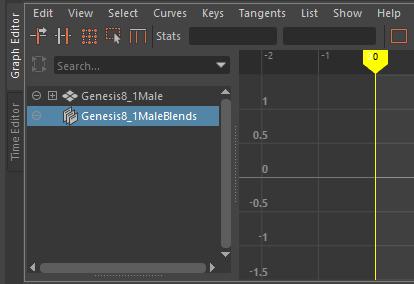
The copy/paste won't work. All the blendshapes remains on 0. If I try to modify them mnually, the error message "attributes locked or connected" shows up. If I unlock or disconnect, I can change the morphs values but it still won't change the animation at all. Note that the attributes won't show up in the graph editor.
OPTION C :
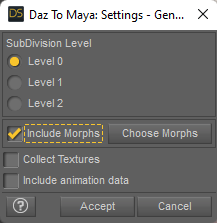
If I export from DAZ a genesis 8.1 or a genesis 8 character with ARKit morphs and animation data is ticked :
The copy/paste work. The blendshapes value are the same between rokoko and genesis BUT it won't be animated. As you can see in this pic, the genesis face is still despite all the morphs data (should be smiling like the rokoko face).
Diffeomorphic DAZ Importer version 1.6.0 releasedKrys Kryngle said:
Anybody have any tips for importing animations into Blender?
That depends on the animation. The daz animations can be very complex in that any morph can be used including ERCs. In general the daz rig or the simple-ik rig are the best to import and export poses and animations because they don't require any retargeting.
https://diffeomorphic.blogspot.com/2021/11/morphing-armatures-and-rendering.html
As for rigify it may need prebending with "optimize pose for ik", though some figures are already bended enough. So it changes the rest pose and animations will somewhat "break". Also both rigify and mhx don't support the full set of daz body morphs, that are mainly useful to pose figures with the daz fk rig, while they're not necessary for ik rigs but daz animations may use them.
https://bitbucket.org/Diffeomorphic/import_daz/issues/498/important-fix-for-rigify-how-to-avoid-pose
edit. note. To avoid importing extra morphs in blender, you can bake a single pose to the bones transformations in daz studio: edit > figure > bake to transforms. But it is not possible to bake animations afaik.
edit. note. To export aniblocks you have first to bake them to the timeline. Animate Lite can be used to bake to the timeline and back you don't need the pro version.
Then of course there's the whole series by @wolf359 that's excellent for mixamo animations.
Diffeomorphic DAZ Importer version 1.6.0 releasedKrys Kryngle said:
rugeyohe said:
Can you add clothing in existing genesis figure with this? I mean lets say I have a mesh based genesis but I changed textures or sculpted character mesh changed. I keep my base mesh with diff than I wanted to add clothes without importing character can I do that?
Here are the steps I use to import new clothing to an existing Blender character (previously imported by diffeomorphic).
1) Open up DAZ with the final character save just before it was exported to Blender.
2) Add all clothing outfits to take advantage of DAZ clothing auto-fit.
3) Save and export like you would normally, for example we'll call this file 'new_clothing'.
4) Open up Blender and import your character with the new clothing, calling this file 'new_clothing.blend'. If you converted your rig to rigify or MHX in your original character file, do it here as well. Save and exit Blender.
5) Open up your original character (without clothing).
6) In Blender, go to File -> Append, and append the objects or collection from 'new_clothing.blend'. This will bring in the new clothing already fitted to your original character.
7) Clothing should fit, just 'merge rigs' and 'transfer shapekeys' if you are using diffeomorphic.
If you've sculpted your character and want to fit clothing to the new shape, I think there would be two approaches. You could re-import the new shape back to DAZ using Morph Loader Pro so that DAZ will auto fit the clothing to the new shape and then you can export using the steps above. Another approach would be to save your sculpt to a shapekey and then use the 'transfer shapekey' option in Diffeo. I'm not 100% sure that would work the way we want, but I think it would.
Thank you for your answer! But I couldnt understand how should I merge rig and transfer shape keys. Yes I use diffo but I have never done this. Where should I look to learn?
Diffeomorphic DAZ Importer version 1.6.0 releasedwolf359 said:
Padone said:
@speaker-60 So it's "bend control" not "blend control" that's why I didn't find anything.
1. As for the raw and final values your suggestion is not possible because that's not how sliders work in blender. In my opinion in blender you can just ignore the final values that are a daz thing and work with the sliders instead.
2. As for importing morphs on an animated figure I'll do some tests and let you know what I find. I agree the limitations should be clear.
3. As for more controls to edit the slider list that would be a nightmare in my opinion, unless you also have the option to save presets so you do the job just one time. But it seems overwhelming to me the diffeo philosophy is to import as few morphs as possible not to have hundreds of morphs to manage. That's also why products as "bend control" don't fit blender too much.
As a personal advice, you shoud try to fit daz to blender if you want to work fine in blender. Not to fit blender to daz. There are many products in the shop that are useful in daz studio, but they don't make too much sense in blender.
@Padone, Well stated sir.Yes, well said.DAZ has so many morphs and sliders because you can't easily sculpt, edit, and shape your character and clothing. With Blender, that limitation does not exist. Some morphs are still very handy to import, but many become unnecessary in the Blender environment.Diffeomorphic DAZ Importer version 1.6.0 released
@Padone, Well stated sir.Padone said:@speaker-60 So it's "bend control" not "blend control" that's why I didn't find anything.
1. As for the raw and final values your suggestion is not possible because that's not how sliders work in blender. In my opinion in blender you can just ignore the final values that are a daz thing and work with the sliders instead.
2. As for importing morphs on an animated figure I'll do some tests and let you know what I find. I agree the limitations should be clear.
3. As for more controls to edit the slider list that would be a nightmare in my opinion, unless you also have the option to save presets so you do the job just one time. But it seems overwhelming to me the diffeo philosophy is to import as few morphs as possible not to have hundreds of morphs to manage. That's also why products as "bend control" don't fit blender too much.
As a personal advice, you shoud try to fit daz to blender if you want to work fine in blender. Not to fit blender to daz. There are many products in the shop that are useful in daz studio, but they don't make too much sense in blender.
Diffeomorphic DAZ Importer version 1.6.0 releasedPadone said:
@speaker-60 So it's "bend control" not "blend control" that's why I didn't find anything.
1. As for the raw and final values your suggestion is not possible because that's not how sliders work in blender. In my opinion in blender you can just ignore the final values that are a daz thing and work with the sliders instead.
2. As for importing morphs on an animated figure I'll do some tests and let you know what I find. I agree the limitations should be clear.
3. As for more controls to edit the slider list that would be a nightmare in my opinion, unless you also have the option to save presets so you do the job just one time. But it seems overwhelming to me the diffeo philosophy is to import as few morphs as possible not to have hundreds of morphs to manage. That's also why products as "bend control" don't fit blender too much.
As a personal advice, you shoud try to fit daz to blender if you want to work fine in blender. Not to fit blender to daz. There are many products in the shop that are useful in daz studio, but they don't make too much sense in blender.
Oh yer sorry i miss typed
1 Could the 'final' vales be there own functional sliders then just have a 'only show final' option that simply repleaces the raw sliders in the menu with the final ones. I would rather use them over raw as the raw ones dont change when there meant to, in the case with corrective morphs so. so as far as im concerned raw values/sliders are useless to me. I mean i cant tick the show final and just look at them 'now i know' this but im mearly sharing my opinion in how this could be made more intuitive for people not used to blender and expect to see it like daz. I mean the final cales have already been implimented so im just suggesting they be implimented better visualy so it just makes more sence
2 Yer its just a case of always making sure users can immediatly understand when an issue is occuring by providing in tool notifications so user know its not a bug or broken but instead a thing they have to navigate around
3 Well how dose the ui order the sliders, alphebeticly? The add an option to let us rename the sliders and have it auto order. this way i can just name sliders '-control' slider to have it order to the top. I guess you mean about saving it so when you import these again it keeps the changes, simply add an import and export button and have it simply store slider names
something like:
Slider01 - RenamedSlider01
Slider02 - RenamedSlider02
ect
So you can just import this file and it search through current imported sliders and match them to the list changeing them to the edited ones, Or just simply let us rename the sliders but not let us save it so we have to do it again on another import still ranaming just helps for the sake of using them in the blend as is
Im not really using daz im mearly using daz content for my own things i only open daz just to export stuff, im using this in ue4 for personal privet projects. So im deliberatly compiling a master character in blender with any and every feature so i can import into ue4 where i can use any and all slider/morphs ect. So because of this im not using this in a standard way asn im not doing standard things. It why i would need a way to import morphs and psoes in random orders as ill be constantly going back to add to this base model. I mean the poses im not really using in ue4 but im using them to test the model make sure it morpsh right ect, it will be a back and forth prosess so i need to get around the issues it currently has
[Released] Turbo Loader for Genesis 8 and 8.1 [Commercial]Ah no worries. I have tried, but could not reproduce the bug. I basically followed the manual, open in the second monitor.
Logged in is not it, I am logged through Studio while using the tool, it's been a while since any Daz metadata has updated, and as I run TL again, everything is still Unknown Product.
Moreover, I just loaded the same scene file as before (not even remotely named similar to any morph lol) and although it appears fine, during loading the popup complained of 5 newly missing morphs:
/data/DAZ 3D/Genesis 8/Female/Morphs/DogZ&Zev0/200 Plus/Eyes Lower Inner.dsf
/data/DAZ 3D/Genesis 8/Female/Morphs/RareStone/RFMC/Eyes Lower Inner.dsf
/data/DAZ 3D/Genesis 8/Female/Morphs/RareStone/RFMC/Eyes Upper Inner.dsf
/data/DAZ 3D/Genesis 8/Female/Morphs/RareStone/RFMC/Eyes Upper Outer.dsf
/data/DAZ 3D/Genesis 8/Female/Morphs/RareStone/RFMC/Teeth Depth.dsfBUT, these do in fact exist, they are/have been enabled in TL, and are not renamed with .tlOff.
Another thing I noticed is that although I have all my expression kits and shaping kits enabled, certain expressions are broken, operating only the brows on one kit, only the mouth on another...
At this point I'm going to have to restore all morphs and not use this, I'm finding it too unstable to be useful. Thanks though, keep up the good work.
<edit>
After restoring all morphs and reloading the scene, those 5 morphs are still reported as missing upon load. However, they appear in the property panel and operate properly. Shutting down Studio, re-installing the products, and reloading the scene has no effect, still "missing" (but not really). Saving the scene and then reloading it fixes the error. So, it seems that altering the delicate ecosystem of morph assets is disruptive to established scenes, if those scenes are subsequently saved with the reduced morph references. Even restoring the morphs does not restore the corrupted references within the scene file until it is once more saved.
Hopefully this info is helpful to you.
[Released] Turbo Loader for Genesis 8 and 8.1 [Commercial]ghost_of_delete_key said:
It turns out I've got roughly 13,000 morphs for G8F. Yikes!. After paring down the unused characters and other kits, I'm left with about 5,000. Somehow my load time has changed very little. Some, not much.
More importantly though, 2 issues:
1) I too have every single item listed as ***UNKNOWN PRODUCT***. My runtime is perfect. I don't move things around, they are exactly as installed by DIM. All my 3rd party content is carefully handcrafted into Daz-canonical DIM installers with complete and correct metadata. With over 2500 products, not one has Lost and Found content, and very few that are not old Poser items are left without metadata. Anyway, TL does not seem to recognize anything, up to and including the Daz fundamental products. All of G8F and Victoria8 base morphs and JCMs are split up and scattered to the winds in the list, took a good hour to hunt everything down and mark it all for an "Essentials" profile. Without proper product categorization, MetaMixer add-ons (and its base figure morphs) are likewise comingled with other products, so one must be careful to separate the morphs by hand.
The biggest issue people are having is that you need to LOG IN while using DS. This makes a HUGE DIFFERENCE. Without ever logging in, the local database is woefully out of date (as expected) and doesn't find the products for anything. You don't have to always be logged in, but recently helps.
2) After the initial run, loading a scene gave me a report of a few missing morphs it needed. I enabled the needed morphs, and reloaded the scene without issue. HOWEVER... on a subsequent run I loaded a scene, had to add morphs for it, and upon closing the scene I went to reload it, and Daz told me FILE DOES NOT EXIST. <head explodes> Indeed, my scene file disappeared from the Scenes folder in the content browser.
After I calmed down and stopped inventing new swear words, I looked in Windows Explorer at my Scenes folder... and there it was... MyScene.duf had been transmogrified to MyScene.tlOff
O_O
I cannot imagine how that is possible if this only rewrites the extension on .dsf files... but do be aware of that and double-check your code. Fortunately, giving back the file's .duf extension saved it, so no harm, no foul.
I'll reserve further judgement until such time as an update (or not) but I'm unfortunately finding limited utility with this.
Weird (and concerning). I would LOVE to know the exact steps you did to make that happen, and be able to reproduce it. That has not been reported before and it should not do that. The only way I could see that happening is if you named the scene the same as a morph and you put the scene file in data/DAZ 3D/Genesis 8/Female/Morphs. It must be something to do with not finding any products. I apologize for the head explosion.
 Diffeomorphic DAZ Importer version 1.6.0 released
Krys Kryngle said:
rugeyohe said:
Can you add clothing in existing genesis figure with this? I mean lets say I have a mesh based genesis but I changed textures or sculpted character mesh changed. I keep my base mesh with diff than I wanted to add clothes without importing character can I do that?
Here are the steps I use to import new clothing to an existing Blender character (previously imported by diffeomorphic).
1) Open up DAZ with the final character save just before it was exported to Blender.
2) Add all clothing outfits to take advantage of DAZ clothing auto-fit.
3) Save and export like you would normally, for example we'll call this file 'new_clothing'.
4) Open up Blender and import your character with the new clothing, calling this file 'new_clothing.blend'. If you converted your rig to rigify or MHX in your original character file, do it here as well. Save and exit Blender.
5) Open up your original character (without clothing).
6) In Blender, go to File -> Append, and append the objects or collection from 'new_clothing.blend'. This will bring in the new clothing already fitted to your original character.
7) Clothing should fit, just 'merge rigs' and 'transfer shapekeys' if you are using diffeomorphic.
If you've sculpted your character and want to fit clothing to the new shape, I think there would be two approaches. You could re-import the new shape back to DAZ using Morph Loader Pro so that DAZ will auto fit the clothing to the new shape and then you can export using the steps above. Another approach would be to save your sculpt to a shapekey and then use the 'transfer shapekey' option in Diffeo. I'm not 100% sure that would work the way we want, but I think it would.
After just watching your tutorial videos (I'm about to re-watch them because there's so much information I can't grasp it all in one go), I have to express my gratitude to you for taking the time to create those tutorials and for adding further tips like this one (above). I watched the first of the videos when you first released them and, though I appreciated your effort, I was put off by the sheer complexity of using Diffeomorphic to transfer all the necessary components of a single character: all the morphs/shapejeys, the JCMs, the rigging, the materials set-up, and merging of geografts, etc. And all the care needed to do things in the right sequence - it was all just too much.
However, now I'm looking at it again and trying to decide whether all that effort will bring benefits such as better animation tools and rendering options (Eevee, for example).
Diffeomorphic DAZ Importer version 1.6.0 releasedKrys Kryngle said:
rugeyohe said:
Can you add clothing in existing genesis figure with this? I mean lets say I have a mesh based genesis but I changed textures or sculpted character mesh changed. I keep my base mesh with diff than I wanted to add clothes without importing character can I do that?
Here are the steps I use to import new clothing to an existing Blender character (previously imported by diffeomorphic).
1) Open up DAZ with the final character save just before it was exported to Blender.
2) Add all clothing outfits to take advantage of DAZ clothing auto-fit.
3) Save and export like you would normally, for example we'll call this file 'new_clothing'.
4) Open up Blender and import your character with the new clothing, calling this file 'new_clothing.blend'. If you converted your rig to rigify or MHX in your original character file, do it here as well. Save and exit Blender.
5) Open up your original character (without clothing).
6) In Blender, go to File -> Append, and append the objects or collection from 'new_clothing.blend'. This will bring in the new clothing already fitted to your original character.
7) Clothing should fit, just 'merge rigs' and 'transfer shapekeys' if you are using diffeomorphic.
If you've sculpted your character and want to fit clothing to the new shape, I think there would be two approaches. You could re-import the new shape back to DAZ using Morph Loader Pro so that DAZ will auto fit the clothing to the new shape and then you can export using the steps above. Another approach would be to save your sculpt to a shapekey and then use the 'transfer shapekey' option in Diffeo. I'm not 100% sure that would work the way we want, but I think it would.
After just watching your tutorial videos (I'm about to re-watch them because there's so much information I can't grasp it all in one go), I have to express my gratitude to you for taking the time to create those tutorials and for adding further tips like this one (above). I watched the first of the videos when you first released them and, though I appreciated your effort, I was put off by the sheer complexity of using Diffeomorphic to transfer all the necessary components of a single character: all the morphs/shapejeys, the JCMs, the rigging, the materials set-up, and merging of geografts, etc. And all the care needed to do things in the right sequence - it was all just too much.
However, now I'm looking at it again and trying to decide whether all that effort will bring benefits such as better animation tools and rendering options (Eevee, for example).
Daz 3D is part of

Connect
DAZ Productions, Inc.
7533 S Center View Ct #4664
West Jordan, UT 84084Licensing Agreement | Terms of Service | Privacy Policy | EULA
© 2026 Daz Productions Inc. All Rights Reserved.