-
Any idea about creating corrective morph using Goz ? [Solved]
You might've misunderstood how GoZ works as per the cases of " fixing corrective morphs (JCMs or cbs) " and "fixing FBM / PBM / bs, etc". The former is pose-based, so the exported morph and modified delta morph is with "a pose" , while the latter is based on the figure with zeroed-pose. The "process of fixing" is different as per what you need...
Gnoll figure?Gordig said:
Lycan looks a bit closer to what you're looking for. You might not want to dial it in all the way, because it's a very overpowering morph.
WOW! I like that Lycan!!
 Measuring the height of a Genesis 8 figure/modifying height
MWall 2 for measuring
https://www.deviantart.com/spyrorue/art/MWall-2-0-for-Daz-Studio-793218213Many morph packs come with dials to change the height and proportions of the figure
Using a Persona's Morph with a Different PersonaOn Zerala 8 and Nix 8 there is a spine interaction HD morph. When I examine the Nix file list there is are separate line items for a spine interaction HD morph. Does this mean it has a separate slider in the Shapes tab for that particular morph which I can use on any G8M persona? For example to add the spine prop to the Peter HD for Vladimir 8 and dial in the HD morph to make it look like it belongs on Peter, but not add the Nix 8 general body shape morph. See attached picture for details.
Also which of these line items indicate a separate slider for that HD morph?
-
/data/DAZ 3D/Nix 8 Spine/Base/Morphs/Daz 3D/Base/MCMNix8SpineInteraction_HDLv4.dsf
-
/data/DAZ 3D/Nix 8 Spine/Base/Morphs/Daz 3D/Base/PBMNix8SpineInteraction_HDLv4.dsf
-
/data/DAZ 3D/Nix 8 Spine/Base/Morphs/Daz 3D/Base/SpineDetails.dhdm
-
/data/DAZ 3D/Nix 8 Spine/Base/Morphs/Daz 3D/Base/SpineDetails.dsf
-
/data/DAZ 3D/Nix 8 Spine/Base/Spine_Cage_2920.dsf
-
/data/DAZ 3D/Nix 8 Spine/Base/Tools/Script Loads/Nix 8 Spine.duf
http://docs.daz3d.com/doku.php/public/read_me/index/56189/file_list
https://www.daz3d.com/zelara-8
https://www.daz3d.com/peter-hd-for-vladimir-8
Any idea about creating corrective morph using Goz ? [Solved]duckbomb said:
This doesn't really address the GOZ issue, specifically, but I've had MUCH better success simply exporting the figure out at base resolution manually, making the morph, saving it as an OBJ, and re-importanting through Morph Loader Pro.
To make it even simpler, when I create charaters I take the whole thing and break it up into different group so my hair/clothes/accessories is separate from the base figure. THis way, I can easily hide everything I don't want to export. In the end it looks like this:
- - G8.1 Girl FULL
- _GirlNameHere
- _GirlStuff
Again, I know your question was about GoZ, but mine broke about 4 years ago and I never bothered to fix it once I started doing it manually. It might be worth a shot if you feel like you're struggling more than necessicary.
Thanks man, that's what I called traditional way, and it's really reliable.
Daz Studio Pro BETA - version 4.22.0.15! (*UPDATED*)maiscxdo said:
Hi everyone, I'm having a super unusual problem and I haven't seen anyone talking about it yet. The problem started in this new version 4.22.
It turns out that when I save and reopen a project (after 2-5 times) the character LOSES his shaping. In other words, it looks weird, and it's not a slider that resets, the shaping just gets lost as if i had deleted it.
I don't know why this happens. I work with a virtual influencer on DAZ, and maintaining the shaping is essential. Thankfully I still had the original files and was able to save it as a shaping preset, so when the shape changes I just apply it.I hope this gets resolved because I was really scared of losing my job!
xoxx, akari
Was this a preset for existing shapes or a newly imported morph or master slider setting existing shapes? If either of the latter, had you saved a new Morph Asset for it or was it just embedded in the scene?
Big monster morph for MookiMooki the Critter looks like a small monster. So he should have a morph where he becomes much larger and has claws, more teeth, and bigger horns.
Any idea about creating corrective morph using Goz ? [Solved]This doesn't really address the GOZ issue, specifically, but I've had MUCH better success simply exporting the figure out at base resolution manually, making the morph, saving it as an OBJ, and re-importanting through Morph Loader Pro.
To make it even simpler, when I create charaters I take the whole thing and break it up into different group so my hair/clothes/accessories is separate from the base figure. THis way, I can easily hide everything I don't want to export. In the end it looks like this:
- - G8.1 Girl FULL
- _GirlNameHere
- _GirlStuff
Again, I know your question was about GoZ, but mine broke about 4 years ago and I never bothered to fix it once I started doing it manually. It might be worth a shot if you feel like you're struggling more than necessicary.
I’d like to hire someone to create a modelWendyLuvsCatz said:
unless it's a morph of a Genesis figure
Good idea, thank you.
Genesis 9 and Male Chestsvwrangler said:
Vinme Morphs do a decent job of reshaping the masculine chest -- although they do call those specific morphs "breasts masculine". Mind, that's a hefty price to pay for the six morphs that affect the male chest, so you would want to get the whole package to use for other things. (And they've finally corrected how it crashed into Shape Shift and caused duplicate formulas.)
Write Idea said:
G8M does have a morph called Pectoral Undercurve (or something along those lines) that either enhances or decreases its size to give a flat chested look. That might help with G9 (if it has one). Though, all those faces might cause some distortions.
Genesis 9 has morphs called "Chest Volume Fix" for both left and right pecs. It reduces the outer curve and maybe a bit on the undercurve. Not sure if that's in the Starter Essentials or the Essentials Expansion add-on.
It's possible that Soto's Breast Utilities might help with this, but the promo images for the male are ... discouraging on that front, let's say. However, I don't have that set so I can't say for sure. And again, not cheap.
Sickleyield's free morphs package also has one morph (SY Free Pecs Shape 02) that squares off the bottom of the pec a bit to attenuate the moobtacular shape. That combined with the Chest Volume Fix might get you where you want to go.
MelissaGT said:
It's not so much the size of the pectoral that is an issue...it's the shape/angle itself. I bought some chest morphs specifically for male figures on the 'other' site and I'm hoping that will help.
@MelissaGT - was that the package by SF-Design? Did it do what you wanted?
Yeah, it's the SF-Design and so far it hasn't really helped. But that chest volume fix is promising! WHY IS THAT HIDDEN UNDER TOOLS??? Vinme morphs has been help. I'm definitely going to give the SY free morphs a shot.
Basically what I've been trying to achieve is a moderately thin yet toned body with defined chest/pecs...which is what has been difficult. Because you either end up with defined everything else and moobs...or a flat bird chest. I'm going to keep playing with it...I'm focusing on the rest of the body right now. It's for fanart of a game character so I've been using screenshots from the game as reference so it's a distinct look I'm going for. I'm not against personalizing it to my tastes and to help give the game character more realism, which is what I did with the face (which came out awesome if I do say so myself), but I still need it to be recognizable.
Wang 9AllenArt said:
MelissaGT said:
AllenArt said:
MelissaGT said:
I know I started a separate thread bout it for G9 males in general...but Wang 9's chest is particularly wonk.
I'm working on it. LOL
Edit: This is likely as good as I'm going to get it with the morphs I have.
What morph packs do you have? I'm looking to help de-boobify a male figure I've been working on and so far nothing I've tried has been able to get the lower pec to not look like a boob, especially the nipple placement. I like what you've done here.
It's a combo of base morphs, Vinme morphs and SF Design Easy Pecs. There is also a morph under Tools in Parameters that is a Chest Volume fix that helps to de-moobify the pecs some ;)
I have the Vinme morphs and SF Design Easy Pecs...will need to keep playing with them!
Gnoll figure?Once you have Lycan applied to get the muzzle length try adding the Face Center Depth to it (Actor/Head/Face/Real World) this is from the Genesis 8 Male Head Morphs Pack. If you need it longer just click on the "Cog" on the upper right of the morph select "Parameter Settings" and the uncheck the "Use Limits" box on the middle right side.
Any idea about creating corrective morph using Goz ? [Solved]Masterstroke said:
When sending to Zbrush, it is important to have "Export with deformations" checked and "Export at current resolution" unchecked.
This way, it should work, but do not change anything in DAZ Studio, while using GoZ, except dialing the newly created Zbrush morh dial to a 100 percent.
Everything you add, that has not been dialed in, during the sending to zbrush process, will be baked into your morph target.Thanks my friend, I do have "Export with deformations" checked and "Export at current resolution" unchecked when using GoZ, but it seems that the morph I got still including those morph I have dialed before starting sending to Zbrush process. I 'll have a try later to figured out if I might got something wrong.
PROBLEM WITH "Dial Fusion for Genesis 2 to 8.1" [RESOLVED]Drogo Nazhur said:
I figured out how to save it but I do have another question. How do I remove the ones that I created and start fresh?
In parameters go to the dial you created and click on the cog icon, then the 3 dots as shown in screenshot. It will open a browser to where the morph is.
Wang 9If I get him I won't be using his heavy morph. Did you notice fat as all get out in the mid-section with a lean and muscular on his rib cage under his arms. Doesn't happen like that in real life.
FaceGen Pulled From StoreI will buy Face Transfer if they update it to give much improved results and so that it works with Genesis 9. As it stands it is one of only 4 products I have returned for a refund.
Wang 9outrider42 said:
don't understand how anyone can recommend Wang at all. He has way more problems than just his chest. The very plain skin, the oddly small head, and freaky neck. What is going on with this dude's neck? Did he swallow a pyramid?Any vampire that tries to bite Wang could potentially lose an eye! That Adam's Apple is dangerous!
I can get buying something and customizing. I pretty much do that with everything. But we are seeing wholesale changes here, using another character's skin, trying to fix the body morph, and so on. At that point...why? I don't understand.
It's a good point outrider42, and I think that's the beauty of these review threads, that there's discussion and experimentation so people can see possibilities or not. I really enjoy robust anatomy threads, I'm always learning.
Here's more experimenting from me. Un-altered vs an Wang-Aroon-Minjun mix (who all seem to play well together), although that chest is a work in progress. Swapped out eyebrows and the mix had Wang's base mats and then I put n Dain 9's normals (I seem to put Dain 9's normals over everything at the moment).
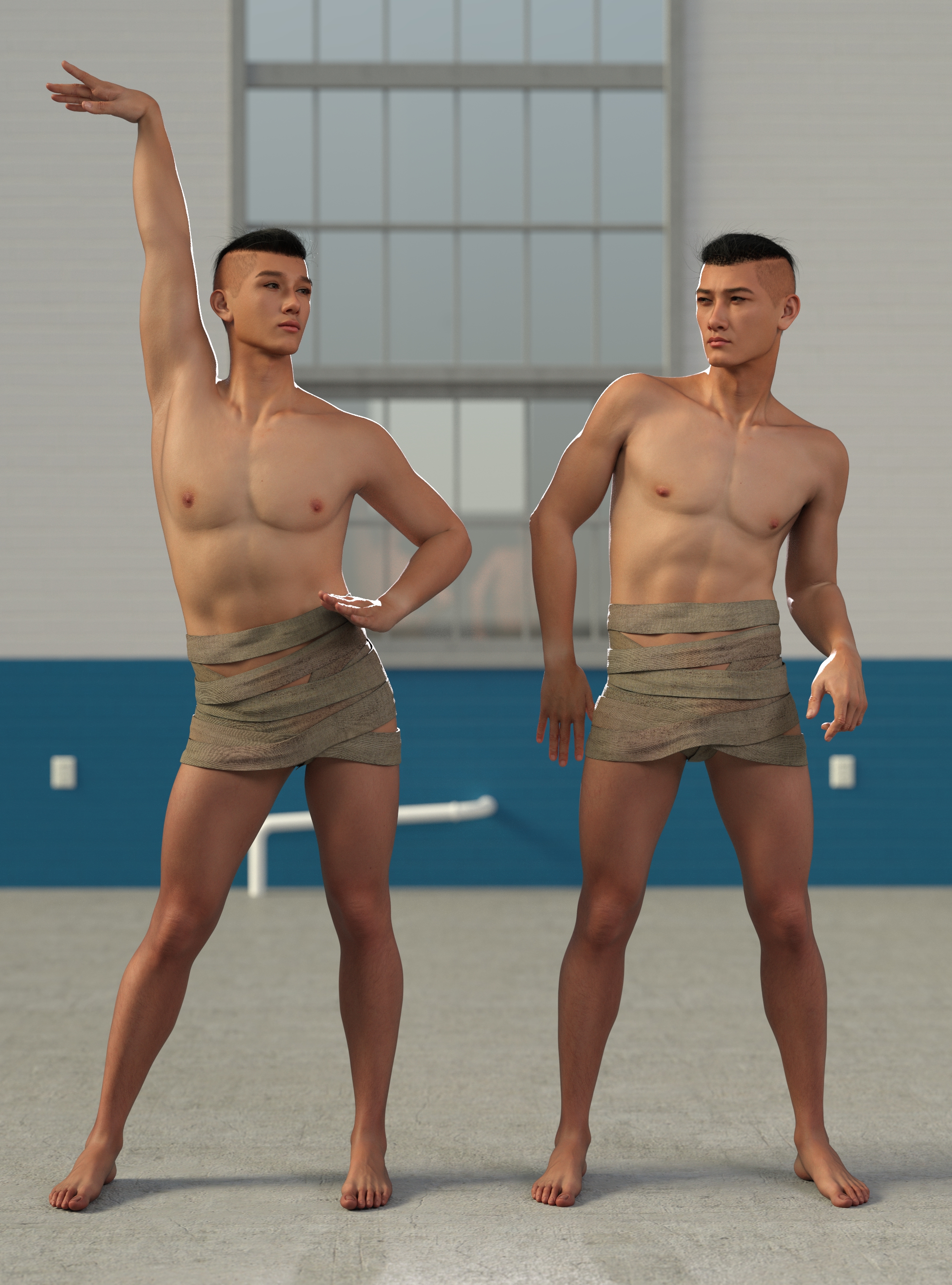 FaceGen Pulled From Store
Also, and I could be wrong here, the fact that it is being developed and still got culled seem to be a clear indicator that Daz 3d is planning something in this direction. But I also didn't realize that the Face Transfer video I posted (because it was just being shown to me as adds before videos I was trying to get to) was three years old already.
►►► aniMate 2 - Real aniMating Power for Daz Studio!Dartanbeck said:
I like the job that Bone Minion does so much that I'm collecting all of them
sadly it doesn't do hands, at least the gen4 to Genesis 9 one doesn't, it's hands move but it doesn't transfer
which is a shame as I can transfer hand animations between every other generation just using DAZ studio
►►► aniMate 2 - Real aniMating Power for Daz Studio!Cross-Generation Animation Translation Using Bone Minion
I am looking for an aniBlock, but... oh... that's right. I have that for Genesis 3, but not 8.
Well, it was a good rendering day. I can take a break.
I load in Genesis 8 and apply a Genesis 3 Bone Minion to it and convert the entire collection in one sitting. It takes a while if they're long aniBlocks like these, but in the end the worth is Incredible. Like getting a whole new pack of aniBlocks for this figure.
It can be easy to mess up, so I'll go through the whole process here. We'll use Genesis 8 Female for this example, and we'll call her G8F and Genesis 3 Female we'll call G3F.
- In either timeline, turn looping off, so Play will stop when the animation is finished
- Load in G8F
- Go to Scripts > Riversoft Art > Bone Minion and, with G8F selected, double-click the G3F Bone Minion*
- Select the Bone Minion (might have to open G8F's hierarchy)
- In Parameters, click the "Bone Minion" parameter heading and change the top value "Automatic Pose Transfer" from On (default) to Off so it does try to write as we preview and apply aniBlocks
- With Bone Minion still selected, load the first aniBlock
- Scrub the timeline (DS or aniMate - doesn't matter) back and fourth once to get Bone Minion off that last pose from the last frame - even though it's sitting on frame 0
- Head to the Daz Studio Timeline - Make sure it is set to "Show All Frames" in its parameter settings dialog
- With the scrubber set at frame 0 - the very beginning of the timeline, Turn Bone Minion's Automatic Pose Transfer On
- Hit the forward one frame button (wait a second) and hit the back one frame button to get back to frame 0 (locks in the pose at frame 0)
- Hit Play and don't pass your mouse over anything that will preview a pose or animation, or we'll have to start over
- It'll take a little while for the transfer to complete - good time to get a cup of coffee
- Upon completion, since we're in the DS Timeline, we'll be on the last frame of the animation
- Hit the rewind button to go back to frame 0
- Turn Off Bone Minion's Automatic Pose Transfer**
- In the scene pane, select G8F
- Go back into aniMate 2 and right-click an empty part of aniMate 2 > Create aniBlock from Daz Studio's Timeline
- Play it through in aniMate 2 to verify the everything is right.
- Right-click the new aniBlock > Save as New > give your aniBlock a name and navigate to or create the folder to keep them in. aniMate defaults to the aniBlocks folder in your library, so the new folder can be put right there if you like
- Select the newly saved aniBlock and click the garbage can icon above it to delete it from the scene
- Select the aniBlock applied to Bone Minion and delete that one as well - in the timeline you'll notice that there are still some residual key frames on Bone Minion
- In the scene pane, select the Bone Minion
- Right-click the Timeline tab that you would use to open the Timeline pane > Clear Animation > Clear Figure Pose
- Repeat the process for the new aniBlock.
It all goes very smoothly. Easier to do than to type.
* Only available if you've purchased a Bone Minion.
Bone Minion folder - if you have more than one Bone Minion for Genesis 3 Poses, there will still only be the one Genesis 3 Female Bone Minion. If you own the correct one, it will just work on the figure you've applied it to.
When I work on these projects, I prefer to use (in this example) G8F Base Figure, rather than a character, just to make sure that the data is made ofr and taken from the main, base figure. It might not make a difference - so if I jst want to do one conversion while my character is open, I'll go ahead and make the conversion (it's just joint rotation data afterall) and also save the resulting aniBlock to potentially (definitely in my case) save time down the road.
** Automatic Pose Transfer On/Off is, unfortunately animatable. Meaning that, if it's already On and we turn it Off on the last frame, it's still On on the first frame.
When Automatic Pose Transfer is active (On), it will constantly send pose-change information to the target. You don't want that to happen any time except when actually transferring. Get into the habit of keeping this turned off except during the transfer, and Always at frame 0!
►►► Back to Main Menu ►►►
Daz 3D is part of

Connect
DAZ Productions, Inc.
7533 S Center View Ct #4664
West Jordan, UT 84084Licensing Agreement | Terms of Service | Privacy Policy | EULA
© 2026 Daz Productions Inc. All Rights Reserved.