-
Where to get modern cars, trucks
daveso said:
Chezjuan said:
Have you gotten either of the city buses from the Daz store?
thanks..don't have those..and I did search at Rendo and nothing came up for me. Also Share CG, and a general google search, but nothing what I was really looking for.
Is it possible to convert 3ds or lwo files into obj in Blender?I don't think anyone answered this... you can. You'll need to download a plugin for 3ds and another for lwo (they're free). Once you have those, you can import those kinds of files into Blender. You can then export as an OBJ so that it can go into DAZ.
Fitting bracelets, rings and earringsThank you @Kainjy ! He didn't explain in the video that the imported file had to be in the exact position when imported, but I figured it out and it worked! Thanks a lot! What Daz unfortunately lack in documentation is compensated by its community!
I'll write a small tutorial (text with screenshots) so I don't forget the steps I did. I'll write down everything, from exporting the model to import into Blender (my case), fitting the wearable there, exporting the wearable back, and then continuing from the point the video starts. I would like to share it here. Is there a place to do this other than the forums?
And about the sliders to adapt to other models, can you point me in the direction of some learning material about how to do that?
Thanks again! :-)
Diffeomorphic DAZ Importer version 1.6.0 releasedPadone said:
You can use the "easy import" to import the base G8F morphs so you'll have expressions and jcms for good deformations. But the "ogre" shape is baked to dbz as the additional muscles morphs, so you will not have the "ogre" morphs by default. You can however import the muscles and ogre morphs as custom morphs if you really need them for your project.
https://diffeomorphic.blogspot.com/p/import-into-blender-version-16.html
As for the animation you can import it in blender if you animate in daz studio and it will work fine. Be sure to import all the morphs you used in the animation. But you can also animate in blender because the custom morphs you import can be animated in blender as well, as you do in daz studio.
One limit is HD morphs that can only be imported with the HD addon by Xin. Otherwise diffeomorphic uses multires for HD figures, that doesn't support HD morphs. This is a blender limit not a diffeo limit.
https://diffeomorphic.blogspot.com/p/hd-meshes-version-16.html
Thanks again @Padone for the explanation. You touched on the thing I was trying to get at which is that I don't really want to animate in DAZ Studio if I have better tools in Blender but I want to be able to apply the same morphs to my characters as I animate them in Blender. Of course I am a long way from being ready to do that yet as I know nothing about the Blender animation timeline but I do have a good tutorial to follow when I get a good stretch of free time.
Diffeomorphic DAZ Importer version 1.6.0 released@speaker-60
In daz studio the morphs can also be used to pose figures. That is, a morph is not only a "geometry shape", but it can also be a "bone pose", or a combination of them. For example all the G8 expressions are bone poses. As for keyframing it's the same in daz studio and any other package you need to use keyframes in animation.
Please describe the exact steps to get the issue since I don't seem to be able to reproduce it. Again I need the exact steps. Keep it as simple as possible if you can avoid to use "bend control". Unless "bend control" is the only one that doesn't work. Also post some pictures so I can see what you get.
Or you can post directly to the tracker so we keep everything in one place.
https://bitbucket.org/Diffeomorphic/import_daz/issues/938/importing-morphs-on-a-posed-figure
EDIT. UPDATE.
Did various tests and everything works fine here. I guess what you were struggling with is the keyframe and morphs concept. That is, when you import a new pose you have to set keyframes and keep the previous morphs. The default values let this to the user for better control, but this doesn't help inexperienced users so may be it should come with better defaults.
steps:
- Import G8F and merge rigs
- import jcms and flexions
- import "bend control" as custom morphs
- import the "strength setter pose" and keyframe it
- set the bend controls as you wish and keyframe them
- import again the "bend control" morphs (this is stupid but just for testing), the keyframed pose and morphs will keep their settings
- import another pose, be sure to have clear morphs = off to keep your previous morphs and auto keying = on to keyframe the new pose, or keyframe it by hand for better control
Please let me know if this works for you. Or provide the exact steps if you still get the issue because I can't reproduce it.
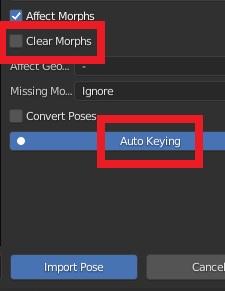 Diffeomorphic DAZ Importer version 1.6.0 released
Padone said:
speaker-60 said:
atm if i import a model then import say the blend control morphs then i import the 'sitter' pose that comes with blend control then if i import say the blend crontrol morphs again(for test sake but really any morphs) the pose brakes but also any now imported pose is also broken from this point on
Reported to Thomas.
https://bitbucket.org/Diffeomorphic/import_daz/issues/938/importing-morphs-on-a-posed-figure
update. @speaker-60 in my tests this seems to happen when you don't keyframe the pose. Did you ? If yes then I can't reproduce the issue. Unless you can provide a specific example possibly not involving "bend control" since we have to setup a test scene for Thomas to work on.
update. Thomas replies there are no restrictions to load morphs on a animated figure.
Okay didnt know about the keyframe thing, another not documented thing or not well documented anyway, but how would this effect new poses being loaded after the fact
So after i loaded the morphs that broke the pose if i import 'any' pose from that point on there all broken(iv tried 20-30 random poses from random packs), Unless keyframing them would fix them too. Just trying to understand the logic of it, like why do poses not need to be keyframed so long as you dont import morphs over them but its okay to import morphs at the start, and it wont brake unkeyframed poses? If the morphs interfear with poses then wouldnt they just brake in any import order? Thats what i dont understand
Thanks for reporting this though, i didnt actualy know where the proper place was to report issues
Turn obj shoes into library asset
No they don't as it's just an obj. Their size is slightly larger than feet but I tried to scale them and then use transfer utility, that won't do, also tried to import each shoe separately and parent them to feet and then use transfer utility, that won't do either. Maybe it's something about rigging or something.Richard Haseltine said:Do the shoes line up with the figure as they imported?
Diffeomorphic DAZ Importer version 1.6.0 releasedYou can use the "easy import" to import the base G8F morphs so you'll have expressions and jcms for good deformations. But the "ogre" shape is baked to dbz as the additional muscles morphs, so you will not have the "ogre" morphs by default. You can however import the muscles and ogre morphs as custom morphs if you really need them for your project.
https://diffeomorphic.blogspot.com/p/import-into-blender-version-16.html
As for the animation you can import it in blender if you animate in daz studio and it will work fine. Be sure to import all the morphs you used in the animation. But you can also animate in blender because the custom morphs you import can be animated in blender as well, as you do in daz studio.
One limit is HD morphs that can only be imported with the HD addon by Xin. Otherwise diffeomorphic uses multires for HD figures, that doesn't support HD morphs. This is a blender limit not a diffeo limit.
https://diffeomorphic.blogspot.com/p/hd-meshes-version-16.html
Possible to Export Posed, Simulated Character to Blender?I'm completely out of my element when it comes to Blender, but I do a lot of exporting out of Daz via FBX.
BTW, isn't that what the Bridges are for?
Perhaps my notes will ring a bell even though I'm using Lightwave as my end app. There's some extra work, but I get morphs, etc. Makes ya appreciate some of the mystery & magic Daz is doing frankly.
To begin with, when I export, I use the zeroed out pose. I used to export the posed scene but that actually complicates things severely. I even memorize everything, although what that actually does I'm not sure but it works.
Upon import, I use the default Z-Bones option. Everyone shrieks "But the bones aren't aligned", but the thing is, it doesn't matter for FK posing.
A huge advantage with that is I can export poses using just the Base Figure Pose option in the FBX Export panel. I then import using a Load from Scene option of just this "skeleton" into Lightwave in my case, then use a utility to copy & paste the pose. But, I'm only pasting the Rotations, so I can use ANY pose from ANY Daz figure (Humanoid for Human, etc., even animals of like structure). I've built up quite library.
There's really no reason this shouldn't apply to other apps. The tools and procedure names may be different of course
FLUIDOS II for Daz Studio - update 2.2 [commercial]Jovanni said:
Has anyone been able to import openvdb from blender to daz3d? :D
If you have vdb files of simulation of liquids, the vdbs are probably level sets, these can be transformed to meshes using remeshing in Fluidos II. But for smoke, fog, explosions, the current version (V2.1) cannot read these vdbs, but the plugin ABAS can do it (see https://youtu.be/FfGlaJyXXVo).
Possible to Export Posed, Simulated Character to Blender?WendyLuvsCatz said:
Animate2 mdd exporter works as a Lightwave point cache import on a matching obj export imported with vertex order checked not split but it is very resource hogging on my PC
so laggy I have not gotten a decent render yet as it freezes every step setting up lighting
Man, I just used the mdd approach on just some hair alone. I have a beefy system, and blender grinded to a stand still. I am thinking maybe there is a way to decimate the mesh(es)?
Diffeomorphic DAZ Importer version 1.6.0 releasedPadone said:
marble said:
An example: in DAZ Studio I can load a G8 figure and then dial-in a shape for her, click on clothing from my Content Library, click on a pose from that library, click on a skin texture from another character, apply make-up, etc., etc. My point about understanding the big picture is - how much of that needs to be done in DAZ Studio before exporting using Diffeo and how much can be replicated using assets saved to the Blender library?
That's a good question so I'll reply here also for others to know. Basically everything is possible.
1. To apply a shape you have to use erc morphs. https://diffeomorphic.blogspot.com/2021/11/morphing-armatures-and-rendering.html
2. To apply a cloth to the current figure is possible as well. http://diffeomorphic.blogspot.com/2021/07/changing-outfits.html
3. To load poses and animations. https://diffeomorphic.blogspot.com/p/posing-panel-version-16.html
4. To load materials on the current figure is not documented yet was recently added. https://bitbucket.org/Diffeomorphic/import_daz/issues/857/material-import-issues
But the real question is, should it be done in blender or in daz studio ? The "blender way" is to use daz studio as a character generator, then import in blender to animate and render. This is clean and easy for blender since you avoid to import most morphs and there's a file for each figure, as done in a common animation project. Otherwise the "daz way" is to use blender as a sort of replacement for daz studio, where you load a basic figure and do in blender everything you did in daz studio before. This makes very heavy scenes to handle in blender with lots of morphs as daz studio does. That's not what diffeomorphic was designed for, though the features were added under user request.
Oh dear ... all that homework! Ah, well, I had to ask didn't I?
Can I ask for a little further clarification, please? What are the limitations of the "Blender Way"? My mind goes to a character I produce using all the morphs available to me in DAZ Studio so I morph G8F into a muscular ogre and send her to Blender. Does diffeo just see that as a figure shape or are all the morphs adjustable after import into Blender? So when my ogre gets angry, her muscles can bulge and her expression can look vicious? Or is it just a shape with a rig?
Again, an example of what I'm trying to understand: I make a short animation in DAZ Studio where I have two characters interacting. Perhaps they embrace. At frame zero they are all relaxed. At frame 30 they are more braced, certain muscles are tighter, expressions have changed, etc. ... Blender Way or DAZ Way?
Turn obj shoes into library assetI made a pair of shoes in blender and figured out how to import it into Daz saving material, but now I'm stuck on the fact that I have no idea how to turn this obj into a clickable asset. Transfer utility doesn't seem to help, and I suppose there is something else I should do before using it. I would be glad if someone explain me this process.Is there a reason I am unable to select polygons with geometry tool of G8F Shell?
Thank you, appreciate the advicehansolocambo said:If you want to edit the shell's geometry, export it as obj. Import that obj. And use the Transfer Utility to conform this imported "shell" object to Genesis as you'd do with a custom made cloth.
Edit > Object > Transfer Utility.
Now that the "shell" is rigged to the Genesis bones, as if it were a custom made cloth for example, you can apply the original shell's surface or any other surface to it. And edit its geometry to delete unwanted parts, define new surface groups, etc.
reset coordinate locationsHello everyone!
I am new on the forum and this is the first time I post here. I have been using daz for about 8 years now and the software really helps me everyday in my concept art carrer, I love it !
I am facing a problem today, I am often using the trasnfert asset utility system to create a sculpt and assigning it to a character or even an animal to have my model rigged on top of the genesis figure.However this time I want to import an object that appears in a 0,0,0, position. Then I want to move this object to new location and then, from this location reset the coordinate so it is reset to 0,0,0 but in the new position, so that after, I can transfert it to my figure the way I used to do.
Is that possible? I found some similar question on the forum but nobody answer it.
And of course it would be too easy if it would simply be to reimport it with the new locations. I reimport with the new locations set, i Hvae to do that INSIDE Daz after importing.
Thanks in advance !
Diffeomorphic DAZ Importer version 1.6.0 releasedPadone said:
marble said:
An example: in DAZ Studio I can load a G8 figure and then dial-in a shape for her, click on clothing from my Content Library, click on a pose from that library, click on a skin texture from another character, apply make-up, etc., etc. My point about understanding the big picture is - how much of that needs to be done in DAZ Studio before exporting using Diffeo and how much can be replicated using assets saved to the Blender library?
That's a good question so I'll reply here also for others to know. Basically everything is possible.
1. To apply a shape you have to use erc morphs. https://diffeomorphic.blogspot.com/2021/11/morphing-armatures-and-rendering.html
2. To apply a cloth to the current figure is possible as well. http://diffeomorphic.blogspot.com/2021/07/changing-outfits.html
3. To load poses and animations. https://diffeomorphic.blogspot.com/p/posing-panel-version-16.html
4. To load materials on the current figure is not documented yet was recently added. https://bitbucket.org/Diffeomorphic/import_daz/issues/857/material-import-issues
But the real question is, should it be done in blender or in daz studio ? The "blender way" is to use daz studio as a character generator, then import in blender to animate and render. This is clean and easy for blender since you avoid to import most morphs and there's a file for each figure, as done in a common animation project. Otherwise the "daz way" is to use blender as a sort of replacement for daz studio, where you load a basic figure and do in blender everything you did in daz studio before. This makes very heavy scenes to handle in blender with lots of morphs as daz studio does. That's not what diffeomorphic was designed for, though the features were added under user request.
The "blender way" seems to be fine. Just want the JCM morphs to support the posing. Clothes can be adjusted in Daz Studio as well for a specific figure.
Thanks again for all your great support.Diffeomorphic DAZ Importer version 1.6.0 releasedspeaker-60 said:
atm if i import a model then import say the blend control morphs then i import the 'sitter' pose that comes with blend control then if i import say the blend crontrol morphs again(for test sake but really any morphs) the pose brakes but also any now imported pose is also broken from this point on
Reported to Thomas.
https://bitbucket.org/Diffeomorphic/import_daz/issues/938/importing-morphs-on-a-posed-figure
update. @speaker-60 in my tests this seems to happen when you don't keyframe the pose. Did you ? If yes then I can't reproduce the issue. Unless you can provide a specific example possibly not involving "bend control" since we have to setup a test scene for Thomas to work on.
update. Thomas replies there are no restrictions to load morphs on a animated figure.
Diffeomorphic DAZ Importer version 1.6.0 releasedmarble said:
An example: in DAZ Studio I can load a G8 figure and then dial-in a shape for her, click on clothing from my Content Library, click on a pose from that library, click on a skin texture from another character, apply make-up, etc., etc. My point about understanding the big picture is - how much of that needs to be done in DAZ Studio before exporting using Diffeo and how much can be replicated using assets saved to the Blender library?
That's a good question so I'll reply here also for others to know. Basically everything is possible.
1. To apply a shape you have to use erc morphs. https://diffeomorphic.blogspot.com/2021/11/morphing-armatures-and-rendering.html
2. To apply a cloth to the current figure is possible as well. http://diffeomorphic.blogspot.com/2021/07/changing-outfits.html
3. To load poses and animations. https://diffeomorphic.blogspot.com/p/posing-panel-version-16.html
4. To load materials on the current figure is not documented yet was recently added. https://bitbucket.org/Diffeomorphic/import_daz/issues/857/material-import-issues
But the real question is, should it be done in blender or in daz studio ? The "blender way" is to use daz studio as a character generator, then import in blender to animate and render. This is clean and easy for blender since you avoid to import most morphs and there's a file for each figure, as done in a common animation project. Otherwise the "daz way" is to use blender as a sort of replacement for daz studio, where you load a basic figure and do in blender everything you did in daz studio before. This makes very heavy scenes to handle in blender with lots of morphs as daz studio does. That's not what diffeomorphic was designed for, though the features were added under user request.
Adding your own mapsIf I want to add my own map to say the dforce Miranda Dress product, how would I do it? I know that in Bryce, you simply change the image file that Bryce is pointing to and use the functions provided in the Materials Editor to adjust the placement of the map and manipulate the bump map. How is this done in DAZ Studio? Do you import one of the maps used in the Miranda Dress product, import it into Photoshop, change the pattern, and add the new image back into the map folder for the Miranda Dress product?
In-Depth Tutorial for squeezing the best of 3Delight?Sven Dullah said:
dsum55 said:
Sven,
Not sure if this is the right forum but i want to know how do i make eyes with 3delight shaders? i feel i cant find anything about start or creating eyes for 3delight and iray materials. i feel there is a need for anime eyes in daz for NRP renders. do you know what program i use to create eye texture then in turn how do i get them to .duf format. any help will be much appreciated. I am going to post this wuestion around the forum just in case you dont reply t this one.
If anyone knows how to make eye textures please help me lol send any tips.
Regards.
D.Burgess
Well there's only so much you can do in the surface tab (tint the diffuse color, play with glossiness, etc). To create new textures you need an image editor (Photo Shop, GIMP). Suggested workflow: Open your character, head into the surface tab and check the location of the eye textures. Import them into the image editor and modify them or use as templates to make entirely new ones. Save them as .png (lossless) or .jpg (smaller file size) to a folder of choice. Go back into DS and in the surface tab go to diffuse color (3DL) or Base Color (Iray) and browse to your folder to import the new textures. Adjust settings to your liking and save as a materials preset (.duf). In the save options box uncheck everything except the eye surfaces you want to include.
I hope I got you right! If you simply meant editing surface settings in DS, that's a different story...I can probably help with that although not at all into NPR myself;)
Yes Wow thank you so much. I literaly have looked everywhere to try and find how people create eyes. Once again thank you.
Removing a single frame from the timelineThere are a few different approaches. One way is to export the item as an OBJ and re-import it as a morph for the item. dForce2Morph does this for you, but it can be done manually as well. If you don't already have the scene set up, you can just build it around your current scene; if it is, you can merge the desired scene into your current one. If you don't need to animate anything else in the scene, you can simply limit your timeline to the single frame you need.
Daz 3D is part of

Connect
DAZ Productions, Inc.
7533 S Center View Ct #4664
West Jordan, UT 84084Licensing Agreement | Terms of Service | Privacy Policy | EULA
© 2026 Daz Productions Inc. All Rights Reserved.