-
Diffeomorphic DAZ Importer version 1.6.0 released
@Papabravio For simple-ik you have to bake with blender (pose > animation > bake action). I see for some reason it doesn't wotk with "only selected bones", dunno why. Other than that seems to work here.
steps:
- import g8f, merge rigs, make bones posable
- add custom shapes, add simple ik
- animate with ik
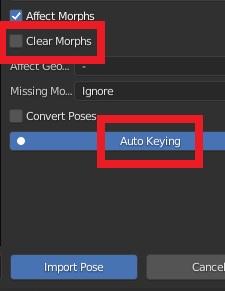
- bake with blender using the settings in the attached picture, don't use "only selected bones"
- save pose preset
How do I create more material zones? new: how to increase polygons ... Possible?@WillowRaven: From this:

to this:

...try the following (it is not difficult, i still am an absolute beginner with Hexagon!)
Before you start, please test if this method will work with your shirt:
A) Choose "wire shaded" as Draw Mode in the viewport. Then try to loopselect the collar to which you would like to add the second "line" as described in steps 12 to 15. If it works as described, your prop is suitable for this guide and you can continue. (Thanks to Richard Haseltine for spotting this weakness!)
1. Load your shirt and send it to Hexagon

2. Choose Display Mode "Flat Solid and Edges"

3. Leftclick on the shirt to select it which looks like so:

4. Press the "Select Edges" Button:

5. Select one edge in the collar zone where you want to add a second "line"

6. Press the RING Button:

7. Now it looks like this:
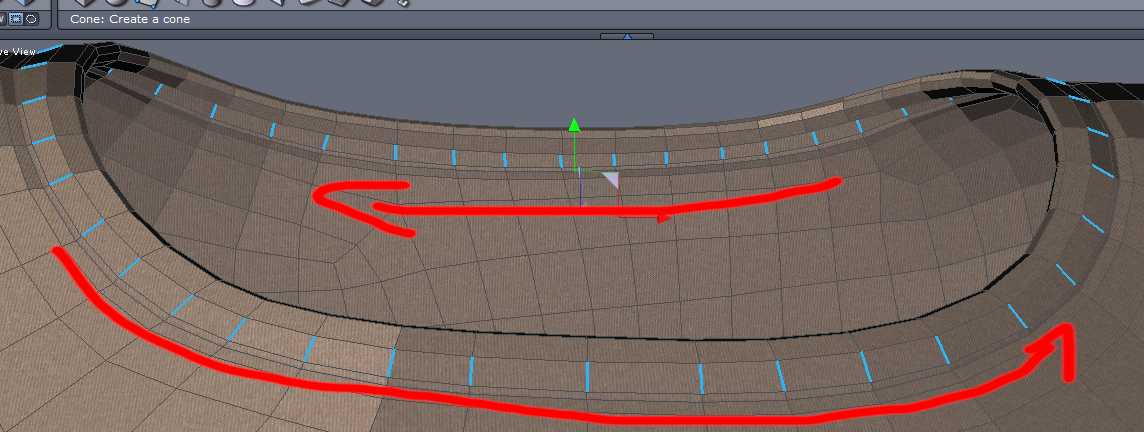
8. Now select Tools --> Lines --> Insert Points:

9. ... which creates the extra geometry. Now send it back to DAZ:

10. In DAZ STudio: Choose import as a prop:

11. If you haven't yet, delete the original shirt in the Scene Tab and select the "new" shirt. Choose "Wire Shaded" as Draw Mode in the Viewport
12. Now activate the Geometry Editor:

13. Select 2 adjacent faces in one of the lines:
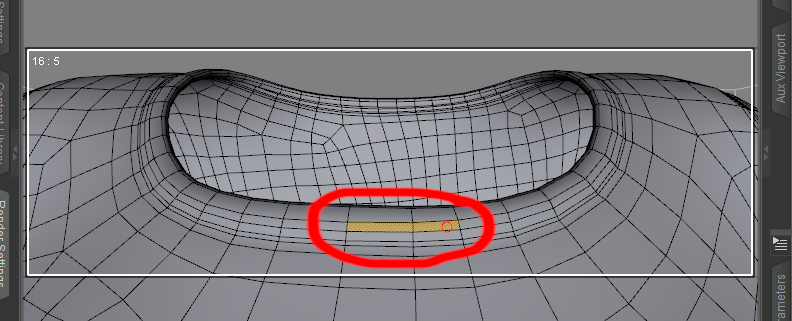
14. Rightclick and choose loop selection:

15. Your first line is selected:

16. Rightclick to choose create surface from selection and choose a name:

17. Repeat steps 13-16 for the second line, then you can already put shaders on the lines and rest of shirt.
18. Now convert the new shirt prop to subd:

19. Load the Genesis Figure the shirt was created for, select the new shirt prop and start the Transfer Utility:

20. Source is the genesis figure and target the new shirt prop:

21. Adapt SubD level and surface settings to your liking.Just to show the UV mapping wasn't destroyed:
 How do I Import Hair inside "Create/Edit New Strand Based Hair" Utility ?
Richard Haseltine said:
You can import the distribution maps, but not - if this is not strand-absed hair but rather dForce hair - the styling, as far as I know.
The one I tried was a dForce,gonna have to try a different one. Thanks!
How do I Import Hair inside "Create/Edit New Strand Based Hair" Utility ?You can import the distribution maps, but not - if this is not strand-absed hair but rather dForce hair - the styling, as far as I know.
How do I Import Hair inside "Create/Edit New Strand Based Hair" Utility ?Is it because I cant Import Actual Strands of Hair, only the textures?
How do I Import Hair inside "Create/Edit New Strand Based Hair" Utility ?I used the Strand baced hair utility before to put hair on a figure, but when it comes to trying to import a hair I have no idea what to do after I press the Import button.
As illustraded in an image below I have chosen a sculp of Ingrid Hair as an object onto which i wanted to import Ingreed hair so that i could style it in the way that I want.
So after i pressed Import button a directory opened up, from which i navigated to the Ingreed Hair folder with a bunch of different files, I chose one and some long message popped up, altered the way sculp looks in the display window but other than that nothing happenned.
If someone has ever used this function susessfully can you please tell me how to use it, what type of files to choose to import and so on, because I'm completely at a loss with this, could't find any tutorials on you tube, need to know what im doing wrong.
Thank you
The Kids 4 Complete and the DAZ to Maya BridgeI enlisted them to help me to create illustrations for a children's book. I was hoping that they would do the heavy lifting, but as it turns out, I probably will have to do a substantial part of the work. First problem is that I have to educate them on using DAZ. I am not an expert on DAZ and am struggling with it, so it is difficult to pass on my knowledge. I assumed that because they are familiar with Maya that it would be easy for them to come up to speed on DAZ Studio. My assumption is that if they buy the DAZ products that define the main characters in the book and install them on their system, they can then use the DAZ to Maya bridge to import the characters into Maya and then develop scenes that we can share and work interactively with. I am not sure if this will work as I do not fully understand what is required to pass files back and forth between programs. It may be the only thing that we can do is to share the main characters. The first milestone in the project is to define the main characters. Once that is done, I assume that they can develop scenes using Maya.
When they initially presented their view of the main characters in the book, I was disappointed. I already had sent them renders of the characters using DAZ products (Kids 4 and Lincoln), so I thought they could simply take my images and create their own versions in Maya. It did not work out that way.
I think that one problem is that using Kids 4 was not the best DAZ product to use if I want to bridge to Maya as it is not a Gen 8 product. The problem is that I created a character that exactly depicts my view of the main character using Kids 4. If the Kids 4 figure does not convert, we are back to square one. The second character was a Lincoln figure that may be ok because it is a Gen 8 product. The biggest problem is figuring out how to use the Kids 4 product with newer products that were developed for Gen 8.
UltraSceneryXT - large terrain/landscape generatorOso3D said:
I used heightmaps from World Creator without problems.
I just made sure to reduce them to 1024 8 bit png first.
What version of worldcreator are you using and what settings if you don't mind sharing. Also, here's an 8bit export and import with settings and the result.
UltraSceneryXT - large terrain/landscape generatorHowieFarkes said:
Richard Haseltine said:
Totte said:
As DAZ Studio does not support 16 bit greyscale images, only 8 bit, bandit is an issue.
Daz Studio itself imports 16 bit images - most displacement maps are 16 bit. Daz Studio has been able to import 16 bit images from the outset, as far as I can recall.
Daz Studio may be able to - but I haven’t yet found anything exposed in the SDK API that enables a plug-in to access this so I have to use the image and file loading capabilities of QT 4.8 - which does not support 16bit images
Hmm... but if i load one of the three png-pictures ultrascenery generates in a graficprogram
it shows me, that the pictures are in 24bit !!! The heightmap in 1024 resolution, the cavity and
flowmap in 2048 resolution.
UltraSceneryXT - large terrain/landscape generatorRichard Haseltine said:
Totte said:
As DAZ Studio does not support 16 bit greyscale images, only 8 bit, bandit is an issue.
Daz Studio itself imports 16 bit images - most displacement maps are 16 bit. Daz Studio has been able to import 16 bit images from the outset, as far as I can recall.
Daz Studio may be able to - but I haven’t yet found anything exposed in the SDK API that enables a plug-in to access this so I have to use the image and file loading capabilities of QT 4.8 - which does not support 16bit images
UltraSceneryXT - large terrain/landscape generator
Yeah. But the issue that I'm having is with USXT not Daz.Richard Haseltine said:Totte said:
As DAZ Studio does not support 16 bit greyscale images, only 8 bit, bandit is an issue.
Daz Studio itself imports 16 bit images - most displacement maps are 16 bit. Daz Studio has been able to import 16 bit images from the outset, as far as I can recall.
UltraSceneryXT - large terrain/landscape generatorTotte said:
As DAZ Studio does not support 16 bit greyscale images, only 8 bit, bandit is an issue.
Daz Studio itself imports 16 bit images - most displacement maps are 16 bit. Daz Studio has been able to import 16 bit images from the outset, as far as I can recall.
Eon VueHaven't used Vue (in my case Vue Infinite 2016) for quite a while now. Using Vue as the renderer? or Vue models into DS?
I mostly exported models from DS as .obj files (incl. textures). After import, it is usually necessary to modify/adjust the material settings in Vue. I don't recall exactly, but exporting from DS as .DAE files didn't work well with Vue.
For the reverse (and depending on the models), I did prefer exporting from Vue as .DAE for import in DS.
Importing VDB flamesHello. Is there a way to import VDB flames into Daz Studio? Thanks.
Geometry "disappearing"I'm creating a few jewelry pieces for the G8F. I've exported the G8F figure (Collada), imported it on Blender, created and positioned the pieces (one by one) on Blender around the G8f geometry. Then, I exported the object I created as Collada, opened Daz, imported the Collada and reexported as an OBJ file (I know I could export as an OBJ from Blender, but there are so many problems like scaling, positioning, etc, that this is simply easier to do). Finally, with the OBJ of the new object saved, I open a new scene, load a G8F, import the OBJ (it lands perfectly positioned), use the "bake joint rotations" on the G8F, use the Transfer Utility, and finally save my new object as a Support Asset (figure/prop asset).
I've already created a bracelet, a ring and two earrings, with one LEFT and one RIGHT version for each. Everything worked fine, and after saving them as "support assets" I could open a new scene, load a G8F and double click each of the DUF files to load them. They landed perfectly, had their textures applied, followed the G8F movements, and I was a very happy person.
But now, after testing everything (all was working), when I loaded one of the earrings (the left one for one of the two models I created) it was loaded as a "brick" (see the attached image please). I've opened the Geometry Editor, and there was NOTHING there (no geometry, surfaces, nothing)... After trying to load it again a few times, I deleted the DUF and repeated the process, exporting it again from Blender, doing everything I had done inside Daz and finally recreating the DUF. Once again it worked fine, but soon the OTHER model (that loaded PERFECTLY before) had the same problem out of nowhere (coincidence or not, in the same left ear).
And, after it happens ONCE with that specific DUF file, it will ALWAYS happen (I'm not able to load that specific object correctly again).
How can it happen? If Daz loaded the object once and it worked, how can it be loaded without any geometry later, using the SAME FILE? And what can I do to avoid it happening again? Now I'm afraid it can happen to any other object for no reason.
Thanks in advance for any help!
Daz to Maya Update 1.7aescalle_654802c013 said:
Hi,
I get this issue on the option "Rig or Re-target Skeleton" - DazToMaya 1.8 with Maya 2020 or 2022 versions. When I click on the option, nothing change on the model. No new rig. The model stay in T position. But these new things appears in the Maya's Outliner (Wich doesn't comes as seen on the DAZ videos with the same hierachie):- Geometry
- ExportSetup
- hip_ctrl_zero
And I get this error message:
"// Error: file: C:/Users/MACPRO03/Documents/maya/modules/DazToMaya/scripts/DAZTools.mel line 1694: Could not add constraint or connections."The Basic Genesis 8 model stay in the T pose. I have tried to reinstall several time the DazToMaya plugin. Doesn't want to work even with the github files...
Is someone to help or get same issue ? Thank you in advance for a help ;-)The complete log error is:
1- For the import sequence:
import maya.cmds as cmds
import DazToMaya
if int(cmds.about(v=True)) > 2020:
import importlib
importlib.reload(DazToMaya)
else:
reload(DazToMaya)
DazToMaya.run()
# pymel.core : Updating pymel with pre-loaded plugins: mayaHIK, invertShape, curveWarp, substanceworkflow, hairPhysicalShader, ATFPlugin, ikSpringSolver, retargeterNodes, RokokoMotionLibrary, sweep, AutodeskPacketFile, lookdevKit, Type, Boss, bifrostGraph, meshReorder, modelingToolkit, MayaMuscle, matrixNodes, bifmeshio, deformerEvaluator, shaderFXPlugin, objExport, bifrostshellnode, ufeSupport, GPUBuiltInDeformer, mayaVnnPlugin, substancemaya, svgFileTranslator, GamePipeline, tiffFloatReader, MASH, poseInterpolator, bifrostvisplugin, cacheEvaluator, mtoh, ik2Bsolver, xgenToolkit, AbcExport, gameFbxExporter, OpenEXRLoader, Unfold3D, mayaCharacterization, mtoa, rotateHelper, AbcImport, autoLoader, sceneAssembly, gpuCache, Substance, mayaUsdPlugin, OneClick, renderSetup, ArubaTessellator, substancelink, quatNodes, fbxmaya #
Daz to Maya, run() method
win32
d2m start
file -f -new;
// Result: untitled //
file -f -new;
// Result: untitled //
Importing Daz...
// Logfile: "C:\Users\MACPRO03\Documents\maya\FBX\Logs\2020.1\maya2022imp.log" //
setAttr -type "string" Genesis8Male.StudioNodeName "Genesis8Male";
setAttr -type "string" Genesis8Male.StudioNodeLabel "Genesis 8 Male";
setAttr -type "string" Genesis8Male.StudioPresentationType "Actor/Character";
setAttr -type "string" Genesis8Male.StudioPresentationAutoFitBase "/Genesis 8/Male";
setAttr -type "string" Genesis8Male.StudioPresentationPreferredBase "";
setAttr -type "string" Genesis8Male.ControllerScales "Youth Morph=-0.445;CTRLGunnar=0;CTRLCaspian=0;CTRLHugren=0.0599999;CTRL-RSC-GarethHD=0.036;FBMRealBodiesJules=-0.0324572;Beast HD=0.17;CTRL-FIYousef=0.03;CTRL-E3DYonni=0.021;CTRL-E3DWalker=0.065;CTRL-E3DTamati=-0.014;CTRL-E3DSeb=-0.025;CTRL-E3DLeonard=0.03;CTRL-E3DLeon=0.02;CTRL-E3DKichiro=-0.0499999;CTRL-E3DGui=-0.025;CTRL-E3DGanaatarDemon=0.026;CTRL-E3DGanaatar=-0.026;CTRL-E3DDonovan=0.012;CTRL-E3DBjarke=0.032;Daniel=0.0650001;CTRLVladimir8=0.056;CTRLValentino8=-0.048;CTRLTheBrute8=0.17;CTRLScar8=0.056;CTRLMrWoo8=-0.105;CTRLMichael8=0.04;CTRLLee8=-0.06;CTRLLandon8=0.04;CTRLKjaer8=-0.02;CTRLJonathan8=0.04;CTRLHolt8=0.068;CTRLDiego8=-0.018;CTRLDasan8=-0.02;CTRLDain8=0.044;FBM_CGI_Miklos_Body=0.03;FBM_CGI_HKClaus_Body=0.02;CCRafael=-0.018;CCMagnus=0.1515;CCJack=-0.0172213;CCDragomir=0.0453";
AutoIK...
namespace fix finished
// Error: line 1: No source attribute was specified. //
// Error: line 1: The source attribute 'm5philliplashes.outColor' cannot be found. //
// Error: line 1: setAttr: No object matches name: Genesis8Female.drawStyle //
------------------------------------
------------------------------------
// Error: line 1: Non-deletable node 'perspShape' cannot be deleted. //
// Error: line 1: Non-deletable node 'persp' cannot be deleted. //
// Error: line 1: Non-deletable node 'topShape' cannot be deleted. //
// Error: line 1: Non-deletable node 'top' cannot be deleted. //
// Error: line 1: Non-deletable node 'frontShape' cannot be deleted. //
// Error: line 1: Non-deletable node 'front' cannot be deleted. //
// Error: line 1: Non-deletable node 'sideShape' cannot be deleted. //
// Error: line 1: Non-deletable node 'side' cannot be deleted. //
// Error: line 1: setAttr: No object matches name: Genesis3Male.drawStyle //
// Error: line 1: setAttr: No object matches name: Genesis3Female.drawStyle //
// New character 'Character1' was created.
parentConstraint -mo -weight 1;
// Result: lBigToe_parentConstraint1 //
parentConstraint -mo -weight 1;
// Result: lSmallToe1_parentConstraint1 //
parentConstraint -mo -weight 1;
// Result: lSmallToe2_parentConstraint1 //
parentConstraint -mo -weight 1;
// Result: lSmallToe3_parentConstraint1 //
parentConstraint -mo -weight 1;
// Result: lSmallToe4_parentConstraint1 //
parentConstraint -mo -weight 1;
// Result: rBigToe_parentConstraint1 //
parentConstraint -mo -weight 1;
// Result: rSmallToe1_parentConstraint1 //
parentConstraint -mo -weight 1;
// Result: rSmallToe2_parentConstraint1 //
parentConstraint -mo -weight 1;
// Result: rSmallToe3_parentConstraint1 //
parentConstraint -mo -weight 1;
// Result: rSmallToe4_parentConstraint1 //
// New Rig: Character1_ControlRig was created.
// Error: line 1: setAttr: No object matches name: Scalp.cosinePower //
// Error: line 1: setAttr: No object matches name: SummerLash_1006.alphaGain //
DazToMaya Complete!
2- For the Retarget Skeleton sequence :
---- Running DAZ Rigger v1.02 ----
// Warning: file: C:/Users/MACPRO03/Documents/maya/modules/DazToMaya/scripts/DAZTools.mel line 491: New name contains invalid characters. Illegal characters were converted to "_". //
---- Geometries grouped ----
// Error: file: C:/Users/MACPRO03/Documents/maya/modules/DazToMaya/scripts/DAZTools.mel line 1694: Connection not made: 'hip_scaleConstraint1.constraintScaleX' -> 'hip.scaleX'. Destination attribute must be writable. //
// Error: file: C:/Users/MACPRO03/Documents/maya/modules/DazToMaya/scripts/DAZTools.mel line 1694: Could not add constraint or connections. //If it's the same problem I had, go to where it says control rig in the top right hand side and change it to none. Then retarget the skeleton and it should work. Now here's the thing, I have yet to get it to work with a character with clothes or hair, so I just send them over with absolutely nothing, get the rig set up and animate that and send the keys back into Daz to apply to the character and render in Daz. If you happen to figure out how to get the skeleton to work with the character having clothes, please post it here as I'd love to know how to do it. I'm sure it's doable but I don't know Maya well enough to know what's what.
Diffeomorphic DAZ Importer version 1.6.0 releasedPadone said:
@speaker-60
In daz studio the morphs can also be used to pose figures. That is, a morph is not only a "geometry shape", but it can also be a "bone pose", or a combination of them. For example all the G8 expressions are bone poses. As for keyframing it's the same in daz studio and any other package you need to use keyframes in animation.
Please describe the exact steps to get the issue since I don't seem to be able to reproduce it. Again I need the exact steps. Keep it as simple as possible if you can avoid to use "bend control". Unless "bend control" is the only one that doesn't work. Also post some pictures so I can see what you get.
Or you can post directly to the tracker so we keep everything in one place.
https://bitbucket.org/Diffeomorphic/import_daz/issues/938/importing-morphs-on-a-posed-figure
EDIT. UPDATE.
Did various tests and everything works fine here. I guess what you were struggling with is the keyframe and morphs concept. That is, when you import a new pose you have to set keyframes and keep the previous morphs. The default values let this to the user for better control, but this doesn't help inexperienced users so may be it should come with better defaults.
steps:
- Import G8F and merge rigs
- import jcms and flexions
- import "bend control" as custom morphs
- import the "strength setter pose" and keyframe it
- set the bend controls as you wish and keyframe them
- import again the "bend control" morphs (this is stupid but just for testing), the keyframed pose and morphs will keep their settings
- import another pose, be sure to have clear morphs = off to keep your previous morphs and auto keying = on to keyframe the new pose, or keyframe it by hand for better control
Please let me know if this works for you. Or provide the exact steps if you still get the issue because I can't reproduce it.
Hay thankyou for your help so yer its basicly me not knowing things :P
Knowing those options defonatly help, maybe they shpuld be on by default , I did just post in bitbucket and i also made a suggestion about morph ordering but not the same one i made here as i recently found a wonderful addon for a new shapekey menu with folder grouping built in

https://github.com/MichaelGlenMontague/shape_keys_plus
This replaces and hides blenders origonal menu, iv asked if he could allow 'custom properties' to be able to be added to this menu as we could use those for sliders that contol multiple morphs(the ones that appear in diffo and not blenders shapekey menu)
Also i just discovered this http://blenderartists.org/forum/archive/index.php/t-247429.html About shapekeys driving bones its an arhived post i managed to find and the 3rd to last poster
Pesho says how to do it, Would this be of use to replicate daz's Bone morphs as shapekey sliders?
EDIT.
Okay so the settings you suggested didnt not fix the bend control spesific issue, i can import any other morphs(so far) over now keyframed poses
I have norrowed down the spesific morps responsable for the issue
pCTRLKneesUp.dsf - pCTRLKneesUpLeft.dsf - pCTRLKneesUpRight.dsf - pCTRLLegsOut.dsf - pCTRLLegsOutLeft.dsf - pCTRLLegsOutRight.dsf
Any one of these messes with the pose, Guessing these are bone morphs?
Question on Creating a Smooth Foot (No Toes) or Amputee MorphSpacious said:
Maybe import two copies of the base mesh into Blender and anly sculpt on one of them. Use a combination of the Elastic Deform and Smooth Brushes to sculpt until it's the same shape as the original mesh.
As long as you don't check the Dynotopo Box you should have no problems.
I once tried to use the Smooth brush and other sculpt tools to make stockings or socks from the feet and toes Base Mesh, but due to the very complicated geometry of the nails all I was able to sculpt was a nice sharp claws morph! Better try the Geograft option or use existing stockings with a skin texture.
Missing TexturesHi, I'm new to daz3d and running into some issues that have gotten me a bit bummed out. I bought some packs to start with, and I'm having some problems. When I try to import Victoria 8, I get a message that files or textures are missing. However, when I go to the runtime folder, the textures and files that do not load are there. The program simply does not see them. Am I doing something wrong? It happens to me with other models, such as a bedroom, the textures in the runtime folder always give me an error.
Where to get modern cars, trucksdaveso said:
Chezjuan said:
Have you gotten either of the city buses from the Daz store?
thanks..don't have those..and I did search at Rendo and nothing came up for me. Also Share CG, and a general google search, but nothing what I was really looking for.
Is it possible to convert 3ds or lwo files into obj in Blender?I don't think anyone answered this... you can. You'll need to download a plugin for 3ds and another for lwo (they're free). Once you have those, you can import those kinds of files into Blender. You can then export as an OBJ so that it can go into DAZ.
Daz 3D is part of

Connect
DAZ Productions, Inc.
7533 S Center View Ct #4664
West Jordan, UT 84084Licensing Agreement | Terms of Service | Privacy Policy | EULA
© 2026 Daz Productions Inc. All Rights Reserved.