-
Missing DAZ Files
Richard Haseltine said:
future_boy_f2de9c36c5 said:
felis said:
How are you installing your content?
Through DazConnect and DIM.
Which? Doing both is a waste of space. Daz Connect instalaltions can fail to decrypt, which might well produce the "missing" thumbnails if there are .png files theer but they cannot be read 9and then the actual content files too might be unreadable - the log would then complain about expecting { or [ - Help>Troubleshooting>View Log File). If there are Connect files then any DIM install will be ignored, so bad files will block the good from DIM.
(Sorry for the double post)
I meant Daz Central. I deleted Daz Central to see if it solves my problem, apparently it didn't solve everything. Should I uninstall everything and start over?
DAZ Studio and other DAZ software not shown for standard user on Win 10I installed DAZ Studio with the administrator user, but when I go to the standard user DAZ folder is not shown on the Start menu (Windows 10 fresh install). The folder and all the voices are present in the Admin user. The program is installed in the right folder under C:\Program Files. Installed using DIM and Daz Central. Why aren't the Menu voices present for the normal user? Has something gone wrong with the installation process?
DAZ to Blender Bridge How?1)Do you need DAZ Central for it?
(If this would be the only possible way to get it to work, then we're done here.
I won't use DAZ Central)
2)I installed it with DIM.
I only have it in Menue>File>Send To> DAZ To Blender.
Nothing at all in Menue>Scripts like it has been said.
3)How to install the opposite side of the Bridge in Blender?
When I open Blender 3.5.1, there is no dialog refering to the DAZ To Blender Bridge.My DazStudio 4 application folder is located on D: drive.
My Studio>MyLibrary folder is also located on D: drive
Blender 3.5.1. is located on E: driveThose who bought or Beta-tested ParticleFX DazStudio the last build you got still works in 4+depending on which installer you used it works or it doesnt...check and see..If it doesnt work post here which installer you used DIM or central...for me central works for dim it doesnt..
Space Road Stop and Add-Ons [Commercial]myotherworld said:
"futur part"
hello I like the sound of that, are you saying theres more to come?
ah ah yes. i have the project to completely fill the station.
i started working add-on3, with the hall next the central room of add-on2 .for the moment there is a self-service refectory for visitor and crew member with kitchen,cold room and all the stuff for coocking. i think there will be also a bar, a room with cultural stuff and a store for vending parts for spaceship maintenance or something like that. there is also the paths to make the junction to the 2 corridors "SRS 17 Corridor Alpha"


and for the futur add-on 4,5, and more:
-the garden (you can see his place in space road stop, at the top of the station, behind a big moveable part)
-the room with evacuation module (behind the big yellow door in addon2,you can see the overture for ejection pod on the outside bottom of the station ),
-a fully automatic room where all the box are tidy coming from the small elevator you can see on space road stop level 0,
-reactor room who provide electricity, water treatment room ,may be small dark corridor for aeration like in alien1.
-crew dormitory, computer room and infirmary will take place under the antenna zone.
-a room for the maintenance of the circular droïd who carry spaceship in level 0
-and many maintenance rooms to make junction between all the sector.
New! Novica & Forum Members Tips & Product Reviews Pt 14Your dogs are pretty.
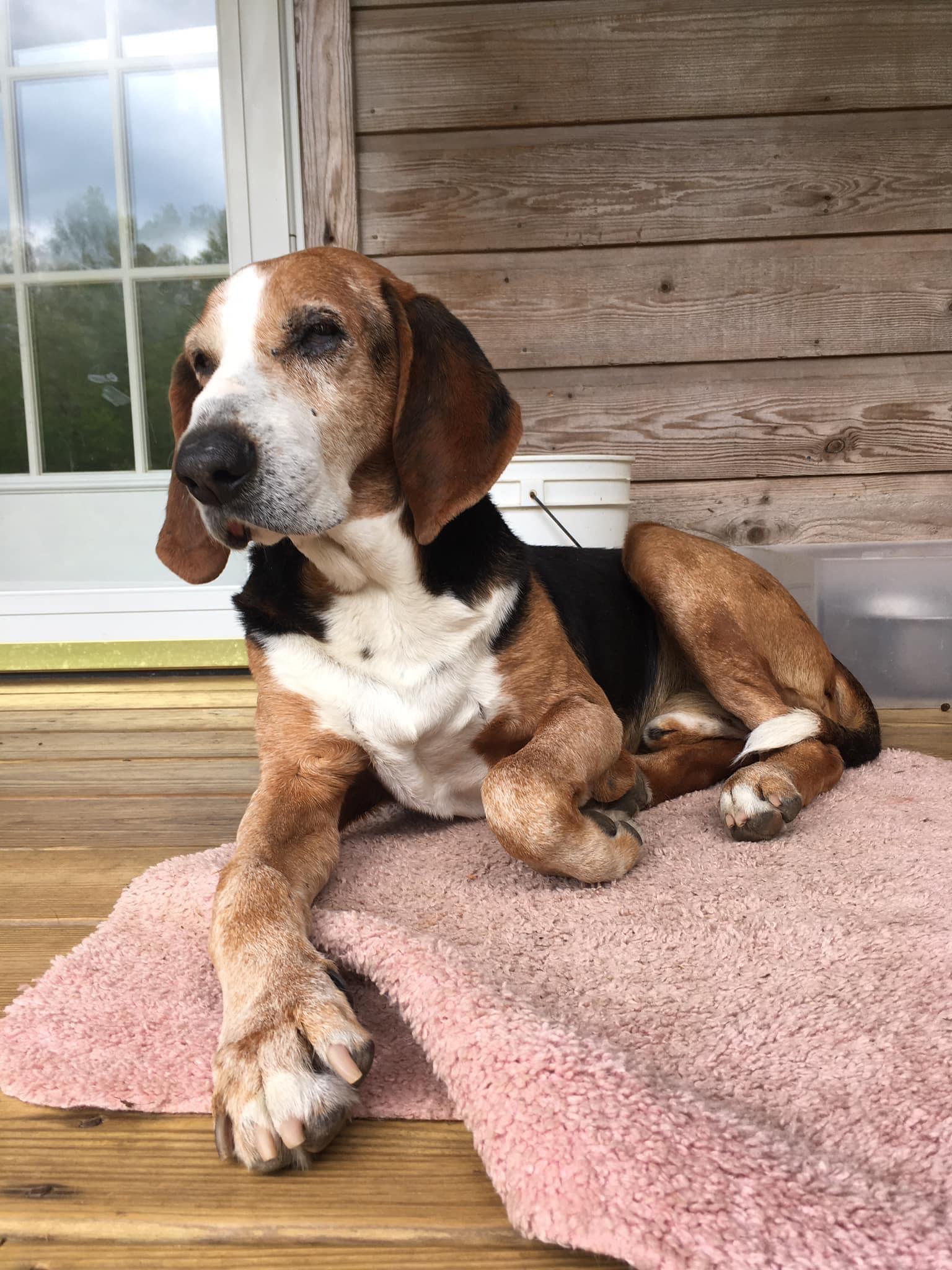
Here is Sammy Duke. I just call him Sam. I don't know his original name. I was driving down a rural road, and as usual I was driving slow, enough so that Sam decided he would stand out in the middle of the road to get me to stop. It worked. When I did stop he came up to my car window and I pat him on the head. I was about to leave, and he was grudingly about to walk away, when I noticed he was a rack of bones. I thought uh-oh, he's starving, but he was so pretty I thought he must be someone's pet. I decided I would "steal" him because if he was someone's pet they have abandoned him. So I "stole" him.
I think he is a foxhound, but in central Appalachia they call foxhounds, coonhounds. When I first "stole" him almost everytime a vehicle would come by or I would leave he'd climb into the vehicle and ride shotgun. i think because it was taught him when he was used for hunting. I got him a transport cage and he actually likes to go in of his own accord to sleep or relax. I also think that was trained behaviour when they crated him up to go hunting. However, he hates going into the chainlink kennel in the backyard.
He is very old, but I'm not sure how old. I think the original owners were hunters that dumped him near some stranger's house assuming that house would adopt him (they didn't or never noticed him) when he got too old to hunt as he has mobility problems with his hips. He is a gentle as can be with people but I think probably the foxes and coons of the world have a different opinion of him.
 Let's appreciate/discuss today's new releases - ongoing thread
PerttiA said:
ecks201 said:
The toilets at my school were nowhere near this posh. Looks more like a hotel.
In the beginning of the seventies, ours was still an outhouse where we sat side by side with no dividers or screens between us.
At the senior school I went to it was a bit backward. There were two rows of toilets facing each other on either side of a central corridor. The doors started at neck level and went down to knee level when you were sitting on the trap, and you could hold a conversation and make eye contact with up to three people on the other side of the corridor. The corridor between the traps was roofed over for the first time the August before the September I went to the school. The school was 98 years old at that point. Until then, each row of traps only had a corrugated iron roof over them. The urinal at the end of the central corridor was fixed to a wall and had never been covered against the weather until that roof was built. That was 1979. Oh, did I mention it was a boarding school, so you couldn't hang on until you got home?
Regards,
Richard.
Vitruvian error - help, please.reserv888 said:
felis said:
reserv888 said:
The weird thing is that it doesn't matter how large i make the suit. There are still poke throughs.
What do you mean with "how large"?
You could add a push modifier to the suit and set it at 0.1-0.2 would probably fix it.
I scale the suit (with scale slider, under Parameters tab) to to make it larger.
I will test the push modifier.
Thanks for the tip.Scaling moves everything away from a central point, which means that a surface that is nearer to the central point than the adjacent area of the base figure will get closer or even peentrate it. A Push Modifier moves the surface of the mesh outward, as defined by the local normal (iamginary line pointing up from the polygon) - in most cases that is what is needed to add a bit of extra space (obviously not always - a pipe or tube would just get thicker).
Installing a new version of Daz studioI have no idea what you mean by gatekeeper. I have Daz central installed and am able to download studio but when I hit the download link everything just grinds to a halt. Is this due to my data connection, if so perhaps just leaving it might be the answer
The I Miss the Old Days Complaint Thread..you need your own place. Seems that these living situations you end up in are fraught with highly restrictive rules. Does the place you are in have central AC?
Daz to Blender Bridge - Meet the Teamainm.sloinneadh said:
I'm having some issues installing the bridge. Tried both DIM and Daz Central, but I'm getting nothing in either Blender or Daz Studio (neither under scripts nor in the send to menu).
I've e had a rummage about the files in DIM. Download size is ~10MB and it only reports installing 2 files. A dll in the same folder as other plugins (where measure metrics gets installed) and a dsx file in the docs folder. Both of those add up to around 10MB.
Dont know if I'm missing something here or if the downloaded file has been packaged incorrectly. I've no references to the bridge in the add-ons/plugin sections of both Blender and Daz. The other bridges I've installed show up fine.
Any advice?
I've had a look at the files list for DTB:
-
Application Data :
-
/Blender Foundation/Blender/DAZ 3D Add-ons/DTB_v280-283.zip
-
/DAZ 3D/Studio4/RunOnce/Daz to Blender_Install.dsa
-
-
DAZ Studio :: 4.5;4.x Public Build;4.x Publishing Build;4.x Private Build :
-
/docs/Plugins/Daz to Blender/Daz to Blender.dsx
-
/resources/images/icons/bridges/Daz to Blender.png
-
/resources/images/icons/bridges/Daz to Blender_Genital.png
-
/resources/images/icons/bridges/Daz to Blender_MorphExporter.png
-
/scripts/support/DAZ/Daz to Blender.dsa
-
/scripts/support/DAZ/Daz to Blender_Genital.dsa
-
/scripts/support/DAZ/Daz to Blender_MorphExporter.dsa
-
The download has only one of the above files plus the aforementioned dll that isn't listed at all. Looks like a broken distribution to me. Is this the right place to bring it to the attention of someone or would it be better raising a ticket?
Daz to Blender Bridge - Meet the TeamI'm having some issues installing the bridge. Tried both DIM and Daz Central, but I'm getting nothing in either Blender or Daz Studio (neither under scripts nor in the send to menu).
I've e had a rummage about the files in DIM. Download size is ~10MB and it only reports installing 2 files. A dll in the same folder as other plugins (where measure metrics gets installed) and a dsx file in the docs folder. Both of those add up to around 10MB.
Dont know if I'm missing something here or if the downloaded file has been packaged incorrectly. I've no references to the bridge in the add-ons/plugin sections of both Blender and Daz. The other bridges I've installed show up fine.
Any advice?
Quick Question about Photoshop CC brushesMelissaGT said:
Wonderland said:
I'm having issues with older brushes not installing into Photoshop through DIM because they were created pre-CC and have to be manually installed because for some reason DIM refuses to install them into newer versions of PS. And every time Photoshop updates to a new version, you have to reinstall them again (or copy brushes over manually) which is a big pain.
I keep all my Photoshop brushes in one central location on a separate drive where I can just load them into Photoshop from the "import brushes" menu directly in Photoshop. Nice n' easy.
I do the same and still use brushes I bought/made in CS3 in Photoshop 2023. It never occured to me to try and use the DIM for this.
Quick Question about Photoshop CC brushesWonderland said:
I'm having issues with older brushes not installing into Photoshop through DIM because they were created pre-CC and have to be manually installed because for some reason DIM refuses to install them into newer versions of PS. And every time Photoshop updates to a new version, you have to reinstall them again (or copy brushes over manually) which is a big pain.
I keep all my Photoshop brushes in one central location on a separate drive where I can just load them into Photoshop from the "import brushes" menu directly in Photoshop. Nice n' easy.
Daz central on M1 MacMoved, belatedly, to Techncial Help as it is not a Daz Studio topic (despite my reply).
Try using Install Manager rather than Daz Central.
Daz central on M1 MacI liked viewing assets using DAZ Central on my old iMac. Any way to do that using Install Manager on an M1Ultra Mac Studio?
Thanks.
DIM not installing anythingSame problem with Win 11, and I can't find Daz Central just link to DIM which just does retry and wont install anything
DIM not installing anythingSeems DAZ central installs what is needed.
The link i posted above found a work-around without installing DAZ central. Instead used old files from other install.
My 1st impression, which by be wrong, or right, is that DAZ Central is needed to get their DIM to work. One guessing assessment might be that requiring DAZ central first is a way of spreading that feature more. Or just a DIM oversight. At least no trial of required advertisements (looking at you Win11 OS as Win10 support deadline announced this week which of course DS users need to use if not on MAC).
So, Easter Eggs?MarcCCTx said:
I have all four pieces of the headdress, but nothing shows up in Install Manager and the manual install doesn't work. Is anyone else having this issue?
Yup, same here - not showing in my Daz Central or in Install Library.
Where are the easter eggs?I have put in my cart snd purchase all the free easter eggs .There are list in my product l;ibrary .But i cannot find them in DAZ Central or in DAZ install manager., something i have missed or not undrstand in that! Where they are ? it would be nice to have them inside DAZ Studio library
Daz 3D is part of

Connect
DAZ Productions, Inc.
7533 S Center View Ct #4664
West Jordan, UT 84084Licensing Agreement | Terms of Service | Privacy Policy | EULA
© 2026 Daz Productions Inc. All Rights Reserved.