-
Could we have a goat, please?
I have quite a few goats actually but using them in DAZ studio not so straightfoward because it's FBX import sucks, I can use them in Unreal, iClone and Carrara (and likely Blender maybe even Poser but not tried)
no help to the OP unless they can get a third party FBX into D|S Via Poser 11+
Diffeomorphic Unicode ErrorPadone said:
As I understand it all the duf files should be ascii for them to be handled by python. You may try loading the offending file into notepad and saving as ascii. Keep a copy of the original just in case.
I don't get it. How do I get Blender to recognize the ascii file when trying to import a scene after saving it as one?
New Install Doesn't Recognize Daz Smart Cloud FilesHello! I just did a fresh install of windows but kept my old Daz library. I put Daz stuff on drive F and the DIM app and Daz Studio seem to be working/connecting. I overwrote the new daz library with my old files and all the ones I imported from Rendo show up in Daz but the ones I downloaded with Daz Studio directly aren't showing up. I even went to preferences and tried changing the Daz Connect folder location to .../data/ then .../data/cloud/ and even the main My Daz Library folder. When I download a file using Daz Studio it goes to the exact folder that is already there but gets a color overlay instead of the grayed out one. I've tried refreshing the metadata. Anyone know how to get Daz Studio to recognize its old cloud data that's in the exact same spot as before???
Thanks in advance.
adding external modelsWent in what? A file browser? You can use File>Import from anywhere, under Other Import formats you can find supported files in any folder in the other formats content directory so you are free to create sub-folders as you wish.
Oh, Misty, I forgot my Complaint ThreadSeems it was just that one model that was being mean. I tried a few other models and they all import fine, though I just noticed one is like, has inverted normals or something? If I display the material in anyuthing but Full Rendered mode it renders like everything's facing the wrong way....
Daz to Blender plugin bug workaround for MacOS & Rendering in Blender using Cycles and M1 GPU/MetalHi all, I got a workaround for the Daz to Blender plugin if it doesn't work for some of you and a tutorial on how to render in Blender using the Cycles engine and M1 GPU/Metal
I am using it on MacBook Pro M1, MacOS 12.2 Monterey, Blender 3.1, Daz Studio 4.20 Pro, so I don't know if the same workaround works on other platforms. I think it might be helpful for people who want to render via Cycles and utilize the M1 GPU (which is available in Blender 3.1).
DAZStudio:
Step 1) Download Daz Studio and Daz to Blender plugin via DAZ3DIM (you must purchase the Daz to Blender plugin in the Daz Store for $0)
Blender:
Step 1) Download Blender 3.1 and Blender 2.93 (or another version that is 2.80 or higher, 2.93 works for me and it is the first version which supports arm64 - the M1 Chip natively)
Step 2) Download Daz to Blender plugin from GitHub, unpack the .zip
Step 3) In Blender go to Edit -> Preferences -> Addons -> Install, then choose DTB.zip which should be located in ../DazToBlender_2.4.0/Blender/DTB.zip (do this for both Blender versions)
Import to Blender from DAZStudio:
Step 1) If you cannot see the scripts menu in DAZStudio, go to Window -> Panes (Tabs) -> Script IDE
Step 2) In the Script IDE choose File -> Open Script -> Manually choose the Daz to Blender plugin, which should be located by default in ../Applications/DAZ\ 3D/DAZStudio4\ 64-bit/scripts/support/DAZ/Daz\ to\ Blender.dsa -> click Execute
Step 3) Choose the settings you want
Step 4) In Blender 2.93 choose the little arrow below Options menu on the right side of the screen -> Daz to Blender -> Import New Genesis Figure
Step 5) It should import the character without any Python-related errors, after that save the blender project
Step 6) Open the Blender project in Blender 3.1
Rendering using Cycles and M1 GPU/Metal in Blender 3.1:
Step 1)Choose Edit -> Preferences -> System -> Cycles Render Devices -> Metal -> Apple M1 GPU (the Apple M1 option means CPU rendering, there is also the MetalRT option, which means that you will enable Ray Tracing, you must choose M1 GPU if you want to use MetalRT, correct me if I am wrong)
Step 2)Choose Render Properties tab on the right side of the screen -> Render Engine: Cycles, Feature Set:Supported, Device:GPU Compute (for MetalRT you should choose the Experimental Feature Set, correct me if I am wrong)
Step 3)Choose Render -> Render Image (F12 keyboard shortcut)
Step 4)Done
Looking for Batmobile from the 60's TV show..usually sketchup models require a fiar bit of "fixing" in a modelling programme to work correctly.
There are also a couple free ones.but the one at CG trader is probably the most accurate of the lot...and it is already set up for Daz (.duf) and has Daz materials so no need to mess around with conversions and/or reskinning.
Here are a couple of the free ones that are in .obj format that will import into Daz.
https://downloadfree3d.com/3d-models/vehicles/car/1960-batmobile/ ;
https://www.cadnav.com/3d-models/model-44955.html
Forced to Re-install Genesis 8 Starter Essentials over and overIceCrMn said:
Sounds like bad metadata to me.
Has that package ever been installed with Connect(inside Studio) and then a second time with either DIM or Central? Don't mix install methods.It gets complicated to keep them working correctly.
Are you logging in inside Studio? Don't if you use DIM or Central for installs.
Not intentionally or to my recollection. I only use DIM for content installation and consider Connect an annoyance. I do log in from DS because it pesters me to sometimes - is that only for Connect? If so, how do I shut up or disable Connect?
Forced to Re-install Genesis 8 Starter Essentials over and overSounds like bad metadata to me.
Has that package ever been installed with Connect(inside Studio) and then a second time with either DIM or Central? Don't mix install methods.It gets complicated to keep them working correctly.
Are you logging in inside Studio? Don't if you use DIM or Central for installs.
Rec 2020 turns Reds Black? Any fix?Padone said:
That's what anyone does when working with hdr it's not alarming at all. You output a series of exr images then post process.
I'll defer to your apparent expertise in this, but it's still alarming that it can't simply render out to AcesCG or BT2020 in a video container with a codec that houses 10-12bit information. It's not like Cinema cameras are shooting 24-30fps with layered raw 32bit images that need significant post-processing to be useable in Premiere and Resolve... I simply import my video, tell it the starting colorspace, and the desired output colorspace, and it's done. This is not the case for .exr images. If the goal of a PBR engine is to calculate light bounces into a software emulated camera sensor and produce an image as if it were a camera, it seems it fails miserably in this regard... It really should be as easy as "Render to BT2020" or "Render to AcesCG" and then all the information you need to work within that colorspace is present in the outputted video file. I can see how .exr is handy, especially for extra post effects, but it *is* a ton of work when you don't plan on using any of those post effects.
Oh, Misty, I forgot my Complaint ThreadGordig said:
I've been too busy with other projects to even think about a DS render. I've been spending most of my time over the last few days getting increasingly frustrated with Marvelous Designer.
I just recently ran into some frustrating troubles with Substance Painter myself. Tried exporting out a model in Cinema 4D and Substance complains for all but one format and that format it'll import but in an unpaintable and unusable state. Collada complains about the header or something expecting <content> to be there, and OBJ gives me a "string <nan, nan, nan" followed by a list of vertex coordinates so long it almost crashes Substance... But FBX it'll load just fine. At the cost of the UV's being off-canvas so it can't be painted. I can load existing textures onto it and they'll even display fine - but I can't do anything meaningful to the model myself :/
Problem loading files from library correctly since DAZStudio 4.20.0.2 (Windows 10 pro)Thank for your suggestion
I put here file some parts of the log file
I am suprised that DAZStudio seems to try to load file from Poser pro 12 ( which i have with Poser format file for DAZ Bigcat2)
I have redownload the file and reinstall Big cat2 file in DAZStudio 4,20 SAME problem
022-04-16 09:32:01.388 [INFO] :: Prepare asset load (open): /Animals/DAZ Big Cat 2/DAZ Big Cat 2.duf
2022-04-16 09:32:01.392 [INFO] :: Locking viewport redraw...
2022-04-16 09:32:01.392 [INFO] :: Viewport redraw locked.
2022-04-16 09:32:01.564 [INFO] :: Native format content directories: 15
2022-04-16 09:32:01.564 [INFO] :: Poser format content directories: 10
2022-04-16 09:32:01.564 [INFO] :: Other import format content directories: 1
2022-04-16 09:32:01.564 [INFO] :: Begin asset load (open): /Animals/DAZ Big Cat 2/DAZ Big Cat 2.duf
2022-04-16 09:32:01.757 [INFO] :: *** Scene Cleared ***
2022-04-16 09:32:01.777 [INFO] :: Determining missing assets...
2022-04-16 09:32:02.456 [INFO] :: E:/Poser Pro 2012/data/DAZ 3D/DAZ Big Cat 2/Base/DAZBigCat2.dsf (1,1): Syntax error - expected '{' or '['
2022-04-16 09:32:02.463 [INFO] :: E:/Poser Pro 2012/data/DAZ 3D/DAZ Big Cat 2/Base/DAZBigCat2.dsf (1,1): Syntax error - expected '{' or '['
2022-04-16 09:32:02.470 [INFO] :: E:/Poser Pro 2012/data/DAZ 3D/DAZ Big Cat 2/Base/DAZBigCat2.dsf (1,1): Syntax error - expected '{' or '['
2022-04-16 09:32:02.476 [INFO] :: E:/Poser Pro 2012/data/DAZ 3D/DAZ Big Cat 2/Base/DAZBigCat2.dsf (1,1):2022-04-16 09:32:03.718 [WARNING] :: ..\..\..\..\..\src\sdksource\fileinput\dzassetdaz.cpp(1644): Material not created: EyeIrisRing-1!
2022-04-16 09:32:03.720 [WARNING] :: ..\..\..\..\..\src\sdksource\fileinput\dzassetdaz.cpp(5852): Shape for material instance not found.
2022-04-16 09:32:03.720 [WARNING] :: ..\..\..\..\..\src\sdksource\fileinput\dzassetdaz.cpp(1644): Material not created: EyePupils-1!
2022-04-16 09:32:03.720 [WARNING] :: ..\..\..\..\..\src\sdksource\fileinput\dzassetdaz.cpp(5852): Shape for material instance not found.
2022-04-16 09:32:03.720 [WARNING] :: ..\..\..\..\..\src\sdksource\fileinput\dzassetdaz.cpp(1644): Material not created: Eyeball-1!
2022-04-16 09:32:03.723 [WARNING] :: ..\..\..\..\..\src\sdksource\fileinput\dzassetdaz.cpp(5852): Shape for material instance not found.
2022-04-16 09:32:03.723 [WARNING] :: ..\..\..\..\..\src\sdksource\fileinput\dzassetdaz.cpp(1644): Material not created: SkinBody-1!
2022-04-16 09:32:03.723 [WARNING] :: ..\..\..\..\..\src\sdksource\fileinput\dzassetdaz.cpp(5852): Shape for material instance not found.
2022-04-16 09:32:03.723 [WARNING] :: ..\..\..\..\..\src\sdksource\fileinput\dzassetdaz.cpp(1644): Material not created: Pads-1!
2022-04-16 09:32:03.725 [WARNING] :: ..\..\..\..\..\src\sdksource\fileinput\dzassetdaz.cpp(5852): Shape for material instance not found.
2022-04-16 09:32:03.725 [WARNING] :: ..\..\..\..\..\src\sdksource\fileinput\dzassetdaz.cpp(1644): Material not created: Claws-1!
2022-04-16 09:32:03.726 [WARNING] :: ..\..\..\..\..\src\sdksource\fileinput\dzassetdaz.cpp(5852): Shape for material instance not found.
2022-04-16 09:32:03.726 [WARNING] :: ..\..\..\..\..\src\sdksource\fileinput\dzassetdaz.cpp(1644): Material not created: Whiskers-1!
2022-04-16 09:32:03.729 [WARNING] :: ..\..\..\..\..\src\sdksource\fileinput\dzassetdaz.cpp(5852): Shape for material instance not found.
2022-04-16 09:32:03.729 [WARNING] :: ..\..\..\..\..\src\sdksource\fileinput\dzassetdaz.cpp(1644): Material not created: Nose-1!
2022-04-16 09:32:03.729 [INFO] :: Resolving legacy figures...
2022-04-16 09:32:03.729 [INFO] :: Preparing modifiers...
2022-04-16 09:32:03.736 [INFO] :: E:/Poser Pro 2012/data/DAZ 3D/DAZ Big Cat 2/Base/DAZBigCat2.dsf (1,1): Syntax error - expected '{' or '['
2022-04-16 09:32:03.739 [WARNING] :: ..\..\..\..\..\src\sdksource\fileinput\dzassetdaz.cpp(5904): Modifier definition not found.
2022-04-16 09:32:03.739 [WARNING] :: ..\..\..\..\..\src\sdksource\fileinput\dzassetdaz.cpp(1711): Modifier not prepared: SkinBinding!
2022-04-16 09:32:03.739 [INFO] :: Creating modifiers...
2022-04-16 09:32:03.739 [WARNING] :: ..\..\..\..\..\src\sdksource\fileinput\dzassetdaz.cpp(1728): Modifier not created: SkinBinding!
2022-04-16 09:32:03.739 [INFO] :: Sorting property groups...
2022-04-16 09:32:03.744 [INFO] :: Finished asset load (open): 0m 2.179s - /Animals/DAZ Big Cat 2/DAZ Big Cat 2.duf
2022-04-16 09:32:03.979 [INFO] :: Unlocking viewport redraw...
2022-04-16 09:32:03.979 [INFO] :: Viewport redraw unlocked.Where do I import HDRI fille?I know there are websites that have lots of free HDRI files. I just cannot remember where they are. Where are some good sites?
Once I download them, where do I put them so that I can use them in my renders?
VR Movie Renderingjust render a video sequence using the spherical lens on the camera AFAIK
I don't have goggles to test but people tell me mine work with them
https://youtube.com/playlist?list=PL403UZF5-5dIRzfe0i4NVT-GyicTfVvpE
I use Blender Video editor to do the big mp4's and add 360 metadata with an exe sadly Google has pulled but there are other programs that do it I believe
Rec 2020 turns Reds Black? Any fix?prixat said:
You don't have to "correct" the EXR files. The compositing program will take care of that.
Does your compositor import EXR files?
Yes, I have Resolve, Premier, and AfterEffects, they all import .exr (from what I've tried with the last render I just did)
Does your compositor output to rec2020? (most do, even the free versions!)
Again, yes all 3 will output Rec2020
How will you judge the conversion/settings/result if you don't have a reference monitor or even a basic HDR screen?
I have my Asus ProArt PA329C which covers 84% Rec2020 in HDR, and I have 4 x 4K Televisions that all support HDR. How is it assumed that I don't have a "basic HDR screen"?
This video of the process, EXR files from Blender to Resolve should give you a better idea of what you've got yourself into.

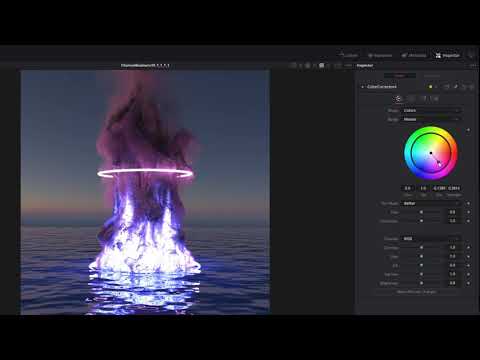
Thanks, I'll give it a look, at first import for an .exr still image, it was still all white in resolve, so I figured I must be missing something...
Diffeomorphic DAZ Importer version 1.6.0 releasedOther people's blend files, who have used diffeo to import daz to blender.
Rec 2020 turns Reds Black? Any fix?You don't have to "correct" the EXR files. The compositing program will take care of that.
Does your compositor import EXR files?
Does your compositor output to rec2020? (most do, even the free versions!)
How will you judge the conversion/settings/result if you don't have a reference monitor or even a basic HDR screen?
This video of the process, EXR files from Blender to Resolve should give you a better idea of what you've got yourself into.
Diffeomorphic DAZ Importer version 1.6.0 releasedWhen I import the standard JCMs it adds custom properties to the rig's object data. So the shape key is driven by the custom properties. When I look at other people's blends, the JCM shape keys are driven directly by bones.
How do I do this with diffeo? Because if I disable drivers in the morph section, it disables the JCMs when posing. I want the shape keys driven directly by bones so that they don't get disabled.
Example on shape key pJCMCollarTwist_p30_L
This is what I see on mine:

This is what I see on others: [Released] Substance Painter Assistant [Commercial]
jedijudd said:
So this could used for texturing G8 figures?
The texturing itself is done outside of Substance Painter Assistant. However, if you use Substance Painter for texturing your figures, then yes, the Substance Painter Assistant can help with setting that up. The Substance Painter Maps Import can be used no matter what texturing program you use.
loading free VDB filesHey all,
I have read thru many threads but not seeing how to actually import a free vdb file I have downloaded, if @ all possible. Is there a way to import or load a free non Daz Studio vdb product pls?
Thanks!!
Daz 3D is part of

Connect
DAZ Productions, Inc.
7533 S Center View Ct #4664
West Jordan, UT 84084Licensing Agreement | Terms of Service | Privacy Policy | EULA
© 2026 Daz Productions Inc. All Rights Reserved.