-
THIS STUFF IS NOT EASY
Installed most from the Daz Install manager. Bought a couple from third party - won't be doing that again.
Got the Victoria 4 packages and can't see any of them in Smart Content (Products).Is Genesis 8 really that good?I think G8 is very good. But I migrated from Victoria 4, so I don't have much G1-G3 experience. Is G8 as good as "professional" bespoke characters? No. But G8 also doesn't cost as much.
Is Genesis 8 really that good?Genesis 8 has better facial tech for better expressions.
To me the skin shader settngs on the G3 platform was more realistic out of the box than most of the G8. Being as I can change it it's not really an issue for me. When G8 was realeased a lot of people noticed the difference and kept harping on about how G8 skin textures had a plastic look to them.
Agree on the skin but I find most G8 expressions to be further into the uncanny valley than their G3 equivalents. Especially the smiles, which often come across as a bit creepy and more like something you'd see on the Joker than in real life. Most of the other "improvements" are makerting hype or things that could have been implemented in G3 just as easily... it IS the same mesh and UV set, after all.
Other than that... I've found Genesis 3 to be much more powerful in terms of figure creation simply because of the lack of G8 support in GenX2, which allows transfer of morphs from as far back as Victoria 3, whereas with G8 one has to bump from the original shape to G3 and then to G8 using a more convoluted process. This may finally be changing as there are now several PAs producing G3 to G8 transfer systems, with Zev0's promising both male and female G3 to G8 conversion with the much needed JCM transfer, but untiil we have direct transfer to all the old school figures, G8 will still be stuck with the copy of a copy syndrome.
[Released] Character Converter from Genesis 3 Female to Genesis 8 Female(Now Conv JCMs) [Commercial]Something similar was already asked and answered, but I want to be certain: Does the converter work with characters like "XY for Rune 7" or "XY for Karen 7"? I managed to convert some main characters using the script by Redz, but derivates from those main characters proved to be difficult and often lacked body details, e.g. Brenna for Ophelia 7.
Brenna and a couple of originally victoria 4, gen x'd to Genesis 3 and then further manually tweaked ladies are also on my list, so interested to hear how this works out.
Addon characters seem to work! Pic is Shiloh for Lilith 7 and she's identical to her G3 version.
Grabbed! Will post my results with a gen x abomination* when I get home from work and have time to play a bit with this.
*Actually, I'll try DMR Ella (https://www.daz3d.com/dmr-ella), so I'd say abomination's pretty far from what I was going for
LOL. I look forward to you posting abominations or not quite abominations!
 [Released] Character Converter from Genesis 3 Female to Genesis 8 Female(Now Conv JCMs) [Commercial]
Something similar was already asked and answered, but I want to be certain: Does the converter work with characters like "XY for Rune 7" or "XY for Karen 7"? I managed to convert some main characters using the script by Redz, but derivates from those main characters proved to be difficult and often lacked body details, e.g. Brenna for Ophelia 7.
This is no problem.
Something similar was already asked and answered, but I want to be certain: Does the converter work with characters like "XY for Rune 7" or "XY for Karen 7"? I managed to convert some main characters using the script by Redz, but derivates from those main characters proved to be difficult and often lacked body details, e.g. Brenna for Ophelia 7.
Brenna and a couple of originally victoria 4, gen x'd to Genesis 3 and then further manually tweaked ladies are also on my list, so interested to hear how this works out.
Addon characters seem to work! Pic is Shiloh for Lilith 7 and she's identical to her G3 version.
Thank you very much for sharing!
 [Released] Character Converter from Genesis 3 Female to Genesis 8 Female(Now Conv JCMs) [Commercial]
Something similar was already asked and answered, but I want to be certain: Does the converter work with characters like "XY for Rune 7" or "XY for Karen 7"? I managed to convert some main characters using the script by Redz, but derivates from those main characters proved to be difficult and often lacked body details, e.g. Brenna for Ophelia 7.
Brenna and a couple of originally victoria 4, gen x'd to Genesis 3 and then further manually tweaked ladies are also on my list, so interested to hear how this works out.
Addon characters seem to work! Pic is Shiloh for Lilith 7 and she's identical to her G3 version.
Grabbed! Will post my results with a gen x abomination* when I get home from work and have time to play a bit with this.
*Actually, I'll try DMR Ella (https://www.daz3d.com/dmr-ella), so I'd say abomination's pretty far from what I was going for
[Released] Character Converter from Genesis 3 Female to Genesis 8 Female(Now Conv JCMs) [Commercial]Something similar was already asked and answered, but I want to be certain: Does the converter work with characters like "XY for Rune 7" or "XY for Karen 7"? I managed to convert some main characters using the script by Redz, but derivates from those main characters proved to be difficult and often lacked body details, e.g. Brenna for Ophelia 7.
Brenna and a couple of originally victoria 4, gen x'd to Genesis 3 and then further manually tweaked ladies are also on my list, so interested to hear how this works out.
Addon characters seem to work! Pic is Shiloh for Lilith 7 and she's identical to her G3 version.
[Released] Character Converter from Genesis 3 Female to Genesis 8 Female(Now Conv JCMs) [Commercial]Something similar was already asked and answered, but I want to be certain: Does the converter work with characters like "XY for Rune 7" or "XY for Karen 7"? I managed to convert some main characters using the script by Redz, but derivates from those main characters proved to be difficult and often lacked body details, e.g. Brenna for Ophelia 7.
Brenna and a couple of originally victoria 4, gen x'd to Genesis 3 and then further manually tweaked ladies are also on my list, so interested to hear how this works out.
3D Art Freebie Challenge-July 2019-"Pool Party" -Entries Thread Only3D Art Freebie Challenge July 2019 "Pool Party"
I had 7 characters prepared for this scene at first but my computer could not handle that, so I had to slightly change the story...
[Watch at full size to see all details.]
"The First Early Guests..."
Starring: Anaya, Gabriella, Jeane, Barack and Eddie
The tale:Maui Beach, 16:08 PM - In June, Gabriella and Eddie, since their second meeting on the beach when Eddie asked her if she would like to rub him in with sun milk, were together for exactly a year and decided to give a pool party to celebrate. Eddie was just creating a playlist for the party that would start at 8 o'clock in the evening when Anaya & Barack already arrived. (Something had gone wrong with booking the airline ticket and they were forced to take a much earlier flight.) And while Anaya puts on her bikini, Eddie (always a gentleman) gets her a glass of red wine (after serving Barack and himself a cold foreign beer first) because he doesn't know yet she doesn't drink alcohol. Gabriella is thinking about that, maybe she's been drinking too much lately, also she doesn't want Jeane to smoke nearby her and told her that several times, and what about dinner tonight? On top of that, Eddie has not yet been rubbed in with sunscreen and he is already getting a red glow. Jeane, Eddie's sister has been living with the couple for almost six months now and she would only stay for a couple of weeks...
Soundtrack:Vybz Kartel - Summertime (© 2011)
https://www.youtube.com/watch?v=QNMgHltOh2Q
[First thing they sing is... Pool Party!]
COUNTABLE FREEBIES: (Alphabetic order)#01! 15 Facial Piercings for Michael 4 by Cool Tuna Studio
http://www.cooltuna.com/poser/poser-freebies.html (Item 29)
[Hard to see, used a nose piercing on the Anaya character]#02! 3D Glasses by inLite studio
http://inlitestudio.com/3d/product/3d-glasses/ **#03! 420 by DivabugDesigns
https://www.sharecg.com/v/75652/browse/11/Poser/420 **
[Doobie]#04! African Summer for Wilmap's Summer Top for G3F by eblank99
https://www.sharecg.com/v/81693/gallery/21/DAZ-Studio/African-Summer **#05! A Summer Top for Genesis 3 Female by Wilmap's Digital Creations
https://www.wilmapsdigitalcreations.co.uk/view_product.php?id=398 **#06! Anaya for G3/G8 by hindudreams
https://www.renderosity.com/mod/freestuff/anaya-for-g3-g8/78072 **#07! Ankle Bracelet by Gorilla Labs 3D
https://www.sharecg.com/v/72980/browse/5/3D-Model/Ankle-Bracelet **#08! Barack for G3M by dumbuser
https://www.sharecg.com/v/88699/gallery/21/DAZ-Studio/Barack-for-G3M **#09! Beach Towel by Ildanach
https://www.daz3d.com/forums/discussion/206316/free-beach-towel-updated-with-morphs-and-materials
[Dropbox download link]#10! Beer Bottle for Daz Studio by forged3DX
https://www.deviantart.com/forged3dx/art/Beer-Bottle-for-Daz-Studio-608260601#11! Belly piercings for Genesis 3 Female by KarenGrant
https://sharecg.com/v/85855/gallery/21/DAZ-Studio/Belly-piercings-for-Genesis-3-Female **#12! Bikini for Genesis 3 Female by Wilmap's Digital Creations
https://www.wilmapsdigitalcreations.co.uk/view_product.php?id=397 **#13! Body-Tattoos (G3F, G8F) by SmidA
https://www.renderosity.com/mod/freestuff/body-tattoos-g3f-g8f-/82815&ca **#14! Braid Bracelets for G3M, G3F, G8M, and G8F by Fisty
https://www.sharecg.com/v/92874/gallery/21/DAZ-Studio/Braid-Bracelets-for-G3M-G3F-G8M-and-G8F **#15! Bubble Gum for Genesis by takoyaki8
https://www.renderosity.com/mod/freestuff/bubble-gum-for-genesis/66934 **#16! Chair (OBJ) by CGAxis
https://free.cgaxis.com/product/3d-chair-free/ *1#17! Channing's Button Prop re-posted by Seacanyon
https://www.sharecg.com/v/56691/related/21/DAZ-Studio/Channings-Button-Prop **#18! Corkscrew (OBJ) by CGAxis
https://free.cgaxis.com/product/3d-corkscrew/ *1#19! Cute Rainbow Tattoos by MysticArtDesign
https://sharecg.com/v/92233/gallery/21/DAZ-Studio/Cute-Rainbow-Tattoos **
[Also works on G3F and G3M]#20! Day at the Beach Bundle by Daz Originals
https://www.daz3d.com/day-at-the-beach-bundle **
[Used String Bikini for Victoria 6 by Mada, Sarsa - Also comes with DAZ Studio 4.x Pro]#21! Drinks by klausdbg
https://www.sharecg.com/v/74240/gallery/5/3D-Model/Summer-IV-Drinks **#22! Fiberhair Goatee Beard for Genesis 3 Male by RedzStudio
https://www.renderosity.com/mod/freestuff/fiberhair-goatee-beard-for-genesis-3-male/75957 **#23! Free 3D Models Set 2017 by CGAxis
https://cgaxis.com/product/free-3d-models-set-2017/ *1
[Notebook used]#24! freeSPEX Glasses for Genesis by Slosh
https://www.sharecg.com/v/69673/browse/21/DAZ-Studio/freeSPEX-Glasses-for-Genesis-DAZ-4.6 **#25! G3F Head Morphs by Cybrea
https://www.renderosity.com/mod/freestuff/g3f-head-morphs/76945 **#26! G3M Shorts & Tanks by RenderGuyNY
https://www.sharecg.com/v/85215/browse/21/DAZ-Studio/G3M-Shorts-Tanks **#27! Genesis 2 Male Beard by Laticis Imagery
https://www.deviantart.com/laticis/art/Laticis-Imagery-FREE-Genesis-2-Male-Beard-512280041
[Works even better on G3M]#28! Genesis 2 Male Beard 03 by Laticis Imagery
https://laticis.deviantart.com/art/Laticis-Imagery-FREE-Genesis-2-Male-Beard-03-521807046
[Works better on G3M]#29! Groovy 60`s Style Sunglasses by foxtare
https://www.sharecg.com/v/35786/browse/11/Poser/Groovy-60%60s-Style-Sunglasses **#30! Gwennili Hair for Genesis 3 Female by kayleyss
https://www.renderosity.com/mod/freestuff/gwennili-hair-for-genesis-3-female/77151 **#31! Henna Tattoo by MysticArtDesign
https://sharecg.com/v/92182/gallery/21/DAZ-Studio/Henna-Tattoo **
[Also works on G3F and G3M]#32! Huge Hoop Earrings for Genesis 3 Female by Fisty
https://sharecg.com/v/87043/gallery/21/DAZ-Studio/Huge-Hoop-Earrings-for-Genesis-3-Female **#33! Inspire Beauty Jewellery for G2F by PandyGirl
https://issuu.com/philatdsc/docs/ds_creative_13 (page 20)#34! Iray car related shader presets 'megapack' by Tom2099
https://www.deviantart.com/tom2099/art/Iray-car-related-shader-presets-megapack-539622361#35! Jewelry Set (G3F & G8F) by Leilana
https://www.renderosity.com/mod/freestuff/jewelry-set/78314 **#36! Labeled Whiskey Bottle by Area-50
https://www.sharecg.com/v/24358/gallery/11/Poser/Botles **
[Used to label and fill the wine bottle]#37! Liquids - DS Shaders & Poser MT5s by Fisty
https://www.sharecg.com/v/82337/gallery/7/Material-and-Shader/Fistys-Liquids-DS-Shaders-Poser-MT5s **
[Goblet used]#38! Lotion bottle by AphoticInferno
https://www.renderosity.com/mod/freestuff/midnight-pirate-beach-party/76528 **#39! LouderPhones by insane_machine
https://www.renderosity.com/mod/freestuff/louderphones/64153 **#40! MicCable Set by MDP
https://sites.google.com/site/mdp6gdl/ (item 12)#41! Purr (&) Gabriella for G3/G8 by hindudreams
https://www.renderosity.com/mod/freestuff/purr-gabriella-for-g3-g8/77841 **#42! Queen Palm by Xfrog inc.
http://xfrog.com/product/TR19.html **#43! Round Brown Sunshade Umbrella (OBJ) by CGAxis
https://free.cgaxis.com/product/3d-round-brown-sunshade-umbrella-free/ *1#44! Sago Palm by Xfrog inc.
http://xfrog.com/product/HP05.html **#45! Sassy Pose for Genesis 3 Female by Tako Yakida
https://sharecg.com/v/90449/gallery/21/DAZ-Studio/Sassy-Pose-for-Genesis-3-Female **
[Slightly adjusted]#46! Simple Smoke by Ladymist95
https://www.sharecg.com/v/76297/browse/21/DAZ-Studio/Simple-Smoke **#47! Speakers by Digi-Dotz
http://www.digi-dotz.com/index.php/free-poses/props/243-speakers-prop-for-daz-studio#48! Suncreme by klausdbg
http://www.sharecg.com/v/74239/gallery/5/3D-Model/Summer-III-Suncreme **
['After Sun' texture by me]#49! Trish Hair for Genesis 3 Female by kayleyss
https://www.renderosity.com/mod/freestuff/trish-hair-for-genesis-3-female/77150 **#50! Winebottle by TrekkieGrrrl
http://trekkiegrrrl.dk/prp1.htm (item 4)#51! Wine Glass with Contents by Dexterdoodle
https://sharecg.com/v/50759/gallery/5/3D-Model/Wine-Glass-with-Contents **
NO-COUNT ITEMS:--- 3Stone Ring for Genesis 3 Female by AllenArt
--- AllenArt Iray Jewelry Shaders by AllenArt
--- Bezel Cut Ring for Genesis 8 Female by AllenArt
--- CasualOutfit for G3M by Tab [Watch used]
--- CasualOutfit2 for G3M by Tab [Bracelet used]
--- Channel Bangle for Genesis 3 Female by AllenArt
++ DAZ Studio Iray HDR Outdoor Environments by Daz Originals, DimensionTheory [Maui used]
--- Drinking Glass prop for Iray with shaders by AllenArt
--- Filigree Earrings G3F Iray Only by AllenArt
--- Free Iray Outdoor Lights by Dreamlight
--- Genny Bracelet for Genesis 3 Female by AllenArt
--- Nose Ring 01 for G2F, G3F and/or G8F by AllenArt
--- Pavè Bangle for Genesis 3 Female by AllenArt
--- Pinwheel Earrings for Genesis 2 Female by AllenArt
++ Rocker Outfit for G3F and G8F by by Daz Originals, DirtyFairy, Mada [Necklace used]
++ Surf's Up Outfit and Board by Sarsa [Flipflops, Hat and Shorts used]
++ Toulouse Hair for Genesis 3 Female by Daz Originals
PURCHASED/PAID FOR ITEMS:$1. Hotel Indoor Pool by DAZ Originals
https://www.daz3d.com/hotel-indoor-pool
*1 E-mail address required
** Registration required
#x! Countable Items (Bold ones are used by me for the first time I think.)
--- No longer available freebies
++ Free with DAZ Studio (or the Essentials)
$x. Purchased/Paid For Item
Rendered with DAZ Studio 4.10.0.123 (nVidia Iray)Other free software used: GIMP v2.10.8 and Irfanview 4.52
Postwork: used the AltaLux Image Enhancement Filter (Effect) by Stefano Tommesani that comes with Irfanview and the Lens Flare filter (oa) that comes with GIMP.
Also used mcjDenoise by mcasual. (https://sites.google.com/site/mcasualsdazscripts9/mcjdenoise)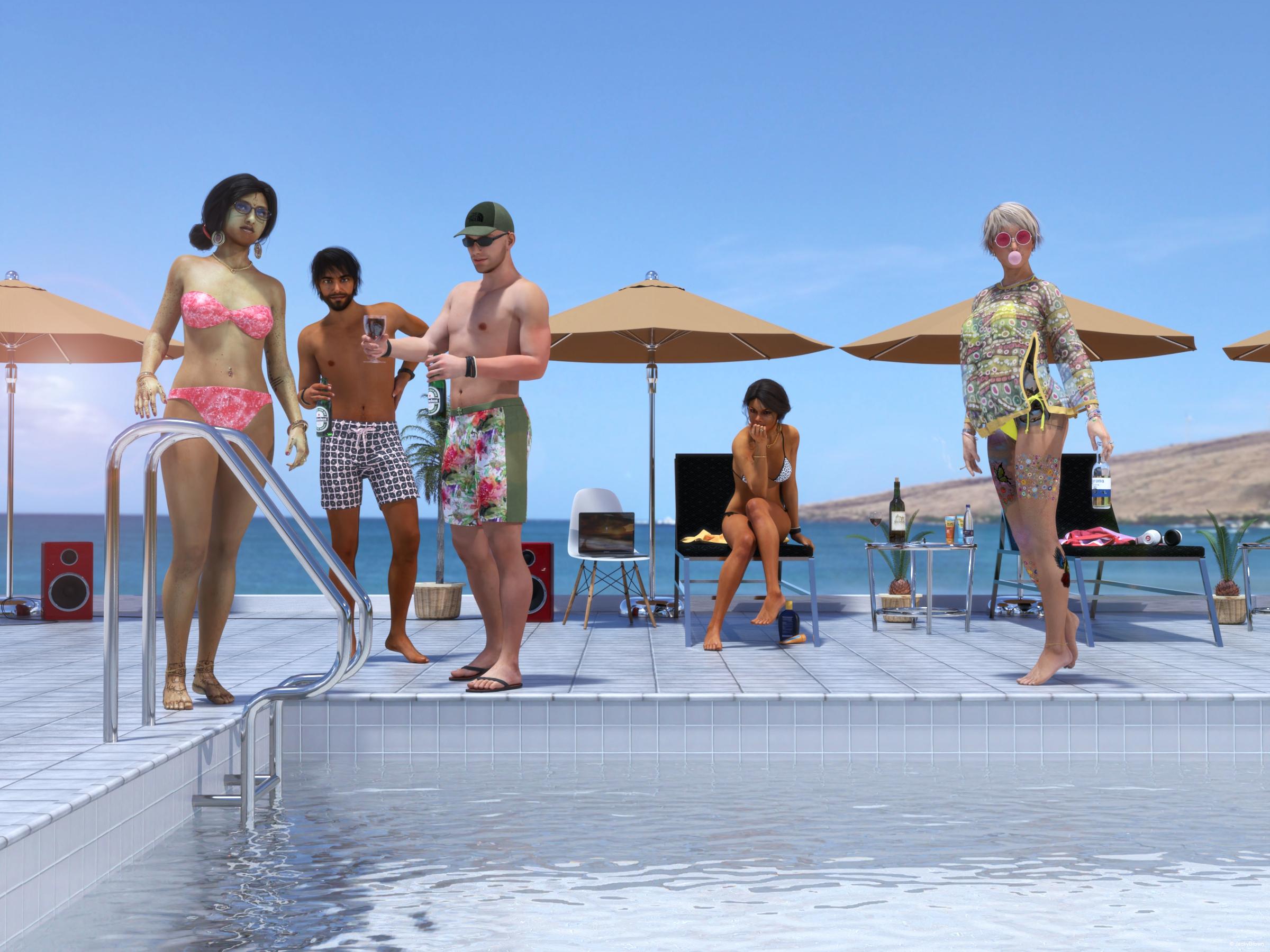
"The First Early Guests..."
3D Art Freebie Challenge-July 2019-"Pool Party" -Main Thread Only3D Art Freebie Challenge July 2019 "Pool Party"
I had 7 characters prepared for this scene at first but my computer could not handle that, so I had to slightly change the story...
[Watch at full size to see all details.]
"The First Early Guests..."
Starring: Anaya, Gabriella, Jeane, Barack and Eddie
The tale:Maui Beach, 16:08 PM - In June, Gabriella and Eddie, since their second meeting on the beach when Eddie asked her if she would like to rub him in with sun milk, were together for exactly a year and decided to give a pool party to celebrate. Eddie was just creating a playlist for the party that would start at 8 o'clock in the evening when Anaya & Barack already arrived. (Something had gone wrong with booking the airline ticket and they were forced to take a much earlier flight.) And while Anaya puts on her bikini, Eddie (always a gentleman) gets her a glass of red wine (after serving Barack and himself a cold foreign beer first) because he doesn't know yet she doesn't drink alcohol. Gabriella is thinking about that, maybe she's been drinking too much lately, also she doesn't want Jeane to smoke nearby her and told her that several times, and what about dinner tonight? On top of that, Eddie has not yet been rubbed in with sunscreen and he is already getting a red glow. Jeane, Eddie's sister has been living with the couple for almost six months now and she would only stay for a couple of weeks...
Soundtrack:Vybz Kartel - Summertime (© 2011)
https://www.youtube.com/watch?v=QNMgHltOh2Q
[First thing they sing is... Pool Party!]
COUNTABLE FREEBIES: (Alphabetic order)#01! 15 Facial Piercings for Michael 4 by Cool Tuna Studio
http://www.cooltuna.com/poser/poser-freebies.html (Item 29)
[Hard to see, used a nose piercing on the Anaya character]#02! 3D Glasses by inLite studio
http://inlitestudio.com/3d/product/3d-glasses/ **#03! 420 by DivabugDesigns
https://www.sharecg.com/v/75652/browse/11/Poser/420 **
[Doobie]#04! African Summer for Wilmap's Summer Top for G3F by eblank99
https://www.sharecg.com/v/81693/gallery/21/DAZ-Studio/African-Summer **#05! A Summer Top for Genesis 3 Female by Wilmap's Digital Creations
https://www.wilmapsdigitalcreations.co.uk/view_product.php?id=398 **#06! Anaya for G3/G8 by hindudreams
https://www.renderosity.com/mod/freestuff/anaya-for-g3-g8/78072 **#07! Ankle Bracelet by Gorilla Labs 3D
https://www.sharecg.com/v/72980/browse/5/3D-Model/Ankle-Bracelet **#08! Barack for G3M by dumbuser
https://www.sharecg.com/v/88699/gallery/21/DAZ-Studio/Barack-for-G3M **#09! Beach Towel by Ildanach
https://www.daz3d.com/forums/discussion/206316/free-beach-towel-updated-with-morphs-and-materials
[Dropbox download link]#10! Beer Bottle for Daz Studio by forged3DX
https://www.deviantart.com/forged3dx/art/Beer-Bottle-for-Daz-Studio-608260601#11! Belly piercings for Genesis 3 Female by KarenGrant
https://sharecg.com/v/85855/gallery/21/DAZ-Studio/Belly-piercings-for-Genesis-3-Female **#12! Bikini for Genesis 3 Female by Wilmap's Digital Creations
https://www.wilmapsdigitalcreations.co.uk/view_product.php?id=397 **#13! Body-Tattoos (G3F, G8F) by SmidA
https://www.renderosity.com/mod/freestuff/body-tattoos-g3f-g8f-/82815&ca **#14! Braid Bracelets for G3M, G3F, G8M, and G8F by Fisty
https://www.sharecg.com/v/92874/gallery/21/DAZ-Studio/Braid-Bracelets-for-G3M-G3F-G8M-and-G8F **#15! Bubble Gum for Genesis by takoyaki8
https://www.renderosity.com/mod/freestuff/bubble-gum-for-genesis/66934 **#16! Chair (OBJ) by CGAxis
https://free.cgaxis.com/product/3d-chair-free/ *1#17! Channing's Button Prop re-posted by Seacanyon
https://www.sharecg.com/v/56691/related/21/DAZ-Studio/Channings-Button-Prop **#18! Corkscrew (OBJ) by CGAxis
https://free.cgaxis.com/product/3d-corkscrew/ *1#19! Cute Rainbow Tattoos by MysticArtDesign
https://sharecg.com/v/92233/gallery/21/DAZ-Studio/Cute-Rainbow-Tattoos **
[Also works on G3F and G3M]#20! Day at the Beach Bundle by Daz Originals
https://www.daz3d.com/day-at-the-beach-bundle **
[Used String Bikini for Victoria 6 by Mada, Sarsa - Also comes with DAZ Studio 4.x Pro]#21! Drinks by klausdbg
https://www.sharecg.com/v/74240/gallery/5/3D-Model/Summer-IV-Drinks **#22! Fiberhair Goatee Beard for Genesis 3 Male by RedzStudio
https://www.renderosity.com/mod/freestuff/fiberhair-goatee-beard-for-genesis-3-male/75957 **#23! Free 3D Models Set 2017 by CGAxis
https://cgaxis.com/product/free-3d-models-set-2017/ *1
[Notebook used]#24! freeSPEX Glasses for Genesis by Slosh
https://www.sharecg.com/v/69673/browse/21/DAZ-Studio/freeSPEX-Glasses-for-Genesis-DAZ-4.6 **#25! G3F Head Morphs by Cybrea
https://www.renderosity.com/mod/freestuff/g3f-head-morphs/76945 **#26! G3M Shorts & Tanks by RenderGuyNY
https://www.sharecg.com/v/85215/browse/21/DAZ-Studio/G3M-Shorts-Tanks **#27! Genesis 2 Male Beard by Laticis Imagery
https://www.deviantart.com/laticis/art/Laticis-Imagery-FREE-Genesis-2-Male-Beard-512280041
[Works even better on G3M]#28! Genesis 2 Male Beard 03 by Laticis Imagery
https://laticis.deviantart.com/art/Laticis-Imagery-FREE-Genesis-2-Male-Beard-03-521807046
[Works better on G3M]#29! Groovy 60`s Style Sunglasses by foxtare
https://www.sharecg.com/v/35786/browse/11/Poser/Groovy-60%60s-Style-Sunglasses **#30! Gwennili Hair for Genesis 3 Female by kayleyss
https://www.renderosity.com/mod/freestuff/gwennili-hair-for-genesis-3-female/77151 **#31! Henna Tattoo by MysticArtDesign
https://sharecg.com/v/92182/gallery/21/DAZ-Studio/Henna-Tattoo **
[Also works on G3F and G3M]#32! Huge Hoop Earrings for Genesis 3 Female by Fisty
https://sharecg.com/v/87043/gallery/21/DAZ-Studio/Huge-Hoop-Earrings-for-Genesis-3-Female **#33! Inspire Beauty Jewellery for G2F by PandyGirl
https://issuu.com/philatdsc/docs/ds_creative_13 (page 20)#34! Iray car related shader presets 'megapack' by Tom2099
https://www.deviantart.com/tom2099/art/Iray-car-related-shader-presets-megapack-539622361#35! Jewelry Set (G3F & G8F) by Leilana
https://www.renderosity.com/mod/freestuff/jewelry-set/78314 **#36! Labeled Whiskey Bottle by Area-50
https://www.sharecg.com/v/24358/gallery/11/Poser/Botles **
[Used to label and fill the wine bottle]#37! Liquids - DS Shaders & Poser MT5s by Fisty
https://www.sharecg.com/v/82337/gallery/7/Material-and-Shader/Fistys-Liquids-DS-Shaders-Poser-MT5s **
[Goblet used]#38! Lotion bottle by AphoticInferno
https://www.renderosity.com/mod/freestuff/midnight-pirate-beach-party/76528 **#39! LouderPhones by insane_machine
https://www.renderosity.com/mod/freestuff/louderphones/64153 **#40! MicCable Set by MDP
https://sites.google.com/site/mdp6gdl/ (item 12)#41! Purr (&) Gabriella for G3/G8 by hindudreams
https://www.renderosity.com/mod/freestuff/purr-gabriella-for-g3-g8/77841 **#42! Queen Palm by Xfrog inc.
http://xfrog.com/product/TR19.html **#43! Round Brown Sunshade Umbrella (OBJ) by CGAxis
https://free.cgaxis.com/product/3d-round-brown-sunshade-umbrella-free/ *1#44! Sago Palm by Xfrog inc.
http://xfrog.com/product/HP05.html **#45! Sassy Pose for Genesis 3 Female by Tako Yakida
https://sharecg.com/v/90449/gallery/21/DAZ-Studio/Sassy-Pose-for-Genesis-3-Female **
[Slightly adjusted]#46! Simple Smoke by Ladymist95
https://www.sharecg.com/v/76297/browse/21/DAZ-Studio/Simple-Smoke **#47! Speakers by Digi-Dotz
http://www.digi-dotz.com/index.php/free-poses/props/243-speakers-prop-for-daz-studio#48! Suncreme by klausdbg
http://www.sharecg.com/v/74239/gallery/5/3D-Model/Summer-III-Suncreme **
['After Sun' texture by me]#49! Trish Hair for Genesis 3 Female by kayleyss
https://www.renderosity.com/mod/freestuff/trish-hair-for-genesis-3-female/77150 **#50! Winebottle by TrekkieGrrrl
http://trekkiegrrrl.dk/prp1.htm (item 4)#51! Wine Glass with Contents by Dexterdoodle
https://sharecg.com/v/50759/gallery/5/3D-Model/Wine-Glass-with-Contents **
NO-COUNT ITEMS:--- 3Stone Ring for Genesis 3 Female by AllenArt
--- AllenArt Iray Jewelry Shaders by AllenArt
--- Bezel Cut Ring for Genesis 8 Female by AllenArt
--- CasualOutfit for G3M by Tab [Watch used]
--- CasualOutfit2 for G3M by Tab [Bracelet used]
--- Channel Bangle for Genesis 3 Female by AllenArt
++ DAZ Studio Iray HDR Outdoor Environments by Daz Originals, DimensionTheory [Maui used]
--- Drinking Glass prop for Iray with shaders by AllenArt
--- Filigree Earrings G3F Iray Only by AllenArt
--- Free Iray Outdoor Lights by Dreamlight
--- Genny Bracelet for Genesis 3 Female by AllenArt
--- Nose Ring 01 for G2F, G3F and/or G8F by AllenArt
--- Pavè Bangle for Genesis 3 Female by AllenArt
--- Pinwheel Earrings for Genesis 2 Female by AllenArt
++ Rocker Outfit for G3F and G8F by by Daz Originals, DirtyFairy, Mada [Necklace used]
++ Surf's Up Outfit and Board by Sarsa [Flipflops, Hat and Shorts used]
++ Toulouse Hair for Genesis 3 Female by Daz Originals
PURCHASED/PAID FOR ITEMS:$1. Hotel Indoor Pool by DAZ Originals
https://www.daz3d.com/hotel-indoor-pool
*1 E-mail address required
** Registration required
#x! Countable Items (Bold ones are used by me for the first time I think.)
--- No longer available freebies
++ Free with DAZ Studio (or the Essentials)
$x. Purchased/Paid For Item
Rendered with DAZ Studio 4.10.0.123 (nVidia Iray)Other free software used: GIMP v2.10.8 and Irfanview 4.52
Postwork: used the AltaLux Image Enhancement Filter (Effect) by Stefano Tommesani that comes with Irfanview and the Lens Flare filter (oa) that comes with GIMP.
Also used mcjDenoise by mcasual. (https://sites.google.com/site/mcasualsdazscripts9/mcjdenoise)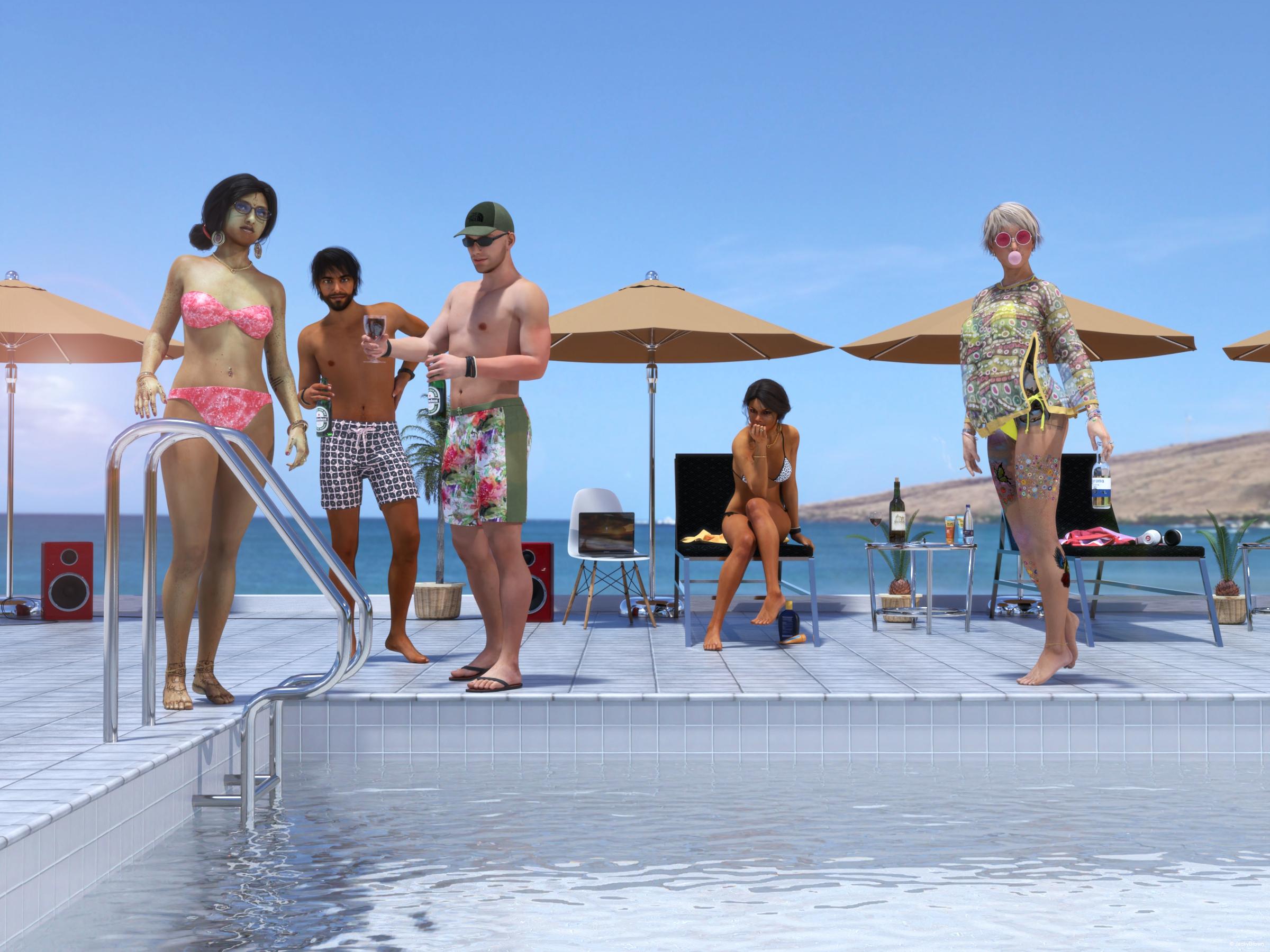
"The First Early Guests..."
All Links Check Out Plz Move To Entries Thread
Trying to understand namespretty well
Genesis 8 F is base figure model for that generation of genesis female
She then has quite a few main characters,- Victoria 8
- Olympia 8
- Stephanie 8
- Monique 8
- Teen Josie 8
- Charlotte 8
- Sakura 8
- Karyssa 8
- Alexandra 8
- Aiko 8 to name just a few. these are all different purpose built shapes exploring different ethnicities, body shapes and variations etc which are released at roughhly monthly intervals. On release days you will find a base character, a starter bundle and a pro bundle, which include other products. If you want you character to be "Anatomically correct" then you need to buy the pro bundle for at least one of the adult characters (M&F) as genitalia are only released in the adult pro bundles.
there are also morph packs, these enable you to dial in differences to either the base figure or the characters, and desighn your own unique look
Then there are named extension packs such as https://www.daz3d.com/ry-tessa-for-victoria-8 ; which is optimised to be used with V8 but can actually be used on the base figure but won't look exactly the same.
Have I confused you?
Not at all! Thank you so much! :D I'm mostly insterested in working the models and not full 3D scenes so this is perfect advice.
One more quick question though... I found Victoria and Karysa but only because I had seen them before in tutorials. If I want to search for characters is here an easier way? I say this because Karyssa for example is not on the "figure" list in filters... :)
Thank you so much guys!! :D you were great help!pretty well
Genesis 8 F is base figure model for that generation of genesis female
She then has quite a few main characters,- Victoria 8
- Olympia 8
- Stephanie 8
- Monique 8
- Teen Josie 8
- Charlotte 8
- Sakura 8
- Karyssa 8
- Alexandra 8
- Aiko 8 to name just a few. these are all different purpose built shapes exploring different ethnicities, body shapes and variations etc which are released at roughhly monthly intervals. On release days you will find a base character, a starter bundle and a pro bundle, which include other products. If you want you character to be "Anatomically correct" then you need to buy the pro bundle for at least one of the adult characters (M&F) as genitalia are only released in the adult pro bundles.
there are also morph packs, these enable you to dial in differences to either the base figure or the characters, and desighn your own unique look
Then there are named extension packs such as https://www.daz3d.com/ry-tessa-for-victoria-8 ; which is optimised to be used with V8 but can actually be used on the base figure but won't look exactly the same.
Have I confused you?
Not at all! Thank you so much! :D I'm mostly insterested in working the models and not full 3D scenes so this is perfect advice.
One more quick question though... I found Victoria and Karysa but only because I had seen them before in tutorials. If I want to search for characters is here an easier way? I say this because Karyssa for example is not on the "figure" list in filters... :)
And if you want only the main characters with bundles: https://www.daz3d.com/genesis-8-core-figures
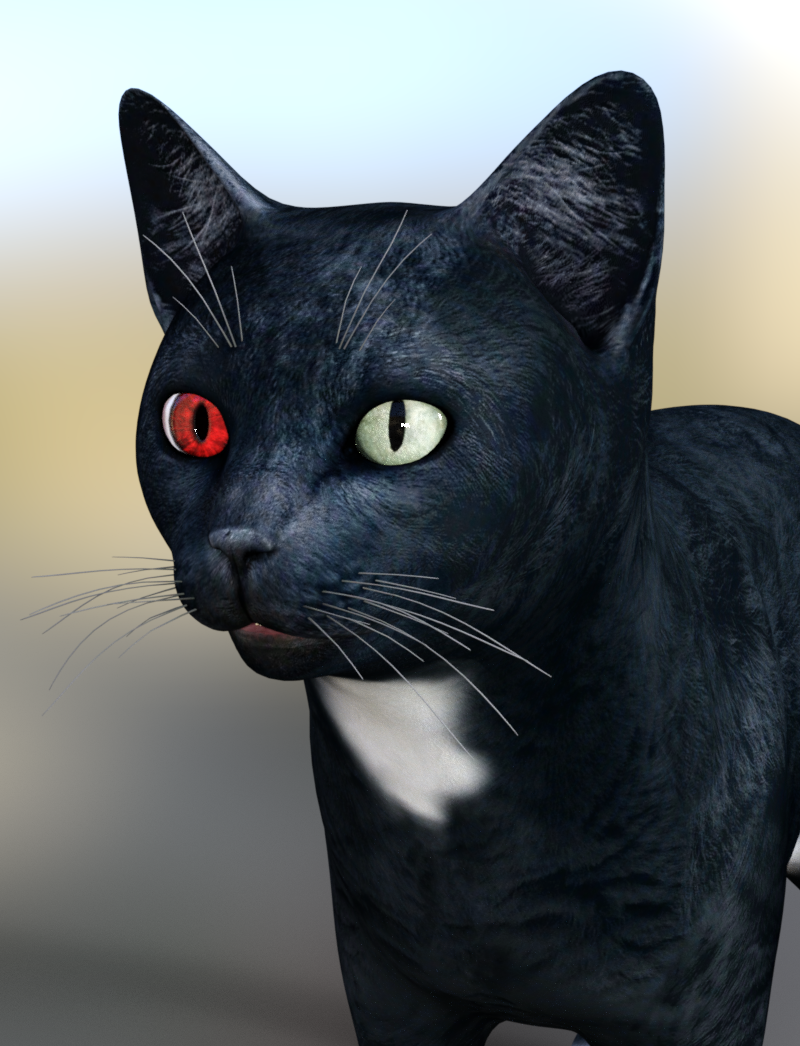
Is the new DAZ CAT finally here???!!!@Wonderland I don't know the difference between the V4 eyes and the M4 eyes, besides them conforming to their respective figures. Eyes are eyes, at least here, if they can pass for cat eyes. The "Look At Me" eyes that come with Raiya's characters (the other eye props I own) don't work for this because they load as the pair and don't have pupil slit morphs. (At least I don't have any of those morphs because my characters from her are normal humans.)
@carrie58 The eyes are from Eyedeas 3+ for V4 and M4. They are a poser product, they either load together or individuallly. In this case, I loaded them individually and parented them to each eye. This is what I needed for the cat to get a better fit. These eyes should be scaled at around 74% to be roughly the same size as the cat's eyes. They will need to be re-scaled to a different size, depending on how you morphed your cat.
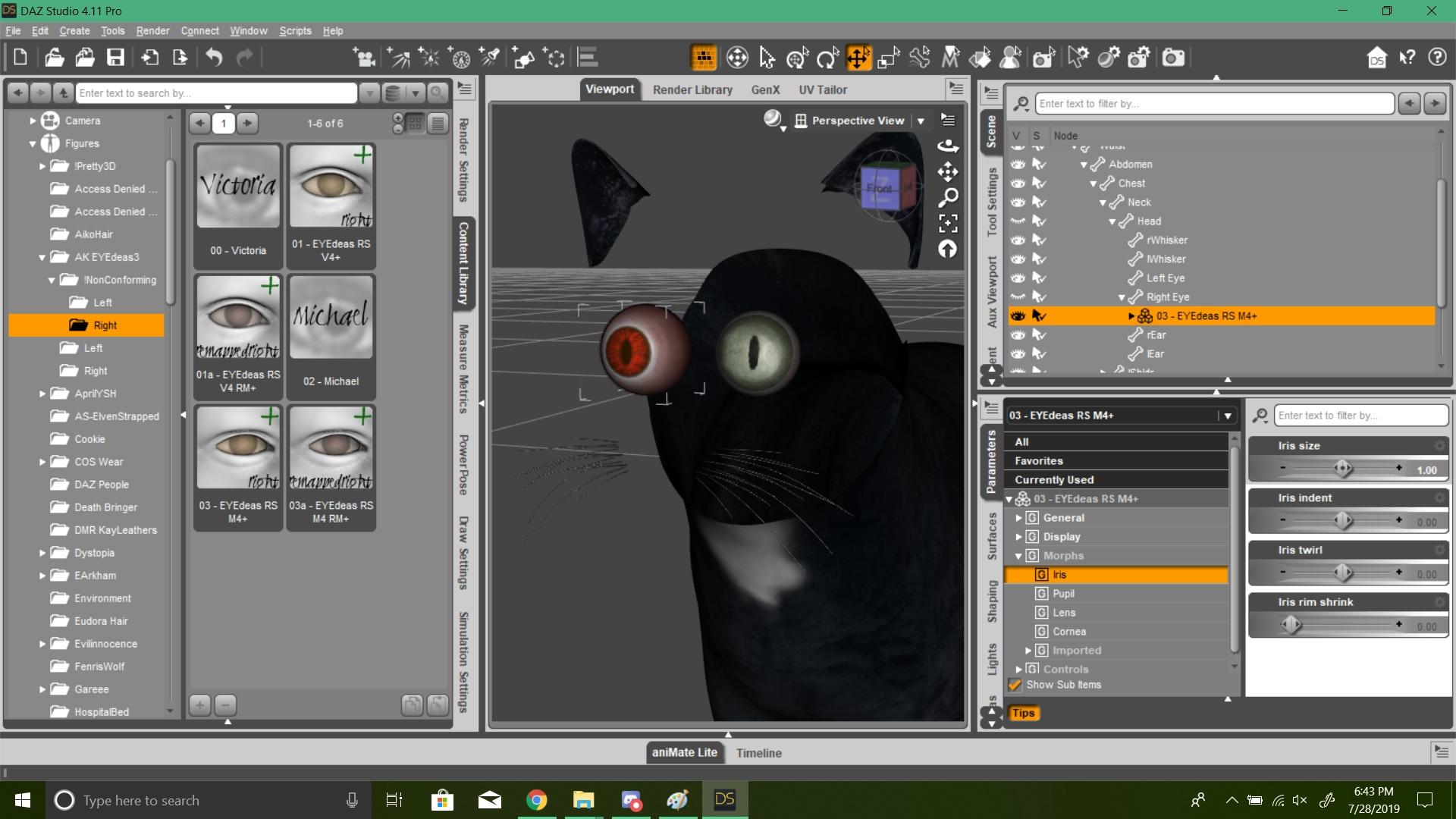
EDIT: A rendered version with the cat's face visible again, so you can compare the two eyes next to each other.
 3D Art Freebie Challenge-July 2019-"Pool Party" -Main Thread Only
3D Art Freebie Challenge July 2019 "Pool Party"
I had 7 characters prepared for this scene at first but my computer could not handle that, so I had to slightly change the story...
[Watch at full size to see all details.]
"The First Early Guests..."
Starring: Anaya, Gabriella, Jeane, Barack and Eddie
The tale:Maui Beach, 16:08 PM - In June, Gabriella and Eddie, since their second meeting on the beach when Eddie asked her if she would like to rub him in with sun milk, were together for exactly a year and decided to give a pool party to celebrate. Eddie was just creating a playlist for the party that would start at 8 o'clock in the evening when Anaya & Barack already arrived. (Something had gone wrong with booking the airline ticket and they were forced to take a much earlier flight.) And while Anaya puts on her bikini, Eddie (always a gentleman) gets her a glass of red wine (after serving Barack and himself a cold foreign beer first) because he doesn't know yet she doesn't drink alcohol. Gabriella is thinking about that, maybe she's been drinking too much lately, also she doesn't want Jeane to smoke nearby her and told her that several times, and what about dinner tonight? On top of that, Eddie has not yet been rubbed in with sunscreen and he is already getting a red glow. Jeane, Eddie's sister has been living with the couple for almost six months now and she would only stay for a couple of weeks...
Soundtrack:Vybz Kartel - Summertime (© 2011)
https://www.youtube.com/watch?v=QNMgHltOh2Q
[First thing they sing is... Pool Party!]
COUNTABLE FREEBIES: (Alphabetic order)#01! 15 Facial Piercings for Michael 4 by Cool Tuna Studio
http://www.cooltuna.com/poser/poser-freebies.html (Item 29)
[Hard to see, used a nose piercing on the Anaya character]#02! 3D Glasses by inLite studio
http://inlitestudio.com/3d/product/3d-glasses/ **#03! 420 by DivabugDesigns
https://www.sharecg.com/v/75652/browse/11/Poser/420 **
[Doobie]#04! African Summer for Wilmap's Summer Top for G3F by eblank99
https://www.sharecg.com/v/81693/gallery/21/DAZ-Studio/African-Summer **#05! A Summer Top for Genesis 3 Female by Wilmap's Digital Creations
https://www.wilmapsdigitalcreations.co.uk/view_product.php?id=398 **#06! Anaya for G3/G8 by hindudreams
https://www.renderosity.com/mod/freestuff/anaya-for-g3-g8/78072 **#07! Ankle Bracelet by Gorilla Labs 3D
https://www.sharecg.com/v/72980/browse/5/3D-Model/Ankle-Bracelet **#08! Barack for G3M by dumbuser
https://www.sharecg.com/v/88699/gallery/21/DAZ-Studio/Barack-for-G3M **#09! Beach Towel by Ildanach
https://www.daz3d.com/forums/discussion/206316/free-beach-towel-updated-with-morphs-and-materials
[Dropbox download link]#10! Beer Bottle for Daz Studio by forged3DX
https://www.deviantart.com/forged3dx/art/Beer-Bottle-for-Daz-Studio-608260601#11! Belly piercings for Genesis 3 Female by KarenGrant
https://sharecg.com/v/85855/gallery/21/DAZ-Studio/Belly-piercings-for-Genesis-3-Female **#12! Bikini for Genesis 3 Female by Wilmap's Digital Creations
https://www.wilmapsdigitalcreations.co.uk/view_product.php?id=397 **#13! Body-Tattoos (G3F, G8F) by SmidA
https://www.renderosity.com/mod/freestuff/body-tattoos-g3f-g8f-/82815&ca **#14! Braid Bracelets for G3M, G3F, G8M, and G8F by Fisty
https://www.sharecg.com/v/92874/gallery/21/DAZ-Studio/Braid-Bracelets-for-G3M-G3F-G8M-and-G8F **#15! Bubble Gum for Genesis by takoyaki8
https://www.renderosity.com/mod/freestuff/bubble-gum-for-genesis/66934 **#16! Chair (OBJ) by CGAxis
https://free.cgaxis.com/product/3d-chair-free/ *1#17! Channing's Button Prop re-posted by Seacanyon
https://www.sharecg.com/v/56691/related/21/DAZ-Studio/Channings-Button-Prop **#18! Corkscrew (OBJ) by CGAxis
https://free.cgaxis.com/product/3d-corkscrew/ *1#19! Cute Rainbow Tattoos by MysticArtDesign
https://sharecg.com/v/92233/gallery/21/DAZ-Studio/Cute-Rainbow-Tattoos **
[Also works on G3F and G3M]#20! Day at the Beach Bundle by Daz Originals
https://www.daz3d.com/day-at-the-beach-bundle **
[Used String Bikini for Victoria 6 by Mada, Sarsa - Also comes with DAZ Studio 4.x Pro]#21! Drinks by klausdbg
https://www.sharecg.com/v/74240/gallery/5/3D-Model/Summer-IV-Drinks **#22! Fiberhair Goatee Beard for Genesis 3 Male by RedzStudio
https://www.renderosity.com/mod/freestuff/fiberhair-goatee-beard-for-genesis-3-male/75957 **#23! Free 3D Models Set 2017 by CGAxis
https://cgaxis.com/product/free-3d-models-set-2017/ *1
[Notebook used]#24! freeSPEX Glasses for Genesis by Slosh
https://www.sharecg.com/v/69673/browse/21/DAZ-Studio/freeSPEX-Glasses-for-Genesis-DAZ-4.6 **#25! G3F Head Morphs by Cybrea
https://www.renderosity.com/mod/freestuff/g3f-head-morphs/76945 **#26! G3M Shorts & Tanks by RenderGuyNY
https://www.sharecg.com/v/85215/browse/21/DAZ-Studio/G3M-Shorts-Tanks **#27! Genesis 2 Male Beard by Laticis Imagery
https://www.deviantart.com/laticis/art/Laticis-Imagery-FREE-Genesis-2-Male-Beard-512280041
[Works even better on G3M]#28! Genesis 2 Male Beard 03 by Laticis Imagery
https://laticis.deviantart.com/art/Laticis-Imagery-FREE-Genesis-2-Male-Beard-03-521807046
[Works better on G3M]#29! Groovy 60`s Style Sunglasses by foxtare
https://www.sharecg.com/v/35786/browse/11/Poser/Groovy-60%60s-Style-Sunglasses **#30! Gwennili Hair for Genesis 3 Female by kayleyss
https://www.renderosity.com/mod/freestuff/gwennili-hair-for-genesis-3-female/77151 **#31! Henna Tattoo by MysticArtDesign
https://sharecg.com/v/92182/gallery/21/DAZ-Studio/Henna-Tattoo **
[Also works on G3F and G3M]#32! Huge Hoop Earrings for Genesis 3 Female by Fisty
https://sharecg.com/v/87043/gallery/21/DAZ-Studio/Huge-Hoop-Earrings-for-Genesis-3-Female **#33! Inspire Beauty Jewellery for G2F by PandyGirl
https://issuu.com/philatdsc/docs/ds_creative_13 (page 20)#34! Iray car related shader presets 'megapack' by Tom2099
https://www.deviantart.com/tom2099/art/Iray-car-related-shader-presets-megapack-539622361#35! Jewelry Set (G3F & G8F) by Leilana
https://www.renderosity.com/mod/freestuff/jewelry-set/78314 **#36! Labeled Whiskey Bottle by Area-50
https://www.sharecg.com/v/24358/gallery/11/Poser/Botles **
[Used to label and fill the wine bottle]#37! Liquids - DS Shaders & Poser MT5s by Fisty
https://www.sharecg.com/v/82337/gallery/7/Material-and-Shader/Fistys-Liquids-DS-Shaders-Poser-MT5s **
[Goblet used]#38! Lotion bottle by AphoticInferno
https://www.renderosity.com/mod/freestuff/midnight-pirate-beach-party/76528 **#39! LouderPhones by insane_machine
https://www.renderosity.com/mod/freestuff/louderphones/64153 **#40! MicCable Set by MDP
https://sites.google.com/site/mdp6gdl/ (item 12)#41! Purr (&) Gabriella for G3/G8 by hindudreams
https://www.renderosity.com/mod/freestuff/purr-gabriella-for-g3-g8/77841 **#42! Queen Palm by Xfrog inc.
http://xfrog.com/product/TR19.html **#43! Round Brown Sunshade Umbrella (OBJ) by CGAxis
https://free.cgaxis.com/product/3d-round-brown-sunshade-umbrella-free/ *1#44! Sago Palm by Xfrog inc.
http://xfrog.com/product/HP05.html **#45! Sassy Pose for Genesis 3 Female by Tako Yakida
https://sharecg.com/v/90449/gallery/21/DAZ-Studio/Sassy-Pose-for-Genesis-3-Female **
[Slightly adjusted]#46! Simple Smoke by Ladymist95
https://www.sharecg.com/v/76297/browse/21/DAZ-Studio/Simple-Smoke **#47! Speakers by Digi-Dotz
http://www.digi-dotz.com/index.php/free-poses/props/243-speakers-prop-for-daz-studio#48! Suncreme by klausdbg
http://www.sharecg.com/v/74239/gallery/5/3D-Model/Summer-III-Suncreme **
['After Sun' texture by me]#49! Trish Hair for Genesis 3 Female by kayleyss
https://www.renderosity.com/mod/freestuff/trish-hair-for-genesis-3-female/77150 **#50! Winebottle by TrekkieGrrrl
http://trekkiegrrrl.dk/prp1.htm (item 4)#51! Wine Glass with Contents by Dexterdoodle
https://sharecg.com/v/50759/gallery/5/3D-Model/Wine-Glass-with-Contents **
NO-COUNT ITEMS:--- 3Stone Ring for Genesis 3 Female by AllenArt
--- AllenArt Iray Jewelry Shaders by AllenArt
--- Bezel Cut Ring for Genesis 8 Female by AllenArt
--- CasualOutfit for G3M by Tab [Watch used]
--- CasualOutfit2 for G3M by Tab [Bracelet used]
--- Channel Bangle for Genesis 3 Female by AllenArt
++ DAZ Studio Iray HDR Outdoor Environments by Daz Originals, DimensionTheory [Maui used]
--- Drinking Glass prop for Iray with shaders by AllenArt
--- Filigree Earrings G3F Iray Only by AllenArt
--- Free Iray Outdoor Lights by Dreamlight
--- Genny Bracelet for Genesis 3 Female by AllenArt
--- Nose Ring 01 for G2F, G3F and/or G8F by AllenArt
--- Pavè Bangle for Genesis 3 Female by AllenArt
--- Pinwheel Earrings for Genesis 2 Female by AllenArt
++ Rocker Outfit for G3F and G8F by by Daz Originals, DirtyFairy, Mada [Necklace used]
++ Surf's Up Outfit and Board by Sarsa [Flipflops, Hat and Shorts used]
++ Toulouse Hair for Genesis 3 Female by Daz Originals
PURCHASED/PAID FOR ITEMS:$1. Hotel Indoor Pool by DAZ Originals
https://www.daz3d.com/hotel-indoor-pool
*1 E-mail address required
** Registration required
#x! Countable Items (Bold ones are used by me for the first time I think.)
--- No longer available freebies
++ Free with DAZ Studio (or the Essentials)
$x. Purchased/Paid For Item
Rendered with DAZ Studio 4.10.0.123 (nVidia Iray)Other free software used: GIMP v2.10.8 and Irfanview 4.52
Postwork: used the AltaLux Image Enhancement Filter (Effect) by Stefano Tommesani that comes with Irfanview and the Lens Flare filter (oa) that comes with GIMP.
Also used mcjDenoise by mcasual. (https://sites.google.com/site/mcasualsdazscripts9/mcjdenoise)"The First Early Guests..."
Trying to understand namespretty well
Genesis 8 F is base figure model for that generation of genesis female
She then has quite a few main characters,- Victoria 8
- Olympia 8
- Stephanie 8
- Monique 8
- Teen Josie 8
- Charlotte 8
- Sakura 8
- Karyssa 8
- Alexandra 8
- Aiko 8 to name just a few. these are all different purpose built shapes exploring different ethnicities, body shapes and variations etc which are released at roughhly monthly intervals. On release days you will find a base character, a starter bundle and a pro bundle, which include other products. If you want you character to be "Anatomically correct" then you need to buy the pro bundle for at least one of the adult characters (M&F) as genitalia are only released in the adult pro bundles.
there are also morph packs, these enable you to dial in differences to either the base figure or the characters, and desighn your own unique look
Then there are named extension packs such as https://www.daz3d.com/ry-tessa-for-victoria-8 ; which is optimised to be used with V8 but can actually be used on the base figure but won't look exactly the same.
Have I confused you?
Not at all! Thank you so much! :D I'm mostly insterested in working the models and not full 3D scenes so this is perfect advice.
One more quick question though... I found Victoria and Karysa but only because I had seen them before in tutorials. If I want to search for characters is here an easier way? I say this because Karyssa for example is not on the "figure" list in filters... :)
And if you want only the main characters with bundles: https://www.daz3d.com/genesis-8-core-figures
Hi, plz id this female from this make-up?https://www.daz3d.com/lie-make-up-set-for-genesis-8-female
It's an incredible model ... maybe is Olympia 7 ?
Thank you for help guys!!
Hi all,
She is completely Victoria with Tasha 8 textures ;)
it's the expression she has on that is making it look a little different

And yes, most probably expression made her different looking.
I've made a mixture with dials of "Magnetism" and "Psychopath" included at Big Expressive Pack
Trying to understand namespretty well
Genesis 8 F is base figure model for that generation of genesis female
She then has quite a few main characters,- Victoria 8
- Olympia 8
- Stephanie 8
- Monique 8
- Teen Josie 8
- Charlotte 8
- Sakura 8
- Karyssa 8
- Alexandra 8
- Aiko 8 to name just a few. these are all different purpose built shapes exploring different ethnicities, body shapes and variations etc which are released at roughhly monthly intervals. On release days you will find a base character, a starter bundle and a pro bundle, which include other products. If you want you character to be "Anatomically correct" then you need to buy the pro bundle for at least one of the adult characters (M&F) as genitalia are only released in the adult pro bundles.
there are also morph packs, these enable you to dial in differences to either the base figure or the characters, and desighn your own unique look
Then there are named extension packs such as https://www.daz3d.com/ry-tessa-for-victoria-8 ; which is optimised to be used with V8 but can actually be used on the base figure but won't look exactly the same.
Have I confused you?
Not at all! Thank you so much! :D I'm mostly insterested in working the models and not full 3D scenes so this is perfect advice.
One more quick question though... I found Victoria and Karysa but only because I had seen them before in tutorials. If I want to search for characters is here an easier way? I say this because Karyssa for example is not on the "figure" list in filters... :)
Trying to understand namesG8F would be the base, and everything else would be morphs& extra skins (a.k.a. "characters"). There are morph packs without skins, that usually add extra shapes to individualize your figure.
The Victoria ( etc that chohole mentioned above) are "official" characaters/owned by DAZ3D, while characters owned by the PAs might need specific morph packages or an official character to reach the look that you see in the promos. There are also characters that just need the base character, like G8F.
Thank you for your help! :)
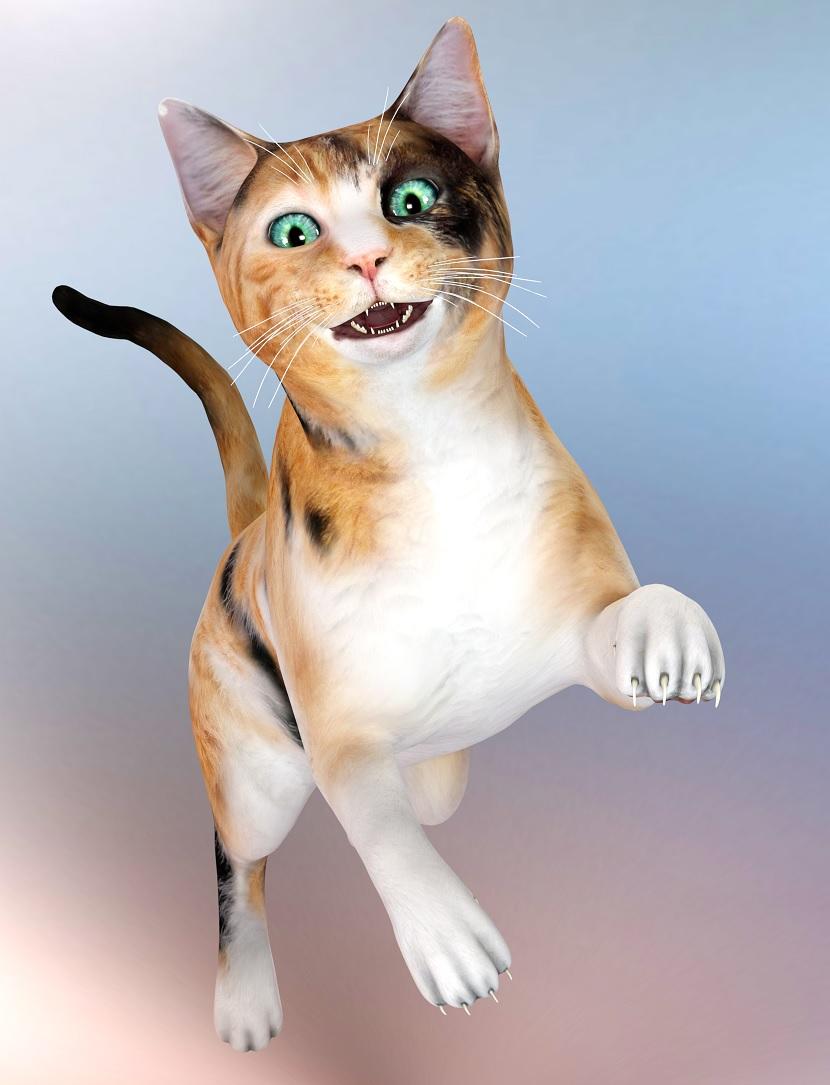
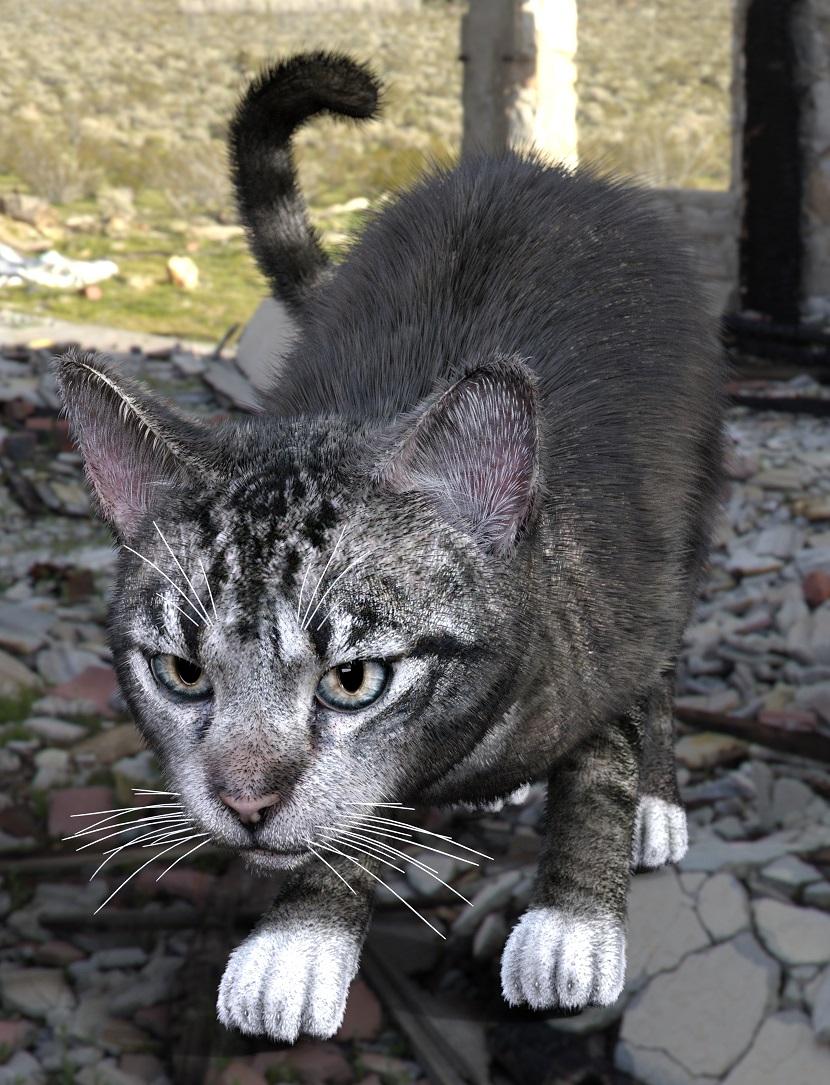
MimicMolly's Renders & WIPsI decided that a "quick fix" for Daz House Cat, is to parent an eyeball prop to each eye, and then hide the eyes. I used EYEdeas 3+ for V4 and M4. The Calico, which uses the same shaping preset I used to recreate my cat, had the eyes scaled up to 76% (because my cats have big eyes). Then the tabby, who is in the default shape, the yes were scaled to 74%. So if you have this product, it comes with pupil slit morphs that you can adjust to your liking. Just remember to make the iris and pupil really big.
The calico, no hair. (in the DAZ Gallery, because this render came out cute IMHO [x])
The tabby with hair. (Also in the DAZ Galleries because it looks believable at a glance. [x])
Now all the DAZ House Cat needs is paw geografts that give it flexible toes/better toe (and toe bean) shaping options, and better claws. I'd also buy wearable eyes, though it's kind of sad that we need add-ons like this to have a more realistic cat.
Apply Makeup Selectively?I'd like to use
Which character are you wanting to use the makeup from? Is it a character that has Diffuse Overlay Makeup, L.I.E. Makeup, or is it makeup that's baked into the character's face textures?
https://www.daz3d.com/amy-lee-for-victoria-8
I don't have her, so I don't know what type of makeup she uses. But what can you can try, if you have a character that uses Diffuse Overlay makeup that applies without changing the face texture (like Aiko 8), is apply that character's makeup to your figure then in the Surfaces Tab where it says Diffuse Overlay Color change that Diffuse Overlay Color map to the map that has the makeup that you want to use. Also, be sure and turn Diffuse Overlay Squared On:
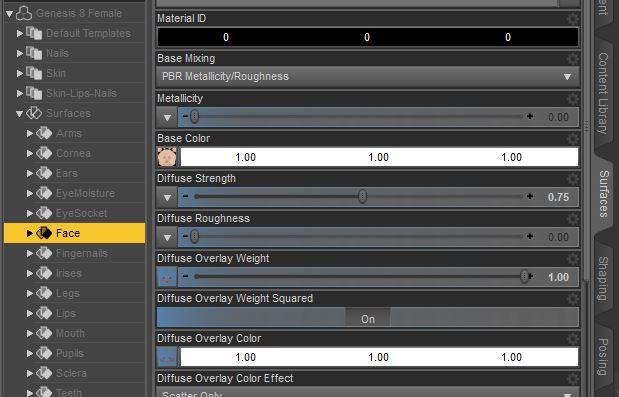
So if you have Aiko 8 (or another character that uses Diffuse Overlay Makeup that doesn't change the underlying face texture), apply one of her makeups (it won't show up in the preview screen unless you're using the Iray Preview Draw Setting), then go to the Surfaces Tab >> Face and click on the Map in the Diffuse Overlay Color slot, select "Browse" and navigate to the folder that has the makeup you want to use. Select the map that has the makeup you want to use and that should apply it to the Diffuse Overlay Color spot. Makes sure you also click "On" for Diffuse Overlay Weight Squared as that can help blend the map better with the face skin.
This technique doesn't work on all makeup but it does work quite a few times that I've tried it. :)
Trying to understand namesG8F would be the base, and everything else would be morphs& extra skins (a.k.a. "characters"). There are morph packs without skins, that usually add extra shapes to individualize your figure.
The Victoria ( etc that chohole mentioned above) are "official" characaters/owned by DAZ3D, while characters owned by the PAs might need specific morph packages or an official character to reach the look that you see in the promos. There are also characters that just need the base character, like G8F.
Daz 3D is part of

Connect
DAZ Productions, Inc.
7533 S Center View Ct #4664
West Jordan, UT 84084Licensing Agreement | Terms of Service | Privacy Policy | EULA
© 2026 Daz Productions Inc. All Rights Reserved.