-
How can I use textures on this KFC model to show up correctly?
In Sketchup is the Parking lot & Building the same mesh?
Noobie here - Looking for a model like this that can be modified to the character I want to drawI am having trouble figuring out how to change the proportions - especially like pelvis width or the width of the legs etc. If it was just a manikin then it seems it would be easy to modify. What if I used sketchup to make my own model for Daz3D? How difficult would that be?
If I'm understanding this right- and not trying to insult you, I don't know what you know- once you have your figure loaded, you go to the Scene tab and click on your figure, then you can right click and "expand all" to see all the parts of the body expand and the "menu" dropdowns (aka the hand will go to the different fingers, etc) then you can click on the individual parts. In Parameters, usually under Actor>General, you'll be able to slide the sliders for Scale and reduce the area.
There are also morph kits, depending on what generation you are using.
Carrara model of St Peter's Square and environsMy last note today is about the import from 3D warehouse. Altogether I have imported about three dozen models, at import totaling about 2,500 master objects, 5,000 shaders, and 1,000 texture maps. I have eliminated about 1,500 master object duplications by replacing them with multiple instances of Carrara master objects, and reduced the number of shaders to about 500. For ease of transfer, all the texture-map images are in one directory. All the objects and shader are categorically named, and the instances organized hierarchically, but I have a little more work to make the naming consistent.
For transfer, I opened the models in 3D warehouse in a trial version of Sketchup Pro and exported them from there. The pro version of Sketchup is definitely not worth $500 to me, and my trial license is about to expire. But I think the only difference between the Pro and free version, as far as Carrara is concerned, is that the Pro version has FBX export. For some models the FBX export works much better than the only viable alternative if one wishes to preserve texture map data: the archaic 3DS format.
FBX VERSUS 3DS
I tried both FBX and 3Ds format for each model, to find out which would yield better results. I found FBX often better than 3DS format, because it preserves object hierarchy and groups more adjacent polygons of the same shading domain into one object. The 3DS format flattens the object hierarchy and splits objects into many more tiny little primitives. However in some cases, especially for older models, the 3DS format preserves shading domains better.
Both imports create multiple objects when one object exists with multiple instances.
So I have manually consolidated about 25% of the duplicate master objects, about 1,500 instances in total, to be instances of the same object. I found when there are less than 8 instances of a simple master object, it doesnt yield that much of a performance difference; but with more than 8 instances, I got significant improvements from replacing the individual identical objects with instances of one master object.
THE SHADER BUG
When importing, one encounters a bug in Carrara. This bug is that the texture maps are imported twice: once as a layer list for the object's global shader, with projection mapping to each shading domain...and again as separate shaders for each shading domain, in the list below the global shader. Immediately after import, if one deletes the topmost global shader, every single one of the lower shaders for the individual shading domains delete too. But after saving the file and changing directory for the images, the global shader gets detached from the shaders for the individual shading domains. Carrara then shades the entire object twice--once from the layers list in the global shader, and once again for each shading domain.
To fix this, after the individual shaders are detached from the global shader, one can delete the shading-domain shaders, and the global shader with its parametric mapping works properly. But if one does not delete the individual shaders from each shading domain, then while shading in shading-domain order over the global shader, the individual shading-domain shaders can cause various parts of the object to be shaded incorrectly and intrioduces some strange and bizarre artifacts.
My solution for this project was to delete the 4,500 individual shaders for each shading domain in every object. This substantially improved rendering time. Also, higher shaders in the global shader's layers list can contain nodes which set properties for all subsequent layers. In other projects, it might be better to keep the individual shaders for each shading domain instead. But with the number of shaders for this model, it made more sense to keep the layer lists in the global shader.
Here is a picture showing the result after the individual shaders are removed and the entire object is being shaded with parametric projections from a layers list in the global shader.
However note to this method: the importer does not add overrides for lower shaders when for example, one layer at the top of the layers list declares transparency, or reflection, or glow, whatever, and lower shaders in the list have no specific settings for that node type. So, if one shader at the top of the layers list declares a glow in the source model, then all the shading domains below it will typically glow too. One has to go in and add the shader nodes to susbsequent layers in the list and override it manually for all the subsequent shading domains, or reorder the list to put layers with more node settings at the end of the list.
With 1,000 unique texture maps, it still takes Carrara 5-10 minutes to load all the textures into 3D view on my machine (i7 with GTX 970), but it does load and render properly, even with 2,500 objects. Prior to the improvements noted above, even half the model did not load on my machine at all. When set to Gouraud shading in the 3D view, it loads and renders with about the same performance as Victoria 4.
Noobie here - Looking for a model like this that can be modified to the character I want to drawhttp://www.daz3d.com/skulduggery
These are older products, if you want more skeletons I'd suggest waiting for the bundles to go on sale.
The clothing item should auto-fit to Genesis.
Sketchup is for making little houses on Google Earth ;-)
I'd suggest Blender and Hexagon as better options to start modeling with. Blender is free and Hexagon indispensible for many little tasks like morphing [has bridge].
Shark CageShark Cage:
http://www.contentparadise.com/productDetails.aspx?id=25767
Or this rescaled as needed:
https://www.renderosity.com/mod/freestuff/?item_id=69872
Or convert this from sketchup:
https://3dwarehouse.sketchup.com/model.html?id=u007ebf9d-1833-4c8e-b262-43ea9ceddd8f
How can I use textures on this KFC model to show up correctly?Normally when I export Sketchup models to Bryce, all textures works greatly. But with this specific model, some are not showing.

If I ungroup the model as shown in attachment, the building and parking terrain are 1 model. Thus if I add a texture to it, everything turns to the texture chosen. I have noticed asphalt textures included and thought they are for the parking area. And the 'red' lines as seen on the original model roof part are not shown either in Bryce. Though if I look at the textures I can't see images which could be the red lines?
Are there ways to ungroup the model further so that the building can be parted from the parking lot?
Any help are much appreciated!
 Noobie here - Looking for a model like this that can be modified to the character I want to draw
I am having trouble figuring out how to change the proportions - especially like pelvis width or the width of the legs etc. If it was just a manikin then it seems it would be easy to modify. What if I used sketchup to make my own model for Daz3D? How difficult would that be?
How to delete a surface in an imported object? [w/ screenshot]Perfect, thank you. And I am assuming, in order to apply iRay shaders (such as gold plating to candle sticks), these sketchup objects first need to be UV mapped.... And, to do this, I would need to separate out each individual obect as a separate .obj file, correct?....Unless.... I can UV map the entire object as a whole...
I cannot tell you how appreciative I am.
Looking for Classic CarThere is this in Sketchup format (which can be converted with some work) free from 3D Warehouse:
https://3dwarehouse.sketchup.com/model.html?id=e93707257ae78f89c1006ed55bc1a3fc
And there is this at TurboSquid available in several formats including obj which can be imported into Poser and DAZ Studio)
http://www.turbosquid.com/3d-models/3d-model-bentley-le-mans/880368?referral=The_Dodger
What can Bryce Do?Lotharan, I am only a hobbyist (taught myself 3D with help in forums when needed) but somehow I prefer Bryce for most renders. Only programs I am using are Bryce 7.1, Daz Studio, Hexagon (still learning) and believe it or not, SketchUp. I have used my own built shop model for renders. I am so impressed that any SketchUp format model (when exported as an .obj) can be used in Bryce and reads SketchUp's textures! How cool is this!? Only thing is sometimes it crashes but it depends. On attached images though never crashed! :)
The images are all SketchUp models been used, except the human figures are Daz Studio's. I did a tiny bit postwork on the pavement but the rest are all BRYCE! :)
Interior image done on Win10 laptop yesterday.
Laura
Looking for Classic CarNothing directly suitable for Poser that I'm aware of.
The Supercharged 1930 Bentley is an awesome vehicle... Like an old fighter plane with no wings... Unfortunately due to licensing, few people would directly name the model after what it's supposed to be, thus making finding one way harder... Never mind finding one in Poser format.
TurboSquid has one that goes for $260... Way too expensive and its only available in MAX format, so you would need $3,000 3DS MAX to convert it to anything else... They also have a nice 1927 model for $129 in multiple formats, still would require some work in Poser... 3D Warehouse has a free one, but with the top up... And it would require a bit of work to make it Poser ready... If I had to categorize it, I would say it's detail level is about early 2000s game quality... Other than that, there is nothing I can find...
Not at all the same beast, but if you are in to 30s British sports cars, there is semi-decent model of a 1930 Jag at Planit3D for free in 3DS format (not MAX, but there is that too)... As far as I'm aware Poser still can import .3ds, but there is work in that too...
If you are interested in converting the 3D Warehouse model, I'd be happy to explain the workflow methods I use to convert my SketchUp models to Poser.
Good luck.
How to delete a surface in an imported object? [w/ screenshot]Hey guys,
I have an object file of an altar which I got from the google/sketchup database. As you can see in the screenshot below, this object has multiple surfaces. What I would like to do is to delete some surfaces (for example, I want to delete the human figure, the book + stand, etc.). Is there a way to individually delete these items within the single object?
Thanks!
Show Us Your Bryce Renders! Part 9Some time back I have shared a Bryce scene with my own built fashion shop made in SketchUp. I have made interior scenes. All the props are from SketchUp Warehouse with Genesis Female character. But to use the rotation inside the scene for different views is quite hard and the lighting is just awfull. I really need to learn more about this.
Help needed - DS 4.8.0.59 - requires at least OpenGL 1.3 (Win10)Hi there,
Today I have upgraded from Win 7 64-bit to Win 10. On Win 7 everything worked great but now DS doesn't even open and give a message: 'Daz Studio requires at least OpenGL version 1.3. Your machine currently provides OpenGL 1.1. Please contact your video card provider to get updated drivers or upgrade to an OpenGL 1.3 compatible graphics card'. Other programs such as Bryce 7.1, SketchUp, etc works though on Win 10 fine. Can one upgrade online the OpenGL?
Is this because it's now Win 10? It's still the same 64-bit laptop I have used with Win 7. I had an icon for an Intel HD graphics card but now it's not showing under hidden icons. When I have clicked on hidden icons in Win 7, I got another menu showing all items where you could manage what should be showing or not, but not anymore! Where can I now check the graphics card that the system is using? It do not show under system settings of Windows or devices. I am absolutely clueless when it comes to technical stuff! :(
Any advice is much appreciated!
Laura
Advise for architecture designsfor 3D Modeling i have Carrara 8.5 Pro, Hexagon and Vue Architecture bundle for Sketchup but if it's possible i would use all in Carrara as i am not that familar with Hexagon right now and as Sketchup goes, i don't really like to use it.
But thanks a lot for the Informations, Architools looks very interesting.Advise for architecture designsI have used Carrara for this. I've only done interriors. I have used Carrara because It's easier for me to get a photo realistic look. But it is hard because Carrara isn't as user friendly entering dimensions and locations. I'm doing a lot of math. I don't really recommend it. I do walls and ceilings with the spline modeler and everything else in the vertex. I use the set size command alot. I do like how easy it is to use textures esp fabric wall treatment. My sister does interrior design and I think my renders look much better then her sketchup renders, but Carrara isn't really the right tool for the job. So it is not cost effective if you value your time. I played a bit with arch tools but I didn't really think it would help. This was typed on a phone so i'm sure it's full of typo's. BradAdvise for architecture designsI have sketchup and I know there are also vray plugins for it, it might've an easy to use software but it's not what I really like to use as it is not exactly how I would work, hard to explain.
i am using Carrara for more than 1 year right now and with the help of this forum and the training dvd's from infinite skills I've learned a lot.
i love Carrara as it is an awesome all in one software that can produce great realistic images even without any plugin, so I am not a beginner at all.
most of the time I was more working on characters but I would more like to do more than just that.
in some way, I want to make it to my job.
i won't sit with the clients when I'm realizing the project but maybe when talking about it what they want or when it's finished or they wish some changes but first I want to just get started creating my own examples that if somebody wants something like that can see what I am doing an what is possible.
i have just not really started yet, was watching for blueprints on google but don't know what views I should need, all sides of the building + top view and inside view? Or anything else?
but thanks a lot for your replies! :) I will take a look on architools
Advise for architecture designsI am thinking about making a photorealistic 3D model from blueprints, outside and inside like for example if someone is planning to build a house that I can make a fully 3d model for them that looks like the house is already build
Architools by inagoni I could be a start . What exactly do you want to do?
I agree with Head Wax. If you start from the blue print and want interior/exterior; Architool is the best start if you want to stay inside Carrara. It has an easy learning curve, can be easily configured, can import any window/door necessary (see here a nice repository) can export to obj... The main issue I have with it is that creating dormers, while possible, is not straighforward and has limitations.
Outside Carrara, Sketchup is famous for creating buildings from street pictures and can export Collada to Carrara.
There are also plenty of specialized software for Archviz from Free to outragiously expensive.
Thank you Oskarsson and Luthbel (and others)Sometimes a mishap isn't such a bad thing : )
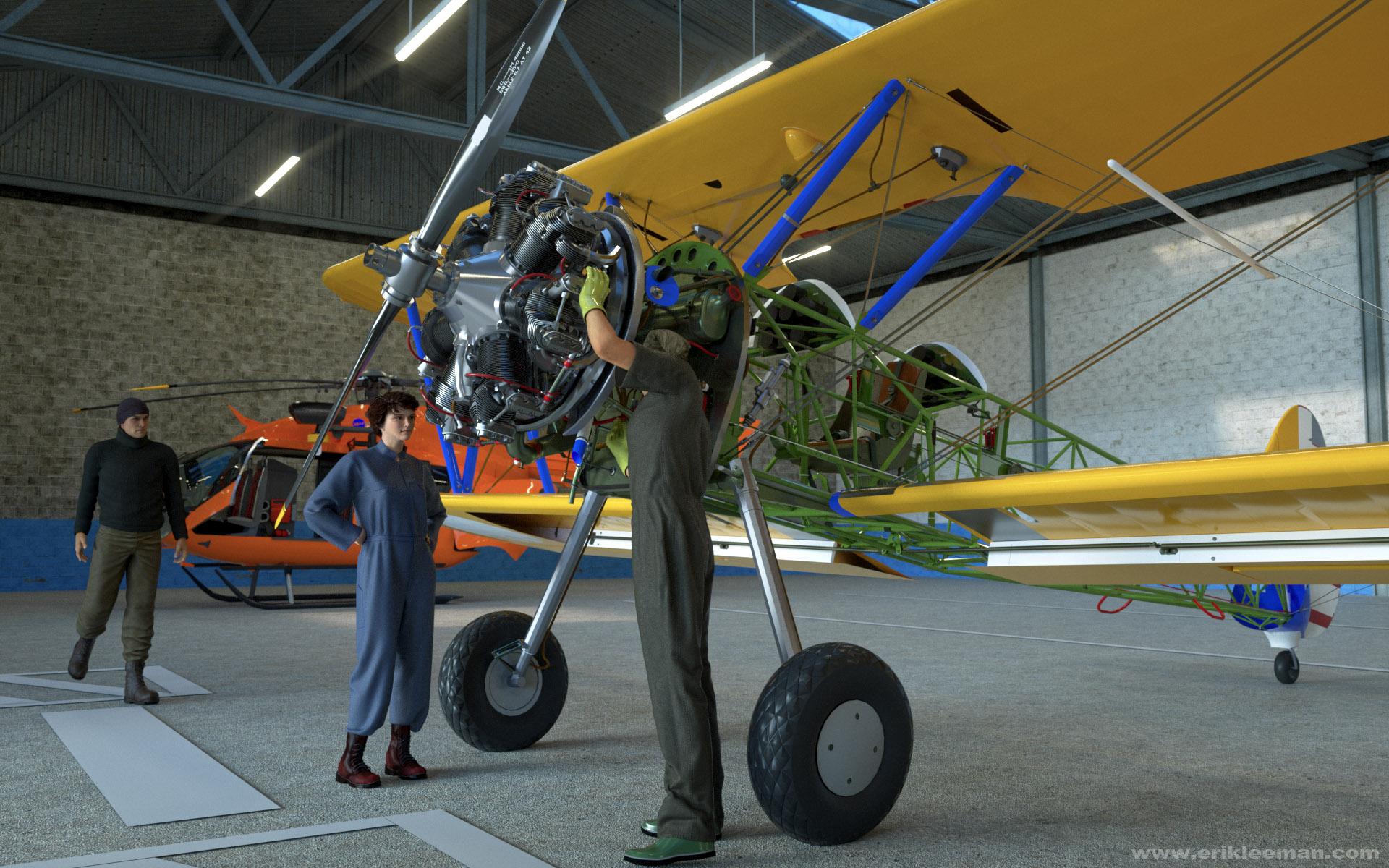
SketchUp crashed while converting/exporting this wonderful Boeing Stearman model by PM3D from 3D WareHouse, but I think the result was more interesting than what I originally intended.
I wanted this scene to try out Yura's Air Defender suit for G2M and Aave Nainen's Blue Collar Basics Coveralls (I'll replace it later).
The hangar actually is Stonemason's Warehouse stripped empty.
The Boeing (19 MB) can be found here:
https://3dwarehouse.sketchup.com/user.html?id=1521012555791842123422033
Cheers!
Erik
edit: final version with Oskarsson's Prison Clothes for G2M and Yura's Air Defender
Awesome! And thanks for the link.
- Greg
Thank you Oskarsson and Luthbel (and others)Sometimes a mishap isn't such a bad thing : )
SketchUp crashed while converting/exporting this wonderful Boeing Stearman model by PM3D from 3D WareHouse, but I think the result was more interesting than what I originally intended.
I wanted this scene to try out Yura's Air Defender suit for G2M and Aave Nainen's Blue Collar Basics Coveralls (I'll replace it later).
The hangar actually is Stonemason's Warehouse stripped empty.
The Boeing (19 MB) can be found here:
https://3dwarehouse.sketchup.com/user.html?id=1521012555791842123422033
Cheers!
Erik
edit: final version with Oskarsson's Prison Clothes for G2M and Yura's Air Defender
Daz 3D is part of

Connect
DAZ Productions, Inc.
7533 S Center View Ct #4664
West Jordan, UT 84084Licensing Agreement | Terms of Service | Privacy Policy | EULA
© 2026 Daz Productions Inc. All Rights Reserved.