-
Centaur 8 - extra horse textures and other thoughts
A Thanks for letting me know, that you have not such problems with centaurs, GlenWebb.
It looks like my Daz Studio and its content is screwed up on my computer.
First I have lost all my custom actions and all bookmarks from https://www.daz3d.com/mf-content-bookmarks
Now I have discovered, that I have lost also some characters, like Victoria 8.
I could not even find in the content characters just recently installed via DIM centaur https://www.daz3d.com/genesis-8-male-centaur
Something is wrong and it is no fun anymore, to fix it.
Need to look through, what updates or content I have installed via DIM or from zips.
This is not centaur related but I’m having similar problems with DS 4.11. Every time it crashes (which is often!) it corrupts all my custom scripts which have taken hours each time to set up again and this is driving me crazy and tech support hasn’t figured out a solution yet and my smart content is glitchy with some items disappearing and reappearing and some have metadata that don’t work although CS says it works fine when they try it. This is becoming so frustrating that sometimes I wonder if I should have just stuck with Poser and V4! All the money I would have saved...
Assigning compatibility base for Smart ContentYou need to right-click on the items (just the CR2/HR2/PP2 files, not the poses in most cases as those are for the clothing), Assign Compatibility (I think, going from memory), and select Victoria 4. If you set the actual items as compatibility bases in their own right you can then mark the presets as compatible with them.
Assigning compatibility base for Smart ContentGreetings -
If this is a repost of an earlier thread, I apologize. Neither I nor Uncle Google could find a recent post dealing with quite this same issue - but if there is one, just post the link and I'll close this thread. (All of the threads I can find deal with non-Daz content that doesn't show up *at all* in Smart Content; deal with categorizing content in the Library, not Smart Content; or deal with much older versions of the software.)
Okay, here's the situation:
I have a ton of Daz content, purchased from Daz - mostly V4 stuff - that doesn't show correctly in Smart Content. My example here is Winter Flower for Victoria 4, which is a skirt and shirt for (obv) V4.
After purchase/install/download:
- Product DOES appear in "Smart Content" pane
- Product DOES NOT have items categorized (ie, nothing is categorized as Wardrobe, Materials, etc. - it's all visible only in the "All Products" category)
- Product DOES NOT have items tagged as compatible with the appropriate figure(s) (ie, the "Filter by Context" option doesn't populate these items in the SC pane when the correct figure is selected)
So, the second bullet item I seem to have fixed - I can right-click on a particular item within the product, select "Categorize..." and correctly place an item in a category - Wardrobe, Material, etc.
Where I'm having trouble is with the compatibility base. I've gone through the "Edit metadata..." window to assign the items a compatibility base (see attached screenshot), but the products still don't show in the SC pane when I have a V4 figure selected and have the "Filter by Context" option selected.
Sooooo..... what am I doing wrong?
My phone will not charge complaint threadWhy are all the elf ears I have for genesis 8 female the dagger style? I prefer softer more subtle elf ears. Vulcaneque, y'know?
Also, I don't seem to have any fangs for my genesis 8 gals. I see some likely candidates for that though. Rachelle Vamp HD, Viollet HD for Tasha 8 (although I don't have Tasha 8), Amaris HD for Victoria 8 (I do have Victoria 8) look like they might have the fang sliders (although Viollet and Amaris look too much like Sasha). Or I could go with EJ teeth collection... that has a variety of options.
And I need a proper Kitsune set of ears and tails on my wishlist... or did i find some already?
Why am I so random today?
Centaur 8 - extra horse textures and other thoughtsThanks for letting me know, that you have not such problems with centaurs, GlenWebb.
It looks like my Daz Studio and its content is screwed up on my computer.
First I have lost all my custom actions and all bookmarks from https://www.daz3d.com/mf-content-bookmarks
Now I have discovered, that I have lost also some characters, like Victoria 8.
I could not even find in the content characters just recently installed via DIM centaur https://www.daz3d.com/genesis-8-male-centaur
Something is wrong and it is no fun anymore, to fix it.
Need to look through, what updates or content I have installed via DIM or from zips.
ZDG random Daz Studio discoveries and questions.ok, a few more render than original thinking, and I am not looking forward to fighting Grammarly for words before coffee. I have one render, a couple of screencaps, and a few thoughts, I just need to get them from my non-awake mind to the web page in my non-caffeinated state, lol. So where was I with the other thing, oh, about there? I may have had some inspiration from this vid.
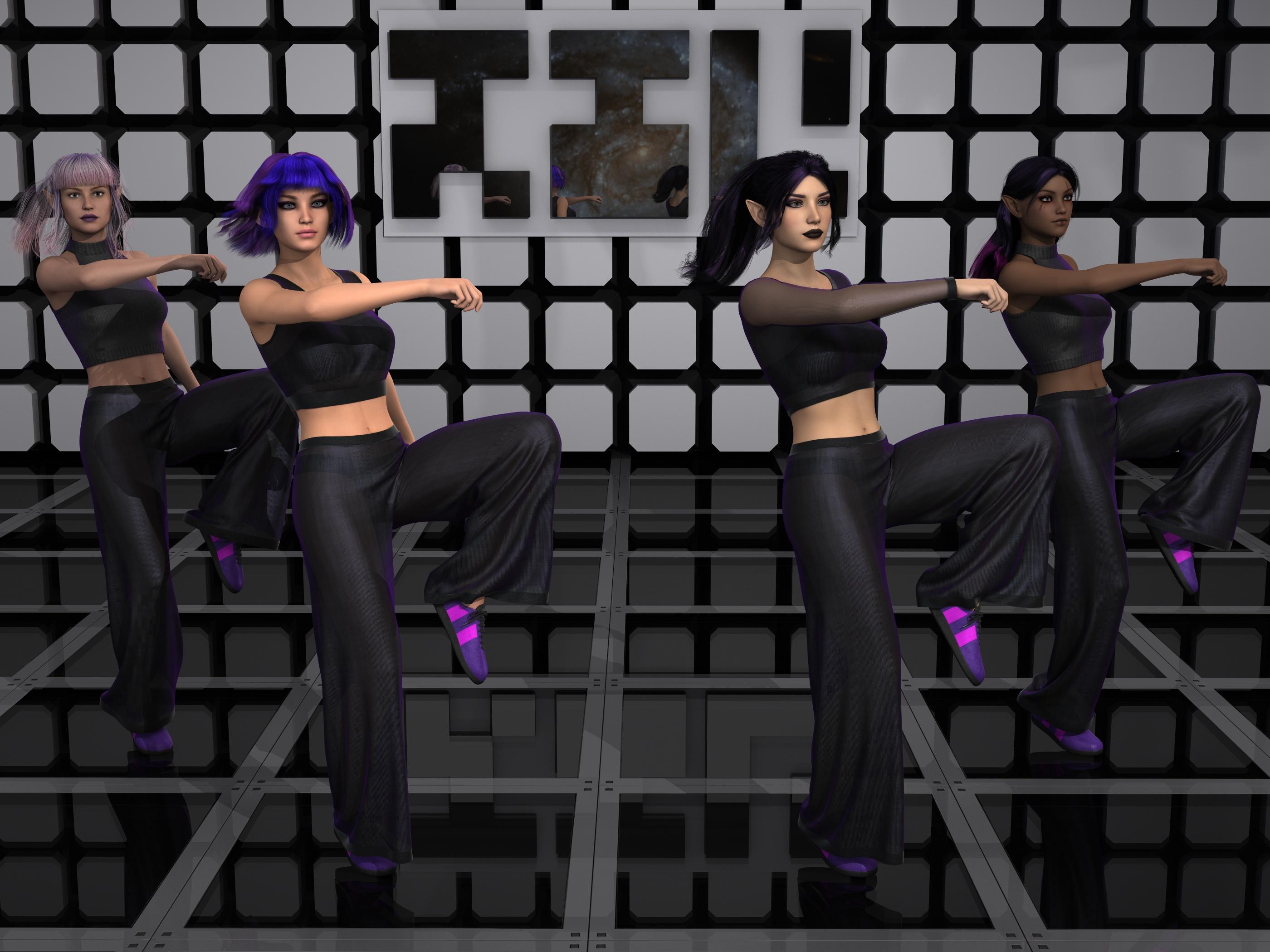
far left is FWE Neiva with Mirai hair (hair balls removed via shader trickery). I did end up resorting to a d-former to pose the front bangs, I am sort of doing stuff that not everyone does so it's understandable that not every pose morph was thought of.
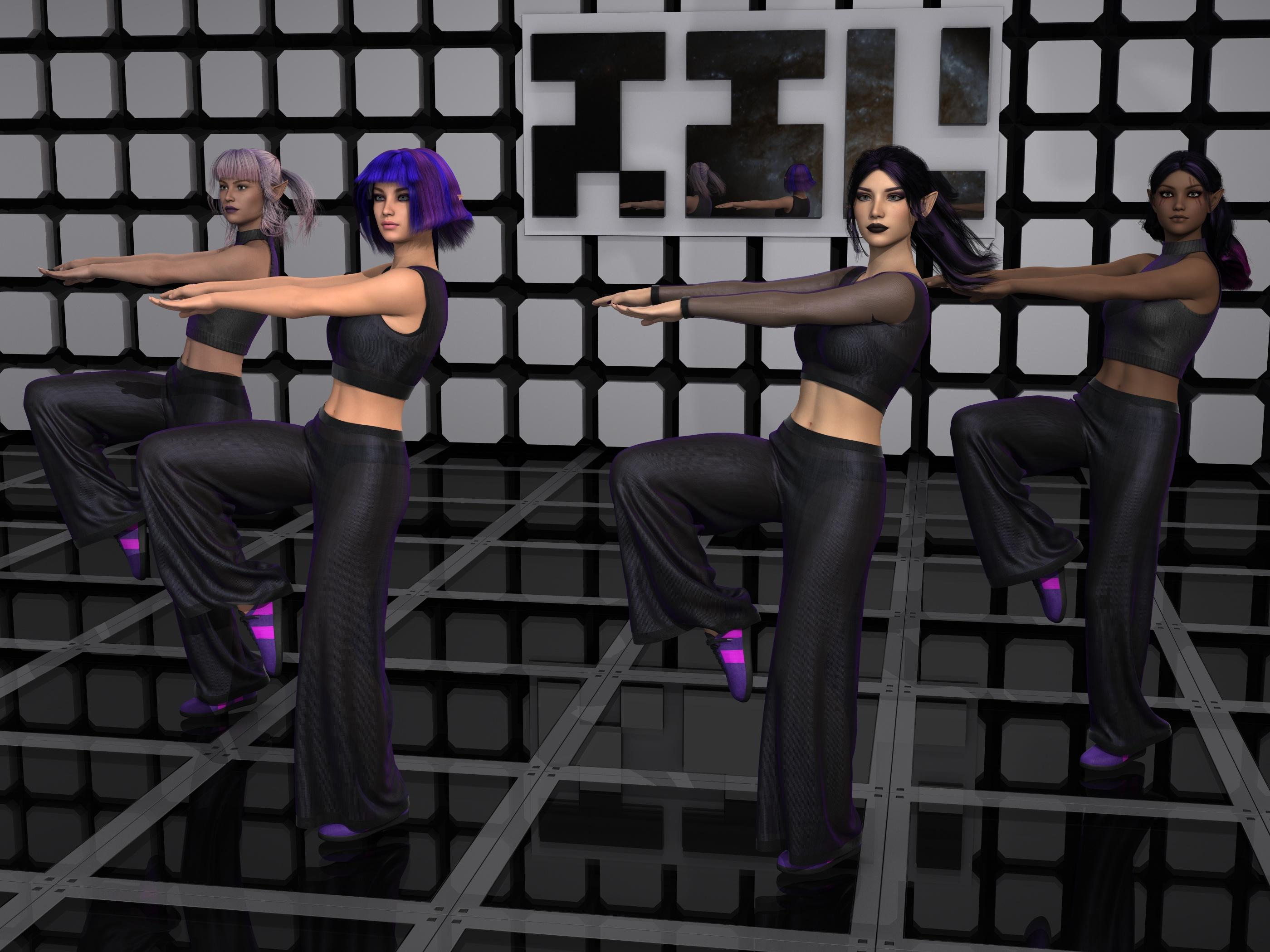
next of Left is RS Salem (karyssa 8 ears) with Lala hair. I probably should have used a d-former as well on that hair, I was just too lazy to, lol.

then there is (the artist formerly known as DES) DEJ Rosalind (mix of "ears elf long" and TJ8 ears1) with Sherry hair. I don't know why I was thinking them two were complete elves, guess I've just had the scene subsets for that long. I had to put the hair on a null to keep the tail bones from getting deleted by Auto-mangle, lol.
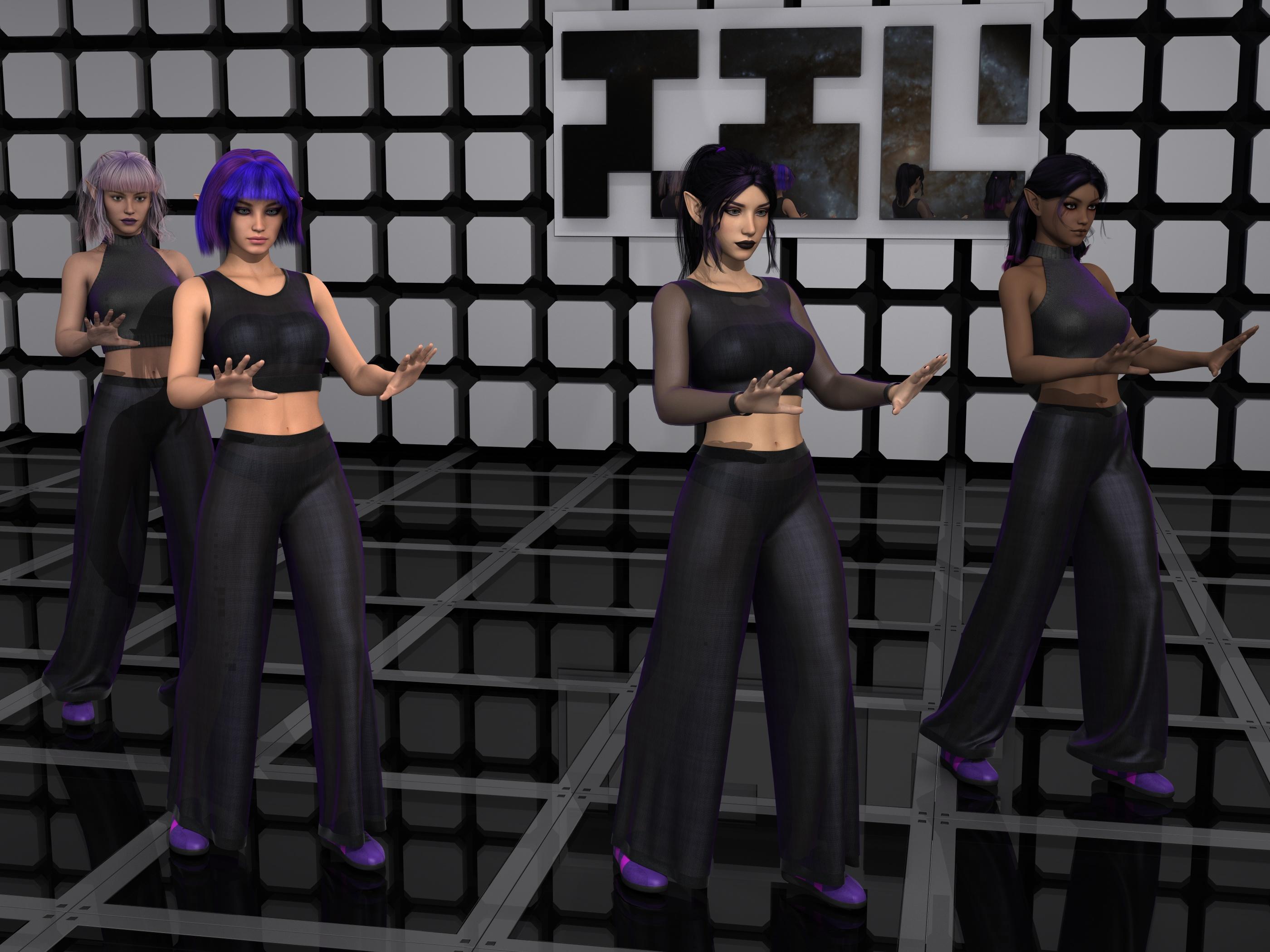
Then there is Sewa (Sewa ears) with Rowana hair. Another that I had to put the hair on a null and parent the null to the head (or maybe that was the former hair I had on her, long week, lol.). That only works if the hair has enough scalp shaping morphs to work or the figure is mostly defacto-scalp shaped.

(twidles thumbs as the scene loads so I can pull up the names of all the hair used, lol. I so need to put that SSD in that comp) posing took the longest with a cube to mark where the toes were from the last pose. Draping wasn't too bad when I got them far enough apart to not be snagging someone else's clothes.
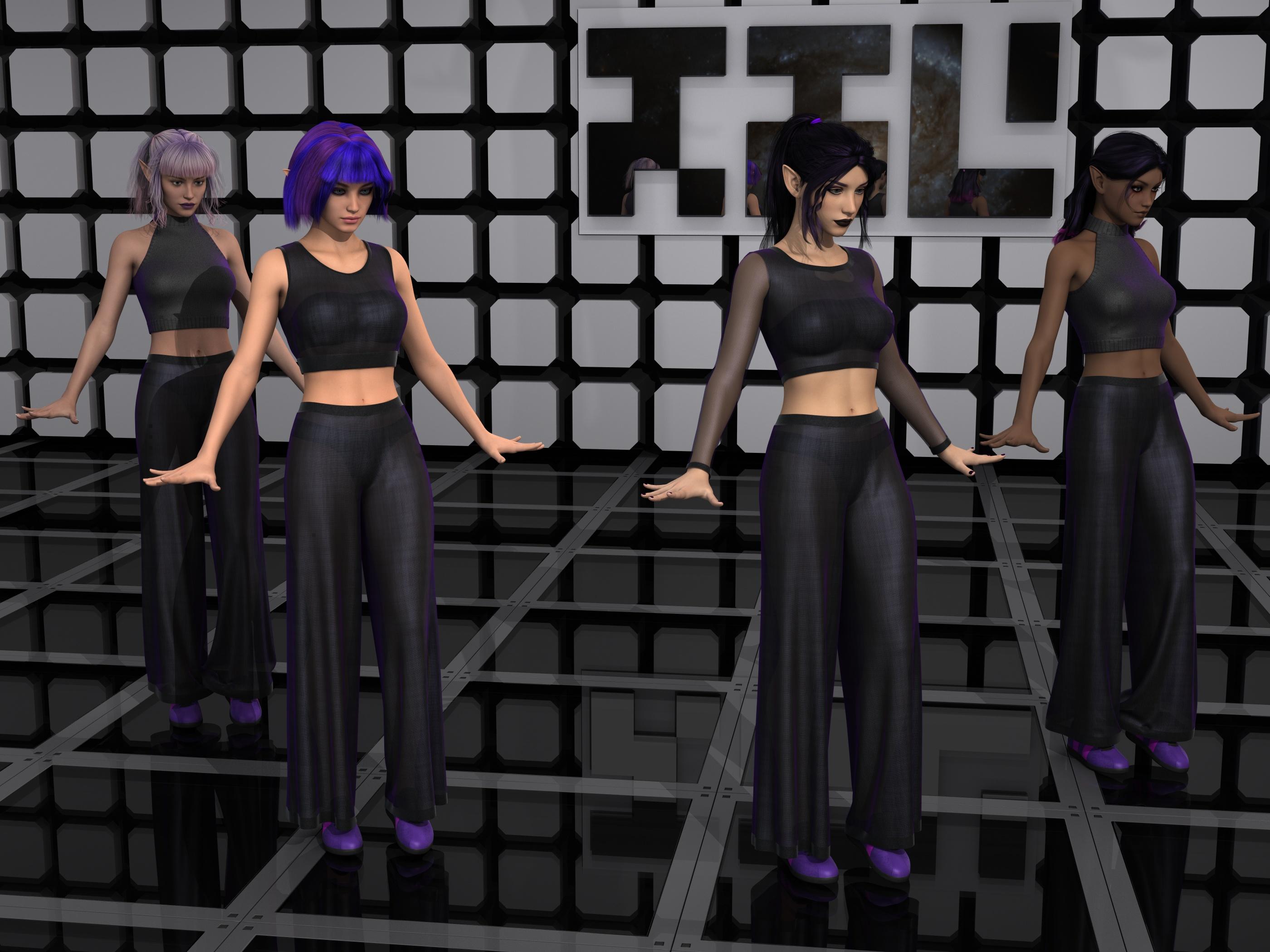
ok, need to render one more pose, and sort out some thoughts. There was a cool witch dress that had some cool stuff, and some not so cool stuff (I have yet to even get screen-caps of that). Also, the GA figure I was playing with makeup with the past few days has a lot of cool stuff, she just has some aspects that are not a personal taste kind of thing, so I need to consider wording.
Victoria 8 with Default Genesis 8 Female Height?Hello,
So I noticed with Michael 8 that if you activate his body morph individually, he still retains his default Genesis 8 male height. It is only when you activate the Micheal 8 character morph in the actor tab that you get the default Micheal 8 height. With Victoria 8 though, even if you activate the body morph only, her height still increases.
Is there any way to retain the default Genesis 8 Female height while having the Victoria 8 body morph? And also vice versa, is there any way to apply the Victoria 8 height to the default Genesis 8 female?
Thank you in advance for your help and time.
How long does your DIM take to populate?3) DIM scans your Daz product library
It doesn't seem to do that (as I wrote in my first post). I've tried to rename the DAZ Library as well as the Connect library and then update DIM online, it didn't complain but updated as normal. If it does and doesn't warn you if the DAZ Library is missing it's badly coded, but I doubt the DAZ programmers are that careless (that would normally also cause some serious malfunction).
Not your local 'My Library' - the Daz Product Library under your account - and I'm assuming the process is semi-optimized to look at updates since last connect, but I may be wrong. This is how it finds out about new purchases and updates.
What is the path to that "Daz Product Library"?
There is a DIM folder called "ManifestFiles" which contains modified versions of the .dsx files that accompanies the install zips in the "Downloads" folder, these ManifestFiles contain information about the installed products and DIM uses them to keep track of what is installed and where. I've moved these and all other product related files that DIM is using to another drive:

This is the .dsx file that accompanies the product file(s), and below the modfied version which contains local install data:
<?xml version="1.0" encoding="UTF-8"?>
<ProductSupplement VERSION="0.1">
<ProductName VALUE="Victoria 2.0 Character Pack 1"/>
<ProductStoreIDX VALUE="8-1"/>
<UserOrderId VALUE="6717907"/>
<UserOrderDate VALUE="2011-01-10T19:39:07Z"/>
<InstallerDate VALUE="2013-02-08T00:05:00Z"/>
<ProductFileGuid VALUE="5d4b40a5-b6e0-da8e-9a4d-f46b438e95b6"/>
<InstallTypes VALUE="Content"/>
<ProductTags VALUE="DAZStudio4_5,DAZStudio4,DAZStudio3,DAZStudioLegacy,Poser9,PoserLegacy,CloudAvailable"/>
</ProductSupplement>-----------------------------------------------------------------------
<?xml version="1.0" encoding="UTF-8"?>
<DAZInstallManifest VERSION="0.1">
<GlobalID VALUE="3835eed4-edb1-04ca-54be-0f94c44b0b0e"/>
<MetadataGlobalID VALUE="3835eed4-edb1-04ca-54be-0f94c44b0b0e"/>
<SmartContent VALUE="False"/>
<ProductName VALUE="Victoria 2.0 Character Pack 1"/>
<ProductStoreIDX VALUE="8-1"/>
<ProductFileGuid VALUE="5d4b40a5-b6e0-da8e-9a4d-f46b438e95b6"/>
<InstallTypes VALUE="Content"/>
<ProductTags VALUE="DAZStudio4_5,DAZStudio4,DAZStudio3,DAZStudioLegacy,Poser9,PoserLegacy,CloudAvailable"/>
<ArchiveDate VALUE="2013-02-08T00:05:00Z"/>
<InstallerDate VALUE="2013-02-08T00:05:00Z"/>
<UserInstallAccount VALUE="Account"/>
<UserOrderId VALUE="6717907"/>
<UserOrderDate VALUE="2011-01-10T19:39:07Z"/>
<UserInstallDate VALUE="2017-05-29T04:47:42Z"/>
<InstalledSize VALUE="543613"/>
<UserInstallPath VALUE="F:/My DAZ 3D Library"/>
<File TARGET="Content" ACTION="Install" VALUE="Content/Runtime/Libraries/Face/V2 Character Head/Alien.fc2"/>
<File TARGET="Content" ACTION="Install" VALUE="Content/Runtime/Libraries/Face/V2 Character Head/Alien.rsr"/>
<File TARGET="Content" ACTION="Install" VALUE="Content/Runtime/Libraries/Face/V2 Character Head/Elderly.fc2"/>
<File TARGET="Content" ACTION="Install" VALUE="Content/Runtime/Libraries/Face/V2 Character Head/Elderly.rsr"/>
<File TARGET="Content" ACTION="Install" VALUE="Content/Runtime/Libraries/Face/V2 Character Head/Heavy Torso.fc2"/>
<File TARGET="Content" ACTION="Install" VALUE="Content/Runtime/Libraries/Face/V2 Character Head/Heavy Torso.rsr"/>
<File TARGET="Content" ACTION="Install" VALUE="Content/Runtime/Libraries/Face/V2 Character Head/Oriental.fc2"/>
<File TARGET="Content" ACTION="Install" VALUE="Content/Runtime/Libraries/Face/V2 Character Head/Oriental.rsr"/>
<File TARGET="Content" ACTION="Install" VALUE="Content/Runtime/Libraries/Face/V2 Character Head/Super Model 2.fc2"/>
<File TARGET="Content" ACTION="Install" VALUE="Content/Runtime/Libraries/Face/V2 Character Head/Super Model 2.rsr"/>
<File TARGET="Content" ACTION="Install" VALUE="Content/Runtime/Libraries/Pose/V2 Character Body/Alien Body.pz2"/>
<File TARGET="Content" ACTION="Install" VALUE="Content/Runtime/Libraries/Pose/V2 Character Body/Alien Body.rsr"/>
<File TARGET="Content" ACTION="Install" VALUE="Content/Runtime/Libraries/Pose/V2 Character Body/Elderly Body.pz2"/>
<File TARGET="Content" ACTION="Install" VALUE="Content/Runtime/Libraries/Pose/V2 Character Body/Elderly Body.rsr"/>
<File TARGET="Content" ACTION="Install" VALUE="Content/Runtime/Libraries/Pose/V2 Character Body/Heavy Torso Body.pz2"/>
<File TARGET="Content" ACTION="Install" VALUE="Content/Runtime/Libraries/Pose/V2 Character Body/Heavy Torso Body.rsr"/>
<File TARGET="Content" ACTION="Install" VALUE="Content/Runtime/Libraries/Pose/V2 Character Body/Oriental Body.pz2"/>
<File TARGET="Content" ACTION="Install" VALUE="Content/Runtime/Libraries/Pose/V2 Character Body/Oriental Body.rsr"/>
<File TARGET="Content" ACTION="Install" VALUE="Content/Runtime/Libraries/Pose/V2 Character Body/Super Model 2 Body.pz2"/>
<File TARGET="Content" ACTION="Install" VALUE="Content/Runtime/Libraries/Pose/V2 Character Body/Super Model 2 Body.rsr"/>
<File TARGET="Content" ACTION="Install" VALUE="Content/Runtime/Support/DAZ_3D_8_Victoria_2_0_Character_Pack_1.dsx"/>
</DAZInstallManifest>Which character skin is this?May be, this character is a composition of:
RY Adeline for Victoria 8 by Raiya, https://www.daz3d.com/ry-adeline-for-victoria-8
and Amira HD by bluejaunte?
The skin looks like Amira definetelly.
AIUTO...CHI CONOSCE L’ITALIANO? PARTE DODICIEh no, all'epoca ero in fissa con Sixus1 e il Behemoth 2, che era appena uscito e di cui avevo fatto il beta test per Les, e cercavo dei vestiti da convertirgli. Poi fra una cosa e un altra ho perso sia il programma che l'add on. Però mi hai fatto venire in mente una cosa, mi ricordo che in Victoria 4, c'era un personaggio chiamato V3-V4 o qualcosa del genere, ma quello a che serviva? Per le texture?
Carrara Challenge 48 - Voting Thread - transcendent or immanent - Winners!Entry Number: 5
Title: The Daydream
Artist: Bunyip02
WIP link: https://www.daz3d.com/forums/discussion/comment/4811161/#Comment_4811161
Comments/Credits: Genesis - https://www.daz3d.com/genesis-starter-essentials
Genesis Generation X2 - https://www.daz3d.com/genesis-generation-x2
GenX AddOn Gen3 for A3 and H3 - https://www.daz3d.com/genx-addon-gen3-for-a3-and-h3
A3 and H3 Shapes for Genesis - https://www.daz3d.com/a3-and-h3-shapes-for-genesis
Over 20 morphs from Aiko 3, Hiro 3, Victoria 4, Michael 4, & Genesis used for Dragon critter
Texture Converter 2 - 3D Universe
LM Dragonne Mardi Victoria3 - Lyrra Madril
Victoria 4.2 Base - https://www.daz3d.com/victoria-4-2-base
Arizona Hair - https://www.daz3d.com/arizona-hair
V4 Elite Texture: Amy - https://www.daz3d.com/v4-elite-texture-amy
Giant Twisters in the Lagoon Nebula - GPN-2000-001371 - https://commons.wikimedia.org/wiki/File:Giant_Twisters_in_the_Lagoon_Nebula_-_GPN-2000-001371.jpg Vendors: please include versions in your thumbnails
As someone that ends up right clicking and browse to folder a lot to figure out what gen something might be from, I definitely concur that more people should include a note in the thumbnail.
As for the aforementioned 'no abbreviation' rule, that's just silly. People abbreviate stuff all the time,heck the US Military lives and dies by abbreviations. As for Daz Studio, we ALL know what G3F means. The only one that might be a bit weird is Genesis 1, since it's just referred to as Genesis.
I could see M7 being an issue, as this could be Monique or Michael or Mika, but G2F, G2M, G3F, G3M, G8F and G8M, well those should always be reserved for the Genesis generations. In any case, clothing usually does OK when transferring to various figures from the same generation, so even if an outfit is intended for Victoria 7, listing it as G3F/Genesis 3 Female is still helpful
This becomes particularly important when autofitting clothes from other generations. Again, if there was a Genesis, G2, G3, or G8 note, then this will speed up autofitting as we won't have to 'browse to folder location' to figure out which gen the clothes are from, unless it's listed in the item name of course.
I can see Pre-Genesis being an issue, as I'm not sure how much abberviation overlap there is, but since Autofit concentrates mainly on only a few figures, mainly Michael, Victoria, maybe Aiko, and a couple of others, I'd say that if there's a common autofit feature, the abbreviation should be OK.
My thoughts on the subject anyways! The goal here should be to speed up our workflow, not make it more difficult than it needs to be.
Why is "ground" so difficult to make photorealistic?I'm pretty sure that if you covered a hill with the equivalent of V8 HD's skin, that would take a lot of resources and cause viewers a great deal of discomfort.
To say nothing of how poor Victoria would feel about it.
3D Art Freebie Challenge-August 2019-"Best Friends Forever" -Entries Thread Only
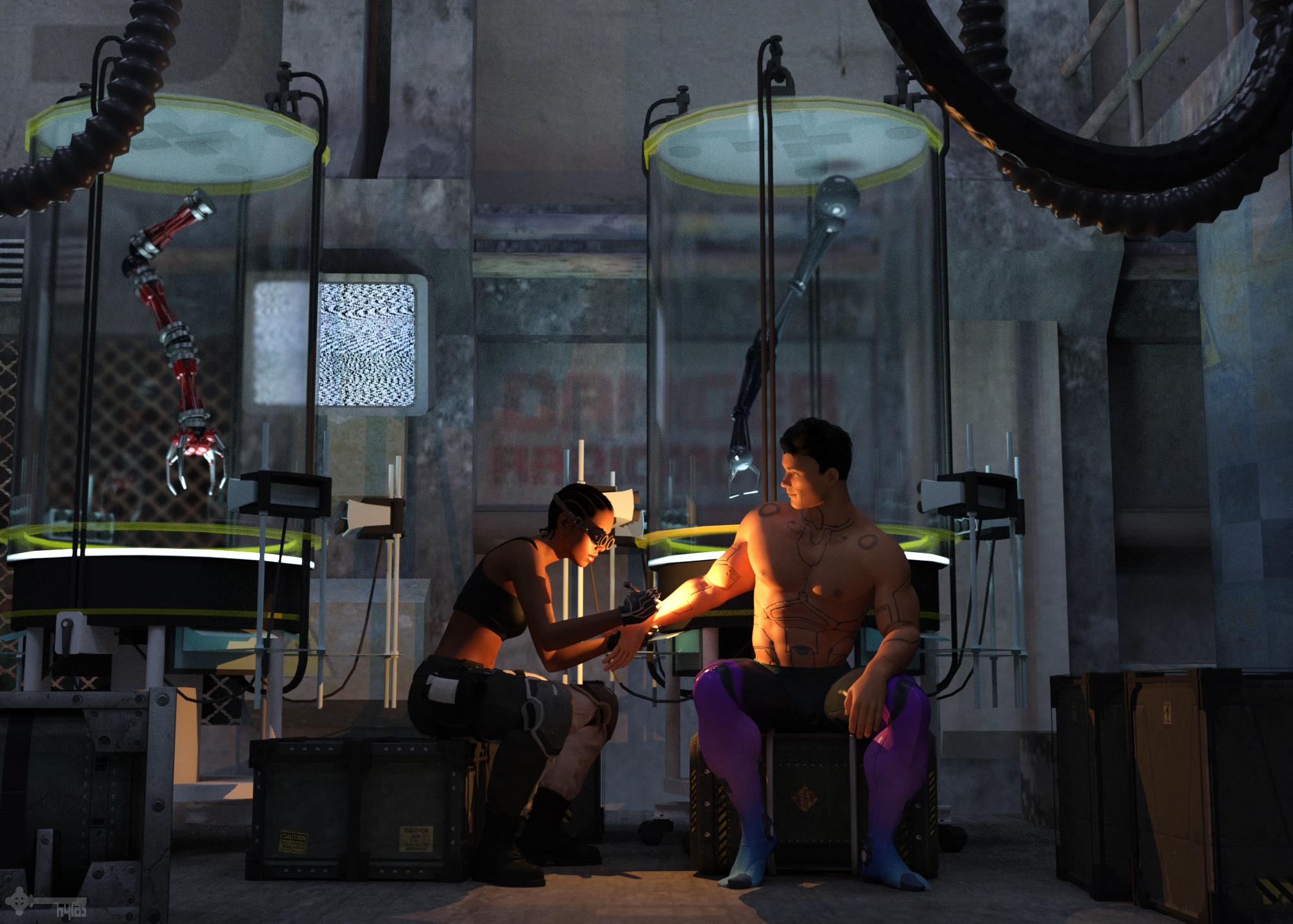
Title: Weld
Version before postwork here.
Freebies:
1) Sci-Fi Room by Mr. Sparky: https://sharecg.com/v/22624/gallery/11/Poser/Alpha-1-The-Reactor
2) Tank by cal: https://www.renderosity.com/mod/freestuff/labtube/31916
3) Robot Arms by Mapps: https://www.renderosity.com/mod/freestuff/sf-military-cyber-arms-and-ammo-can/26192
4) Versatile Tentacle by Tempest: http://www.sharecg.com/v/63819/browse/11/Poser/Versatile-Tentacle-Figure
5) Crates by 3DC: https://www.sharecg.com/v/85903/gallery/11/Poser/Space-Container-Set-01
6) Android Skin by MysticArtDesign: https://www.deviantart.com/mysticartdesign/art/MysticArtDesign-Android-Male-759721929
7) Hair by SquarePeg3D: https://www.patreon.com/posts/hair-big-f-cking-25063694
8) Leggings & Gloves by SquarePeg3D: https://www.renderosity.com/mod/freestuff/hacker-for-genesis-8-female/81206
9) Trousers & Boots by Ultimate Clash: https://www.renderosity.com/mod/freestuff/lt-blade-outfit/82554
10) Face Morph by RenderGuyNY: https://sharecg.com/v/90309/gallery/21/DAZ-Studio/Genesis-8-Female-Faces
11) Welding Tool (repurposed hairpin) by SquarePeg3D: https://www.renderosity.com/mod/freestuff/ameizing-hair-for-g8f/82867
12) Ghost Lights by AndyS: https://sharecg.com/v/87021/browse/7/Material-and-Shader/Simple-iRay-GhostLights-Shader
Purchased:
1) Goggles
2) Cornrows
3) Big Russian Hair comes without textures, so I used the materials of Adriana Hair
4) Lens Flares & Light BeamsNo Counts:
- G8M Head Morphs
- G8M Body Morphs
- G8F Head Morphs
- G8F Body Morphs
- Sports Bra (G8F Basic Wear)3D Art Freebie Challenge-August 2019-"Best Friends Forever" -Main Thread OnlyTitle: Weld
Version before postwork attached below.
I'm also attaching the opacity map I made to transform the opera length gloves of SquarePeg3D's Hacker set into normal length gloves. Feel free to use it without restrictions from my side.Freebies:
1) Sci-Fi Room by Mr. Sparky: https://sharecg.com/v/22624/gallery/11/Poser/Alpha-1-The-Reactor
2) Tank by cal: https://www.renderosity.com/mod/freestuff/labtube/31916
3) Robot Arms by Mapps: https://www.renderosity.com/mod/freestuff/sf-military-cyber-arms-and-ammo-can/26192
4) Versatile Tentacle by Tempest: http://www.sharecg.com/v/63819/browse/11/Poser/Versatile-Tentacle-Figure
5) Crates by 3DC: https://www.sharecg.com/v/85903/gallery/11/Poser/Space-Container-Set-01
6) Android Skin by MysticArtDesign: https://www.deviantart.com/mysticartdesign/art/MysticArtDesign-Android-Male-759721929
7) Hair by SquarePeg3D: https://www.patreon.com/posts/hair-big-f-cking-25063694
8) Leggings & Gloves by SquarePeg3D: https://www.renderosity.com/mod/freestuff/hacker-for-genesis-8-female/81206
9) Trousers & Boots by Ultimate Clash: https://www.renderosity.com/mod/freestuff/lt-blade-outfit/82554
10) Face Morph by RenderGuyNY: https://sharecg.com/v/90309/gallery/21/DAZ-Studio/Genesis-8-Female-Faces
11) Welding Tool (repurposed hairpin) by SquarePeg3D: https://www.renderosity.com/mod/freestuff/ameizing-hair-for-g8f/82867
12) Ghost Lights by AndyS: https://sharecg.com/v/87021/browse/7/Material-and-Shader/Simple-iRay-GhostLights-Shader
Purchased:
1) Goggles
2) Cornrows
3) Big Russian Hair comes without textures, so I used the materials of Adriana Hair
4) Lens Flares & Light BeamsNo Counts:
- G8M Head Morphs
- G8M Body Morphs
- G8F Head Morphs
- G8F Body Morphs
- Sports Bra (G8F Basic Wear)All Links Check Out Plz Move To Entries Thread
3D Art Freebie Challenge-August 2019-"Best Friends Forever" -Main Thread OnlyTitle: Weld
Version before postwork attached below.
I'm also attaching the opacity map I made to transform the opera length gloves of SquarePeg3D's Hacker set into normal length gloves. Feel free to use it without restrictions from my side.Freebies:
1) Sci-Fi Room by Mr. Sparky: https://sharecg.com/v/22624/gallery/11/Poser/Alpha-1-The-Reactor
2) Tank by cal: https://www.renderosity.com/mod/freestuff/labtube/31916
3) Robot Arms by Mapps: https://www.renderosity.com/mod/freestuff/sf-military-cyber-arms-and-ammo-can/26192
4) Versatile Tentacle by Tempest: http://www.sharecg.com/v/63819/browse/11/Poser/Versatile-Tentacle-Figure
5) Crates by 3DC: https://www.sharecg.com/v/85903/gallery/11/Poser/Space-Container-Set-01
6) Android Skin by MysticArtDesign: https://www.deviantart.com/mysticartdesign/art/MysticArtDesign-Android-Male-759721929
7) Hair by SquarePeg3D: https://www.patreon.com/posts/hair-big-f-cking-25063694
8) Leggings & Gloves by SquarePeg3D: https://www.renderosity.com/mod/freestuff/hacker-for-genesis-8-female/81206
9) Trousers & Boots by Ultimate Clash: https://www.renderosity.com/mod/freestuff/lt-blade-outfit/82554
10) Face Morph by RenderGuyNY: https://sharecg.com/v/90309/gallery/21/DAZ-Studio/Genesis-8-Female-Faces
11) Welding Tool (repurposed hairpin) by SquarePeg3D: https://www.renderosity.com/mod/freestuff/ameizing-hair-for-g8f/82867
12) Ghost Lights by AndyS: https://sharecg.com/v/87021/browse/7/Material-and-Shader/Simple-iRay-GhostLights-Shader
Purchased:
1) Goggles
2) Cornrows
3) Big Russian Hair comes without textures, so I used the materials of Adriana Hair
4) Lens Flares & Light BeamsNo Counts:
- G8M Head Morphs
- G8M Body Morphs
- G8F Head Morphs
- G8F Body Morphs
- Sports Bra (G8F Basic Wear)dForce MFD?There seems to be less activity creating textures for commercial garments these days - I don't see the new dress matching the MFD for it's selection of community textures (well, ever).
I've had little trouble using dForce on the MFD - from generation 3* versions to the latest - bits of the expansion sets work with dForce to varying degrees, but I can see why Daz chose not to try to adapt the MFD to dForce as is.
If you are using a selection of figures from across the generations in a scene - the MFD is still brilliant for keeping the clothes in theme and not looking like an anachronistic mess.
* Being able to dForce Victoria 3s MFD has given it a new lease, the skirt rigging was limited
Remember, "There's Always Another Sale™" (Report sales errors here.)One more thing:
The Extra 45% OFF¥ These featured Genesis, Michael 4 and Victoria 4 Items from Featured Artist Catalogs above, seems to be a bit funny:
One item (Nothing)
Shopping Cart

$24.95
$5.76
77%
Two item:
Shopping Cart
-
$24.95
$4.80
81%

Jockey Setnew
$24.95
$4.80
81%
The sale is missing if you buy 2 more then... It's not in the direct sale description, above it with line separeted there is a sale for "40% OFF SPECIAL FEATURED Items Get 50% OFF* when you buy 2 or more" so there shouldn't be a line.
And it seems to be an additional 15-17% off? (4/23%) not 45% off
Just for testing I did throw some random carts together:
One more thing you could mix the categories like buying something from this sale and something from that and you will get a bonus. So the green lines meana it's in one sale offer, but the hard white line should separate sales...
Shopping Cart

Moon Goddess for Genesis 2 Female(s)new
$24.95
$6.12
75%

Body Diversity Morphs for Genesis 3 Female(s)new
$19.95
$7.98
60%

Genesis 3 Clones for Genesis Bundle
$32.95
$9.06
73%
Extra 20% OFF¥ These featured Genesis 3 Items from Featured Artist Catalogs above Seems to be 15% off ?
Extra 30% OFF¥ These featured Genesis 2 Items from Featured Artist Catalogs above Seems to be 17%?
Extra 45% OFF¥ These featured Genesis, Michael 4 and Victoria 4 Items from Featured Artist Catalogs above Seems to be 1/6 %
What about this should it work like this?
I'm still working through this. The one with the jockey and major cache seems to be correct in my cart. They both start with 68% and an additional 20% took the items to 6.86. Final discount is 73%. My understanding was the expected max discount was about 72%. Do your prices show a different start discount to mine?
https://www.daz3d.com/major-cache-for-michael-4 is in the
"Extra 45% OFF¥ These featured Genesis, Michael 4 and Victoria 4 Items from Featured Artist Catalogs above "
sale so shouldn't there be an 45% off? And there is no note about buy two to get an extra 20% off. If I check the top line there is no note about two items.
The two sales are clearly separated with a white line, while in the "Additional Artist Catalog Savings" have green line separating the groups.


ps: I know it's much a smaller thing than the other one was, and was just testing it so people could/might buy the older stuff too.
Store is in flux, so I'll check when it settles down.
Remember, "There's Always Another Sale™" (Report sales errors here.)One more thing:
The Extra 45% OFF¥ These featured Genesis, Michael 4 and Victoria 4 Items from Featured Artist Catalogs above, seems to be a bit funny:
One item (Nothing)
Shopping Cart
-
$24.95
$5.76
77%
Two item:
Shopping Cart
-
$24.95
$4.80
81%
-
Jockey Setnew
$24.95
$4.80
81%
The sale is missing if you buy 2 more then... It's not in the direct sale description, above it with line separeted there is a sale for "40% OFF SPECIAL FEATURED Items Get 50% OFF* when you buy 2 or more" so there shouldn't be a line.
And it seems to be an additional 15-17% off? (4/23%) not 45% off
Just for testing I did throw some random carts together:
One more thing you could mix the categories like buying something from this sale and something from that and you will get a bonus. So the green lines meana it's in one sale offer, but the hard white line should separate sales...
Shopping Cart
-
Moon Goddess for Genesis 2 Female(s)new
$24.95
$6.12
75%
-
Body Diversity Morphs for Genesis 3 Female(s)new
$19.95
$7.98
60%
-
Genesis 3 Clones for Genesis Bundle
$32.95
$9.06
73%
Extra 20% OFF¥ These featured Genesis 3 Items from Featured Artist Catalogs above Seems to be 15% off ?
Extra 30% OFF¥ These featured Genesis 2 Items from Featured Artist Catalogs above Seems to be 17%?
Extra 45% OFF¥ These featured Genesis, Michael 4 and Victoria 4 Items from Featured Artist Catalogs above Seems to be 1/6 %
What about this should it work like this?
I'm still working through this. The one with the jockey and major cache seems to be correct in my cart. They both start with 68% and an additional 20% took the items to 6.86. Final discount is 73%. My understanding was the expected max discount was about 72%. Do your prices show a different start discount to mine?
https://www.daz3d.com/major-cache-for-michael-4 is in the
"Extra 45% OFF¥ These featured Genesis, Michael 4 and Victoria 4 Items from Featured Artist Catalogs above "
sale so shouldn't there be an 45% off? And there is no note about buy two to get an extra 20% off. If I check the top line there is no note about two items.
The two sales are clearly separated with a white line, while in the "Additional Artist Catalog Savings" have green line separating the groups.
ps: I know it's much a smaller thing than the other one was, and was just testing it so people could/might buy the older stuff too.
ps: Readying your comment I might found the problem's root for me the start is 77% of and it will be 81% off.
So 45% off for none PC member and less off for PC members?
Remember, "There's Always Another Sale™" (Report sales errors here.)One more thing:
The Extra 45% OFF¥ These featured Genesis, Michael 4 and Victoria 4 Items from Featured Artist Catalogs above, seems to be a bit funny:
One item (Nothing)
Shopping Cart
-
$24.95
$5.76
77%
Two item:
Shopping Cart
-
$24.95
$4.80
81%
-
Jockey Setnew
$24.95
$4.80
81%
The sale is missing if you buy 2 more then... It's not in the direct sale description, above it with line separeted there is a sale for "40% OFF SPECIAL FEATURED Items Get 50% OFF* when you buy 2 or more" so there shouldn't be a line.
And it seems to be an additional 15-17% off? (4/23%) not 45% off
Just for testing I did throw some random carts together:
One more thing you could mix the categories like buying something from this sale and something from that and you will get a bonus. So the green lines meana it's in one sale offer, but the hard white line should separate sales...
Shopping Cart
-
Moon Goddess for Genesis 2 Female(s)new
$24.95
$6.12
75%
-
Body Diversity Morphs for Genesis 3 Female(s)new
$19.95
$7.98
60%
-
Genesis 3 Clones for Genesis Bundle
$32.95
$9.06
73%
Extra 20% OFF¥ These featured Genesis 3 Items from Featured Artist Catalogs above Seems to be 15% off ?
Extra 30% OFF¥ These featured Genesis 2 Items from Featured Artist Catalogs above Seems to be 17%?
Extra 45% OFF¥ These featured Genesis, Michael 4 and Victoria 4 Items from Featured Artist Catalogs above Seems to be 1/6 %
What about this should it work like this?
I'm still working through this. The one with the jockey and major cache seems to be correct in my cart. They both start with 68% and an additional 20% took the items to 6.86. Final discount is 73%. My understanding was the expected max discount was about 72%. Do your prices show a different start discount to mine?
Daz 3D is part of

Connect
DAZ Productions, Inc.
7533 S Center View Ct #4664
West Jordan, UT 84084Licensing Agreement | Terms of Service | Privacy Policy | EULA
© 2026 Daz Productions Inc. All Rights Reserved.