-
Connect Library Size Doesn't Add Up
That looks like DAZ Connect still has control over your metadata
[Updated] Database issues after moving library (and frustration venting)I thought I was clear, the ONLY method I have used to install items is through DIM. I am still having many database problems. Let me update you on the current situation.
After moving my library, DS and DIM were updated to reflect the proper location for the new library.
Scanning for known files, resetting the database, and reloading metadata seemed to resolve the issue.
I do not have any problems installing new items.However:
When I attempt to use items, I see that many of the morphs do not load. For example, I can load a character file. The body will load, skins, makeup, eyes, etc. all seem to be fine. None of the head files are loading. Other files that are not loading are expression files. I cannot figure out what is going on and how to resolve these issues (short of deleting and reinstalling the entire library).When I encounter a problem with a product, I delete and reinstall (using DIM). The product works without errors.
Blender to Daz rigging problem: SPIKESWhat are your export setings from Blender and Import settings to Daz Studio?
Blender to Daz rigging problem: SPIKESI really don't think the problem is with how it's rigged, the problem is that the mesh is welded there post import.
Blender to Daz rigging problem: SPIKESOk I can see in the FBX version your mesh is fine, although the polygon groups for rigging do not seem to be included (this is in my modeler but I don't see them in D|S either):

the OBJ version is also fine pre-DAZ|Studio:

but I see the same problem you had when I import your OBJ into D|S and rig the door, it has somehow welded a couple of points there:

I don't see any way to prevent this behavior in D|S and I really don't think the problem is with your model. See if you can get Blender to export FBX with your rigging part polygon selections intact.
Should I use Blender for animations?I agree that blender is a little "clunky" in simulation, and it's not so fast either using only the cpu with a limited multithreading (threads are per object). You can get nice results but usually needs a bit of experimentation. Then diffeomorphic helps with this too, it can import dforce outfits and provides some basic soft body effects.
https://diffeomorphic.blogspot.com/2021/04/dforce-simulations.html
https://diffeomorphic.blogspot.com/2022/01/softbody-simulations.html
Blender to Daz rigging problem: SPIKESSquishy said:
It shouldn't be necessary to break your model up into separate exported files to just get the mesh to behave the way you want. IMO what is probably happening is that those points are getting merged on export/import, whether by Blender or D|S. What format are you using? Can I see a copy of one of the problematic models in the exported format (not the blender file or the post-repair one)
Thanks for your help, Squishy.
"It shouldn't be necessary to break your model up into separate exported files to just get the mesh to behave the way you want."
I totally agree. I think Blender has a major flaw here.
"IMO what is probably happening is that those points are getting merged on export/import, whether by Blender or D|S."
Yes. And I suspect it is Blender that is doing it.
"What format are you using?"
I am using .obj format for transfer from Blender to Daz, what Blender calls the "Wavefront obj".
"Can I see a copy of one of the problematic models in the exported format (not the blender file or the post-repair one)"
Totally. I can E-mail you the obj file used for transfer, and/or the Daz .duf file of the car as it is in the picture I attached - minus the driver.
Blender to Daz rigging problem: SPIKESIt shouldn't be necessary to break your model up into separate exported files to just get the mesh to behave the way you want. IMO what is probably happening is that those points are getting merged on export/import, whether by Blender or D|S. What format are you using? Can I see a copy of one of the problematic models in the exported format (not the blender file or the post-repair one)
Should I use Blender for animations?Should I animate the with blender?
You can, many do. Blender is pretty good at everything, not the best and any single thing. The other option is Maya, which is the industry standard but costs quite a bit unless you have a free student license (or know a student that will sign you up).
- Do I have to re-rig everything? (detention work)
Nope. The Daz to Blender Bridge and Diffeomorphic both bring the model into blender with a full rig. Diffeomorphic allows you to choose between 3 different rigs.
- Are the materials/textures working correctly or at least ok?Materials and textures are ok but they were made and optimized for DAZ. I think all textures require some work to look good in whatever render engine you are going to use. I don't think there is any way to transfer textures from one renderer to another and have perfect results. Padone has done a lot of work helping to get DAZ materials into blender and provides us a very good starting point.
- What about the facial expression moprhs of Daz, can I import them too? (no, I don't want to re-model everything)Yes. All of the defualt expressions import, at least with Diffeomorphic and probably with the DAZ to Blender bridge.
- Do I have to rebuild things like JC-Morphs? (forget it, I just can't do those things)One of the best reasons to import characters from DAZ (aside from the huge selection and awesome HD maps) would be the driven joint control morphs and flexions. I looked at iClone and was shocked that they did not have jcm's or shapekeys. Maybe that has changed or I missed something, but I stopped researching it after I read that. You can also import additional morphs as shape keys such as extra shaping morphs.
I would like to make use of all this sassy 21first (late 20th) century stuff, like softbody, collision, dynamics, liquid simluations and a viewport with more than 1.0 fps (wireframe would be ok).
Ok, pump the brakes, slow down a bit. :) Blender is pretty good for animating and sculpting, but I've seen many people complain about all of the above. Blender just isn't great at simulations. You can get them to work and people have, but they are finicky and cantankerous. I've only experimented with them a bit so I'm no expert. I think the pros turn to Houdini for simulations, and Marvelous Designer for cloth sim. I have used MD, and it is awesome at simulating cloth.
Or would it be better to take a look at unreal or unity?
Unreal rendering looks seriously impressive for real time rendering. You should be able to animate and export to Unreal (from Blender) to take advantage of the rendering but I have never done it. I just switched to Maya partially for this reason. The link between Maya and Unreal looks really smooth. When rendering in Blender for animation, you'll want to use Eevee. Cycles will give better results but we'll all be dead by the time it renders an entire animation.
Hope this helps.
Weight Mapping not being sent to Carrara from Daz StudioHola guys and gals. Been a while since my last post, but still using Carrara every day. Quick question regarding weight mapping:
I modeled a new set of eyes for my genesis character. I rigged the model in DS using General Weight Mapping. The item functions as expected in DS. However when I import the .duf file into Carrara, the bones are in place, but none of the rotations are functional. I suspect that somehow the weight mapping isnt transferring. This is surprising to me, because any other models I import into Carrara from DS work just fine, including all the Millenium figures and even Genesis1. Obviously this "can" work, perhaps I chose the wrong weight mapping mode, or maybe I missed something with the export settings?
Any help will be greatly appreciated. Thanks everyone. Happy Mother's Day!
Poses always save expressions, no matter what?I'm sorry, I should have said posing tool rather than shaping, see attached image. (please be sensitive that I am new to DS, not an experienced user. I am coming straight out of 20+ years of Poser and still use the poser speak) So, when I use the word expression, which might mean something else in DS, I mean her face with any head sliders applied such as 'Mouth Open" or Eyebrows Up or some such.
The problem is that when I save a pose, all the options of the face sliders are saved. If they are at zero, it saves as zero. If one or more is set at anything else, it is also saved at the new setting.
Here is an example scenario:
I create a left arm waving pose, and I create a right arm waving pose.
I import g8f into my scene.
I set up an open mouth smile on her face using the posing tool that shows all the sliders.
Now I go and apply the left arm waving pose I created. Suddenly, her open mouth smile is gone and replaced by the expression (or set of sliders) that was on her face (or lack of) when I created the arm waving pose.
This is not the desired affect I want. I want her face to remain the same, but just her arm waving. It is at this point that I have tried every option in the save-as/pose preset command to just include transforms such as rotation, scale, translation, but no matter what, the mouth open or any other slider on the face still is included. If my g8f's face is all set to zero on the posing (no open mouth, etc) and I add the arm waving pose, the expression (if there was one when I created the pose in the first place) will now be applied to my zeroed face.
In short, i want to create a pose preset with absolutely no face sliders included. I can't seem to figure it out.
[Released] Content Wizard [Commercial]DoctorJellybean said:
robertswww said:
@watchdog79 If the product says the product will work it Daz Studio, it may just need some tweaks to the Zip file structure, ot it could just mean that you can import the .obj prop(s). If you want to share a screenshot of what the contents of the unzipped (i.e. extracted) zip folder looks like, that might help. Basically, you want CONTENT at the top-level of the folder, and below that your Data, People, Props, Runtime, Vehicles, etc. You could try to format a copy of the extracted zip file that way, and then re-zip it and import it into CW.Also, your screenshot show that the 3rd zip file you added to Content Wizard was the Templates folder. Templates are not for smart content, so never add them. Remove all 3 of your current zip files using the (-) button. Click Save and exit CW (or at the least write down or grab a screenshot of the exact Product Name, Product ID, etc. that you used). Restart CW and import in the newly re-formatted zip file.
You should also replace the default product thumbnail image, with a thumbnail from the actual product, click "Change Product Icon" and browse to a thumbnail on your hard drive for a suitable image.
The problem here is that there are no DAZ Studio format files in that product. It contains a single .cr2 file and some Poser light and camera files.
Create a folder e.g. Prod Creation somewhere on your hard drive and create directories inside that folder with the following structure:
Vehicles/Skycruiser Albatross
and map the root folder e.g. Prod Creation in Studio. Load the item in Studio. With the item selected, click Save As - Support Asset - Figure/Prop Assets. Select the Skycruiser Albatross folder you have just created, give it a name and enter the details. You can uncheck the Metadata options since Content Wizard will create the metadata. Click Accept.
Now add the created Data and Vehicles folders to the original zip (which should be properly structered as robertswww said. Now CW should work with the updated zip.
Wow, it is nice to have help! Thank you robertswww and DoctorJellybean for your help.
[Released] Content Wizard [Commercial]robertswww said:
@watchdog79 If the product says the product will work it Daz Studio, it may just need some tweaks to the Zip file structure, ot it could just mean that you can import the .obj prop(s). If you want to share a screenshot of what the contents of the unzipped (i.e. extracted) zip folder looks like, that might help. Basically, you want CONTENT at the top-level of the folder, and below that your Data, People, Props, Runtime, Vehicles, etc. You could try to format a copy of the extracted zip file that way, and then re-zip it and import it into CW.Also, your screenshot show that the 3rd zip file you added to Content Wizard was the Templates folder. Templates are not for smart content, so never add them. Remove all 3 of your current zip files using the (-) button. Click Save and exit CW (or at the least write down or grab a screenshot of the exact Product Name, Product ID, etc. that you used). Restart CW and import in the newly re-formatted zip file.
You should also replace the default product thumbnail image, with a thumbnail from the actual product, click "Change Product Icon" and browse to a thumbnail on your hard drive for a suitable image.
The problem here is that there are no DAZ Studio format files in that product. It contains a single .cr2 file and some Poser light and camera files.
Create a folder e.g. Prod Creation somewhere on your hard drive and create directories inside that folder with the following structure:
Vehicles/Skycruiser Albatross
and map the root folder e.g. Prod Creation in Studio. Load the item in Studio. With the item selected, click Save As - Support Asset - Figure/Prop Assets. Select the Skycruiser Albatross folder you have just created, give it a name and enter the details. You can uncheck the Metadata options since Content Wizard will create the metadata. Click Accept.
Now add the created Data and Vehicles folders to the original zip (which should be properly structered as robertswww said. Now CW should work with the updated zip.
[Released] Content Wizard [Commercial]watchdog79 said:
DoctorJellybean said:
watchdog79 said:
I need help, please.
After the intitial success with installing 'rotica outfit and character, I thought I could finally get myself some Renderosity stuff, mostly from Cybertenko. It turns out I cannot do that, as I am getting the same error message for all the products I have tried so far.
I go for a new product, unzip the files, analyze them, and get this:
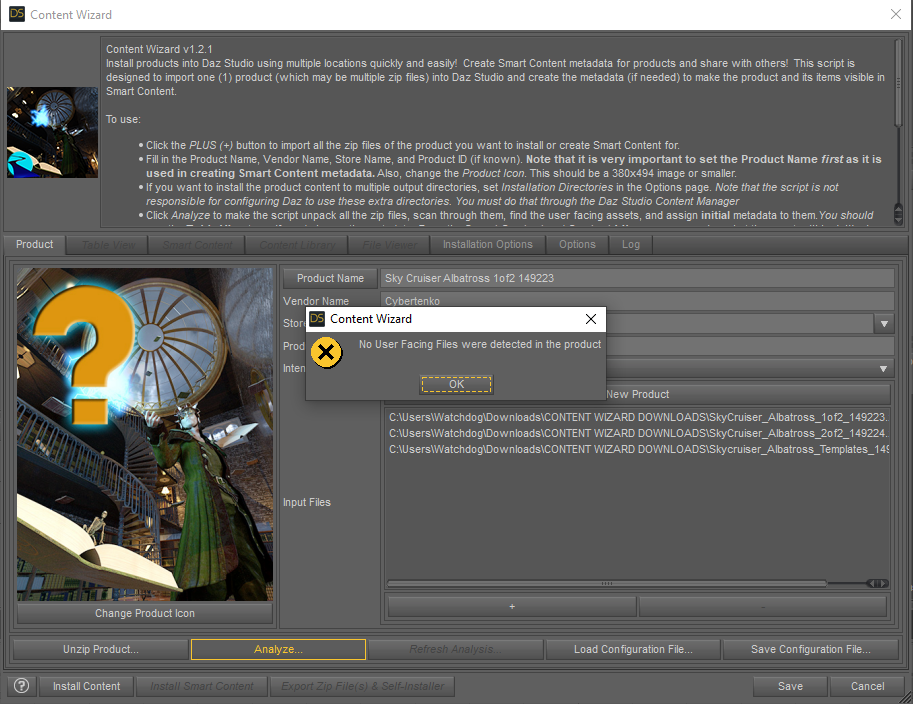
What am I doing wrong? What are these missing files anyway?
That product contains Poser format files, and not Studio.
Well, its description says it is meant for Daz Studio 4. How does one use it then?

@watchdog79 If the product says the product will work it Daz Studio, it may just need some tweaks to the Zip file structure, ot it could just mean that you can import the .obj prop(s). If you want to share a screenshot of what the contents of the unzipped (i.e. extracted) zip folder looks like, that might help. Basically, you want CONTENT at the top-level of the folder, and below that your Data, People, Props, Runtime, Vehicles, etc. You could try to format a copy of the extracted zip file that way, and then re-zip it and import it into CW.
Also, your screenshot show that the 3rd zip file you added to Content Wizard was the Templates folder. Templates are not for smart content, so never add them. Remove all 3 of your current zip files using the (-) button. Click Save and exit CW (or at the least write down or grab a screenshot of the exact Product Name, Product ID, etc. that you used). Restart CW and import in the newly re-formatted zip file.
You should also replace the default product thumbnail image, with a thumbnail from the actual product, click "Change Product Icon" and browse to a thumbnail on your hard drive for a suitable image.
Thanks AM for the Stoat/Ermine/Weasel...so cuteDoc Acme said:
Gordig said:
Doc Acme said:
I really really want him, but unfortunately I can't use dForce hair as I export.
What do you export to? I know C4D can import dForce hair as splines, and I imagine other programs can as well.
And yes, this is super cute, and makes it apparent that I didn't know the difference between a weasel and a badger.
Out of Daz using FBX & into Lightwave. I can then transfer weight maps to the fur, making the posable with fur, but no morphs. At least yet.
dForce hair exports as polys. They're almost splines in that they are all separate, & are single points with beginning & end points. But they get closed somewhere in the process.
I'll have to check into that with CD4.
The trick is to turn line tesselation to 0 so that it's not exporting any geometry, and export as OBJ. You could give that a try with Lightwave, but I don't know if that has any sort of hair system.
[Released] Turbo Loader for Genesis 8 and 8.1 [Commercial]Dieter said:
I had to reload my data because the metadata update messed everything up and data that was previously sorted correctly via DIM was shown as either saved or lost and found.
Sorry, here's the logThe log is cut off. You need to do one more something so I can see what file failed.
[Released] Turbo Loader for Genesis 8 and 8.1 [Commercial]I had to reload my data because the metadata update messed everything up and data that was previously sorted correctly via DIM was shown as either saved or lost and found.
Sorry, here's the log[Released] Turbo Loader for Genesis 8 and 8.1 [Commercial]Dieter said:
After running TL, I found that not all products are showing. Not even after I renewed the metadata online.
As an example: WENG for G8.1F and MSO Eunji HD!
Purchased and updated products are also displayed as UNKNOWN! Example aging face.
What am I possibly doing wrong?See screenshots
Which version are you using?
If you have logged in and updated metadata, there is not much more you (or the script) can do. The script is asking the DS database for products associated with the morph. If the database doesn't return anything, there is nothing the script can do.
[Released] Turbo Loader for Genesis 8 and 8.1 [Commercial]After running TL, I found that not all products are showing. Not even after I renewed the metadata online.
As an example: WENG for G8.1F and MSO Eunji HD!
Purchased and updated products are also displayed as UNKNOWN! Example aging face.
What am I possibly doing wrong?See screenshots
Thanks AM for the Stoat/Ermine/Weasel...so cuteGordig said:
Doc Acme said:
I really really want him, but unfortunately I can't use dForce hair as I export.
What do you export to? I know C4D can import dForce hair as splines, and I imagine other programs can as well.
And yes, this is super cute, and makes it apparent that I didn't know the difference between a weasel and a badger.
Out of Daz using FBX & into Lightwave. I can then transfer weight maps to the fur, making the posable with fur, but no morphs. At least yet.
dForce hair exports as polys. They're almost splines in that they are all separate, & are single points with beginning & end points. But they get closed somewhere in the process.
I'll have to check into that with CD4.
Daz 3D is part of

Connect
DAZ Productions, Inc.
7533 S Center View Ct #4664
West Jordan, UT 84084Licensing Agreement | Terms of Service | Privacy Policy | EULA
© 2026 Daz Productions Inc. All Rights Reserved.