-
Saving an animation with changes
Hi;
I imported an animation with about 800 frames.
This animation represents a choreography.
After import, the character executes the choreography normally, but stays in the same place.
So I placed several keyframes, with modifications for xTranslate and zTranslate.
In the end, I get a pretty good result.First question:
Can I find a tool in DazStudio that shows me the pathwalk of the character, and allows me to modify it graphically.Second question:
How can I export the animation with the mofications I made for the translation.
Indeed, I noticed that the export of this animation didn't take into account my modifications for the translation.[Released] Content Wizard [Commercial]DoctorJellybean said:
watchdog79 said:
robertswww said:
watchdog79 said:
DoctorJellybean said:
watchdog79 said:
I need help, please.
After the intitial success with installing 'rotica outfit and character, I thought I could finally get myself some Renderosity stuff, mostly from Cybertenko. It turns out I cannot do that, as I am getting the same error message for all the products I have tried so far.
I go for a new product, unzip the files, analyze them, and get this:
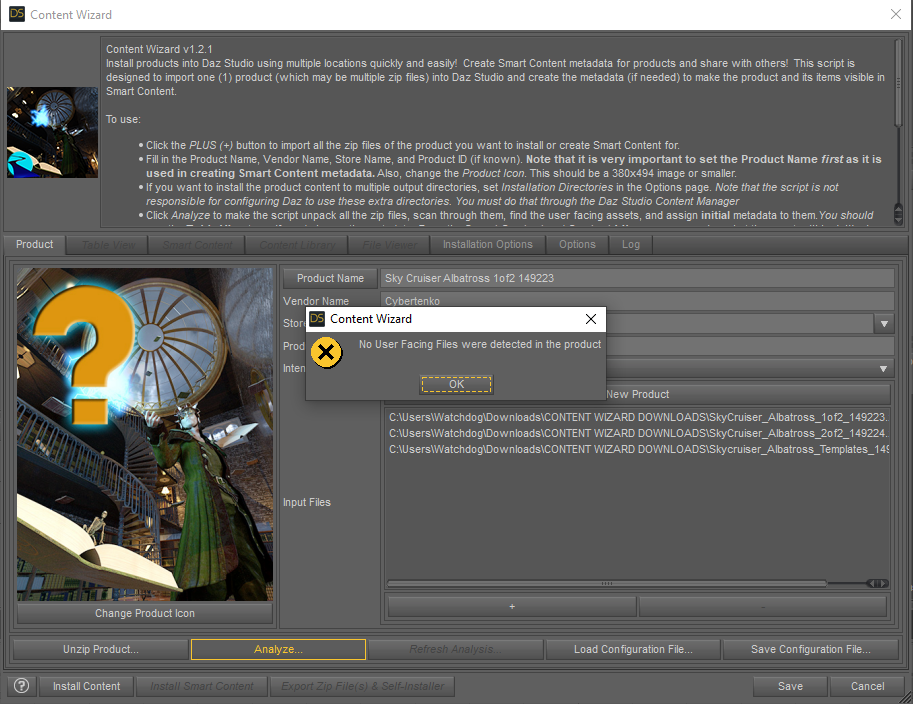
What am I doing wrong? What are these missing files anyway?
That product contains Poser format files, and not Studio.
Well, its description says it is meant for Daz Studio 4. How does one use it then?

@watchdog79 If the product says the product will work it Daz Studio, it may just need some tweaks to the Zip file structure, ot it could just mean that you can import the .obj prop(s). If you want to share a screenshot of what the contents of the unzipped (i.e. extracted) zip folder looks like, that might help. Basically, you want CONTENT at the top-level of the folder, and below that your Data, People, Props, Runtime, Vehicles, etc. You could try to format a copy of the extracted zip file that way, and then re-zip it and import it into CW.
Also, your screenshot show that the 3rd zip file you added to Content Wizard was the Templates folder. Templates are not for smart content, so never add them. Remove all 3 of your current zip files using the (-) button. Click Save and exit CW (or at the least write down or grab a screenshot of the exact Product Name, Product ID, etc. that you used). Restart CW and import in the newly re-formatted zip file.
You should also replace the default product thumbnail image, with a thumbnail from the actual product, click "Change Product Icon" and browse to a thumbnail on your hard drive for a suitable image.
I am sorry for the late reply. Thank you for helping me.
I attached the screenshots of the two ZIP files structure when extracted.
There is an .OBJ file in SkyCruiser_Albatross_1of2_149223\Runtime\Geometries\Skycruiser Albatross if that helps. I guess that is the model itself?
Should I put everything into a single directory, change the structure somehow, and re-zip it, please?
I have that product, and will create a zip with the correct folder structure tomorrow and post screenshots.
User Content files are the files that are presented to the user through Smart Content or Content Library panes. Double clicking on these user content files will then load other files such as objs and textures that are in Runtime and Data. If you notice, DS hides the Data and Runtime directories even in the Content Library pane. That zip file only contains the support files in the Runtime directory.
Re-organizing the zip files is out of the scope of CW. Thankfully, it sounds like @DoctorJellybean is going to generously help you out.
Make Blender reveal vertecies assigned to multiple vertex groups [Solved]lukon100 said:
TheMysteryIsThePoint said:
@lukon100 Sorry, I just now saw this:
import bpy
o = bpy.context.active_object
bpy.ops.object.mode_set(mode = 'EDIT')
bpy.ops.mesh.select_mode(type="VERT")
bpy.ops.mesh.select_all(action = 'DESELECT')
bpy.ops.object.mode_set(mode = 'OBJECT')for vertex in o.data.vertices:
if len( vertex.groups ) > 1:
vertex.select = Truebpy.ops.object.mode_set(mode = 'EDIT')
Thanks, The Mystery.
So I assume this is a script to reveal verticies that belong to more than one vertex group.
I intuit that "len( vertex.groups ) > 1:" is the condition in which a vertex belongs to more than on vertex group.
If so, can another script be made to identify verticies that belong to NO vertex group, by the condition:
"len( vertex.groups ) = 0:" ?
Yes, your intuition is spot on, but it would be with a double equal sign, i.e. "if len( vertex.groups ) == 0:"
My figures move after baking to studio framesRakete said:
I've had the same problem in the past and would love to know if there is a workaround for that behaviour. So far I've either kind of corrected that jumping manually after the fact, or just completely avoided aniblocks. In fact my workaround currently is to do as much as possible in blender, and then only import the animation and keep it as studio keyframes.
Do you use diffeo to bring the keys back into Daz or another method? Right now I'm animating in Maya since I have access through my class and the daz to Maya bridge has a way to export keys back into Daz but once class is over I've gotta figure out another method.
My figures move after baking to studio framesI've had the same problem in the past and would love to know if there is a workaround for that behaviour. So far I've either kind of corrected that jumping manually after the fact, or just completely avoided aniblocks. In fact my workaround currently is to do as much as possible in blender, and then only import the animation and keep it as studio keyframes.
Connect Library Size Doesn't Add UpYes, effectively. Smart Content is how Studio handles the compatibilities and the relationships between items, as defined in the metadata. Connect is a method of installing the content directly from within Studio. In the end, the content and metadata are the same whichever method is used. Connect's main advantage is the ability to update individual pieces, unlike DIM, which must update the entire product package for even the most trivial change. Thankfully for DIM users, that doesn't happen too often, but is that because there are no errors to be corrected, or are the errors are not being corrected? Are there no errors reported, or are there too many to handle? That is a subject for another discussion.
Make Blender reveal vertecies assigned to multiple vertex groups [Solved]TheMysteryIsThePoint said:
@lukon100 Sorry, I just now saw this:
import bpy
o = bpy.context.active_object
bpy.ops.object.mode_set(mode = 'EDIT')
bpy.ops.mesh.select_mode(type="VERT")
bpy.ops.mesh.select_all(action = 'DESELECT')
bpy.ops.object.mode_set(mode = 'OBJECT')for vertex in o.data.vertices:
if len( vertex.groups ) > 1:
vertex.select = Truebpy.ops.object.mode_set(mode = 'EDIT')
Thanks, The Mystery.
So I assume this is a script to reveal verticies that belong to more than one vertex group.
I intuit that "len( vertex.groups ) > 1:" is the condition in which a vertex belongs to more than on vertex group.
If so, can another script be made to identify verticies that belong to NO vertex group, by the condition:
"len( vertex.groups ) = 0:" ?
[Released] Content Wizard [Commercial]watchdog79 said:
robertswww said:
watchdog79 said:
DoctorJellybean said:
watchdog79 said:
I need help, please.
After the intitial success with installing 'rotica outfit and character, I thought I could finally get myself some Renderosity stuff, mostly from Cybertenko. It turns out I cannot do that, as I am getting the same error message for all the products I have tried so far.
I go for a new product, unzip the files, analyze them, and get this:
What am I doing wrong? What are these missing files anyway?
That product contains Poser format files, and not Studio.
Well, its description says it is meant for Daz Studio 4. How does one use it then?
@watchdog79 If the product says the product will work it Daz Studio, it may just need some tweaks to the Zip file structure, ot it could just mean that you can import the .obj prop(s). If you want to share a screenshot of what the contents of the unzipped (i.e. extracted) zip folder looks like, that might help. Basically, you want CONTENT at the top-level of the folder, and below that your Data, People, Props, Runtime, Vehicles, etc. You could try to format a copy of the extracted zip file that way, and then re-zip it and import it into CW.
Also, your screenshot show that the 3rd zip file you added to Content Wizard was the Templates folder. Templates are not for smart content, so never add them. Remove all 3 of your current zip files using the (-) button. Click Save and exit CW (or at the least write down or grab a screenshot of the exact Product Name, Product ID, etc. that you used). Restart CW and import in the newly re-formatted zip file.
You should also replace the default product thumbnail image, with a thumbnail from the actual product, click "Change Product Icon" and browse to a thumbnail on your hard drive for a suitable image.
I am sorry for the late reply. Thank you for helping me.
I attached the screenshots of the two ZIP files structure when extracted.
There is an .OBJ file in SkyCruiser_Albatross_1of2_149223\Runtime\Geometries\Skycruiser Albatross if that helps. I guess that is the model itself?
Should I put everything into a single directory, change the structure somehow, and re-zip it, please?
I have that product, and will create a zip with the correct folder structure tomorrow and post screenshots.
[Released] Content Wizard [Commercial]robertswww said:
watchdog79 said:
DoctorJellybean said:
watchdog79 said:
I need help, please.
After the intitial success with installing 'rotica outfit and character, I thought I could finally get myself some Renderosity stuff, mostly from Cybertenko. It turns out I cannot do that, as I am getting the same error message for all the products I have tried so far.
I go for a new product, unzip the files, analyze them, and get this:
What am I doing wrong? What are these missing files anyway?
That product contains Poser format files, and not Studio.
Well, its description says it is meant for Daz Studio 4. How does one use it then?
@watchdog79 If the product says the product will work it Daz Studio, it may just need some tweaks to the Zip file structure, ot it could just mean that you can import the .obj prop(s). If you want to share a screenshot of what the contents of the unzipped (i.e. extracted) zip folder looks like, that might help. Basically, you want CONTENT at the top-level of the folder, and below that your Data, People, Props, Runtime, Vehicles, etc. You could try to format a copy of the extracted zip file that way, and then re-zip it and import it into CW.
Also, your screenshot show that the 3rd zip file you added to Content Wizard was the Templates folder. Templates are not for smart content, so never add them. Remove all 3 of your current zip files using the (-) button. Click Save and exit CW (or at the least write down or grab a screenshot of the exact Product Name, Product ID, etc. that you used). Restart CW and import in the newly re-formatted zip file.
You should also replace the default product thumbnail image, with a thumbnail from the actual product, click "Change Product Icon" and browse to a thumbnail on your hard drive for a suitable image.
I am sorry for the late reply. Thank you for helping me.
I attached the screenshots of the two ZIP files structure when extracted.
There is an .OBJ file in SkyCruiser_Albatross_1of2_149223\Runtime\Geometries\Skycruiser Albatross if that helps. I guess that is the model itself?
Should I put everything into a single directory, change the structure somehow, and re-zip it, please?
Make Blender reveal vertecies assigned to multiple vertex groups [Solved]@lukon100 Sorry, I just now saw this:
import bpy
o = bpy.context.active_object
bpy.ops.object.mode_set(mode = 'EDIT')
bpy.ops.mesh.select_mode(type="VERT")
bpy.ops.mesh.select_all(action = 'DESELECT')
bpy.ops.object.mode_set(mode = 'OBJECT')for vertex in o.data.vertices:
if len( vertex.groups ) > 1:
vertex.select = Truebpy.ops.object.mode_set(mode = 'EDIT')
Connect Library Size Doesn't Add UpSave the "My Daz Connect Library" folder for Connect installations, which you will likely never use.
You shouldn't need to re-install everything if it is already installed somewhere else, just move it, reset the database and re-import the metadata.
Don't use the terms "Smart Content" and "Connect" interchangeably, they are not the same thing.
Connect Library Size Doesn't Add Up"Normal" would have been the original folder path, but that doesn't really matter. First, determine which drive you want to use. Space will get used up, and you don't want to move it too often. I use a second internal drive with nothing but the DAZ Studio libraries. The name of the root folder doesn't really matter, but since you have "E:/Documents/DAZ 3D/Studio/My Library", you could use that, unless it has your third party content. Maybe "E:/Documents/DAZ 3D/Studio/My DAZ Library"? It is important to maintain the same relative path, so, in a file explorer, just create the new root folder, and drag the top content folders (Animals, Architecture, Environments, People, etc.) onto it. Do one or two small ones at a time to make sure you get it right. You'll know if you see it in the Content Library tab pane (refresh the view first, and don't forget to add that new path to the Content Directory Manager).
The CMS database uses the metadata from the installed products, so if it is really borked, you can reset the database and re-import all the installed products' metadata (Content DB Maintenance - Reset Database, then Re-Import Metadata...). Nothing else to do, really, but wait for it to finish. Studio will use the database to figure out the compatibilities, or at least, what the metadata gave it.
Connect Library Size Doesn't Add UpThe "Smart" part of the Smart Content is derived from the metadata. The metadata can come from any of the installation methods (Connect, DAZ Central, DIM), they are all supposed to be identical. DAZ added the ability to install directly inside Studio, clearly their preferred method, but many prefer DIM. There will always be dissenters to any of the methods, but that is another kettle of fish. You are not wrong in believing that Smart Content and Content Library are different ways of displaying the same information, but it is not explicitly clear. DAZ has been rather vague on that point, whether by design or omission. You do not have to install content from Studio to use the Smart Content system. (Again, there are those who would disagree, and with some merit, it is not foolproof).
Third party data isn't necessarily unwelcome, as long as it follows the conventions used by DAZ vendors (which is sometimes a problem anyway). However, it would be a good idea to keep it separate just in case. By default, those products have to be installed manually unless you make a DIM-compatible package (like with Content Package Assist)
The content is smart if there are compatibility relationships established between items, like a figure or prop and material presets or preset poses. With the figure selected in the scene, Smart Content would show you only those products and files that would be compatible with it. Sometimes the net is pretty wide, but you can narrow down the results by drilling down in the categories on the left side.
If you are sure everything is installed properly, you can re-import the metadata from the Content DB Manager -> Re-Import Metadata... (NOT in Smart Content, that will go and use Connect). Select all products and accept. It could take a while to complete. This action pulls in the metadata from the DIM-installed manifests for the products. Hopefully you won't have to re-download and re-install everything. My own personal concern is leaving it in the Connect folder. That might mess with Studio's head, thinking you should download it when using that folder. The content can be moved to a different folder with little effort (really, just move it) without breaking anything. (Well, almost nothing. There is a path in each product's manifest that says where it was originally installed, but that can be edited to point to the new location with a batch replace using something like notepad++ in 5 minutes).
You can still have more than one library folder, just remember that Studio scans them in the order they are defined looking for files, taking the first one it finds (in case of multiple versions).
Blender Addon: Daz For Blender Bridge: Everything from DTB 2022 + 14 more featuressenichi98 said:
thank you for the addon, the import works fine but whenever i tried to "go rigifiy" the rig controller failed.
Shouldn't the bone be like "Collar.L" instead of "lCollar"? do i need to rename all bones for the rigify to work?
so many error, i'm almost there....only this rig controller left.
Using Blender 3.1.2 and Daz 4.2, using your DaztoBlender scrpits for Daz and your addon for blender (2.24.9)
My error that still intact :
-the script menu still won't show in my Daz top menu, so i manually run the DaztoBlender script using the "Daz to Blender.dsa" (solved maybe)
-the "go rigify" make the error shows up....somthing about toe.L
EDIT : NEVERMIND IT ACTUALLY WORK ON BLENDER 3.0 but not in 3.1.2 thanks
So, in blender 3.1, toe.l is renamed into: toe_fk.l. I added a quick fix to github and changed version number to 2.24.10.
But there are also other bugs in it. Since the abdomenLower bone goes in front of character's face.
I really don't want to read the rigifiy part of old DTB's code, since I don't use rigify at all. So, if you really need rigify, diffeomorphic's bridge should be a better choice.
Blender to Daz rigging problem: SPIKESRichard Haseltine said:
What are your export setings from Blender and Import settings to Daz Studio?
Thanks for your help, Richard.
The settings are these:
Blender 2.79 Export Settings Used, with the single unified model of the whole car selected.
Forward: = -Z Forward
Up: = Y Up
Selection Only = Checked
Animation = Unchecked
Apply Modifiers = Checked
Use Modifiers Render Settings = Unchecked
Include Edges = Checked
Smooth Groups = Unchecked
Bitflag Smooth Groups = Unchecked
Write Normals = Checked
Include UVs = Checked
Write Materials = Checked
Triangulate Faces = Unchecked
Write Nurbs = Unchecked
Polygroups = Checked
Objects as OBJ Objects = Checked
Objects as OBJ Groups = Unchecked
Material Groups = Unchecked
Keep Vertex Order = Checked
Scale: = 1.00
Path Mode: = Auto
Daz Studio 4.11 Pro Import Settings Used in the OBJ Import window that appears when loading the model through the Figure Setup window.From: = Custom
Scale: = 10000 %
Axis Conversion
Lateral (X): = X
Invert Positive Direction = UncheckedVertical (Y): = Y
Invert Positive Direction = UncheckedDepth (Z): = Z
Invert Positive Direction = UncheckedRead UV Coordinates = Checked
Read Faces = Checked
Read Polylines = Checked
Read Groups = Checked
Read Surfaces = Checked
Read Material Library = Checked
Connect Library Size Doesn't Add UpPerttiA said:
That looks like DAZ Connect still has control over your metadata
No, it looks as if the installed-with-DIM/DazCentral content is not in a mapped directory and so is not being found. (Of coruse the Connect data is still available, otherwise it wouldn't be showing the download arrow, but if it was seeing the other files the icon would be in colour and usable.
Connect Library Size Doesn't Add UpThat looks like DAZ Connect still has control over your metadata
[Updated] Database issues after moving library (and frustration venting)I thought I was clear, the ONLY method I have used to install items is through DIM. I am still having many database problems. Let me update you on the current situation.
After moving my library, DS and DIM were updated to reflect the proper location for the new library.
Scanning for known files, resetting the database, and reloading metadata seemed to resolve the issue.
I do not have any problems installing new items.However:
When I attempt to use items, I see that many of the morphs do not load. For example, I can load a character file. The body will load, skins, makeup, eyes, etc. all seem to be fine. None of the head files are loading. Other files that are not loading are expression files. I cannot figure out what is going on and how to resolve these issues (short of deleting and reinstalling the entire library).When I encounter a problem with a product, I delete and reinstall (using DIM). The product works without errors.
Blender to Daz rigging problem: SPIKESWhat are your export setings from Blender and Import settings to Daz Studio?
Blender to Daz rigging problem: SPIKESI really don't think the problem is with how it's rigged, the problem is that the mesh is welded there post import.
Daz 3D is part of

Connect
DAZ Productions, Inc.
7533 S Center View Ct #4664
West Jordan, UT 84084Licensing Agreement | Terms of Service | Privacy Policy | EULA
© 2026 Daz Productions Inc. All Rights Reserved.