-
Should I use Blender for animations?
IClone 8 and Character Creator 4 are both big steps up from the previous versions. Lots of long overdue features have been added. Downsides are, they are expensive and their tutorials tend to be scattered in terms of which features are covered in them and how.
it is in need of a comprehensive straight fwd third party master course.
it does work very very well for animations. As stated though it does not use corrective morphs or Atleast does not import them. Causing there to be less than realistic deformations in animation. But most users feel the advanced animation tools and lip synching abilities make up for it. Also it can bridge directly into the data agnostic Omniverse for rendering. AND they have been teasing a direct data link into Blender to be able to animate in iClone and have the animations update in a linked copy of blender. They have something similar already for Unreal.
Is there a Daz3D to Houdini importer?I googled for a while but all threads I've found are pretty outdated or never finished. Daz3D can export FBX, but this way it's like throwing all advantages of Daz out of the window. Ideally, there should be a way to import Daz3D's model/rig/JCMs as Houdini KineFX rig + Blend Shapes SOP, so we can basically have a "Genesis 8 in Houdini".
Does such a tool exist?Carrara Challenge #62 "Clowns and Other Circus Stuff" -Philemo_Carrara said:
I've decided to enter this challenge.
Whenever I do, I always try something new and take the opportunity to learn something.
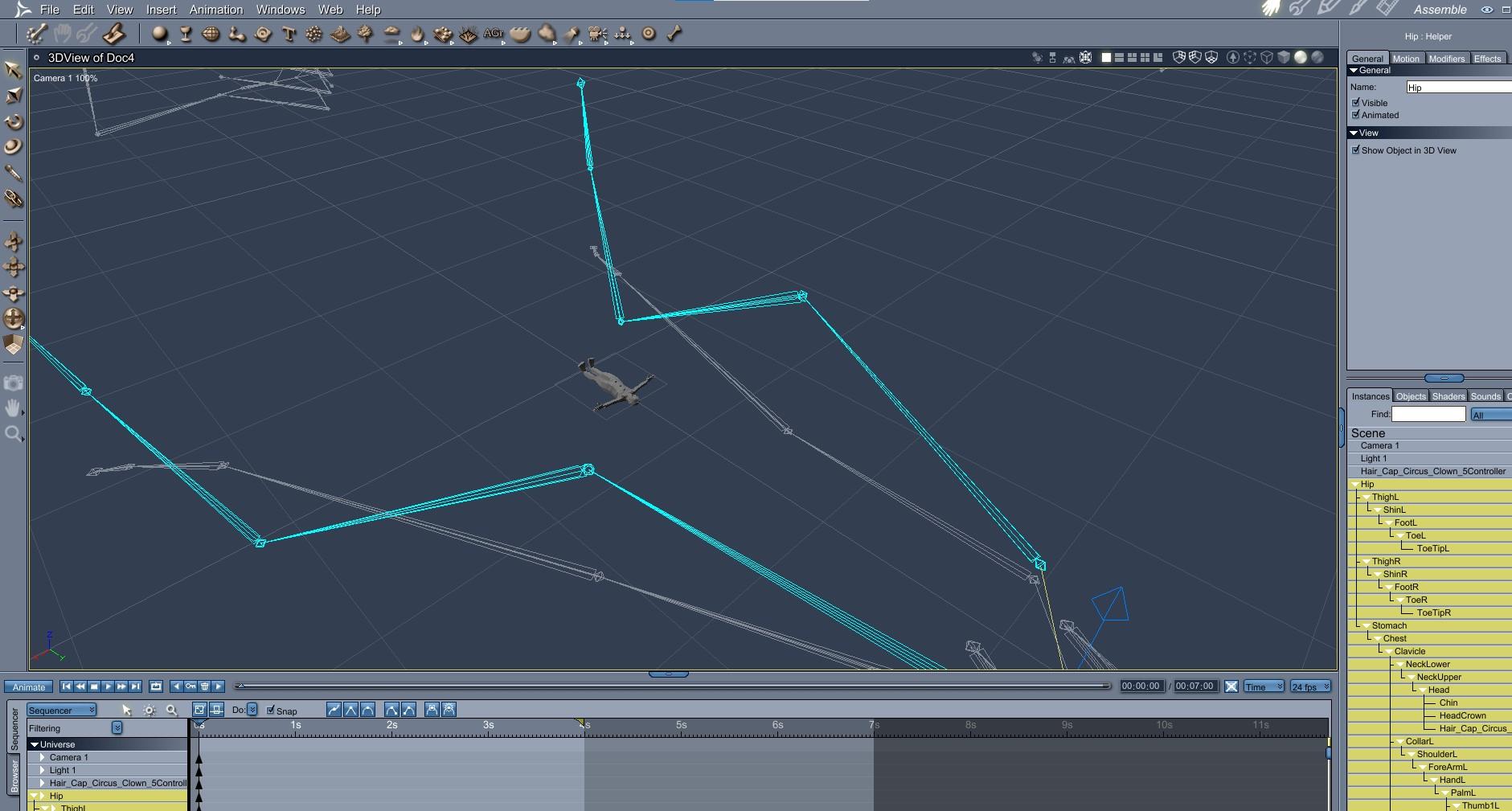
This time, as there is a possibility to submit an animation, my take was to try to build a workflow to import animations from Mixamo. My first tests were disappointing as FBX importer/exporter in Carrara are really out of date. Therefore, I had to use a third party software. It happens I have a nice plugin for Carrara called Daz Studio.
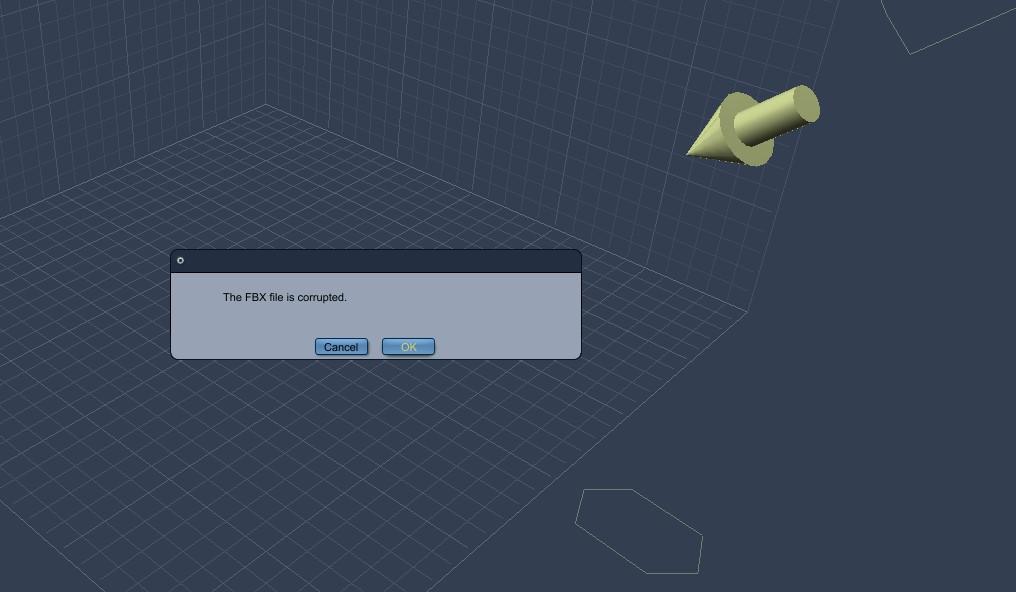
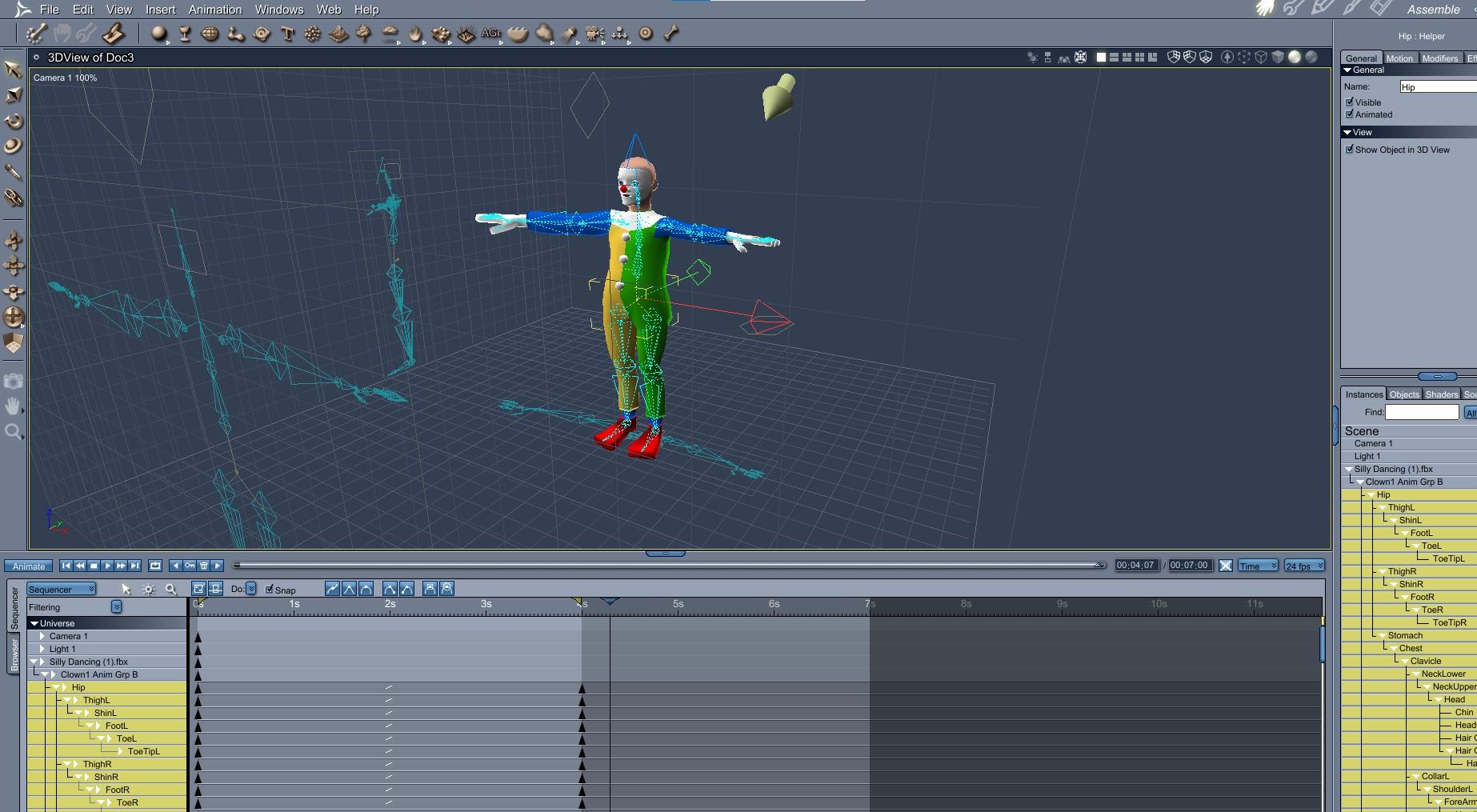
Great to see you entering. Yay. Thanks for the workflow. I have tried my silly Carrra-rigged models in Mixamo. They load and I can watch them in Mixamo, but as you point out, I can't get the exported animation to work correctly in Carrara. Carrara gives an error when trying the default FBX Mixamo export. I can get the model back using the FBX 6.1 export from Mixamo, but no animation keyframes. Trying collada DAE Mixamo export did not align the exported skeleton with the mesh, and no keyframes.

I bet I could rig them in Studio and follow your workflow.
I am looking forward to how you integrate a Mixamo-exported animation. Definitely something that I had been looking into.
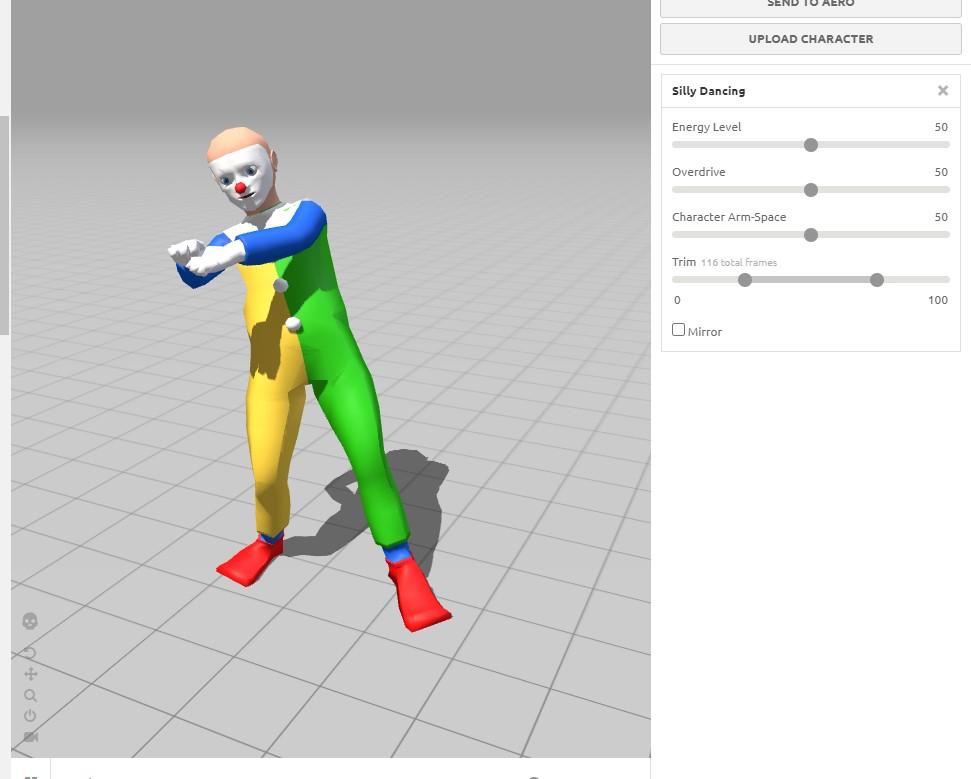
(1) My Clown Model Dancing in Mixamo.
(2) Error loading default Mixamo FBX export
(3) Mesh load Mixamo FBX 6.1 export, but no animation keyframes for skeleton
(4) Mesh and skeleton do not align using Mixamo Collada DAE export
 Carrara Challenge #62 "Clowns and Other Circus Stuff" -
I've decided to enter this challenge.
Whenever I do, I always try something new and take the opportunity to learn something.
This time, as there is a possibility to submit an animation, my take was to try to build a workflow to import animations from Mixamo. My first tests were disappointing as FBX importer/exporter in Carrara are really out of date. Therefore, I had to use a third party software. It happens I have a nice plugin for Carrara called Daz Studio.
It works up to Genesis 2. G7 and G8 have double articulations for thigh and shoulder and Mixamo has trouble with that.
So, this is how it goes.
- From the latest version of studio, export your base figure (in my case Genesis) as FBX using the latest version of the exporter.
- In Mixamo, upload a new character using this export.
- Apply the animation you want. Tune it the way you want. In Genesis, you can fiddle with the Arm space slider.
- Export it still using the latest version of FBX.
- Back in studio, import the resulting FBX and save it as a scene subset.
- Now, in Carrara, create a new scene and add the scene subset from your content.
- select the figure
- In the NLA tab of this figure, click on "create master clip"
- Drag the resulting clip in the clip tab of the browser
- You're done with this scene, you may close it.
- in your project, drag this saved clip to the clip tab of the project
- drag it from there to the NLA line of your figure in the time line. It's done.
Carrara expects translation to be on the model or on the hip. Mixamo export translation on the figure. So, if you're looping an animation, you have to use the override master clip option. The offset from previous clip part doesn't work.
[Released] Content Wizard [Commercial]DoctorJellybean said:
robertswww said:
@watchdog79 If the product says the product will work it Daz Studio, it may just need some tweaks to the Zip file structure, ot it could just mean that you can import the .obj prop(s). If you want to share a screenshot of what the contents of the unzipped (i.e. extracted) zip folder looks like, that might help. Basically, you want CONTENT at the top-level of the folder, and below that your Data, People, Props, Runtime, Vehicles, etc. You could try to format a copy of the extracted zip file that way, and then re-zip it and import it into CW.Also, your screenshot show that the 3rd zip file you added to Content Wizard was the Templates folder. Templates are not for smart content, so never add them. Remove all 3 of your current zip files using the (-) button. Click Save and exit CW (or at the least write down or grab a screenshot of the exact Product Name, Product ID, etc. that you used). Restart CW and import in the newly re-formatted zip file.
You should also replace the default product thumbnail image, with a thumbnail from the actual product, click "Change Product Icon" and browse to a thumbnail on your hard drive for a suitable image.
The problem here is that there are no DAZ Studio format files in that product. It contains a single .cr2 file and some Poser light and camera files.
Create a folder e.g. Prod Creation somewhere on your hard drive and create directories inside that folder with the following structure:
Vehicles/Skycruiser Albatross
and map the root folder e.g. Prod Creation in Studio. Load the item in Studio. With the item selected, click Save As - Support Asset - Figure/Prop Assets. Select the Skycruiser Albatross folder you have just created, give it a name and enter the details. You can uncheck the Metadata options since Content Wizard will create the metadata. Click Accept.
Now add the created Data and Vehicles folders to the original zip (which should be properly structered as robertswww said. Now CW should work with the updated zip.
Sorry, I was sick and I had no energy to deal with this.
I have the directories structure ready, but I struggle with the step to create a .DUF file. I do not seem to be able to load any .OBJ or .CR2 file manually. Daz Studio allows me to Open or Merge only DAZ format files. Edit: Alright, I managed to create a DUF file from the CR2 file by importing it.
Could you, please, explain to me what do you mean by "Prod Creation" and how do I "map the root folder e.g. Prod Creation in Studio"?
You see, I have only been using Smart Content until now and I have no idea how to use any other, advanced methods of content management. Renderosity store may contain some very nice products, but getting them to work is a nightmare for a clueless hobby artist like me.
 Blender to Daz rigging problem: SPIKES
Squishy said:
imo if you can figure out how to get Blender to export FBX with your polygon selections for selecting parts and posing then you'd probably have better luck.
Oh no. I just now tried to transfer my car model from Blender to Daz using the FBX format as you suggested, but it won't let me use that format. It seems to only accept OBJ format.
What I mean here is that the special way of imprting in Daz that one must do to for rigging a model does not accept FBX. It is the import dialog box that is part of the "Figure Setup" process tab/window.
iClone 8 and CC4 anyone?marble said:
FSMCDesigns said:
WendyLuvsCatz said:
FSMCDesigns said:
marble said:
Apparently CC4 and iClone 8 have been released.
Has anyone bought these new versions or had a chance to evaluate them? Anything worth knowing for DAZ Studio users? Such as how easy is the export/import between the two applications? What are the limitations (geografts/geoshells, etc.)? Do they compliment DAZ Studio or are they an alternative?
They are mainly for game/avatar design and mostly for exporting from DS, so not sure what use most DS users would have for them. it's funny how reallusion reaps all the benefits of being able to rip off DAZ content, yet Daz/ Daz Studio users get the shaft, LOL
well you could say that about Blender, Unreal Engine, Unity, 3Dstudio Max, Maya which all have DAZ bridges and to some extent Carrara and Poser
the only difference is DAZ never made an iClone bridge
I do say that about those since most are one way as well, LOL he did specify how are they for Daz Studio users, so I assume he was wanting to know about the import to DS options which really are non existant.
Well, that would have been interesting but since it is not available that's the end of discussion for iClone to DAZ Studio.
Back to the other direction, though, I am interested in what can be done with DAZ Studio characters exported to iClone8 or CC4 (I'm still not sure why there are two applications or how they work together though). As you know there is a VR application called VAM (Virt-A-Mate) which allows for import of Genesis 3 characters into a kind of VR game engine and then applies physics and provides animation capabilities which are way beyond what can be done in DAZ Studio. My Oculus is gathering dust in a corner because I didn't take to the wearing of the headset and couldn't get used to focusing my eyes but the software is impressive for a Patreon funded one-man enterprise.
So coming back to iClone, I would have thought that similar features (soft-body physics, more advanced and faster animation capabilities) would be available in a non-VR environment, especially with such big company resources. So my question was really to find out whether iClone8/CC4 is worth a look because DAZ does not seem interested in providing such features in DAZ Studio for the foreseeable future. VAM works with G3 figures and the certain geografts that are available. I believe that the new version, which will import G8 figures, is still some way off but that's what you get with a development team of one. DAZ, however, is even slower with much better resources so go figure.
VAM uses G2 figures with G8 support coming in version 2 and you can use it in desktop mode as well.
Basically what you are seeing is the difference between a game engine like Unity and just a regular 3D app that has specific features coded into it's programing, like DS. All IClone is, is a full featured, real time animation app. Think of it this way, CC4 is similar to the DS app, where you can use premade figures and morph them, clothe them, pose them, even render them. Think of iClone as a non scripted version of VAM or Unity with good animation tools. The features are there, real time lighting, physics, etc, but to have your figure do anything other than what you animate, you need a game engine to program it all together..
Honestly, if you are just looking for another app that has features you think should be in DS, then any game engine or high end modeling app like Maya would have that, BUT you will loose lots of the DS only tech that makes hair, clothing, etc work so well with Daz figures in DS. What really needs to happen is DAZ needs to make it easier and feasable to import more features and formats, that will increase their user base more than having bridges and such..
Soul Sucker CommissionRichard Haseltine said:
The import settings in Morph Loader must balance the export settings - it sounds as if it was exported using the Daz Studio settings and imported using the Poser settings.
The exported OBJ isnt the issue. I can do everything fine with the exported OBJ.... with the exception of posing it in any way, or using any of the native morphs.
-MJSoul Sucker CommissionThe import settings in Morph Loader must balance the export settings - it sounds as if it was exported using the Daz Studio settings and imported using the Poser settings.
iClone 8 and CC4 anyone?“it's funny how reallusion reaps all the benefits of being able to rip off DAZ content, yet Daz/ Daz Studio users get the shaft, LOL”
Odd…Not sure how giving iclone users an incentive to go over to the Daz store and $$buy$$ DAZ content is “ripping off” Daz.

“I am interested in what can be done with DAZ Studio characters exported to iClone8 or CC4”
The genesis characters are never actually “imported” but their shapes an textures are copied onto a native Iclone Avatar for full compatibility with all of Iclone’s features..the clothing and hair are transformed into native Iclone format as well.
So my question was really to find out whether iClone8/CC4 is worth a look because DAZ does not seem interested in providing such features in DAZ Studio for the foreseeable future.If you do not already own Iclone 7 and CC3 you are facing a $900 USD buy-in to enter the Reallusion eco system with IC8 & CC4.
Even us version7&CC3 owners have to pay an upgrade price of $600 USD.
which is why I am sticking with my iclone 7/CC3 and the free blender pipeline
tool which supports importing& coverting to rigify and RETARGETING both Iclone/actor core body & face motion as well as Mixamo
(see the link to my youtube tutorial playlist )Don’t get me wrong Iclone 8 is a LONG OVERDUE upgrade (in features) for those Iclone users who wish to remain exclusively within the reallusion ecosystem,
however for us Blender or UE5 users, it offers nothing we dont already have
and even less so in the area of rendering and VFX
What really needs to happen is DAZ needs to make it easier and feasable to import more features and formats, that will increase their user base more than having bridges and such..No…the ability to EXPORT Daz content to other programs via ‘Bridges and such” is the core of the Daz business model as a 3D figure and content provider.
I personally see no reason for Daz to enable the import of external figures INTO Daz studio as Daz studio is purpose built to support the genesis figure platform..
Not a general 3DCC like blender where I can import figures from multiple Character eco-systems
( Daz studio,Iclone, even poser) via “bridges and such”.iClone 8 and CC4 anyone?FSMCDesigns said:
WendyLuvsCatz said:
FSMCDesigns said:
marble said:
Apparently CC4 and iClone 8 have been released.
Has anyone bought these new versions or had a chance to evaluate them? Anything worth knowing for DAZ Studio users? Such as how easy is the export/import between the two applications? What are the limitations (geografts/geoshells, etc.)? Do they compliment DAZ Studio or are they an alternative?
They are mainly for game/avatar design and mostly for exporting from DS, so not sure what use most DS users would have for them. it's funny how reallusion reaps all the benefits of being able to rip off DAZ content, yet Daz/ Daz Studio users get the shaft, LOL
well you could say that about Blender, Unreal Engine, Unity, 3Dstudio Max, Maya which all have DAZ bridges and to some extent Carrara and Poser
the only difference is DAZ never made an iClone bridge
I do say that about those since most are one way as well, LOL he did specify how are they for Daz Studio users, so I assume he was wanting to know about the import to DS options which really are non existant.
Well, that would have been interesting but since it is not available that's the end of discussion for iClone to DAZ Studio.
Back to the other direction, though, I am interested in what can be done with DAZ Studio characters exported to iClone8 or CC4 (I'm still not sure why there are two applications or how they work together though). As you know there is a VR application called VAM (Virt-A-Mate) which allows for import of Genesis 3 characters into a kind of VR game engine and then applies physics and provides animation capabilities which are way beyond what can be done in DAZ Studio. My Oculus is gathering dust in a corner because I didn't take to the wearing of the headset and couldn't get used to focusing my eyes but the software is impressive for a Patreon funded one-man enterprise.
So coming back to iClone, I would have thought that similar features (soft-body physics, more advanced and faster animation capabilities) would be available in a non-VR environment, especially with such big company resources. So my question was really to find out whether iClone8/CC4 is worth a look because DAZ does not seem interested in providing such features in DAZ Studio for the foreseeable future. VAM works with G3 figures and the certain geografts that are available. I believe that the new version, which will import G8 figures, is still some way off but that's what you get with a development team of one. DAZ, however, is even slower with much better resources so go figure.
Soul Sucker CommissionRichard Haseltine said:
Gator said:
I've been helping out MJ007 with this. He's having an issue importing the morphs, I believe it is due to that he is using Studio 2.3. I'm guessing that the process to import a morph is slightly different than with 4.x, but I have never used Studio 2.x so I don't know. If he imports the OBJ, then adds morphs to the OBJ it works fine on the OBJ. With Studio 2.3 and the morph loader, there is no "Reverse Deformations" option.
- Load the pre-edit OBJ, the one that was exported for modification, as a new morph and set it to -100%
- Load the modified OBJ as a moprh and set is to 100%
- Export that as an OBJ and close without saving (you don't want the temporary morphs)
- Load the exported morph and you will have only the changes made, as with reverse deformations.
Ok, question... The Pre-Editted OBJ at 100% is TINY in comparision to the editted OBJ. I use the Poser preset of 1 unit = 8ft. This is something that was raised in the beginning.
When i go to step2 to load the modified OBj, using the same preset, its set to 24384%. Doing this generates the message: "One or more of the files loaded had no effect".What do I do?
-MJiClone 8 and CC4 anyone?WendyLuvsCatz said:
FSMCDesigns said:
marble said:
Apparently CC4 and iClone 8 have been released.
Has anyone bought these new versions or had a chance to evaluate them? Anything worth knowing for DAZ Studio users? Such as how easy is the export/import between the two applications? What are the limitations (geografts/geoshells, etc.)? Do they compliment DAZ Studio or are they an alternative?
They are mainly for game/avatar design and mostly for exporting from DS, so not sure what use most DS users would have for them. it's funny how reallusion reaps all the benefits of being able to rip off DAZ content, yet Daz/ Daz Studio users get the shaft, LOL
well you could say that about Blender, Unreal Engine, Unity, 3Dstudio Max, Maya which all have DAZ bridges and to some extent Carrara and Poser
the only difference is DAZ never made an iClone bridge
I do say that about those since most are one way as well, LOL he did specify how are they for Daz Studio users, so I assume he was wanting to know about the import to DS options which really are non existant.
iClone 8 and CC4 anyone?FSMCDesigns said:
marble said:
Apparently CC4 and iClone 8 have been released.
Has anyone bought these new versions or had a chance to evaluate them? Anything worth knowing for DAZ Studio users? Such as how easy is the export/import between the two applications? What are the limitations (geografts/geoshells, etc.)? Do they compliment DAZ Studio or are they an alternative?
They are mainly for game/avatar design and mostly for exporting from DS, so not sure what use most DS users would have for them. it's funny how reallusion reaps all the benefits of being able to rip off DAZ content, yet Daz/ Daz Studio users get the shaft, LOL
well you could say that about Blender, Unreal Engine, Unity, 3Dstudio Max, Maya which all have DAZ bridges and to some extent Carrara and Poser
the only difference is DAZ never made an iClone bridge
iClone 8 and CC4 anyone?marble said:
Apparently CC4 and iClone 8 have been released.
Has anyone bought these new versions or had a chance to evaluate them? Anything worth knowing for DAZ Studio users? Such as how easy is the export/import between the two applications? What are the limitations (geografts/geoshells, etc.)? Do they compliment DAZ Studio or are they an alternative?
They are mainly for game/avatar design and mostly for exporting from DS, so not sure what use most DS users would have for them. it's funny how reallusion reaps all the benefits of being able to rip off DAZ content, yet Daz/ Daz Studio users get the shaft, LOL
Soul Sucker CommissionGator said:
I've been helping out MJ007 with this. He's having an issue importing the morphs, I believe it is due to that he is using Studio 2.3. I'm guessing that the process to import a morph is slightly different than with 4.x, but I have never used Studio 2.x so I don't know. If he imports the OBJ, then adds morphs to the OBJ it works fine on the OBJ. With Studio 2.3 and the morph loader, there is no "Reverse Deformations" option.
- Load the pre-edit OBJ, the one that was exported for modification, as a new morph and set it to -100%
- Load the modified OBJ as a moprh and set is to 100%
- Export that as an OBJ and close without saving (you don't want the temporary morphs)
- Load the exported morph and you will have only the changes made, as with reverse deformations.
Soul Sucker CommissionI've been helping out MJ007 with this. He's having an issue importing the morphs, I believe it is due to that he is using Studio 2.3. I'm guessing that the process to import a morph is slightly different than with 4.x, but I have never used Studio 2.x so I don't know. If he imports the OBJ, then adds morphs to the OBJ it works fine on the OBJ. With Studio 2.3 and the morph loader, there is no "Reverse Deformations" option.
Blender not exporting materials helpHey guys/gals
I am such a rookie and everything is self taught in the last 2 weeks at 55 years old but this one is got me stumped.
I import my daz character to blender using the bridge. My character shows up and when i go to viewport shading/material preview everything looks great and all is there. My problem comes when I try to export this as a .glb/.gltf all I get is the model with no textures. I am sure this is an easy one to answer but I have searched and could not find the answer on my own. Any help is appreciated
Anomaly after importing a morphHi,
I exported the GF8.0 body in FBX format and imported it into Cinema 4D, to make a morph, for the torso only.
I changed the position of some points only for the Chest upper and Chest lower parts.
Then I exported this body modified using OBJ format.
I used Morph Loader Pro to import this new OBJ file, and create a chest morph called Chest_Morph.By moving the slider of this morph, I see that the chest is gradually modified in a correct way (as I wanted it to be)
But when I release the left mouse button which allows me to move the cursor, I notice an anomaly.
Indeed, the head of GF8, on which I didn't make any modification, changes very slightly in appearance.On the images below, I didn't show the deformation of the torso for this morph, but the parasitic deformation on the face only.
We see that the profile of the face doesn't seem to have changed, but the mouth is slightly half-opened.I noticed that the body of GF8.1 has the same problem.
Of course, this parasitic deformation is very slight. It can be totaly erased, by applying a Mouth a Closed morph.
But applying a morph to correct a spurious deformation is an exotic solution ! Daz crashing after new GPU install.
Hey, so I recently decided to update my graphics card to an RTX 3090 from a GTX 1080ti. After I installed the new card I spent night 1 rendering and it went find and rendered something like 52 renders in a night. Night 2 however, daz crashed after rendering 4-5 renders. I don't get a crash report though, daz just closes. I was told up update my graphics drives which I did and I was also told to update my daz to 4.20 which I also did. After updating my daz to 4.20 I could batch render again, however, all my ghost lights stopped working which I found was a common issue apparently. So I've now downgraded back to 4.16 which is what I was on before and my ghost lights have started working again, however, batch rendering and rendering in general has stopped working. Even if I just click the render button daz will start the render but like 20 seconds later just close on it's own.
Any idea what the issue could be? I'm not sure where I can upload a crash report but here is a snippet of the end.
2022-05-13 09:08:41.839 Starting NVIDIA Iray...
2022-05-13 09:08:41.848 Iray [INFO] - CLUSTR:NETWORK :: 0.1 CLUSTR net info : Networking is switched off.
2022-05-13 09:08:41.851 Iray [INFO] - CT:IMAGE :: 1.1 CT img info : Plugin "ct" (build 334300.9558, 27 Mar 2021) initialized
2022-05-13 09:08:41.851 Iray [INFO] - DDS:IMAGE :: 1.1 DDS img info : Plugin "dds" (build 334300.9558, 27 Mar 2021) initialized
2022-05-13 09:08:41.851 Iray [INFO] - FREIMG:IMAGE :: 1.1 FREIMG img info : Plugin "fi_bmp" (build 334300.9558, 27 Mar 2021) initialized
2022-05-13 09:08:41.851 Iray [INFO] - FREIMG:IMAGE :: 1.1 FREIMG img info : Plugin "fi_cut" (build 334300.9558, 27 Mar 2021) initialized
2022-05-13 09:08:41.851 Iray [INFO] - FREIMG:IMAGE :: 1.1 FREIMG img info : Plugin "fi_dds" (build 334300.9558, 27 Mar 2021) initialized
2022-05-13 09:08:41.851 Iray [INFO] - FREIMG:IMAGE :: 1.1 FREIMG img info : Plugin "fi_exr" (build 334300.9558, 27 Mar 2021) initialized
2022-05-13 09:08:41.851 Iray [INFO] - FREIMG:IMAGE :: 1.1 FREIMG img info : Plugin "fi_faxg3" (build 334300.9558, 27 Mar 2021) initialized
2022-05-13 09:08:41.851 Iray [INFO] - FREIMG:IMAGE :: 1.1 FREIMG img info : Plugin "fi_gif" (build 334300.9558, 27 Mar 2021) initialized
2022-05-13 09:08:41.851 Iray [INFO] - FREIMG:IMAGE :: 1.1 FREIMG img info : Plugin "fi_hdr" (build 334300.9558, 27 Mar 2021) initialized
2022-05-13 09:08:41.851 Iray [INFO] - FREIMG:IMAGE :: 1.1 FREIMG img info : Plugin "fi_ico" (build 334300.9558, 27 Mar 2021) initialized
2022-05-13 09:08:41.851 Iray [INFO] - FREIMG:IMAGE :: 1.1 FREIMG img info : Plugin "fi_iff" (build 334300.9558, 27 Mar 2021) initialized
2022-05-13 09:08:41.851 Iray [INFO] - FREIMG:IMAGE :: 1.1 FREIMG img info : Plugin "fi_j2k" (build 334300.9558, 27 Mar 2021) initialized
2022-05-13 09:08:41.852 Iray [INFO] - FREIMG:IMAGE :: 1.1 FREIMG img info : Plugin "fi_jng" (build 334300.9558, 27 Mar 2021) initialized
2022-05-13 09:08:41.852 Iray [INFO] - FREIMG:IMAGE :: 1.1 FREIMG img info : Plugin "fi_jp2" (build 334300.9558, 27 Mar 2021) initialized
2022-05-13 09:08:41.852 Iray [INFO] - FREIMG:IMAGE :: 1.1 FREIMG img info : Plugin "fi_jpg" (build 334300.9558, 27 Mar 2021) initialized
2022-05-13 09:08:41.852 Iray [INFO] - FREIMG:IMAGE :: 1.1 FREIMG img info : Plugin "fi_jxr" (build 334300.9558, 27 Mar 2021) initialized
2022-05-13 09:08:41.852 Iray [INFO] - FREIMG:IMAGE :: 1.1 FREIMG img info : Plugin "fi_koala" (build 334300.9558, 27 Mar 2021) initialized
2022-05-13 09:08:41.852 Iray [INFO] - FREIMG:IMAGE :: 1.1 FREIMG img info : Plugin "fi_lbm" (build 334300.9558, 27 Mar 2021) initialized
2022-05-13 09:08:41.852 Iray [INFO] - FREIMG:IMAGE :: 1.1 FREIMG img info : Plugin "fi_pbm" (build 334300.9558, 27 Mar 2021) initialized
2022-05-13 09:08:41.852 Iray [INFO] - FREIMG:IMAGE :: 1.1 FREIMG img info : Plugin "fi_pcd" (build 334300.9558, 27 Mar 2021) initialized
2022-05-13 09:08:41.852 Iray [INFO] - FREIMG:IMAGE :: 1.1 FREIMG img info : Plugin "fi_pfm" (build 334300.9558, 27 Mar 2021) initialized
2022-05-13 09:08:41.852 Iray [INFO] - FREIMG:IMAGE :: 1.1 FREIMG img info : Plugin "fi_pict" (build 334300.9558, 27 Mar 2021) initialized
2022-05-13 09:08:41.852 Iray [INFO] - FREIMG:IMAGE :: 1.1 FREIMG img info : Plugin "fi_png" (build 334300.9558, 27 Mar 2021) initialized
2022-05-13 09:08:41.852 Iray [INFO] - FREIMG:IMAGE :: 1.1 FREIMG img info : Plugin "fi_psd" (build 334300.9558, 27 Mar 2021) initialized
2022-05-13 09:08:41.852 Iray [INFO] - FREIMG:IMAGE :: 1.1 FREIMG img info : Plugin "fi_ras" (build 334300.9558, 27 Mar 2021) initialized
2022-05-13 09:08:41.852 Iray [INFO] - FREIMG:IMAGE :: 1.1 FREIMG img info : Plugin "fi_sgi" (build 334300.9558, 27 Mar 2021) initialized
2022-05-13 09:08:41.852 Iray [INFO] - FREIMG:IMAGE :: 1.1 FREIMG img info : Plugin "fi_targa" (build 334300.9558, 27 Mar 2021) initialized
2022-05-13 09:08:41.852 Iray [INFO] - FREIMG:IMAGE :: 1.1 FREIMG img info : Plugin "fi_tiff" (build 334300.9558, 27 Mar 2021) initialized
2022-05-13 09:08:41.852 Iray [INFO] - FREIMG:IMAGE :: 1.1 FREIMG img info : Plugin "fi_wbmp" (build 334300.9558, 27 Mar 2021) initialized
2022-05-13 09:08:41.852 Iray [INFO] - FREIMG:IMAGE :: 1.1 FREIMG img info : Plugin "fi_webp" (build 334300.9558, 27 Mar 2021) initialized
2022-05-13 09:08:41.852 Iray [INFO] - FREIMG:IMAGE :: 1.1 FREIMG img info : Plugin "fi_xpm" (build 334300.9558, 27 Mar 2021) initialized
2022-05-13 09:08:41.937 Iray [INFO] - IRAY:RENDER :: 1.1 IRAY rend info : NVIDIA display driver version: 512.59
2022-05-13 09:08:41.937 Iray [INFO] - IRAY:RENDER :: 1.1 IRAY rend info : Your NVIDIA driver supports CUDA version up to 11.6; iray requires CUDA version 11.0; all is good.
2022-05-13 09:08:41.937 Iray [INFO] - IRAY:RENDER :: 1.1 IRAY rend info : CUDA device 0 (NVIDIA GeForce RTX 3090): compute capability 8.6 will be run as 8.0 by this version of iray.
2022-05-13 09:08:41.937 Iray [INFO] - IRAY:RENDER :: 1.1 IRAY rend info : Please look for an update with your software provider to render at optimal performance.
2022-05-13 09:08:41.939 Iray [INFO] - IRAY:RENDER :: 1.1 IRAY rend info : Using iray plugin version 5.1, build 334300.9558 n, 27 Mar 2021, nt-x86-64-vc14.
2022-05-13 09:08:41.998 Iray [INFO] - IRAY:RENDER :: 1.1 IRAY rend info : CUDA device 0 (NVIDIA GeForce RTX 3090): compute capability 8.6, 24.000 GiB total, 22.904 GiB available, display attached
2022-05-13 09:08:41.999 Iray [INFO] - IRAY:RENDER :: 1.1 IRAY rend info : iray photoreal CPU fallback is enabled.
2022-05-13 09:08:41.999 Iray [VERBOSE] - IRAY:RENDER :: 1.1 IRAY rend stat : Environment cache size capacity: 5.
2022-05-13 09:08:41.999 Iray [INFO] - BLEND:RENDER :: 1.1 BLEND rend info : Plugin "blend render" (build 334300.9558, 27 Mar 2021) initialized
2022-05-13 09:08:41.999 Iray [INFO] - IRAY_CLOUD_CLIENT:NETWORK :: 1.1 IRAY_C net info : Plugin "iray_cloud" (build 334300.9558, 27 Mar 2021) initialized
2022-05-13 09:08:41.999 Iray [INFO] - IRAY_CLOUD_CLIENT:NETWORK :: 1.1 IRAY_C net info : Plugin "irt_cloud" (build 334300.9558, 27 Mar 2021) initialized
2022-05-13 09:08:41.999 Iray [INFO] - IRAY_CLOUD_CLIENT:NETWORK :: 1.1 IRAY_C net info : Plugin "nitro_cloud" (build 334300.9558, 27 Mar 2021) initialized
2022-05-13 09:08:41.999 Iray [INFO] - IRAY_CLOUD_CLIENT:NETWORK :: 1.1 IRAY_C net info : Plugin "iq_irt_cloud" (build 334300.9558, 27 Mar 2021) initialized
2022-05-13 09:08:42.000 Iray [INFO] - IRT:RENDER :: 1.1 IRT rend info : Plugin "irt" (build 334300.9558, 27 Mar 2021) initialized
2022-05-13 09:08:42.000 Iray [INFO] - EIAXF:IO :: 1.1 EIAXF io info : Plugin "axf importer" (build 334300.9558, 27 Mar 2021) initialized
2022-05-13 09:08:42.000 Iray [INFO] - ICB:IO :: 1.1 ICB io info : Plugin "cb_importer" (build 334300.9558, 27 Mar 2021) initialized
2022-05-13 09:08:42.000 Iray [INFO] - IRAY_CLOUD_CLIENT:NETWORK :: 1.1 IRAY_C net info : Plugin "iray_bridge_snapshot" (build 334300.9558, 27 Mar 2021) initialized
2022-05-13 09:08:42.000 Iray [INFO] - IRAY_CLOUD_SERVER:NETWORK :: 1.1 IRAY_C net info : Plugin "iray_bridge_server" (build 334300.9558, 27 Mar 2021) initialized
2022-05-13 09:08:42.000 Iray [INFO] - EEMI:IO :: 1.1 EEMI io info : Plugin ".mi exporter" (build 334300.9558, 27 Mar 2021) initialized
2022-05-13 09:08:42.000 Iray [INFO] - EIMI:IO :: 1.1 EIMI io info : Plugin ".mi importer" (build 334300.9558, 27 Mar 2021) initialized
2022-05-13 09:08:42.001 NVIDIA Iray GPUs:
2022-05-13 09:08:42.001 GPU: 1 - NVIDIA GeForce RTX 3090
2022-05-13 09:08:42.001 Memory Size: 23.9 GB
2022-05-13 09:08:42.001 Clock Rate: 1725000 kHz
2022-05-13 09:08:42.001 Multi Processor Count: 82
2022-05-13 09:08:42.001 CUDA Device ID: 0
2022-05-13 09:08:42.001 CUDA Compute Capability: 8.6
2022-05-13 09:08:42.001 PCI Bus ID: 1
2022-05-13 09:08:42.001 PCI Device ID: 0
2022-05-13 09:08:42.001 TCC Mode: disabled
2022-05-13 09:08:42.001 Display: attached
2022-05-13 09:08:42.001 NVIDIA Iray Scheduling Configuration:
2022-05-13 09:08:42.001 CPU Load Limit: 16
2022-05-13 09:08:42.001 CPU Thread Affinity: disabled
2022-05-13 09:08:42.001 GPU Load Limit: 1
2022-05-13 09:08:42.158 Total class factories: 2078
2022-05-13 09:08:42.159 Creating Script Engine...
2022-05-13 09:08:42.168 WARNING: 3DConnexion Plug-in Error: Could not create Device, CoCreateInstance failed
2022-05-13 09:08:42.169 3D mouse support library could not be loaded.
2022-05-13 09:08:42.169 Creating Main Window...
2022-05-13 09:08:42.170 Creating Viewport Manager...
2022-05-13 09:08:42.197 Successfully created OpenGL viewport for Viewport1.
2022-05-13 09:08:42.254 Successfully created OpenGL viewport for Viewport2.
2022-05-13 09:08:42.291 Successfully created OpenGL viewport for Viewport3.
2022-05-13 09:08:42.328 Successfully created OpenGL viewport for Viewport4.
2022-05-13 09:08:42.371 Creating Action Manager...
2022-05-13 09:08:42.376 Creating Pane Manager...
2022-05-13 09:08:42.465 Successfully created OpenGL viewport for AuxViewportView.
2022-05-13 09:08:42.895 Updated metadata for 0 of 1 items.
2022-05-13 09:08:43.031 Executing startup script...
2022-05-13 09:08:43.077 Started in: C:/Users/CellStudios/Desktop/DAZ Studio_4.5_(64-Bit)/DAZ 3D/DAZStudio4 Public Build
2022-05-13 09:08:43.077 DAZ Studio Started
2022-05-13 09:08:43.077 Creating Pixel Buffer
2022-05-13 09:08:43.097 Pixel buffer - Width: 1024 Height: 1024
2022-05-13 09:08:43.097 Compiling OpenGL Shader...
2022-05-13 09:08:43.101 Fragment Shader:
Fragment Shader compiled successfully.
Linking Shader:
Shader Program successfully linked.
2022-05-13 09:08:43.486 WARNING: ..\..\..\..\..\src\sdksource\cloud\dzcloudtasknotifier.cpp(660): sync completed successfully, 1 items succeeded, 0 items failed.
2022-05-13 09:08:43.486 Metadata update succeeded.
Daz 3D is part of

Connect
DAZ Productions, Inc.
7533 S Center View Ct #4664
West Jordan, UT 84084Licensing Agreement | Terms of Service | Privacy Policy | EULA
© 2026 Daz Productions Inc. All Rights Reserved.